1
8
Dingo User Guide
Using the Menu System
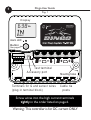
You can move around the menu system and change settings
using the button on the front of the controller. There are
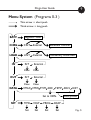
seven top-level menu items in the menu system (BATV,
CHRG, LOAD etc - see figure 5). Each menu item provides
access to a sub-menu, and some of these sub-menus lead
again to further sub-menus.
A short push tells the controller to advance to the next
menu item or setting value. To do a short push, press on
the button on the front of the controller, and release it
immediately.
A long push “selects”, moving into a sub-menu or allowing
you to change settings. To do a long push, press the button,
holding it down until the menu changes (about one second).
Getting back
Wherever you are in the menu system, a series of shortpushes will bring you back to the top-level menus without
changing any settings. There are two exceptions: when a
number is flashing during setting adjustment (see page 10)
and when you see the word “EXIT” in the “HISTORY” sub
menu - see page 16.
Note: ‘external’ screens do not appear if there are no
accessories attached. If an accessory is attached, the
screen names will indicate the accessory type.