1
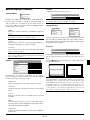
Wiring Diagram
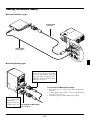
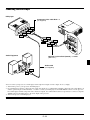
Macintosh or Compatibles
(Desktop type or notebook type)
Monitor
RGB INPUT
AUDIO
RGB OUTPUT
VCR, DVD Player or
LaserDisc Player
IN
OUT
OUT
IN
IBM VGA or Compatibles
(Desktop type or notebook type)
PC CONTROL
S-VIDEO
VIDEO
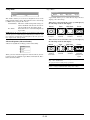
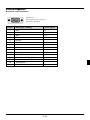
Signal cable (supplied)
To mini D-Sub 15-pin connector on
the projector. It is recommended
that you use a commercially
available distribution amplifier if
connecting a signal cable longer
than the supplied cable.
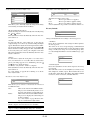
DVD Player (with component output)
To video, S-video, and audio
inputs on the projector.
Component video cable RCA3 (not supplied) and
Optional 15-Pin-to-RCA (female) 3 cable (ADP-CV1)
Document Camera
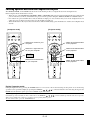
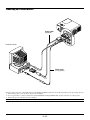
NOTE: When using with a notebook PC, be sure to connect between the projector and the notebook PC before turning on the
power to the notebook PC. In most cases signal cannot be output
from RGB output unless the notebook PC is turned on after connecting with the projector.
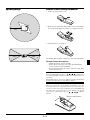
NOTE:
* If the screen goes blank while using your remote control, it
may be the result of the computer’s screen-saver or power
management software.
* If you accidentally hit the POWER OFF button on the remote
control, wait 60 seconds and then press the POWER ON button again to resume.
NOTE: If using video, S-video, or audio cables, the cables should
be 3 m (9.8 feet) or shorter.
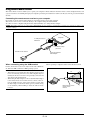
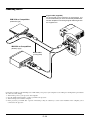
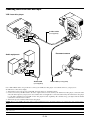
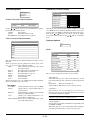
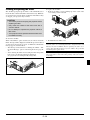
To connect SCART output (RGB)
Before connections: An exclusive SCART adapter (ADP-SC1)
and a commercially available SCART cable are required for this
connection.
NOTE: Audio signal is not available for this connection.
Video equipment such as DVD player
Projector
ADP-SC1
Commercially available SCART cable Female
1. Turn off the power to the projector and your video equipment.
2. Use the NEC ADP-SC1 SCART adapter and a commercially
available SCART cable to connect the RGB input of your
projector and a SCART output (RGB) of your video equipment.
3. Turn on the power to the projector and your video equipment.
4. Use the RGB button on the remote control to select the RGB
input.
5. Press the MENU button on the remote control to display the
menu.
6. From the Advanced menu, select [Projector Options] →
[Setup] → [Signal Select RGB] → [Scart].
SCART is a standard European audio-visual connector for TVs,
VCRs and DVD players. It is also referred to as Euro-connector.
NOTE: The ADP-SC1 SCART adapter is obtainable from your
NEC dealer in Europe.
Contact your NEC dealer in Europe for more information.
E–19