1
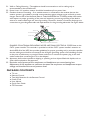
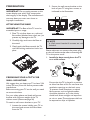
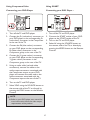
PREPARATION 2Secure the wall mount bracket to the back of your TV using four screws, as indicated in the illustration. IMPORTANT: Do not apply pressure to the screen display area which may compromise the integrity of the display. The manufacturer’s warranty does not cover user abuse or improper installations. M4 screws 100 mm 100 mm ATTACHING THE BASE IMPORTANT: The Base of the TV must be assembled prior to usage. M4 screws 1.Place TV unit face down on a soft and flat surface (blanket, foam, cloth, etc.) to prevent any damage to the TV. 2.Carefully align and insert the Base to the stand. NOTE Wall mount bracket & screws are not included. 3.Gently push the Base towards the TV until the locking mechanism locks into place. Please make sure to connect the power plug to the wall outlet socket after connecting the TV to the power cord! 1.Install the base stand; place the TV on a solid surface. Min 1m PREPARING YOUR LCD TV FOR WALL MOUNTING Ensure that the TV is placed in a position to allow free flow of air. Do not cover the ventilation openings on the back cover. To prevent unsafe situations, no naked flame sources, such as lighted candles, should be placed on or in the vicinity. Avoid heat, direct sunlight and exposure to rain or water. The equipment shall not be exposed to drips or splashes. We suggest that you keep your TV at least 2.36 inches (60 mm) from the wall to prevent cable interference. Before mounting your TV on the wall, you need to remove the base. For your safety, please use listed wall mount bracket with minimum weight of the TV without stand. (Please see page.26) To attach a wall mount bracket to your TV: 1Loosen the screws holding your TV to the stand and remove the stand base from the TV. 6