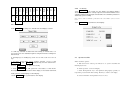
1
Cool button(self-lock button) Press the button, the cooling pump
3
4 Operation
starts, the cool indictor is lighting; press again(reset) to stop the pump and the
cool indictor light is off. Auto/man all are effective.
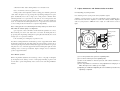
4.1 Directions of operation panel
Start button (reset button) In automatic mode, after press this button
4
for 1 second, the hydraulic oil pump starts, the system begins automatic cycle.
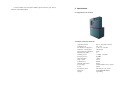
4.1.1 Illustration of operation panel
5 Emergency Stop button In an emergency situation, can press the
button to cut off heating and the motor of oil pump.
a. If there is any abnormal status in works, press this button immediately to
POWER Emergency
Touchable
Screen
stop the machine, so that find out the reason caused the abnormal status.
b. After eliminating fault, turn the button in clockwise. When the spring
clicks springing back, stop turning and release the button. It is relieved of
HEAT
COOL START
emergency stop, self-lock resets.
c. After terminating an emergency stop, press the start button to restart
operating.
4.1.2 Function of push buttons
1 Power switch (self-lock button)
After pressing down the button,
power supply is connected through, the system is power on and the power
indictor lights; press again to reset and cut off power, the indicator off.
a. When power is on, all of electrical equipments and hydraulic system are
in a state of stand-by.
b. When need to stop the machine, usually just reset the button; if no work
for a long time, pull off the power plug.
c. Only this button is at 1 position, all of electrical equipment and hydraulic
system are able to work.
2 Heating button(self-lock button) Press the button, the heat press
plates start heating and the heating indictor is lighting; press again (reset) to
stop heating and the heating indictor light is off. Auto/manual all are effective.
Note: it can heat only in selecting work, otherwise PLC alarms. If PLC alarms, cut
off power then restarting.