1
4.2
Touch screen display and function select
Touch
Work 1
, goes into work 1 display
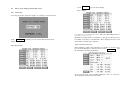
Work 1 display:
4.2.1 Initial display
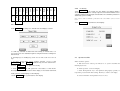
Press the power button, after power supply is on, a display is showed as below:
Note: When power is on, PLC default is Work 0, must select a Work number first, then
being able to operate as below.
Touch Operation
display.
4.2.2 Work display
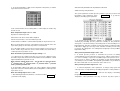
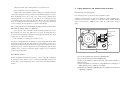
, the machine goes into a work status and gets a work
Display time at right column is counted time, a work goes at which pressure
level, which one begins to count down time. Above display shows the second
level remains 0.4 minute before it finishes.
4.2.3 Amend work parameter
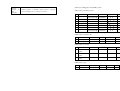
Work parameters include heat temperature, the number of pressure level,
pressure and holding time of each pressure level. Touch
, enter
Work-P
into the display of amend work parameter:
At first select work No. when amending parameters, work 1 is selected as
above display, then doing as below procedure: