1
The Smart Design tool
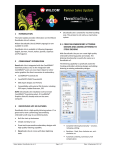
Select one of the vectors on the workspace.
Select the object type and fill mode you want to use fro
the new object to be created from the available options in
the Smart Design tool.
The result is a new object of the selected type, whth the
shape of the selected vector.
Repeat the same procedure for the other vectors.
Select the vector
Select the object type
Select the color
Change any fill property
then, the new objects will be automatically created.
7-5