1
Thank you for your purchase of the Motion S Phablet. Before using this product,
please carefully read this manual.
Packing List
No
Accessories
1
Power Adapter
Please note that the functions and information in this manual are subject to
change without any prior notice. E-Ceros can not be held responsible for any loss
of personal data and damage caused by incorrect operation of software/hardware,
artificial damages, replacement of batteries or any other accident. To avoid loss of
your data, please backup your data to your computer.
E-Ceros cannot control any issues arrising due to users' misunderstanding or
incorrect operation against what is stated in the manual, and E-Ceros can not be
held liable for any accidental loss potentially occurring.
Please do not repair the E-Ceros Motion S Phablet by yourself, as doing so will void
the warranty, and after-sale seruice can not be provided.
2
3
4
Ouantitv
USB Cable
1
User Manual
1
OTG Cable
1
Attention: Accessories are subject to change without notice
Safety Notices
1.
Please do not subject E-Ceros Motion S to drops, impacts with hard objects,
objects that can cause scratches, ect, as this may cause damage to the tablet mold
or the screen, battery damage, data loss, or other damages to the internal
1. Overview
1.1 Appearance and Keys
hardware.
2. Please do not expose the E-Ceros Motion S to humid environments or rain, as
this may lead to water leaking into the phablet that may disable it to the extent
that it is beyond the ability to repair.
3. lt is recommended not to use earphones or a headset when media, set at a
high volume, is played for a long period of time. Please adjust the volume down
and avoid using the E-Ceros Motion S at high volume when using earphones or
headsets to avoid damage to your hearing, as excessive volume can cause
3
I
8l
permanent hearing damage.
4.
Please don't turn the E-Ceros Motion S on where the use of wireless
is forbidden or when the usage of the device will cause interference
and danger. Please observe any relevant restrictions.
lt is suggested to use the original accessories provided and E-Ceros can not be
held liable when non compatible accessories are used with the E-Ceros Motion S.
Do not attempt to removed and replace the battery as this will void the
equipment
5.
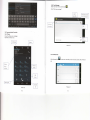
svmbol
I
Volume+
Volume-
2
Power
3
4
Front Camera
Back Camera
5
Micro
6
HDMI
MicroDhone
speaker
SIM Slot
6.
warranty.
7.
Please don't use the device at gas stations unless safely in your car and do not
expose the E-Ceros Motion S to fuel or chemicals.
8. Please don't use this product when you are driving or walking in the street, as
this may cause an accident.
9. Never clean the E-Ceros Motion S with any chemicals and detergents as this
will damage the product surface or screen, and corrode the surface.
Description
Press the left side of the key quickly to reduce the volume
Press the right side of the key quickly to increase the
volume
Quickly press to enter sleeping/wake up mode
Long press to switch ON/OFF
Name
7
8
9
USB
port
0.3 Mesapixel Camera
5.0 Mesapixel Camera
Connect with PCIOTG/Charser oort
Connect to HDTV
Built-in Microohone
Built-in Soeaker
Unlock SIM cards accepted
2G GsM: 850/900/1800/1900
3G WCDMA:21OO