1
avast! antivirus Home Edition 4.8 – User Guide
7. The Web Shield
The Web Shield works as a local proxy server. On NT-based operating systems
(Windows NT/2000/XP/2003/Vista/2008) the protection is completely transparent
and it is not usually necessary to adjust any of the normal settings. If you are using
Windows 95/98/ME however, it is necessary to change the settings in Internet
Options - in particular, the address and port of the local proxy as follows:
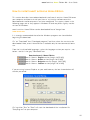
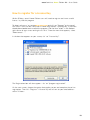
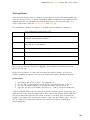
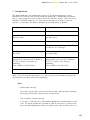
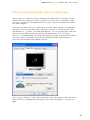
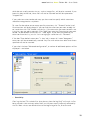
If using a local area network (LAN):
If using a dial-up connection (modem):
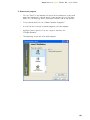
Start Internet Explorer.
Start Internet Explorer.
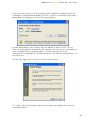
Select Tools then Internet Options... from
the main menu.
Select Tools then Internet Options... from
the main menu.
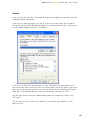
Switch to the Connections page
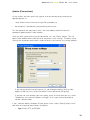
Switch to the Connections page.
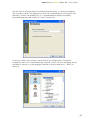
Click on the LAN Settings
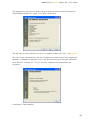
Select your dial-up connection from the
list and click on “Settings”.
Check the option “Use a proxy server for
your LAN”
Check the option “Use a proxy server for
this connection”.
Write “localhost” in the Address field
(alternatively, you can enter IP address
127.0.0.1, which is the same as
localhost).
Enter 12080 in the Port field.
Write “localhost” in the Address field
(alternatively, you can enter IP address
127.0.0.1, which is the same as
localhost).
Enter 12080 in the Port field.
Confirm by clicking OK.
Confirm by clicking OK
Note: If you use multiple connections, it is necessary to set the address and port of
the local proxy for each connection separately.
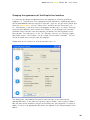
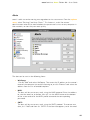
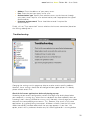
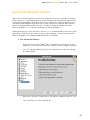
Basic
•
Enable web scanning
By unchecking this box, you can turn off the web scanning feature without
affecting the URL blocking, which will remain active
•
Use intelligent stream scanning
If this box is checked, files that are downloaded are scanned almost in real
time. The pieces of data are scanned as soon as they arrive - and the next
parts are downloaded only when the previous parts are verified to be virus-
62