1
MAINBOARD
User's Manual
Rev: 1.00
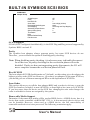
Date: April - 2000
* All other product names are trademarks or copyrights of their respective owners.
* Specifications and information contained in this manual are subject to change
without notice.
FCC & DoC Compliance Statement
This device complies with Part 15 of the FCC rules, operation is subject to the following
two conditions.
1. This device may not cause harmful interference and,
2. This device must accept any interference received, including interference that may
cause undesired operation.
This equipment has been tested and found to comply with limits for a Class B digital
device, pursuant to Part 15 of the FCC rules. These limits are designed to provide
reasonable protection against harmful interference in residential installations. This
equipment generates, uses, and can radiate radio frequency energy, and if not installed and
used in accordance with the instructions, may cause harmful interface to radio
communications. However, there is no guarantee that interference will not occur in a
particular installation. If this equipment does cause interference to radio or television
equipment reception, which can be determined by turning the equipment off and on, the
user is encouraged to try to correct the interference by one or more of the following
measures:
,
,
,
,
Reorient or relocate the receiving antenna.
Move the equipment away from the receiver.
Plug the equipment into an outlet on a circuit different from that to which the
receiver is connected.
Consult the dealer or an experienced radio/television technician for additional
suggestions.
The FCC requires the user to be notified that any change or modifications to the
equipment by the user not expressly approved by the grantee or manufacturer could void
the user's authority to operate such equipment. The use of shielded cables for connection
of the monitor to the graphics card is required to assure compliance with FCC regulations.
2
Package Checklist
Your mainboard package should include the items listed below. Damaged or
missing items should be reported to your vendor.
þ The mainboard
þ Floppy disk ribbon cable for
3.5” floppy drive
þ 80 pin IDE ribbon cable for
internal ATA66 or ATA33
IDE drive (Note: The 80pin
ribbon cable is designed
with a 40pin connector.)
þ This User’s Manual
þ Support CD-ROM containing the
following support software:
(The latest drivers can always be found
at their respective web sites.)
§ VIAâ PCI Bridge driver,
§ VIA VxD driver,
http://www.via.com.tw/drivers
§ Support software for updating the
FLASH BIOS
§ Trendâ PC-cillin Anti-Virus software
http://www.antivirus.com
3
Table of Contents
1. I NT RO DU CT IO N .........................................................................6
1.1 P rod uct D esc rip tio n...............................................................................6
1.2 F eat ure s & Sp eci fic ati ons .....................................................................7
1.3 B oar d Lev el Fe atu re...............................................................................8
1.3 .1 Bo ard L eve l Par t Def ini tio ns ........................................................9
1.4 C omp reh ens ive M ain boa rd Vie w ......................................................10
2. H AR DWA RE I NS TALLATIO N .................................................11
2.1 J ump er Se tti ng ......................................................................................11
2.1 .1 S ett ing t he Ju mpe rs ......................................................................11
2.1 .2 K eyb oar d Po wer -on J ump er .......................................................12
2.1 .3 F las h BIO S Wri te Pr ote ct/ Ena ble .............................................12
2.1 .4 Cl ear C MO S..................................................................................13
2.1 .5 S US P ow er ....................................................................................13
2.1 .6 A C97 /MC 97 M ode S ele cti on J ump er ......................................14
2.2 C onn ect ion s..........................................................................................1 5
2.2 .1 In sta lli ng th e CPU ........................................................................15
2.2 .2 Co oli ng F an...................................................................................1 6
2.2 .3 In sta lli ng th e Mem ory M odu les ( DI MM ).................................1 7
2.2 .4 F lop py, ID E Har d and C D- RO Ms D riv es .................................18
2.2 .5 P ow er LE D Co nne cti ons ............................................................1 9
2.2 .6 P ow er Su ppl y Con nec tor ............................................................20
2.2.7 IrDA-Compliant Infrared Module Connector..........................20
2.2 .8 LA N Wake -up C onn ect or............................................................2 1
2.2 .9 M ode m Wake -up F unc tio n..........................................................21
2.2 .10 E xte rna l Con nec tor s...................................................................2 2
2.2 .11 I ns tal lin g an AG P Car d ..............................................................24
2.2 .12 I ns tal lin g an AM R Car d .............................................................24
3. M AI NB OA RD B IO S SE TU P....................................................25
3.1
3.2
3.3
3.4
3.5
3.6
4
A bou t the B IO S ....................................................................................25
M ain M enu ............................................................................................27
S tan dar d CM OS F eat ure s ...................................................................28
A dva nce d BIO S Fe atu res ....................................................................32
A dva nce d Chi ps et Fe atu res ................................................................35
I nte gra ted P eri phe ral s ........................................................................38
User's Manual
3.7 P ow er Ma nag eme nt Se tup ..................................................................38
3.8 P nP /PC I Con fig ura tio ns .....................................................................47
3.9 P C Hea lth S tat us ..................................................................................50
3.1 0 Fr equ enc y / Volta ge Co ntr ol ............................................................51
3.1 1 Loa d Fai l-S afe D efa ult s ....................................................................52
3.1 2 Loa d Op tim ize d Def aul ts..................................................................5 2
3.13 Supervisor Password and User Password Setting .........................52
3.1 4 Sav e & Exi t Set up / Ex it Wi tho ut Sa vin g .......................................53
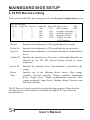
3.1 5 PC I Dev ice L istin g ............................................................................54
4. BUILT-IN SYMBIOS SCSI BIOS .............................................55
5. FLASH BIOS PROGRAMMING UTILITY...............................62
6. DMI UTILITY ..............................................................................64
7. INSTANTLY AVAILABLE PC...................................................65
7.1
7.2
7.3
7.4
7.5
7.6
W hat i s an In st ant ly Ava ila ble P C? ...................................................65
C ore Te chn olo gy S us pen d to RA M (S 3) ..........................................65
T he Ke y Ing red ien ts ............................................................................66
I ns tal lat ion ............................................................................................67
U sin g Su sp end t o RA M .......................................................................68
R ela ted D ocu men ts ..............................................................................69
8. SOFTWARE INSTALLATION .......................................................70
8.1
8.2
8.3
8.4
8.5
8.6
8.7
8.8
I ns tal l Via PC I Bri dge D riv er .............................................................72
I ns tal l Via Vx d Dr ive r .........................................................................73
Install Sound Chip Driver (for On-Board Audio Only)..................74
T ren d PC -Ci lli n An ti- Viru s So ftw are ...............................................75
I ns tal l Via Bu s Ma ste r ID E Dri ver .....................................................77
I ns tal l Via Mi ni- por t Dri ver ...............................................................78
H ard Ware M oni tor ing U til ity .............................................................79
I ns tal lAD OB E Acr oba t Rea der V 4.0 ................................................80
User's Manual
5
1. INTRODUCTION
1.1 Product Description
T
his mainboard represents the highest level of technology available in PC
Mainboards today. Designed as a flexible, high-performance and costeffective solution for System Integrators and End Users alike, this
mainboard provides the power and expandability to meet the requirements of the
most advanced operating systems and software applications.
This mainboard feature "SLOT A" architecture, a modular design that supports
the latest high performance AMD Althon K7 (FSB 100/133MHz) system board
that utilizes the VIA Apollo KX133 chipset on ATX Platform. Leading edge
AGP 2X/4X graphic capability is provided for the full range of graphic intensive
games and programs. The ATX form factore design allows for more efficient
system assembly with built-in mouse, serial and parallel port connectors. This
providing next generation features and great graphics performance at a lower
cost.
Advanced hardware designs include ACPI's Suspend to RAM for the
implementation of Instantly Available PCs. Also, by incorporating AMR, 2X/4X
AGP, AC97, Super I/O, Ultra DMA/66 Bus Mastering IDE and Universal
Serial Bus (USB) onto the mainboard, optimum system performance is assured
and system design and implementation is simplified.
Fully Plug & Play compatible via an Award BIOS, this mainboard facilitates easy
system configuration and peripheral setup. Advanced BIOS features include Intelligent
Hardware Monitoring and Alert functions. The Award BIOS also supports ACPI
readiness and is compatible with Pc98 specification. This mainboard is the ideal
foundation for high-end computer systems.
6
User's Manual
INTRODUCTION
1.2 Specification
Processor
Chipset
BIOS
System
Memory
On-board I/O
Features
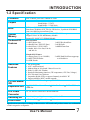
Slot A Athlon processors 500MHz to 1GHz
VIAâ KX133
North Bridge : VT8371
South Bridge : VT82C686A
2MB Award â PCI BIOS, support ACPI, DMI, P nP
Boot from CD-ROM, SCSI, LS-120, ZIP devices , Symbios® SCSI BIOS
Anti-virus BIOS to prevent Boot-Virus
3´168-pin DIMM Sockets up to 768 MB SDRAM Memory
Support 32/64/128/256 MB Memory Module
Support PC-100/PC-133 SDRAM Module
Rear I/O Panel
1 ´ PS/2 Mouse Port
1 ´ PS/2 Keyboard Port
1 ´ Parallel Port ( EPP, ECP Port )
2 ´ USB Ports
2 ´ Serial Port ( 16550 UART )
1 ´ MIDI/Game Port
1 ´ Audio Jacks: Line Out, Line In,
and Mic. In
Standard I/O Feature
1 ´ Floppy Port ( Up to 2.88MB )
1 ´ IrDA TX/RX Header
2 ´ USB Header
Advanced
Features
PCI Bus Master
IDE
Expansion Slot
2 ´ IDE Hard Disk Port support up
to 4 Hard drive
1. 4X AGP upgrade
2. AC97 Audio on-board
3. Modem Ring-in / Keyboard / Mouse Power On
4. Wake Up On LAN / Modem
5. Hardware Monitoring function ( CPU temperature, CPU Fan, Voltage )
6. PC-Cillin Anti-Virus Software
7. Suspend to RAM (STR) to support “Instantly Available” PC
8. Support AMR for MC97 modem upgrade
2 ´ ATA33/66 IDE Ports Support up to 66MB/Sec.
5 ´ 32-bit PCI Bus Master Slots, 1 ´ 16-bit ISA Slots, 1 ´ 4X/2X AGP Slot, 1
AMR Slot
ATX Power
Connector
Switching VR
3V, 5V and 12V 20 Pin ATX Power connector.
Form Factor
ATX Size (7.5’’ ´ 12’’ or 190mm ´ 305mm )
Switching Voltage Regulator to support 1.3V to 3.5V
Specifications are subject to change without notice. All brands and product names are trademarks
of their respective companies.
User's Manual
7
INTRODUCTION
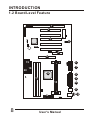
1.2 Board Level Feature
1
3
3
2
4
5
19
20
6
7
18
16
8
9
17
15
10
11
14
8
User's Manual
12 13
INTRODUCTION
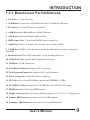
1.3.1 Board Level Part Definitions
1 ISA Slot: (1) 16-bit ISA slots.
2 USB Header: Connects to the USB bracket for (2) additional USB ports.
3 PCI Slots: (5) 32-bit PCI slots are provided.
4 AMR Slot: Audio Modem Riser (AMR) Connector.
5 AGP Slot: Accelerated Graphics Port (AGP).
6 MIDI/Game Port: 15-pin female MIDI/Joystick connector.
7 Audio Port: Three 1/8 female jacks for Line Out, Line In and MIC.
8 COM2 Port: COM2 can be directed to the Infrared Module for wireless connection
capability.
9 Printer Port: EPP and ECP compatible 25-pin D-Sub parallel port.
10 COM1 Port: High-speed UART compatible serial port.
11 USB Ports: 2 USB Connectors.
12 PS/2 Mouse Connector: Supports PS/2 style mice.
13 PS/2 Keyboard Connector: Supports PS/2 style keyboards.
14 Power Connector: 20-Pin ATX Power Connector.
15 CPU Slot : Slot A for AMD Athlon processors 500MHz - 1GHz.
16 VIA KX133 AGPset: Features PC133 SDRAM, and AGP 2X or 4X support.
17 DIMM Sockets: (3) 168-pin DIMM sockets.
18 Floppy Connector: Built-in floppy controller supports (2) 5.25" or 3.5" floppy drives.
19 Primary IDE Connector: Connector for first IDE channel.
20 Secondary IDE Connector: Connector for second IDE channel.
User's Manual
9
INTRODUCTION
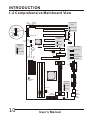
1.4 Comprehensive Mainboard View
Modem
LAN
Wake-up
Wake-up
JP12 JP10
J11
FLASH BIOS
JP20
ISA Bus
20 19
11
IDE
LED
JP2
PCI Bus 5
J11
Green Switch
(SMI)
JP2
JP9
PCI Bus 4
SCSI LED
1
JBAT1
PCI Bus 2
IrDA (IR)
JP4
Disable
AC97/MC97 Mode
JP7
JP8
1
JP7
JP8
JP19
1
AMR
Floppy
1
1
2
JP14
PCI Bus 1
Primary IDE
Secondary
IDE
Clear CMOS
JP20
Enable
BAT1
1
Write Protect
USB
12V
Clear CMOS
JBAT1
Normal
SUS Power
JP19
PCI Bus 3
Speed
Fan2 Sensor
JP18
G
1
Mainboard BIOS
Power/
Suspend
LED
Soft
Power
JP9
Write Enable
Reset
Speaker
1
Onboard AC97
Only
AMR Only
Onboard AC97 &
AMR MC97
AGP Slot
1
Audio/MIDI/Game
CD
Slot A
J13
1
Fan Power
Power
Connector
Normal
USB
JP1
1
DIMM 1
DIMM 3
DIMM 2
J7
G
12V
Speed
Sensor
Enabled
10
User's Manual
COM 1
1
COM 2
Keyboard
Power-on
Printer
RAM Power
LED
PS/2
Mouse
Keyboard
HARDWARE INSTALLATION
2. Hardware Installation
2.1 Jumpers Setting
Static Precautions
Static electricity can be a serious danger to the electronic components on
this mainboard. To avoid damage caused by electrostatic discharge,
observe the following precautions:
[
Don't remove the mainboard from its anti-static packaging until
you are ready to install it into a computer case. Also, handle addin cards and modules by the edges or mounting bracket.
[
Before you handle the mainboard in any way, touch a grounded,
anti-static surface, such as an unpainted portion of the system
chassis, for a few seconds to discharge any built-up static
electricity.
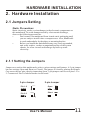
2.1.1 Setting the Jumpers
Jumpers are used on this mainboard to select various settings and features. A 2-pin jumper
has two settings: Open and Short (or Closed). The jumper is closed by placing the Jumper
Cap across the two pins, thereby connecting them. 3-pin jumpers can be set to pins 1-2 or
2-3 connected. Pin-1 is labeled on the circuit board.
3-pin Jumper
2-pin Jumper
Pin 1-2
Open
Pin 2-3
Short
User's Manual
11
HAREWARE INSTALLATION
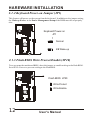
2.1.2 Keyboard Power-on Jumper (JP1)
This feature will power on the system from the keyboard. In addition to the jumper setting,
the Wake up Events in the Power Management Setup of the BIOS must be set properly
also.
Keyboard Power-on
JP1
1
Normal
KB Wake-up
2.1.3 Flash BIOS Write Protect/Enable (JP20)
To re-program the mainboard BIOS, short this jumper to enable writing to the flash BIOS.
Set to Write Protect to prevent writing to the flash BIOS.
Flash BIOS JP20
Write Protect
Write Enable
12
User's Manual
HARDWARE INSTALLATION
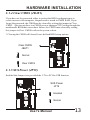
2.1.4 Clear CMOS (JBAT1)
If you have set the password, either to protect the BIOS configuration or to
restrict access to the computer, the password is stored in CMOS RAM. If you
forget the password, the CMOS can be cleared by setting this jumper to Clear
CMOS. Also in case there is a CMOS error or improper CPU setting through the
mainboard's BIOS that causes boot failure, the CMOS must cleared by setting
this jumper to Clear CMOS to allow the system to boot.
* Clearing the CMOS will clear all user-defined BIOS setup options.
Clear CMOS
JBAT1
Normal
1
Clear CMOS
2.1.5 SUS Power (JP19)
Enabled this Jumper is to provided the 3.3V to PCI for STR function.
SUS Power
JP19
Enabled
Normal
User's Manual
13
HAREWARE INSTALLATION
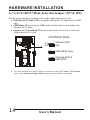
2.1.6 AC97/MC97 Mode Selection Jumper (JP7 & JP8)
Set this jumper block according to the audio/modem device(s) used:
! Onboard AC97 Only: When using the onboard AC97 audio and no AMR
card.
! AMR Only: When using an AMR audio/modem add-on card and not the
onboard AC97 audio.
! Onboard AC97 & AMR MC97: When using both the onboard AC97 audio and
AMR modem (MC97) card.
AC97/MC97 Mode
JP7
JP8
1
1
Onboard AC97
Only
AMR (MC97 Only)
Onboard AC97 &
AMR MC97
4
To use the onboard AC97/MC97 support, also make sure the AC97 Audio / AC97 Modem
option in the Advanced Chipset Feature of the mainboard BIOS is set to Auto.
14
User's Manual
HARDWARE INSTALLATION
2.2 Connections
Static Precautions
Static electricity can be a serious danger to the electronic components on
this mainboard. To avoid damage caused by electrostatic discharge,
observe the following precautions:
[ Don't remove the mainboard from its anti-static packaging until you
are ready to install it into a computer case. Also, handle add-in cards
and modules by the edges or mounting bracket.
[ Before you handle the mainboard in any way, touch a grounded, antistatic surface, such as an unpainted portion of the system chassis, for
a few seconds to discharge any built-up static electricity.
2.2.1 Installing the CPU
You Mainboard features "SLOT A" architecture, a modular design that can
accommodate the latest AMD K7 processors.
User's Manual
15
HAREWARE INSTALLATION
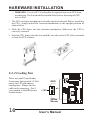
[ WARNING: Use of a CPU Cooling Fan is required to prevent CPU from
overheating. The Fan should be installed first before inserting the CPU
into its Slot.
K
The CPU retention mechanism is already attached onboard. Before installing
the CPU, simply unfold the retention mechanism to the upright position as
shown below.
L Slide the CPU down into the retention mechanism. Make sure the CPU is
correctly oriented.
M Seat the CPU firmly into the slot until the two tabs on the CPU click outwards
to lock the CPU in place.
2.2.2 Cooling Fan
These are small 3-pin Header
Connectors that provide 12-Volt
power for CPU and chassis
cooling fans. Plug in the fan
cable to the connector. Pin-2
corresponds to the RED power
lead as shown:
GND
1
+12V
Speed
Sensor
16
User's Manual
HARDWARE INSTALLATION
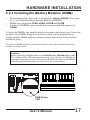
2.2.3 Installing the Memory Modules (DIMM)
[
[
[
This mainboard has three sockets available for 168-pin DIMMs. They must
be 3.3 volt Unbuffered Synchronous DRAMs (SDRAM).
DIMM Sizes supported:32MB, 64MB, 128MB and 256MB
A total of (3) DIMMs can be installed for a maximum RAM capacity of
768MB.
To insert the DIMMs, the modules must be oriented in the correct way. Notice the
notches of the DIMM. Align these notches as shown in the diagram below.
Gently push the DIMM until the retainers on both sides of the socket lock the
module in place.
To remove a DIMM, push the retainers outwards to release the module then pull the
module out of the socket.
Caution:
Before removing a DIMM, make sure the RAM Power LED Indicator is off.
The blinking of the LED indicates that power is provided for the DRAM, as
in normal operation as well as in Suspend to RAM mode. Removing a DIMM
in the Suspend to RAM mode will result in loss of system context.
1
notch
1
DIMM 1
1
DIMM 2
1
DIMM 3
notch
RAM Power
LED
User's Manual
17
HAREWARE INSTALLATION
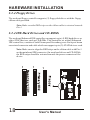
2.2.4 Floppy Drives
The on-board floppy controller supports (2) floppy disk drives with the floppy
ribbon cable provided.
Note: Make sure the RED stripe on the ribbon cable is oriented towards
Pin-1.
2.2.4 IDE Hard Drives and CD-ROMs
The on-board Enhanced IDE controller can support up to (4) IDE hard drives or
other ATAPI devices, such as CD-ROMs. This controller, as with all Enhanced
IDE controllers, consists of both Primary and Secondary ports. Each port has an
associated connector and cable which can support up to (2) ATAPI devices each.
Note: Make sure to align the RED stripe on the ribbon cable with Pin-1
on the mainboard IDE connector. On most hard drives and CD-ROMs,
the RED stripe should be oriented towards the power connector of the
device
1
1
Floppy
Primary IDE
Secondary IDE
18
1
User's Manual
HARDWARE INSTALLATION
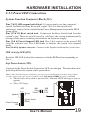
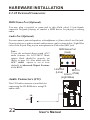
2.2.5 Power LED Connections
System Function Connector Block (J11)
Pins [7 & 9] SMI suspend switch lead - If your system's case has a suspend
switch, hook the lead from the switch to pins 7 & 9. For this switch to be
functional, it must first be enabled in the Power Management Setup in the BIOS
Setup utility.
Pins [17 & 19] Reset switch lead - Connects to the Reset Switch lead from the
system's case. The reset switch is used to cold-boot the system without actually
turning off the power, reducing wear and tear on the power supply.
Pins [2 & 6] Power/Suspend LED lead Pins 2 & 6 connect to the power LED
from the system's case. This LED blinks to indicate the system is in suspend
mode.
Pins [14 & 20] Speaker connector - Connects to the Speaker lead from the system's case.
IDE Activity LED (JP2)
Hook the IDE LED lead to this connector, with the RED lead corresponding to
Pin-1.
Soft Power Switch (JP9)
Connects to the Power Switch featured on ATX case designs. This switch must be
hooked up before the system can be powered on.
Note: Under the following two conditions, you have to press and hold the switch for longer than 4
seconds to power off your system, regardless of the Soft-Off by PWRBTN setting in the BIOS.
! Shortly after the system is powered on, when the BIOS message is not yet
appear.
! When CPU hangs.
J11
JP9
Soft
Power
20 19
Reset
Speaker
1 1
JP2
IDE
LED
Green Switch
(SMI)
Power/ Suspend
LED
2 1
User's Manual
19
HAREWARE INSTALLATION
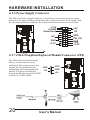
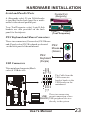
2.2.6 Power Supply Connector
The ATX-style Power Supply Connector is keyed to prevent connection in the wrong
direction. Line up the locking mechanism on the connector from the Power Supply with
the tab on the mainboard connector. Press down until the two connectors are locked.
+12V
+15VSB
PowerGood
+5V
-5V
GND
+5V
GND
+3.3V
PW_ON
GND
-12V
+3.3V
2.2.7 IrDA-Compliant Infrared Module Connector (JP4)
The IrDA connector bracket hooks
directly to this connector on the
mainboard. This connector provides
support for the optional wireless
transmitting and receiving infrared
module. You must first configure
through the BIOS setup where UART2
is directed, COM2 or IrDA.
20
IRTX
GND
IRRX
NC
+5V
1
User's Manual
HARDWARE INSTALLATION
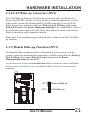
2.2.8 LAN Wake-up Connector (JP12)
The LAN Wake-up function will allow the network to wake up a Soft Power
Down (Soft-Off) PC. However, if your system is in the Suspend mode, you can
wake-up the system only through an IRQ or DMA interrupt. To use the LAN
Wake-up function, you must enable the Wake Up On LAN/Ring field (under
Wake Up Events) in the Power Management Setup of the Award BIOS. Connect
the cable that comes with your LAN card to this connector on the system board.
Refer to the add-in card's manual for details.
Note: Your LAN card must support Magic Packet in order to use the LAN Wakeup function.
2.2.9 Modem Wake-up Function (JP11)
The Modem Wake-up function allows the modem to remotely power on the
system. Install an external modem (normally to COM2) and enable the Wake Up
On LAN/Ring field (under Wake Up Events) function in the Power
Management Setup from the BIOS.
For the function to work for an internal modem card, you must also connect the Modem
Wake-up cable on the modem card to this Modem Wake-up function connector on the
mainboard.
JP11
Modem Wake-up
JP12
LAN Wake-up
User's Manual
21
HAREWARE INSTALLATION
2.2.10 External Connectors
MIDI/Game Port (Optional)
You may plug a joystick or game pad to this (Gold color) 15-pin female
connector for game playing, or connect a MIDI device for playing or editing
audio.
Audio Port (Optional)
You can connect powered speakers or headphones to (Lime color) Line Out jack.
Cassette players or other external audio sources can be connected to ( Light Blue
color) Line In jack. Plug in your microphones to (Pink color) MIC jack.
Note:
To use the on-board direct sound AC97
audio features, the AC97/MC97 Mode
jumper block should be properly set
(Refer to page 16). Also make sure the
AC97 Audio option is set to Auto
(default) in Advanced Chipset Features
of the BIOS.
Audio Connectors (J13)
MIDI/Game Port
(Gold)
Line Out
MIC In
(Lime)
Line In (Pink)
(Light Blue)
This CD Audio connector is available for
connecting the CD-ROM drive using CD
audio cable.
CD
1
J13
22
User's Manual
HARDWARE INSTALLATION
Serial and Parallel Ports
Parallel Port
(Burgundy)
A (Burgundy color) 25-pin D-Sub header
is provided on the back panel for a multimode bi-directional parallel port.
Two (Teal/Turquoise color) 9-pin D-Sub
headers are also provided on the back
panel for Serial ports.
COM 1
COM 2
(Teal/Turquoise)
PS/2 Keyboard and Mouse Connectors
These two connectors (Green color) PS/2 Mouse
and (Purple color) PS/2 Keyboard are located
on the back panel of the mainboard.
PS/2
Mouse
(Green)
PS/2
Keyboard
(Purple)
USB Connectors
+5V
USBP0-
USBP0+
GND
This mainboard supports (Black
color) 4 USB devices.
1
8
+5V
USBP1-
USBP1+
GND
The Cable from the
USB connector
bracket hooks to the
USB header on the
mainboard.
These two connectors
USB permit connection of two
(BLACK) USB peripheral devices
directly to the system.
User's Manual
23
HAREWARE INSTALLATION
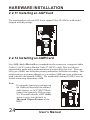
2.2.11 Installing an AGP Card
The mainboard provides an AGP slot to support 2X or 4X AGPset with model
shipped with the package.
2.2.12 Installing an AMR Card
One AMR (Audio/Modem Riser) standard interface connector is supports Audio
Codec 97 (AC97) and/or Modem Codec 97 (MC97) cards. This provides an
upgreadeable audio and/or modem solution at an increbibly low cost. There are
two type of AMR, one defined as primary and another defined as secondary. This
mainboard uses as primary channel so, a secondary AMR can coexit without the
need to disable the onboard CODEC. The mainboard's onboard CODEC must be
disable when using the primary AMR.
Note:
If your audio function is coming from
the AMR card instead of the onboard
audio feature, set AC97/MC97 Mode
jumper block properly (Refer to page
16). Also make sure the AC97 Audio
option is set to Auto (default) in
Advanced Chipset Features of the
BIOS.
24
User's Manual
MAINBOARD BIOS SETUP
3. MAINBOARD BIOS SETUP
3.1 About the BIOS
The Mainboard BIOS (Basic Input/Output System) acts as the bridge between
your Hardware (CPU, Disk Drives, Video, etc.) and Operating System Software
(Windows 95, OS/2 and so on ) The BIOS Setup (also called CMOS Setup) is
where many hardware configuration options are set and stored. This
configuration information will remain in the BIOS until it is changed, or cleared
by removing the battery for a while then reinstalling it back or by setting the
Clear CMOS jumper if there is one.
CMOS (Complementary Metal Oxide Semiconductor) refers to the chip in which
the BIOS information is stored.
This mainboard features Award BIOS, which provides an easy to use Setup
program to aid in hardware configuration. In this section we will look at the
various menus and options contained in the Award BIOS Setup Program. This
mainboard also features a Flash BIOS. A Flash BIOS can be upgraded via
software, thereby eliminating the need to actually replace the BIOS Chip on the
mainboard. Procedures for updating the BIOS follow this section.
The Award BIOS installed in your computer system's ROM (Read Only Memory)
is a custom version of an industry standard BIOS. This means that it supports
Intel processor in a standard IBM-AT compatible input/output system.
Using Setup
In general, you use the arrow keys to highlight items, <Enter> to select or
display the possible selections, <PageUp> and <PageDown> keys to change
entries, <F1> for general help and <Esc> to quit.
An item marked with a indicates that there is a submenu for this item. A gray-out
item marked with an x indicates that the item is not available. The item may be
associated with another item and its availability is dependent on that associated
item. Gray-out items are for information display only and contain no selectable
fields.
User's Manual
25
MAINBOARD BIOS SETUP
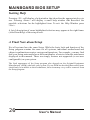
Getting Help
Pressing <F1> will display a help window that describes the appropriate keys to
use. Pressing <Enter> will display a small help window that describes the
possible selections for the highlighted item. To exit the Help Window press
<Esc>.
A brief description of some highlighted selection may appear at the right frame
(titled Item Help) of the setup screen.
A Final Note about Setup
Not all systems have the same Setup. While the basic look and function of the
Setup program remains the same for all systems, individual motherboard and
chipset combinations require custom configurations. For example, you may find
that your Setup main menu has a different number of entries from the main menu
displayed in this manual. These are simply features not supported (or not user
configurable) on your system.
The final appearance of the Setup program also depends on the Original Equipment
Manufacturer (OEM) who built your system. If your OEM has decided that certain items
should only be available to their technicians, those items may very well be removed from
the Setup program.
26
User's Manual
MAINBOARD BIOS SETUP
3.2 Main Menu
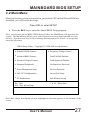
Shortly after the system is powered on, provided a CPU and sufficient RAM are
installed, you will see the message:
Press DEL to enter SETUP
!
Press the DEL key to enter the Award BIOS Setup program.
Once you enter the Award BIOS CMOS Setup Utility, the Main Menu will appear on the
screen. The Main Menu allows you to select from several setup functions and two exit
choices. Use the arrow keys to select among the items and press <Enter> to accept and
enter the sub-menu.
CMOS Setup Utility – Copyright (C) 1984-2000 Award Software
4 Standard CMOS Features
4 Frequency/Voltage Control
4 Advanced BIOS Features
Load Fail-Safe Defaults
4 Advanced Chipset Features
Load Optimized Defaults
4 Integrated Peripherals
Set Supervisor Password
4 Power Management Setup
Set User Password
4 PnP / PCI Configurations
Save & Exit Setup
4 PC Health Status
Exit Without Saving
Esc : Quit
F10 : Save & Exit Setup
- ¯ ® ¬ : Select Item
Note that a brief description of each highlighted selection appears at the bottom of the
screen.
User's Manual
27
MAINBOARD BIOS SETUP
3.3 Standard CMOS Features
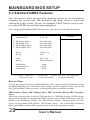
This first menu is where the most basic hardware options are set. Information
regarding the system clock, IDE hard disks and floppy drives is stored and
configured in this section. To enter the Standard CMOS Features setup screen,
press the [ENTER] key with this menu highlighted.
Upon entering the Standard CMOS Setup screen, you will see a screen like that below:
4
4
4
4
Date (mm:dd:yy)
Time (hh:mm:ss)
Mon, Dec 18 2000
00 : 00 : 00
IDE Primary Master
IDE Primary Slave
IDE Secondary Master
IDE Secondary Slave
Press Enter None
Press Enter None
Press Enter None
Press Enter None
Drive A
Drive B
1.44M, 3.5 in.
None
Video
Halt On
EGA / VGA
All, But Keyboard
Item Help
Menu Level
Base Memory
Extended Memory
Total Memory
- ¯ ® ¬:Move Enter:Select
F5:Previous Values
4
640K
65472K
1024K
+/-/PU/PD:Value
F10:Save ESC:Exit F1: General Help
F6:Fail-Safe Defaults
F7:Optimized Defaults
Date and Time
Use the arrow keys to move to and highlight the Date option. Select the Month by using
the PgDn and PgUp keys. This is how most settings will be configured. Then, move to the
day, year and time via the arrow keys to finish setting the system date and time.
IDE Primary Master, IDE Primary Slave, IDE Secondary Master, IDE Secondary
Slave
These four options relate to the (4) IDE hard drives, CD-ROMs or other ATAPI devices
that can be controlled via the on-board IDE controller (review IDE Hard Drives and CDROMs in the Installation Guide). The IDE Primary Master setting specifies the first
device on the primary IDE channel, IDE Primary Slave - the second. IDE Secondary
Master and IDE Secondary Slave specify the devices on the secondary channel.
28
User's Manual
MAINBOARD BIOS SETUP
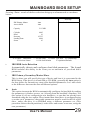
Pressing <Enter> at each of the four selections brings up a submenu such as one shown
below:
IDE HDD Auto-Detection
Press Enter
IDE Primary Master
Access Mode
Auto
Auto
Capacity
Menu Level
8
2113 MB
Cylinder
Head
Precomp
Landing Zone
Sector
4095
16
65535
4094
63
- ¯ ® ¬:Move Enter:Select
F5:Previous Values
=
Item Help
+/-/PU/PD:Value
F10:Save ESC:Exit F1: General Help
F6:Fail-Safe Defaults
F7:Optimized Defaults
IDE HDD Auto-Detection
Automatically detects and configures hard disk parameters. The Award
BIOS includes this ability in the event you are uncertain of your hard disk's
parameters.
=
IDE Primary/Secondary Master/Slave
This is where you will specify the type of device and how it is represented in the
BIOS Setup. If the device is a hard disk or CD-ROM, generally the Auto option is
the best choice for fast and easy setup of the hard disk parameters. Let's take a look
at the difference between the Auto and Manual options:
8
Auto
This option instructs the BIOS to automatically configure the hard disk by reading
the parameters (cylinders, sectors, etc.) directly from the hard disk's firmware. Use
this option if you are configuring a new hard drive, or one that has already been
formatted using the Auto option. Keep in mind that a hard drive is configured using
a certain set of parameters, those same parameters must be used for the life of the
drive, unless the drive is re-FDISKed using a different parameter set. (This
procedure deletes the old partition(s) on the drive and creates a new one, using the
new parameters).
User's Manual
29
MAINBOARD BIOS SETUP
8
Manual
This option allows you to manually enter in the parameters (cylinder, head,
precomp, landing zone and sector) of the hard drive. Generally, this option would
be used only if the hard drive has already been formatted with a certain set of
parameters, and assured consistency between the old and new parameters is
desired.
,
Access Mode
One of Enhanced IDE's most important features is LBA (Logical Block Addressing)
Mode. This feature allows the use of larger hard drives by providing a way to
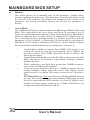
bypass the cylinder limitations imposed by many Operating Systems. LBA Mode is
used to extend a hard drive's useable capacity by remapping the cylinders in a way
that is acceptable to these operating systems. For instance, a hard drive with the
parameters of 2100 Cylinders, 16 Heads and 63 Sectors would be represented by
LBA Mode as 525 Cylinders, 64 Heads and 63 Sectors. (Notice that the Cylinders
have been divided, and the Heads have been multiplied, by a factor of 4.)
,
,
,
,
,
30
On hard drives smaller in capacity than 528MB, LBA support is not
needed. The option on these devices is ignored, even if enabled. For
hard drives greater than 528MB, LBA mode should be enabled. The
following rules apply:
Operating Systems that do not use the FAT file system do not need LBA
Mode, and can use the Normal or Large Modes. Examples would be
NetWare and Unix.
When configuring a new hard drive greater than 528MB in capacity,
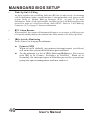
always make sure LBA mode is enabled.
If you are using a hard drive that is over 528MB in capacity, but was
already formatted without using LBA mode, LBA support will be
ignored even if it is enabled. This assures correct access to the drive's
data.
SCSI Hard Drives are NOT entered into the Mainboard BIOS Setup in
any way. The hard drive settings in the Standard CMOS Setup are only
for drives connected to the IDE Controller. So, if only SCSI drives were
installed, all these settings would be set to None. SCSI Devices are
configured via the SCSI controller's BIOS.
User's Manual
MAINBOARD BIOS SETUP
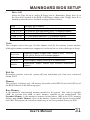
Drive A/B
=
Select the Type for the A: and/or B: floppy drives. Remember, floppy drive A: is
the first drive, hooked to the END of the floppy ribbon cable. Floppy drive B: is
hooked up after the twist. Available settings are listed below:
None
360K, 5.25 in
1.2M, 5.25 in
720K, 3.5 in
1.44M, 3.5 in
2.88M, 3.5 in
No floppy drive installed
5-1/4 inch PC-type standard drive; 360 kilobyte capacity
5-1/4 inch AT-type high-density drive; 1.2 megabyte capacity
3-1/2 inch double-sided drive; 720 kilobyte capacity
3-1/2 inch double-sided drive; 1.44 megabyte capacity
3-1/2 inch double-sided drive; 2.88 megabyte capacity
Video
This category selects the type of video adapter used for the primary system monitor.
Although secondary monitors are supported, you do not have to select their type in Setup.
EGA/VGA
CGA 40
CGA 80
MONO
Enhanced Graphics Adapter/Video Graphics Array. For EGA,
VGA, SEGA, SVGA or PGA monitor adapters.
Color Graphics Adapter, power up in 40 column mode
Color Graphics Adapter, power up in 80 column mode
Monochrome adapter, includes high resolution monochrome
adapters
Halt On
Determines whether or not the system will stop and prompt you if an error is detected
during POST.
Memory
This category is display-only. All memory detected by the POST (Power On Self Test) of
the BIOS is shown as the following types:
Base Memory
Is the amount of conventional memory installed in the system. This value is typically
640K for systems with 640K or more memory installed on the motherboard. The
Extended Memory is the amount of memory located above 1MB in the CPU's memory
address map. Other Memory refers to the memory located in the region between 640K
and 1MB. This region can be used for shadowing as well as expanded memory in DOS.
User's Manual
31
MAINBOARD BIOS SETUP
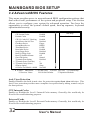
3.4 Advanced BIOS Features
This menu provides access to more advanced BIOS configuration settings that
deal with overall performance of the system and peripheral setup. This section
allows you to configure your system for advanced operation. You have the
opportunity to select the system's default speed, boot-up sequence, keyboard
operation and security.
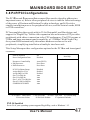
Anti-Virus Protection
CPU Internal Cache
External Cache
CPU L2 Cache ECC Checking
Quick Power On Self Test
First Boot Device
Second Boot Device
Third Boot Device
Boot Other Device
Swap Floppy Drive
Boot Up Floppy Seek
Boot Up NumLock Status
Gate A20 Option
Typematic Rate Setting
x Typematic Rate (Chars/Sec)
x Typematic Delay (Msec)
Security Option
OS Select For DRAM > 64MB
- ¯ ® ¬:Move Enter:Select
F5:Previous Values
Enabled
Enabled
Enabled
Enabled
Disabled
Floppy
HDD-0
LS/ZIP
Enabled
Disabled
Enabled
Off
Normal
Disabled
6
250
Setup
Non-OS2
Item Help
Menu Level
4
+/-/PU/PD:Value
F10:Save ESC:Exit F1: General Help
F6:Fail-Safe Defaults
F7:Optimized Defaults
Anti-Virus Protection
Enables/Disables the built-in anti-virus for protection against boot virus infection. This
Anti-Virus protection provides more complete virus protection by taking control early in
the boot process.
CPU Internal Cache
Enables or Disables the Level-1 Internal Cache memory. Generally, this would only be
Disabled for troubleshooting purposes.
External Cache
Enables or Disables the Level-2 External Cache memory. Generally, this would only be
Disabled for troubleshooting purposes.
32
User's Manual
MAINBOARD BIOS SETUP
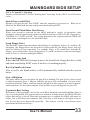
CPU L2 Cache ECC Checking
Enables or Disables ECC (Error Checking and Correcting) for the CPU's Level 2 built-in
cache.
Quick Power on Self Test
Speeds up Power On Self Test (POST) after the computer is powered on. When set to
Enabled, the BIOS will shorten or skip some checks during POST.
First/Second/Third/Other Boot Device
When your system is powered on, the BIOS performs a variety of operations, then
attempts to boot an Operating System from either a hard drive (IDE or SCSI), floppy drive,
CD-ROM, LS-120/ZIP or LAN. This setting determines the sequence that the BIOS will
follow when searching devices for a bootable disk.
Swap Floppy Drive
The hardware connections determine which floppy is configured as drive A: and drive B:
Swapping the floppy drives can be useful if your system has two floppy drives, and you
want the ability to boot from both. For example: Since a PC cannot boot from the B:
Floppy, you would need to Swap floppy drives A: and B: in order to set the second floppy
drive to drive A:, thereby making it bootable.
Boot Up Floppy Seek
When enabled, BIOS will attempt to move the head of the floppy disk drive forth
and back once during POST to see if the drive is working properly.
Boot Up NumLock Status
This set to On, the NumLock key will be automatically enabled when the system
boots.
Gate A20 Option
This entry allows you to select how the gate A20 is handled. The gate A20 is a device used
to address memory above 1 Mbytes. Initially, the gate A20 was handled via a pin on the
keyboard (Normal). Today, while keyboards still provide this support, it is more common,
and much faster, for the system chipset (Fast; default) to provide support for gate A20.
Typematic Rate Setting
Determines if the typematic rate is to be used. When disabled, continually holding down a
key on your keyboard will generate only one instance. In other words, the BIOS will only
report that the key is down. When the typematic rate is enabled, the BIOS will report as
before, but it will then wait a moment, and, if the key is still down,it will begin to report
that the key has been depressed repeatedly. This feature is used to accelerate cursor
movements with the arrow keys.
User's Manual
33
MAINBOARD BIOS SETUP
Typematic Rate (Chars/Sec)
When the typematic rate is enabled, this selection allows you to select the rate at which the
keys are accelerated: Options are 6 (default), 8, 10, 12, 15, 20, 24 and 30.
Typematic Delay (Msec)
When the typematic rate is enabled, this selection allows you to select the delay (in msec)
between when the key was first depressed and when the acceleration begins. Options are
250 (default), 500, 750 and 1000.
Security Option
This option enables password checking every time the computer is powered on or every
time BIOS Setup is executed. If System is chosen, a user password prompt appears every
time the computer is turned on. If Setup is chosen, the password prompt appears only when
the BIOS Setup program is executed. Refer to the section Supervisor Password for more
information.
OS Select For DRAM > 64MB
This should be set to OS2 if you are running IBM OS/2 with more than 64MB of RAM in
the system. Otherwise, the setting should be Non-OS2.
Report No FDD For WIN95/98
When no floppy disk drive is installed, set this option to No to release IRQ6 for passing
Windows 95/98 logo. This option is irrelevant under normal operation.
Video BIOS Shadow
This option controls the location of the contents of the 32KB of Video ROM beginning at
the C0000h memory location. The settings are:
Enabled
Disabled
The contents of C0000h-C7FFFh are written to the same add ress in
system memory (RAM) for faster execution.
The video ROM is not copied to RAM. The contents of the video
ROM cannot be read from or written t o cache memory.
C8000-DFFFF Shadow
These options control the location of the contents of the 16KB expansion card ROMs
beginning at the specified memory location. If no adapter ROM is using the named ROM
area, this area is made available to the local bus. Shadowing a ROM reduces the memory
available between 640KB and 1024KB by the amount used for this purpose.
34
User's Manual
MAINBOARD BIOS SETUP
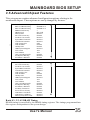
3.5 Advanced Chipset Features
This setup menu contains advanced configuration options relating to the
mainboard chipset. These options are rarely changed by the user.
*
Bank 0/1 DRAM Timing
Bank 2/3 DRAM Timing
Bank 4/5 DRAM Timing
SDRAM CAS Latency
DRAM Clock
Memory Hole
P2C/C2P Concurrency
Fast R-W Turn Around
System BIOS Cacheable
Video RAM Cacheable
AGP Aperture Size
AGP-4X Mode
OnChip USB
USB Keyboard Support
AC97 Audio
AC97 Modem
CPU to PCI Write Buffer
PCI Dynamic Bursting
PCI Master 0 WS Write
SDRAM 10 ns
SDRAM 10 ns
SDRAM 10 ns
3
Host CLK
Disabled
Enabled
Disabled
Disabled
Disabled
64M
Enabled
Enabled
Disabled
Auto
Auto
Enabled
Disabled
Enabled
Memory Hole
P2C/C2P Concurrency
Fast R-W Turn Around
System BIOS Cacheable
Video RAM Cacheable
AGP Aperture Size
AGP-4X Mode
OnChip USB
USB Keyboard Support
AC97 Audio
AC97 Modem
CPU to PCI Write Buffer
PCI Dynamic Bursting
PCI Master 0 WS Write
PCI Delay Transaction
PCI #2 Access #1 Retry
AGP Master 1 WS Write
AGP Master 1 WS Read
Memory Parity/ECC Check
Disabled
Enabled
Disabled
Disabled
Disabled
64M
Enabled
Enabled
Disabled
Auto
Auto
Enabled
Disabled
Enabled
Enabled
Disabled
Enabled
Disabled
Disabled
Item Help
Menu Level
4
Item Help
Menu Level
4
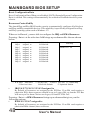
Bank 0/1, 2/3, 4/5 DRAM Timing
DRAM timing is controlled by the DRAM timing registers. The timings programmed into
this register are dependent on the system design.
User's Manual
35
MAINBOARD BIOS SETUP
SDRAM CAS Latency
This item allows you to set the SDRAM CAS Latency Timer. Options are 2, 3 (default) and
Auto. Select Auto if you encounter problem.
DRAM Clock
The Host CLK option allows the DRAM clock to synchronize with the CPU clock. The
HCLK-33M (and HCLK+33M) option allows the 66/100 and 100/133 memory/CPU (and
CPU/memory) asynchronous system architecture.
Memory Hole
In order to improve compatibility, certain space in memory can be reserved for old style
ISA cards that map memory between 15M-16M.
P2C/C2P Concurrency
Determines the PCI bus and CPU bus concurrency. When disabled, CPU bus will be
occupied during the entire PCI operation period.
Fast R-W Turn Around
Enabling this fast read-write turn around option can improve performance, however,
stability problem may occur.
System BIOS Cacheable
When Enabled, the contents of the F0000h system memory segment can be cached to the
Level-2 cache memory.
Video RAM Cacheable
When Enabled, C0000h to C7FFH become cacheable memory.
AGP Aperture Size
Select the size of the AGP aperture. The aperture is a portion of the PCI memory address
range dedicated for graphics memory address space.
AGP-4X Mode
Set to Enabled if your AGP card supports the 4X mode.
AGP Driving Control
Set to Manual for the next selection "AGP Driving Value" to enter the value of AGP
Driving Value.
K7 CLK_CTL Select
Set to Optimal for K7 clock ramp according to system clock multiplier and the system bus
speed.
OnChip USB
Select Enabled. The next option will become available:
36
User's Manual
MAINBOARD BIOS SETUP
USB Keyboard Support
This item allows you to enable or disable the USB keyboard within the onboard BIOS.
AC97 Audio
If you want to use the Sound Blaster compatible mode or an add-on audio card instead, set
this option to Disabled to avoid possible conflict.
AC97 Modem
If you want to use the legacy modem compatible mode or an add-on modem card instead,
set this option to Disabled to avoid possible conflict.
CPU to PCI Write Buffer
When Enabled, up to four D words of data can be written to the PCI bus without
interrupting the CPU. When disabled, a write buffer is not used and the CPU read cycle
will not be completed until the PCI bus signals that it is ready to receive the data.
PCI Dynamic Bursting
When Enabled, data transfers on the PCI bus, where possible, make use of the highperformance PCI bust protocol, in which greater amounts of data are transferred at a
single command.
PCI Master 0 WS Write
When Enabled, writes to the PCI bus are command with zero wait states.
PCI Delay Transaction
The chipset has an embedded 32-bit posted write buffer to support delay transactions
cycles. Select Enabled to support compliance with PCI specification version 2.1.
PCI#2 Access #1 Retry
This item allows you enable/disable the PCI #2 Access #1 Retry.
AGP Master 1 WS Write
This implements a single delay when writing to the PCI Bus. By default, two wait states
are used by the system, allowing for greater stability.
AGP Master 1 WS Read
This implements a single delay when reading to the PCI Bus. By default, two wait states
are used by the system, allowing for greater stability.
Memory Parity/ECC Check
When Disabled, there will be no memory errors shown on the monitor for Memory parity
SERR# (NMI). When parity DRAM modules are used, select Parity or ECC (Error
Checking and Correcting) to correct 1 bit memory errors in the memory.
User's Manual
37
MAINBOARD BIOS SETUP
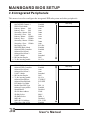
3.6 Integrated Peripherals
This menu is used to configure the integrated IDE subsystem and other peripherals.
OnChip IDE Channel 0
OnChip IDE Channel 1
IDE Prefetch Mode
Primary Master
PIO
Primary Slave
PIO
Secondary Master PIO
Secondary Slave PIO
Primary Master
UDMA
Primary Slave
UDMA
Secondary Master UDMA
Secondary Slave UDMA
Init Display First
IDE HDD Block Mode
Onboard FDD Controller
Onboard Serial Port 1
Onboard Serial Port 2
UART 2 Mode
x IR Function Duplex
x Tx, Rx inverting enable
Enabled
Enabled
Enabled
Auto
Auto
IDE HDD Block Mode
Onboard FDD Controller
Onboard Serial Port 1
Onboard Serial Port 2
UART 2 Mode
x IR Function Duplex
x Tx, Rx inverting enable
Onboard Parallel Port
Onboard Parallel Mode
ECP Mode Use DMA
Parallel Port EPP Type
Onboard Legacy Audio
Sound Blaster
SB I/O Base Address
SB IRQ Select
SB DMA Select
MPU-401
MPU-401 I/O Address
Game Port (200-207H)
Enabled
Enabled
Auto
Auto
Standard
Half
No, Yes
378/IRQ7
ECP/EPP
3
EPP 1.9
Enabled
Disabled
220H
IRQ 5
DMA 1
Disabled
330 -333H
Enabled
38
Item Help
Menu Level
4
Auto
Auto
Auto
Auto
Auto
Auto
PCI Slot
Enabled
Enabled
Auto
Auto
Standard
Half
No, Yes
Item Help
Menu Level
User's Manual
4
MAINBOARD BIOS SETUP
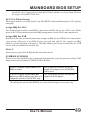
On-Chip IDE Channel 0
Enables or Disables the primary controller. Situations where this controller would be
disabled are: a) You are not using any IDE Drives or b) You are using an add-on IDE
controller in a PCI Slot.
On-Chip IDE Channel 1
Enables or Disables the secondary controller. Situations where this controller would be
disabled are: a) You are not using any IDE Drives or b) You are using IDE Drives ONLY on
the primary controller or c) You are using an add-on IDE controller in a PCI Slot.
IDE Prefetch Mode
Enable prefetching for IDE drive interfaces that support its faster drive accesses. If you
are getting disk drive errors, change the setting to omit the drive interface where the errors
occur. Depending on the configuration of your IDE subsystem, this field may not appear,
and it does not appear when the Internal PCI/IDE field, above, is Disabled.
!
!
IDE PIO Mode
IDE Programmed I/O Mode - This setting relates
to the speed at which the hard drive is able to
transfer data, up to 16.6MB/second for Mode 4
drives. Available settings are Auto, 0, 1, 2, 3, or 4.
As with the Type setting, Auto is the preferred
choice, in that the supported PIO Mode is read
directly from the hard drive. Be sure not to use a
PIO Mode higher than what the drive actually
supports. This could result in loss of data.
PIO Mode
0
1
2
3
4
Timing
600 ns
383 ns
240 ns
180 ns
120 ns
IDE UDMA (Ultra DMA) Mode
The chipset used for this mainboard improves the IDE performance by
implementing UltraDMA/66 Bus Mastering IDE which can handle data transfer up
to 66 Mbyte/sec. This UDMA technology is downward compatible with existing
ATA-2 IDE. So there is no upgrade required for current hard drives and cabling.
Init Display First
When your system has an AGP card coexisting with other PCI display card, this option
tells your system which display card to use initially.
IDE HDD Block Mode
This allows your hard disk controller to use fast block mode to transfer data to and from
your hard disk drive (HDD).
Onboard FDD Controller
Set to Enabled if you have a floppy disk drive installed on the system board and you wish
to use it. Even when so equipped, if you add a higher performance controller, you will
need to disable this feature.
User's Manual
39
MAINBOARD BIOS SETUP
Onboard Serial Port 1
With this option, the on-board Serial Port 1 can be Disabled, or set to Auto, 3F8/IRQ4,
2F8/IRQ3, 3E8/IRQ4 or 2E8/IRQ3.
Onboard Serial Port 2
With this option, the on-board Serial Port 2 can be Disabled, or set to Auto, 3F8/IRQ4,
2F8/IRQ3, 3E8/IRQ4 or 2E8/IRQ3.
UART 2 Mode
By default, this field is set to Standard, which directs the second serial port
UART to support the COM2 serial port.
Choosing ASKIR (SHARP IR) or HPSIR (IrDA) will activate the on-board
infrared feature and redirect the second serial port UART to support the infrared
module connector on the mainboard. The following infrared function related
options will become available:
IR Function Duplex
Select the option required by the IR device connected to the IR port. Full-duplex
mode permits simultaneous two-direction transmission. Half-duplex mode
permits transmission in one direction only at a time.
Tx, Rx inverting enable
Determines the Infrared Transmission and Receiving inverting mode.
Onboard Parallel Port
With this option, the on-board Parallel Port can be Disabled, or set to 378/IRQ7,
3BC/IRQ7 or 278/IRQ5.
Onboard Parallel Mode
Sets the operating mode of the parallel port. Options are: Normal, EPP, ECP and ECP/EPP.
Normal: Standard Parallel Port, EPP: Enhanced Parallel Port, ECP: Extended Capability
Port.
ECP Mode Use DMA
Options are 1 and 3. This field is available only when one of the two following options in
Parallel Port EPP Type
Options are 1.7 and 1.9 (default ; IEEE 1284 compliant).
40
User's Manual
MAINBOARD BIOS SETUP
Onboard Legacy Audio
Enabling this option allows the system to use the on-chip legacy SoundBlastercompatible audio support.
*** The following fields are available only when the Onboard Legacy Audio is Enabled.
Sound Blaster
Enables/Disables the Sound Blaster compatible mode.
SB I/O Base Address
This option allows the user to select the audio I/O base address in Sound Blaster
compatible mode.
SB IRQ Select
This option allows the user to select the IRQ for audio in Sound Blaster compatible mode.
SB DMA Select
This option allows the user to select the DMA for audio in Sound Blaster compatible mode.
MPU-401
Enables/Disables the MPU-401 MIDI interface standard.
MPU-401 I/O Address
This option allows the user to select the I/O base address for the use of MPU-401 MIDI
device.
Game Port (200-207H)
Enable this option to use the game port, which occupies 200-207H address.
User's Manual
41
MAINBOARD BIOS SETUP
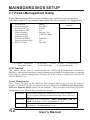
3.7 Power Management Setup
Power Management allows you to configure you system to use energy most
efficiently, and still in a manner consistent with your own style of computer use.
ACPI function
4 Power Management
ACPI Suspend Type
PM Control by APM
Video Off Option
Video Off Method
MODEM Use IRQ
Soft-Off by PWRBTN
State After Power Failure
4 Wake Up Events
- ¯ ® ¬:Move Enter:Select
F5:Previous Values
Enabled
Press Enter
S1(POS)
Yes
Suspend -> Off
V/H SYNC+Blank
3
Instant-Off
Off
Press Enter
Item Help
Menu Level
4
+/-/PU/PD:Value
F10:Save ESC:Exit F1: General Help
F6:Fail-Safe Defaults
F7:Optimized Defaults
ACPI function
This option allows you to enable/disable the Advanced Configuration and Power
Interface, which makes hardware status information available to the operating system and
offers improved power management. To make an ACPI system, you must use an ACPI OS
such as Windows 98.
Power Management
Press <Enter> to bring up the submenu. This category allows you to select the type (or
degree) of Green PC power saving and is directly related to the HDD Power Down, Doze
Mode and Suspend Mode options in the submenu. There are three selections for Power
Management, two of which have fixed mode settings:
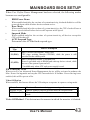
User Define
Max Saving
Min Saving
42
Set each mode individually. When Enabled, each range is from 10 sec.
to 1 hr., except for HDD Power Down which ranges from 1 min. to 15
min.
Maximum power management – ONLY AVAILABLE FOR SL
CPUs. Doze Mode = 10 sec., Suspend Mode = 10 sec.
Minimum power management.
Doze Mode = 1 hr, Suspend Mode = 1 hr.
User's Manual
MAINBOARD BIOS SETUP
When User Define Power Management has been selected, the following modes
become user configurable:
=
HDD Power Down
When enabled and after the set time of system inactivity, the hard disk drive will be
powered down while all other devices remain active.
=
Doze Mode
When enabled and after the set time of system inactivity, the CPU clock will run at
slower speed while all other devices still operate at full speed.
=
Suspend Mode
When enabled and after the set time of system inactivity, all devices except the
CPU will be shut off.
=
ACPI Suspend Type
Determines the ACPI defined suspend type.
Suspend
Type
S1 (POS)
S3 (STR)
Power Consumption
State 1 (Power On Suspend) - below 30W
CPU stops working through STPCLK#, while the power is still
provided for the whole system.
State 3 (Suspend to RAM) - Less than 10W
Power is provided only to DRAM and wake-up devices circuit, while
the rest of the system is powered off.
* Available only when ATX style power supply is used.
PM Control by APM
When set to Yes, an Advanced Power Management device will be activated to enhance the
Max. Power Saving mode and stop the CPU internal clock. If the Max. Power Saving is not
enabled, this will be preset to No.
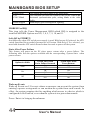
Video Off Option
When enabled, this feature allows the VGA adapter to operate in a power saving mode.
Always On
Suspend à Off
All Modes à Off
Monitor will remain on during power saving modes.
Monitor blanked when the systems enters the Suspend mode.
Monitor blanked when the system enters any power saving
mode.
Video Off Method - This determines the manner in which the monitor is blanked.
User's Manual
43
MAINBOARD BIOS SETUP
Blank Screen
V/H
SYNC+Blank
DPMS Support
This option only writes blanks to the video buffer.
This selection will cause the system to turn off the vertical and
horizontal synchronization ports, writing blanks to the video
buffer.
Initial display power management signaling.
MODEM Use IRQ
This item tells the Power Management BIOS which IRQ is assigned to the
installed MODEM. Options are NA, 3, 4, 5, 7, 9, 10, and 11.
Soft-Off by PWRBTN
Available only when ATX styled power supply is used. With Instant-Off selected, the ATX
switch functions like a normal system power off button. With Delay 4 Sec. selected, you
must hold down the ATX switch for more than 4 seconds to power off the system.
State After Power Failure
This feature will power-on the PC when power returns after a power failure. The
following table lists the options available and the corresponding System State when
power returns.
Options Available
Auto
On
Off
System State When
Power Failure Occurred
On
Off
On
Off
On
Off
System State When
Power Returns
On
Off
On
On
Off
Off
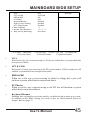
Wake up Events
Wake up Events are I/O events whose occurrence can prevent the system from
entering a power saving mode or can awaken the system from such a mode. In
effect, the system remains alert for anything which occurs to a device which is
configured as On/Enabled, even when the system is in a power down mode.
Press <Enter> to bring up the submenu:
44
User's Manual
MAINBOARD BIOS SETUP
VGA
LPT & COM
HDD & FDD
PCI Master
Keyboard Resume
Wake Up On LAN/Ring
RTC Alarm Resume
x Date (of Month)
x Resume Time (hh:mm:ss)
4 IRQs Activity Monitoring
- ¯ ® ¬:Move Enter:Select
F5:Previous Values
=
OFF
LPT/CO M
ON
OFF
Disabled
Disabled
Disabled
0
0 : 0 : 0
Press Enter
Item Help
Menu Level
8
+/-/PU/PD:Value
F10:Save ESC:Exit F1: General Help
F6:Fail-Safe Defaults
F7:Optimized Defaults
VGA
When set to On, any event occurring at a VGA port will awaken a system which has
been powered down.
=
LPT & COM
Determines if any event occurring at a LPT (printer) and/or COM (serial) port will
awaken a system which has been powered down.
=
HDD & FDD
When set to On, any event occurring at a hard or floppy drive port will
awaken a system which has been powered down.
=
PCI Master
When set to On, any event occurring to the PCI bus will awaken a system
which has been powered down.
=
Keyboard Resume
Enabling this option allows pressing any key on the keyboard to wake up a system.
In addition to this BIOS setting, you need to also set the Keyboard Power-on
Jumper. Refer to page 13.
User's Manual
45
MAINBOARD BIOS SETUP
=
Wake Up On LAN/Ring
An input signal on the serial Ring Indicator (RI) line in other words, an incoming
call on the modem (either external modem or internal modem card) power on the
system. Refer to Modem Wake-up Function (JP11) on page 21 for more
information. With a LAN card installed, the Wake-up On LAN function allows the
network to wake up a Soft Power Down (Soft-Off) PC. Refer to LAN Wake-up
Connector (J12) on page 21 for more information.
=
RTC Alarm Resume
When enabled, the system will automatically power on or returns to full power out
of suspend/standby mode at the time and date of the month (0 for daily) specified.
=
IRQs Activity Monitoring
Press <Enter> to bring up the submenu.
8
8
46
Primary INTR
When set to On (default), any primary interrupt request (see below)
will awake the system which has been powered down.
On the submenu is a list of IRQs (Interrupt ReQuests). You can set
each IRQ to be Primary, Secondary or Disabled. When set to
Secondary, the interrupt request will neither prevent the system from
going into a power management mode nor awaken it.
User's Manual
MAINBOARD BIOS SETUP
3.8 PnP/PCI Configurations
The PCI Personal Component Interconnect Bus was developed to address two
important issues: a) How to allow peripheral devices to take the fullest advantage
of the power of Pentium and Pentium Pro chip technology, and b) Provide a
simpler installation process for peripheral devices, such as Network cards, EIDE
or SCSI controllers.
PCI accomplishes these goals with its 32-bit Data path Local Bus design, and
support for Plug & Play. Unlike older expansion bus architectures, PCI provides
peripherals with a direct connection to the CPU and memory. The PCI bus runs at
33Mhz and has a maximum transfer capability of 132MBps. With Plug & Play,
the system BIOS automatically determines hardware resources for new
peripherals, simplifying installation of multiple interface cards.
This Setup Menu provides configuration options for the PCI Bus and its assigned
resources.
PNP OS Installed
Reset Configuration Data
No
Disabled
Item Help
Menu Level
Resources Controlled By
x IRQ Resources
x DMA Resources
PCI/VGA Palette Snoop
Assign IRQ For VGA
Assign IRQ For USB
Slot 1 Use IRQ No.
Slot 2 Use IRQ No.
Slot 3, AC97 Use IRQ No.
Slot 4,5 USB Use IRQ No.
SYMBIOS SCSI BIOS
- ¯ ® ¬:Move Enter:Select
F5:Previous Values
4
Auto (ESCD)
Press Enter
Press Enter
Disabled
Enabled
Enabled
Auto
Auto
Auto
Auto
Auto
+/-/PU/PD:Value
F10:Save ESC:Exit F1: General Help
F6:Fail-Safe Defaults
F7:Optimized Defaults
PNP OS Installed
Set to Yes if your operating system supports Plug & Play, such as Windowsâ 95.
User's Manual
47
MAINBOARD BIOS SETUP
Reset Configuration Data
Reset Configuration Data: When set to Enabled, ESCD (Extended System Configuration
Data) is cleared. This setting will automatically be set back to Disabled when the system
reboots.
Resources Controlled By
The Award Plug and Play BIOS has the capacity to automatically configure all of the boot
and Plug and Play compatible devices. This capability is specifically designed for a Plug
and Play operating system such as Windows 95.
When set to Manual, you are able to configure the IRQ and DMA Resources.
Pressing <Enter> at the selection field brings up a submenu like the one shown
below:
IRQ-3
IRQ-4
IRQ-5
IRQ-7
IRQ- 9
IRQ-10
IRQ-11
IRQ-12
IRQ-14
IRQ-15
assigned
assigned
assigned
assigned
assigned
assigned
assigned
assigned
assigned
assigned
to
to
to
to
to
to
to
to
to
to
- ¯ ® ¬:Move Enter:Select
F5:Previous Values
=
PCI/ISA PnP
PCI/ISA PnP
PCI/ISA PnP
PCI/ISA PnP
PCI/ISA PnP
PCI/ISA P nP
PCI/ISA PnP
PCI/ISA PnP
PCI/ISA PnP
PCI/ISA PnP
Item Help
Menu Level
8
+/-/PU/PD:Value
F10:Save ESC:Exit F1: General Help
F6:Fail-Safe Defaults
F7:Optimized Defaults
IRQ3/4/5/7/9/10/11/12/14/15 assigned to
By default, all resources are assigned to the PCI Bus. If an ISA card requires a
particular IRQ, those resources should be set to Legacy ISA so that the PCI Bus
will not try to use them. Choices are Legacy ISA and PCI/ISA PnP.
Pressing <Enter> at DMA Resources brings up a submenu that gives you the
following options:
=
DMA 0/1/3/5/6/7 assigned to
By default, all resources are assigned to the PCI Bus. If an ISA card requires a
particular DMA channel, those resources
48
User's Manual
MAINBOARD BIOS SETUP
should be set to Legacy ISA so that the PCI Bus will not try to use them. Choices
are Legacy ISA and PCI/ISA PnP.
PCI/VGA Palette Snoop
This option must be set to Enabled if any ISA MPEG card installed requires VGA palette
snooping.
Assign IRQ For VGA
The Enabled option allows the BIOS to auto-route an IRQ for use by a VGA card. While
most of the VGA cards do not need the IRQ assignment, certain VGA cards may need it.
Assign IRQ For USB
When Enabled, the system automatically assigns an IRQ for the USB device connected to
your system. However, if no USB devices are used and an ISA slot requires an IRQ
address, set this function to Disabled. The IRQ address previously occupied by the USB
device will be available for the ISA slot.
Slot 1-5
Auto-routes or specifies an IRQ for the particular device.
SYMBIOS SCSI BIOS
When set to Auto (Default), the system will automatically sense the presence of any SCSI
adapter that uses a Symbios SYM53C8XX SCSI chip:
If the SCSI adapter installed has its own
BIOS on board:
If the SCSI adapter installed does not
have its own BIOS and the card uses or is
compatible with the SYM53C8XX chip:
The on-board SCSI BIOS will not be
loaded. The adapter’s own SCSI BIOS
will be used.
The on-board SCSI BIOS will load and
control the SCSI adapter.
*Disabling the onboard SCSI BIOS prevents it from being active in any way.
User's Manual
49
MAINBOARD BIOS SETUP
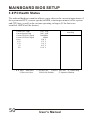
3.9 PC Health Status
The onboard hardware monitor allows you to observe the current temperatures of
the system and CPU, current speeds (in RPM, rotation per minute) of the system
and CPU fans, as well as the various operating voltages. (If the fan is not
installed, 0 RPM will be shown.)
Current CPU Temp.
Current System Temp .
Current CPUFAN1 Speed
Current CPUFAN2 Speed
Vcore
2.5V
3.3V
5V
12V
- ¯ ® ¬:Move Enter:Select
F5:Previous Values
50
35°C/ 95°F
30°C/ 86°F
5400 RPM
0 RPM
2.04 V
2.33 V
3.21 V
4.97 V
11.85 V
Item Help
Menu Level
4
+/-/PU/PD:Value
F10:Save ESC:Exit F1: General Help
F6:Fail-Safe Defaults
F7:Optimized Defaults
User's Manual
MAINBOARD BIOS SETUP
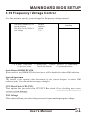
3.10 Frequency / Voltage Control
Use this menu to specify your settings for frequency/voltage control.
Auto Detect DIMM/PCI Clk
Spread Spectrum
CPU Host Clock (CPU/PCI)
VIO Voltage
- ¯ ® ¬:Move Enter:Select
F5:Previous Values
Enabled
Disabled
Default
3.3V
Item Help
Menu Level
4
+/-/PU/PD:Value
F10:Save ESC:Exit F1: General Help
F6:Fail-Safe Defaults
F7:Optimized Defaults
Auto Detect DIMM/PCI Clk
When enabled, any DIMM/PCI clock not in use will be disabled to reduce EMI radiation.
Spread Spectrum
The default is the optimal value determined by the system designer to reduce EMI
radiation peak. Users should not attempt to change it.
CPU Host Clock (CPU/PCI)
This option lets you select the CPU/PCI Bus clock. Over-clocking may cause
serious system damage.
VIO Voltage
This option allows you select the processor's input and output pins voltage.
User's Manual
51
MAINBOARD BIOS SETUP
3.11 Load Fail-Safe Defaults
Loads Fail Safe settings into the BIOS Setup program. These options are
designed to slow the system down for troubleshooting purposes. To load the
default values, highlight this option and press [ENTER]. Enter Y in the
confirmation screen and press [ENTER] again. User-defined options in the
Standard CMOS Setup are not affected.
3.12 Load Optimized Defaults
Loads the default values for best system performance into the BIOS Setup
program. To load the default values, highlight this option and press [ENTER].
Enter Y in the confirmation screen and press [ENTER] again. User-defined
options in the Standard CMOS Setup are not affected.
3.13 Supervisor Password and User Password
Setting
Passwords can be set to provide protection for the BIOS configuration options, or
to restrict access to the computer itself.
When enabled, User Password will require all users to enter a password in order
to use the system, and/or enter the BIOS setup (but can't change its contents). A
Supervisor Password is used to protect the stored CMOS options from being
changed by unauthorized users.
Keep in mind that when set, a password is required only when booting the system.
It will not provide protection to a system that is already booted.
The password check option is set in Advanced BIOS Features by choosing either System
(the password prompt appears every time the system is powered on) or Setup (the
password prompt appears only when the user enters the BIOS Setup). The password is
stored in CMOS RAM, and can be cleared by the Clear CMOS jumper. (Refer to page 14.)
52
User's Manual
MAINBOARD BIOS SETUP
To set a password:
1. You must first set the Supervisor password by choosing Supervisor
Password and pressing [ENTER]. Setup prompts for a password.
2. Enter a 1-8 character password using letters, numbers, or a combination
of both. The specific characters are not shown as you enter them. Press
[ENTER].
3. A confirmation box appears asking you to re-enter the password. Enter the
password again. Press [ENTER]. Follow the same procedure to set the
User Password.
Changing a Password:
Select the appropriate password option (Supervisor or User) from the main menu
and press [ENTER]. Enter the current password and press [Enter]. The screen
does not display the characters entered. Enter in the new password, then the
confirmation. You cannot change the current password unless you know it.
Erasing a Password:
1. If you know the current password, but want to disable password checking,
follow the procedure for changing the password. When Setup prompts for
the new password, simply press [ENTER]. You will see a message
indicating that the password is disabled.
2. If you do not know the current password, the CMOS must be cleared by
cleared by the Clear CMOS jumper (Refer to page 14). *This will clear all
user-defined BIOS Setup options.
3.14 Save & Exit Setup / Exit Without Saving
Select Save & Exit Setup to save into the CMOS memory all modifications
specified during the current session. To save the configuration changes,
highlight this option in the main menu and press [ENTER]. The system displays a
confirmation message on the screen. Press the Y key and then [Enter]. Press the
N key and then the [Enter] key to abort. The Exit Without Saving option allows
the user to exit the BIOS Setup without updating any changes made during the
current session.
User's Manual
53
MAINBOARD BIOS SETUP
3.15 PCI Device Listing
This list of installed PCI devices appears after the System Configuration screen:
PCI device listing .....
Bus No. Device No. Func No. Vendor ID
0
7
1
1106
0
7
2
1106
0
7
3
1106
0
7
5
1106
0
9
0
5333
Device ID
0571
3038
3038
3038
8A22
Device Class
IRQ
IDE Controller
14/15
Serial Bus Controller 5
Serial Bus Controller 5
Multimedia Device
10
Display controller
11
ACPI Controller
9
Bus No.
Encoded value indicating 1 of 256 possible buses in a system.
Device No.
Encoded value indicating 1 of 32 possible devices on a given bus.
Func No.
Encoded value indicating 1 of 8 possible functions on a multifunction
device.
Vendor ID
Identifies the manufacturer of the device. Valid vendor identifiers are
allocated by the PCI SIG (Special Interest Group) to ensure
uniqueness.
Device ID
Identifies the particular device. Th is identifier is allocated by the
vendor.
Device
Class
Specifies one of the following device classes: Mass storage
controller, Network controller , Display controller, Multimedia
device, Bridge device, Simple communication controller, Base
system peripherals, Input device, Docking station, Processor and
Serial bus controller.
The PCI device listing is useful for troubleshooting purposes. More detailed
information for each field may be obtained through the PCI specification
documentation.
54
User's Manual
BUILT-IN SYMBIOS SCSI BIOS
4. BUILT-IN SYMBIOS SCSI BIOS
To provide easy to use and cost effective support for adapters using or
compatible with the Symbios Logic 53C8XX SCSI chips, this mainboard
features built-in Symbios SCSI BIOS.
In most cases you should not need to change the default configuration of your
host adapter. You may decide to alter these default values if there is a conflict
between device settings, or if you need to optimize system performance. A
message appears on your computer monitor (for about 5 seconds) during boot
that looks like this:
Press Crtl-C to start Symbios Configuration Utility
If you decide to press Ctrl-C during boot, the following message appears:
Please wait, invoking Symbios Configuration Utility
After a brief pause, your computer will display the Main Menu of the utility.
The Symbios SCSI Configuration Utility
This menu driven utility allows you to view and change the default configuration
settings for host adapters using Symbios 53C8XX chips.
Note: Pressing Ctrl-A after memory count during re-boot allows you to recover
the default settings and reconfigure.
The following tables list the configuration settings you can change:
!
!
Global: Affects both the adapter and all SCSI devices
Device: Affects only the individual SCSI devices
User's Manual
55
BUILT-IN SYMBIOS SCSI BIOS
Global Default Settings
Settings
Default
SCAM Support
On
Device Default Settings
Settings
Default
Synchronous Transfer
20
Rate (MB/sec)
Parity Checking
On
Data Width
8
Host Adapter SCSI ID
7
Disconnect
On
Scan Order
Low to High (0-Max)
Read Write I/O Timeout
(secs)
10
Scan for Devices at Boot
Time
Yes
Scan for SCSI LUNs
Yes
Queue Tags
No
Main Menu
MAIN MENU
SYM53C860
Port
Num
EC00
Irq
Level
1
----------Status--------Current
Next-Boot
On
On
NvRAM
Found
Yes
Change Adapter Status
Adapter Boot Order
Additional Adapter Configuration
Display Mode = Verbose
Mono/Color
Language
Help
Quit
You can select an adapter only if the current status is On . Changes are only
possible with SCSI adapters that support NVRAM (non-volatile memory).
Check the NvRAM Found column to see if NVRAM is present on your adapter.
If you choose to alter any of these settings, exit via the Quit option and the
system will reboot.
Change Adapter Status
Allows you to activate or deactivate a host adapter and all SCSI devices attached to it. The
change takes place after a reboot, which is automatic upon exit from the utility when this
option is changed.
56
User's Manual
BUILT-IN SYMBIOS SCSI BIOS
Adapter Boot Order
Allows you to set the order in which host adapters will boot when more than one Symbios
host adapter is present in the system. To change an adapter's boot order, select it and press
<Enter>. You are then prompted to enter the new boot sequence number. When the
adapters are ordered properly, press the <Esc> key to exit this menu.
Boot Order
SYM53C860
SYM53C820
SYM53C825
SYM53C815
Port
Num
FC00
0
FD00
FE00
Irq
Level
9
0
9
10
----------Status--------Current
Next-Boot
On
On
Off
Off
On
On
On
On
NvRAM
Found
Yes
?
Yes
No
Display Mode
Determines how much information about your host adapters and SCSI devices is
displayed on your computer monitor during boot:
! verbose: for more complete information
! terse: for a faster boot
Mono/Color
Allows you to choose between a black and white or color display for the SCSI
Configuration utility.
Language
English mode only.
Help
Brings up a help screen with information about the Main menu.
Quit
Exits the SCSI Configuration utility.
Adapter Utilities Menu
When you select a host adapter from the main menu, the following screen is displayed:
SYM53C860
Adapter Setup
Device Selections
Help
Exit this menu
!
Adapter Setup:
Adapter settings are viewed and changed.
User's Manual
57
BUILT-IN SYMBIOS SCSI BIOS
SYM53C860
Adapter Setup
SCAM Support
Parity
Host SCSI ID
Scan Order
Removable Media Support
CHS Mapping
Secondary Cluster Server
Spinup Delay (Secs)
Termination
Help
Restore Default Setup
Exit this menu
Off
On
7
Low to High (0..Max)
None
SCSI Plug and Play Mapping
No
2
Auto
SCAM Support
SCAM (SCSI Configured AutoMatically) is the SCSI Plug and Play protocol supported by
Symbios BIOS version 4.X.
Parity
The Symbios host adapters always generate parity, but some SCSI devices do not.
Therefore, you are offered the option of disabling parity checking.
Note: When disabling parity checking, it is also necessary to disable disconnect
for all devices, as parity checking for the reselection phase will not be
disabled. If a device does not supporting parity disconnects, the I/O will
never complete because the reselection phase will halt.
Host SCSI ID
The host adapter SCSI ID should remain on 7 (default), as this setting gives the adapter the
highest priority on the SCSI bus. However, if you have two adapters on the same SCSI bus,
you should give one of them an unassigned ID to avoid duplication of SCSI IDs.
Scan Order
This option allows you to tell the host adapter BIOS and your device drivers to scan the
SCSI bus from low to high (0 to max) SCSI IDs, or from high to low (max to 0) SCSI IDs.
If you have more than one device on the SCSI bus, changing the scan order changes the
order in which drive letters are assigned by the system.
Removable Media Support
Determine if the removable media will be used as BIOS device. A BIOS device here is a
device that can be controlled via BIOS INT 13H, i.e. it does not need a device driver and
can be bootable. However, when used as a BIOS device, the full removability of
removable media devices is not preserved. The following constraints apply:
58
User's Manual
BUILT-IN SYMBIOS SCSI BIOS
a) The device can only work as a fixed disk, i.e. media change is not allowed.
b) The media must be inserted before the system boot-up.
c) Only media with 512Bytes/sector is supported.
None
Boot Drive
Only
With Media
Installed
The removable media devices will not be used as BI OS devices.
Allows only the removable media installed as Drive C: to work as a
BIOS device.
Enables all removable disk drives to work as BIOS devices.
CHS Mapping
Cylinder, Head, Sector mapping. Options are SCSI Plug and Play Mapping (default) and
Alternate CHS Mapping .
Spinup Delay (Secs)
1-10 seconds. The default is a 2-second delay before the BIOS starts to scan for SCSI
devices during initialization. This amount of time is enough for most devices to get ready
for proper operation. Since some older hard drives may need more time to spin up, you
may need to extend the delay for those devices.
!
Device Selections: Settings for the devices attached to the selected adapter are
viewed and changed.
SYM53C860
Devices 0 to 7
Dev0 N/A
Dev1 N/A
Dev2 N/A
Dev3 N/A
Dev4 N/A
Dev5 N/A
Dev6 N/A
SYM53C860
Devices 8 to15
Help
Exit this menu
Sync
Rate
Data
Width
Disc
20
20
20
20
20
20
20
20
8
8
8
8
8
8
8
8
On
On
On
On
On
On
On
On
Time
Out
Bus
10
10
10
10
10
10
10
10
Yes
Yes
Yes
Yes
Yes
Yes
Yes
Yes
Scan
LUNS
Yes
Yes
Yes
Yes
Yes
Yes
Yes
Yes
Queue
Tags
Init
Boot
On
On
On
On
On
On
On
On
No
No
No
No
No
No
No
No
The above menu provides information about individual SCSI devices
attached to the selected host adapter, as well as the adapter itself. To make
changes to these settings select a device from this display and press <Enter>
to bring up the individual Device Setup menu.
User's Manual
59
BUILT-IN SYMBIOS SCSI BIOS
Device Setup Menu
When you select a specific device from the Device Selection menu, your
computer displays the following Device Setup menu. The settings in this menu
effect individual SCSI devices attached to the selected host adapter. Changes
made from this menu will require a system reboot upon exit from the SCSI
Configuration utility.
SYM53C860 Setup for All devices on this adapter
Sync Rate (MBytes/sec)
Width (bits)
Disconnect
Read Write I/O Timeout (secs)
Scan for Device at Boot Time
Scan for SCSI LUNS
Queue Tags
Initial Boot Device
Format
Verify
Help
Restore Default Setup
Exit this menu
20
8
On
10
Yes
Yes
On
No
Sync Rate (Mega Bytes/sec)
Defines the maximum transfer rate the host adapter attempts to negotiate. The host
adapter and a SCSI device must agree to a rate they can both handle.
Width (bits)
Sets the maximum data width the host adapter will attempt to negotiate. The host adapter
and a SCSI device must agree to a width they can both handle. Only those host adapters
that support 16 bit data transfers will show this option as enabled.
Disconnect
SCSI devices have the ability to disconnect from the bus during an I/O transfer. This
option tells the host adapter whether or not to allow a device to disconnect. Some devices
run faster with disconnect enabled (mostly newer devices), while some run faster with
disconnect disabled (mostly older devices).
Read Write I/O Timeout (secs)
This option sets the time the host adapter waits for a read, write, verify, or seek command
to complete before trying the I/O transfer again. Since this provides a safeguard allowing
the system to recover if an I/O operation fails, it is recommended that you always set the
time-out to a value greater than zero (no time-out).
60
User's Manual
BUILT-IN SYMBIOS SCSI BIOS
Scan for Device at Boot Time
When there is a device you do not wish to make available to the system, set this option to
No for that device. Also, on a bus with only a few devices attached, you can speed up boot
time by changing this setting to No for unused SCSI IDs.
Scan for SCSI LUNs
You can set this option to No if you have problems with a device that responds to all LUNs
whether they are occupied or not.
Queue Tags
If your device driver can issue queue tags, this option allows you to enable or disable the
issuing of queue tags during I/O requests.
Format
Low level format the selected device. All information on the drive will be erased.
Verify
This command is used to detect bad blocks on the chosen disk. With your confirmation,
the bad blocks detected can be reassigned for future operations. This command is nondestructive, and therefore won't destroy the data on the drive.
Since some changes only take effect after your system reboots, it is important
that you quit this Configuration utility properly. You should return to the Main
Menu and exit via the Quit option. If you reboot the system without properly
exiting the utility, some changes may not be saved.
Device Drivers
To function properly with different SCSI devices under different operating
systems you'll need to install device drivers. The device driver information
should be available in your SCSI adapter's package.
User's Manual
61
FLASH BIOS PROGRAMMING UTILITY
5. FLASH BIOS PROGRAMMING
UTILITY
Updating the Award BIOS Code is made easy with the AWDFLASH Utility found
under the Utilities folder of the supplied CD-ROM. Since this mainboard
features FLASH BIOS, it is not necessary to change the actual BIOS chip in order
to upgrade the System BIOS. The user can simply re-program the old BIOS using
the AWDFLASH Utility as follows:
1. First, boot the system with DOS or to Safe mode command prompt only under
Windows 95/98. If you are booting DOS from a hard drive or floppy disk, press [F5]
when the message Starting MS-DOS appears on the screen. If you are booting
Windows 95/98, press the [F8] key, and select the Safe mode command prompt only
option. This will assure that the system is running in real mode with no device
drivers loaded. This is the only correct way to run the AWDFLASH Utility program.
2. There are (2) important files needed to re-program the BIOS. The first is
AWDFLASH.EXE which is the FLASH BIOS Programming Utility. The second file
needed is the updated BIN file which contains the actual BIOS code. This file will
have the extension [.bin], such as P598GH.BIN . Make sure these files are on the
diskette or hard drive in the same directory.
3. Start the AWDFLASH Utility by changing to the directory where the two required
files exist, typing: AWDFLASH and pressing [ENTER].
4. The AWDFLASH Utility Screen appears. You will be asked for the file name to
program. Type in the name of the new BIOS (.bin) file and hit [ENTER].
62
User's Manual
FLASH BIOS PROGRAMMING UTILITY
5. The program will then ask if you want to backup the old BIOS. This is
recommended in case there are any problems with the new .bin file. Enter the name
of the new backup file (such as backup.bin ) and press [ENTER].
6. At this time the system will prompt you for final confirmation before beginning
programming. The Utility can be aborted at this time by hitting n . To begin
programming, hit y
7. When the Flash programming starts, a bar indicator will show the progress of the
programming operation. After successful completion, hit the reset button or power
off the computer.
Be sure to perform Load Optimized Defaults for your new BIOS to
synchronize the previous BIOS with the updated BIOS.
User's Manual
63
DMI UTILITY
6. DMI UTILITY
This mainboard supports the Desktop Management Interface (DMI), which is a
new method of providing enterprise management for personal computers. The
main component of DMI is the Management Information Format Database (MIF),
which contains information about the computer system and its components, such
as BIOS version/vendor, CPU speed/type, memory size/type, L1/L2 cache, port
connectors (IDE, floppy, 2S/1P, USB, keyboard, mouse, ), slots etc. Using DMI,
remote PC management software is able to obtain various information about the
system, including hardware profiles, capabilities, operational status, installation
dates, and other information about the system and its components.
This DMI utility, DMICFG.EXE found under the Utilities folder of the supplied
CD-ROM, allows you to add additional information, such as serial numbers,
vendor information, and enclosure/chassis configurations, into the MIF.
[Edit DMI] [Add DMI] [Load DMI FILE] [Save DMI FILE]
BIOS
System
Base Board
Enclosure/Chassis
Processor
Memory Controller
Memory Module
Memory Module
Memory Module
Memory Module
Memory Module
Memory Module
Memory Module
Memory Module
Cache
Cache
Port Connector
Port Connector
Port Connector
Port Connector
=== Display component ===
Type : BIOS Information
Handle : 0000
Vendor Name : Award Software International, Inc.
BIOS Version : 4.51 PG
BIOS starting Address Segment : E000
BIOS Build Date : 08/26/98
BIOS Characteristics : Press [ENTER] for detail
Size of BIOS ROM : 0256K
- ¯ ¬ ® Move cursor Enter-Accept DEL-Delete ESC-Abort&Exit
Note: The DMI utility must be run in real mode without the EMM386 memory
manager loaded.
64
User's Manual
INSTANTLY AVAILABLE PC
7. INSTANTLY AVAILABLE PC
7.1 What is an Instantly Available PC?
Instantly Available Technology Boosts PC Energy Savings and Improves
PC's Ease of Use at full system capability
Wouldn't it be nice if your personal computer is ready when you are, just like any
home appliance, with just a touch of a button? How about keeping your personal
computer available 24 hours a day to answer phones, receive faxes, and connect
users to each other, with power consumption no more than a night light?
It's here the Instantly Available PC is here to bring these new capabilities to PC
users!
With an Instantly Available PC, users can allow their PCs to power down to a
very deep sleep state, consuming very little power, while retaining the capability
to respond to various external or user programmed events such as a phone call,
network alerts or a backup procedure. And the wakeup is quick, within a few
seconds. So no more time-consuming shutdown/restart/reboot process to
interrupt and resume operation!
7.2 Core Technology Suspend to RAM (S3)
The ideal sleep state with the lowest power consumption for an Instantly
Available PC is Suspend to RAM (STR). In this state over 95% of the PC's
power is shut off while the system context is maintained in system memory,
enabling a breakthrough in power savings while maintaining full system
capability and connectivity.
Suspend To RAM (STR) is defined by the Advanced Configuration and Power
Interface (ACPI) specification as the S3 sleep state. ACPI is a power
management specification proposed by Intel, Toshiba and Microsoft, which
makes hardware status information available to the operating system and is an
Operating System Directed Power Management.
User's Manual
65
INSTANTLY AVAILABLE PC
APM vs. ACPI
The old generation APM (Advanced Power Management) is a BIOS directed
power management can be activated to save energy, but at the expense of system
performance and/or connectivity due to its unawareness of the system states.
With ACPI and Suspend to RAM technology, the user will not have to make any tradeoffs
when it comes to power management. Network and modem connections will still be there
and you will enjoy full system capabilities along with aggressive power management.
7.3 The Key Ingredients
>
An ACPI -enabled Operating System such as Microsoft Windows 98 or
Windows 2000 family is required to direct the system-wide power
management.
>
BIOS on Motherboard must support ACPI and Suspend to RAM (STR)
sleep state.
>
Hardware circuits, especially Auxiliary Power Source and Split Power
Planes must be implemented on motherboard.
>
Add-on adapters must support ACPI capabilities to make whole system
Instantly Available . Refer to Add-on Device Compatibility List .
>
ATX power must comply with ATX 2.01 specification (Provide more than 720mA
Stand-By current at 5V)
66
User's Manual
INSTANTLY AVAILABLE PC
7.4 Installation
Mainboard BIOS
Enable the ACPI option provided in the BIOS by:
1. Enter Power Management Setup of the BIOS.
2. Set ACPI function to Enabled .
3. Set ACPI Suspend Type to S3 (STR) .
Operating System
If your existing 98 system is in APM mode, update the system to ACPI mode as
follows:
1.
2.
3.
4.
5.
6.
7.
Boot-up with Windows 98.
Open the "Control Panel" and double-click the "System" icon.
Click the "Device Manager" Tab and then the "System devices".
Double-click the "Plug and Play BIOS" .
Click the "Driver" Tab and choose "Update Driver" .
"Update Device Driver Wizard" starts. Click on the "Next" button.
The Wizard provides a choice between having the Wizard search for a
better driver than the one in use or displaying a list of drivers from a
specific location. Choose "Display ..." and click on the "Next" button.
8. Select "Show all hardware" and then "Advanced Configuration and
Power Interface (ACPI) BIOS" .
9. Click on the "Next" button.
10. An "Update Driver Warning" dialog box appears. Click on the "Yes"
button.
11. "Update Device Driver Wizard" will starts again. Click on the "Next"
button.
12. When copying files to the system is completed, click on the "Finish"
button.
13. Restart the computer. Your windows 98 system is in the ACPI mode.
User's Manual
67
INSTANTLY AVAILABLE PC
7.5 Using Suspend to RAM
How to put your system into Suspend to RAM (STR) sleep state
There are several ways to initiate Suspend to RAM (STR):
Note: The Message LED should be blinking while system is in standby,
Suspend to RAM mode. Depending on the mainboard and the chassis designs,
the Message LED may be the Power LED or other LED on the front panel of
the chassis.
Using the mouse button:
1. From the "Start" menu in Windows 98, select "Shut Down" .
2. Select "Stand by" in the Shut Down Windows dialog box.
3. Press "OK" to enter the "Suspend to RAM (STR)" sleep state.
Setting the standby time
1. Enter "Control Panel" .
2. Double-click the "Power Management" icon.
3. "Power Management Properties" dialog box appears. Select "Power
Schemes" tab.
4. Use "System standby" option to set the time for the system to
automatically enter standby mode when the system is not in use.
Using the system power button:
1.
2.
3.
4.
Enter "Control Panel" .
Double-click the "Power Management" icon.
In the Power Management Properties dialog box, select "Advanced" tab.
Define the System Power Button to be "Standby" or "Shutdown" :
,
,
Standby
When the power switch of the front bezel or "Sleep" key of the Windows
98 keyboard is pressed, Windows 98 will enter "Suspend to RAM"
mode and later can be waken up by pressing the "Wakeup" key or power
switch.
Now you can press the Power on button to enter the "Suspend to RAM
(STR)" sleep state
Shutdown
System is turned off almost immediately without corrupting the data.
68
User's Manual
INSTANTLY AVAILABLE PC
Using the Windows 98 keyboard buttons:
Press the "Sleep" button to enter the Suspend to RAM mode.
Note:
1. The "Power Off" button on the Windows 98 keyboard can also be used to
enter the standby mode as described above.
2. You need to set the mainboard BIOS to use the "Wakeup" button. Please
see the following section.
How to recover your system from "Suspend to RAM (STR)" sleep
state
You can set the way to wake up the system from the mainboard BIOS Setup:
At the Integrated Peripherals Setup Screen, under "Wake Up Events":
=
=
Keyboard Resume Enabling this option allows pressing any key on the
keyboard to wake up a system which has been powered down.
Wake Up On LAN/Ring An input signal on the serial Ring Indicator (RI)
line in other words, an incoming call on the modem (either external
modem or internal modem card) power on the system.
With a LAN card installed, the Wake-up On LAN function allows the network to
wake up a Soft Power Down (Soft-Off) PC.
=
RTC Alarm Resume - When enabled, the system will automatically power on or
returns to full power out of suspend/standby mode at the time and date of the
month (0 for daily) specified.
7.6 Related Documents
=
=
=
=
ACPI, Advanced Configuration and Power Interface Revision 1.0b,
http://www.teleport.com/~acpi/spec.htm
ACPI Implementers' Guide,
http://www.teleport.com/~acpi/impguid.htm
Instantly Available PC Technology,
http://developer.intel.com/technology/iapc/
OnNow Whitepapers,
http://www.microsoft.com/hwdev/onnow.htm/
User's Manual
69
SOFTWARE INSTALLATION
8. Software Installation
Included in your mainboard package you can find a CD-ROM containing support
drivers and utilities. Just insert the CD-ROM, and from the Autorun screen, click
the driver/utility that you want to install. Follow the on-screen instructions to
complete the installation.
Note: The Support CD contents are subject to change at any time without notice.
Setup Items
Install Via PCI Bridge Driver
Install PCI Bridge Driver for Windows 95/98/NT/2000.
Install Via VxD Driver
Install VxD Driver for Windows 95/98/NT/2000.
Install Sound chip Driver(For On_board Audio Only)
Install the drivers and utilities needed to run the on-board audio AC97 codec chipset.
Trend PC-Cillin Anti-Virus Software
Install the PC-Cillin virus protection software. View the readme for more information.
70
User's Manual
SOFTWARE INSTALLATION
Install Via IDE Bus Master Driver
Install Bus Masster IDE driver for Windows 95/98/NT/2000.
Install Via Mini-Port Driver
Install Mini-Port Driver for Windows 95/98/NT/2000.
HardWare Monitoring Utility
Installs this utility to monitor yours computer's Fan, temperature and voltages.
Install Adobe Acrobat Reader
Installs this Adobe Acrobat Reader to read "pdf" files format.
Exit
Exits the CD Setup Items Menu.
Operating Systems
This mainboards passed testing on most operating system, the OS shown in these
sections will be Microsoft's Windows 98. You should always use the latest OS
and updates when using new hardware to ensure full compliancy. For Windows
95, you must use OSR 2.0 or later. For Windows NT 4.0, you must use Service
Pack 3.0 or later.
Microsoft Window 98
When Windows 98 is installed for the first time. System will Subsequent restarts
with the plug and play initializing the "Add New Hardware Wizard" and may
attempt to install the a Windows default driver from its system registry. When
prompted to restart, Select NO and then follow the normal setup procedure later
in this section.
NOTE: Because there are various mainboard settings, options, and expansion
cards, the following can only be uses as a guide and general reference and not an
exact reflection of your system.
User's Manual
71
SOFTWARE INSTALLATION
8.1 Install Via PCI Bridge Driver
Insert the Support CD that shipped with the motherboard into your CD-ROM
drive or double-click the CD drive icon in "My computer" to bring up the
setup screen.
Step 1
Press here
Step 3
Press here
Step 2
Step 4
Press here
Press here
72
User's Manual
SOFTWARE INSTALLATION
8.2 Install Via VxD Driver
Insert the Support CD that shipped with the motherboard into your CD-ROM
drive or double-click the CD drive icon in "My computer" to bring up the
setup screen.
Step 1
Press here
Step 3
Press here
Step 2
Step 4
Press here
Press here
User's Manual
73
SOFTWARE INSTALLATION
8.3 Install Sound chip Driver (For with onboard audio only)
Insert the Support CD that shipped with the motherboard into your CD-ROM
drive or double-click the CD drive icon in "My computer" to bring up the
setup screen.
Step 1
Step 3
Press here
Press here
Step 2
Step 4
Press here
Press here
74
User's Manual
SOFTWARE INSTALLATION
8.4 Trend PC-Cillin Anti-Virus Software
Insert the Support CD that shipped with the motherboard into your CD-ROM
drive or double-click the CD drive icon in "My computer" to bring up the
setup screen.
Press here
Press here
Press here
Press here
Press here
Press here
User's Manual
75
SOFTWARE INSTALLATION
Press here
Press here
Press here
76
User's Manual
SOFTWARE INSTALLATION
8.5 Install VIA IDE Bus Master Driver
Insert the Support CD that shipped with the motherboard into your CD-ROM
drive or double-click the CD drive icon in "My computer" to bring up the
setup screen.
Press here
Press here
Press here
Press here
Press here
Press here
User's Manual
77
SOFTWARE INSTALLATION
8.6 Install Via Mini-port Driver
Insert the Support CD that shipped with the motherboard into your CD-ROM
drive or double-click the CD drive icon in "My computer" to bring up the
setup screen.
Step 1
Step 3
Press here
Press here
Step 2
Press here
78
User's Manual
SOFTWARE INSTALLATION
8.7 HardWare Monitoring Utility
Insert the Support CD that shipped with the motherboard into your CD-ROM
drive or double-click the CD drive icon in "My computer" to bring up the
setup screen.
Step 3
Step 1
Press here
Press here
Step 2
Step 4
Press here
Press here
User's Manual
79
SOFTWARE INSTALLATION
8.8 Install ADOBE Acrobat Reader V4.0
Insert the Support CD that shipped with the motherboard into your CD-ROM
drive or double-click the CD drive icon in "My computer" to bring up the
setup screen.
Press here
Press here
Press here
Press here
80
Press here
User's Manual