1
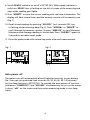
P3.0: Coefficient settings In P3.0, press “ENTER” to go into P3.1 for changing barometric value in mmHg (default 760mmHg, see Fig. 4). Press “MODE” to increase and “MEM” to decrease the value. Press “ENTER” to P3.2 to change barometric value in kPA (default 101.3kPA) and P3.3 to change salinity value (default 0.0ppt). Press “ENTER” again to confirm the settings and go back to P3.0. (Check pressure in different altitude. See appendix) P4.0: Ready indication Press “ENTER” to go into P4.1 and press “MODE” or “MEM” to switch Ready indicator ON or OFF. (Fig. 5) P5.0: Auto power off time Press “ENTER” to go into P5.1, and select auto power off time with “MODE” or “MEM”. The options are 20, 30, 40, 60, 90,120 minutes. Press “ENTER” to complete the setting. P6.0: Real time clock In P6.0, press “ENTER” to go through P6.1 to P6.6 for date and time settings. Y-M-D and H:M:S will show in turn and corresponding digits will be flashing for further change. Press “MODE” to increase and “MEM” to decrease the numbers and press “ENTER” to confirm every setting. P7.0: Beta (membrane temperature coefficient) In P7.0, press “ENTER” to go into P7.1 and it displays default Beta temperature coefficient of the membrane 4.8 on the screen (Fig. 6). If different membrane is used, change the correct value with “MODE” or “MEM” and press “ENTER” to confirm the setting. P8.0: View Calibration data Press “ENTER” to go into P8.1. The LCD displays the latest calibration data Slope (sensor sensitivity) and time. Enter P8.2 to view calibration temperature. P9.0: Reset Press “ENTER” to go into P9.1. Select "n"-No or "y"-Yes with “MODE” or “MEM” for data reset to factory default. Press “ENTER” to confirm selection. Fig. 4 Fig. 6 Fig. 5 6