1
v5
05 05
Since 1993, over 50 million QLogic products have shipped inside servers, workstations, RAID
subsystems, tape libraries, disk and tape drives. These products were delivered to small, medium
and large enterprises around the world. Powering solutions from leading companies like Cisco,
Dell, EMC, Fujitsu, Hitachi, HP, IBM, NEC, Network Appliance, Quantum, StorageTek and Sun
Microsystems, the broad line of QLogic controller chips, host bus adapters, network switches
and management software move data from storage devices through the network fabric to servers.
A member of the S&P 500 and NASDAQ 100, QLogic was named to the following during fiscal year
2004: (i) Fortune's 100 Fastest Growing Companies list for the fourth consecutive year; (ii)
Forbes' Best 200 Small Companies for the fifth consecutive year; and (iii) Business Week's list
of 100 Hot Growth Companies. For more information visit www.qlogic.com.
Recent accolades include:
• Member of NASDAQ 100 Index
• BusinessWeek Hot Growth Company
• Member of S&P 500 Index
• Forbes Best 200 Small Companies
• Barron’s 500
• Fortune’s 100 Fastest Growing
Companies
TM
Corporate Headquarters
QLogic Corporation
26650 Aliso Viejo Parkway
Aliso Viejo, CA 92656
949.389.6000
•
•
•
•
•
Bloomberg Top 10 High Tech Company
Network Computing Editor’s Choice
Network Computing “Well-Connected Award”
Business 2.0 100 Fastest Growing Tech Companies
BusinessWeek Global 1000
Europe Headquarters
QLogic (UK) LTD.
Surrey Technology Centre
40 Occam Road Guildford
Surrey GU2 7YG UK
+440(0)1483 295825
SAN Configuration Guide HDS Storage
SAN Configuration Guide HDS Storage
v5
05
05
SIMPLE
LOW COST
v5
05 05
SAN Configuration Guide
HDS Storage
W W W. Q L O G I C . C O M
QLOGIC PRESS
SN0135526-00 REV E 05/05
SANS
QLOGIC PRESS
QLogic SAN Configuration Guide for
HDS Storage
Version 5.0
Copyright © 2003-2005 QLogic Corporation. All rights reserved.
THE INFORMATION PROVIDED IN THIS DOCUMENT IS PROVIDED "AS IS" WITHOUT WARRANTY OF ANY KIND, INCLUDING
ANY WARRANTY OF MERCHANTABILITY, FITNESS FOR A PARTICULAR PURPOSE, INTEROPERABILITY, OR COMPATIBILITY. All of the Partners' products are warranted in accordance with the agreements under which the warranties for the products are
provided. Unless otherwise specified, the product manufacturer, supplier, or publisher of non-Partner products provides warranty, service, and support directly to you. THE PARTNERS MAKE NO REPRESENTATIONS OR WARRANTIES REGARDING THE PARTNERS PRODUCTS OR NON-PARTNER PRODUCTS AND NO WARRANTY IS PROVIDED FOR EITHER THE FUNCTIONALITY
OR PROBLEM RESOLUTION OF ANY PRODUCTS.
Within this document, “Partner” refers to QLogic and the other companies referenced herein who provide products or services that
you may use along with QLogic products. These Partners include, but are not limited to, HDS, Sun, and Microsoft. The inclusion of
the Partners' products on an interoperability list is not a guarantee that they will work with the other designated storage products. In
addition, not all software and hardware combinations created from compatible components will necessarily function properly together.
The Partners do not provide service or support for the non-Partner products listed, but does not prohibit them from being used
together with their storage products. During problem debug and resolution, the Partners may require that hardware or software additions be removed from products to provide problem determination and resolution on the supplied hardware/software. For support
issues regarding non-Partner products, please contact the manufacturer of the product directly. This information could include technical inaccuracies or typographical errors. The Partners do not assume any liability for damages caused by such errors as this information is provided "AS IS” for convenience only; the reader uses this information at its own risk, and should confirm any information
contained herein with the associated vendor. Changes are periodically made to the content of this document. These changes will be
incorporated in new editions of the document. The Partners may make improvements and/or changes in product(s)and/or program(s)
described in this document at any time without notice.
Any references in this information to non-Partner s are provided for convenience only and do not in any manner serve as an endorsement of those s. The materials at those s are not part of the materials for this Interoperability Guide and the use of those s is at your
own risk. Information concerning non-Partner products was obtained from the suppliers of those products, their published announcements, or other publicly available sources. The Partners have not tested those products and cannot confirm the accuracy of performance, compatibility, or any other claims related to those products. Questions about the capabilities of non-Partner products should
be addressed to the suppliers of those products. All statements regarding the Partners' future direction or intent are subject to change
or withdrawal without notice, and represent goals and objectives only. This information is only for planning purposes, any use of the
information contained herein is at the user's sole risk. The information herein is subject to change before the products described
become available.
QLogic, the QLogic logo, the Powered by QLogic logo, QLogic Press, the QLogic Press logo, QLogic Simplify, SANblade Manager,
SANbox, SANbox2, SANsurfer Management Suite, and SANtrack are trademarks or registered trademarks of QLogic Corporation in
the United States, other countries, or both. Hitachi Data Systems or HDS, the HDS logo, Hitachi Freedom Storage, Thunder 9500 and
Lightning 9900 are trademarks or registered trademarks of Hitachi Data Systems in the United States, other countries, or both. Sun,.
Brocade, the Brocade logo, and Silkworm are trademarks or registered trademarks of Brocade Communications Systems, Inc. in the
United States, other countries, or both. McDATA, the McDATA logo, and Sphereon are trademarks or registered trademarks of
McDATA Corporation in the United States, other countries, or both. Microsoft is a trademark or registered trademark of Microsoft corporation in the United States, other countries, or both. Other company, product, and service names may be trademarks or service
marks of others.
QLogic Corporation
26650 Aliso Viejo Parkway
Aliso Viejo, CA 92656
Phone: (949) 389-6000 or (800) 662-4471
Fax: (949) 389-6009
Table of Contents
Introduction ............................................................................................................... 9
Statement of Support ............................................................................................. 11
Test Philosophy ...................................................................................................... 13
Application-Level Interoperability Test..................................................................................... 13
Device-Level Interoperability ..................................................................................................... 13
Server Interoperability ............................................................................................................ 13
Storage Interoperability .......................................................................................................... 13
Application Device-Level Interoperability................................................................................ 13
Tested SAN Configurations ....................................................................................................... 14
Single-Switch Configuration: SANbox2-64 ............................................................................. 14
Cascade Configuration: SANbox 5200 ................................................................................... 15
Cascade Configuration: SANbox 5602 and SANbox 5200..................................................... 15
Cascade Configuration: SANbox 5000 Series and Brocade 3800 ......................................... 16
Cascade Configuration: SANbox 5000 Series and McDATA 4500 ........................................ 16
Cascade Configuration: SANbox 5000 Series and SANbox2-64 .......................................... 17
Cascade Configuration: SANbox2-64 and McDATA 4500 ..................................................... 17
Cascade Configuration: SANbox2-64 and Brocade 3800 ...................................................... 18
Driver and Firmware Levels ................................................................................... 19
QLogic SANblade HBAs ............................................................................................................. 19
Switches....................................................................................................................................... 19
Hitachi Data Systems Storage ................................................................................................... 19
Application Software .................................................................................................................. 20
Operating Systems ..................................................................................................................... 20
SAN Setup and Configuration .............................................................................. 21
Server Configuration .................................................................................................................. 22
Fibre Channel HBAs Overview ............................................................................................... 22
Assumptions ........................................................................................................................... 22
Installing SANsurfer Management Suite................................................................................. 23
QLOGIC SAN CONFIGURATION GUIDE FOR HDS STORAGE
VERSION 5.0, MAY 2005
PAGE 5
Configuring the Server on Windows ....................................................................................... 30
Installing the Windows Driver........................................................................................... 30
Configuring the HBA on Windows.................................................................................... 34
Configuring the Server on Solaris........................................................................................... 37
Installing the Solaris HBA Driver ...................................................................................... 37
Configuring the HBA on Solaris ....................................................................................... 38
Configuring the Server on Red Hat ........................................................................................ 39
Installing the Red Hat Driver ............................................................................................ 39
Configuring the HBA on Red Hat ..................................................................................... 41
Storage Configuration ................................................................................................................ 45
HDS Storage Overview .......................................................................................................... 45
Assumptions ........................................................................................................................... 45
Thunder 9500 ......................................................................................................................... 46
Creating a LUN ................................................................................................................ 46
Assigning a LUN to a Port................................................................................................ 51
Configuring the Port Type ................................................................................................ 54
Lightning 9900 Series............................................................................................................. 58
Assumptions for the 9900 Series Configuration............................................................... 58
Connecting to the Unit...................................................................................................... 58
Expanding a Volume ........................................................................................................ 65
Assigning a Volume to a Port........................................................................................... 67
Lightning 9900V Series .......................................................................................................... 74
Connecting to the Unit...................................................................................................... 74
Configuring the Host Type ............................................................................................... 77
Configuring the Port Type ................................................................................................ 79
Expanding a Volume ........................................................................................................ 81
Configuring LUN Security................................................................................................. 85
Storage Network Configuration ................................................................................................. 89
Fibre Channel Switches from QLogic ..................................................................................... 89
SANbox 5000 Series Stackable Switches........................................................................ 89
SANbox2-64 Switches ..................................................................................................... 89
Configuration Process ............................................................................................................ 89
Installing the SANsurfer Switch Manager ............................................................................... 90
Initial Switch Configuration ..................................................................................................... 94
PAGE 6
QLOGIC SAN CONFIGURATION GUIDE FOR HDS STORAGE
VERSION 5.0, MAY 2005
Command Line Configuration ........................................................................................ 102
Switch-Specific Configuration Steps .............................................................................. 103
SANbox 5000 Series Configuration......................................................................................... 104
Configuring Port Properties .................................................................................................. 104
Connecting Cables ............................................................................................................... 107
Configuring Zones ................................................................................................................ 108
Activating the Zone Set Manually................................................................................... 114
SANbox2-64 Configuration ...................................................................................................... 117
Configuring Port Properties .................................................................................................. 117
Connecting Cables ............................................................................................................... 121
Configuring Zones ................................................................................................................ 122
Activating the Zone Set Manually................................................................................... 128
Index....................................................................................................................... 131
QLogic Press Review ........................................................................................... 135
QLogic Company Information ............................................................................. 137
QLOGIC SAN CONFIGURATION GUIDE FOR HDS STORAGE
VERSION 5.0, MAY 2005
PAGE 7
PAGE 8
QLOGIC SAN CONFIGURATION GUIDE FOR HDS STORAGE
VERSION 5.0, MAY 2005
Introduction
The QLogic SAN Configuration Guide for HDS Storage is a comprehensive resource for developers and
consultants interested in deploying QLogic solutions.
How to Use This Guide
This guide provides detailed solution configurations and interoperability information, which allow you to
deploy a QLogic-powered SAN. Updated versions of this guide can be downloaded from the QLogic
website at: http://www.qlogic.com/interopguide.
End-to-end interoperability not only includes switches, host bus adapters (HBAs), and storage products; it
also extends to the component level. Therefore, this guide includes detailed information outlining the exact
configurations tested by QLogic and the procedures necessary to deploy a SAN.
For More Information
Since 1993, more than 50 million QLogic products have shipped inside storage solutions from Cisco, Dell,
EMC, HP, IBM, NEC, Network Appliance, and Sun Microsystems. In 2004, QLogic was named to Fortune
magazine’s 100 Fastest Growing Companies and Forbes magazine’s Best 200 Small Companies lists.
Additional QLogic resources can be found at the following locations:
Fibre Channel Host Bus Adapters
http://www.qlogic.com/products/fc_san_hostadapers.asp
Fibre Channel Switches
http://www.qlogic.com/products/fc_san_switchs.asp
QLogic Technical Support
http://www.qlogic.com/support/
Interoperability Guides from QLogic Press
http://www.qlogic.com/interopguide/
QLOGIC SAN CONFIGURATION GUIDE FOR HDS STORAGE
VERSION 5.0, MAY 2005
PAGE 9
Introduction
PAGE 10
QLOGIC SAN CONFIGURATION GUIDE FOR HDS STORAGE
VERSION 5.0, MAY 2005
Statement of Support
QLogic understands the unique needs and complexities of each and every SAN. As a result, the QLogic
SANtrack™ Service and Support Program provides customers with a flexible way to create a unique
service and support package designed specifically to meet your distinct business requirements.
QLogic switch products allow a wide range of organizations to exploit the power of a SAN. Whether it's a
fast growing small firm implementing a network with 10-20 devices or a Fortune 100 Corporation creating a
large infrastructure with thousands of devices, QLogic SANtrack Service and Support Program effectively
addresses either set of business requirements.
The SANtrack Service and Support Program is a diverse offering of a range of services including: Select
and Prime service plans, Pre-Install Analysis, Installation, On-Site and Spare Upgrades. Customers may
choose among the services that best meet the demands of their business. Most importantly, customers are
assured complete satisfaction since QLogic and its qualified partners fully guarantee all products and
services.
NOTE: For additional information on support, please see the QLogic website at:
http://www.qlogic.com/support/warranty_santrack.asp.
QLOGIC SAN CONFIGURATION GUIDE FOR HDS STORAGE
VERSION 5.0, MAY 2005
PAGE 11
Statement of Support
PAGE 12
QLOGIC SAN CONFIGURATION GUIDE FOR HDS STORAGE
VERSION 5.0, MAY 2005
Test Philosophy
The QLogic SAN configuration test philosophy is broken down into two test levels:
Application-level interoperability
Device-level interoperability
Application-Level Interoperability Test
The application-level interoperability test ensures that applications such as backup/restore, LAN-free
back-up, serverless backup, and server clustering will run as designed on a combinations of hardware
components that are representative of customer configurations. At this level, the hardware configurations
are, for the most part, complex and can involve numerous devices that differ by type, vendor and operating
system. Since the objective of this test is to determine the feasibility of typical customer SAN solutions, not
every function of the application can be tested. While the application-level interoperability test addresses
the major functions of the application, successful completion of the test does not guarantee full
interoperability. However, it does provide a reasonably high level of confidence that the application will
function well in most SAN solution scenarios.
Device-Level Interoperability
The device-level and system integration test verifies functionality of the device with additional hardware
and software. The interoperability and system integration test ensures conformance with the ANSI Fibre
Channel (FC) standards and interoperability between servers and storage.
Server Interoperability
This ensures there are no problems between the HBA and the server. Potential problems, which may be
found in this testing, include incompatibility between the HBA and server PCI chipsets, and conflicts
between the HBA driver/BIOS setting and drivers/BIOS setting of other installed devices/adapters in the
server.
Storage Interoperability
Storage devices such as disk arrays and tape devices are tested with SAN hardware and HBAs. This
ensures compatibility between the end device and SAN hardware. Potential problems that may be found
include improper LIP handling, AL_PA and Worldwide Name problems, jitter, and so on.
Application Device-Level Interoperability
The application device-level interoperability test ensures coexistence with the operating system
environment and typical user shrink-wrapped software. It also ensures that the software works with the
applicable hardware. In the case of a Windows environment, the component should have successfully
completed all applicable Microsoft Hardware Certification program tests.
QLOGIC SAN CONFIGURATION GUIDE FOR HDS STORAGE
VERSION 5.0, MAY 2005
PAGE 13
Tested SAN Configurations
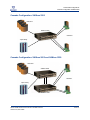
Single-Switch Configuration: SANbox2-64
Tested SAN Configurations
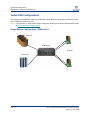
The following SAN illustrations show several different configurations and components certified by QLogic.
Your configuration details may differ.
NOTE: For information on multi-vendor switch configuration, please see the Switch Interoperability Guide
at http://www.qlogic.com/interopguide.
Single-Switch Configuration: SANbox2-64
HDS 9xxx
SANbox2-64
QLA23xx
Tape Library
PAGE 14
QLOGIC SAN CONFIGURATION GUIDE FOR HDS STORAGE
VERSION 5.0, MAY 2005
Tested SAN Configurations
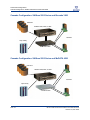
Cascade Configuration: SANbox 5200
Cascade Configuration: SANbox 5200
HDS 9xxx
SANbox 5200
QLA23xx
Tape Library
Cascade Configuration: SANbox 5602 and SANbox 5200
HDS 9xxx
SANbox 5602
QLA23xx
Tape Library
SANbox 5200
QLOGIC SAN CONFIGURATION GUIDE FOR HDS STORAGE
VERSION 5.0, MAY 2005
PAGE 15
Tested SAN Configurations
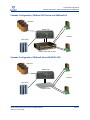
Cascade Configuration: SANbox 5000 Series and Brocade 3800
Cascade Configuration: SANbox 5000 Series and Brocade 3800
HDS 9xxx
SANbox 5200, 5202, or 5602
QLA23xx
Tape Library
Brocade 3800
Cascade Configuration: SANbox 5000 Series and McDATA 4500
HDS 9xxx
SANbox 5200, 5202, or 5602
QLA23xx
Tape Library
McDATA 4500
PAGE 16
QLOGIC SAN CONFIGURATION GUIDE FOR HDS STORAGE
VERSION 5.0, MAY 2005
Tested SAN Configurations
Cascade Configuration: SANbox 5000 Series and SANbox2-64
Cascade Configuration: SANbox 5000 Series and SANbox2-64
HDS 9xxx
SANbox2-64
QLA23xx
Tape Library
SANbox 5200, 5202, or 5602
Cascade Configuration: SANbox2-64 and McDATA 4500
HDS 9xxx
SANbox2-64
QLA23xx
Tape Library
McDATA 4500
QLOGIC SAN CONFIGURATION GUIDE FOR HDS STORAGE
VERSION 5.0, MAY 2005
PAGE 17
Tested SAN Configurations
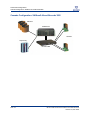
Cascade Configuration: SANbox2-64 and Brocade 3800
Cascade Configuration: SANbox2-64 and Brocade 3800
HDS 9xxx
SANbox2-64
QLA23xx
Tape Library
Brocade 3800
PAGE 18
QLOGIC SAN CONFIGURATION GUIDE FOR HDS STORAGE
VERSION 5.0, MAY 2005
Driver and Firmware Levels
The following driver and firmware levels were used during QLogic certification testing. See the QLogic
website for the latest drivers, software, and manuals: http://www.qlogic.com/support/drivers_software.asp.
NOTE: When visiting the website, be sure to choose the information specific to HDS / QLogic products, as
support levels may be different from the latest QLogic released versions. For HDS storage, verify
currently supported driver and firmware levels for SAN components by contacting HDS Technical
Support.
QLogic SANblade HBAs
Model
QLA2310
QLA2340
QLA2342
Windows 2000
Windows 2003
(SCSI 32-bit)
Windows 2003
(STOR 32-bit)
Red Hat 3.0
(32-bit)
9.0.1.12 or above
9.0.1.12 or above
9.0.1.12 or above
9.0.1.12 or above
9.0.1.12 or above
9.0.1.12 or above
9.0.1.17 or above
9.0.1.17 or above
9.0.1.17 or above
7.03.00 or above
7.03.00 or above
7.03.00 or above
Solaris Driver
4.06 or above
4.06 or above
4.06 or above
BIOS
1.43 or above
1.43 or above
1.43 or above
Switches
Manufacturer
Model
Firmware
SANsurfer
QLogic
SANbox 5602
5.x or above
5.x or above
QLogic
SANbox 5202
5.x or above
5.x or above
QLogic
SANbox 5200
5.x or above
5.x or above
QLogic
SANbox2-64
5.x or above
5.x or above
McDATA
See the QLogic Switch Interoperability Guide for information on supported McDATA switches.
Brocade
See the QLogic Switch Interoperability Guide for information on supported Brocade switches.
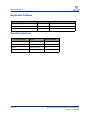
Hitachi Data Systems Storage
Model
Microcode
Lightning 9900 Series
01-19-67-00/00
Thunder 9570
0659AZ
Lightning 9900 V Series
21-06-25-00/00
QLOGIC SAN CONFIGURATION GUIDE FOR HDS STORAGE
VERSION 5.0, MAY 2005
PAGE 19
Application Software
Application Software
Application
Vendor
Version
SANsurfer™ Management Suite CD
QLogic
4.x or above
Hitachi Resource Manager
HDS
4.0 or above
Disk Array Management Program 3
HDS
10.05 or above
Operating Systems
Operating System
Version
Service Pack/Patch
Microsoft Windows
2000 Server
SP3 or above
Microsoft Windows
2003 Server
none
Red Hat
Enterprise Linux 3.0
none
Sun Solaris
8 or above
8 or above
PAGE 20
QLOGIC SAN CONFIGURATION GUIDE FOR HDS STORAGE
VERSION 5.0, MAY 2005
SAN Setup and Configuration
The following section of the QLogic SAN Configuration Guide for HDS Storage provides instructions to set
up and configure your storage, servers, and storage network. Once you have completed these steps,
additional procedures illustrate how to connect the host and storage ports to the networks and how to
validate your storage network connections.
In most cases, the SAN setup and configuration proceeds in this order:
1.
Server Configuration
2.
Storage Configuration
3.
Storage Network Configuration
QLOGIC SAN CONFIGURATION GUIDE FOR HDS STORAGE
VERSION 5.0, MAY 2005
PAGE 21
Server Configuration
Fibre Channel HBAs Overview
Server Configuration
This section walks you through the steps needed to ready your server for connection to the storage
network, including information on:
Fibre Channel HBAs from QLogic
Installing and configuring HBA drivers
Installing the HBA and switch device management application (SANsurfer Management Suite)
Configuring the HBA with appropriate settings
Once you have completed the steps in this section, you can continue to set up the storage network and
connect the server to the fabric.
Fibre Channel HBAs Overview
The award-winning QLogic SANblade 2300 Series Fibre Channel HBAs offer 2Gb performance for
demanding SANs and are available in PCI-X form factor, which is backwards compatible to PCI. QLogic
SANblade HBAs are the industry's highest-performing and most widely deployed host adapter solutions for
server, networking, storage and clustering solutions.
The SANblade 2300 Series architecture is the result of more than 15 years of progressive development
and testing. The QLogic proven architecture delivers higher overall reliability and enables advanced
functionality with its single chip integration, placing QLogic years ahead of its competitors. The SANblade
2300 also has proven interoperability with all major software applications, hardware platforms and
operating systems.
The QLogic QLA23xx HBAs tested with the HDS storage systems are:
QLA234x
QLA2310
Assumptions
The following procedures assume that:
You have installed the HBA device into the system according to specifications in the hardware
installation guide provided with the HBA. For more information, see the SANblade user manual at:
http://www.qlogic.com/support/home_resources.asp?id=76.
Your operating system and appropriate patches have been installed to meet the software and driver
requirements for all components. For information, see “Driver and Firmware Levels” on page 19.
To complete the server configuration, refer to these sections:
Installing SANsurfer Management Suite
Configuring the Server on Windows
Configuring the Server on Solaris
Configuring the Server on Red Hat
PAGE 22
QLOGIC SAN CONFIGURATION GUIDE FOR HDS STORAGE
VERSION 5.0, MAY 2005
Server Configuration
Installing SANsurfer Management Suite
Installing SANsurfer Management Suite
To install the SANsurfer Management Suite, follow these steps:
1.
Download the latest version from the Download section of the QLogic website
(http://www.qlogic.com/support/drivers_software.asp) and double click the icon to start the
installation.
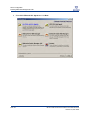
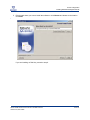
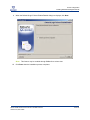
2.
When the Introduction dialog displays, click Next.
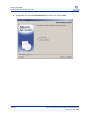
3.
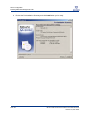
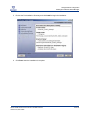
Read the Application Notes carefully and click Next when you’re ready:
QLOGIC SAN CONFIGURATION GUIDE FOR HDS STORAGE
VERSION 5.0, MAY 2005
PAGE 23
Server Configuration
Installing SANsurfer Management Suite
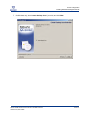
4.
PAGE 24
Select ALL GUIs and ALL Agents and click Next.
QLOGIC SAN CONFIGURATION GUIDE FOR HDS STORAGE
VERSION 5.0, MAY 2005
Server Configuration
Installing SANsurfer Management Suite
5.
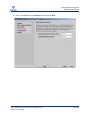
Edit the path where you want to install the software or click Choose and browse to the location.
Click Next:
b
If you are installing on Red Hat, proceed to step 8.
QLOGIC SAN CONFIGURATION GUIDE FOR HDS STORAGE
VERSION 5.0, MAY 2005
PAGE 25
Server Configuration
Installing SANsurfer Management Suite
6.
PAGE 26
On Windows only, select the Shortcut Profile you wish to use and click Next:
QLOGIC SAN CONFIGURATION GUIDE FOR HDS STORAGE
VERSION 5.0, MAY 2005
Server Configuration
Installing SANsurfer Management Suite
7.
On Windows only, check create desktop icon if you wish, and click Next:
QLOGIC SAN CONFIGURATION GUIDE FOR HDS STORAGE
VERSION 5.0, MAY 2005
PAGE 27
Server Configuration
Installing SANsurfer Management Suite
8.
PAGE 28
Review the Pre-Installation Summary and click Install when you’re ready:
QLOGIC SAN CONFIGURATION GUIDE FOR HDS STORAGE
VERSION 5.0, MAY 2005
Server Configuration
Installing SANsurfer Management Suite
9.
When the Default QLogic Failover Enable/Disable dialog box displays, click Next.
NOTE: This feature may be enabled through SANsurfer at a later date.
10.
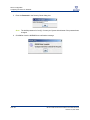
Click Done when the installation process completes.
QLOGIC SAN CONFIGURATION GUIDE FOR HDS STORAGE
VERSION 5.0, MAY 2005
PAGE 29
Server Configuration
Configuring the Server on Windows
Configuring the Server on Windows
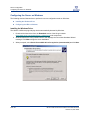
The following sections illustrate how to perform the server configuration tasks on Windows:
Installing the Windows Driver
Configuring the HBA on Windows
Installing the Windows Driver
The QLA23xx HBAs are plug-and-play devices automatically detected by Windows.
1.
Download the latest driver from the Download section of the QLogic website
(http://www.qlogic.com/support/drivers_software.asp) and extract them.
2.
Windows detects the newly installed device, then displays the Found New Hardware Wizard
message. Click Next to begin the driver installation.
3.
When prompted, select Search for a suitable driver for my device (recommended) and click Next.
PAGE 30
QLOGIC SAN CONFIGURATION GUIDE FOR HDS STORAGE
VERSION 5.0, MAY 2005
Server Configuration
Configuring the Server on Windows
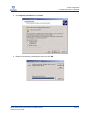
4.
Check Specify a location and click Next:
5.
Browse to the directory containing the driver and click OK:
QLOGIC SAN CONFIGURATION GUIDE FOR HDS STORAGE
VERSION 5.0, MAY 2005
PAGE 31
Server Configuration
Configuring the Server on Windows
6.
When the Driver Files Search Results display, click Next:
7.
Click Finish to complete the installation.
Windows 2000 HBA Pseudo LUN Driver
For Windows 2000 only, you must also install the pseudo LUN driver. Windows 2000 detects the newly
installed device automatically.
1.
Click Next to begin the driver installation from the Found New Hardware Wizard message.
2.
When prompted, select Search for a suitable driver for my device (recommended) and click Next.
3.
Check Specify a location and click Next.
4.
Browse to the directory containing the driver and click OK.
PAGE 32
QLOGIC SAN CONFIGURATION GUIDE FOR HDS STORAGE
VERSION 5.0, MAY 2005
Server Configuration
Configuring the Server on Windows
5.
When the Driver Files Search Results display, click Next:
6.
Click Finish to complete the installation.
QLOGIC SAN CONFIGURATION GUIDE FOR HDS STORAGE
VERSION 5.0, MAY 2005
PAGE 33
Server Configuration
Configuring the Server on Windows
Configuring the HBA on Windows
To configure the QLogic HBA on Windows, follow these steps:
1.
Launch SANsurfer.
2.
From the SANsurfer FC HBA Manager, click Connect on the toolbar:
PAGE 34
QLOGIC SAN CONFIGURATION GUIDE FOR HDS STORAGE
VERSION 5.0, MAY 2005
Server Configuration
Configuring the Server on Windows
3.
From the Connect to Host dialog, select the host from the list and click Connect:
4.
From the SANsurfer FC HBA Manager window:
a. Select the port to configure from the FC HBA list on the left.
b. Click the Settings tab on the right.
c. Select the desired port settings.
d. Click Save.
QLOGIC SAN CONFIGURATION GUIDE FOR HDS STORAGE
VERSION 5.0, MAY 2005
PAGE 35
Server Configuration
Configuring the Server on Windows
5.
Enter the Password in the Security Check dialog box:
NOTE: The default password is "config”. Contact your System Administrator if the password was
changed.
6.
PAGE 36
Click OK to close the NVRAM Save confirmation message.
QLOGIC SAN CONFIGURATION GUIDE FOR HDS STORAGE
VERSION 5.0, MAY 2005
Server Configuration
Configuring the Server on Solaris
Configuring the Server on Solaris
The following sections describe how to configure the server on Red Hat:
Installing the Solaris HBA Driver
Configuring the HBA on Solaris
Installing the Solaris HBA Driver
1.
Install the QLA23xx HBA.
2.
Power up the computer.
3.
Download the latest driver from the HDS-specific page in the Download section of the QLogic
website (http://www.qlogic.com/support/drivers_software.asp) and uncompress the file using the
uncompress command.
4.
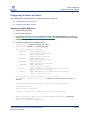
Follow the example below to install the driver:
sodium:/qlogic-> uncompress qla2300_pkg_v406.Z
sodium:/qlogic->pkgadd -d ./qla2300_pkg_v406
The following packages are available:
1 QLA2300-1
QLogic QLA2300 driver
(sparc) Solaris 2.6, Rev=4.06
2 QLA2300-2
QLogic QLA2300 driver
(sparc) Solaris 7, Rev=4.06
3 QLA2300-3
QLogic QLA2300 driver
(sparc) Solaris 8-9, Rev=4.06
4 QLSDMLIB
QLogic SDM Library
(sparc) Solaris 7-8-9, Rev=2.02
5 QLSDMLIB6
QLogic SDM Library
(sparc) Solaris 2.6, Rev=2.02
6 scfx2-6
QLogic SANblade Control FX (HBA Configuration Utility)
(sparc) Solaris 2.6, 7 Rev=1.18
7 scfx2-8
QLogic SANblade Control FX (HBA Configuration Utility)
(sparc) Solaris 8-9 Rev=1.18
Select package(s) you wish to process (or 'all' to process
all packages). (default: all) [?,??,q]: 3 (choose the correct driver for your OS
version.)
Processing package instance <QLA2300-3> from </qlogic/qla2300_pkg_v406>
QLogic QLA2300 driver
(sparc) Solaris 8-9, Rev=4.06
Copyright (c) 1996-2002, by QLogic Corporation. All rights reserved.
Where do you want the driver object installed (default=/kernel/drv): <Hit Enter>
## Executing checkinstall script.
Using </> as the package base directory.
QLOGIC SAN CONFIGURATION GUIDE FOR HDS STORAGE
VERSION 5.0, MAY 2005
PAGE 37
Server Configuration
Configuring the Server on Solaris
##
##
##
##
##
Processing package information.
Processing system information.
Verifying disk space requirements.
Checking for conflicts with packages already installed.
Checking for setuid/setgid programs.
This package contains scripts which will be executed with super-user
permission during the process of installing this package.
Do you want to continue with the installation of <QLA2300-3> [y,n,?] y
Installing QLogic QLA2300 driver as <QLA2300-3>
## Installing part 1 of 1.
/kernel/drv/qla2300
/kernel/drv/qla2300.conf
/kernel/drv/sparcv9/qla2300
[ verifying class <none> ]
## Executing postinstall script.
Reboot client to install driver.
Installation of <QLA2300-3> was successful.
Configuring the HBA on Solaris
To configure the HBA on Solaris, the same steps described for Windows in the section, “Configuring the
HBA on Windows” (page 34).
PAGE 38
QLOGIC SAN CONFIGURATION GUIDE FOR HDS STORAGE
VERSION 5.0, MAY 2005
Server Configuration
Configuring the Server on Red Hat
Configuring the Server on Red Hat
The following sections describe how to configure the server on Red Hat:
Installing the Red Hat Driver
Configuring the HBA on Red Hat
Installing the Red Hat Driver
To install the Red Hat driver, follow these steps:
1.
Download the latest driver from the Download section of the QLogic website
(http://www.qlogic.com/support/drivers_software.asp) and extract them.
2.
Verify that you have the kernel source package installed:
[root@localhost qlogic]# rpm -qa |grep kernel-source
3.
Uncompress and extract the distribution file:
[root@localhost qlogic]# tar zxvf qla2x00-v7.03.00-dist.tgz
4.
Change to the directory where you extracted the distribution file:
[root@localhost qlogic]# cd qlogic
5.
Execute the "drvrinstall" script to extract the driver:
[root@localhost qlogic]# ./drvrinstall
6.
Compile the driver and copy it to the correct system location:
[root@localhost qlogic]# make qla2300.o install
and add "SMP=1" for multiple processor systems. For example:
[root@localhost qlogic]# make qla2300.o install SMP=1
7.
Load the driver by hand:
[root@localhost scsi]# modprobe qla2300
New RAMDISK for the Red Hat Driver
If you are using Red Hat, follow these steps to create a new RAMDISK and load the driver by default.
1.
Edit /etc/modules.conf and add the following entries:
alias scsi_hostadapter# qla2300_conf
alias scsi_hostadapter# qla2300
where "#" is a unique number. For example:
alias scsi_hostadapter0 qla2300_conf
alias scsi_hostadapter1 qla2300
QLOGIC SAN CONFIGURATION GUIDE FOR HDS STORAGE
VERSION 5.0, MAY 2005
PAGE 39
Server Configuration
Configuring the Server on Red Hat
2.
Change to the /boot directory:
[root@localhost etc]# cd /boot
3.
Create a new RAMDISK
[root@localhost boot]# mkinitrd -f 2.4.21-15smp_qlogic 2.4.21-15.ELsmp
where mkinitrd -f <image name> <kernel version> is the actual image name and kernel version
you are using. Be sure the image name is unique or you may overwrite an existing file.
NOTE: If you did not run this command in the /boot directory, copy your new image to the /boot
directory.
4.
Create a new entry in the bootloader to load the new RAMDISK. (We assume GRUB as it is the
default for Red Hat). For example:
title Red Hat Enterprise Linux ES (2.4.21-15.ELsmp) - QLogic Driver
root (hd1,0)
kernel /boot/vmlinuz-2.4.21-15.ELsmp ro root=LABEL=/
initrd /boot/2.4.21-15smp_qlogic
5.
PAGE 40
Reboot the server and select the new RAMDISK.
QLOGIC SAN CONFIGURATION GUIDE FOR HDS STORAGE
VERSION 5.0, MAY 2005
Server Configuration
Configuring the Server on Red Hat
Configuring the HBA on Red Hat
On Red Hat, follow these steps to configure the QLogic HBA:
1.
Launch SANsurfer.
2.
From the SANsurfer FC HBA Manager tab, click Connect:
QLOGIC SAN CONFIGURATION GUIDE FOR HDS STORAGE
VERSION 5.0, MAY 2005
PAGE 41
Server Configuration
Configuring the Server on Red Hat
3.
From the Connect to Host dialog, select the host from the list and click Connect.
4.
From the SANsurfer FC HBA Manager window:
a. Select the desired port from the tree in the left hand frame.
b. Click the Settings tab.
c. From the Connection Options list, select the connection type to use.
PAGE 42
QLOGIC SAN CONFIGURATION GUIDE FOR HDS STORAGE
VERSION 5.0, MAY 2005
Server Configuration
Configuring the Server on Red Hat
d. Select a Data Rate from the list.
e. Click Save.
5. Enter the password in the Security Check dialog box.
6. Click OK to the NVRAM Save confirmation message.
QLOGIC SAN CONFIGURATION GUIDE FOR HDS STORAGE
VERSION 5.0, MAY 2005
PAGE 43
Server Configuration
Configuring the Server on Red Hat
PAGE 44
QLOGIC SAN CONFIGURATION GUIDE FOR HDS STORAGE
VERSION 5.0, MAY 2005
Storage Configuration
HDS Storage Overview
Storage Configuration
This section outlines configuration procedures for the following HDS platforms:
Thunder 9500
Lightning 9900 Series
Lightning 9900V Series
For each of the HDS storage platforms, you will find step-by-step procedures for the following tasks:
Storage port configuration
Volume/LUN creation
Volume/LUN assignment
LUN security
Completing these steps will prepare the allocated storage for connection to the fabric.
HDS Storage Overview
Hitachi Data Systems is known for its information storage solutions and its alliances with industry-leading
vendors to provide for data center, systems integration, e-commerce, and enterprise process renewal
needs. For more information on HDS storage systems, refer to the HDS website at
http://www.hds.com/products_services/san/.
Assumptions
The following procedures assume that:
You have allocated storage space of suitable size for the application being used.
You have created and defined a RAID group within the storage.
Your storage system has an available port.
QLOGIC SAN CONFIGURATION GUIDE FOR HDS STORAGE
VERSION 5.0, MAY 2005
PAGE 45
Storage Configuration
Thunder 9500
Thunder 9500
The Hitachi Freedom Storage™ Thunder 9500™ provides fast, reliable storage with scalability and
performance. Use the following procedures to configure the 9500 for use with QLogic SAN components:
Creating a LUN
Assigning a LUN to a Port
Configuring the Port Type
Creating a LUN
1.
Launch the Hitachi Resource Manager application.
2.
Select the array you want to work with and choose Change Mode from the File menu.
3.
Enter the password to enter management mode and click OK.
4.
Launch the Array System Viewer by double clicking on the array icon:
5.
Click the Logical Status tab from the Array System Viewer dialog.
PAGE 46
QLOGIC SAN CONFIGURATION GUIDE FOR HDS STORAGE
VERSION 5.0, MAY 2005
Storage Configuration
Thunder 9500
6.
Select the RAID Group you wish to use from the RAID Group section:
QLOGIC SAN CONFIGURATION GUIDE FOR HDS STORAGE
VERSION 5.0, MAY 2005
PAGE 47
Storage Configuration
Thunder 9500
7.
PAGE 48
From the Settings menu, choose Logical Unit-Settings:
QLOGIC SAN CONFIGURATION GUIDE FOR HDS STORAGE
VERSION 5.0, MAY 2005
Storage Configuration
Thunder 9500
8.
In the Logical Unit Property dialog, select a default Controller and change the logical unit Size as
needed:
9.
Click OK to the close the Message box:
QLOGIC SAN CONFIGURATION GUIDE FOR HDS STORAGE
VERSION 5.0, MAY 2005
PAGE 49
Storage Configuration
Thunder 9500
10.
Right-click on the new LUN. Select Format, Online:
11.
Click OK to format the logical unit:
PAGE 50
QLOGIC SAN CONFIGURATION GUIDE FOR HDS STORAGE
VERSION 5.0, MAY 2005
Storage Configuration
Thunder 9500
12.
Click OK to close the status message:
Assigning a LUN to a Port
1.
Launch the Hitachi Resource Manager application.
2.
Change from Normal Mode to Management Mode by selecting the array you wish work with and
selecting Change Mode from the File menu.
3.
Enter the password to enter management mode and click OK.
4.
Launch the Array System Viewer by double clicking on the array icon.
QLOGIC SAN CONFIGURATION GUIDE FOR HDS STORAGE
VERSION 5.0, MAY 2005
PAGE 51
Storage Configuration
Thunder 9500
5.
Right-click on the desired port and select Add New Host Group.
6.
Enter Host Group Name, and click OK:
PAGE 52
QLOGIC SAN CONFIGURATION GUIDE FOR HDS STORAGE
VERSION 5.0, MAY 2005
Storage Configuration
Thunder 9500
7.
When the following confirmation message displays, click OK:
8.
Expand the newly created Host Group under the port, right-click on Logical Unit, and select Modify
Mapping:
9.
Map the LUN as follows:
a. Select the newly created LUN number under the LUN column on the left.
b. Select the desired Host LUN number from the column on the right.
QLOGIC SAN CONFIGURATION GUIDE FOR HDS STORAGE
VERSION 5.0, MAY 2005
PAGE 53
Storage Configuration
Thunder 9500
c. Click the + arrow button to transfer the mapping to the Reserved Configuration column.
d. Click OK.
Configuring the Port Type
1.
Launch the Hitachi Resource Manager application.
2.
Change from Normal Mode to Management Mode by selecting the array you wish work with and
selecting Change Mode from the File menu.
3.
Enter the password to enter management mode and click OK.
PAGE 54
QLOGIC SAN CONFIGURATION GUIDE FOR HDS STORAGE
VERSION 5.0, MAY 2005
Storage Configuration
Thunder 9500
4.
Launch the Array System Viewer by double clicking on the array icon. From the Settings menu,
select Configuration Settings:
QLOGIC SAN CONFIGURATION GUIDE FOR HDS STORAGE
VERSION 5.0, MAY 2005
PAGE 55
Storage Configuration
Thunder 9500
5.
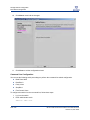
From the Parameter dialog, click the Fibre Channel tab and:
a. Select the Port you want to configure.
b. Select the Topology Information and Data Rate from the lists.
c. Click Apply.
6.
PAGE 56
Click OK to close the warning message:
QLOGIC SAN CONFIGURATION GUIDE FOR HDS STORAGE
VERSION 5.0, MAY 2005
Storage Configuration
Thunder 9500
7.
Click OK to close the Fibre Channel status message:
QLOGIC SAN CONFIGURATION GUIDE FOR HDS STORAGE
VERSION 5.0, MAY 2005
PAGE 57
Storage Configuration
Lightning 9900 Series
Lightning 9900 Series
Hitachi’s Freedom Storage™ Lightning 9900™ Series offers advanced enterprise storage systems.
Assumptions for the 9900 Series Configuration
In addition to the assumptions listed on page 45, the following procedures to configure the 9900 series
assume that:
The Fibre Channel port on the HDS system is connected to the same fabric as your host systems.
If zoning is implemented on your fabric, the port you are configuring is within the same zone as your
host systems.
To set up the 9900 series, complete the following procedures:
Connecting to the Unit
Configuring the Host Type
Configuring the Port Type
Expanding a Volume
Assigning a Volume to a Port
Configuring Security
Connecting to the Unit
1.
PAGE 58
Log in to the Remote Console with a valid user name and password:
QLOGIC SAN CONFIGURATION GUIDE FOR HDS STORAGE
VERSION 5.0, MAY 2005
Storage Configuration
Lightning 9900 Series
2.
From the Remote Console window, click Connect:
3.
From the Connection Control window, select the desired controller and click Connect:
QLOGIC SAN CONFIGURATION GUIDE FOR HDS STORAGE
VERSION 5.0, MAY 2005
PAGE 59
Storage Configuration
Lightning 9900 Series
4.
PAGE 60
After the Hitachi Resource Manager appears click LUN Manager (it may take a few moments to load):
QLOGIC SAN CONFIGURATION GUIDE FOR HDS STORAGE
VERSION 5.0, MAY 2005
Storage Configuration
Lightning 9900 Series
Configuring the Host Type
1.
From the File menu, select Off Line Mode:
NOTE: Be sure you are not running any I/O to the port you are setting offline.
2.
The Remote Console displays two warning messages. Click OK to acknowledge each one:
QLOGIC SAN CONFIGURATION GUIDE FOR HDS STORAGE
VERSION 5.0, MAY 2005
PAGE 61
Storage Configuration
Lightning 9900 Series
3.
From the LUN Manager window, select the desired port and click Host Mode to assign the host type:
4.
From the Set Host Mode window:
a. Click the Host list
b. Select the host type (for example, Solaris or Windows 2000).
c. Click OK.
PAGE 62
QLOGIC SAN CONFIGURATION GUIDE FOR HDS STORAGE
VERSION 5.0, MAY 2005
Storage Configuration
Lightning 9900 Series
Configuring the Port Type
1.
From the LUN Manager tab:
a. From the Port list, select the Port you want to configure.
b. Click the Fibre Parameter button:
QLOGIC SAN CONFIGURATION GUIDE FOR HDS STORAGE
VERSION 5.0, MAY 2005
PAGE 63
Storage Configuration
Lightning 9900 Series
2.
Modify the port settings as needed in the Fibre Parameter dialog:
3.
Click OK.
PAGE 64
QLOGIC SAN CONFIGURATION GUIDE FOR HDS STORAGE
VERSION 5.0, MAY 2005
Storage Configuration
Lightning 9900 Series
Expanding a Volume
1.
From the LUN Manager tab, select the Port you want to configure:
2.
From the LUN Manager:
a. Click the LUN Expansion Define tab.
b. From the list, select the LDEV you want to create.
QLOGIC SAN CONFIGURATION GUIDE FOR HDS STORAGE
VERSION 5.0, MAY 2005
PAGE 65
Storage Configuration
Lightning 9900 Series
c. Click Expand.
3.
In the LUN Expansion dialog:
a. Enter the desired number of volumes in the Enter VOL count box.
b. Click OK.
PAGE 66
QLOGIC SAN CONFIGURATION GUIDE FOR HDS STORAGE
VERSION 5.0, MAY 2005
Storage Configuration
Lightning 9900 Series
Assigning a Volume to a Port
1.
From the LUN Manager tab, select the port to configure and click Add SCSI Path:
QLOGIC SAN CONFIGURATION GUIDE FOR HDS STORAGE
VERSION 5.0, MAY 2005
PAGE 67
Storage Configuration
Lightning 9900 Series
2.
From the Set SCSI Path Parameter - Fibre Channel window:
a. Select the Port to assign your target LUN.
b. Choose the LUN to assign the target.
c. Select the CU where the target LUN was originally created.
d. Select the LDEV ID.
e. Click Set.
3.
Repeat step 1 to include all the LUNs you want available on the selected port.
4.
Click OK when you are finished to apply the changes.
PAGE 68
QLOGIC SAN CONFIGURATION GUIDE FOR HDS STORAGE
VERSION 5.0, MAY 2005
Storage Configuration
Lightning 9900 Series
Configuring Security
1.
To register WWNs for hosts that will have access to the LUNs you created:
a. Click the Hitachi SANtinel tab.
b. Check Use Security.
c. Select the port from the Port list.
d. Click New WWN(List).
2.
From the WWN List dialog, click the DKC tab and:
a. Expand the list and select the appropriate Port.
b. Select each WWN you want to register for the port.
QLOGIC SAN CONFIGURATION GUIDE FOR HDS STORAGE
VERSION 5.0, MAY 2005
PAGE 69
Storage Configuration
Lightning 9900 Series
c. Click Set.
PAGE 70
QLOGIC SAN CONFIGURATION GUIDE FOR HDS STORAGE
VERSION 5.0, MAY 2005
Storage Configuration
Lightning 9900 Series
3.
Click OK to confirm the changes:
4.
Click OK to apply the changes:
QLOGIC SAN CONFIGURATION GUIDE FOR HDS STORAGE
VERSION 5.0, MAY 2005
PAGE 71
Storage Configuration
Lightning 9900 Series
5.
To set LUN security, from the Hitachi SANtinel tab, click Security:
6.
From the Security window,
a. Select the LUN/LUN Group you want to assign.
b. Choose one or more WWNs from the WWN/WWN Group list.
c. Click Set to move your selection to the Permitted WWN/WWN Group list.
7.
Repeat Step 2 for each LUN for which you want to assign WWNs.
8.
Click OK to apply these changes.
PAGE 72
QLOGIC SAN CONFIGURATION GUIDE FOR HDS STORAGE
VERSION 5.0, MAY 2005
Storage Configuration
Lightning 9900 Series
9.
From the LUN Manager – Offline Mode window click OK to apply and save all your configuration
settings.
10.
Click OK at the prompt for confirmation:
11.
Click OK again to acknowledge completion:
QLOGIC SAN CONFIGURATION GUIDE FOR HDS STORAGE
VERSION 5.0, MAY 2005
PAGE 73
Storage Configuration
Lightning 9900V Series
Lightning 9900V Series
The Hitachi Freedom Storage™ Lightning 9900™ V Series is a storage platform offering massive
consolidation. It includes the single-cabinet Lightning 9970V and multi-cabinet Lightning 9980V. Follow the
steps outlined in these sections to configure your 9900V systems:
Connecting to the Unit
Configuring the Host Type
Configuring the Port Type
Expanding a Volume
Assigning a Volume to a Port
Configuring LUN Security
Connecting to the Unit
1.
Open a web browser, connect to the Storage Navigator and select the storage unit.
NOTE: You must be running Java version 1.3.1 or higher.
PAGE 74
QLOGIC SAN CONFIGURATION GUIDE FOR HDS STORAGE
VERSION 5.0, MAY 2005
Storage Configuration
Lightning 9900V Series
2.
Enter your User ID and Password at the Storage Navigator login window:
QLOGIC SAN CONFIGURATION GUIDE FOR HDS STORAGE
VERSION 5.0, MAY 2005
PAGE 75
Storage Configuration
Lightning 9900V Series
3.
From the Storage Navigator, Information tab, click the View button.
4.
Click OK to confirm changing modes:
PAGE 76
QLOGIC SAN CONFIGURATION GUIDE FOR HDS STORAGE
VERSION 5.0, MAY 2005
Storage Configuration
Lightning 9900V Series
Configuring the Host Type
1.
Click the LUN Management/LUN Security button.
2.
From the LUN Manager tab:
a. In the LU Path list, select and expand the port you want to use.
b. Right click on the host group and select Change Host Group.
QLOGIC SAN CONFIGURATION GUIDE FOR HDS STORAGE
VERSION 5.0, MAY 2005
PAGE 77
Storage Configuration
Lightning 9900V Series
3.
PAGE 78
From the Change Host Group dialog, select the Host Mode from the list and click OK.
QLOGIC SAN CONFIGURATION GUIDE FOR HDS STORAGE
VERSION 5.0, MAY 2005
Storage Configuration
Lightning 9900V Series
4.
Click Apply:
5.
Click OK to confirm and apply the changes:
Configuring the Port Type
1.
From the LUN Manager:
a. Select the Port tab.
b. Select the port from the list.
QLOGIC SAN CONFIGURATION GUIDE FOR HDS STORAGE
VERSION 5.0, MAY 2005
PAGE 79
Storage Configuration
Lightning 9900V Series
c. In the Change Port Mode group, make the desired changes and click Set:
2.
Click OK to confirm the changes:
3.
Click Apply in the Storage Navigator.
4.
Click OK at the prompt to apply changes.
PAGE 80
QLOGIC SAN CONFIGURATION GUIDE FOR HDS STORAGE
VERSION 5.0, MAY 2005
Storage Configuration
Lightning 9900V Series
Expanding a Volume
1.
Click the LUN Expansion/Virtual LDI/LUN button.
2.
From the LUN Expansion (LUSE) tab:
a. Double-click the LDEV folder.
b. Select a CU.
c. Select an LDEV from the pull-down menu.
d. Select a size from the Volume Count list or select individual LDEVs from the Free LDEVs section
and click Add.
e. Click Set.
QLOGIC SAN CONFIGURATION GUIDE FOR HDS STORAGE
VERSION 5.0, MAY 2005
PAGE 81
Storage Configuration
Lightning 9900V Series
3.
Click OK to confirm and apply the changes:
4.
Click Apply in the Storage Navigator.
5.
Click OK at the prompt to apply changes.
PAGE 82
QLOGIC SAN CONFIGURATION GUIDE FOR HDS STORAGE
VERSION 5.0, MAY 2005
Storage Configuration
Lightning 9900V Series
Assigning a Volume to a Port
1.
Click the LUN Management/LUN Security button.
2.
From the LUN Manager tab:
a. Select and expand the port from the LU Path group box.
b. Select the host group in the expanded port list.
c. Select the CU and LDEV(s) from the LDEV group box.
d. Select the LUNs the host will use.
e. Click Add LU Path.
QLOGIC SAN CONFIGURATION GUIDE FOR HDS STORAGE
VERSION 5.0, MAY 2005
PAGE 83
Storage Configuration
Lightning 9900V Series
3.
In the Check Paths dialog, verify the path information and click OK.
4.
Click Apply in the Storage Navigator.
5.
Click OK at the prompt to apply changes.
PAGE 84
QLOGIC SAN CONFIGURATION GUIDE FOR HDS STORAGE
VERSION 5.0, MAY 2005
Storage Configuration
Lightning 9900V Series
Configuring LUN Security
1.
From the LUN Manager tab, right-click on the port and select LUN Security: OFF->ON.
2.
Click YES to confirm and proceed with the settings:
3.
Expand the port in the LU Path list.
QLOGIC SAN CONFIGURATION GUIDE FOR HDS STORAGE
VERSION 5.0, MAY 2005
PAGE 85
Storage Configuration
Lightning 9900V Series
4.
Right-click on the host group and select Add New WWN.
5.
Select a WWN and enter a Name (optional) in the Add New WWN dialog:
PAGE 86
QLOGIC SAN CONFIGURATION GUIDE FOR HDS STORAGE
VERSION 5.0, MAY 2005
Storage Configuration
Lightning 9900V Series
6.
Click Apply in the Storage Navigator:
7.
Click OK to confirm and apply the changes:
QLOGIC SAN CONFIGURATION GUIDE FOR HDS STORAGE
VERSION 5.0, MAY 2005
PAGE 87
Storage Configuration
Lightning 9900V Series
PAGE 88
QLOGIC SAN CONFIGURATION GUIDE FOR HDS STORAGE
VERSION 5.0, MAY 2005
Storage Network Configuration
Fibre Channel Switches from QLogic
Storage Network Configuration
This section provides instructions to set up and configure the QLogic Fibre Channel switches in the
SANbox 5000 Series and the SANbox2-64. Completing the configuration steps in this section prepares the
network for host and storage connections.
Fibre Channel Switches from QLogic
Deployed as standalone units or in multi-stage fabrics of any size, QLogic SANbox switches come with all
the software tools necessary to create easy-to-manage, resilient and intelligent SANs. For additional
information, see http://www.qlogic.com/products/fc_san_switchs.asp.
SANbox 5000 Series Stackable Switches
The SANbox 5000 Series switches provide the same benefits as stackable IP switches for your SAN. The
SANbox 5200 is the first switch in the new SANbox 5000 Series, providing the benefits of stackable IP
switches for your SAN. With up to sixteen 2Gb ports plus a four-pack of high-speed 10Gb ISL ports, each
5200 stackable switch provides maximum flexibility for configuring, managing and scaling SANs.
The SANbox 5602 stackable switch delivers the benefits of stackable IP switches for high performance
4Gb SANs. With up to sixteen 4Gb ports plus a four-pack of high-speed 10Gb ISL ports, each 5000 Series
stackable switch provides maximum flexibility for workgroup or enterprise class SANs.
SANbox2-64 Switches
The SANbox2-64 switches offer a scalable, highly available solution to protect the investment in your SAN
backbone. These next-generation switches bring performance, reliability and simplicity to storage
networking. The SANbox2-64 switch is designed to meet the needs of your growing enterprise.
Configuration Process
The configuration process for your SANbox switch involves three stages described in the following
sections:
Installing the SANsurfer Switch Manager
Initial Switch Configuration
Switch-Specific Configuration Steps
QLOGIC SAN CONFIGURATION GUIDE FOR HDS STORAGE
VERSION 5.0, MAY 2005
PAGE 89
Storage Network Configuration
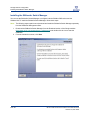
Installing the SANsurfer Switch Manager
Installing the SANsurfer Switch Manager
You can use the SANsurfer Switch Manager to configure both the SANbox 5000 series and the
SANbox2-64. To install the SANsurfer Switch Manager, follow these steps:
NOTE: The following steps explain how to download and install the SANsurfer Switch Manager separately
from the SANsurfer Management Suite.
1.
Download the SANsurfer Switch Manager from the Download section of the QLogic website
(http://www.qlogic.com/support/drivers_software.asp) and double-click the icon to start the
installation.
2.
From the Introduction screen, click Next:
PAGE 90
QLOGIC SAN CONFIGURATION GUIDE FOR HDS STORAGE
VERSION 5.0, MAY 2005
Storage Network Configuration
Installing the SANsurfer Switch Manager
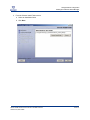
3.
From the Choose Install Folder screen:
a. Select an installation folder.
b. Click Next.
QLOGIC SAN CONFIGURATION GUIDE FOR HDS STORAGE
VERSION 5.0, MAY 2005
PAGE 91
Storage Network Configuration
Installing the SANsurfer Switch Manager
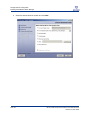
4.
PAGE 92
Select the desired shortcut location and click Next.
QLOGIC SAN CONFIGURATION GUIDE FOR HDS STORAGE
VERSION 5.0, MAY 2005
Storage Network Configuration
Installing the SANsurfer Switch Manager
5.
Review the Pre-Installation Summary and click Install to begin the installation:
6.
Click Done when the installation is complete.
QLOGIC SAN CONFIGURATION GUIDE FOR HDS STORAGE
VERSION 5.0, MAY 2005
PAGE 93
Storage Network Configuration
Initial Switch Configuration
Initial Switch Configuration
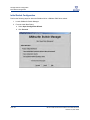
Perform the following steps for either the SANbox2-64 or a SANbox 5000 Series switch:
1.
Launch SANsurfer Switch Manager.
2.
From the Initial Start Dialog:
a. Select Open Configuration Wizard.
b. Click Proceed.
PAGE 94
QLOGIC SAN CONFIGURATION GUIDE FOR HDS STORAGE
VERSION 5.0, MAY 2005
Storage Network Configuration
Initial Switch Configuration
3.
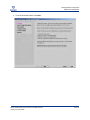
From the Overview window, click Next:
QLOGIC SAN CONFIGURATION GUIDE FOR HDS STORAGE
VERSION 5.0, MAY 2005
PAGE 95
Storage Network Configuration
Initial Switch Configuration
4.
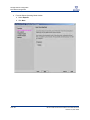
From the Select Operating Mode window:
a. Select Express.
b. Click Next.
PAGE 96
QLOGIC SAN CONFIGURATION GUIDE FOR HDS STORAGE
VERSION 5.0, MAY 2005
Storage Network Configuration
Initial Switch Configuration
5.
From the Network Configuration window:
a. Enter a temporary IP address and Subnet Mask.
b. Click Next.
QLOGIC SAN CONFIGURATION GUIDE FOR HDS STORAGE
VERSION 5.0, MAY 2005
PAGE 97
Storage Network Configuration
Initial Switch Configuration
6.
Enter "password" into the Admin Password field and click Next.
NOTE: User authentication is enabled by default.
PAGE 98
QLOGIC SAN CONFIGURATION GUIDE FOR HDS STORAGE
VERSION 5.0, MAY 2005
Storage Network Configuration
Initial Switch Configuration
7.
When the Cycle Power on Switch window displays:
a. Power on or cycle power on the switch.
b. Click Next after re-applying power to the switch.
QLOGIC SAN CONFIGURATION GUIDE FOR HDS STORAGE
VERSION 5.0, MAY 2005
PAGE 99
Storage Network Configuration
Initial Switch Configuration
8.
Click Next wen the initial network configuration is complete:
PAGE 100
QLOGIC SAN CONFIGURATION GUIDE FOR HDS STORAGE
VERSION 5.0, MAY 2005
Storage Network Configuration
Initial Switch Configuration
9.
Enter a new password for the Admin account and click Next:
QLOGIC SAN CONFIGURATION GUIDE FOR HDS STORAGE
VERSION 5.0, MAY 2005
PAGE 101
Storage Network Configuration
Initial Switch Configuration
10.
Click Next to commit all the changes:
11.
Click Close to exit the configuration wizard:
Command Line Configuration
You can use the following serial port settings to perform the command line switch configuration:
Baud Rate: 9600
Data Bits: 8
Parity: None
Stop Bits: 1
Flow Control: None
To configure the switch from the command line, follow these steps:
1.
Log in to the switch.
2.
Enter administrator mode:
SANbox #> admin start
PAGE 102
QLOGIC SAN CONFIGURATION GUIDE FOR HDS STORAGE
VERSION 5.0, MAY 2005
Storage Network Configuration
Initial Switch Configuration
3.
Start the switch setup program to configure the IP address by typing this command:
SANbox (admin) #> set setup system
4.
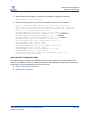
When the setup program runs, follow the command line instructions. For example:
A list of attributes with formatting and current values will follow.
Enter a new value or simply press the ENTER key to accept the current value.
If you wish to terminate this process before reaching the end of the list
press 'q' or 'Q' and the ENTER key to do so.
Eth0NetworkDiscovery (1=Static, 2=Bootp, 3=Dhcp, 4=Rarp) [Static ]
Eth0NetworkAddress (dot-notated IP Address) [0.0.0.0 ] <IP Address>
Eth0NetworkMask (dot-notated IP Address) [0.0.0.0 ] <Netmask>
Eth0GatewayAddress (dot-notated IP Address) [0.0.0.0 ] <Gateway>
AdminTimeout (dec value 0-1440 minutes, 0=never) [30 ]
InactivityTimeout (dec value 0-1440 minutes, 0=never) [0 ]
LocalLogEnabled (True / False) [True ]
RemoteLogEnabled (True / False) [False ]
RemoteLogHostAddress (dot-notated IP Address) [10.0.0.254 ]
NTPClientEnabled (True / False) [False ]
NTPServerAddress (dot-notated IP Address) [10.0.0.254 ]
EmbeddedGUIEnabled (True / False) [True ]
Do you want to save and activate this system setup? (y/n): [n] y
System setup saved and activated.
Switch-Specific Configuration Steps
The additional steps to configure your SANbox switch are similar, whether you use the SANbox 5000
Series or the SANbox2-64. After you install the SANsurfer Switch Manager and perform the initial switch
configuration, refer to the appropriate section for your switch:
SANbox 5000 Series Configuration
SANbox2-64 Configuration
QLOGIC SAN CONFIGURATION GUIDE FOR HDS STORAGE
VERSION 5.0, MAY 2005
PAGE 103
SANbox 5000 Series Configuration
Configuring Port Properties
SANbox 5000 Series Configuration
The following procedures explain how to configure a SANbox 5000 series switch and verify the
connections:
Command Line Configuration
Configuring Port Properties
Connecting Cables
Configuring Zones
Configuring Port Properties
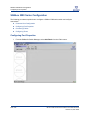
1.
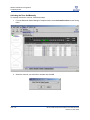
From the SANsurfer Switch Manager, select Add Fabric from the Fabric menu:
PAGE 104
QLOGIC SAN CONFIGURATION GUIDE FOR HDS STORAGE
VERSION 5.0, MAY 2005
SANbox 5000 Series Configuration
Configuring Port Properties
2.
From the Add a New Fabric dialog:
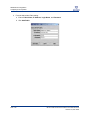
a. Enter a Fabric Name, IP Address, Login Name, and Password.
b. Click Add Fabric.
3.
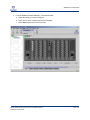
From the SANsurfer Switch Manager – Faceplate window:
a. Select the switch you want to configure.
b. Select one or more 1/2/4Gb ports from the faceplate.
c. Select Port Properties from the Port menu.
QLOGIC SAN CONFIGURATION GUIDE FOR HDS STORAGE
VERSION 5.0, MAY 2005
PAGE 105
SANbox 5000 Series Configuration
Configuring Port Properties
4.
From the Port Properties dialog:
a. Select the desired port settings.
b. Click OK.
5.
Click OK to close the Updating Port Properties message:
PAGE 106
QLOGIC SAN CONFIGURATION GUIDE FOR HDS STORAGE
VERSION 5.0, MAY 2005
SANbox 5000 Series Configuration
Connecting Cables
Connecting Cables
1.
Connect the devices to the SANbox 5000 series switch ports you configured.
2.
Verify that the green Login LED is illuminated for each device.
3.
Launch SANsurfer Switch Manager and connect to the SANbox 5200.
4.
From the SANsurfer Switch Manager – Faceplate window, verify that all devices are listed.
QLOGIC SAN CONFIGURATION GUIDE FOR HDS STORAGE
VERSION 5.0, MAY 2005
PAGE 107
SANbox 5000 Series Configuration
Configuring Zones
Configuring Zones
1.
Launch the SANsurfer Switch Manager and connect to the SANbox 5000 series switch.
2.
From the SANsurfer Switch Manager – Faceplate window, select Edit Zoning from the Zoning menu:
PAGE 108
QLOGIC SAN CONFIGURATION GUIDE FOR HDS STORAGE
VERSION 5.0, MAY 2005
SANbox 5000 Series Configuration
Configuring Zones
3.
From the Edit Zoning dialog, select Create Zone Set from the Edit menu:
4.
From the Create a zone set dialog:
a. Enter a Zone Set Name.
b. Click OK.
QLOGIC SAN CONFIGURATION GUIDE FOR HDS STORAGE
VERSION 5.0, MAY 2005
PAGE 109
SANbox 5000 Series Configuration
Configuring Zones
5.
From the Edit Zoning dialog:
a. Select the new zone set in the left frame.
b. Select Create a Zone from the Edit menu.
6.
From the Create a zone dialog:
a. Enter a Zone Name.
b. Click OK.
PAGE 110
QLOGIC SAN CONFIGURATION GUIDE FOR HDS STORAGE
VERSION 5.0, MAY 2005
SANbox 5000 Series Configuration
Configuring Zones
7.
From the Edit Zoning dialog:
a. Expand the zone set and select the zone in the left frame.
b. Highlight the devices to add in the right frame.
c. Select Add Members from the Edit menu.
d. Click Apply.
QLOGIC SAN CONFIGURATION GUIDE FOR HDS STORAGE
VERSION 5.0, MAY 2005
PAGE 111
SANbox 5000 Series Configuration
Configuring Zones
8.
From the Save Zoning & Error Check dialog:
a. Click Perform Error Check and verify that no errors are found.
b. Click Save Zoning.
9.
10.
If you would like to activate your new zone set now, click Yes and continue to step 10. Otherwise,
click No and skip to step 13.
Select the zone set you would like to activate and click OK:
PAGE 112
QLOGIC SAN CONFIGURATION GUIDE FOR HDS STORAGE
VERSION 5.0, MAY 2005
SANbox 5000 Series Configuration
Configuring Zones
11.
When the zone set has been activated, click Close:
12.
Click Close to exit the Edit Zoning dialog. Skip the remaining steps if you have activated your zone.
13.
When the zone set has been saved, click Close:
14.
Click Close to exit from the Edit Zoning dialog.
QLOGIC SAN CONFIGURATION GUIDE FOR HDS STORAGE
VERSION 5.0, MAY 2005
PAGE 113
SANbox 5000 Series Configuration
Configuring Zones
Activating the Zone Set Manually
To manually activate the zone set, follow these steps:
1.
From the SANsurfer Switch Manager Faceplate window, select Activate Zone Set from the Zoning
menu:
2.
Select the zone set you would like to activate and click OK:
PAGE 114
QLOGIC SAN CONFIGURATION GUIDE FOR HDS STORAGE
VERSION 5.0, MAY 2005
SANbox 5000 Series Configuration
Configuring Zones
3.
Click OK to the Activate Zone Set message:
QLOGIC SAN CONFIGURATION GUIDE FOR HDS STORAGE
VERSION 5.0, MAY 2005
PAGE 115
SANbox 5000 Series Configuration
Configuring Zones
PAGE 116
QLOGIC SAN CONFIGURATION GUIDE FOR HDS STORAGE
VERSION 5.0, MAY 2005
SANbox2-64 Configuration
SANbox2-64 Configuration
The following procedures explain how to configure the SANbox2-64 switch, verify the connections and test
your configuration:
Configuring Port Properties
Connecting Cables
Configuring Zones
Configuring Port Properties
1.
From the SANsurfer Switch Manager, select Add Fabric from the Fabric menu:
QLOGIC SAN CONFIGURATION GUIDE FOR HDS STORAGE
VERSION 5.0, MAY 2005
PAGE 117
SANbox2-64 Configuration
Configuring Port Properties
2.
From the Add a New Fabric dialog:
a. Enter a Fabric Name, IP Address, Login Name, and Password.
b. Click Add Fabric.
PAGE 118
QLOGIC SAN CONFIGURATION GUIDE FOR HDS STORAGE
VERSION 5.0, MAY 2005
SANbox2-64 Configuration
3.
From the SANsurfer Switch Manager – Faceplate window:
a. Select the switch you want to configure.
b. Select one or more 1/2/4Gb ports from the faceplate.
c. Select Port Properties from the Port menu.
QLOGIC SAN CONFIGURATION GUIDE FOR HDS STORAGE
VERSION 5.0, MAY 2005
PAGE 119
SANbox2-64 Configuration
Configuring Port Properties
4.
From the Port Properties dialog:
a. Select the desired port settings.
b. Click OK.
5.
Click OK to close the Updating Port Properties message:
PAGE 120
QLOGIC SAN CONFIGURATION GUIDE FOR HDS STORAGE
VERSION 5.0, MAY 2005
SANbox2-64 Configuration
Connecting Cables
1.
Connect the devices to the SANbox2-64 switch ports you configured.
2.
Verify that the green Login LED is illuminated for each device.
3.
Launch SANsurfer Switch Manager and connect to the SANbox2-64.
4.
From the SANsurfer Switch Manager – Faceplate window, verify that all devices are listed.
QLOGIC SAN CONFIGURATION GUIDE FOR HDS STORAGE
VERSION 5.0, MAY 2005
PAGE 121
SANbox2-64 Configuration
Configuring Zones
Configuring Zones
1.
Launch the SANsurfer Switch Manager and connect to the SANbox2-64 switch.
2.
From the SANsurfer Switch Manager – Faceplate window, select Edit Zoning from the Zoning menu:
PAGE 122
QLOGIC SAN CONFIGURATION GUIDE FOR HDS STORAGE
VERSION 5.0, MAY 2005
SANbox2-64 Configuration
3.
From the Edit Zoning dialog, select Create Zone Set from the Edit menu:
4.
From the Create a zone set dialog:
a. Enter a Zone Set Name.
b. Click OK.
QLOGIC SAN CONFIGURATION GUIDE FOR HDS STORAGE
VERSION 5.0, MAY 2005
PAGE 123
SANbox2-64 Configuration
Configuring Zones
5.
From the Edit Zoning dialog:
a. Select the new zone set in the left frame.
b. Select Create a Zone from the Edit menu.
6.
From the Create a zone dialog:
a. Enter a Zone Name.
b. Click OK.
PAGE 124
QLOGIC SAN CONFIGURATION GUIDE FOR HDS STORAGE
VERSION 5.0, MAY 2005
SANbox2-64 Configuration
7.
From the Edit Zoning dialog:
a. Expand the zone set and select the zone in the left frame.
b. Highlight the devices to add in the right frame.
c. Select Add Members from the Edit menu.
d. Click Apply.
QLOGIC SAN CONFIGURATION GUIDE FOR HDS STORAGE
VERSION 5.0, MAY 2005
PAGE 125
SANbox2-64 Configuration
Configuring Zones
8.
From the Save Zoning & Error Check dialog:
a. Click Perform Error Check and verify that no errors are found.
b. Click Save Zoning.
9.
10.
If you would like to activate your new zone set now, click Yes and continue to step 10. Otherwise,
click No and skip to step 13.
Select the zone set you would like to activate and click OK:
PAGE 126
QLOGIC SAN CONFIGURATION GUIDE FOR HDS STORAGE
VERSION 5.0, MAY 2005
SANbox2-64 Configuration
11.
When the zone set has been activated, click Close:
12.
Click Close to exit the Edit Zoning dialog. Skip the remaining steps if you have activated your zone.
13.
When the zone set has been saved, click Close:
14.
Click Close to exit from the Edit Zoning dialog.
QLOGIC SAN CONFIGURATION GUIDE FOR HDS STORAGE
VERSION 5.0, MAY 2005
PAGE 127
SANbox2-64 Configuration
Configuring Zones
Activating the Zone Set Manually
To manually activate the zone set, follow these steps:
1.
From the SANsurfer Switch Manager Faceplate window, select Activate Zone Set from the Zoning
menu:
2.
Select the zone set you would like to activate and click OK:
PAGE 128
QLOGIC SAN CONFIGURATION GUIDE FOR HDS STORAGE
VERSION 5.0, MAY 2005
SANbox2-64 Configuration
3.
Click OK to the Activate Zone Set message:
QLOGIC SAN CONFIGURATION GUIDE FOR HDS STORAGE
VERSION 5.0, MAY 2005
PAGE 129
SANbox2-64 Configuration
Configuring Zones
PAGE 130
QLOGIC SAN CONFIGURATION GUIDE FOR HDS STORAGE
VERSION 5.0, MAY 2005
Index
A
overview 89
Firmware levels 19
Application device
tested interoperability 13
G
B
Guide
getting updates 9
Brocade 3800
tested configuration 16, 18
H
C
Cables
connecting to SANbox 5200 107
connecting to SANbox2-64 121
Cascade configurations 15, 16, 17, 18
Configuration
cascade 15, 16, 17, 18
Lightning 9900 Series 58
minimum storage requirements 45
network 89
SAN overview 21
SANbox 5000 Series 104
SANbox2-64 117
server overview 22
tested versions 14
D
Driver levels 19
HBAs
configuration assumptions 22
installing drivers 30
installing pseudo LUN driver 32
overview 22
HDS (Hitachi Data Systems)
storage overview 45
I
Installation
HBA drivers 30
HBA pseudo LUN driver 32
SANsurfer Management Suite 23
Solaris HBA driver 37
Interoperability
device and application 13
Introduction
QLogic resources 9
IP address
SANbox 5200 97
F
Fibre Channel HBAs
overview 22
Fibre Channel switches
QLOGIC SAN CONFIGURATION GUIDE FOR HDS STORAGE
VERSION 5.0, MAY 2005
L
Lightning 9900 Series
changing the configuration 58
PAGE 131
Index
configuration overview 58
Lightning 9900 V Series
configuration overview 74
M
McDATA 4500
tested configuration 16, 17
N
Network configuration
overview 89
P
Port properties
SANbox 5200 104
SANbox2-64 117
Q
QLA23xx
tested with XIOtech storage 22
QLogic
about 137
company information 137
contacting 138
introduction 9
SANtrack Service and Support Program 11
website resources 9
S
SAN
configuration overview 21
SANblade
overview 22
SANbox 5000 Series
PAGE 132
configuration overview 104
SANbox 5200
assigning IP address 97
cable connections 107
cascade configuration 15
configuration options 94
port properties 104
zone configuration 108
SANbox2-64
cable connections 121
cascade configuration 17
configuration overview 117
port properties 117
zone configuration 122
SANsurfer Switch Manager
installation 90
SANtrack Service and Support Program 11
Server
assumptions for configuration 22
configuration overview 22
tested interoperability 13
Solaris HBA driver
installing 37
Storage
assumptions for minimum requirements 45
tested interoperability 13
Storage configuration
Lightning 9900 Series 58
Switches
SANbox2-64 overview 89
T
Testing
overview and interoperability 13
Thunder 9500
Assigning a LUN to a port 51
configuration 46
Creating a LUN 46
QLOGIC SAN CONFIGURATION GUIDE FOR HDS STORAGE
VERSION 5.0, MAY 2005
Index
V
Version information
drivers and firmware 19
W
Website resources
QLogic 9
Windows
installing HBA drivers 30
Z
Zone configuration
SANbox 5200 108
SANbox2-64 122
QLOGIC SAN CONFIGURATION GUIDE FOR HDS STORAGE
VERSION 5.0, MAY 2005
PAGE 133
Index
PAGE 134
QLOGIC SAN CONFIGURATION GUIDE FOR HDS STORAGE
VERSION 5.0, MAY 2005
QLogic Press Review
The QLogic Press authors value your feedback. We are especially interested in situations where a QLogic
Press publication has made a difference. Please review the document, addressing value, subject matter,
structure, depth, and quality as appropriate.
Please use one of the following methods to provide feedback so we can make this document better suit your
needs:
■
Visit the QLogic website at http://www.qlogic.com/go/qlogic-press-review and complete the online form; or
■
Print both pages of this Press Review form and fax completed pages to: (949) 389-6114.
Your Contact Information
The data you provide here may be used to send you information about QLogic products, services, or activities.
Name:
Title:
Company Name:
Email Address:
Phone Number:
Address:
City, State, Zip:
Please identify yourself as belonging to one of the following groups:
Customer
Business Partner
Solution Developer
QLogic Employee
Other (please specify):
QLogic Press Document Title
Please rate your overall satisfaction with the document:
Very Satisfied
Satisfied
Somewhat Satisfied
QLOGIC SAN CONFIGURATION GUIDE FOR HDS STORAGE
VERSION 5.0, MAY 2005
Not Satisfied
PAGE 135
QLogic Press Review
Review Comments
What other subjects would you like to see QLogic Press address?
PAGE 136
QLOGIC SAN CONFIGURATION GUIDE FOR HDS STORAGE
VERSION 5.0, MAY 2005
QLogic Company Information
Powered by QLogic
Since 1993, more than 50 million QLogic products have shipped inside servers, workstations, RAID
subsystems, tape libraries, disk and tape drives. These products were delivered to small, medium, and
large enterprises around the world.
Powering solutions from leading companies like Cisco, Dell, EMC, Fujitsu, Hitachi, HP, IBM, NEC, Network
Appliance, Quantum, StorageTek, and Sun Microsystems, the broad line of QLogic controller chips, HBAs,
network switches and management software move data from storage devices through the network fabric to
servers. A member of the S&P 500 and NASDAQ 100, QLogic was named to the following during fiscal
year 2004: Fortune magazine’s 100 Fastest Growing Companies list for the fourth consecutive year,
Forbes’ Best 200 Small Companies for the fifth consecutive year, and Business Week's list of 100 Hot
Growth Companies.
To learn more about QLogic, visit the QLogic website at www.qlogic.com or refer to the contact information
on the following page.
QLOGIC SAN CONFIGURATION GUIDE FOR HDS STORAGE
VERSION 5.0, MAY 2005
PAGE 137
QLogic Company Information
Contacting QLogic
For more information about QLogic markets and applications, sales channels, products, milestones and
technology roadmaps, please visit the QLogic website at www.qlogic.com or use one of the following
contact numbers.
Locations
North American Corporate Headquarters
26650 Aliso Viejo Parkway
Aliso Viejo, CA 92656
Phone: (949) 389-6000
(800) 662-4471
Fax (949) 389-6009
EMEA Headquarters
Surrey Technology Centre
40 Occam Road
Guildford GU2 5YG
Surrey, UK
Phone: (44) 1483-295825
Fax: (44) 1483-295827
APAC Headquarters
Servants International Corporation
(QLogic exclusive representative)
1-15-9 Hosoe Bldg. 4F
Kojima-cho, Chofu-shi
Tokyo 182
JAPAN
Phone: (81) 424889649
Fax: (81) 424889648
Partner Programs
Channel Programs
(877) 975-6442
[email protected]
Interoperability Testing
[email protected]
Business Alliances Programs
(949) 389-6557
[email protected]
Sales Education and Technical Training
Technical Training
[email protected]
Sales Training
[email protected]
Sales Information
(800) 662-4471
Technical Support
(952) 932-4040
[email protected]
PAGE 138
QLOGIC SAN CONFIGURATION GUIDE FOR HDS STORAGE
VERSION 5.0, MAY 2005
v5
05 05
Since 1993, over 50 million QLogic products have shipped inside servers, workstations, RAID
subsystems, tape libraries, disk and tape drives. These products were delivered to small, medium
and large enterprises around the world. Powering solutions from leading companies like Cisco,
Dell, EMC, Fujitsu, Hitachi, HP, IBM, NEC, Network Appliance, Quantum, StorageTek and Sun
Microsystems, the broad line of QLogic controller chips, host bus adapters, network switches
and management software move data from storage devices through the network fabric to servers.
A member of the S&P 500 and NASDAQ 100, QLogic was named to the following during fiscal year
2004: (i) Fortune's 100 Fastest Growing Companies list for the fourth consecutive year; (ii)
Forbes' Best 200 Small Companies for the fifth consecutive year; and (iii) Business Week's list
of 100 Hot Growth Companies. For more information visit www.qlogic.com.
Recent accolades include:
• Member of NASDAQ 100 Index
• BusinessWeek Hot Growth Company
• Member of S&P 500 Index
• Forbes Best 200 Small Companies
• Barron’s 500
• Fortune’s 100 Fastest Growing
Companies
TM
Corporate Headquarters
QLogic Corporation
26650 Aliso Viejo Parkway
Aliso Viejo, CA 92656
949.389.6000
•
•
•
•
•
Bloomberg Top 10 High Tech Company
Network Computing Editor’s Choice
Network Computing “Well-Connected Award”
Business 2.0 100 Fastest Growing Tech Companies
BusinessWeek Global 1000
Europe Headquarters
QLogic (UK) LTD.
Surrey Technology Centre
40 Occam Road Guildford
Surrey GU2 7YG UK
+440(0)1483 295825
SAN Configuration Guide HDS Storage
SAN Configuration Guide HDS Storage
v5
05
05
SIMPLE
LOW COST
v5
05 05
SAN Configuration Guide
HDS Storage
W W W. Q L O G I C . C O M
QLOGIC PRESS
SN0135526-00 REV E 05/05
SANS
QLOGIC PRESS