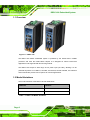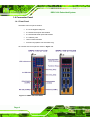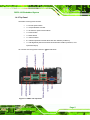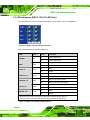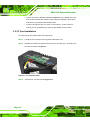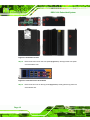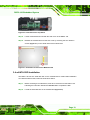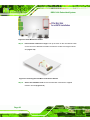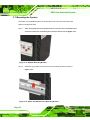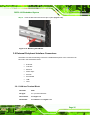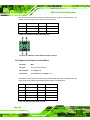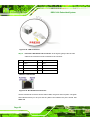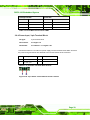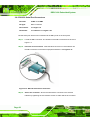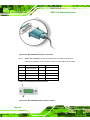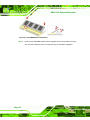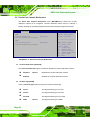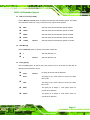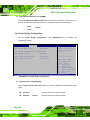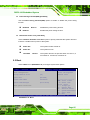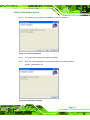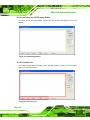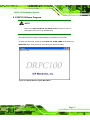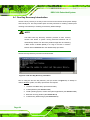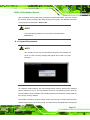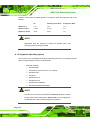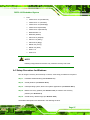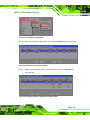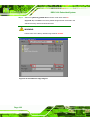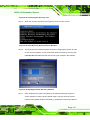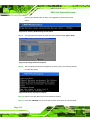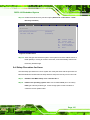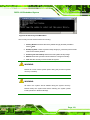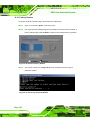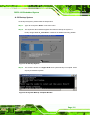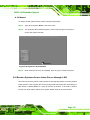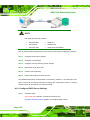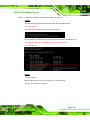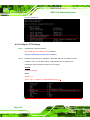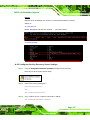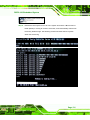
1
DRPC-100 Embedded System IEI Technology Corp. MODEL: DRPC-100 Fanless Embedded System with Intel® Atom™ N2800 CPU, DIN Rail Mounting Support, OLED Display or LED Indicators, Dual GbE, USB, DIO, CAN-bus, Serial Ports, 9V~28V DC Power Input, RoHS Compliant User Manual Page i Rev. 1.01 – 30 November, 2012 DRPC-100 Embedded System Revision Date Version Changes 30 November, 2012 1.01 Updated the operating temperature range, packing list and DIN rail mounting method 16 November, 2012 Page ii 1.00 Initial release DRPC-100 Embedded System Copyright COPYRIGHT NOTICE The information in this document is subject to change without prior notice in order to improve reliability, design and function and does not represent a commitment on the part of the manufacturer. In no event will the manufacturer be liable for direct, indirect, special, incidental, or consequential damages arising out of the use or inability to use the product or documentation, even if advised of the possibility of such damages. This document contains proprietary information protected by copyright. All rights are reserved. No part of this manual may be reproduced by any mechanical, electronic, or other means in any form without prior written permission of the manufacturer. TRADEMARKS All registered trademarks and product names mentioned herein are used for identification purposes only and may be trademarks and/or registered trademarks of their respective owners. Page iii DRPC-100 Embedded System Table of Contents 1 INTRODUCTION.......................................................................................................... 1 1.1 OVERVIEW ................................................................................................................. 2 1.2 MODEL VARIATIONS ................................................................................................... 2 1.3 FEATURES .................................................................................................................. 3 1.4 CONNECTOR PANEL.................................................................................................... 4 1.4.1 Front Panel ........................................................................................................ 4 1.4.2 Top Panel ........................................................................................................... 5 1.5 LED INDICATORS (DRPC-100-CV-LED ONLY)........................................................ 6 1.6 PROGRAMMABLE OLED DISPLAY (DRPC-100-CV-OLED ONLY) ........................... 7 1.7 TECHNICAL SPECIFICATIONS ...................................................................................... 7 1.8 DIMENSIONS .............................................................................................................. 9 2 UNPACKING ............................................................................................................... 10 2.1 ANTI-STATIC PRECAUTIONS .......................................................................................11 2.2 UNPACKING PRECAUTIONS........................................................................................11 2.3 UNPACKING CHECKLIST ........................................................................................... 12 3 INSTALLATION ......................................................................................................... 14 3.1 INSTALLATION PRECAUTIONS ................................................................................... 15 3.1.1 High Surface Temperature ............................................................................... 15 3.2 CF CARD INSTALLATION .......................................................................................... 16 3.3 MOTHERBOARD REMOVAL ....................................................................................... 17 3.4 MSATA SSD INSTALLATION .................................................................................... 19 3.5 JUMPER SETTINGS .................................................................................................... 21 3.5.1 Access the Jumpers .......................................................................................... 22 3.5.2 Clear CMOS Jumper........................................................................................ 22 3.6 AT/ATX MODE SELECTION ..................................................................................... 23 3.7 MOUNTING THE SYSTEM .......................................................................................... 24 3.8 EXTERNAL PERIPHERAL INTERFACE CONNECTORS .................................................. 25 3.8.1 CAN-bus Terminal Block.................................................................................. 25 3.8.2 Digital Input/Output Terminal Block ............................................................... 26 Page iv DRPC-100 Embedded System 3.8.3 LAN Connectors............................................................................................... 27 3.8.4 Power Input, 3-pin Terminal Block.................................................................. 29 3.8.5 RS-232 Serial Port Connectors........................................................................ 30 3.8.6 RS-422/485 Serial Port Connectors................................................................. 31 3.8.7 USB Connectors............................................................................................... 33 3.8.8 VGA Connector ................................................................................................ 34 3.9 DRIVER INSTALLATION ............................................................................................. 36 4 SYSTEM MAINTENANCE ....................................................................................... 37 4.1 SYSTEM MAINTENANCE INTRODUCTION .................................................................. 38 4.2 MOTHERBOARD REPLACEMENT ............................................................................... 38 4.3 SO-DIMM REPLACEMENT ...................................................................................... 39 5 BIOS .............................................................................................................................. 41 5.1 INTRODUCTION ........................................................................................................ 42 5.1.1 Starting Setup ................................................................................................... 42 5.1.2 Using Setup ...................................................................................................... 42 5.1.3 Getting Help..................................................................................................... 43 5.1.4 Unable to Reboot After Configuration Changes.............................................. 43 5.1.5 BIOS Menu Bar................................................................................................ 43 5.2 MAIN ....................................................................................................................... 44 5.3 ADVANCED ............................................................................................................... 45 5.3.1 ACPI Settings ................................................................................................... 46 5.3.2 CPU Configuration.......................................................................................... 47 5.3.3 IDE Configuration ........................................................................................... 48 5.3.4 USB Configuration........................................................................................... 49 5.3.5 F81866 Super IO Configuration ...................................................................... 50 5.3.5.1 Serial Port n Configuration ....................................................................... 51 5.3.6 F81866 H/W Monitor....................................................................................... 57 5.3.6.1 Smart Fan Mode Configuration ................................................................ 59 5.3.7 Serial Port Console Redirection ...................................................................... 60 5.4 CHIPSET ................................................................................................................... 62 5.4.1 Host Bridge Configuration .............................................................................. 63 5.4.1.1 Intel IGD Configuration............................................................................ 63 5.4.2 South Bridge Configuration............................................................................. 64 Page v DRPC-100 Embedded System 5.5 BOOT ....................................................................................................................... 65 5.6 SECURITY................................................................................................................. 67 5.7 SAVE & EXIT ............................................................................................................ 68 6 PROGRAMMABLE OLED DISPLAY (DRPC-100-CV-OLED ONLY)................ 70 6.1 OVERVIEW ............................................................................................................... 71 6.2 OLED IMAGE EDITOR ............................................................................................. 71 6.2.1 OLED Image Editor Installation ..................................................................... 71 6.2.2 Launching the OLED Image Editor................................................................. 74 6.2.3 Function List .................................................................................................... 74 6.2.4 OLED Control.................................................................................................. 75 6.2.5 OLED Erase Page............................................................................................ 76 6.3 DRPC100 DEMO PROGRAM .................................................................................... 77 6.3.1 Dialog Menu .................................................................................................... 78 6.3.2 LCD Menu........................................................................................................ 79 6.3.3 DEMO Menu.................................................................................................... 80 7 INTERFACE CONNECTORS ................................................................................... 81 7.1 PERIPHERAL INTERFACE CONNECTORS..................................................................... 82 7.2 INTERNAL PERIPHERAL CONNECTORS ...................................................................... 83 7.2.1 Battery Connector (CN1)................................................................................. 83 7.2.2 Burn in CAN-bus Firmware Connector (CN4).................................................. 84 7.2.3 Burn in MCU Firmware Connector (JP5)....................................................... 84 7.2.4 CompactFlash® Card Slot (CF1).................................................................... 84 7.2.5 CPU Fan Connector (CPU_FAN1).................................................................. 85 7.2.6 Indicator Connector (F_PANEL1) ................................................................... 86 7.2.7 OLED/LED Signal Connector (OLED1) ......................................................... 86 7.2.8 PCIe Mini Card Slot (M_PCIE1)..................................................................... 86 7.2.9 SATA 3Gb/s Connectors(SATA1)...................................................................... 87 7.2.10 SATA Power Connector (SATA_PWR1) ......................................................... 88 7.2.11 SPI Flash Connector (SPI1)........................................................................... 88 7.3 EXTERNAL INTERFACE PANEL CONNECTORS ............................................................ 88 7.3.1 CAN-bus Terminal Block (CAN1) .................................................................... 89 7.3.2 Digital I/O Terminal Block (J1) ....................................................................... 89 7.3.3 Power Input Terminal Block (DC_CN1).......................................................... 89 Page vi DRPC-100 Embedded System 7.3.4 RJ-45 LAN Connectors (LAN/USB1, LAN/USB2) ........................................... 90 7.3.5 RS-232 Serial Ports (COM1/2)........................................................................ 90 7.3.6 RS-422/485 Serial Ports (COM3/4)................................................................. 90 7.3.7 USB 2.0 Connectors (LAN/USB1, LAN/USB2)................................................ 91 7.3.8 VGA Connector (VGA1)................................................................................... 91 7.4 JUMPER SETTINGS .................................................................................................... 91 7.4.1 Clear CMOS Jumper (JP1).............................................................................. 92 7.4.2 CAN-bus 1 Long Wire Transmitting Jumper (JP3) .......................................... 92 7.4.3 CAN-bus 2 Long Wire Transmitting Jumper (JP4) .......................................... 92 A ONE KEY RECOVERY ............................................................................................. 93 A.1 ONE KEY RECOVERY INTRODUCTION ...................................................................... 94 A.1.1 System Requirement......................................................................................... 95 A.1.2 Supported Operating System ........................................................................... 96 A.2 SETUP PROCEDURE FOR WINDOWS ......................................................................... 97 A.2.1 Hardware and BIOS Setup .............................................................................. 98 A.2.2 Create Partitions ............................................................................................. 98 A.2.3 Install Operating System, Drivers and Applications ..................................... 102 A.2.4 Build-up Recovery Partition.......................................................................... 103 A.2.5 Create Factory Default Image....................................................................... 105 A.3 AUTO RECOVERY SETUP PROCEDURE.....................................................................110 A.4 SETUP PROCEDURE FOR LINUX ..............................................................................115 A.5 RECOVERY TOOL FUNCTIONS .................................................................................118 A.5.1 Factory Restore ............................................................................................. 120 A.5.2 Backup System ............................................................................................... 121 A.5.3 Restore Your Last Backup.............................................................................. 122 A.5.4 Manual........................................................................................................... 123 A.6 RESTORE SYSTEMS FROM A LINUX SERVER THROUGH LAN.................................. 123 A.6.1 Configure DHCP Server Settings .................................................................. 124 A.6.2 Configure TFTP Settings ............................................................................... 126 A.6.3 Configure One Key Recovery Server Settings ............................................... 127 A.6.4 Start the DHCP, TFTP and HTTP ................................................................. 128 A.6.5 Create Shared Directory................................................................................ 128 A.6.6 Setup a Client System for Auto Recovery ...................................................... 129 A.7 OTHER INFORMATION ............................................................................................ 132 Page vii DRPC-100 Embedded System A.7.1 Using AHCI Mode or ALi M5283 / VIA VT6421A Controller....................... 132 A.7.2 System Memory Requirement ........................................................................ 134 B SAFETY PRECAUTIONS ....................................................................................... 135 B.1 SAFETY PRECAUTIONS........................................................................................... 136 B.1.1 General Safety Precautions ........................................................................... 136 B.1.2 Anti-static Precautions .................................................................................. 137 B.1.3 Explanation of Graphical Symbols................................................................ 137 B.1.4 Product Disposal ........................................................................................... 138 B.2 MAINTENANCE AND CLEANING PRECAUTIONS ...................................................... 138 B.2.1 Maintenance and Cleaning............................................................................ 138 B.2.2 Cleaning Tools ............................................................................................... 139 C DIGITAL I/O INTERFACE..................................................................................... 140 C.1 INTRODUCTION ...................................................................................................... 141 C.2 DIO CONNECTOR PINOUTS ................................................................................... 141 C.3 ASSEMBLY LANGUAGE SAMPLES ........................................................................... 142 C.3.1 Enable the DIO Input Function..................................................................... 142 C.3.2 Enable the DIO Output Function .................................................................. 142 D HAZARDOUS MATERIALS DISCLOSURE ....................................................... 143 D.1 HAZARDOUS MATERIALS DISCLOSURE TABLE FOR IPB PRODUCTS CERTIFIED AS ROHS COMPLIANT UNDER 2002/95/EC WITHOUT MERCURY..................................... 144 Page viii DRPC-100 Embedded System List of Figures Figure 1-1: DRPC-100 .....................................................................................................................2 Figure 1-2: DRPC-100 Front Panel ................................................................................................4 Figure 1-3: DRPC-100 Top Panel...................................................................................................5 Figure 1-4: DRPC-100-CV-LED LED Indicators............................................................................6 Figure 1-5: Physical Dimensions (millimeters)............................................................................9 Figure 3-1: CF Card Slot Cover ...................................................................................................16 Figure 3-2: CF Card Installation ..................................................................................................17 Figure 3-3: Replacing the CF Card Slot Cover ..........................................................................17 Figure 3-4: Retention Screws ......................................................................................................18 Figure 3-5: Hex Nuts on the Front Panel....................................................................................18 Figure 3-6: Hex Nuts on the Top Panel.......................................................................................19 Figure 3-7: Retention Screws on the Motherboard ...................................................................19 Figure 3-8: PCIe Mini Slot Location ............................................................................................20 Figure 3-9: Inserting the PCIe Mini Card into the Socket .........................................................20 Figure 3-10: Securing the PCIe Mini Card ..................................................................................21 Figure 3-11: Clear CMOS Jumper Location ...............................................................................23 Figure 3-12: AT/ATX Switch Location.........................................................................................23 Figure 3-13: DIN Rail Mounting Bracket .....................................................................................24 Figure 3-14: Attach the DIN Rail to the Mounting Bracket .......................................................24 Figure 3-15: Mounting the DIN Rail.............................................................................................25 Figure 3-16: CAN-bus Terminal Block Pinout Location............................................................26 Figure 3-17: DIO Terminal Block Pinout Location.....................................................................27 Figure 3-18: LAN Connection ......................................................................................................28 Figure 3-19: RJ-45 Ethernet Connector......................................................................................28 Figure 3-20: 3-pin Power Terminal Block Pinout Location.......................................................29 Figure 3-21: RS-232 Serial Device Connector ...........................................................................30 Figure 3-22:RS-232 Serial Port Pinout Location........................................................................31 Figure 3-23: RS-422/485 Serial Device Connector ....................................................................32 Figure 3-24: RS-422/485Serial Port Pinout Location.................................................................32 Figure 3-25: USB Device Connection .........................................................................................33 Page ix DRPC-100 Embedded System Figure 3-26: VGA Connector .......................................................................................................35 Figure 3-27: VGA Connector .......................................................................................................35 Figure 4-1: SO-DIMM Module Location.......................................................................................39 Figure 4-2: SO-DIMM Module Installation...................................................................................40 Figure 6-1: OLED Image Editor Setup Wizard ...........................................................................72 Figure 6-2: Select Installation Folder..........................................................................................72 Figure 6-3: Confirm Installation ..................................................................................................73 Figure 6-4: Installation Complete................................................................................................73 Figure 6-5: OLED Image Editor ...................................................................................................74 Figure 6-6: Function List..............................................................................................................74 Figure 6-7: OLED Control ............................................................................................................75 Figure 6-8: OLED Erase Page......................................................................................................76 Figure 6-9: DR100 Demo Program Main Menu ..........................................................................77 Figure 6-10: Dialog Menu.............................................................................................................78 Figure 6-11: LCD Menu ................................................................................................................79 Figure 6-12: DEMO Menu .............................................................................................................80 Figure 7-1: Main Board Layout Diagram (Front Side) ...............................................................82 Figure 7-2: Main Board Layout Diagram (Solder Side) .............................................................82 Figure A-1: IEI One Key Recovery Tool Menu ...........................................................................94 Figure A-2: Launching the Recovery Tool .................................................................................99 Figure A-3: Recovery Tool Setup Menu .....................................................................................99 Figure A-4: Command Mode..................................................................................................... 100 Figure A-5: Partition Creation Commands.............................................................................. 101 Figure A-6: Launching the Recovery Tool .............................................................................. 103 Figure A-7: Manual Recovery Environment for Windows ..................................................... 104 Figure A-8: Building the Recovery Partition........................................................................... 104 Figure A-9: Press Any Key to Continue .................................................................................. 105 Figure A-10: Press F3 to Boot into Recovery Mode............................................................... 105 Figure A-11: Recovery Tool Menu ........................................................................................... 106 Figure A-12: About Symantec Ghost Window........................................................................ 106 Figure A-13: Symantec Ghost Path ......................................................................................... 107 Figure A-14: Select a Local Source Drive ............................................................................... 107 Figure A-15: Select a Source Partition from Basic Drive ...................................................... 107 Figure A-16: File Name to Copy Image to ............................................................................... 108 Figure A-17: Compress Image.................................................................................................. 109 Page x DRPC-100 Embedded System Figure A-18: Image Creation Confirmation ............................................................................. 109 Figure A-19: Image Creation Process...................................................................................... 109 Figure A-20: Image Creation Complete ................................................................................... 110 Figure A-21: Press Any Key to Continue ................................................................................ 110 Figure A-22: Auto Recovery Utility .......................................................................................... 111 Figure A-23: Disable Automatically Restart............................................................................ 112 Figure A-24: Launching the Recovery Tool ............................................................................ 113 Figure A-25: Auto Recovery Environment for Windows ....................................................... 113 Figure A-26: Building the Auto Recovery Partition................................................................ 113 Figure A-27: Factory Default Image Confirmation ................................................................. 114 Figure A-28: Image Creation Complete ................................................................................... 114 Figure A-29: Press any key to continue .................................................................................. 114 Figure A-30: IEI Feature ............................................................................................................ 115 Figure A-31: Partitions for Linux.............................................................................................. 116 Figure A-32: System Configuration for Linux......................................................................... 117 Figure A-33: Access menu.lst in Linux (Text Mode) .............................................................. 117 Figure A-34: Recovery Tool Menu ........................................................................................... 118 Figure A-35: Recovery Tool Main Menu .................................................................................. 119 Figure A-36: Restore Factory Default ...................................................................................... 120 Figure A-37: Recovery Complete Window .............................................................................. 120 Figure A-38: Backup System.................................................................................................... 121 Figure A-39: System Backup Complete Window ................................................................... 121 Figure A-40: Restore Backup ................................................................................................... 122 Figure A-41: Restore System Backup Complete Window ..................................................... 122 Figure A-42: Symantec Ghost Window ................................................................................... 123 Figure A-43: Disable Automatically Restart............................................................................ 130 Page xi DRPC-100 Embedded System List of Tables Table 1-1: DRPC-100 Model Variations.........................................................................................2 Table 1-2: DRPC-100-CV-LED LED Definitions............................................................................6 Table 1-3: Technical Specifications..............................................................................................8 Table 3-1: Jumpers .......................................................................................................................22 Table 3-2: Clear CMOS Jumper Settings....................................................................................22 Table 3-3: CAN-bus Terminal Block Pinouts .............................................................................26 Table 3-4: DIO Terminal Block Pinouts ......................................................................................26 Table 3-5: LAN Pinouts ................................................................................................................28 Table 3-6: RJ-45 Ethernet Connector LEDs ...............................................................................29 Table 3-7: 3-pin Power Terminal Block Pinouts ........................................................................29 Table 3-8: RS-232 Serial Port Pinouts ........................................................................................31 Table 3-9: RS-422/485 Serial Port Pinouts .................................................................................32 Table 3-10: USB Port Pinouts......................................................................................................34 Table 3-11: VGA Connector Pinouts...........................................................................................35 Table 5-1: BIOS Navigation Keys ................................................................................................43 Table 7-1: Peripheral Interface Connectors ...............................................................................83 Table 7-2: Battery Connector (CN1) Pinouts .............................................................................83 Table 7-3: Burn in CAN-bus Firmware Connector (CN4) Pinouts .............................................84 Table 7-4: Burn in MCU Firmware (JP5) Pinouts.......................................................................84 Table 7-5: CompactFlash® Card Slot (CF1) Pinouts.................................................................85 Table 7-6: CPU Fan Connector (CPU_FAN1) Pinouts ...............................................................85 Table 7-7: Indicator Connector (F_PANEL1) Pinouts ...............................................................86 Table 7-8: OLED/LED Signal Connector (OLED1) Pinouts .......................................................86 Table 7-9: PCIe Mini Card Slot (M_PCIE1) Pinouts ...................................................................87 Table 7-10: SATA 3Gb/s Connector (SATA1) Pinouts ..............................................................87 Table 7-11: SATA Power Connector (SATA_PWR1) Pinouts ...................................................88 Table 7-12: SPI Flash Connector (SPI1) Pinouts .......................................................................88 Table 7-13: Rear Panel Connectors ............................................................................................89 Table 7-14: CAN-bus Terminal Block (CAN1) Pinouts ..............................................................89 Table 7-15: Digital I/O Terminal Block (J1) Pinouts ..................................................................89 Page xii DRPC-100 Embedded System Table 7-16: Power Input Terminal Block (DC_CN1) Pinouts ....................................................89 Table 7-17: RJ-45 LAN Connector Pinouts ................................................................................90 Table 7-18: RS-232 Serial Port Pinouts ......................................................................................90 Table 7-19: RS-422/485 Serial Port Pinouts ...............................................................................90 Table 7-20: USB 2.0 Connectors (LAN/USB1, LAN/USB2) Pinouts .........................................91 Table 7-21: VGA Connector (VGA1) Pinouts .............................................................................91 Table 7-22: Jumpers .....................................................................................................................91 Table 7-23: Clear CMOS Jumper (JP1) Settings........................................................................92 Table 7-24: C CAN-bus 1 Long Wire Transmitting Jumper (JP3) Settings .............................92 Table 7-25: C CAN-bus 2 Long Wire Transmitting Jumper (JP4) Settings .............................92 DRPC-100 Page xiii DRPC-100 Embedded System 4Chapter 1 1 Introduction Page 1 DRPC-100 Embedded System 1.1 Overview Figure 1-1: DRPC-100 The DRPC-100 fanless embedded system is powered by the Intel® Atom™ N2800 processor and uses the Intel® NM10 chipset. It is designed for harsh environment applications and supports DIN rail mounting method. The DRPC-100 accepts a wide range of DC power input (9V~28V), allowing it to be powered anywhere. Four USB 2.0, two GbE, two RS-232, two RS-422/485, two CAN-bus and one 8-bit DIO provide rich I/O options for various applications. 1.2 Model Variations The model variations of the DRPC-100 are listed below. Model No. Indicators DRPC-100-CV-LED-R10 LED DRPC-100-CV-OLED-R10 OLED Table 1-1: DRPC-100 Model Variations Page 2 DRPC-100 Embedded System 1.3 Features The DRPC-100 features are listed below: Intel® Atom™ N2800 processor Low power consumption Fanless design DIN rail mounting support Intel® GMA 3650 with 640 MHz graphics core speed supports Blu-ray 2.0, DirectX 9, MPEG-2, H.264, C-1 and 1080p decoding Supports 1066 MHz DDR3 SO-DIMM (up to 4 GB) Supports one mSATA, one SATA DOM and one CompactFlash® Wide range DC power input (9V~28V) Extended temperature fanless design supports -25C~65C (with SSD) One PCIe Mini card slot Serial, CAN-bus and DIO interfaces with isolation protection Supports two GbE, four USB 2.0, two RS-232, two RS-422/485, two CAN-bus and one 8-bit DIO LED indicators (DRPC-100-CV-LED only) Programmable OLED display (DRPC-100-CV-OLED only) RoHS compliant Page 3 DRPC-100 Embedded System 1.4 Connector Panel 1.4.1 Front Panel The DRPC-100 front panel contains: 2 x RJ-45 Gigabit LAN ports 2 x RS-232 serial ports with isolation 2 x RS-422/485 serial ports with isolation 4 x USB 2.0 ports LED or OLED indicators Function keys (DRPC-100-CV-OLED only) An overview of the front panel is shown in Figure 1-2. 691H Figure 1-2: DRPC-100 Front Panel Page 4 DRPC-100 Embedded System 1.4.2 Top Panel The DRPC-100 top panel contains: 1 x AT/ATX power switch 1 x CompactFlash® card slot 1 x 9V~28V DC power terminal block 1 x Power button 1 x Reset button 1 x VGA connector 2 x CAN-bus (Phoenix terminal block with 3KV isolation protection) 1 x 8-bit digital I/O (Phoenix terminal block with 3KV isolation protection, 4-bit input/4-bit output) An overview of the top panel is shown in Figure 1-3 below. 691H H Figure 1-3: DRPC-100 Top Panel Page 5 DRPC-100 Embedded System 1.5 LED Indicators (DRPC-100-CV-LED Only) The LED indicators on the front panel of the DRPC-100-CV-LED are shown in Figure 1-4. Figure 1-4: DRPC-100-CV-LED LED Indicators All the LED definitions are listed in Table 1-2. LED Color POWER Red HDD CAN 1~2 COM TX 1~4 COM RX 1~4 Green Green Yellow Green DIO DI 1~4* Yellow DIO DO 1~4* Green Status Description On System power is on Off System power is off Blinking Storage device accessing Off Storage device not accessing On Active Off Inactive On COM port is transmitting data Off COM port is not transmitting data On COM port is receiving data Off COM port is not receiving data On Active Off Inactive On Active Off Inactive * When the DIO is set to pull-high, the DIO LED indicators always light up. When the DIO is set to pull-low, the DIO LED indicators are always off. Table 1-2: DRPC-100-CV-LED LED Definitions Page 6 DRPC-100 Embedded System 1.6 Programmable OLED Display (DRPC-100-CV-OLED Only) For programming the OLED display on the front panel of the DRPC-100-CV-OLED, refer to Chapter 6. 1.7 Technical Specifications The DRPC-100 technical specifications are listed in Table 1-3. Specifications System CPU 1.86 GHz Intel® Atom N2800 dual-core processor Chipset Intel® NM10 Memory 1 x 2 GB 204-pin 1066 MHz DDR3 SO-DIMM (system max. 4 GB) Ethernet Controller Dual GbE by Realtek RTL8111E controllers Storage SATA mSATA and SATA DOM support CompactFlash® 1 x CompactFlash® card slot I/O and Indicators Ethernet 2 x RJ-45 ports RS-232 2 x DB-9 serial ports with 3KV isolation protection RS-422/RS-485 2 x DB-9 serial ports with 3KV isolation protection USB 4 x USB 2.0 ports Display 1 x VGA port (supports resolution up to 1920 x 1200@ 60Hz) Digital I/O 1 x Phoenix terminal block with 3KV isolation protection (8-bit, 4-bit input/4-bit output) CAN-bus 1 x Phoenix terminal block with 3KV isolation protection (supports 2-port CAN-bus) Interior Expansion 1 x PCIe Mini card slot (full size) Indicators LED (for DRPC-100-CV-LED-R10) OLED (for DRPC-100-CV-OLED-R10) Page 7 DRPC-100 Embedded System Specifications Buttons Power button Reset button Power Power Input 9V~28V DC (3-pin terminal block) Power Consumption [email protected] (1.86 GHz Intel® Atom™ N2800 dual-core CPU with 2 GB 1066 MHz DDR3 SO-DIMM) AT/ATX Mode AT/ATX switch Environmental and Mechanical Mounting DIN rail, desktop Operating Temperature -25C~65C (with SSD) Storage Temperature -25C~70C Humidity 5%~95%, non-condensing Chassis Construction Extruded aluminum alloy for fanless support Chassis Color Black Operating Shock Half-sine shock test 5G/11ms, 3 shocks per axis Operating Vibration MIL-STD-810F 514.5 C-1 (HDD), MIL-STD-810F 514.5 C-2 (SSD) Safety CE/FCC Weight (Net/Gross) 1 Kg/2 Kg Physical Dimensions 59.4 mm x 170 mm x 140 mm (W x H x D) Table 1-3: Technical Specifications Page 8 DRPC-100 Embedded System 1.8 Dimensions The physical dimensions are shown below: Figure 1-5: Physical Dimensions (millimeters) Page 9 DRPC-100 Embedded System Chapter 2 2 Unpacking Page 10 DRPC-100 Embedded System 2.1 Anti-static Precautions WARNING: Failure to take ESD precautions during installation may result in permanent damage to the DRPC-100 and severe injury to the user. Electrostatic discharge (ESD) can cause serious damage to electronic components, including the DRPC-100. Dry climates are especially susceptible to ESD. It is therefore critical that whenever the DRPC-100 or any other electrical component is handled, the following anti-static precautions are strictly adhered to. Wear an anti-static wristband: Wearing a simple anti-static wristband can help to prevent ESD from damaging the board. Self-grounding: Before handling the board touch any grounded conducting material. During the time the board is handled, frequently touch any conducting materials that are connected to the ground. Use an anti-static pad: When configuring the DRPC-100, place it on an antic-static pad. This reduces the possibility of ESD damaging the DRPC-100. 2.2 Unpacking Precautions When the DRPC-100 is unpacked, please do the following: Follow the anti-static precautions outlined in Section 2.1. Make sure the packing box is facing upwards so the DRPC-100 does not fall out of the box. Make sure all the components shown in Section 2.3 are present. Page 11 DRPC-100 Embedded System 2.3 Unpacking Checklist NOTE: If some of the components listed in the checklist below are missing, please do not proceed with the installation. Contact the IEI reseller or vendor you purchased the DRPC-100 from or contact an IEI sales representative directly. To contact an IEI sales representative, please send an email to [email protected]. The DRPC-100 is shipped with the following components: Quantity Item and Part Number Image Standard 1 DRPC-100 or 3 3-pin terminal block 2 5-pin terminal block 1 DIN rail mounting bracket (50 mm x 45 mm x 8.7 mm) 3 Mounting bracket screw (P/N: 44015-030051-RS) Page 12 DRPC-100 Embedded System Quantity Item and Part Number Image Standard 2 Screw (for securing an PCIe Mini card) (P/N: 44003-020031-RS) 1 One Key Recovery CD 1 User manual and driver CD The following table lists the optional items that can be purchased separately. Optional Power adapter (P/N: 63000-FSP036RAB610-RS) Power cord, European standard, 1830 mm (P/N: 32000-000002-RS) Power cord, American standard, 1830 mm (P/N: 32000-000025-RS) Power cable, DC jack (5.5x2.5) to 3-pin terminal block, 200 mm (P/N: 32102-026500-100-RS) Flash disk, mSATA, 2GB~32GB, 0C ~ 70C (P/N: IPE-5200IM-xxx) Flash disk, mSATA, 2GB~32GB, -40C ~ 85C (P/N: IPE-5200VM-xxx) Page 13 DRPC-100 Embedded System Chapter 3 3 Installation Page 14 DRPC-100 Embedded System 3.1 Installation Precautions During installation, be aware of the precautions below: Read the user manual: The user manual provides a complete description of the DRPC-100, installation instructions and configuration options. DANGER! Disconnect Power: Power to the DRPC-100 must be disconnected during the installation process. Failing to disconnect the power may cause severe injury to the body and/or damage to the system. Qualified Personnel: The DRPC-100 must be installed and operated only by trained and qualified personnel. Maintenance, upgrades, or repairs may only be carried out by qualified personnel who are familiar with the associated dangers. Air Circulation: Make sure there is sufficient air circulation when installing the DRPC-100. The DRPC-100’s cooling vents must not be obstructed by any objects. Blocking the vents can cause overheating of the DRPC-100. Leave at least 5 cm of clearance around the DRPC-100 to prevent overheating. Grounding: The DRPC-100 should be properly grounded. The voltage feeds must not be overloaded. Adjust the cabling and provide external overcharge protection per the electrical values indicated on the label attached to the back of the DRPC-100. 3.1.1 High Surface Temperature WARNING: Some surfaces of the equipment may become hot during operation. The surface temperature may be up to several tens of degrees hotter than the ambient temperature. Under these circumstances, the equipment needs to be protected against accidental contact. The equipment is intended for installation in a RESTRICTED ACCESS LOCATION. Page 15 DRPC-100 Embedded System Access can only be gained by SERVICE PERSONS or by USERS who have been instructed about the reasons for the restrictions applied to the location and about any precautions that shall be taken. Access is through the use of a TOOL or lock and key, or other means of security, and is controlled by the authority responsible for the location. 3.2 CF Card Installation To install the CF card, please follow the steps below: Step 1: Locate the CF card slot on the top panel of the DRPC-100. Step 2: Release the retention screw that secures the CF card slot cover, and then open the cover as shown in Figure 3-1. Figure 3-1: CF Card Slot Cover Step 3: Insert the CF card into the slot (Figure 3-2). Page 16 DRPC-100 Embedded System Figure 3-2: CF Card Installation Step 4: Replace the CF card slot cover and secure it with the retention screw (Figure 3-3). Figure 3-3: Replacing the CF Card Slot Cover 3.3 Motherboard Removal Before the jumper settings can be configured and the mSATA SSD can be installed, the motherboard must be removed from the DRPC-100. Follow the steps below to complete the task. Step 1: Remove the retention screws indicated in Figure 3-4. Page 17 DRPC-100 Embedded System Figure 3-4: Retention Screws Step 2: Remove the hex nuts on the front panel (Figure 3-5). Gently pull the front panel out of the DRPC-100. Figure 3-5: Hex Nuts on the Front Panel Step 3: Remove the hex nuts on the top panel (Figure 3-6). Gently pull the top panel out of the DRPC-100. Page 18 DRPC-100 Embedded System Figure 3-6: Hex Nuts on the Top Panel Step 4: Lift the motherboard secured with the side cover off the DRPC-100. Step 5: Release the motherboard from the side cover by removing the four retention screws (Figure 3-7) on the solder side of the motherboard. Figure 3-7: Retention Screws on the Motherboard 3.4 mSATA SSD Installation The DRPC-100 has one PCIe Mini slot on the motherboard for mSATA SSD installation. To install the mSATA SSD, follow the instructions below. Step 1: Before accessing the motherboard, it has to be removed from the DRPC-100. Following the instruction described in Section 3.3 to complete the task. Step 2: Locate the PCIe Mini slot on the motherboard (Figure 3-8). Page 19 DRPC-100 Embedded System Figure 3-8: PCIe Mini Slot Location Step 3: Insert into the socket at an angle. Line up the notch on the card with the notch on the connector. Slide the PCIe Mini card into the socket at an angle of about 20º (Figure 3-9). Figure 3-9: Inserting the PCIe Mini Card into the Socket Step 4: Secure the PCIe Mini card. Secure the PCIe Mini card with the supplied retention screws (Figure 3-10). Page 20 DRPC-100 Embedded System Figure 3-10: Securing the PCIe Mini Card Step 5: Reassemble the whole system. Step 0: 3.5 Jumper Settings NOTE: A jumper is a metal bridge used to close an electrical circuit. It consists of two or three metal pins and a small metal clip (often protected by a plastic cover) that slides over the pins to connect them. To CLOSE/SHORT a jumper means connecting the pins of the jumper with the plastic clip and to OPEN a jumper means removing the plastic clip from a jumper. The jumpers on the DRPC-100 motherboard are listed in Table 3-1. The JP3 and JP4 543H jumpers are preconfigured for the DRPC-100. Users should not change these jumpers. Description Label Type Clear CMOS JP1 3-pin header Page 21 DRPC-100 Embedded System CAN-bus 1 long wire transmitting JP3 2-pin header CAN-bus 2 long wire transmitting JP4 2-pin header Table 3-1: Jumpers 3.5.1 Access the Jumpers To access the jumpers, the motherboard has to be removed from the DRPC-100. Follow the instruction described in Section 3.3 to complete the task. 3.5.2 Clear CMOS Jumper Jumper Label: JP1 Jumper Type: 3-pin header Jumper Settings: See Table 3-2 Jumper Location: See Figure 3-11 50H If the DRPC-100 fails to boot due to improper BIOS settings, the clear CMOS jumper clears the CMOS data and resets the system BIOS information. To do this, use the jumper cap to close the pins for a few seconds then remove the jumper clip. If the “CMOS Settings Wrong” message is displayed during the boot up process, the fault may be corrected by pressing the F1 to enter the CMOS Setup menu. Do one of the following: Enter the correct CMOS setting Load Optimal Defaults Load Failsafe Defaults. After having done one of the above, save the changes and exit the CMOS Setup menu. The clear CMOS jumper settings are shown in Table 3-2. Clear CMOS Description Short 1 - 2 Keep CMOS Setup Short 2 - 3 Clear CMOS Setup Table 3-2: Clear CMOS Jumper Settings Page 22 Default DRPC-100 Embedded System The clear CMOS jumper location is shown in Figure 3-11 below. 52H Figure 3-11: Clear CMOS Jumper Location 3.6 AT/ATX Mode Selection AT and ATX power modes can both be used on the DRPC-100. The selection is made through an AT/ATX switch on the top panel as shown below (Figure 3-12). Figure 3-12: AT/ATX Switch Location Page 23 DRPC-100 Embedded System 3.7 Mounting the System The DRPC-100 embedded system can be mounted onto a DIN rail. Follow the steps below to complete the task. Step 1: Attach the supplied DIN rail mounting bracket to the rear panel of the embedded system. Secure the bracket to the embedded system with there retention screws (Figure 3-13). 762H Figure 3-13: DIN Rail Mounting Bracket Step 2: Attach the upper edge of the DIN rail to the mounting bracket as shown in Figure 3-14. Figure 3-14: Attach the DIN Rail to the Mounting Bracket Page 24 DRPC-100 Embedded System Step 3: Push the DIN rail inward until it clips in place (Figure 3-15). Figure 3-15: Mounting the DIN Rail 3.8 External Peripheral Interface Connectors The DRPC-100 has the following connectors. Detailed descriptions of the connectors can be found in the subsections below. 8-bit DIO CAN-bus Ethernet Power input RS-232 RS-422/485 USB VGA 3.8.1 CAN-bus Terminal Block CN Label: CAN CN Type: 2 x 3-pin terminal block CN Location: See Figure 1-3 CN Pinouts: See Table 3-3 and Figure 3-16 Page 25 DRPC-100 Embedded System The Phoenix terminal block with 3KV isolation protection supports 2-port CAN-bus. The pinouts of the terminal block are shown in the table below. Pin Description Pin Description 1 CAN1H 2 CAN2H 3 CAN1L 4 CAN2L 5 CAN1_GROUND 6 CAN2_GROUND Table 3-3: CAN-bus Terminal Block Pinouts Figure 3-16: CAN-bus Terminal Block Pinout Location 3.8.2 Digital Input/Output Terminal Block CN Label: DIO CN Type: 2 x 5-pin terminal block CN Location: See Figure 1-3 CN Pinouts: See Table 3-4 and Figure 3-17 The digital I/O terminal block provides programmable input and output for external devices. The pinouts for the digital I/O terminal block are listed in the table below. Pin Description Pin Description 1 DGI_0 2 DGO_0 3 DGI_1 4 DGO_1 5 DGI_2 6 DGO_2 7 DGI_3 8 DGO_3 9 Isolator GND 10 Isolator Vin Table 3-4: DIO Terminal Block Pinouts Page 26 DRPC-100 Embedded System Figure 3-17: DIO Terminal Block Pinout Location 3.8.3 LAN Connectors CN Type: RJ-45 CN Location: See Figure 1-2 CN Pinouts: See Table 3-5 The LAN connectors allow connection to an external network. Step 1: Locate the RJ-45 connectors. The locations of the RJ-45 connectors are shown in Figure 1-2. Step 2: Align the connectors. Align the RJ-45 connector on the LAN cable with one of the RJ-45 connectors on the DRPC-100. See Figure 3-18. Page 27 DRPC-100 Embedded System Figure 3-18: LAN Connection Step 3: Insert the LAN cable RJ-45 connector. Once aligned, gently insert the LAN cable RJ-45 connector into the on-board RJ-45 connector. Pin Description Pin Description 1 MD0+ 5 MD2+ 2 MD0- 6 MD2- 3. MD1+ 7 MD3+ 4. MD1- 8 MD3- Table 3-5: LAN Pinouts Figure 3-19: RJ-45 Ethernet Connector The RJ-45 Ethernet connector has two status LEDs, one green and one yellow. The green LED indicates activity on the port and the yellow LED indicates the port is linked. See Table 3-6. Page 28 DRPC-100 Embedded System Activity/Link LED Speed LED STATUS DESCRIPTION STATUS DESCRIPTION Off No link Off 10 Mbps connection Yellow Linked Green 100 Mbps connection Blinking TX/RX activity Orange 1 Gbps connection Table 3-6: RJ-45 Ethernet Connector LEDs 3.8.4 Power Input, 3-pin Terminal Block CN Type: 3-pin terminal block CN Location: See Figure 1-3 CN Pinouts: See Table 3-7 and Figure 3-20 Connect the leads of a 9V~28V DC power supply into the terminal block. Make sure that the power and ground wires are attached to the correct sockets of the connector. Pin Description Pin Description 1 9~28V input 3 GND 2 9~28V input Table 3-7: 3-pin Power Terminal Block Pinouts Figure 3-20: 3-pin Power Terminal Block Pinout Location Page 29 DRPC-100 Embedded System 3.8.5 RS-232 Serial Port Connectors CN Label: COM1 and COM2 CN Type: DB-9 connectors CN Location: See Figure 1-2 CN Pinouts: See Table 3-8 and Figure 3-22 RS-232 serial port devices can be attached to the DB-9 ports on the front panel. Step 1: Locate the DB-9 connector. The locations of the DB-9 connectors are shown in Figure 1-2. Step 2: Insert the serial connector. Insert the DB-9 connector of a serial device into the DB-9 connector on the external peripheral interface. See Figure 3-21. Figure 3-21: RS-232 Serial Device Connector Step 3: Secure the connector. Secure the serial device connector to the external interface by tightening the two retention screws on either side of the connector. Page 30 DRPC-100 Embedded System Pin Description Pin Description 1 DCD 6 DSR 2 RXD 7 RTS 3 TXD 8 CTS 4 DTR 9 RI 5 GND Table 3-8: RS-232 Serial Port Pinouts Figure 3-22:RS-232 Serial Port Pinout Location 3.8.6 RS-422/485 Serial Port Connectors CN Label: COM3 and COM4 CN Type: DB-9 connectors CN Location: See Figure 1-2 CN Pinouts: See Table 3-9 and Figure 3-24 RS-422/485 serial port devices can be attached to the DB-9 ports on the front panel. Step 1: Locate the DB-9 connector. The locations of the DB-9 connectors are shown in Figure 1-2. Step 2: Insert the serial connector. Insert the DB-9 connector of a serial device into the DB-9 connector on the external peripheral interface. See Figure 3-23. Page 31 DRPC-100 Embedded System Figure 3-23: RS-422/485 Serial Device Connector Step 3: Secure the connector. Secure the serial device connector to the external interface by tightening the two retention screws on either side of the connector. Pin Description Pin Description 1 RS422TX-/RS485D- 6 NC 2 RS422TX+/RS485D+ 7 NC 3 RS422RX+ 8 NC 4 RS422RX 9 NC 5 GND Table 3-9: RS-422/485 Serial Port Pinouts Figure 3-24: RS-422/485Serial Port Pinout Location Page 32 DRPC-100 Embedded System 3.8.7 USB Connectors CN Type: USB port CN Location: See Figure 1-2 CN Pinouts: See Table 3-10 The USB ports are for connecting USB peripheral devices to the system. Step 1: Locate the USB connectors. The locations of the USB connectors are shown in Figure 1-2. Step 2: Align the connectors. Align the USB device connector with one of the connectors. See Figure 3-25. Figure 3-25: USB Device Connection Step 3: Insert the device connector. Once aligned, gently insert the USB device connector into the on-board connector. Page 33 DRPC-100 Embedded System Pin Description Pin Description 1 VCC 5 VCC 2 DATA- 6 DATA- 3 DATA+ 7 DATA+ 4 GROUND 8 GROUND Table 3-10: USB Port Pinouts 3.8.8 VGA Connector CN Label: VGA CN Type: 15-pin Female CN Location: See Figure 1-3 CN Pinouts: See Figure 3-27 and Table 3-11 The VGA connector connects to a monitor that accepts VGA video input. Step 1: Locate the female DB-15 connector. The location of the female DB-15 connector is shown in Figure 1-3. Step 2: Align the VGA connector. Align the male DB-15 connector on the VGA screen cable with the female DB-15 connector on the external peripheral interface. Step 3: Insert the VGA connector. Once the connectors are properly aligned with, insert the male connector from the VGA screen cable into the female connector on the DRPC-100. See Figure 3-26. Page 34 DRPC-100 Embedded System Figure 3-26: VGA Connector Step 4: Secure the connector. Secure the DB-15 VGA connector from the VGA monitor to the external interface by tightening the two retention screws on either side of the connector. Figure 3-27: VGA Connector Pin Description Pin Description 1 RED 2 GREEN 3 BLUE 4 NC 5 GND 6 GND 7 GND 8 GND 9 VCC 10 GND 11 NC 12 DDC DAT 13 HSYNC 14 VSYNC 15 DDCCLK Table 3-11: VGA Connector Pinouts Page 35 DRPC-100 Embedded System 3.9 Driver Installation NOTE: The content of the CD may vary throughout the life cycle of the product and is subject to change without prior notice. Visit the IEI website or contact technical support for the latest updates. The following drivers can be installed on the system: Chipset VGA LAN To install the drivers, insert the CD into an optical disk drive connected to the system, and then locate the corresponding driver folders to install all the drivers listed above. Page 36 DRPC-100 Embedded System Chapter 4 4 System Maintenance Page 37 DRPC-100 Embedded System 4.1 System Maintenance Introduction The following system components may require maintenance. Motherboard SO-DIMM module If these components fail, they must be replaced. Please contact the system reseller or vendor to purchase replacement parts. Replacement instructions for the above listed components are described below. WARNING! Before accessing any DRPC-100 internal components, make sure all power to the system has been disconnected. Failing to do so may cause severe damage to the DRPC-100 and injury to the user. WARNING! Please take antistatic precautions when working with the internal components. The interior of the DRPC-100 contains very sensitive electronic components. These components are easily damaged by electrostatic discharge (ESD). Before working with the internal components, make sure all anti-static precautions described earlier have been observed. 4.2 Motherboard Replacement A user cannot replace a motherboard. If the motherboard fails it must be shipped back to IEI to be replaced. If the system motherboard has failed, please contact the system vendor, reseller or an IEI sales person directly. Page 38 DRPC-100 Embedded System 4.3 SO-DIMM Replacement To install/replace the SO-DIMM modules, please follow the steps below. Step 1: Remove the motherboard from the DRPC-100. Refer to Section 3.3. Step 2: Locate the SO-DIMM module on the motherboard. Figure 4-1: SO-DIMM Module Location Step 3: Release the SO-DIMM module by pulling both the spring retainer clips outward from the socket. Step 4: Grasp the SO-DIMM module by the edges and carefully pull it out of the socket. Step 5: Install the new SO-DIMM module by pushing it into the socket at an angle (Figure 4-2). Step 6: Gently push the rear of the SO-DIMM module down (Figure 4-2). The spring retainer clips clip into place and secure the SO-DIMM module in the socket. Page 39 DRPC-100 Embedded System Figure 4-2: SO-DIMM Module Installation Step 7: Push the new SO-DIMM module until it engages and the white plastic end clips click into place. Make sure the end clips are fully secured after installation. Step 0: Page 40 DRPC-100 Embedded System Chapter 5 5 BIOS Page 41 DRPC-100 Embedded System 5.1 Introduction The BIOS is programmed onto the BIOS chip. The BIOS setup program allows changes to certain system settings. This chapter outlines the options that can be changed. 5.1.1 Starting Setup The UEFI BIOS is activated when the computer is turned on. The setup program can be activated in one of two ways. 1. Press the DEL or F2 key as soon as the system is turned on or 2. Press the DEL or F2 key when the “Press DEL or F2 to enter SETUP” message appears on the screen. If the message disappears before the DEL or F2 key is pressed, restart the computer and try again. 5.1.2 Using Setup Use the arrow keys to highlight items, press ENTER to select, use the PageUp and PageDown keys to change entries, press F1 for help and press ESC to quit. Navigation keys are shown in the following table. Key Function Up arrow Move to previous item Down arrow Move to next item Left arrow Move to the item on the left hand side Right arrow Move to the item on the right hand side + Increase the numeric value or make changes - Decrease the numeric value or make changes Page Up key Move to the next page Page Dn key Move to the previous page Page 42 DRPC-100 Embedded System Key Function Esc key Main Menu – Quit and not save changes into CMOS Status Page Setup Menu and Option Page Setup Menu -Exit current page and return to Main Menu F1 General help, only for Status Page Setup Menu and Option Page Setup Menu F2 Load previous values F3 Load optimized defaults F4 Save changes and Exit BIOS Table 5-1: BIOS Navigation Keys 5.1.3 Getting Help When F1 is pressed a small help window describing the appropriate keys to use and the possible selections for the highlighted item appears. To exit the Help Window press ESC or the F1 key again. 5.1.4 Unable to Reboot After Configuration Changes If the computer cannot boot after changes to the system configuration are made, CMOS defaults. Use the jumper described in Chapter 3. 5.1.5 BIOS Menu Bar The menu bar on top of the BIOS screen has the following main items: Main – Changes the basic system configuration. Advanced – Changes the advanced system settings. Chipset – Changes the chipset settings. Boot – Changes the system boot configuration. Security – Sets User and Supervisor Passwords. Save & Exit – Selects exit options and loads default settings. The following sections completely describe the configuration options found in the menu items at the top of the BIOS screen and listed above. Page 43 DRPC-100 Embedded System 5.2 Main The Main BIOS menu (BIOS Menu 1) appears when the BIOS Setup program is entered. The Main menu gives an overview of the basic system information. Aptio Setup Utility – Copyright (C) 2011 American Megatrends, Inc. Main Advanced Chipset Boot Security Save & Exit BIOS Information BIOS Vendor Core Version Compliancy Project Version Build Date and Time American Megatrends 4.6.5.1 0.13 UEFI 2.3; PI 1.2 E407AR06.ROM 06/21/2012 11:53:40 Set the Date. Use Tab to switch between Data elements. ---------------------- : Select Screen : Select Item Enter: Select +/-: Change Opt. Access Level Administrator F1: General Help F2: Previous Values F3: Optimized Defaults F4: Save & Exit ESC: Exit Version 2.14.1219. Copyright (C) 2011 American Megatrends, Inc. System Date System Time [Wed 10/24/2012] [15:10:27] BIOS Menu 1: Main System Overview The BIOS Information lists a brief summary of the BIOS. The fields in BIOS Information cannot be changed. The items shown in the system overview include: BIOS Vendor: Installed BIOS vendor Core Version: Current BIOS version Project Version: the board version Build Date and Time: Date and time the current BIOS version was made The System Overview field also has two user configurable fields: System Date [xx/xx/xx] Use the System Date option to set the system date. Manually enter the day, month and year. Page 44 DRPC-100 Embedded System System Time [xx:xx:xx] Use the System Time option to set the system time. Manually enter the hours, minutes and seconds. 5.3 Advanced Use the Advanced menu (BIOS Menu 2) to configure the CPU and peripheral devices through the following sub-menus: WARNING! Setting the wrong values in the sections below may cause the system to malfunction. Make sure that the settings made are compatible with the hardware. Aptio Setup Utility – Copyright (C) 2011 American Megatrends, Inc. Main Advanced Chipset Boot Security Save & Exit System ACPI Parameters. > > > > > > > ACPI Settings CPU Configuration IDE Configuration USB Configuration F81866 Super IO Configuration F81866 H/M Monitor Serial Port Console Redirection ---------------------- : Select Screen : Select Item Enter: Select +/-: Change Opt. F1: General Help F2: Previous Values F3: Optimized Defaults F4: Save & Exit ESC: Exit Version 2.14.1219. Copyright (C) 2011 American Megatrends, Inc. BIOS Menu 2: Advanced Page 45 DRPC-100 Embedded System 5.3.1 ACPI Settings The ACPI Settings menu (BIOS Menu 3) configures the Advanced Configuration and Power Interface (ACPI) options. Aptio Setup Utility – Copyright (C) 2011 American Megatrends, Inc. Advanced ACPI Settings ACPI Sleep State [S3 (Suspend to RAM)] Select the highest ACPI sleep state the system will enter when the SUSPEND button is pressed. ---------------------: Select Screen : Select Item Enter: Select +/-: Change Opt. F1: General Help F2: Previous Values F3: Optimized Defaults F4: Save & Exit ESC: Exit Version 2.14.1219. Copyright (C) 2011 American Megatrends, Inc. BIOS Menu 3: ACPI Configuration ACPI Sleep State [S3 (Suspend to RAM)] Use the ACPI Sleep State option to specify the sleep state the system enters when it is not being used. Suspend Disabled S1 (CPU The system enters S1(POS) sleep state. The Stop system appears off. The CPU is stopped; RAM is Clock) refreshed; the system is running in a low power mode. S3 (Suspend RAM) to DEFAULT The caches are flushed and the CPU is powered off. Power to the RAM is maintained. The computer returns slower to a working state, but more power is saved. Page 46 DRPC-100 Embedded System 5.3.2 CPU Configuration Use the CPU Configuration menu (BIOS Menu 4) to view detailed CPU specifications and configure the CPU. Aptio Setup Utility – Copyright (C) 2011 American Megatrends, Inc. Advanced CPU Configuration Processor Type EMT64 Processor Speed System Bus Speed Ratio Status Actual Ratio System Bus Speed Processor Stepping Microcode Revision L1 Cache RAM L2 Cache RAM Processor Core Hyper-Threading Intel(R) Atom(TM) CPU N2800 @ 1.86GHz Supported 1865 MHz 533 MHz 14 14 533 MHz 30661 262 2x56 k 2x512 k Dual Supported Enabled for Windows XP and Linux (OS optimized for Hyper-Threading Technology) and Disabled for other OS (OS not optimized for Hyper-Threading Technology). ---------------------- : Select Screen : Select Item Enter: Select +/-: Change Opt. F1: General Help F2: Previous Values Hyper-Threading [Enabled] F3: Optimized Defaults F4: Save & Exit ESC: Exit Version 2.14.1219. Copyright (C) 2011 American Megatrends, Inc. BIOS Menu 4: CPU Configuration The CPU Configuration menu (BIOS Menu 4) lists the following CPU details: Processor Type: Lists the brand name of the CPU being used. EMT64: Indicates if EMT64 is supported by the CPU. Processor Speed: Lists the CPU processing speed. System Bus Speed: Lists the system bus speed. Ratio Status: Lists the ratio status. Actual Ratio: Lists the ratio of the frequency to the clock speed. Processor Stepping: Lists the CPU ID. Microcode Revision: Lists the microcode revision. L1 Cache RAM: Lists the CPU L1 cache size. L2 Cache RAM: Lists the CPU L2 cache size. Processor Core: Lists the number of the processor core. Hyper-Threading: Indicates if Intel HT Technology is supported by the CPU. Page 47 DRPC-100 Embedded System Hyper-Threading [Enabled] Use the Hyper-Threading function to enable or disable the Intel Hyper-Threading Technology. Disabled Enabled Disables the Intel Hyper-Threading Technology. DEFAULT Enables the Intel Hyper-Threading Technology. 5.3.3 IDE Configuration Use the IDE Configuration menu (BIOS Menu 5) to change and/or set the configuration of the SATA devices installed in the system. Aptio Setup Utility – Copyright (C) 2011 American Megatrends, Inc. Advanced SATA Port0 SATA Port1 Not Present IEI Technology (4.2GB Configure SATA as Select a configuration for SATA Controller. [AHCI] --------------------- SATA Port 0 Hot Plug SATA Port 1 Hot Plug [Enabled] [Enabled] : Select Screen : Select Item Enter: Select +/-: Change Opt. F1: General Help F2: Previous Values F3: Optimized Defaults F4: Save & Exit ESC: Exit Version 2.14.1219. Copyright (C) 2011 American Megatrends, Inc. BIOS Menu 5: IDE Configuration Configure SATA as [AHCI] Use the Configure SATA as option to configure SATA devices as normal IDE or AHCI devices. IDE AHCI Page 48 Configures SATA devices as normal IDE device. DEFAULT Configures SATA devices as AHCI device. DRPC-100 Embedded System SATA Port 0/1 Hot Plug [Enabled] Use the SATA Port 0/1 Hot Plug option to enable or disable the hot-plug function of the SATA port 0 or 1. Enabled Disabled Enables the hot-plug function of the SATA port. DEFAULT Disables the hot-plug function of the SATA port.. 5.3.4 USB Configuration Use the USB Configuration menu (BIOS Menu 6) to read USB configuration information and configure the USB settings. Aptio Setup Utility – Copyright (C) 2011 American Megatrends, Inc. Advanced USB Configuration USB Support Parameters USB Devices: 1 Keyboard, 1 Mouse --------------------- Legacy USB Support [Enabled] : Select Screen : Select Item Enter: Select +/-: Change Opt. F1: General Help F2: Previous Values F3: Optimized Defaults F4: Save & Exit ESC: Exit Version 2.14.1219. Copyright (C) 2011 American Megatrends, Inc. BIOS Menu 6: USB Configuration USB Devices The USB Devices field lists the USB devices that are enabled on the system Legacy USB Support [Enabled] Use the Legacy USB Support BIOS option to enable USB mouse and USB keyboard support. Normally if this option is not enabled, any attached USB mouse or USB keyboard does not become available until a USB compatible operating system is fully booted with all USB drivers loaded. When this option is enabled, any attached USB mouse or USB Page 49 DRPC-100 Embedded System keyboard can control the system even when there is no USB driver loaded onto the system. Enabled Disabled Legacy USB support disabled Auto Legacy USB support disabled if no USB devices are Legacy USB support enabled DEFAULT connected 5.3.5 F81866 Super IO Configuration Use the F81866 Super IO Configuration menu (BIOS Menu 7) to set or change the configurations for the serial ports. Aptio Setup Utility – Copyright (C) 2011 American Megatrends, Inc. Advanced F81866 Super IO Configuration F81866 Super IO > Serial Port 1 > Serial Port 2 > Serial Port 3 > Serial Port 4 > Serial Port 5 Chip Configuration Configuration Configuration Configuration Configuration Set Parameters of Serial Port 1 (COMA) F81866 --------------------: Select Screen : Select Item Enter: Select +/-: Change Opt. F1: General Help F2: Previous Values F3: Optimized Defaults F4: Save & Exit ESC: Exit Version 2.14.1219. Copyright (C) 2011 American Megatrends, Inc. BIOS Menu 7: Super IO Configuration Page 50 DRPC-100 Embedded System 5.3.5.1 Serial Port n Configuration Use the Serial Port n Configuration menu (BIOS Menu 8) to configure the serial port n. Aptio Setup Utility – Copyright (C) 2011 American Megatrends, Inc. Advanced Serial Port n Configuration Serial Port Device Settings Enable or Disable Serial Port (COM) [Enabled] IO=3F8h; IRQ=4 --------------------: Select Screen : Select Item Enter: Select +/-: Change Opt. F1: General Help F2: Previous Values F3: Optimized Defaults F4: Save & Exit ESC: Exit Version 2.14.1219. Copyright (C) 2011 American Megatrends, Inc. Change Settings [Auto] BIOS Menu 8: Serial Port n Configuration Menu 5.3.5.1.1 Serial Port 1 Configuration Serial Port [Enabled] Use the Serial Port option to enable or disable the serial port. Disabled Enabled Disable the serial port DEFAULT Enable the serial port Change Settings [Auto] Use the Change Settings option to change the serial port IO port address and interrupt address. Auto DEFAULT The serial port IO port address and interrupt address are automatically detected. IO=3F8h; Serial Port I/O port address is 3F8h and the interrupt IRQ=4 address is IRQ4 Page 51 DRPC-100 Embedded System IO=3F8h; Serial Port I/O port address is 3F8h and the interrupt IRQ=3, 4, address is IRQ3, 4, 5, 6, 7, 10, 11, 12 5, 6, 7, 10, 11, 12 IO=2F8h; Serial Port I/O port address is 2F8h and the interrupt IRQ=3, 4, address is IRQ3, 4, 5, 6, 7, 10, 11, 12 5, 6, 7, 10, 11, 12 IO=3E8h; Serial Port I/O port address is 3E8h and the interrupt IRQ=3, 4, address is IRQ3, 4, 5, 6, 7, 10, 11, 12 5, 6, 7, 10, 11, 12 IO=2E8h; Serial Port I/O port address is 2E8h and the interrupt IRQ=3, 4, address is IRQ3, 4, 5, 6, 7, 10, 11, 12 5, 6, 7, 10, 11, 12 5.3.5.1.2 Serial Port 2 Configuration Serial Port [Enabled] Use the Serial Port option to enable or disable the serial port. Disabled Enabled Disable the serial port DEFAULT Enable the serial port Change Settings [Auto] Use the Change Settings option to change the serial port IO port address and interrupt address. Auto DEFAULT The serial port IO port address and interrupt address are automatically detected. Page 52 DRPC-100 Embedded System IO=2F8h; Serial Port I/O port address is 2F8h and the interrupt IRQ=3 address is IRQ3 IO=3F8h; Serial Port I/O port address is 3F8h and the interrupt IRQ=3, 4, address is IRQ3, 4, 5, 6, 7, 10, 11, 12 5, 6, 7, 10, 11, 12 IO=2F8h; Serial Port I/O port address is 2F8h and the interrupt IRQ=3, 4, address is IRQ3, 4, 5, 6, 7, 10, 11, 12 5, 6, 7, 10, 11, 12 IO=3E8h; Serial Port I/O port address is 3E8h and the interrupt IRQ=3, 4, address is IRQ3, 4, 5, 6, 7, 10, 11, 12 5, 6, 7, 10, 11, 12 IO=2E8h; Serial Port I/O port address is 2E8h and the interrupt IRQ=3, 4, address is IRQ3, 4, 5, 6, 7, 10, 11, 12 5, 6, 7, 10, 11, 12 5.3.5.1.3 Serial Port 3 Configuration Serial Port [Enabled] Use the Serial Port option to enable or disable the serial port. Disabled Enabled Disable the serial port DEFAULT Enable the serial port Change Settings [Auto] Use the Change Settings option to change the serial port IO port address and interrupt address. Page 53 DRPC-100 Embedded System Auto DEFAULT The serial port IO port address and interrupt address are automatically detected. IO=3E8h; Serial Port I/O port address is 3E8h and the interrupt IRQ=7 address is IRQ7 IO=3F8h; Serial Port I/O port address is 3F8h and the interrupt IRQ=3, 4, address is IRQ3, 4, 5, 6, 7, 10, 11, 12 5, 6, 7, 10, 11, 12 O=2F8h; Serial Port I/O port address is 2F8h and the interrupt IRQ=3, 4, address is IRQ3, 4, 5, 6, 7, 10, 11, 12 5, 6, 7, 10, 11, 12 IO=3E8h; Serial Port I/O port address is 3E8h and the interrupt IRQ=3, 4, address is IRQ3, 4, 5, 6, 7, 10, 11, 12 5, 6, 7, 10, 11, 12 IO=2E8h; Serial Port I/O port address is 2E8h and the interrupt IRQ=3, 4, address is IRQ3, 4, 5, 6, 7, 10, 11, 12 5, 6, 7, 10, 11, 12 IO=2F0h; Serial Port I/O port address is 2F0h and the interrupt IRQ=3, 4, address is IRQ3, 4, 5, 6, 7, 10, 11, 12 5, 6, 7, 10, 11, 12 IO=2E0h; Serial Port I/O port address is 2E0h and the interrupt IRQ=3, 4, address is IRQ3, 4, 5, 6, 7, 10, 11, 12 5, 6, 7, 10, 11, 12 Page 54 DRPC-100 Embedded System 5.3.5.1.4 Serial Port 4 Configuration Serial Port [Enabled] Use the Serial Port option to enable or disable the serial port. Disabled Enabled Disable the serial port DEFAULT Enable the serial port Change Settings [Auto] Use the Change Settings option to change the serial port IO port address and interrupt address. Auto DEFAULT The serial port IO port address and interrupt address are automatically detected. IO=2E8h; Serial Port I/O port address is 2E8h and the interrupt IRQ=7 address is IRQ7 IO=3F8h; Serial Port I/O port address is 3F8h and the interrupt IRQ=3, 4, address is IRQ3, 4, 5, 6, 7, 10, 11, 12 5, 6, 7, 10, 11, 12 O=2F8h; Serial Port I/O port address is 2F8h and the interrupt IRQ=3, 4, address is IRQ3, 4, 5, 6, 7, 10, 11, 12 5, 6, 7, 10, 11, 12 IO=3E8h; Serial Port I/O port address is 3E8h and the interrupt IRQ=3, 4, address is IRQ3, 4, 5, 6, 7, 10, 11, 12 5, 6, 7, 10, 11, 12 IO=2E8h; Serial Port I/O port address is 2E8h and the interrupt IRQ=3, 4, address is IRQ3, 4, 5, 6, 7, 10, 11, 12 5, 6, 7, 10, 11, 12 Page 55 DRPC-100 Embedded System IO=2F0h; Serial Port I/O port address is 2F0h and the interrupt IRQ=3, 4, address is IRQ3, 4, 5, 6, 7, 10, 11, 12 5, 6, 7, 10, 11, 12 IO=2E0h; Serial Port I/O port address is 2E0h and the interrupt IRQ=3, 4, address is IRQ3, 4, 5, 6, 7, 10, 11, 12 5, 6, 7, 10, 11, 12 5.3.5.1.5 Serial Port 5 Configuration Serial Port [Enabled] Use the Serial Port option to enable or disable the serial port. Disabled Enabled Disable the serial port DEFAULT Enable the serial port Change Settings [Auto] Use the Change Settings option to change the serial port IO port address and interrupt address. Auto DEFAULT The serial port IO port address and interrupt address are automatically detected. IO=2F0h; Serial Port I/O port address is 2F0h and the interrupt IRQ=7 address is IRQ7 IO=3F8h; Serial Port I/O port address is 3F8h and the interrupt IRQ=3, 4, address is IRQ3, 4, 5, 6, 7, 10, 11, 12 5, 6, 7, 10, 11, 12 Page 56 DRPC-100 Embedded System O=2F8h; Serial Port I/O port address is 2F8h and the interrupt IRQ=3, 4, address is IRQ3, 4, 5, 6, 7, 10, 11, 12 5, 6, 7, 10, 11, 12 IO=3E8h; Serial Port I/O port address is 3E8h and the interrupt IRQ=3, 4, address is IRQ3, 4, 5, 6, 7, 10, 11, 12 5, 6, 7, 10, 11, 12 IO=2E8h; Serial Port I/O port address is 2E8h and the interrupt IRQ=3, 4, address is IRQ3, 4, 5, 6, 7, 10, 11, 12 5, 6, 7, 10, 11, 12 IO=2F0h; Serial Port I/O port address is 2F0h and the interrupt IRQ=3, 4, address is IRQ3, 4, 5, 6, 7, 10, 11, 12 5, 6, 7, 10, 11, 12 IO=2E0h; Serial Port I/O port address is 2E0h and the interrupt IRQ=3, 4, address is IRQ3, 4, 5, 6, 7, 10, 11, 12 5, 6, 7, 10, 11, 12 5.3.6 F81866 H/W Monitor The F81866 H/W Monitor menu (BIOS Menu 9) contains the fan configuration submenus and displays operating temperature, fan speed and system voltages. Page 57 DRPC-100 Embedded System Aptio Setup Utility – Copyright (C) 2011 American Megatrends, Inc. Advanced PC Health Status Smart Fan Mode Select > Smart Fan Mode Configuration CPU Temperature System Temperature CPU_FAN1 Speed +VCC_CPU +VCC_GFX +V1.05S +V1.5_DDR3 VSB5V +V3.3S VSB3V VBAT : : : : : : : : : : : +51 C +49 C N/A +1.200 +1.680 +1.056 +1.520 +4.968 +3.360 +3.328 +3.264 V V V V V V V V --------------------: Select Screen : Select Item Enter: Select +/-: Change Opt. F1: General Help F2: Previous Values F3: Optimized Defaults F4: Save & Exit ESC: Exit Version 2.14.1219. Copyright (C) 2011 American Megatrends, Inc. BIOS Menu 9: H/W Monitor PC Health Status The following system parameters and values are shown. The system parameters that are monitored are: System Temperatures: o o CPU Temperature System Temperature Fan Speeds: o CPU Fan Speed Voltages: o o o o o o o o Page 58 +VCC_CPU +VCC_GFX +V1.05S +1.5_DDR3 VSB5V +V3.3S VSB3V VBAT DRPC-100 Embedded System 5.3.6.1 Smart Fan Mode Configuration Use the Smart Fan Mode Configuration submenu (BIOS Menu 10) to configure fan temperature and speed settings. Aptio Setup Utility – Copyright (C) 2011 American Megatrends, Inc. Advanced Smart Fan Mode Configuration CPU_FAN1 Smart Fan Control CPU Temperature 1 CPU Temperature 2 CPU Temperature 3 CPU Temperature 4 Smart Fan Mode Select [Auto Duty-Cycle Mode] 60 50 40 30 --------------------: Select Screen : Select Item Enter: Select +/-: Change Opt. F1: General Help F2: Previous Values F3: Optimized Defaults F4: Save & Exit ESC: Exit Version 2.14.1219. Copyright (C) 2011 American Megatrends, Inc. BIOS Menu 10: Smart Fan Mode Configuration CPU_FAN1 Smart Fan Control [Auto Duty-Cycle Mode] Use the CPU_FAN1 Smart Fan Control option to configure the CPU Smart Fan. Auto DEFAULT Duty-Cycle The fan adjusts its speed using Auto Duty-Cycle settings Mode Manual Duty Mode The fan spins at the speed set in Manual Duty Mode settings CPU Temperature n Use the + or – key to change the fan CPU Temperature n value. Enter a decimal number between 1 and 100. Page 59 DRPC-100 Embedded System 5.3.7 Serial Port Console Redirection The Serial Port Console Redirection menu (BIOS Menu 11) allows the console redirection options to be configured. Console redirection allows users to maintain a system remotely by re-directing keyboard input and text output through the serial port. Aptio Setup Utility – Copyright (C) 2011 American Megatrends, Inc. Advanced COM1 Console Redirection > Console Redirection Settings [Disabled] Console Redirection Enable or Disable --------------------- COM2 Console Redirection > Console Redirection Settings : Select Screen : Select Item Enter: Select +/-: Change Opt. F1: General Help F2: Previous Values F3: Optimized Defaults F4: Save & Exit ESC: Exit Version 2.14.1219. Copyright (C) 2011 American Megatrends, Inc. [Disabled] BIOS Menu 11: Serial Port Console Redirection Console Redirection [Disabled] Use Console Redirection option to enable or disable the console redirection function. Disabled Enabled DEFAULT Disabled the console redirection function Enabled the console redirection function Terminal Type [ANSI] Use the Terminal Type option to specify the remote terminal type. VT100 The target terminal type is VT100 VT100+ The target terminal type is VT100+ VT-UTF8 The target terminal type is VT-UTF8 ANSI Page 60 DEFAULT The target terminal type is ANSI DRPC-100 Embedded System Bits per second [115200] Use the Bits per second option to specify the serial port transmission speed. The speed must match the other side. Long or noisy lines may require lower speeds. 9600 Sets the serial port transmission speed at 9600. 19200 Sets the serial port transmission speed at 19200. 38400 Sets the serial port transmission speed at 38400. 57600 Sets the serial port transmission speed at 57600. 115200 DEFAULT Sets the serial port transmission speed at 115200. Data Bits [8] Use the Data Bits option to specify the number of data bits. 7 8 Sets the data bits at 7. DEFAULT Sets the data bits at 8. Parity [None] Use the Parity option to specify the parity bit that can be sent with the data bits for detecting the transmission errors. None Even DEFAULT No parity bit is sent with the data bits. The parity bit is 0 if the number of ones in the data bits is even. Odd The parity bit is 0 if the number of ones in the data bits is odd. Mark The parity bit is always 1. This option does not provide error detection. Space The parity bit is always 0. This option does not provide error detection. Page 61 DRPC-100 Embedded System Stop Bits [1] Use the Stop Bits option to specify the number of stop bits used to indicate the end of a serial data packet. Communication with slow devices may require more than 1 stop bit. 1 2 DEFAULT Sets the number of stop bits at 1. Sets the number of stop bits at 2. 5.4 Chipset Use the Chipset menu (BIOS Menu 12) to access the Host Bridge and Southbridge configuration menus. WARNING! Setting the wrong values for the Chipset BIOS selections in the Chipset BIOS menu may cause the system to malfunction. Aptio Setup Utility – Copyright (C) 2011 American Megatrends, Inc. Main Advanced Chipset Boot Security Save & Exit > Host Bridge > South Bridge Host Bridge Parameters --------------------: Select Screen : Select Item Enter: Select +/-: Change Opt. F1: General Help F2: Previous Values F3: Optimized Defaults F4: Save & Exit ESC: Exit Version 2.14.1219. Copyright (C) 2011 American Megatrends, Inc. BIOS Menu 12: Chipset Page 62 DRPC-100 Embedded System 5.4.1 Host Bridge Configuration Use the Host Bridge Configuration menu (BIOS Menu 13) to configure the Intel IGD Configuration and display the memory information. Aptio Setup Utility – Copyright (C) 2011 American Megatrends, Inc. Chipset > Intel IGD Configuration Config Intel IGD Settings. ******* Memory Information ******* Memory Frequency 1067 MHz(DDR3) Total Memory 2048 MB DIMM#1 2048 MB --------------------: Select Screen : Select Item Enter: Select +/-: Change Opt. F1: General Help F2: Previous Values F3: Optimized Defaults F4: Save & Exit ESC: Exit Version 2.14.1219. Copyright (C) 2011 American Megatrends, Inc. BIOS Menu 13: Host Bridge Configuration 5.4.1.1 Intel IGD Configuration Use the Intel IGD Configuration menu (BIOS Menu 14) to configure the graphics options. Aptio Setup Utility – Copyright (C) 2011 American Megatrends, Inc. Chipset Intel IGD Configuration Fixed Graphics Memory Size [128MB] Configure Fixed Graphics Memory Size --------------------- : Select Screen : Select Item Enter: Select +/-: Change Opt. F1: General Help F2: Previous Values F3: Optimized Defaults F4: Save & Exit ESC: Exit Version 2.14.1219. Copyright (C) 2011 American Megatrends, Inc. BIOS Menu 14: Intel IGD Configuration Page 63 DRPC-100 Embedded System Fixed Graphics Memory Size [128MB] Use the Fixed Graphics Memory Size option to specify the maximum amount of memory that can be allocated as graphics memory. Configuration options are listed below. 128MB DEFAULT 256MB 5.4.2 South Bridge Configuration Use the South Bridge Configuration menu (BIOS Menu 15) to configure the Southbridge chipset. Aptio Setup Utility – Copyright (C) 2011 American Megatrends, Inc. Chipset Auto Power Button Status [Disabled] High Precision Event Timer Configuration High Precision Timer [Enabled] Power Saving Function(ERP) Restore AC Power Loss [Disabled] [Last State] Enabled or Disabled the High Precision Event Timer. --------------------- : Select Screen : Select Item Enter: Select +/-: Change Opt. F1: General Help F2: Previous Values F3: Optimized Defaults F4: Save & Exit ESC: Exit Version 2.14.1219. Copyright (C) 2011 American Megatrends, Inc. BIOS Menu 15: South Bridge Configuration High Precision Timer [Enabled] Use the High Precision Timer BIOS option to enable or disable the High Precision Event Timer. Disabled Enabled Page 64 High Precision Event Timer disabled DEFAULT High Precision Event Timer enabled DRPC-100 Embedded System Power Saving Function(ERP) [Disabled] Use the Power Saving Function(ERP) option to enable or disable the power saving function. Disabled DEFAULT Enabled Disables the power saving function. Enables the power saving function. Restore AC Power Loss [Last State] Use the Restore AC Power Loss BIOS option to specify what state the system returns to if there is a sudden loss of power to the system. Power Off The system remains turned off Power On The system turns on Last State DEFAULT The system returns to its previous state. If it was on, it turns itself on. If it was off, it remains off. 5.5 Boot Use the Boot menu (BIOS Menu 16) to configure system boot options. Aptio Setup Utility – Copyright (C) 2011 American Megatrends, Inc. Main Advanced Chipset Boot Security Save & Exit Boot Configuration Bootup NumLock State [On] Quiet Boot Launch PXE OpROM [Enabled] [Disabled] Select the keyboard NumLock state --------------------: Select Screen Option ROM Messages [Force BIOS] : Select Item Enter: Select Boot Option Priorities +/-: Change Opt. F1: General Help F2: Previous Values F3: Optimized Defaults F4: Save & Exit ESC: Exit Version 2.14.1219. Copyright (C) 2011 American Megatrends, Inc. BIOS Menu 16: Boot Page 65 DRPC-100 Embedded System Bootup NumLock State [On] Use the Bootup NumLock State BIOS option to specify if the number lock setting must be modified during boot up. On DEFAULT Allows the Number Lock on the keyboard to be enabled automatically when the computer system boots up. This allows the immediate use of the 10-key numeric keypad located on the right side of the keyboard. To confirm this, the Number Lock LED light on the keyboard is lit. Does not enable the keyboard Number Lock Off automatically. To use the 10-keys on the keyboard, press the Number Lock key located on the upper left-hand corner of the 10-key pad. The Number Lock LED on the keyboard lights up when the Number Lock is engaged. Quiet Boot [Enabled] Use the Quiet Boot BIOS option to select the screen display when the system boots. Disabled Enabled Normal POST messages displayed DEFAULT OEM Logo displayed instead of POST messages Launch PXE OpROM [Disabled] Use the Launch PXE OpROM option to enable or disable boot option for legacy network devices. Disabled Enabled Page 66 DEFAULT Ignore all PXE Option ROMs Load PXE Option ROMs. DRPC-100 Embedded System Option ROM Messages [Force BIOS] Use the Option ROM Messages option to set the Option ROM display mode. Force DEFAULT Sets display mode to force BIOS. BIOS Keep Sets display mode to current. Current 5.6 Security Use the Security menu (BIOS Menu 17) to set system and user passwords. Aptio Setup Utility – Copyright (C) 2011 American Megatrends, Inc. Main Advanced Chipset Boot Security Save & Exit Password Description If ONLY the Administrator’s password is set, then this only limits access to Setup and is only asked for when entering Setup. If ONLY the User’s password is set, then this is a power on password and must be entered to boot or enter Setup. In Setup the User will have Administrator rights. The password length must be in the following range: Minimum length 3 Maximum length 20 Set Administrator Password --------------------: Select Screen : Select Item Enter: Select +/-: Change Opt. F1: General Help F2: Previous Values F3: Optimized Defaults F4: Save & Exit ESC: Exit Administrator Password User Password Version 2.14.1219. Copyright (C) 2011 American Megatrends, Inc. BIOS Menu 17: Security Administrator Password Use the Administrator Password to set or change an administrator password. User Password Use the User Password to set or change a user password. Page 67 DRPC-100 Embedded System 5.7 Save & Exit Use the Save & Exit menu (BIOS Menu 18) to load default BIOS values, optimal failsafe values and to save configuration changes. Aptio Setup Utility – Copyright (C) 2011 American Megatrends, Inc. Main Advanced Chipset Boot Security Save & Exit Save Changes and Reset Discard Changes and Reset Reset the system after saving the changes. Restore Defaults Save as User Defaults Restore User Defaults --------------------: Select Screen : Select Item Enter: Select +/-: Change Opt. F1: General Help F2: Previous Values F3: Optimized Defaults F4: Save & Exit ESC: Exit Version 2.14.1219. Copyright (C) 2011 American Megatrends, Inc. BIOS Menu 18: Save & Exit Save Changes and Reset Use the Save Changes and Reset option to save the changes made to the BIOS options and to exit the BIOS configuration setup program. Discard Changes and Reset Use the Discard Changes and Reset option to exit the system without saving the changes made to the BIOS configuration setup program. Restore Defaults Use the Restore Defaults option to load the optimal default values for each of the parameters on the Setup menus. F3 key can be used for this operation. Page 68 DRPC-100 Embedded System Save as User Defaults Use the Save as User Defaults option to save the changes done so far as user defaults. Restore User Defaults Use the Restore User Defaults option to restore the user defaults to all the setup options. Page 69 DRPC-100 Embedded System Chapter 6 6 Programmable OLED Display (DRPC-100-CV-OLED Only) Page 70 DRPC-100 Embedded System 6.1 Overview The DRPC-100-CV-OLED comes with a programmable OLED display that allows users to program their own APIs to show any information on it in graphic and text formats. The driver CD includes two programs as below: OLED Image Editor: Allows displaying information in graphic format. DR100 Demo Program: Allows displaying information in text format. The following sections will introduce these two programs. 6.2 OLED Image Editor The OLED Image Editor allows displaying information in graphic format. 6.2.1 OLED Image Editor Installation To install the OLED Image Editor, please follow the steps below. Step 1: Insert the driver CD into an optical disk drive connected to the system. Step 2: Locate the setup file in the OLEDImageEditor folder of the driver CD. Double click the setup file to start the installation. Step 3: The OLED Image Editor Setup Wizard welcome window appears (Figure 6-1). Click Next to start. Page 71 DRPC-100 Embedded System Figure 6-1: OLED Image Editor Setup Wizard Step 4: Select a folder for OLED Image Editor Installation in Figure 6-2. Click Next to continue. Figure 6-2: Select Installation Folder Page 72 DRPC-100 Embedded System Step 5: The following screen appears. Click Next to confirm the installation. Figure 6-3: Confirm Installation Step 6: The system starts installing the OLED Image Editor. Step 7: When the OLED Image Editor is successfully installed, the following window appears. Click Close to exit. Step 0: Figure 6-4: Installation Complete Page 73 DRPC-100 Embedded System 6.2.2 Launching the OLED Image Editor To launch the OLED Image Editor, double click the OLED Image Editor icon on the desktop. Figure 6-5: OLED Image Editor 6.2.3 Function List The OLED Image Editor provides picture drawing function. Users can draw simple pictures on the Canvas field. Figure 6-6: Function List Page 74 DRPC-100 Embedded System OPEN: Allows loading a 24-bit BMP file. The resolution of the 24-bit BMP file must be 128 x 64. SAVE: Allows saving as a BMP file. The file must be saved as 24-bit BMP with 128 x 64 resolution. CLEAR: Clears the picture drew on the Canvas field. Pen Color: Sets the pen color to black or white. 6.2.4 OLED Control The OLED Control allows setup to the OLED module. Refer to the DRPC100-OLED UART Protocol reference manual packaged in the driver CD for detailed setup. Figure 6-7: OLED Control PAGE(0-511): Allows users to indicate a page number to burn or display the image of the page using the function buttons below it. The range of page number is 0 ~ 511. Burn image: Clicks to burn the image on the Canvas field into the OLED module according Page 75 DRPC-100 Embedded System to the indicated page number. When writing an image into the OLED module, the OLED Status field displays “The page is under writing. Please wait…”. Wait for several seconds. When finished, “Write Page Done” is displayed. Display: Clicks to show the corresponding image on the OLED display according to the indicated page number. Clear Screen: Clicks to clear the OLED screen. 6.2.5 OLED Erase Page The OLED Erase Page allows erasing the images in the indicated page numbers. The range of page number is 0 ~ 511. Besides, be noticed that the Start PAGE must be smaller than the End Page. Figure 6-8: OLED Erase Page When the page number range is set, click Erase. A warning message will appear, reminding users the estimated time. Click Yes to continue. The OLED Status field will display the erasing status. To erase all images, set the page number from 0 to 511. Page 76 DRPC-100 Embedded System 6.3 DRPC100 Demo Program NOTE: Refer to the DRPC100-Matrix LED UART Protocol reference manual packaged in the driver CD for detailed setup. The DRPC100 Demo Program allows displaying information in text format. To launch the DRPC100, double click the DRPC100_OLED_DEMO file located in the DEMO APP folder of the driver CD. The main menu appears as below. Figure 6-9: DR100 Demo Program Main Menu Page 77 DRPC-100 Embedded System 6.3.1 Dialog Menu The Dialog menu allows clearing the OLED screen and getting ID. Figure 6-10: Dialog Menu Get ID: Clicks to get ID. Clr OLED: Clicks to clear the OLED screen. Close: Clicks to return to the main menu. Clear: Clears the messages. Page 78 DRPC-100 Embedded System 6.3.2 LCD Menu The LCD menu allows entering text to be displayed on the OLED display. Figure 6-11: LCD Menu Send: Clicks to send the input text to be displayed on the OLED display. Clear: Clears the input text. Close: Clicks to return to the main menu. Page 79 DRPC-100 Embedded System 6.3.3 DEMO Menu The DEMO menu lists the activities of the function keys. Click Close to return to the main menu. Figure 6-12: DEMO Menu Page 80 DRPC-100 Embedded System Chapter 7 7 Interface Connectors Page 81 DRPC-100 Embedded System 7.1 Peripheral Interface Connectors The DRPC-100 embedded system motherboard comes with a number of peripheral interface connectors and configuration jumpers. The connector locations are shown in Figure 6-1 and Figure 6-2. The Pin 1 locations of the on-board connectors are also indicated in the diagrams. The connector pinouts for these connectors are listed in the following sections. Figure 7-1: Main Board Layout Diagram (Front Side) Figure 7-2: Main Board Layout Diagram (Solder Side) Page 82 DRPC-100 Embedded System 7.2 Internal Peripheral Connectors Internal peripheral connectors are found on the motherboard and are only accessible when the motherboard is outside of the chassis. The table below shows a list of the peripheral interface connectors on the DRPC-100 motherboard. Pinouts of these connectors can be found in the following sections. Connector Type Label Battery connector 2-pin wafer CN1 Burn in CAN-bus firmware connector 8-pin header CN4 Burn in MCU firmware connector 5-pin wafer JP5 CompactFlash® card slot (solder CF slot CF1 CPU Fan connector 3-pin wafer CPU_FAN1 Indicator connector 6-pin wafer F_PANEL1 OLED/LED signal connector 8-pin header OLED1 PCIe Mini card slot (supports mSATA) PCIe Mini card slot M_PCIE1 SATA 3Gb/s connector SATA connector SATA1 SATA power connector 2-pin wafer SATA_PWR1 SO-DIMM connector SO-DIMM connector DIMM1 SPI Flash connector 6-pin wafer SPI1 side) Table 7-1: Peripheral Interface Connectors 7.2.1 Battery Connector (CN1) PIN NO. DESCRIPTION 1 VBATT 2 GND Table 7-2: Battery Connector (CN1) Pinouts Page 83 DRPC-100 Embedded System 7.2.2 Burn in CAN-bus Firmware Connector (CN4) PIN NO. DESCRIPTION PIN NO. DESCRIPTION 1 GND 5 NC 2 TDO 6 TMS 3 TDI 7 GND 4 NC 8 TCK Table 7-3: Burn in CAN-bus Firmware Connector (CN4) Pinouts 7.2.3 Burn in MCU Firmware Connector (JP5) PIN NO. DESCRIPTION 1 MCLR 2 +V5S 3 GND 4 ICSPDAT 5 ICSPCLK Table 7-4: Burn in MCU Firmware (JP5) Pinouts 7.2.4 CompactFlash® Card Slot (CF1) PIN NO. DESCRIPTION PIN NO. DESCRIPTION 1 GROUND 26 S_IDE_Detect 2 S_D3 27 S_D11 3 S_D4 28 S_D12 4 S_D5 29 S_D13 5 S_D6 30 S_D14 6 S_D7 31 S_D15 7 S_DCS1# 32 S_DCS3# 8 GROUND 33 GROUND 9 GROUND 34 S_IOR# 10 GROUND 35 S_IOW# 11 GROUND 36 VCC_COM 12 GROUND 37 S_INT Page 84 DRPC-100 Embedded System PIN NO. DESCRIPTION PIN NO. DESCRIPTION 13 VCC_COM 38 VCC_COM 14 GROUND 39 M/S 15 GROUND 40 NC 16 GROUND 41 S_RST 17 GROUND 42 S_IORDY 18 S_DA2 43 S_DRQ 19 S_DA1 44 S_DACK# 20 S_DA0 45 SIDE_LED# 21 S_D0 46 S_PCBLID 22 S_D1 47 S_D8 23 S_D2 48 S_D9 24 NC 49 S_D10 25 CFD2 50 GROUND Table 7-5: CompactFlash® Card Slot (CF1) Pinouts 7.2.5 CPU Fan Connector (CPU_FAN1) PIN NO. DESCRIPTION 1 CPUFANIN 2 +12V 3 GND Table 7-6: CPU Fan Connector (CPU_FAN1) Pinouts Page 85 DRPC-100 Embedded System 7.2.6 Indicator Connector (F_PANEL1) PIN NO. DESCRIPTION 1 VCC 2 GND 3 PWR_LED+ 3 PWR_LED- 5 HDD_LED+ 6 HDD_LED- Table 7-7: Indicator Connector (F_PANEL1) Pinouts 7.2.7 OLED/LED Signal Connector (OLED1) PIN NO. DESCRIPTION PIN NO. DESCRIPTION 1 +3V 2 +12V 3 LED_SDA 4 GPIO 5 LED_SCL 6 GPIO 7 GND 8 RESET# Table 7-8: OLED/LED Signal Connector (OLED1) Pinouts 7.2.8 PCIe Mini Card Slot (M_PCIE1) PIN NO. DESCRIPTION PIN NO. DESCRIPTION 1 PCIE_WAKE# 2 VCC3 3 N/C 4 GND 5 N/C 6 1.5V 7 N/C 8 N/C 9 GND 10 N/C 11 CLK- 12 N/C 13 CLK+ 14 N/C 15 GND 16 N/C 17 PCIRST# 18 GND 19 N/C 20 VCC3 Page 86 DRPC-100 Embedded System PIN NO. DESCRIPTION PIN NO. DESCRIPTION 21 GND 22 PCIRST# 23 PERN2 24 3VDual 25 PERP2 26 GND 27 GND 28 1.5V 29 GND 30 SMBCLK 31 PETN2 32 SMBDATA 33 PETP2 34 GND 35 GND 36 USBD- 37 N/C 38 USBD+ 39 N/C 40 GND 41 N/C 42 N/C 43 N/C 44 N/C 45 N/C 46 N/C 47 N/C 48 1.5V 49 N/C 50 GND 51 N/C 52 VCC3 Table 7-9: PCIe Mini Card Slot (M_PCIE1) Pinouts 7.2.9 SATA 3Gb/s Connectors(SATA1) PIN NO. DESCRIPTION 1 GND 2 TX+ 3 TX- 4 GND 5 RX- 6 RX+ 7 GND Table 7-10: SATA 3Gb/s Connector (SATA1) Pinouts Page 87 DRPC-100 Embedded System 7.2.10 SATA Power Connector (SATA_PWR1) PIN NO. DESCRIPTION 1 5V (supports 1A) 2 GND Table 7-11: SATA Power Connector (SATA_PWR1) Pinouts 7.2.11 SPI Flash Connector (SPI1) PIN NO. DESCRIPTION 1 SPI_VCC 2 SPI_CS# 3 SPI_MISO 4 SPI_CLK 5 SPI_MOSI 6 GND Table 7-12: SPI Flash Connector (SPI1) Pinouts 7.3 External Interface Panel Connectors The table below lists the rear panel connectors on the DRPC-100 motherboard. Pinouts of these connectors can be found in the following sections. Connector Type Label CAN-bus terminal block 2 x 3-pin terminal block CAN1 Digital I/O terminal block 2 x 5-pin terminal block J1 Power input terminal block 3-pin terminal block DC_CN1 RJ-45 LAN and USB 2.0 RJ-45, LAN/USB1, connectors USB 2.0 LAN/USB2 Power button Push button PWR_BTN1 Reset button Push button RST_BTN1 Page 88 DRPC-100 Embedded System Connector Type Label RS-232 serial ports DB-9 COM1/2 RS-422/485 serial ports DB-9 COM3/4 VGA connector 15-pin female GA1 Table 7-13: Rear Panel Connectors 7.3.1 CAN-bus Terminal Block (CAN1) PIN NO. DESCRIPTION PIN NO. DESCRIPTION 1 CAN1H 2 CAN2H 3 CAN1L 4 CAN2L 5 CAN1_GROUND 6 CAN2_GROUND Table 7-14: CAN-bus Terminal Block (CAN1) Pinouts 7.3.2 Digital I/O Terminal Block (J1) PIN NO. DESCRIPTION PIN NO. DESCRIPTION 1 DGI_0 2 DGO_0 3 DGI_1 4 DGO_1 5 DGI_2 6 DGO_2 7 DGI_3 8 DGO_3 9 Isolator GND 10 Isolator Vin Table 7-15: Digital I/O Terminal Block (J1) Pinouts 7.3.3 Power Input Terminal Block (DC_CN1) PIN NO. DESCRIPTION PIN NO. DESCRIPTION 1 9~28V input 3 GND 2 9~28V input Table 7-16: Power Input Terminal Block (DC_CN1) Pinouts Page 89 DRPC-100 Embedded System 7.3.4 RJ-45 LAN Connectors (LAN/USB1, LAN/USB2) PIN NO. DESCRIPTION PIN NO. DESCRIPTION 1 MD0+ 5 MD2+ 2 MD0- 6 MD2- 3 MD1+ 7 MD3+ 4 MD1- 8 MD3- Table 7-17: RJ-45 LAN Connector Pinouts 7.3.5 RS-232 Serial Ports (COM1/2) PIN NO. DESCRIPTION PIN NO. DESCRIPTION 1 DCD 6 DSR 2 RXD 7 RTS 3 TXD 8 CTS 4 DTR 9 RI 5 GND Table 7-18: RS-232 Serial Port Pinouts 7.3.6 RS-422/485 Serial Ports (COM3/4) PIN NO. DESCRIPTION PIN NO. DESCRIPTION 1 RS422TX-/RS485D- 6 NC 2 RS422TX+/RS485D+ 7 NC 3 RS422RX+ 8 NC 4 RS422RX 9 NC 5 GND Table 7-19: RS-422/485 Serial Port Pinouts Page 90 DRPC-100 Embedded System 7.3.7 USB 2.0 Connectors (LAN/USB1, LAN/USB2) PIN NO. DESCRIPTION PIN NO. DESCRIPTION 1 VCC 10 VCC 2 DATA- 11 DATA- 3 DATA+ 12 DATA+ 4 GROUND 13 GROUND Table 7-20: USB 2.0 Connectors (LAN/USB1, LAN/USB2) Pinouts 7.3.8 VGA Connector (VGA1) PIN NO. DESCRIPTION PIN NO. DESCRIPTION 1 RED 2 GREEN 3 BLUE 4 NC 5 GND 6 GND 7 GND 8 GND 9 VCC 10 GND 11 NC 12 DDC DAT 13 HSYNC 14 VSYNC 15 DDCCLK Table 7-21: VGA Connector (VGA1) Pinouts 7.4 Jumper Settings The JP3 and JP4 jumpers are preconfigured for the DRPC-100. Users should not change these jumpers. It is only for reference. Jumper Name Label Type Clear CMOS JP1 3-pin header CAN-bus 1 long wire transmitting JP3 2-pin header CAN-bus 2 long wire transmitting JP4 2-pin header Table 7-22: Jumpers Page 91 DRPC-100 Embedded System 7.4.1 Clear CMOS Jumper (JP1) Pin Description Short 1-2 Keep CMOS Setup (Default) Short 2-3 Clear CMOS Setup Table 7-23: Clear CMOS Jumper (JP1) Settings 7.4.2 CAN-bus 1 Long Wire Transmitting Jumper (JP3) Pin Description 1 CAN1H 2 CAN1L Table 7-24: C CAN-bus 1 Long Wire Transmitting Jumper (JP3) Settings 7.4.3 CAN-bus 2 Long Wire Transmitting Jumper (JP4) Pin Description 1 CAN2H 2 CAN2L Table 7-25: C CAN-bus 2 Long Wire Transmitting Jumper (JP4) Settings Page 92 DRPC-100 Embedded System Appendix A A One Key Recovery Page 93 DRPC-100 Embedded System A.1 One Key Recovery Introduction The IEI one key recovery is an easy-to-use front end for the Norton Ghost system backup and recovery tool. This tool provides quick and easy shortcuts for creating a backup and reverting to that backup or reverting to the factory default settings. NOTE: The latest One Key Recovery software provides an auto recovery function that allows a system running Microsoft Windows OS to automatically restore from the factory default image after encountering a Blue Screen of Death (BSoD) or a hang for around 10 minutes. Please refer to Section A.3 for the detailed setup procedure. The IEI One Key Recovery tool menu is shown below. Figure A-1: IEI One Key Recovery Tool Menu Prior to using the IEI One Key Recovery tool (as shown in Figure A-1) to backup or restore Windows system, five setup procedures are required. 1. Hardware and BIOS setup (see Section A.2.1) 2. Create partitions (see Section A.2.2) 3. Install operating system, drivers and system applications (see Section A.2.3) 4. Build the recovery partition (see Section A.2.4) 5. Create factory default image (see Section A.2.5) Page 94 DRPC-100 Embedded System After completing the five initial setup procedures as described above, users can access the recovery tool by pressing <F3> while booting up the system. The detailed information of each function is described in Section A.5. NOTE: The initial setup procedures for Linux system are described in Section A.3. A.1.1 System Requirement NOTE: The recovery CD can only be used with IEI products. The software will fail to run and a warning message will appear when used on non-IEI hardware. To create the system backup, the main storage device must be split into two partitions (three partitions for Linux). The first partition will be for the operating system, while the second partition will be invisible to the operating system and contain the backup made by the one key recovery software. The partition created for recovery images must be big enough to contain both the factory default image and the user backup image. The size must be calculated before creating the Page 95 DRPC-100 Embedded System partitions. Please take the following table as a reference when calculating the size of the partition. OS OS Image after Ghost Compression Ratio Windows® 7 7 GB 5 GB 70% Windows® XPE 776 MB 560 MB 70% Windows® CE 6.0 36 MB 28 MB 77% NOTE: Specialized tools are required to change the partition size if the operating system is already installed. A.1.2 Supported Operating System The recovery CD is compatible with both Microsoft Windows and Linux operating system (OS). The supported OS versions are listed below. Microsoft Windows o o o o o o o o Windows 2000 Windows XP (Service Pack 2 or 3 required) Windows Vista Windows 7 Windows CE 5.0 Windows CE 6.0 Windows XP Embedded Windows Embedded Standard 7 NOTE: The auto recovery function (described in Section A.3) and the restore through LAN function (described in Section A.6) are not supported in the Windows CE 5.0/6.0 operating system environment. Page 96 DRPC-100 Embedded System Linux o o o o o o o o o o o o o o Fedora Core 12 (Constantine) Fedora Core 11 (Leonidas) Fedora Core 10 (Cambridge) Fedora Core 8 (Werewolf) Fedora Core 7 (Moonshine) RedHat RHEL-5.4 RedHat 9 (Ghirke) Ubuntu 8.10 (Intrepid) Ubuntu 7.10 (Gutsy) Ubuntu 6.10 (Edgy) Debian 5.0 (Lenny) Debian 4.0 (Etch) SuSe 11.2 SuSe 10.3 NOTE: Installing unsupported OS versions may cause the recovery tool to fail. A.2 Setup Procedure for Windows Prior to using the recovery tool to backup or restore, a few setup procedures are required. Step 1: Hardware and BIOS setup (see Section A.2.1) Step 2: Create partitions (see Section A.2.2) 70H Step 3: Install operating system, drivers and system applications (see Section A.2.3) 71H Step 4: Build the recovery partition (see Section A.2.4) or build the auto recovery partition (see Section A.3) tep 0: Step 5: Create factory default image (see Section A.2.5) S 73H The detailed descriptions are described in the following sections. Page 97 DRPC-100 Embedded System NOTE: The setup procedures described below are for Microsoft Windows operating system users. For Linux, most of the setup procedures are the same except for several steps described in Section A.3. A.2.1 Hardware and BIOS Setup Step 1: Make sure the system is powered off and unplugged. Step 2: Install a hard drive or SSD in the system. An unformatted and unpartitioned disk is recommended. Step 3: Connect an optical disk drive to the system and insert the recovery CD. Step 4: Turn on the system. Step 5: Press the <DELETE> key as soon as the system is turned on to enter the BIOS. st Step 6: Select the connected optical disk drive as the 1 boot device. (Boot Boot Device Priority 1st Boot Device). Step 7: Save changes and restart the computer. Continue to the next section for instructions on partitioning the internal storage. A.2.2 Create Partitions To create the system backup, the main storage device must be split into two partitions (three partitions for Linux). The first partition will be for the operating system, while the second partition will be invisible to the operating system and contain the backup made by the one key recovery software. Step 1: Put the recovery CD in the optical drive of the system. Step 2: Boot the system from recovery CD. When prompted, press any key to boot from the recovery CD. It will take a while to launch the recovery tool. Please be patient! Page 98 DRPC-100 Embedded System Figure A-2: Launching the Recovery Tool Step 3: The recovery tool setup menu is shown as below. Figure A-3: Recovery Tool Setup Menu Step 4: Press <6> then <Enter>. Page 99 DRPC-100 Embedded System Figure A-4: Command Mode Step 5: The command prompt window appears. Type the following commands (marked in red) to create two partitions. One is for the OS installation; the other is for saving recovery files and images which will be an invisible partition. (Press <Enter> after entering each line below) system32>diskpart DISKPART>list vol DISKPART>sel disk 0 DISKPART>create part pri size= ___ DISKPART>assign letter=N DISKPART>create part pri size= ___ DISKPART>assign letter=F DISKPART>exit system32>format N: /fs:ntfs /q /y system32>format F: /fs:ntfs /q /v:Recovery /y system32>exit Page 100 DRPC-100 Embedded System Figure A-5: Partition Creation Commands Page 101 DRPC-100 Embedded System NOTE: Use the following commands to check if the partitions were created successfully. Step 6: Press any key to exit the recovery tool and automatically reboot the system. Please continue to the following procedure: Build-up Recovery Partition. A.2.3 Install Operating System, Drivers and Applications Install the operating system onto the unlabelled partition. The partition labeled "Recovery" is for use by the system recovery tool and should not be used for installing the operating system or any applications. NOTE: The operating system installation program may offer to reformat the chosen partition. DO NOT format the partition again. The partition has already been formatted and is ready for installing the new operating system. To install the operating system, insert the operating system installation CD into the optical drive. Restart the computer and follow the installation instructions. Page 102 DRPC-100 Embedded System A.2.4 Build-up Recovery Partition Step 1: Put the recover CD in the optical drive. Step 2: Start the system. Step 3: Boot the system from recovery CD. When prompted, press any key to boot from the recovery CD. It will take a while to launch the recovery tool. Please be patient! Figure A-6: Launching the Recovery Tool Step 4: When the recovery tool setup menu appears, press <2> then <Enter>. Page 103 DRPC-100 Embedded System Figure A-7: Manual Recovery Environment for Windows Step 5: The Symantec Ghost window appears and starts configuring the system to build a recovery partition. In this process the partition created for recovery files in Section A.2.2 is hidden and the recovery tool is saved in this partition. Figure A-8: Building the Recovery Partition Step 6: After completing the system configuration, press any key in the following window to reboot the system. Page 104 DRPC-100 Embedded System Figure A-9: Press Any Key to Continue Step 7: Eject the recovery CD.S tep 0: A.2.5 Create Factory Default Image NOTE: Before creating the factory default image, please configure the system to a factory default environment, including driver and application installations. To create a factory default image, please follow the steps below. Step 1: Turn on the system. When the following screen displays (Figure A-10), press 76H the <F3> key to access the recovery tool. The message will display for 10 seconds, please press F3 before the system boots into the operating system. Figure A-10: Press F3 to Boot into Recovery Mode Step 2: The recovery tool menu appears. Type <4> and press <Enter>. (Figure A-11) 7H Page 105 DRPC-100 Embedded System Figure A-11: Recovery Tool Menu Step 3: The About Symantec Ghost window appears. Click OK button to continue. Figure A-12: About Symantec Ghost Window Step 4: Use mouse to navigate to the option shown below (Figure A-13). 78H Page 106 DRPC-100 Embedded System Figure A-13: Symantec Ghost Path Step 5: Select the local source drive (Drive 1) as shown in Figure A-14. Then click OK. 79H Figure A-14: Select a Local Source Drive Step 6: Select a source partition (Part 1) from basic drive as shown in Figure A-15. 780H Then click OK. Figure A-15: Select a Source Partition from Basic Drive Page 107 DRPC-100 Embedded System Step 7: Select 1.2: [Recovery] NTFS drive and enter a file name called iei (Figure A-16). Click Save. The factory default image will then be saved in the 781H selected recovery drive and named IEI.GHO. WARNING: The file name of the factory default image must be iei.GHO. Figure A-16: File Name to Copy Image to Page 108 DRPC-100 Embedded System Step 8: When the Compress Image screen in Figure A-17 prompts, click High to make 782H the image file smaller. Figure A-17: Compress Image Step 9: The Proceed with partition image creation window appears, click Yes to continue. Figure A-18: Image Creation Confirmation Step 10: The Symantec Ghost starts to create the factory default image (Figure A-19). 783H Figure A-19: Image Creation Process Page 109 DRPC-100 Embedded System Step 11: When the image creation completes, a screen prompts as shown in Figure A-20. 784H Click Continue and close the Ghost window to exit the program. Figure A-20: Image Creation Complete Step 12: The recovery tool main menu window is shown as below. Press any key to reboot the system. Ste p0 : Figure A-21: Press Any Key to Continue A.3 Auto Recovery Setup Procedure The auto recovery function allows a system to automatically restore from the factory default image after encountering a Blue Screen of Death (BSoD) or a hang for around 10 minutes. To use the auto recovery function, follow the steps described in the following sections. Page 110 DRPC-100 Embedded System CAUTION: The auto recovery function can only run on a Microsoft Windows system with the following OS versions: Windows 2000 Windows 7 Windows XP Windows XP Embedded Windows Vista Windows Embedded Standard 7 CAUTION: The setup procedure may include a step to create a factory default image. It is suggested to configure the system to a factory default environment before the configuration, including driver and application installations. Step 1: Follow the steps described in Section A.2.1 ~ Section A.2.3 to setup BIOS, create partitions and install operating system. Step 2: Install the auto recovery utility into the system by double clicking the Utility/AUTORECOVERY-SETUP.exe in the One Key Recovery CD. This utility MUST be installed in the system, otherwise, the system will automatically restore from the factory default image every ten (10) minutes. Figure A-22: Auto Recovery Utility Step 3: Disable the automatically restart function before creating the factory default image. Go to: My Computer Properties Advanced. Click the Page 111 DRPC-100 Embedded System Settings button of Startup and Recovery. Deselect “Automatically restart”. Click OK to save the settings and exit. (See Figure A-23) Figure A-23: Disable Automatically Restart Step 4: Reboot the system from the recovery CD. When prompted, press any key to boot from the recovery CD. It will take a while to launch the recovery tool. Please be patient! Page 112 DRPC-100 Embedded System Figure A-24: Launching the Recovery Tool Step 5: When the recovery tool setup menu appears, press <4> then <Enter>. Figure A-25: Auto Recovery Environment for Windows Step 6: The Symantec Ghost window appears and starts configuring the system to build an auto recovery partition. In this process the partition created for recovery files in Section A.2.2 is hidden and the auto recovery tool is saved in this partition. Figure A-26: Building the Auto Recovery Partition Step 7: After completing the system configuration, the following message prompts to confirm whether to create a factory default image. Type Y to have the system create a factory default image automatically. Type N within 6 seconds to skip this Page 113 DRPC-100 Embedded System process (The default option is YES). It is suggested to choose YES for this option. Figure A-27: Factory Default Image Confirmation Step 8: The Symantec Ghost starts to create the factory default image (Figure A-28). Figure A-28: Image Creation Complete Step 9: After completing the system configuration, press any key in the following window to restart the system. Figure A-29: Press any key to continue Step 10: Eject the One Key Recovery CD and restart the system. Step 11: Press the <DELETE> key as soon as the system is turned on to enter the BIOS. Page 114 DRPC-100 Embedded System Step 12: Enable the Auto Recovery Function option (Advanced iEi Feature Auto Recovery Function). Main Advanced PCIPNP BIOS SETUP UTILITY Boot Security Chipset Exit iEi Feature Auto Recovery Function [Enabled] Recover from PXE [Disabled] Enter F1 F10 ESC Select Screen Select Item Go to SubScreen General Help Save and Exit Exit v02.61 ©Copyright 1985-2006, American Megatrends, Inc. Figure A-30: IEI Feature Step 13: Save changes and restart the system. If the system encounters a Blue Screen of Death (BSoD) or a hang for around 10 minutes, it will automatically restore from the factory default image. Step 0: A.4 Setup Procedure for Linux The initial setup procedures for a Linux system are mostly the same with the procedure for Microsoft Windows. Please follow the steps below to setup the recovery tool for Linux OS. Step 1: Hardware and BIOS setup. Refer to Section A.2.1. 785H Step 2: Install Linux operating system. Make sure to install GRUB (v0.97 or earlier) MBR type and Ext3 partition type. Leave enough space on the hard drive to create the recover partition later. Page 115 DRPC-100 Embedded System NOTE: If the Linux OS is not installed with GRUB (v0.97 or earlier) and Ext3, the Symantec Ghost may not function properly. While installing Linux OS, please create two partitions: Partition 1: / Partition 2: SWAP NOTE: Please reserve enough space for partition 3 for saving recovery images. Figure A-31: Partitions for Linux Step 3: Create a recovery partition. Insert the recovery CD into the optical disk drive. Follow Step 1 ~ Step 3 described in Section A.2.2. Then type the following 786H commands (marked in red) to create a partition for recovery images. system32>diskpart DISKPART>list vol DISKPART>sel disk 0 DISKPART>create part pri size= ___ DISKPART>assign letter=N DISKPART>exit Page 116 DRPC-100 Embedded System system32>format N: /fs:ntfs /q /v:Recovery /y system32>exit Step 4: Build-up recovery partition. Press any key to boot from the recovery CD. It will take a while to launch the recovery tool. Please be patient. When the recovery tool setup menu appears, type <3> and press <Enter> (Figure A-32). The 78H Symantec Ghost window appears and starts configuring the system to build-up a recovery partition. After completing the system configuration, press any key to reboot the system. Eject the recovery CD. Figure A-32: System Configuration for Linux Step 5: Access the recovery tool main menu by modifying the “menu.lst”. To first access the recovery tool main menu, the menu.lst must be modified. In Linux system, enter Administrator (root). When prompt appears, type: cd /boot/grub vi menu.lst Figure A-33: Access menu.lst in Linux (Text Mode) Page 117 DRPC-100 Embedded System Step 6: Modify the menu.lst as shown below. Step 7: The recovery tool menu appears. (Figure A-34) 78H Figure A-34: Recovery Tool Menu Step 8: Create a factory default image. Follow Step 2 ~ Step 12 described in Section A.2.5 to create a factory default image. 789H A.5 Recovery Tool Functions After completing the initial setup procedures as described above, users can access the recovery tool by pressing <F3> while booting up the system. However, if the setup procedure in Section A.3 has been completed and the auto recovery function is enabled, the system will automatically restore from the factory default image without pressing the F3 key. The recovery tool main menu is shown below. Page 118 DRPC-100 Embedded System Figure A-35: Recovery Tool Main Menu The recovery tool has several functions including: 1. Factory Restore: Restore the factory default image (iei.GHO) created in Section A.2.5. 790H 2. Backup system: Create a system backup image (iei_user.GHO) which will be saved in the hidden partition. 3. Restore your last backup: Restore the last system backup image 4. Manual: Enter the Symantec Ghost window to configure manually. 5. Quit: Exit the recovery tool and restart the system. WARNING: Please do not turn off the system power during the process of system recovery or backup. WARNING: All data in the system will be deleted during the system recovery. Please backup the system files before restoring the system (either Factory Restore or Restore Backup). Page 119 DRPC-100 Embedded System A.5.1 Factory Restore To restore the factory default image, please follow the steps below. Step 1: Type <1> and press <Enter> in the main menu. Step 2: The Symantec Ghost window appears and starts to restore the factory default. A factory default image called iei.GHO is created in the hidden Recovery partition. Figure A-36: Restore Factory Default Step 3: The screen is shown as in Figure A-37 when completed. Press any key to 791H reboot the system. Figure A-37: Recovery Complete Window Page 120 DRPC-100 Embedded System A.5.2 Backup System To backup the system, please follow the steps below. Step 1: Type <2> and press <Enter> in the main menu. Step 2: The Symantec Ghost window appears and starts to backup the system. A backup image called iei_user.GHO is created in the hidden Recovery partition. Figure A-38: Backup System Step 3: The screen is shown as in Figure A-39 when system backup is complete. Press 792H any key to reboot the system. Figure A-39: System Backup Complete Window Page 121 DRPC-100 Embedded System A.5.3 Restore Your Last Backup To restore the last system backup, please follow the steps below. Step 1: Type <3> and press <Enter> in the main menu. Step 2: The Symantec Ghost window appears and starts to restore the last backup image (iei_user.GHO). Figure A-40: Restore Backup Step 3: The screen is shown as in Figure A-41 when backup recovery is completed. 793H Press any key to reboot the system. Figure A-41: Restore System Backup Complete Window Page 122 DRPC-100 Embedded System A.5.4 Manual To restore the last system backup, please follow the steps below. Step 1: Type <4> and press <Enter> in the main menu. Step 2: The Symantec Ghost window appears. Use the Ghost program to backup or recover the system manually. Figure A-42: Symantec Ghost Window Step 3: When backup or recovery is completed, press any key to reboot the system. S te p0: A.6 Restore Systems from a Linux Server through LAN The One Key Recovery allows a client system to automatically restore to a factory default image saved in a Linux system (the server) through LAN connectivity after encountering a Blue Screen of Death (BSoD) or a hang for around 10 minutes. To be able to use this function, the client system and the Linux system MUST reside in the same domain. Page 123 DRPC-100 Embedded System NOTE: The supported client OS includes: Windows 2000 Windows 7 Windows XP Windows CE Windows Vista Windows XP Embedded Prior to restoring client systems from a Linux server, a few setup procedures are required. Step 1: Configure DHCP server settings Step 2: Configure TFTP settings Step 3: Configure One Key Recovery server settings Step 4: Start DHCP, TFTP and HTTP Step 5: Create a shared directory Step 6: Setup a client system for auto recovery The detailed descriptions are described in the following sections. In this document, two types of Linux OS are used as examples to explain the configuration process – CentOS 5.5 (Kernel 2.6.18) and Debian 5.0.7 (Kernel 2.6.26). A.6.1 Configure DHCP Server Settings Step 1: Install the DHCP #yum install dhcp (CentOS, commands marked in red) #apt-get install dhcp3-server (Debian, commands marked in blue) Page 124 DRPC-100 Embedded System Step 2: Confirm the operating system default settings: dhcpd.conf. CentOS Use the following command to show the DHCP server sample location: #vi /etc/dhcpd.conf The DHCP server sample location is shown as below: Use the following command to copy the DHCP server sample to etc/dhcpd.conf: #cp /usr/share/doc/dhcp-3.0.5/dhcpd.conf.sample /etc/dhcpd.conf #vi /etc/dhcpd.conf Debian #vi /etc/dhcpd.conf Edit “/etc/dhcpd.conf” for your environment. For example, add next-server PXE server IP address; Page 125 DRPC-100 Embedded System filename “pxelinux.0”; A.6.2 Configure TFTP Settings Step 1: Install the tftp, httpd and syslinux. #yum install tftp-server httpd syslinux (CentOS) #apt-get install tftpd-hpa xinetd syslinux (Debian) Step 2: Enable the TFTP server by editing the “/etc/xinetd.d/tftp” file and make it use the remap file. The “-vvv” is optional but it could definitely help on getting more information while running the remap file. For example: CentOS #vi /etc/xinetd.d/tftp Modify: disable = no server_args = -s /tftpboot –m /tftpboot/tftpd.remap -vvv Page 126 DRPC-100 Embedded System Debian Replace the TFTP settings from “inetd” to “xinetd” and annotate the “inetd” by adding “#”. #vi /etc/inetd.conf Modify: #tftp dgram udp wait root /usr/sbin....... (as shown below) #vi /etc/xinetd.d/tftp A.6.3 Configure One Key Recovery Server Settings Step 1: Copy the Utility/RECOVERYR10.TAR.BZ2 package from the One Key Recovery CD to the system (server side). Step 2: Extract the recovery package to /. #cp RecoveryR10.tar.bz2 / #cd / #tar –xvjf RecoveryR10.tar.bz2 Step 3: Copy “pxelinux.0” from “syslinux” and install to “/tftboot”. #cp /usr/lib/syslinux/pxelinux.0 /tftpboot/ Page 127 DRPC-100 Embedded System A.6.4 Start the DHCP, TFTP and HTTP Start the DHCP, TFTP and HTTP. For example: CentOS #service xinetd restart #service httpd restart #service dhcpd restart Debian #/etc/init.d/xinetd reload #/etc/init.d/xinetd restart #/etc/init.d/dhcp3-server restart A.6.5 Create Shared Directory Step 1: Install the samba. #yum install samba Step 2: Create a shared directory for the factory default image. #mkdir /share #cd /share #mkdir /image #cp iei.gho /image WARNING: The file name of the factory default image must be iei.gho. Step 3: Confirm the operating system default settings: smb.conf. #vi /etc/samba/smb.conf Page 128 DRPC-100 Embedded System Modify: [image] comment = One Key Recovery path = /share/image browseable = yes writable = yes public = yes create mask = 0644 directory mask = 0755 Step 4: Edit “/etc/samba/smb.conf” for your environment. For example: Step 5: Modify the hostname #vi /etc/hostname Modify: RecoveryServer A.6.6 Setup a Client System for Auto Recovery Step 1: Disable the automatically restart function before creating the factory default image. Go to: My Computer Properties Advanced. Click the Settings button of Startup and Recovery. Deselect “Automatically restart”. Click OK to save the settings and exit. (See Figure A-43). Page 129 DRPC-100 Embedded System Figure A-43: Disable Automatically Restart Step 2: Configure the following BIOS options of the client system. Advanced → iEi Feature → Auto Recovery Function → Enabled Advanced → iEi Feature → Recover from PXE → Enabled Boot → Launch PXE OpROM → Enabled Step 3: Continue to configure the Boot Option Priorities BIOS option of the client system: Boot Option #1 remain the default setting to boot from the original OS. Boot Option #2 select the boot from LAN option. Step 4: Save changes and exit BIOS menu. Exit Save Changes and Exit Step 5: Install the auto recovery utility into the system by double clicking the Utility/AUTORECOVERY-SETUP.exe in the One Key Recovery CD. This utility MUST be installed in the system, otherwise, the system will automatically restore from the factory default image every ten (10) minutes. Page 130 DRPC-100 Embedded System Step 6: Restart the client system from LAN. If the system encounters a Blue Screen of Death (BSoD) or a hang for around 10 minutes, it will automatically restore from the factory default image. The following screens will show when the system starts auto recovering. Page 131 DRPC-100 Embedded System NOTE: A firewall or a SELinux is not in use in the whole setup process described above. If there is a firewall or a SELinux protecting the system, modify the configuration information to accommodate them. A.7 Other Information A.7.1 Using AHCI Mode or ALi M5283 / VIA VT6421A Controller When the system uses AHCI mode or some specific SATA controllers such as ALi M5283 or VIA VT6421A, the SATA RAID/AHCI driver must be installed before using one key recovery. Please follow the steps below to install the SATA RAID/AHCI driver. Step 1: Copy the SATA RAID/AHCI driver to a floppy disk and insert the floppy disk into a USB floppy disk drive. The SATA RAID/AHCI driver must be especially designed for the on-board SATA controller. Step 2: Connect the USB floppy disk drive to the system. Step 3: Insert the One Key Recovery CD into the system and boot the system from the CD. Step 4: When launching the recovery tool, press <F6>. Page 132 DRPC-100 Embedded System Step 5: When the following window appears, press <S> to select “Specify Additional Device”. Page 133 DRPC-100 Embedded System Step 6: In the following window, select a SATA controller mode used in the system. Then press <Enter>. The user can now start using the SATA HDD. Step 7: After pressing <Enter>, the system will get into the recovery tool setup menu. Continue to follow the setup procedure from Step 4 in Section A.2.2 Create Partitions to finish the whole setup process.Ste p0: A.7.2 System Memory Requirement To be able to access the recovery tool by pressing <F3> while booting up the system, please make sure to have enough system memory. The minimum memory requirement is listed below. Using Award BIOS: 128 MB system memory Using AMI BIOS: 512 MB system memory. Page 134 DRPC-100 Embedded System Appendix B B Safety Precautions Page 135 DRPC-100 Embedded System B.1 Safety Precautions WARNING: The precautions outlined in this appendix should be strictly followed. Failure to follow these precautions may result in permanent damage to the DRPC-100. Please follow the safety precautions outlined in the sections that follow: B.1.1 General Safety Precautions Please ensure the following safety precautions are adhered to at all times. Make sure the power is turned off and the power cord is disconnected when moving, installing or modifying the system. Do not apply voltage levels that exceed the specified voltage range. Doing so may cause fire and/or an electrical shock. Electric shocks can occur if opened while still powered on. Do not drop or insert any objects into the ventilation openings. If considerable amounts of dust, water, or fluids enter the system, turn off the power supply immediately, unplug the power cord, and contact the system vendor. DO NOT: o o o o Page 136 Drop the system against a hard surface. Strike or exert excessive force onto the LCD panel. Touch any of the LCD panels with a sharp object In a site where the ambient temperature exceeds the rated temperature DRPC-100 Embedded System B.1.2 Anti-static Precautions WARNING: Failure to take ESD precautions during the installation of the DRPC-100 may result in permanent damage to the DRPC-100 and severe injury to the user. Electrostatic discharge (ESD) can cause serious damage to electronic components, including the DRPC-100. Dry climates are especially susceptible to ESD. It is therefore critical that whenever the DRPC-100 is opened and any of the electrical components are handled, the following anti-static precautions are strictly adhered to. Wear an anti-static wristband: Wearing a simple anti-static wristband can help to prevent ESD from damaging any electrical component. Self-grounding: Before handling any electrical component, touch any grounded conducting material. During the time the electrical component is handled, frequently touch any conducting materials that are connected to the ground. Use an anti-static pad: When configuring or working with an electrical component, place it on an antic-static pad. This reduces the possibility of ESD damage. Only handle the edges of the electrical component: When handling the electrical component, hold the electrical component by its edges. B.1.3 Explanation of Graphical Symbols This symbol warns the user that the part has this symbol is hot. Therefore, it is dangerous to make any kind of contact with this part. This symbol alerts the user that important information concerning the operation and maintenance of this unit has been included. Therefore, the information should be read carefully in order to avoid any problems. Page 137 DRPC-100 Embedded System B.1.4 Product Disposal CAUTION: Risk of explosion if battery is replaced by an incorrect type. Only certified engineers should replace the on-board battery. Dispose of used batteries according to instructions and local regulations. Outside the European Union - If you wish to dispose of used electrical and electronic products outside the European Union, please contact your local authority so as to comply with the correct disposal method. Within the European Union: EU-wide legislation, as implemented in each Member State, requires that waste electrical and electronic products carrying the mark (left) must be disposed of separately from normal household waste. This includes monitors and electrical accessories, such as signal cables or power cords. When you need to dispose of your display products, please follow the guidance of your local authority, or ask the shop where you purchased the product. The mark on electrical and electronic products only applies to the current European Union Member States. Please follow the national guidelines for electrical and electronic product disposal. B.2 Maintenance and Cleaning Precautions When maintaining or cleaning the DRPC-100, please follow the guidelines below. B.2.1 Maintenance and Cleaning Prior to cleaning any part or component of the DRPC-100, please read the details below. The interior of the DRPC-100 does not require cleaning. Keep fluids away from the DRPC-100 interior. Page 138 DRPC-100 Embedded System Be cautious of all small removable components when vacuuming the DRPC-100. Turn the DRPC-100 off before cleaning the DRPC-100. Never drop any objects or liquids through the openings of the DRPC-100. Be cautious of any possible allergic reactions to solvents or chemicals used when cleaning the DRPC-100. Avoid eating, drinking and smoking within vicinity of the DRPC-100. B.2.2 Cleaning Tools Some components in the DRPC-100 may only be cleaned using a product specifically designed for the purpose. In such case, the product will be explicitly mentioned in the cleaning tips. Below is a list of items to use when cleaning the DRPC-100. Cloth – Although paper towels or tissues can be used, a soft, clean piece of cloth is recommended when cleaning the DRPC-100. Water or rubbing alcohol – A cloth moistened with water or rubbing alcohol can be used to clean the DRPC-100. Using solvents – The use of solvents is not recommended when cleaning the DRPC-100 as they may damage the plastic parts. Vacuum cleaner – Using a vacuum specifically designed for computers is one of the best methods of cleaning the DRPC-100. Dust and dirt can restrict the airflow in the DRPC-100 and cause its circuitry to corrode. Cotton swabs - Cotton swaps moistened with rubbing alcohol or water are excellent tools for wiping hard to reach areas. Foam swabs - Whenever possible, it is best to use lint free swabs such as foam swabs for cleaning. Page 139 DRPC-100 Embedded System Appendix C C Digital I/O Interface Page 140 DRPC-100 Embedded System C.1 Introduction The DIO connector on the DRPC-100 is interfaced to GPIO ports on the Super I/O chipset. The DIO has both 4-bit digital inputs and 4-bit digital outputs. The digital inputs and digital outputs are generally control signals that control the on/off circuit of external devices or TTL devices. Data can be read or written to the selected address to enable the DIO functions. NOTE: For further information, please refer to the datasheet for the Super I/O chipset. C.2 DIO Connector Pinouts The following table describes how the DIO connector pins are connected to the Super I/O GPIO port 1. Pin Description Super I/O Pin Super I/O Pin Description 1 Ground N/A N/A 2 VCC N/A N/A 3 Output 3 GP27 General purpose I/O port 2 bit 7. 4 Output 2 GP26 General purpose I/O port 2 bit 6. 5 Output 1 GP25 General purpose I/O port 2 bit 5. 6 Output 0 GP24 General purpose I/O port 2 bit 4. 7 Input 3 GP23 General purpose I/O port 2 bit 3. 8 Input 2 GP22 General purpose I/O port 2 bit 2 9 Input 1 GP21 General purpose I/O port 2 bit 1 10 Input 0 GP20 General purpose I/O port 2 bit 0 Table C-1: Digital I/O Connector Pinouts Page 141 DRPC-100 Embedded System C.3 Assembly Language Samples C.3.1 Enable the DIO Input Function The BIOS interrupt call INT 15H controls the digital I/O. An assembly program to enable digital I/O input functions is listed below. MOV AX, 6F08H Sets the digital port as input INT 15H Initiates the INT 15H BIOS call C.3.2 Enable the DIO Output Function The BIOS interrupt call INT 15H controls the digital I/O. An assembly program to enable digital I/O output functions is listed below. MOV AX, 6F09H MOV BL, 09H INT 15H Page 142 Sets the digital port as output Initiates the INT 15H BIOS call DRPC-100 Embedded System Appendix D D Hazardous Materials Disclosure Page 143 DRPC-100 Embedded System D.1 Hazardous Materials Disclosure Table for IPB Products Certified as RoHS Compliant Under 2002/95/EC Without Mercury The details provided in this appendix are to ensure that the product is compliant with the Peoples Republic of China (China) RoHS standards. The table below acknowledges the presences of small quantities of certain materials in the product, and is applicable to China RoHS only. A label will be placed on each product to indicate the estimated “Environmentally Friendly Use Period” (EFUP). This is an estimate of the number of years that these substances would “not leak out or undergo abrupt change.” This product may contain replaceable sub-assemblies/components which have a shorter EFUP such as batteries and lamps. These components will be separately marked. Please refer to the table on the next page. Page 144 DRPC-100 Embedded System Part Name Toxic or Hazardous Substances and Elements Lead Mercury Cadmium Hexavalent Polybrominated Polybrominated (Pb) (Hg) (Cd) Chromium Biphenyls Diphenyl (CR(VI)) (PBB) Ethers (PBDE) Housing X O O O O X Display X O O O O X Printed Circuit X O O O O X X O O O O O X O O O O X Fan Assembly X O O O O X Power Supply X O O O O X O O O O O O Board Metal Fasteners Cable Assembly Assemblies Battery O: This toxic or hazardous substance is contained in all of the homogeneous materials for the part is below the limit requirement in SJ/T11363-2006 X: This toxic or hazardous substance is contained in at least one of the homogeneous materials for this part is above the limit requirement in SJ/T11363-2006 Page 145 DRPC-100 Embedded System 此附件旨在确保本产品符合中国 RoHS 标准。以下表格标示此产品中某有毒物质的含量符 合中国 RoHS 标准规定的限量要求。 本产品上会附有”环境友好使用期限”的标签,此期限是估算这些物质”不会有泄漏或突变”的 年限。本产品可能包含有较短的环境友好使用期限的可替换元件,像是电池或灯管,这些元 件将会单独标示出来。 部件名称 有毒有害物质或元素 铅 汞 镉 六价铬 多溴联苯 多溴二苯 (Pb) (Hg) (Cd) (CR(VI)) (PBB) 醚 (PBDE) 壳体 X O O O O X 显示 X O O O O X 印刷电路板 X O O O O X 金属螺帽 X O O O O O 电缆组装 X O O O O X 风扇组装 X O O O O X 电力供应组装 X O O O O X 电池 O O O O O O O: 表示该有毒有害物质在该部件所有物质材料中的含量均在 SJ/T11363-2006 标准规定的限量要求以下。 X: 表示该有毒有害物质至少在该部件的某一均质材料中的含量超出 SJ/T11363-2006 标准规定的限量要求。 Page 146