1
Connecting your TV
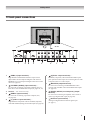
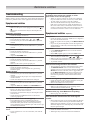
Connecting an amplifier equipped with an
MPEG decoder
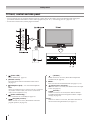
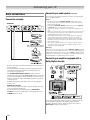
Side connections
Connection example
• The audio from the speaker will be muted when connecting
the headphone to this terminal.
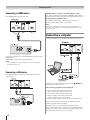
Connecting an HDMI or a DVI device
• This TV is not intended for connection to and should not be
used with a PC.
You can enjoy motion picture with dynamic realistic sound by
connecting the TV to an amplifier equipped with an MPEG
audio decoder or MPEG audio processor. When using this
setup, select Bitstream in Digital Output menu.
• When turning on your electronic components, turn on the
TV first, and then the HDMI or DVI device.
• When turning off your electronic components, turn off the
HDMI or DVI device first, and then the TV.
• This TV may not be compatible with features and/or
specifications that may be added in the future.
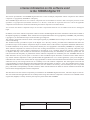
Connecting an amplifier equipped with a
digital audio (optical or coaxial) input
• This TV is only operable with L-PCM on 32/44. 1/48 kHz
and 16/20/24 bits.
Connecting an HDMI or a DVI device
The HDMI input on your TV receives digital audio and
uncompressed digital video from an HDMI device or
uncompressed digital video from a DVI device.
This input is designed to accept HDCP program material
in digital from EIA/CEA-861/861B compliant consumer
electronic devices (such as a set top box or DVD player with
HDMI or DVI output).
The HDMI input is designed for best performance with 1080i
(50 Hz/60 Hz), 1080p (50Hz/60Hz) high-definition video
signals, but will also accept and display 480i, 480p, 576i, 576p,
720p (50 Hz/60 Hz (60Hz: except for the E-EDID)) and VGA
signals.
HDMI: High-Definition Multimedia Interface
DVI: Digital Video Interface
HDCP: High-bandwidth Digital Content Protection
EIA/CEA-861/861B compliance covers the transmission
of uncompressed digital video with high-bandwidth digital
content protection, which is being standardized for reception
of high-definition video signals. Because this is an evolving
technology, it is possible that some devices may not operate
properly with the TV.
• E-EDID: Enhanced-Extended Display Identification
• VGA: VESA 640 x 480 @ 60 Hz
• L-PCM: Linear-Pulse Code Modulation
•
•
•
•
You can enjoy dynamic sound of 2-channel digital stereo by
connecting the TV to an amplifier equipped with a digital
audio (optical or coaxial) input and speaker system (right and
left front speakers). When using this setup, select PCM in
Digital Output menu.
29