1
Model 152 Smart Card Reader/Writer Operation Instructions
Commands
The TLP-224 protocol has some commands which we call the “core” commands. These
commands are implemented with the objective of being compatible with other readers which use
the TLP-224 protocol. Most readers implement these commands in the same way. Thus, if you
use only these commands, you may be plug compatible with other readers. The core
commands are marked with an * in Table 16.
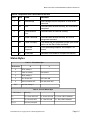
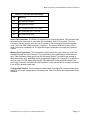
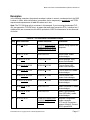
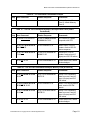
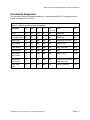
Table 14 - TLP-224 Reader Commands
HEX
Name
Use
39
Version Report
Transmits Version String
7F
Warm Reset
Simulates power cycle
0101
Reader Status Request /
Set LEDs
Transmits Reader Status Bytes, can also be used
to set LEDs
43
Select Card Connector
Selects the card Connector to be used with
subsequent card I/O commands
54
Select Memory Card Type
Selects the type of Memory Card for use with
subsequent Memory Card commands
23
Configuration Request
Transmits Reader Configuration Bytes to the host
Version Report. Use this Command when you want to know the version of the Model 152
firmware currently loaded. The response is an ASCII string giving the firmware ID.
Warm Reset. Use this command when you want the reader to simulate a power cycle.
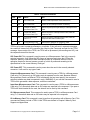
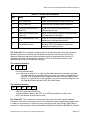
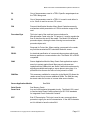
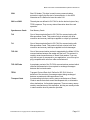
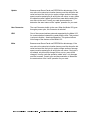
Reader Status Request / Set LEDs. Use this command to interrogate the reader about its
operational status and, optionally, to set the state of the LEDs. One byte of status information
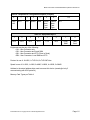
will be returned, see Tables 7 & 8 for status byte interpretation.. ICC Power and Card Seated
bits refer to the currently selected card Connector. Card Seated is only meaningful for the User
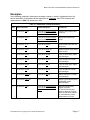
Connector. If you wish to manipulate the LEDs with this command, you must send an extra byte
after the 0101H bytes sent to designate the command. The extra byte tells the reader how to
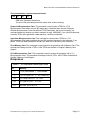
manipulate the LEDs, and you can find the encoding for that byte in Table 15.
8182760 Revision G Copyright Axiohm 1998 All Rights Reserved
Page 1.3