1
and when it reproduces any unique, referential, or check constraint. As a result, if
you use the dbschema output to create a new object (table, index, view, procedure,
constraint, sequence, or synonym), the owner of the original object owns the new
object. If you want to change the owner of the new object, you must edit the
dbschema output before you run it as an SQL script.
You can use the output of dbschema to create a new function if you also specify
the path name to a file in which compile-time warnings are stored. This path name
is displayed in the dbschema output.
For more information about the CREATE TABLE, CREATE INDEX, CREATE
SYNONYM, CREATE VIEW, CREATE SEQUENCE, CREATE PROCEDURE,
CREATE FUNCTION, and GRANT statements, see the IBM Informix Guide to SQL:
Syntax.
dbschema server-specific information
The dbschema -ss option generates server-specific information. In all Informix
database servers except SE, the -ss option always generates the lock mode, extent
sizes, and the dbspace name if the dbspace name is different from the database
dbspace. In addition, if tables are fragmented, the -ss option displays information
about the fragmentation strategy.
When you specify the dbschema -ss option, the output also displays any GRANT
FRAGMENT statements that are issued for a particular user or in the entire
schema.
The -si option, which is available only with the -ss option, excludes the generation
of index storage clauses for non-fragmented tables.
If the dbspace contains multiple partitions, dbspace partition names appear in the
output.
For information about fragment-level authority, see the GRANT FRAGMENT and
REVOKE FRAGMENT statements in the IBM Informix Guide to SQL: Syntax.
User-defined and complex data types
The dbschema -u option displays the definitions of any user-defined and complex
data types that the database contains. The suboption i adds the type inheritance to
the information that the dbschema -u option displays.
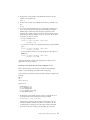
The following command displays all the user-defined and complex data types for
the stork database:
dbschema -d stork -u all
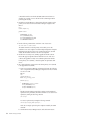
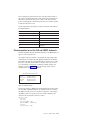
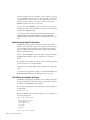
Output from dbschema that ran with the specified option -u all might appear as
the following example shows:
create row type ’informix’.person_t
(
name varchar(30, 10) not null,
address varchar(20, 10),
city varchar(20, 10),
state char(2),
zip integer,
bdate date
);
create row type ’informix’.employee_t
11-6
IBM Informix Migration Guide