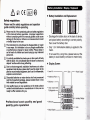
1
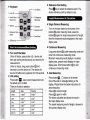
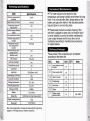
● Reference POint se"ing
● κeyboard
Press1囿 Dkey to seleCtthe reference point The
Vn"sw"ch
device reference point by defauⅡ
Pythagorean
Measu冖 ng
岫酾∞ ∷
田 I帑 回
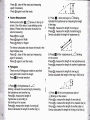
● single Distance Measuring:
窳瑞醢
眚
・subtrauon
Turn on the Iaser beam by short pre$s ofthe
・Baoklight on/o料
・0ff
Remoˇ e
∷∷
Ⅱ
∷∷I
is rear
button躐 胗黟under measrlng mode,press the
button躐 踺鹂again for single rneasurement oflength,
・saVe/Read
then the measured resu"s disp丨 ayed in the malor
display area
● Continuous Measuring:
Long press button黠 under measuring mode and
● Turn on'o仟 the Meter
Under o矸 status,press button镙 黪 ,device and
丨
aser get starting simu"aneously and stand by for
enterinto Continuous measuring mode
Minirnum measuring resu"dispIays in aux"iary
dispIay area,present resu"dispIays in malor
display area short press bo‖ on曩 to exit
measurement
∽der m statu黾 ong町 ess button黪 衔 3
seconds to turn the deVice off The device w"l
be shut o仟 VVithout any operation for150seConds
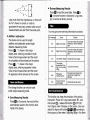
● unit seⅡ ing
Press bu‖ on日日,reset current measuremenl un",
the defau"unit is∶
continuous measuring rnode
● Area
“
,
□ shows on the screen
0ne ofthe side of rectangIe bⅡ nking on the
display Please fo"ow the below instructions for
0000m
There are6units for selection
Volume
Measu"ng:
Press bu⒒ on I囝
ˉ
area measunng∶
Press噌 爰
羧0nce
攮
簧
营
翥
翥
ength
oo00m
Area
o000mz
o00Omˇ
Press黪
o00m
o0Om2
o00m3
The deVice calculates and shoWs the resu"in
o Oin
o 00fl‘
o 00ftˇ
o 00ft
o 0Oft∠
o00ff
Length
01/16in
o oomz
000Ⅱ
001"6
o oOn‘
000Ⅱ
0’
°
ˇ
for丨
ag画 n for width
the malor display area
The resent rneasuring resu"oflength is shoˇ Ved in
the auXⅢ ary display area