1
Notes:
B.
MASTER & SLAVE (NETWORK)
When setting up a SmartCom³ Master and
Slave (Network) system, the master controller
will display an error message during
commissioning.
This will clear once the
commissioning is complete.
Th 09 : 30 Zone 1
COMMS ERR Zone 6
REMOTE SWITCHED INPUTS
Remote Door Interlock
EXTERNAL / DOOR
FROST ONLY
SmartCom³ controllers can be connect to a
door interlock, remote frost stat or permanent
off switch via terminals B2 and B0. When a
volt free connection is provided (ie closed circuit to enable) at these terminals, the
controller reverts to a FROST ONLY mode.
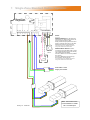
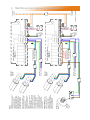
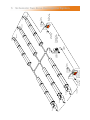
Refer to the individual wiring diagrams for
wiring configurations and type.
SmartCom³ controllers can be operated
remotely via a remote ON or a remote OFF
signal in the following ways:
A. Building Management System Control
(BMS).
EXTERNAL / BMS
AUTO
SmartCom³ controllers can be operated via a
BMS system, by applying a volt free
connection (ie closed circuit to enable) across
terminals B1 and B0 turns the system on.
Making this connection on a master controller
will turn the entire system on whereas making
this connection on a slave unit will only bring
on that zone.
1. BMS Controlling Time only.
Document reference number GB/CON/005/0309
Ensure all the programmed ON times in the
SmartCom³ are turned off
(i.e. They read “- -:- -”).
2. BMS Controlling Time and Temperature.
Ensure all the programmed ON times in the
SmartCom² are turned off
(i.e. They read “- -:- -”). Set all the required
day temperatures to 30°C.
AmbiRad Limited Fens Pool Avenue
Brierley Hill West Midlands DY5 1QA
United Kingdom.
Telephone 01384 489700
Facsimile 01384 489707
Email [email protected]
Website www.ambirad.co.uk
Technical Suport www.s-i-d.co.uk
AmbiRad is a registered trademark of AmbiRad Limited. Because of continuous product
innovation, AmbiRad reserve the right to change product specification without due notice