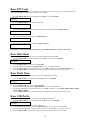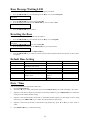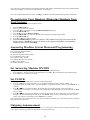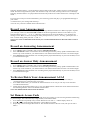
1
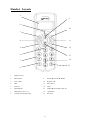
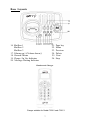
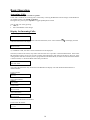
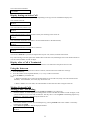
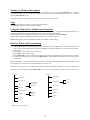
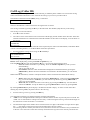
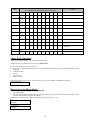
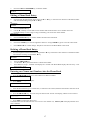
User Manual Model C220-1/C220-2/C220-3 Digital Cordless Phone TABLE OF CONTENTS Important Safety Instructions ..................................................................................................... 4 Safety Instructions for Handset Battery Pack ............................................................................ 5 Handset and Base Layouts ......................................................................................................... 6 Handset and Charger .................................................................................................................. 7 LCD Display .............................................................................................................................. 8 Getting Started............................................................................................................................ 8 Features ...................................................................................................................................... 9 Basic Operation ........................................................................................................................ 10 Answering Calls ....................................................................................................................... 10 Display for incoming calls: ...................................................................................................... 10 Display during an active call.................................................................................................... 11 Display after a call is terminated.............................................................................................. 11 Using the Intercom ................................................................................................................... 11 Making External Calls.............................................................................................................. 11 Ending your outgoing call ........................................................................................................ 12 Teleconference and Intercom Call Transferring....................................................................... 12 Call Waiting.............................................................................................................................. 12 Call Waiting ID ........................................................................................................................ 12 Redial ....................................................................................................................................... 12 Muting the Handset Microphone.............................................................................................. 13 Page .......................................................................................................................................... 13 Using the ‘Hands-Free’ Handset Speakerphone....................................................................... 13 Handset Menu and Programming............................................................................................. 13 Call Log (Caller ID) ................................................................................................................. 14 CALLER ID Prefix .................................................................................................................. 15 Smart Dialing ........................................................................................................................... 15 Phone Book .............................................................................................................................. 15 Characters................................................................................................................................. 15 Phone Book Operation ............................................................................................................. 16 How to use your Phone Book:.................................................................................................. 16 Editing a Phone Book entry: .................................................................................................... 17 Deleting a Phone Book entry: .................................................................................................. 17 Entering new names and numbers into the Phone Book.......................................................... 17 Volume ..................................................................................................................................... 18 Ring Volume............................................................................................................................. 18 Ring Pattern.............................................................................................................................. 18 Auto talk................................................................................................................................... 18 Low Battery alert Tone............................................................................................................. 19 No coverage alert Tone............................................................................................................. 19 2 Key Tone .................................................................................................................................. 19 Key Lock .................................................................................................................................. 20 Handset Naming....................................................................................................................... 20 Language .................................................................................................................................. 20 LCD Contrast ........................................................................................................................... 21 Reset Handset........................................................................................................................... 21 Default Handset settings........................................................................................................... 21 Base PIN Code ......................................................................................................................... 22 Base Dial Mode........................................................................................................................ 22 Base Flash Time ....................................................................................................................... 22 Base CID Prefix ....................................................................................................................... 22 Base Message Waiting LED..................................................................................................... 23 Resetting the Base .................................................................................................................... 23 Default Base setting ................................................................................................................. 23 Date / Time ............................................................................................................................... 23 Base Unit Status Indication ...................................................................................................... 24 Display Messages..................................................................................................................... 24 Registering Your Handsets (Adding Handsets to Your System) .............................................. 24 De-registering Your Handsets (Removing Handsets from Your System) ................................ 25 Answering machine system Menu and programming.............................................................. 25 Set Answering Machine ON/OFF ............................................................................................ 25 Set CLOCK .............................................................................................................................. 25 Outgoing Announcement.......................................................................................................... 25 Record your Announcement..................................................................................................... 26 Record an Answering Announcement ...................................................................................... 26 Record an Answer Only Announcement .................................................................................. 26 To Review/Delete Your Announcement A1/A2 ....................................................................... 26 Set remote access code............................................................................................................. 26 Remote Operation .................................................................................................................... 27 Set 'Announce Only' On / Off .................................................................................................. 27 Set Audible Message Alert On / Off......................................................................................... 28 Set Base Ringer On / Off.......................................................................................................... 28 Set Number of Rings to Answer............................................................................................... 28 Record a Memo ........................................................................................................................ 28 Listen to your Messages........................................................................................................... 28 Play messages........................................................................................................................... 28 Delete Message ........................................................................................................................ 29 Other Important Things You Should Know ............................................................................. 29 Consumer Information ............................................................................................................. 29 GFM Guarantee…………………………………………………………………………….....31 3 Important Safety Instructions BEFORE USING YOUR TELEPHONE EQUIPMENT, BASIC SAFETY PRECAUTIONS SHOULD ALWAYS BE FOLLOWED TO REDUCE THE RISK OF FIRE, ELECTRIC SHOCK AND INJURY TO PERSON, INCLUDING THE FOLLOWING: 1. Read and understand all instructions. 2. Follow all warnings and instructions marked on the product. 3. Unplug this product from the wall outlet before cleaning. Do not use liquid cleanser or aerosol cleanser. Use a damp cloth for cleaning. 4. Do not use this product near water, for example, near a bath tub, wash bowl, kitchen sink, laundry tub, in a wet basement, or near a swimming pool. 5. Do not place this product on an unstable cart, stand, or table. The product may fall, causing serious damage to the product. 6. Slots and openings in the cabinet and the back or bottom are provided for ventilation. To protect it from overheating, these openings must not be blocked or covered. The openings should never be blocked by placing the product on the bed, sofa, rug, or other similar surface. This product should never be placed near or over a radiator or heat register. This product should not be placed in a built-in installation unless proper ventilation is provided. 7. This product should be operated only from the type of power source indicated on the label. If you are not sure of the type of power supply to your home, consult your dealer or local power company. 8. Do not allow anything to rest on the power cord. Do not locate this product where the cord will be damaged by persons walking on it. 9. Do not overload wall outlet extension cords, as this can result in the risk of fire or electric shock. 10. Never push objects of any kind into this product through cabinet slots as they may touch dangerous voltage points or short out parts that could result in a risk of fire or electric shock. Never spill liquid of any kind on this product. 11. To reduce the risk of electric shock, do not disassemble this product. Instead, when repair work is required, take the unit to a qualified technician. Opening or removing covers may expose you to dangerous voltages or other risks. Incorrect reassembly can cause electric shock when the appliance is subsequently used. 12. Unplug this product from the wall outlet and refer servicing to a qualified service personnel under the following conditions: a. When the power supply cord or plug is damaged or frayed. b. If liquid has been spilled into the product. c. If the product has been exposed to rain or water. d. If the product does not operate normally by following the operating instructions. Adjust only those controls that are covered by the operating instructions because improper adjustment of other controls may result in damage and will often require extensive work by a qualified technician to restore the product to normal operation. e. If the product has been dropped or cabinet has been damaged. f. If the product exhibits a distinct change in performance. 4 13. Avoid using a telephone (other than a cordless type) during an electrical storm. There may be a remote risk of electrical shock from lightning. 14. Do not use the telephone to report a gas leak in the vicinity of the leak. 15. This power unit is intended to be correctly oriented in a vertical or floor mount position. 16. Use only with Class (Class 2) power source 7.5VDC 300mA. SAVE THESE INSTRUCTIONS Safety Instructions for Handset Battery Pack CAUTION: There is danger of explosion if the battery is incorrectly replaced. Use only an approved battery pack in the handset of your Cordless Telephone System. To reduce the risk of fire or injury, always do the following when replacing, discarding, or charging battery. When handling the batteries, be careful not to short the battery with conducting materials such as rings, bracelets, and keys. The Battery or conducting material may overheat and cause burns. Use only the following type and size of battery pack: FOR HANDSET UNIT: LEXEL, LH060-3A43C2BRML1P 600mAH 2.4V Battery Pack CONTAINS NICKEL-METAL HYDRIDE BATTERY. BATTERY MUST BE RECYCLED OR DISPOSED OF PROPERLY 1. Do not dispose of the battery in a fire. The cell may explode. Check with local codes for possible special disposal instructions. 2. Do not open or mutilate the battery. Released electrolyte is corrosive and may cause damage to the eyes or skin. It may be toxic if swallowed. 3. Exercise care in handling batteries in order not to short the battery with conducting materials such as rings, bracelets and keys. The battery or conductor may overheat and cause burns. 4. Charge the batteries provided with, or identified for use, with this product only in accordance with the instructions and limitations specified in this manual. 5. Observe proper polarity orientation between the battery(ies) and the battery charger. 6. Do not mix old and new batteries in this product. 7. Do not mix batteries of different sizes or from different manufacturers in this product. SAVE THESE INSTRUCTIONS 5 Handset Layouts 1 9 2 10 3 4 11 5 12 6 13 14 7 15 8 1 Display (LCD) 2 Phone Book 9 Volume ▲ / Scroll ▲ /Redial 3 Clear / Mute 10 Program / OK 4 Talk 11 Off / Cancel 5 Intercom 12 Flash 6 Speakerphone 13 Volume ▼/ Scroll ▼/ Caller ID 7 Dialing Keys (0-9; *; #) 14 Oper/Pause 8 Asterisk /Tone/Ring off key 15 Key lock 6 Base Layouts 16 Mailbox 1 Mailbox 2 Mailbox 3 17. Volume up(+)/Volume down(-) 18. Record/ Memo 19. Charge / In Use Indicator 20. Message Waiting Indicator 21. 22. 23. 24. 25. 26. Page key Menu Previous Delete Next Stop Handset and Charger Charger suitable for Model C220-2 and C220-3 7 LCD Display Speakerphone icon (displayed when the Speakerphone is ON) Key lock icon (displayed when the user locks the keypad) Mute icon (displayed when the Handset microphone is Muted) Low battery icon (on only if the battery voltage is low) Off Hook icon (displayed when the Handset is on an external or intercom call) NEW icon (displayed when the new Caller ID records are available) Ringer OFF icon (displayed when the user turns the ringer off) In Service icon (displayed when the Handset is ‘in range’ of the Base) Getting Started Install and Charge the Battery Pack 1 Open the battery compartment by sliding the cover down. 2 Plug the Battery Pack connector into the Handset socket, then place the battery pack and wires in the compartment. 3 Slide the battery cover back into place. 4 5 6 Plug the telephone cord and DC power cord into the corresponding jacks on the bottom of the Base. Connect the power supply to a live outlet. Make sure the outlet is not controlled by a switch. Leave the Handset in the Base for 10 hours so that the battery pack is fully charged. 8 7 8 9 Plug the adaptor into the socket/outlet which is near equipment and easily accessible. Place the Handset in the Base cradle. The Handset and Base communicate with each other automatically (if an expansion handset has not been registered to the base before, its display will show “Not Reg” to indicate that this handset needs to be registered. See instructions on page (26). Allow the Handset to charge for a day for the first time. The CHARGE indicator on the Base will glow while the Handset is charging. Features Congratulations on your purchase of this high quality, cordless telephone set. The set offers the following features: 1. Phone book for 50 entries with names and numbers. 2. Caller ID function with caller list for 30 numbers or names from phone book (dependent on network) 3. Dot matrix alphanumeric LCD display 4. 10 number redial log 5. Microphone mute 6. Keypad lock 7. Supports 3 operating languages. 8. Internal communication between handsets 9. Pre-dialing 10. Post-Dialing 11. Smart dialing 12. Automatic call answering on/off 13. Operation of up to 4 handsets 14. Up to 100 hours standby 15. Up to 10 hours talk time 16. 30 minutes record time 17. 59 messages capacity 18. 3 mail boxes 9 Basic Operation Answering Calls If auto talk is disabled, press TALK or Speaker. If auto talk is enabled, the incoming call is answered by removing the Handset from the charger. If the Handset is not cradled, simply press TALK or Speaker. During the call, you can press Speaker to toggle Speakerphone On/Off You can end your call by pressing: • OFF, or • Place the Handset in the charger Display for Incoming Calls: An incoming call without caller ID: Call If your local service provider sends the caller ID information, First “Call” and then “ caller ID information will display. ” will display, then the 987-654-3210 or, in addition to that, the caller’s name information will be displayed. The name, which will be shown, may either come from the service provider or from the Phone Book. If the Caller ID information sent by the service provider contains name information, this name will be shown. However, if the calling number matches a number you have programmed in the Phone Book, the name associated with this number is shown instead; i.e. the Phone Book name takes precedence. SOMEBODY 987-654-3210 The Caller ID information may be blocked. The Handset will display calls with blocked name/numbers as indicated below: Private number: SMITH Private Out of area number: SMITH Unavailable Private name: Private 987-765-4321 Out of area name: Unavailable 987-765-4321 If both name and number are blocked: Private name & number: Private 10 Out of area name & number: Unavailable Display during an Active Call After answering the call, the display changes depending on the type of call. The different displays are: Call without Caller ID: Call 00:00:10 Call with caller ID (number only): 987-654-3210 00:00:10 If the Caller ID number is blocked (and no name), the incoming call is shown as: Call 00:00:10 Call with Caller ID (number and name or an associated number in the Phone book): SOMEBODY 00:00:10 Calls with blocked name in Caller ID are shown as: Call 00:00:10 The number ‘00:00:10’ represents the elapsed time of your call, in hours, minutes and seconds. Key entries during a call will replace the number/name in the first line, and the digits will scroll off the left side in case the entered number exceeds 16 digits. Display after a Call is Terminated When the call is terminated, the current screen remains for 2 seconds before the phone returns to idle. Using the Intercom If more than one handset is registered on the base station, internal calls can be made free of charge. 1. Press the INT key. 2. Press the number of the required handset (1..4) . Carry out the conversation. 3. Press the OFF key to end the call. Note: 1. When two handsets are in intercom mode and there is an external call (a beep tone can be heard on the handsets). A third handset, if it exists, may answer the call. 2. When a handset is in call mode, the other handsets are able call each other using the intercom. Making External Calls Making Calls – Pre-Dialing You can enter the phone number before pressing TALK or Speaker to get a dial tone: 1. Enter the number. It will be displayed in enlarged font. In the event that the number exceeds 16 digits, it will split the numbers into two lines with normal font. You may enter a 3-second pause in the dialing sequence by holding “0”. The pause is indicated by the character "P". 1234567890123P96 322300 2. 3. Check if the number is correct. You can backspace by pressing CLEAR. The entire number is cleared by holding down CLEAR. Press TALK or Speaker to dial the displayed number. …890123P96322300 00:00:01 11 4. 5. During the call, you can press Speaker to toggle the Speakerphone On/Off. The maximum length of the pre-dialing number is 24 digits. Making Calls – Post-Dialing 1. Press TALK or Speaker, and listen for dial tone. 2. Enter the phone number and it will dial out: 9876543210 00:00:01 The display shows the digits of the number as they are entered. The first digit is entered in the left-hand side of the first line. 3. During the call, you can press Speaker to toggle Speakerphone On/Off. Ending your Outgoing Call Your outgoing call is terminated by either pressing: 1. OFF 2. or by placing the Handset in the charger. After terminating your call, the Call Timer stops running. The Handset returns to the idle screen after 2 seconds. If the Handset is put in the cradle, it returns to the idle screen immediately. NOTE: If the Handset connection is lost, (e.g. the Handset is out of range of the Base for at least 5 seconds), the Base Unit automatically goes on-hook (terminates the call), and the Handset will display ‘Searching’. Teleconference and Intercom Call Transferring After having received an external call, it is possible to include a second handset in the conversation (three-way conference) 1. Press INT and enter the number of the corresponding handset (e.g.2) that will receive the transfer of the call. 2. The external caller is kept on hold. As soon as handset 2 takes the call, press the OFF key to transfer the call to handset 2. Note: the handset which initiates the intercom call can switch between the phone call and the intercom handset by pressing PROG/OK key twice to select the ‘Switching’. (When the intercom is connecting, the far end user will hear a beep tone) 3. 4. Or In order to join a Teleconference, simply press the TALK or Speaker button of a handset not currently on the external call and the teleconference will be activated automatically. (A beep tone will be heard and “Conference” will be displayed on the LCD.) By pressing the OFF key, any of the handsets can be disconnected from the teleconference and the other handset continues with the external call. Call Waiting When you receive a Call Waiting alert tone in the earpiece (or Handset Speakerphone), the ‘waiting’ call can be answered by pressing the FLASH key. If the ‘waiting’ call is not answered, the display will return to normal active call after 20 seconds. Call Waiting ID When the Handset is in use, and you receive Caller ID information, the Redial and call log menu will be available by pressing “PROG/OK” button. 1. Use the ▲ and ▼ scroll keys to highlight the desired action. 2. Confirm the action by pressing PROG/OK. 3. The Handset then returns to the normal call display. For more information on Call Waiting options, contact your local service provider. Redial The last 10 numbers called are stored in the redial memory. With the Handset idle (on hook), press RDL and Use the ▲ and ▼ scroll keys to find the desired phone number. “Empty” will be displayed if there is no redial memory, and then the unit will return to standby mode. 12 Muting the Handset Microphone It is possible to mute the microphone during a conversation by pressing the Clear/MUTE key. With the microphone muted, you can hear the other party, but they can’t hear you. Return to the two-way conversation by pressing Clear/MUTE again. The Mute function is automatically cancelled when you hang up (go on hook) Page The page call function is used as an aid to locate the Handset. Press PAGE on the Base Unit to page the Handset. Using the ‘Hands-Free’ Handset Speakerphone The hands-free operation can be switched on and off while in conversation. Using the Handset Speakerphone, you can place the Handset on a table and talk hands-free. It’s a portable speakerphone! With the handset active, hands-free function can be enabled or disabled by pressing Speaker The hands-free mode is automatically deactivated when you terminate your call. NOTE: You can also use the speakerphone while the Handset is in the charger. Handset Menu and Programming 1. Press the PROG/OK key to enter the menu. 2. Use the ▲ / ▼ keys to scroll through the menu items. By pressing the ▼ key twice at the last menu item, you will scroll to the first menu item; and by pressing ▲ twice at the first menu item, you will scroll to the last menu item. 3. Press Clear to go back one level in the menu. 4. Press OFF to enter the idle stage. 5. Press PROG/OK to choose the menu item shown in the first line of the display which has an Arrow pointer. 6. Confirm the setting/level by pressing the PROG/OK key. The Handset automatically returns to the previous menu level. In case the Handset is in the menu mode when a call arrives, the phone automatically aborts the menu and receives the incoming call. The menu is not accessible during an active call. If there are no key presses for 1 minute while in the menu mode, the Handset automatically returns to an idle state. The menu is accessed by pressing the PROG/OK key. An overview of the menu structure is shown in Figure 1.1. Setup HS Setup BS Change PIN Ring melody Tone Ring Volume Dial mode Low battery Tones Pulse No coverage Key tone Flash time Auto talk CID prefix Handset name Language VMWI English Francais Espanol Reset Contrast Reset Figure 1.1 Menu structure. 13 Call Log (Caller ID) Caller ID logs all incoming calls with a valid Caller ID, provided the phone numbers are stored in the call log. Name and time/date information is also stored in the call log if your service provider sends it. The number of unanswered calls (NEW), if any, is indicated: Missed Calls The new call indicator is removed when the call log has been reviewed. The call log is entered by pressing the ▼ key in the idle mode. The Handset jumps directly to the call log. The call log is reviewed as follows: 1. Press ▼ to enter the menu. 2. The caller’s name will be shown in the second line of the display, and the number in the third line. If the time and date information are contained in the Caller ID and there are three lines in the display, it will be shown in the top line. 12/10 7:48PM NEW SOMEBODY 987-654-3210 The name contained in the received Caller ID will be replaced by the name in the Phone Book, if the Phone Book contains a matching number; i.e. the Phone Book name takes precedence. 3. Scroll through the call log entries using the ▼ and ▲ keys. 11/27 11:02AM ANOTHERPERSON 012-345-6789 The following actions are possible from the call log: Dial the caller displayed by pressing the TALK or Speaker key. Or Press the PROG/OK key and, using the ▼ and ▲ keys, you can select the following actions. o Select the number and edit it as pre-dialing. Press the TALK or Speaker key when you have finished editing and you are ready to dial. o Save number: Save the Caller ID information displayed into the Phone Book by pressing the PROG/OK key. Before the name and number is transferred to the Phone Book, you can edit the name. Note: Caller ID information, without a valid phone number cannot be transferred to Phone Book memory. o o Delete: Delete the caller displayed by pressing the PROG/OK key. After pressing the PROG/OK key, you will be asked to ‘Confirm?’; you can either accept deletion by pressing PROG/OK or cancel it by pressing Clear. Delete all: You can delete all entries in the call log by pressing the PROG key. You will then be asked to ‘Confirm?’ Accept the deletion by pressing PROG/OK or cancel it by pressing Clear. By selecting PROG/OK, the phone displays “All deleted” and then “Empty”. It returns to main menu after deleting. By selecting Clear, the phone returns to the Call Log. • Exit the Call Log review by pressing the OFF key. Two information messages are displayed together with the Caller ID data: • ‘NEW’ icon on the right hand side of the top line indicates that the call has not previously been reviewed. The ‘NEW’ icon is cleared when scrolling to the next entry or when leaving the Call Log. The maximum length of the name shown in the second line is 15 characters. • The maximum length of the number shown in the third line is 16 digits. If the number is longer than 16 digits, the “…” will display on the left most position and followed by the last 15 digits. The incoming calls are sorted by the order of arrival; the latest is shown first. A number is only contained once in the list. A new call from a caller that is already contained in the log removes the old entry and inserts the 14 new call. All calls with a blocked number are stored as individual calls. Your Handset stores 30 records. If the call log is full, the oldest entry is deleted to make room for the new call. If the call log is empty when the user tries to enter to Call Log review, ‘Empty’ is displayed and the phone returns to the main menu after 2 seconds. Empty CALLER ID Prefix 1. 2. When Caller ID is received, a prefix digit ‘1’ is optionally added before saving to the Call log. The option is available to the user via the Handset menu settings. If adding prefix digit ‘1’ option is enabled, this digit ‘1’ will only be added if the received CID pattern matches the same conditions as indicated in Table 1.1. For examples: If the received Caller ID is 345-6789 it will be saved as 1-345-6789. If the received Caller ID is 987-345-6789, it will be saved as 1-987-345-6789. If the received Caller ID is 1-345-6789, it will still be saved as 1-345-6789. If the received Caller ID is 1987-345-6789, it will still be saved as 1-987-345-6789. If the received Caller ID is 45-6789, it will still be saved as 456789 without any change. If the received Caller ID is 61-245-6789, it will still be saved as 61-245-6789 without any change. If adding prefix digit ‘1’ option is disabled, the original CID digits received from PSTN will be stored into Call log without any change. Smart Dialing It is possible to change the number format in the call log before storing the name/number in the Phone book or dialing the caller. Pressing the # key toggles the number format. The available number formats depend on the received number. The table below shows the possible selections and the order as a function of the incoming number format. The number format is changed by truncating or by adding the digits as described in the table 1.1. Incoming format 11 Dialable/storable formats and selection sequence 1xxx-yyy-yyyy xxx-yyy-yyyy 1-yyy-yyyy 10 xxx-yyy-yyyy 8 1-yyy-yyyy 7 yyy-yyyy Table 1.1 1-yyy-yyyy yyy-yyyy yyy-yyyy 1xxx-yyy-yyyy yyy-yyyy 1-yyy-yyyy Number format selection. yyy-yyyy: basic number xxx: area code Phone Book • • • You can store up to 50 Phone book entries, which includes names and phone numbers. The Phone book entries are sorted and presented in alphabetical order. Press Phone Book to initiate Phone book operation. Characters Names are entered using the numerical keys. Characters are generated by multiple key presses (see the table below). The cursor moves to the next position if another numerical key is pressed or by pressing the ▼ key. The last entered character is deleted by pressing CLEAR. The entire name is cleared with a long CLEAR key press. At any time, you can Press * to switch between Upper and Lower case. 15 Alphanumeric (For Phone book, including upper & lower case) Key 1st 2nd 3rd 4th space 1 space 1 A B C 2 2 a b c 2 D E F 3 3 d e f 3 G H I 4 4 g h i 4 J K L 5 5 j k l 5 M N O 6 6 m n o 6 P Q R S 7 p q r s T U V 8 8 t u v 8 W X Y Z 9 w x y Z . , ? ! 0 . , ? ! * Toggle upper/lower case # * @ \ # # * @ \ Table 1.2 Character guide. 5th 6th 7th 8th 9th Number 10th 1 1 2 3 4 5 6 7 7 7 8 9 9 0 0 + + - : : ' ' / / _ _ ( ( ) ) = = 9 " " 0, P (Pause) * § # Phone Book Operation The Phone Book is entered via the menu, as described below. The Phone book is accessed by simply pressing Phone Book. From the Phone Book menu it is possible to: • Search for an entry and dial the number. If no records match the search criteria, the closest alphabetic match is displayed. • Add a new entry • Select. • Edit an entry. • Delete an entry. When attempting to search, edit or delete entries in an empty Phone Book, the Handset will display: Phonebook Empty How to use your Phone Book: Searching for and dialing from the Phone Book: 1. 2. Press Phone Book. Scroll through the Phone Book entries using the▼ or ▲ key; OR enter the first character of the desired name and continue searching using the ▼ or ▲ key. NOTE: You can toggle Contact name and number display by pressing “*” key. R >ROBERT ROGER * >9898327822 ROGER 16 3. Press the TALK or SPEAKER key to dial the number. ROBERT 00:00:01 Editing a Phone Book Entry: 1. 2. Press the Phone Book key. Scroll through the Phone book entries using the ▼ or ▲ key; or enter the first character of the desired name and continue searching using the ▼ or ▲ key. R >ROBERT ROGER 3. 4. Press the PROG/OK key. Use the ▼ or ▲ key to select Edit to enter number edit mode and enter correct number. Press the Clear/MUTE key to erase a digit. A long CLEAR key press erases the whole number. 9898327777 5. Press the PROG/OK key to confirm number and enter name edit mode. ROBT 6. Press the CLEAR key to erase the rightmost character. A long CLEAR key press erases the whole name. 7. Press PROG/OK to confirm change. The phone will return to the Phone Book recall mode. Deleting a Phone Book Entry: 1. 2. Press the Phone Book key. Scroll through the Phone book entries using the ▼ or ▲ key; OR enter the first character of the desired name and continue searching using the▼ or ▲ key. >ROBERT ROGER 3. 4. 5. Press the PROG/OK key. Use the ▼ or ▲ key and select Delete? to delete the Number. Press PROG to accept. “Deleted” will display for 2 seconds. The Phone Book displays the next entry. –ORPress Clear to abort. Confirm? Entering new Names and Numbers into the Phone Book 1. Press the Phone Book key. 2. Press the PROG/OK key twice to select Add new to add new number Enter number 3. Enter the number (up to 24 digits). 4. Press PROG. Enter name 5. Enter the desired name (up to 15 characters). A name has to be entered; otherwise the number cannot be saved. Enter name 6. Press the PROG/OK key. Your new entry has been stored. “Saved” will display, and the screen returns to: >SOMEBODY --------------7. Press OFF to return to the idle screen. If the Phone Book is full when the user tries to store a new number in it, ‘Memory full’ is displayed and an error tone is emitted. Memory full 17 Volume During your conversation, the volume can be adjusted with the ▲/▼ keys. The level will be represented by the number of bars displayed on the screen. The display returns to normal in-call after 3 seconds. Ring Volume The ring volume is adjusted by the following key sequence: 1. Press the PROG /OK key twice to select Setup HS > Ring melody Ring volume 2. Press the ▼ key once and Press PROG/OK to enter the ring volume sub-menu. 3. Use the ▼/▲ keys. The current ring tone will be played once at the selected new volume. 4. Press the PROG/OK key to confirm the setting. The display returns to: >RING VOLUME Tones Ringing is switched off by holding the * key and there is an alert tone to indicate that the ringer is OFF / ON. Ring Pattern There are 8 ring tones for your choice The ring pattern of an incoming call is changed by the following key sequence: 1. Press the PROG/OK key twice to select Setup HS. > Ring melody Ring volume 2. Press PROG/OK once more. 3. Use the ▼/▲ keys. The selected ring pattern is played for you. > Melody 1 Melody 2 4. Press PROG/OK to confirm the setting. The display will show: Saved Auto Talk With Auto talk ON, you can answer a call by simply removing the Handset from the Base Unit. 1. Press the PROG/OK key twice to select Setup HS. > Ring melody Ring volume 2. Press the ▼ key three times. >AUTO TALK Handset name 3. Press the PROG/OK key to enter the auto talk sub-menu. >On OFF 4. Use the ▲or ▼key to select your option (On / Off) 5. Press the PROG/OK key to confirm the setting. The display will return to: >AUTO TALK Handset name 18 Low Battery Alert Tone It is possible to disable the low battery alert tone by the following sequence: 1. Press the PROG/OK key twice to select Setup HS. > Ring melody Ring volume 2. Press the ▼ key two times. >Tones Auto talk 3. Press the PROG/OK key to enter the Tones sub-menu. >Low battery No coverage 4. 5. 6. Press the PROG/OK key to enter the Low battery tone sub-menu. Use the ▲or ▼ key to select your option (On / Off). Press the PROG/OK key to confirm the setting. Note: Low battery alert tone is off by default No coverage Alert Tone It is possible to switch off the Out-of-range / no coverage alert tone by the following sequence: 1. Press the PROG/OK key twice to select Setup HS. > Ring melody Ring volume 2. Press the ▼ key two times. >Tones Auto talk 3. Press the PROG/OK key to enter the Tones sub-menu. >Low battery No coverage 4. Press the ▼ key once. >No coverage Key tone 5. Press the PROG/OK key to enter the No coverage tone sub-menu. 6. Use the ▲or ▼ key to select your option (On / Off). 7. Press the PROG/OK key to confirm the setting. Note: No coverage alert tone is Off by default Key Tone When the key tone option is enabled, any key pressed generates a click sound. To access the Key Tone option: 1. Press the PROG/OK key twice to select Setup HS. > Ring melody Ring volume 2. Press the ▼ key two times. >Tones Auto talk 3. Press the PROG/OK key to enter the Tones sub-menu. >Low battery No coverage 4. Press the ▼ key two times. 19 >Key tone -----------------5. Press the PROG/OK key to enter Key tone sub-menu 6. Use the ▲ or ▼ key to select your option (On / Off) 7. Press the PROG/OK key to confirm the setting. The display will return to: >Key tone -----------------Note: Key Click is On by default Key Lock It is possible to lock / unlock the Handset keypad by holding #. Key lock is disabled in the event of an incoming call, but returns to key lock when the call is terminated. Key lock is disabled by default. Handset Naming It is possible to name your Handset. The name is shown in the 2nd line during idle mode, and it replaces the “Handset” indication. The maximum name length is 13 characters. To set your Handset name: 1. Press the PROG/OK key twice to select Setup HS. > Ring melody Ring volume 2. Press the ▼ key four times. >HANDSET NAME LANGUAGE 3. Press the PROG/OK key to enter the Handset name sub-menu and the current Handset name will be displayed: Handset 4. Enter the Handset name (characters are entered in the same way as for the Phone Book). DADDY PHONE 5. Press PROG/OK to confirm the setting. Language To set the language used in the Handset display: 1. Press the PROG/OK key twice to select Setup HS. >Ring melody Ring volume 2. Press the ▼ key five times. >Language Contrast 3. Press the PROG/OK key to enter the language selection sub-menu. The current language is shown in the first line with an arrow marking it. Use the ▲ or ▼ key to select English, Spanish or French, respectively. >English Francais 4. Press the PROG/OK key to confirm the setting. The phone returns to the previous menu. >Language Contrast The default language is English. 20 LCD Contrast To adjust the LCD contrast of the display: 1. Press the PROG/OK key twice to select Setup HS. > Ring melody Ring volume 2. Press the ▼ key six times. > Contrast Reset 3. Press the PROG/OK key to enter the sub-menu. 4. Use the ▼/▲ key to select the new contrast. 5. Press the PROG/OK key to confirm the setting. The display returns to: >Contrast Reset The default Contrast is set to 3. Reset Handset To reset the Handset to its default setting: 1. Press the PROG/OK key twice to select Setup HS. > Ring melody Ring volume 2. Press the ▼ key seven times. > Reset ----------------3. Press the PROG/OK key to enter the sub-menu. Reset? 4. Press the PROG/OK key to confirm the setting. The system will perform a system reset. Default Handset Settings Item Language Key click tone Keypad locked function Low battery tone No coverage tone Ringer off Auto talk Melody number for external ringer Volume for external ringer Ear piece volume Speaker phone volume Phone book record Redial record Selection 0:English 1:French 2:Spanish On/off On/off On/off On/off On/off On/off 1 to 19 1 to 5 1 to 5 1 to 5 Preset 0 Remark on off off off off on 1 5 1 3 Empty Empty 21 Maximum 24 digits for number and 15 characters for name Maximum 24 digits Base PIN Code The Base settings and information can be reset by resetting the base unit. However, to avoid un-authorized resetting of the Base, a PIN Code is needed in order to Reset. 1. Press the PROG/OK key once and then press the▼ key once to Setup BS. > Setup BS Date/Time 2. Press the PROG/OK twice to select Change PIN. Enter PIN 3. Enter the EXISTING PIN Code, the default PIN code is 0000 and Press the PROG/OK key. **-4. Enter the NEW PIN Code and Press the PROG/OK key. New PIN 5. Repeat the NEW PIN Code and Press the PROG /OK key. Repeat PIN Note: Please record the PIN code as there is no way to find it within the system if you forget it. Base Dial Mode Depending on your Telephone network, you can select different Dialing modes: 1. Press the PROG/OK key once and then press the ▼ key once to select Setup BS. > Setup BS Date/Time 2. 3. 4. 5. Press the PROG/OK key once to select Setup BS. Press the ▼ key once and then the PROG/OK key once to select Dial Mode. The current Dial Mode is shown with an arrow. Use the▲ or ▼ key to select Tone or Pulse dialing. Press the PROG/OK key to confirm the setting. The phone will return to the previous menu. Base Flash Time Depending on your Telephone network, you can select different Flash timing: 1. Press the PROG/OK once and then press the▼ key once to Setup BS. > Setup BS Date/Time 2. 3. 4. 5. Press the PROG/OK key once to select Setup BS. Press the ▼ key twice and then the PROG/OK key once to select Flash Time. The current Flash Time is shown with an arrow. Use the ▲ or ▼ key to select 100ms, 120ms, 270ms, 300ms, 370ms, 600ms or 800ms. Press the PROG/OK key to confirm the settings. The phone will return to the previous menu. Base CID Prefix You can set to add a prefix digit “1” to Call log by following procedures; 1. Press the PROG/OK key once and then press the ▼ key once to Setup BS. > Setup BS Date/Time 2. Press the PROG/OK key once to select Setup BS. 3. Press the ▼ key three times and then the PROG/OK key once to select Caller ID prefix. 4. The current Caller ID prefix is shown with an arrow. Use the ▲ or ▼ key to select On or Off. 5. Press the PROG/OK to confirm the setting. The phone will return to the previous menu. 22 Base Message Waiting LED You can turn off the Message Waiting LED by following the procedures: 1. Press the PROG/OK key once and then press the ▼key once to select Setup BS. > Setup BS Date/Time 2. Press the PROG/OK key once to select Setup BS. 3. Press the ▼ key four times and the PROG/OK key once to select VMWI. VMWI off ? 4. Press the PROG/OK key to confirm. Resetting the Base You can reset the base through the following procedures: 1. Press the PROG/OK key once and then press the ▼key once to Setup BS. > Setup BS Date/Time 2. Press the PROG/OK key once to select Setup BS. 3. Press the ▼ key five times and the PROG/OK key once to select Reset. Enter PIN 4. 5. Enter the PIN Code and Press the PROG/OK key. Press the PROG/OK key to confirm, wait several seconds for the Base to Reset and “Saved” is shown when completed. Default Base Setting Item Dial mode Calls log record Flash time Pin code Time Date CID prefix Selection Tone or Pulse Maximum 20 digits with Date/Time each record 100,120,270,300,370,600,800ms Any 4 digits 12:00a to 11:59p Any valid date within year 2000 to 2099 On/Off Preset Tone Empty Remark 600ms 0000 12.01p Year:2006 Month:1 Date:1 Off Date / Time You can set the Date/Time displayed in idle mode. 1. Press the PROG/OK key . 2. Press ▲ or ▼ key to select “Date/Time” then press the PROG/OK key, the LCD will display “Year 20xx”. 3. Input the correct last two digits of year (range: 00-99) using number key, press PROG/OK key to confirm the setting and enter month and date setting. 4. Input the correct month and date, the format is: month/date (month range: 01-12, date range: 01-30/31) using number key, press PROG/OK key to confirm the setting and enter time setting. 5. Input the correct time, the format is: hour/minute using number key, press ▲ or ▼ key to select “AM” or “PM”. 6. Press PROG/OK key to confirm the setting. 23 Base Unit Status Indication • • The Base Unit is equipped with a CHARGE indicator (a red LED), which is turned on by putting the Handset in the charge cradle. The second Base Unit indicator is a Message Waiting indicator. This LED is turned on when voice mail message waiting indicator (VMWI) signal is received. Display Messages The Handset provides a number of on-screen status messages, both in the idle state and during conversation. The following status messages are shown in the idle mode (in prioritized order): When the Handset does not have a valid registration, the display shows: Not Reg When the Handset is out of range, "Searching" is shown in line one. Searching When another HS (registered to the same Base) is in use, the display shows: Ext. in use When a voice mail message waiting indicator signal is received at the base, the display shows: Message waiting When there is a non-answered incoming call with Caller ID information, the display shows: Missed calls When the handset put on the cradle, it will display "Charging": Charging If the battery voltage is too low to guarantee reliable use, the display shows: Note: Message and display priority. 1. Not Reg-no registration record. 2. Searching-out of range from base. 3. Ext. in use-HS is in use. 4. Message waiting-voice message waiting indication. 5. Missed calls-Caller ID missed call. 6. Charging-Handset on cradle for charging. Registering Your Handsets (Adding Handsets to Your System; for C220-2,C220-3) Further handsets can be registered with the Base station. 1. 2. 3. 4. 5. 6. 7. 8. Press the PROG/OK key. Press # 2 4 5 0 # keys in sequence. Press the Down key repeatedly to select the REGISTRATION submenu. Press the PROG/OK key. Press the PROG/OK key again, Press and hold down the PAGE key on the Base station for 10 seconds, then enter the PIN when requested. (Default setting=0000). Press the PROG/OK key. If the registration succeeds, the display shows “Successful” for 2 seconds. If the registration fails after 60 seconds, the display shows “No Base” for 2 seconds. 24 Note: After the connection has been established, the name and number of the handset (The next available number, if less than 4 handsets are already registered) appears in the display. Note: An unregistered handset will show “Not Reg” to indicate that this handset needs registration before use. De-registering Your Handsets (Removing Handsets from Your System) Any handset can be removed from the Base station. 1. Press the PROG/OK key. 2. Press # 2 4 5 0 # keys in sequence. 3. Press the ▼ key repeatedly to select the REGISTRATION submenu. 1. Press the PROG/OK key. 2. Press the▼ key once to Remove handset. 3. Press the PROG/OK key, then enter the PIN when requested. (Default setting=0000) 4. Press the PROG/OK key 5. Press ▲ or ▼ key to select a handset 6. Press the PROG/OK key twice to confirm, if the handset being used was selected, the display shows “Not Reg” or else will return to the upper menu and the corresponding handset display shows “Not Reg”. Answering Machine System Menu and Programming In idle mode, you can program each of the following options: Turn Answering System On/Off Set the Day and Time Record your outgoing Announcement Set your Remote Access code Set ‘Announce Only’ On/Off Turn audible Message Alert On/Off Set Base ringer On/Off Set number of Rings to answer Set Answering Machine ON/OFF When you first switch on your phone, the answering machine is in the ON mode. 1. Press Menu key. When you hear the announcement, press or to switch between the On/Off setting. 2. Press Menu key to confirm your setting. Set CLOCK 1. 2. Press Menu key repeatedly until you reach Clock setting option. Press or key to program the Day. As you program, the display shows ' d' and a number, 1 to 7,representing the day of the week 1 represents Monday; 2 represents Tuesday, and so on. Press Menu key to confirm. 3. Press or key to program the Hour. Be careful that you program pm hour if the current time is in the afternoon or evening, or an am hour if the current time is after midnight or in the morning. Press Menu key to confirm. 4. Press or key to program the Minute. You'll be programming the 'tens' column first. Your choices are 0 through 5, as the minutes range from 00 to 59. Press Menu. Now, you are programming the 'ones' column, where your choices are 0 through 9. Press Menu key to confirm. Note: If the mains power to the base is lost, your answer machine will display "St." (Set time) to remind you adjust the clock when it is switch on. Outgoing Announcement You can record 2 different outgoing announcements: A 1 inviting your caller to leave a message (Announce Only OFF), and A 2 asking your caller to call back later (AnnounceOnly ON ). 25 Outgoing Announcement A 1 is played when Announce Only mode is OFF. Callers can leave a message in this mode. Your answering machine is preset with Announce Only set to OFF, allowing callers to leave a message. Outgoing Announcement A 2 is played when Announce Only mode is ON. Callers cannot leave a message in this mode. If you do not record your own announcements, your answering system will play a pre-programmed message to your callers: A1:”Please leave your message after the beep.” A2:”I am sorry I am not available. Please call back later.” Record your Announcement Your answering machine has 3 mailboxes, so you can assign different mailboxes to different people to separate your messages. These are marked M1 M2 and M3 on the answering machine. Be sure to tell callers in your announcement to press "1 " , "2 " or 3 ". Otherwise, messages will be stored in Mailbox 1. For example, the message can be “Hello, to leave a message for John, please press star (*) and ‘1’, for Tony, please press star ‘*’ and ‘2’ and for Sally please press star ‘*’ and ‘3’”. Note: Leave a few seconds blank at the end of your recorded announcement to allow the caller to select a mailbox. Record an Answering Announcement Make sure the announce only is set to OFF. 1. Press “Menu” button repeatedly until you hear “Announcement One” 2. Press “Rec/Memo” button. You will hear 'Now Recording' followed by a beep. Speak toward the Base Unit. You have up to 60 seconds for your announcement. Your announcement must be at least 3 seconds in length. 3. Press STOP button when finished. Your recording will be played automatically. If you're not satisfied, record your announcement again. Record an Answer Only Announcement Make sure the announce only is set to ON. 1. Press “Menu” button repeatedly until you hear “Announcement Two” 2. Press “Rec/Memo” button. You will hear 'Now Recording' followed by a beep. Speak toward the Base Unit. You have up to 60 seconds for your announcement. Your announcement must be at least 3 seconds in length. 3. Press STOP button when finished. Your recording will be played automatically. If you're not satisfied, record your announcement again. To Review/Delete Your Announcement A1/A2 2. Press Menu button repeatedly until you hear 'Announcement One' (Announce Only set to OFF) or 'Announcement Two' (Announce Only set to ON). 3. Press MAIL BOX button, you will hear the announcement of A1 or A2 (you can only review the latest recorded announcement). 4. During playing the announcement of A1 or A2, press Delete button to delete the current announcement and the answering machine will use the default announcement. Note: The default announcement cannot be deleted. Set Remote Access Code Your remote access code helps prevent unauthorized people from ringing up your answering machine and listening to your messages. The code can be any 4-digit number, from 0000 to 9999. 1. Press Menu button repeatedly until you hear "Remote access code is..." and the display shows Ac. 2. Press or to set the first digit between 0-9. Press Menu to confirm. 3. Repeat Step 2 until all 4 digits have been set. The machine announces the new code.( The pre-set code is 0000.) 26 Remote Operation You can access many features of this DAM remotely from a touch-tone phone. 1 When the unit is connected to the telephone line. During the announcement, Enter your remote access code (default 0000). 2 If the code entered is correct, it will give one beep. 3 If remote code entered is wrong, the DAM cannot enter remote control mode. The DAM allows user to enter 16 digits maximum. If it still cannot match the 4 digits, the unit will release the line. If the user presses wrongly, the user needs to enter the whole remote code again. 4 Within 5 seconds, enter a remote command (see “remote access commands”) else it will play the help menu automatically. After finished the help menu playback, if there is no command input within 20 seconds, the unit will release the line. 5 The DAM has voice prompts to help you to do remote operation. When you enter Remote Control State, then press ‘* ’ to hear the voice menu while remotely connected to the DAM. 6 The DAM will pause after the message replay for 165 seconds. The playback will stop if don’t press any key on the remote telephone within 20 seconds, then the DAM release the line. 7 Notice that during remote message playback, the unit will not be stopped when remote telephone hanged up. The playback will continue up to end of playback. And During Remote Control State, if pickup the parallel phone to take the line, the unit should exit remote control within 5 seconds. Your Remote Access function allows you to retrieve messages, and record memos and announcements when you're away from your Answering Machine. 1. Call your answering machine from any touch-tone phone. 2. When you hear your outgoing announcement, enter your 4-digit Remote Access code. . 3. You can now perform the following functions: IF YOU WANT TO PRESS 1, 2, or 3 Play messages in a mailbox 4 / Press 4 Twice Repeat / Play Previous Message 5 Stop playback or recording 6 Play Next Message 7 Delete current message 8, then choose Mailbox 1, 2, or 3 Record a Memo 9, then 5 to Stop Record Announcement 0 Turn System On /Off * Play Help Menu 4. After selecting each digit press Menu to confirm. Set 'Announce Only' On / Off 1. 2. 3. Press Menu key repeatedly until you hear “announce only is on or off”. Press or to switch between the On/Off setting. (preset to Off) Press Menu key to confirm your setting. 27 Set Audible Message Alert On / Off When Message Alert is ON, the Base unit will beep once every 10 seconds when new messages have been received. 1. Press Menu key repeatedly until you hear “message alert is on or off”. 2. Press or to switch between the On/Off setting. (preset to Off) 3. Press Menu key to confirm your setting. Set Base Ringer On / Off Your Base Ringer is independent of the Handset ringer. 1. Press Menu key repeatedly until you hear “base ringer is on or off”. 2. Press or to switch between the On/Off setting. (preset to Off) 3. Press Menu key to confirm your setting. Set Number of Rings to Answer Your Answering System can answer after 2 -6 rings or you can choose the Toll Saver option. The Toll saver option instructs the Answering System to answer after 4 rings only if there are new, un-played messages; otherwise, it will answer after 6 rings. The benefit to you is if you are making a long distance call to retrieve messages, if the Answering System does not answer after 4 rings, you can hang up. There are no new messages, and you will save the expense of a long distance call. 1. Press Menu key repeatedly until you hear “number of rings selected is 2/3/4/5/6/toll saver”. 2. Press to choose your desired section.(preset to toll saver) 3. Press Menu key to confirm your setting. Record a Memo You can record a memo, either at the Base Unit or from a remote location. To record a Memo at the Base: 1. Press REC/MEMO. You will be prompted to select a Mailbox. 2. Select the desired MAILBOX. You will hear 'Now Recording', followed by a beep, Speak towards the Base Unit. Press STOP when finished. Your memo is stored like a message from an outside caller. To record a memo from a remote location, follow instructions in the Remote Operation section. Listen to your Messages When you have new messages, the message counter will flash, showing the number of unplayed messages. When you have new messages, the appropriate MAILBOX (es) will flash. If a Mailbox only contains old messages, the indicator will glow steadily. Recorded messages and memos are retained until you delete them. Your Answering System has approximately 30minutes of storage capacity (or 59messages/memos). If its capacity is full, the system will answer after 10 rings, and the caller will hear 'Memory is Full '. Play Messages 1. Press the MAILBOX key you want - M1, M2 or M3. The prompt will tell you how many new and old messages are stored in that Mailbox. If there are one or more new messages, only the new messages will be played. After new message playback is completed, you can press the MAIL BOX key again to hear all old messages. Note: If short press the MAIL BOX key, the order of playback is oldest messages first, newest last. If long press the MAILBOX key, the order of playback is newest messages first, oldest last. Before each message is played, the day and time it was recorded is announced. 2. Press to replay the current message from the beginning. 3. Press twice to play the previously recorded message. 4. Press to skip to the next message. 5. Press STOP at any time to end playback. To listen to your message from a remote location, follow instructions in the Remote Operation section. 28 Delete Message To delete the message or memo currently playing, simply press Delete button. To delete all old messages stored in a Mailbox: 1. In the idle mode, press and hold Delete button. You will be prompted to 'Please Select a Mailbox '. 2. Press the desired MAILBOX key. All old messages will be deleted. NOTE: New unplayed messages cannot be deleted until you play them. Other Important Things You Should Know There is a total of 30minutes of record time. This includes messages, memos, and announcements. The maximum number of messages that can be stored is 59. A message, memo, or announcement can be a maximum of 60 seconds. If a call comes in while you are listening to messages, playback automatically stops. Consumer Information 1. This equipment complies with Part 68 of the FCC rules and the requirements adopted by the ACTA. On the back of this equipment is a label that contains, among other information, a product identifier in the format US: DDKW401BE30001B. If requested, this number must be provided to the telephone company. 2. An applicable certification jacks Universal Service Order Codes (USOC) for the equipment is provided (i.e., RJ11C) in the packaging with each piece of approved terminal equipment. 3. A plug and jack used to connect this equipment to the premises wiring and telephone network must comply with the applicable FCC part 68 rules and requirements adopted by the ACTA. A compliant telephone cord and modular plug is provided with this product. It is designed to be connected to a compatible modular jack that is also compliant. See“Getting Started ”section for details. 4. The REN is used to determine the number of devices that may be connected to a telephone line. Excessive RENs on a telephone line may result in the devices not ringing in response to an incoming call. In most but not all areas, the sum of RENs should not exceed five (5.0). To be certain of the number of devices that may be connected to a line, as determined by the total RENs, contact the local telephone company. The REN for this product is part of the product identifier that has the format US: DDKW401BE30001B. The digits represented by 01 are the REN without a decimal point (e.g., 03 is a REN of 0.3). The REN is separately shown on the label too. 5. If this equipment causes harm to the telephone network, the telephone company will notify you in advance that temporary discontinuance of service may be required. But if advance notice isn’t practical, the telephone company will notify the customer as soon as possible. Also, you will be advised of your right to file a complaint with the FCC if you believe it is necessary. 6. The telephone company may make changes in its facilities, equipment, operations or procedures that could affect the operation of the equipment. If this happens the telephone company will provide advance notice in order for you to make necessary modifications to maintain uninterrupted service. 7. Please follow instructions for repairing if any (e.g. battery replacement section); otherwise do not alternate or repair any parts of device except specified. 8. Connection to party line service is subject to state tariffs. Contact the state public utility commission, public service commission or corporation commission for information. 29 9. This equipment is hearing aid compatible. NOTICE: 1) If your home has specially wired alarm equipment connected to the telephone line, ensure that the installation of this phone does not disable your alarm equipment. If you have questions about what will disable alarm equipment, consult your telephone company or a qualified installer. 2) According to telephone company reports, AC electrical surges, typically resulting from lightning strikes, are very destructive to telephone equipment connected to AC power sources. To minimize damage from these types of surges, a surge protector is recommended. 3) This device complies with part 15 of the FCC Rules. Operation is subject to the following two conditions: (1) This device may not cause harmful interference; and (2) This device must accept any interference received, including interference that may cause undesired operation. 4) For body worn operation, this handset has been tested and meets the FCC RF exposure guidelines. Use of accessories may not ensure compliance with FCC RF exposure guidelines. 5)The FCC ID for base of this product is:RAQE30001BBS,for handset is RAQE30001BHS. If the equipment is causing harm to the telephone network, the telephone company may request that you disconnect the equipment until the problem is resolved. WARNING: Changes or modifications to this unit not expressly approved by the party responsible for compliance could void the user's authority to operate the equipment. CAUTION: To maintain compliance with the FCC's RF exposure guidelines place the base unit at least 20 cm from nearby persons. NOTE: This equipment has been tested and found to comply with the limits for a Class B digital device, pursuant to Part 15 of the FCC Rules. These limits are designed to provide reasonable protection against harmful interference in a residential installation. This equipment generates uses and can radiate radio frequency energy and, if not installed and used in accordance with the instructions, may cause harmful interference to radio communications. However, there is no guarantee that interference will not occur in a particular installation. If this equipment does cause harmful interference to radio or television reception, which can be determined by turning the equipment off and on, the user is encouraged to try to correct the interference by one or more of the following measures: • Reorient or relocate the receiving antenna. • Increase the separation between the equipment and receiver. • Connect the equipment into an outlet on a circuit different from that to which the receiver is needed. • Consult the dealer or an experienced radio TV technician for help. 30 If you are not totally satisfied with this GFM product, you may return it to any Meijer store for a full refund within 1 Year (365days) of purchase when accompanied by a receipt. For customer support, please call (866)845-9436 or go to www.gfmproducts.com. Dist.by Wholesale Merchandisers, Inc., 2929 Walker, NW, Grand Rapids, MI 49544 Made in China 31