1
!
!
!
CHAPTER 2
GETTING STARTED
We recommend that you test your B32 Gimbal Controller, motors, and IMU before
installing them in your application. For this test, you will need to accomplish the following
steps, all of which are described in greater detail later in the manual but outlined here
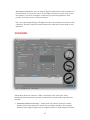
1. Download and install the SimpleBGC GUI software application from BaseCam
Electronics: www.basecamelectronics.com/downloads/32bit/
2. Connect the B32 Gimbal Controller to your computer with a mini USB cable. If your
computer does not detect the controller automatically, you can download the latest
drivers from the following link: www.silabs.com/products/mcu/pages/
usbtouartbridgevcpdrivers.aspx
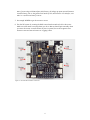
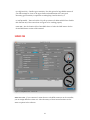
3. Connect the IMU and motors to the B32 Gimbal Controller. Reference Figure 2.1 below
for proper connections.
4. Auto-detect the number of poles for your motors or enter the number manually. For
more information, refer to the NUM.POLES description.
5. Set parameters P=0, I=0.1, D=0 for each axis. For more information, refer to the PID
description.
6. Connect your battery to the B32 Gimbal Controller. The B32 Gimbal Controller comes
with a power cable that has bare wire leads. Solder a connector to the wires that mates
with the connector on your battery. Pay careful attention to the positive and negative
terminals on your battery and ensure that you never short them or connect the battery
backwards. Doing so will damage the B32 Gimbal Controller and may cause your battery
to explode. Make sure that your battery is between 8 and 25V.
"3


![[DYS 3 Axis Gimbal User Manual]](http://vs1.manualzilla.com/store/data/005821240_1-6054c49231c96ddf730544e81a975eb9-150x150.png)