1
3. Settings
Voltage/Frequency Display
a) Setting Display
Trip History
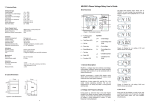
When the relay is not under tripping condition,
pressing “RESET/MODE” can scroll through various
settings. Function LED showing number or alphabet to
indicate which setting is being view as shown in
Figure 4. Table 1 gives description of each setting.
Tip: To quickly jump back to voltage display during
setting display, press and hold “RESET/MODE” for
more than 1.5 seconds.
4. Trip
Undervoltage pickup occurs when any line to line or
line to neutral voltage is less than [nominal voltage U<< %], relay trips when delay time is elapsed.
a) Trip Display
1 U<< Undervoltage %
d) Overvoltage
2 t << Undervoltage time delay
3 U>> Overvoltage %
Overvoltage pickup occurs when any line to line or line
to neutral voltage is more than [nominal voltage + U>>
%], relay trips when delay time is elapsed.
4 t >> Overvoltage time delay
e) Unbalance
b) Programming Setting
5
Unbalance %
Step 1: Press “RESET/MODE” until the Function LED
shows the required setting.
6 t
Unbalance time delay
A tstart Start time delay
Step 2: Press “UP” and “DOWN” simultaneously to
enter programming mode.
The Function LED blinks to indicates the relay is in
programming mode.
c) Undervoltage
b Phase
c Nominal voltage
During pickup, Trip/Pickup LED blinks. During tripping
condition, Trip/Pickup LED on. Function LED and Data
LED blinks with trip source as shown below:
Function
LED
Unbalance is calculated as:
(Vmax-Vmin)/Vmin X 100%
Where Vmax is the maximum voltage among the 3
voltages. Vmin is the minimum voltage among the 3
voltages.
Unbalance pickup occurs when unbalance is more
than set %, relay trips when delay time is elapsed.
Data LED
Description
1
trip voltage
Undervoltage trip
3
trip voltage
Overvoltage trip
5
Ub
Unbalance trip
5
PL
Phase loss trip
5
PS
Phase sequence trip
t
EST
Test
Table 3: Trip display
b) Trip Reset
Phase Sequence trip occurs when the phase
sequence in any 2 or all of the lines are reversed.
Step 4: To save the selected value, press “UP” and
“DOWN” simultaneously again.
It will exit the
programming mode with the Data LED displaying the
newly set value.
E Relay R2 function
Phase Loss trip occurs when any voltage is less than
70% of nominal.
During tripping condition, press “RESET/MODE” to
reset the relay, the relay will reset if condition
permits. If relay is set to Auto reset, the relay will
reset automatically if the condition is 5% below trip
condition.
F Relay R2 type
f) Starting Delay
c) Trip Test
To exit programming mode without saving the selected
setting, press “RESET/MODE” once.
g Auto/Manual reset
Starting delay is the delay time for R1 to turn on during
power up under normal condition.
Trip test is used to simulate a tripping condition.
Press “TEST” button and hold for 1.5s, trip LED
blinks. After 1.5 seconds, “tESt” will blink, R1 off and
R2 will operate by relay R2 type. Press
“RESET/MODE” to reset.
Step 3: Press “UP” or “DOWN” to select the desired
value.
d Relay R1 function
Figure 4: Display mode when pressing
Reset/Mode
Setting
Function
1
U<< Undervoltage
Setting Range
off, 1-25 %
Description
Undervoltage % from nominal voltage
2
t<< Undervoltage delay 0.1-30 s
Time delay for undervoltage
3
U>> Overvoltage
off, 1-20 %
Overvoltage % from nominal voltage
4
t>> Overvoltage delay
0.1-30 s
Time delay for overvoltage
Unbalance
off, 3-20%
Unbalance %
Unbalance delay
0.5-30 s
Unbalance time delay
5
6
t
A
t start Starting delay
0-999 s
On time delay of R1 during power up
b
Phase
L-L, L-N
L-L: Display and uses Line to Line voltage
L-N: Display and uses Line to Neutral
voltage
Nominal voltage. Value depends on L-L or
L-N setting
*Refer to Table 2
c
Nominal Voltage
d
Relay R1 function
380, 400, 415 V or
220, 230, 240 V
0-7
E
Relay R2 function
0-7
*Refer to Table 2
F
Relay R2 type
0-1
0: Normally de-energized
1: Normally energized
g
Auto/Manual resetting
0=auto, 1=manual
auto: auto reset when trip condition clear
manual: press "RESET/MODE" to reset
g) Relay Function Selection
During tripping, output contact relay R1 or R2 will be
de-energized/energized if the related tripping element is
activated.
The setting is shown below:
Code
Phase OV
d) Trip History Display
During Voltage and frequency display, Press
“RESET/MODE” button to jump to Trip History
Display. Display shows the previous trip status with
a 'dot' blinking at Function LED. To clear trip history,
press "UP" and "DOWN" simultaneously.
UV Code : Displays on Data LED
0
0
0
0
1
0
0
1
2
0
1
0
3
0
1
1
4
1
0
0
5
1
0
1
6
1
1
0
7
1
1
1
Phase: Unbalance, Phase Loss
and Phase Sequence
OV : Overvoltage
UV : Undervoltage
e) Trip Bypass Mode
To disable tripping due to incorrect setting, press
“RESET/MODE” and “TEST” simultaneously during
power up. The Trip LED slow blink to indicate Trip
Bypass Mode. Go into programming mode to correct
the setting. Power off and on to reset the relay. The
relay will return to normal if no button is pressed for
longer than 2 minutes.
0= De-activated
1= Activated
Table 2: Relay function selection
Table 1: Description of functions
2
3