1
Renesas Flash Programmer V2.05
Flash memory programming software
User’s Manual: Common
All information contained in these materials, including products and product specifications,
represents information on the product at the time of publication and is subject to change by
Renesas Electronics Corp. without notice. Please review the latest information published by
Renesas Electronics Corp. through various means, including the Renesas Electronics Corp.
website (http://www.renesas.com).
Rev. 2.02 Jul 2015
Notice
1.
Descriptions of circuits, software and other related information in this document are provided only to illustrate the operation of
semiconductor products and application examples. You are fully responsible for the incorporation of these circuits, software,
and information in the design of your equipment. Renesas Electronics assumes no responsibility for any losses incurred by you
or third parties arising from the use of these circuits, software, or information.
2.
Renesas Electronics has used reasonable care in preparing the information included in this document, but Renesas Electronics
does not warrant that such information is error free. Renesas Electronics assumes no liability whatsoever for any damages
incurred by you resulting from errors in or omissions from the information included herein.
3.
Renesas Electronics does not assume any liability for infringement of patents, copyrights, or other intellectual property rights of
third parties by or arising from the use of Renesas Electronics products or technical information described in this document. No
license, express, implied or otherwise, is granted hereby under any patents, copyrights or other intellectual property rights of
Renesas Electronics or others.
4.
You should not alter, modify, copy, or otherwise misappropriate any Renesas Electronics product, whether in whole or in part.
Renesas Electronics assumes no responsibility for any losses incurred by you or third parties arising from such alteration,
modification, copy or otherwise misappropriation of Renesas Electronics product.
5.
Renesas Electronics products are classified according to the following two quality grades: “Standard” and “High Quality”. The
recommended applications for each Renesas Electronics product depends on the product’s quality grade, as indicated below.
“Standard”:
Computers; office equipment; communications equipment; test and measurement equipment; audio and visual
equipment; home electronic appliances; machine tools; personal electronic equipment; and industrial robots etc.
“High Quality”: Transportation equipment (automobiles, trains, ships, etc.); traffic control systems; anti-disaster systems; anticrime systems; and safety equipment etc.
Renesas Electronics products are neither intended nor authorized for use in products or systems that may pose a direct threat to
human life or bodily injury (artificial life support devices or systems, surgical implantations etc.), or may cause serious property
damages (nuclear reactor control systems, military equipment etc.). You must check the quality grade of each Renesas
Electronics product before using it in a particular application. You may not use any Renesas Electronics product for any
application for which it is not intended. Renesas Electronics shall not be in any way liable for any damages or losses incurred
by you or third parties arising from the use of any Renesas Electronics product for which the product is not intended by Renesas
Electronics.
6.
You should use the Renesas Electronics products described in this document within the range specified by Renesas Electronics,
especially with respect to the maximum rating, operating supply voltage range, movement power voltage range, heat radiation
characteristics, installation and other product characteristics. Renesas Electronics shall have no liability for malfunctions or
damages arising out of the use of Renesas Electronics products beyond such specified ranges.
7.
Although Renesas Electronics endeavors to improve the quality and reliability of its products, semiconductor products have
specific characteristics such as the occurrence of failure at a certain rate and malfunctions under certain use conditions. Further,
Renesas Electronics products are not subject to radiation resistance design. Please be sure to implement safety measures to
guard them against the possibility of physical injury, and injury or damage caused by fire in the event of the failure of a Renesas
Electronics product, such as safety design for hardware and software including but not limited to redundancy, fire control and
malfunction prevention, appropriate treatment for aging degradation or any other appropriate measures. Because the evaluation
of microcomputer software alone is very difficult, please evaluate the safety of the final products or systems manufactured by
you.
8.
Please contact a Renesas Electronics sales office for details as to environmental matters such as the environmental compatibility
of each Renesas Electronics product. Please use Renesas Electronics products in compliance with all applicable laws and
regulations that regulate the inclusion or use of controlled substances, including without limitation, the EU RoHS Directive.
Renesas Electronics assumes no liability for damages or losses occurring as a result of your noncompliance with applicable laws
and regulations.
9.
Renesas Electronics products and technology may not be used for or incorporated into any products or systems whose
manufacture, use, or sale is prohibited under any applicable domestic or foreign laws or regulations. You should not use
Renesas Electronics products or technology described in this document for any purpose relating to military applications or use
by the military, including but not limited to the development of weapons of mass destruction. When exporting the Renesas
Electronics products or technology described in this document, you should comply with the applicable export control laws and
regulations and follow the procedures required by such laws and regulations.
10. It is the responsibility of the buyer or distributor of Renesas Electronics products, who distributes, disposes of, or otherwise
places the product with a third party, to notify such third party in advance of the contents and conditions set forth in this
document, Renesas Electronics assumes no responsibility for any losses incurred by you or third parties as a result of
unauthorized use of Renesas Electronics products.
11. This document may not be reproduced or duplicated in any form, in whole or in part, without prior written consent of Renesas
Electronics.
12. Please contact a Renesas Electronics sales office if you have any questions regarding the information contained in this document
or Renesas Electronics products, or if you have any other inquiries.
(Note 1) “Renesas Electronics” as used in this document means Renesas Electronics Corporation and also includes its majorityowned subsidiaries.
(Note 2) “Renesas Electronics product(s)” means any product developed or manufactured by or for Renesas Electronics.
(2012.4)
How to Use This Manual
Target Readers
This manual is intended for users who are using the flash programmer in designing
and developing a system that employs a Renesas Electronics microcontroller
equipped with on-chip flash memory.
Purpose
This manual is intended to give users an understanding of the basic specifications
and correct use of the Renesas flash programmer.
Organization
This manual includes the following sections.
• Overview
• Installation
• Unique code embedding function
• Troubleshooting
• Cautions
• Messages
• Supplementary information
How to Read This Manual
It is assumed that the readers of this manual have general knowledge of electricity,
logic circuits, and microcontrollers.
Conventions
Note: Footnote for item marked with Note in the text.
Caution: Information requiring particular attention
Remark: Supplementary information
Numeral representation:
Binary ... xxxx or xxxxB
Decimal ... xxxx
Hexadecimal ... 0XXXXX or xxxxH
“
[
”:
Any character or item on the screen that can be selected or input
:
Name of button
]:
Name of commands, dialog boxes, options, or areas on the screen
Terminology
The meanings of the terms used in Renesas Flash Programmer manual are as follows:
(1/3)
Term
Meaning
RFP
Abbreviation of the Renesas Flash Programmer software for programming
flash memory
E1/E20
Abbreviation of the E1 emulator / E20 emulator
MINICUBE2
Nickname used for the main unit of QB-MINI2, the on-chip debug emulator
with programming function
Tool used
General term for the tool used by the customer, which is E1, E20, or
MINICUBE2.
Utility
Software used for self-diagnosis of the tool used and to update the
MINICUBE2 firmware.
Target microcontroller
The Renesas Electronics on-chip flash memory microcontroller used by the
user
Target system
User-designed board on which the target microcontroller is mounted
Note 1
Program adapter
Conversion adapter used to write programs to the target microcontroller
Device information file
Device information files contain parameter information required for writing
programs to the flash memory in the target microcontroller. These files have
the extension *.prm, *.pr5, or *.fcf. Do not change the data in the device
information files. If the data is changed, RFP might not operate properly.
Workspace file
The workspace is where projects are stored. There is always at least one
project in the workspace. Some workspaces allow multiple projects to be
registered.
In RFP, workspace files have the extension *.rws.
Caution: Use workspace files that correspond to the version of the generated
RFP. An error occurs when the RFP reads files from other RFP
versions. In such cases, create new workspace files.
Project file
Project files store the data required to write programs. In RFP, a project file
stores the settings related to the programming environment, such as target
microcontroller settings and command option specifications. In RFP, project
files have the extension *.rpj.
Signature
Information about the microcontroller.
rfp.ini
This file is where the RFP settings are saved. The settings are saved when
RFP is terminated.
Note 3
OCD security ID
Flash options
Note 3
Note 3
Option data
A security feature related to on-chip debugging of a microcontroller.
General term for MCU operations such as security settings.
Note 2
General term for flash options, wide-voltage mode, and full-speed mode
Note 3
Authentication code used in the ID authentication mode and in OCD. For
details, refer to the user’s manual of the microcontroller.
Note 3
One of the security functions of the microcontroller. For details, refer to the
user’s manual of the microcontroller.
ID code
Lock bit
HEX file
Program file without option data
HCUHEX file
A program file that integrates option data and that is generated by using the
HEX Consolidation Utility (HCU), which is used to generate ROM code for
flash memory products whose flash memories are pre-written by Renesas
Electronics.
(2/3)
Term
Program file
Meaning
The program file refers to the file that contains the program to be written to
the microcontroller. The following program file formats are supported by
RFP when writing to an RL78, 78K, or V850 microcontroller:
a. HEX files in Intel HEX format
b. HCUHEX files in Intel HEX format
c. HEX files in Motorola S format
d. HCUHEX files in Motorola S format
The following program file formats are supported by RFP when writing to an
RX, or RH850 microcontroller:
a. HEX files in Intel HEX format
b. HEX files in Motorola S format
Caution An empty area will be supplemented with FFH.
Notes 1. Blank areas are complemented by FFH when reading is
performed.
2. For details on the format, refer to the information on how to
order ROM codes (C10302J).
3. The only supported character code is ASCII (one byte).
Unicode (two bytes) is not supported.
COMx
COMx is a serial interface port incorporated in the host PC.
When writing data to the target system by using the serial interface
incorporated in the host PC, select COMx as the tool used. Any value from 1
to 256 can be specified for x.
USB Direct
USB Direct is a method to write in the microcontroller in the USB boot mode
by using the USB interface port of the host PC. When writing data by using
the USB interface of the host PC, select USB Direct as the tool used.
FINE
FINE is a single or dual line communications interface operating through the
FINE pin of microcomputers. Select RX100 and RX200 as the
microcomputer to be used and E1 or E20 as the tool to be used.
User/data area
Target area of the flash memory to which the program file is written.
For the RL78, 78K, and V850: Code flash and data flash
For the RX: User area and data area
For the RH850: Code area and data area
User boot area
Target area of the flash memory to which the program file is written.
For the RL78, 78K, V850, and RX100: None
For the RX200 and RX600: User boot area
For the RH850: User boot area or extended user area
Basic mode
This mode is mainly for writing in mass production, and the focus is on basic
rewriting processing.
Full mode
The full mode is mainly for the use of microcontrollers in development, and
facilitates the control of multiple projects and the checking of setting
information.
ID authentication
Note 3
mode
One of the security functions of the microcontroller. For details, refer to the
user’s manual of the microcontroller.
Command protection
Note 3
mode
One of the security functions of the microcontroller. For details, refer to the
user’s manual of the microcontroller.
OTP
Note 3
One of the security functions of the microcontroller. For details, refer to the
user’s manual of the microcontroller.
OFS
Note 3
One of the security functions of the microcontroller. For details, refer to the
user’s manual of the microcontroller.
(3/3)
Term
Meaning
Note 3
Notes
1.
Trusted Memory
One of the security functions of the microcontroller. For details, refer to the
user’s manual of the microcontroller.
Option-Setting
Note 3
Memory
Collective term for registers that determine the state of the MCU after release
from reset. For details, refer to the user’s manual of the microcontroller.
The program adapter is a product of Naito Densei Machida Mfg. Co., Ltd.
If you have any questions about the FA adapter board, contact Naito Densei Machida Mfg. Co., Ltd.
(Tel: +81-42-750-4172).
2.
The functions that can be used differ depending on the target microcontroller.
3.
Refer to the user’s manual of the target device for more information.
Related documents
When using this manual, also refer to the following documents.
The related documents indicated in this publication may include preliminary versions.
However, preliminary versions are not marked as such.
Documents related to development tools
Document name
Document number
Renesas Flash Programmer V2.05 Common
This manual
Renesas Flash Programmer V2.05 RL78, 78K, V850
R20UT2907E
Renesas Flash Programmer V2.05 RX100, RX200, RX600 (Except RX64M)
R20UT2908E
Renesas Flash Programmer V2.05 RH850, RX700 (Include RX64M)
R20UT2909E
E1 Emulator R0E000010KCE00 E20 Emulator R0E000200KCT00
R20UT0398E
QB-MINI2 On-Chip Debug Emulator with Programming Function
R20UT0449E
MINICUBE2 Diagnosis Tool
U18588E
Caution
The related documents listed above are subject to change without notice.
Be sure to use the latest version of each document for designing, etc.
Term replacement
When the RX100, RX200 is used, some terms in this manual should be replaced as shown
in the table below.
Term
To be replaced with
Flash shield window
Area protection
USB Direct
USB interface mode
Get Flash options
Access window read
Set Security
Access window program
All trademarks and registered trademarks are the property of the respective owner.
CONTENTS
CHAPTER 1 OVERVIEW ............................................................................................ 8
1.1
1.2
1.3
1.4
1.5
1.6
Features ..................................................................................................................................... 8
Writing Quality .......................................................................................................................... 8
Supported Microcontrollers .................................................................................................... 8
System Overview ...................................................................................................................... 9
Operating Environment .......................................................................................................... 10
1.5.1
Hardware environment ............................................................................................... 10
1.5.2
Software environment................................................................................................. 10
Handling of HCUHEX Files .................................................................................................... 11
CHAPTER 2 INSTALLATION ................................................................................... 12
2.1
2.2
2.3
Installation ............................................................................................................................... 12
2.1.1
Notes on installation ................................................................................................... 13
Uninstallation .......................................................................................................................... 14
Updating RFP and Firmware ................................................................................................. 14
CHAPTER 3 UNIQUE CODE EMBEDDING FUNCTION .......................................... 15
3.1
3.2
3.3
3.4
Overview .................................................................................................................................. 15
[Unique code setting] dialog box .......................................................................................... 15
Unique code file ...................................................................................................................... 16
Unique code definition ........................................................................................................... 17
CHAPTER 4 TROUBLESHOOTING ......................................................................... 18
4.1
4.2
Problems During Startup ....................................................................................................... 18
Problems During Operation................................................................................................... 19
CHAPTER 5 CAUTIONS ........................................................................................... 25
5.1
5.2
5.3
5.4
5.5
5.6
Connecting Two or More E1s or E20s .................................................................................. 25
Manipulating the User Boot Mat............................................................................................ 25
Mapping of Data Flash Memory ............................................................................................ 25
Host PC .................................................................................................................................... 25
USB-to-serial converter ......................................................................................................... 25
Option-Setting Memory .......................................................................................................... 25
APPENDIX A MESSAGES ........................................................................................ 26
A.1
A.2
A.3
A.4
Message Format ..................................................................................................................... 26
Messages Displayed in Internal Error, Fatal Error, Selection, and Warning Dialog Boxes Common - ................................................................................................................................ 27
Messages Displayed in Fatal Error, Selection, and Warning Dialog Boxes - RL78, 78K,
V850 - 29
Messages Displayed in Fatal Error, Selection, and Warning Dialog Boxes - RX, RH850 33
APPENDIX B SUPPLEMENTARY INFORMATION .................................................. 42
Renesas Flash Programmer V2.05
CHAPTER 1 OVERVIEW
CHAPTER 1 OVERVIEW
Renesas Flash Programmer (hereafter referred to as RFP) is software that erases, writes, and verifies programs on the
target system on which a Renesas Electronics single-chip microcontroller with on-chip flash memory is mounted by using
an E1 emulator (hereafter referred to as E1), E20 emulator (hereafter referred to as E20), or the on-chip debug emulator
with programming function, QB-MINI2 (hereafter referred to as MINICUBE2), or a serial interface.
1.1
Features
• Writing controlled by the host PC
• Writing settings can be saved in a workspace file
• Microcontroller-specific information required for writing is included in the product package as a device information file.
Such information of the generic device should be obtained by the query.
• Two types of writing operation windows (Basic mode and Full mode)
• Automatic writing by the script execution function
• Embedding of unique codes
1.2
Writing Quality
Thoroughly confirm, verify and evaluate the following points before using RFP, in order to improve the writing quality.
• Design circuits as described in the user’s manual for the target microcontroller, E1, E20, and MINICUBE2.
• Use the microcontroller and RFP as described in the user’s manual of the target microcontroller, RFP, E1, E20, and
MINICUBE2.
• Make sure that the power supplied to the target microcontroller is stable.
1.3
Supported Microcontrollers
Microcontrollers supported by RFP are listed on the following websites:
http://www.renesas.com/rfp
R20UT2906EJ0202 Rev. 2.02
Jul 01, 2015
Page 8 of 47
Renesas Flash Programmer V2.05
1.4
CHAPTER 1 OVERVIEW
System Overview
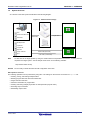
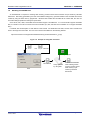
An overview of the RFP system is illustrated in the following diagram.
Figure 1-1. RFP Connection Image
E1
ホスト・マシン
Product
package
Targe system
RFP
Device information file
Target cable
USB cable
USB driver
E20
Workspace file
Project file
MINICUBE2
Program file
Script file
Unique code file
Serial cable (RS-232C)
rfp.ini
Note
USB cable (USB Direct)
Targe systemNote
To write data to the target system by using the serial interface incorporated in the host PC, a writing circuit is
required in the target system. See the sample circuit shown on the following websites:
http://www.renesas.com/rfp
Remark
Do not modify or delete the folder and file configuration of the RFP.
RFP operation overview
The following operations can be performed by using RFP. The settings on the host PC are saved in an rfp.ini file.
• Creating, saving, and reading workspace files
• Reading program files and device information files
• Target command execution
• Checksum calculation for program files
• Creating and saving multiple project files in workspace files (only full mode)
• Executing script commands
• Embedding unique codes
R20UT2906EJ0202 Rev. 2.02
Jul 01, 2015
Page 9 of 47
Renesas Flash Programmer V2.05
1.5
CHAPTER 1 OVERVIEW
Operating Environment
This section explains the following items with respect to the operating environment:
• Hardware environment
• Software environment
1.5.1
Hardware environment
(1) Host PC
• Processor: 1 GHz or higher
• Main memory: 1 GB or more (2 GB or more when using 64-bit Windows); 2 GB or more recommended
• Display: Resolution of 1,024 x 768 or higher and 65,536 or more colors
• Interface: USB 2.0 (when using E1, E20, MINICUBE2, USB Direct)
Serial interface (RS-232C) (when using COMx)
(2) Tools used
• E1
• E20
• MINICUBE2
1.5.2
Software environment
• Windows Vista (32-bit and 64-bit)
• Windows 7 (32-bit and 64-bit)
• Windows 8/8.1 (32-bit and 64-bit)
• Microsoft .NET Framework 4
• Runtime library of Microsoft Visual C++ 2010 SP1
For any of these, we recommend having the latest service pack installed.
R20UT2906EJ0202 Rev. 2.02
Jul 01, 2015
Page 10 of 47
Renesas Flash Programmer V2.05
1.6
CHAPTER 1 OVERVIEW
Handling of HCUHEX Files
An HCUHEX file is required for ordering flash memory products whose flash memories are pre-written by Renesas
Electronics. After being generated by the HEX Consolidation Utility (HCU), operation based on the HCUHEX file must be
verified by using the flash memory programmer. Because RFP handles the HCUHEX file as master data, the user can
check the settings specified for writing and option data.
Some RL78, 78K, V850, and RH850 microcontrollers support HCUHEX files. If a microcontroller supports HCUHEX
files, it is written in the user’s manual of the microcontroller. (SH, RX, and R8C microcontrollers do not support HCUHEX
files.)
For details, see the description on each feature in this manual. For details about the HCU, see the user’s manual of the
HCU or the target microcontroller. The HCU user’s manual is available on the following website:
http://www.renesas.com/support/downloads/download_results/ods/other/hcu_gui.jsp
Figure 1-2. Example of Using RFP and HCUs
HEXfile
PG-FP5 parameter file
Target system
HCUHEX file
Verify operation
by using RFP
HCU
R20UT2906EJ0202 Rev. 2.02
Jul 01, 2015
Send the HCUHEX file
when ordering a flash
memory product whose
flash memory is prewritten by Renesas
Electronics
Page 11 of 47
Renesas Flash Programmer V2.05
CHAPTER 2 INSTALLATION
CHAPTER 2 INSTALLATION
This chapter describes installation.
2.1
Installation
To install the product package (RFP, USB driver, and device information file), insert the CD into the host PC to start the
installer. Install as instructed by the installer program.
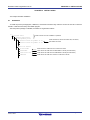
After the product package is installed, the folders are organized as follows:
C:\
\Program Files
Folder structure for which installation is specified
\Renesas Electronics
\Programming Tools
\Renesas Flash Programmer V1.01
Folder where RFP, device information files, documents,
and utilities are stored
\Renesas Flash Programmer V1.02
\MCU Tools Drivers
\E-SeriesUSB
Folder where the USB driver for E1 and E20 is stored
\MINICUBE2
Folder where the USB driver for MINICUBE2 is stored (32-bit Windows)
\USB Driver x64
Folder where the USB driver for MINICUBE2 is stored (64-bit Windows)
\HMSEUSB
Folder where the USB driver TYPE A for USB boot is stored
R20UT2906EJ0202 Rev. 2.02
Jul 01, 2015
Page 12 of 47
Renesas Flash Programmer V2.05
2.1.1
CHAPTER 2 INSTALLATION
Notes on installation
(1) Multiple versions of RFP can be installed on a single host PC. Although we recommend using the latest version of
any development tool, leaving a previous version on your host PC and then installing the latest version lets you
easily switch the development environment. Note that the Vx.yy part of the version notation (Vx.yy.zz) reflects the
ability to install multiple versions (installation of multiple versions with different Vx.yy parts is supported). When
more than one version having the same Vx.yy is installed, the last version to be installed overwrites the previous
version.
(2) You might be asked to reboot your computer after installing the RFP. Be sure to close all other applications before
rebooting your computer.
(3) You must have administrator privileges to install the RFP.
(4) The RFP can only be installed in a folder that is named using ASCII characters. (Note that the 11 characters / * : <
> ? | " \ ; , and character strings that begin and end with a space cannot be used.) The RFP might not operate
correctly if installed in a folder that is named using other characters.
(5) The RFP cannot be installed from a network drive or on a network drive.
(6) The installer does not specify environment variable paths. If these paths are required, add them after installation.
(7) The Microsoft .NET Framework and the Microsoft Visual C++ runtime libraries are required to run the installer. If the
Microsoft .NET Framework or the Microsoft Visual C++ runtime libraries are not installed, the RFP will install them.
(8) If you install the free evaluation version, make sure that your host PC is connected to the network before installing
the program. If you wish to install the program on a host PC that is not connected to the network, first go to the
Microsoft Download Center and install the Microsoft .NET Framework 4 before installing RFP.
(9) The following folders created after installation (including the files under the folders) contain files required for the
tools to operate. Do not delete them.
(Windows is the 32-bit edition and the system drive is C:)
C:\Program Files\Common Files\Renesas Electronics CubeSuite+\
(Windows is the 64-bit edition and the system drive is C:)
C:\Program Files (x86)\Common Files\Renesas Electronics CubeSuite+\
(10) To change the folder of the installed tools, uninstall all the CS+ related software and the programming GUI for RFP,
and install them again.
(11) In the environment where the CS+, RFP, E1, E20, MINICUBE2 and USB driver for USB Boot are installed, the RFP,
E1, E20, MINICUBE2 and USB driver for USB Boot are included in the target software of the CS+ integrated
uninstaller. If you don’t want to delete them, remove them from the uninstallation targets.
(12) If the installer is started on a non-Japanese version of Windows, then if the path contains multi-byte characters it
will cause an error, and the installer will not start.
(13) If a CS+ instance launched via Rapid Start is in the notification area (system tray) during installation, the following
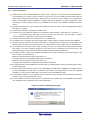
error will appear. Exit the application, and run the installer again.
Figure 2-1 [Question (Q0140035)] Dialog Box
R20UT2906EJ0202 Rev. 2.02
Jul 01, 2015
Page 13 of 47
Renesas Flash Programmer V2.05
2.2
CHAPTER 2 INSTALLATION
Uninstallation
To uninstall the RFP package (RFP, USB driver, and device information file), use “Programs and Features” on the
Control Panel. The CS+ integrated uninstaller can also be used to uninstall the RFP package.
2.3
Updating RFP and Firmware
The firmware is a program embedded in the microcontroller for controlling E1, E20, or MINICUBE2. Updating RFP and
the firmware enables the following:
• Addition of newly supported functions or microcontrollers
• Correction of restrictions
For RFP and the firmware, use of the latest version is recommended to ensure correct operation of E1, E20, and
MINICUBE2.
The latest version of the firmware for RFP and MINICUBE2, and MINICUBE2 Diagnostic Tools can be checked and
obtained at the following websites:
• RFP
http://www.renesas.com/rfp
• MINICUBE2
http://www.renesas.com/minicube2
How to check the firmware version and configure and update your system are described below.
For the E1 and E20, check that the RFP has the correct versions of the E1 and E20 firmware. If the firmware does not
match, the firmware will automatically be updated.
For MINICUBE2, see MINICUBE2 Diagnostic Tools User’s Manual (U18588E) for how to check the firmware version,
and configure and update your system.
R20UT2906EJ0202 Rev. 2.02
Jul 01, 2015
Page 14 of 47
Renesas Flash Programmer V2.05
CHAPTER 3 UNIQUE CODE EMBEDDING FUNCTION
CHAPTER 3 UNIQUE CODE EMBEDDING FUNCTION
This chapter explains the unique code embedding function.
3.1
Overview
The unique code embedding function embeds a unique code in the specified area in the loaded program file. To enable
this function, describe unique codes and a specified area in the unique code file and configure the setting in the [Unique
code setting(U)] dialog box. A unique code file can specify one specified area and multiple unique codes. Each unique
code has an index. When [Program] command or [Autoprocedure] command (for RL78, 78K, V850 only) finishes normally,
the index is updated to the next index. When [Verify] command or [Checksum] command finishes normally, the index is
not updated.
3.2
[Unique code setting] dialog box
This dialog box is used to configure the settings for a unique code (the enable/disable status of the unique code
embedding function, definition file, start/end positions of the definition file, and the action when there is a conflict with the
program file code).
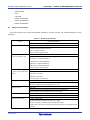
Figure 3-1. [Unique Code Setting] Dialog Box
(1)
(2)
(3)
(4)
(1) [Enabled/ Disabled] option button
Specifies whether to enable/disable the unique code embedding function.
(2) [File Location] area
Specifies the full path of the unique code file. Enter the file name in the [File name:] text box directly, or click
the Browse... button and open the [Browse for folder] dialog box to specify the file.
R20UT2906EJ0202 Rev. 2.02
Jul 01, 2015
Page 15 of 47
Renesas Flash Programmer V2.05
CHAPTER 3 UNIQUE CODE EMBEDDING FUNCTION
(3) [File Start Point] area
Specifies the start/end positions for the indexes described in the unique code file.
[Start from the beginning of the file] option button
The lines from the first to the last are specified. When the RFP restarts, it starts at the first line.
[Start at the last position (start/end positions can be specified)] option button
Specifies the start/end positions. When the RFP restarts, it starts at the last position.
[Next position (blank if it is the beginning of the file)] box
The next position is displayed or specified. The unique code is displayed under the box.
[End position (blank if it is the end of the file)] box
The end position is displayed or specified. The unique code is displayed under the box.
(4) [Data Overwrite] area
Selects the action from the option buttons when data (other than FFh) exists in the area in the loaded program
file where the unique code is to be embedded (that means a conflict exists). If [Overwrite] is selected, the unique
code will overwrite. If [Abort] is selected, the error message is displayed and the command is aborted.
When the OK button is pressed, the settings are saved temporarily and the dialog box closes.
When the Cancel button or the X button is pressed, the settings are discarded and the dialog box closes.
3.3
Unique code file
This section describes a unique code file (file extension, file format, format and example).
(1) File extension
*.ruc
(2) File format
File format: text format
Newline: CR + LF
The only supported character code is ASCII (one byte). Unicode (two bytes) is not supported.
(3) Format
The first line
:format
The second line
:area
The third line
:address
The fourth line
:size
The fifth line
:index data
The sixth line and after :index number and unique code
The lines starting with // are comment lines and will be skipped.
Caution:
The index number should be incremented by 1.
(4) Example
//Sample unique code file
format hex
area user flash
R20UT2906EJ0202 Rev. 2.02
Jul 01, 2015
Page 16 of 47
Renesas Flash Programmer V2.05
CHAPTER 3 UNIQUE CODE EMBEDDING FUNCTION
address 0xf000
size 6
index data
000001 abcdef000001
000002 abcdef000002
000003 abcdef000003
3.4
Unique code definition
This section describes the unique code definition described in a unique code file. The command interpreter is caseinsensitive.
Table 3-1. Unique Code Definition
Function
Unique code definition
Description
Specify the format
format <hex | ascii>
Specifies the format of the unique code.
<hex>: hexadecimal format
<ascii>: ASCII format (0x21-0x7e)
Specify the area
area <code flash 1 | code flash 2 | user boot area | data flash 1 | data flash 2>
: When the RH850 is used
Specifies the area of the flash memory.
<code flash 1>: Code area (BANK A)
<code flash 2>: Code area (BANK B)
<data flash 1>: Data area (BANK A)
<data flash 2>: Data area (BANK B)
<user boot area>: User boot area
Specify the area
area <user flash | data flash | user boot flash>
: When the except RH850 is
Specifies the area of the flash memory.
used
<user flash>: User area
<data flash>: Data area
<user boot flash>: User boot area
Specify the address
address <address>
Specifies the start address of the area where the unique code will be embedded.
<filename>: hexadecimal format starting with ”0x” or ”H”
Specify the size
size <size>
Specifies the size of the area where the unique code will be embedded.
<size>: the size in bytes is specified (range: 1-2048, integer)
Unique code declaration
index data
Declares the unique code data starts at the next line.
Index and unique code
<index> <unique code>
Specifies the Index and unique code. (Maximum: 17280)
<index>:the index is specified (range: 0-4294967295, integer)
<unique code>: the unique code is specified (big endian format, with specified format
and size)
R20UT2906EJ0202 Rev. 2.02
Jul 01, 2015
Page 17 of 47
Renesas Flash Programmer V2.05
CHAPTER 4 TROUBLESHOOTING
CHAPTER 4 TROUBLESHOOTING
This chapter explains how to troubleshoot RFP.
Remark
If an error occurs during the above procedure, see CHAPTER 4 TROUBLESHOOTING and APPENDIX A
MESSAGES. Also see the user’s manual of the tool used and execute diagnostic tests. If the above still
does not resolve the problem, see the FAQ (at http://www.renesas.com/support/), or contact Renesas via
the Renesas website: http://www.renesas.com/contact/.
4.1
Problems During Startup
This section explains how to troubleshoot problems that might occur in the process from installation to startup.
(1) When the tool is connected to the host PC via a USB interface, the driver is not recognized by Plug and
Play.
Cause:
The USB connector might not be inserted properly into the USB port of the host PC.
Action:
Check that the USB connector is fully inserted into the USB port of the host PC. Alternatively, disconnect the
USB connector, and then insert the USB connector again after a while.
(2) The USB driver file cannot be found at the specified location.
Cause:
The USB driver might not have been installed normally.
Action:
See CHAPTER 2 RFP INSTALLATION and reinstall the USB driver.
(3) The tool is connected to the host PC but the power LED on the tool is not turned on.
Cause:
The USB port of the tool or the host PC might have a defect.
Action:
Check a defect of the tool using the diagnostic tool for the tool used. If a defect is found, consider repair. If
there is no defect, try connecting the tool to another host PC.
(4) The “Add New Hardware Wizard” screen appears when tool is connected with the host PC.
Cause:
If the USB connector of the tool is inserted into a port that differs from the one used during installation, the tool
might be recognized as a new hardware item.
Action:
Select “Search for a suitable driver for my device (recommended)” and install the USB driver.
R20UT2906EJ0202 Rev. 2.02
Jul 01, 2015
Page 18 of 47
Renesas Flash Programmer V2.05
4.2
CHAPTER 4 TROUBLESHOOTING
Problems During Operation
This section describes the troubleshooting for problems that may occur during operation.
Remark
For causes and actions for the messages displayed in the internal error, fatal error, selection, and warning
dialog boxes, and output panel, see APPENDIX A MESSAGES.
(1) One of the following errors is displayed on the output panel.
Error (E1000001) : E1/E20/MINICUBE2/COMx communication time out.
Error (E1000009) : E1/E20/MINICUBE2/COMx communication error.
Cause 1:
The USB cable might not be connected properly or the USB driver might not have been installed normally.
Action 1:
See 4.1 Problems During Startup and take an appropriate action.
Cause 2:
The installed USB driver is not displayed in the Device Manager. Alternatively, the “!” or “×” is prefixed.
Action 2:
<1> With RFP connected to the host PC, right-click the driver marked with the “!” or “×”, and then click
[Uninstall].
<2> Execute [Scan for hardware changes] in the Device Manager.
<3> Reinstall the USB driver by Plug and Play.
Cause 3:
The tool might not have been recognized (when connected via a USB hub).
Action 3:
Try the following:
<1> Disconnect the USB cable and then reconnect it.
<2> Connect the USB connector to another port on the USB hub.
<3> If the above measures do not resolve the problem, do not use the USB hub but directly connect the USB
connector to the USB port of the host PC main unit.
R20UT2906EJ0202 Rev. 2.02
Jul 01, 2015
Page 19 of 47
Renesas Flash Programmer V2.05
CHAPTER 4 TROUBLESHOOTING
(2) The following message is displayed in the output panel and the flash memory programming mode cannot
be entered.
Error (E1002001) : No response from Target Microcontroller (FLMD).
Error (E1002002) : No response from Target
Microcontroller (RESET).
Error (E1002003) : No response from Target Microcontroller (FREQ).
Cause 1:
If MINICUBE2 is used, the mode select switch might be specified incorrectly.
Action 1:
Check the target microcontroller and the mode select switch setting.
Cause 2:
If MINICUBE2 is used, the 78K0-OCD board might be connected.
Action 2:
Remove the 78K0-OCD board.
Cause 3:
The connection between the target cable and target system might be wrong.
Action 3:
<1> If 78K or V850 is used, connect the TxD and RxD signals from the target cable with TxD (SO) and RxD
(SI) of the target microcontroller so that signal input/output are consistent.
Tool used
Target microcontroller
TxD
TxD (SO)
RxD
RxD (SI)
<2> The signal lines used for programming must be isolated from other devices, using jumper switches or the
like; otherwise, malfunction might occur.
Cause 4:
The wrong microcontroller name might be selected in the [Create a new workspace] dialog box.
Action 4:
Select the same name as that of the target microcontroller.
Cause 5:
No clock might be able to be supplied to the target microcontroller.
Action 5:
<1> Check if the settings in the [Supply Oscillator] dialog box are correct. For the correct settings, see the
user’s manual of the target microcontroller.
<2> Check the clock supply on the target system.
Cause 6:
Power might not be supplied normally to the target microcontroller.
Action 6:
<1> Check the power supply setting.
<2> Check that the power is supplied on the target system. If the power is supplied from the tool used, a
power shortage might occur. In such a case, supply power from the target system.
Cause 7:
For the RX, the I/O signal setting does not match the wiring of the target system.
Action 7:
Check if the settings in the [Mode Pin Settings] dialog match the wiring of the target system.
R20UT2906EJ0202 Rev. 2.02
Jul 01, 2015
Page 20 of 47
Renesas Flash Programmer V2.05
CHAPTER 4 TROUBLESHOOTING
(3) The following message is displayed on the output panel and normal communication is not performed in
the flash memory programming mode.
Error (E1002004) : Communication failure or timeout.
Cause 1:
The clock or power supply might not be stable.
Action 1:
Confirm that the clock or power is stably supplied on the target system.
Cause 2:
Communication might not be stable.
Action 2:
<1> Check that there is no noise on the communication line.
<2> Confirm that the tool used is properly connected with the target system.
<3> Confirm that unused pins are properly handled.
<4> Confirm that the correct clock and communication rate are selected.
Stable programming might be
achieved by setting a lower value for the clock or communication rate.
R20UT2906EJ0202 Rev. 2.02
Jul 01, 2015
Page 21 of 47
Renesas Flash Programmer V2.05
CHAPTER 4 TROUBLESHOOTING
(4) When the RX is selected, the driver for USB boot is not recognized in the [Select USB Device] dialog box.
Cause:
A wrong driver may be recognized as the driver for USB boot. Normally “Generic Boot USB Direct” should be
recognized.
Action:
Install the correct driver in the following steps (Windows 7 is used in this example).
<1> When a wrong driver is recognized, Windows Device Manager shows the following state.
<2> When you select “Update Driver Software”, the following dialog window is displayed.
R20UT2906EJ0202 Rev. 2.02
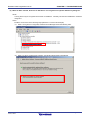
Jul 01, 2015
Page 22 of 47
Renesas Flash Programmer V2.05
CHAPTER 4 TROUBLESHOOTING
<3> Select “Let me pick from a list of device drivers on my computer”.
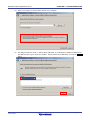
<4> The dialog box below is shown. If “Generic Boot USB Direct” is not displayed, re-install the USB driver for
the USB boot MCU Type A in the RFP installer. Select “Generic Boot USB Direct” and click the Next >
button.
R20UT2906EJ0202 Rev. 2.02
Jul 01, 2015
Page 23 of 47
Renesas Flash Programmer V2.05
CHAPTER 4 TROUBLESHOOTING
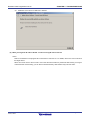
<5> Installation of the driver for USB boot is finished.
(5) When you forget the ID code of the RX. Or when a wrong ID code is entered.
Action:
Refer to the address in the program file to which the ID code was set. For details, refer to the user’s manual of
the target device.
When the control code for the ID code is set so that the entire erasure is performed after entering a wrong ID
code three times consecutively, you can write in the flash memory after another entry into boot mode.
R20UT2906EJ0202 Rev. 2.02
Jul 01, 2015
Page 24 of 47
Renesas Flash Programmer V2.05
CHAPTER 5 CAUTIONS
CHAPTER 5 CAUTIONS
This chapter describes cautions of RFP.
5.1
Connecting Two or More E1s or E20s
Applies to: RX, RH850
The following restriction applies when two or more E1s or E20s are connected to a single host PC. If the USB cable
is connected to or disconnected from an E1 or E20 or the power for an E20 is turned on or off during communication,
the RFP may encounter a communications error or be terminated.
5.2
Manipulating the User Boot Mat
Applies to: RX610
If none of the valid ID codes has been set before a generic boot device is connected (i.e. the device is not protected),
manipulation of the user boot mat gets disabled on completion of the connection. To enable manipulation of the user
boot mat, set a valid ID code before connecting the generic boot device.
5.3
Mapping of Data Flash Memory
Applies to: V850
Mapping of data flash memory might differ according to whether the MCU is in normal operation or flash memory
programming mode. Refer to the user’s manual of the microcontroller for more information on mapping in the flash
memory programming mode.
5.4
Host PC
Applies to: All microcontrollers
Some tools (E1, E20, MINICUBE2, serial interface, and USB interface) may not work with the host PC you are using.
If this is the case, check the connection between the tool and the host PC. If the tool still does not work, you may
need to use a different host PC.
5.5
USB-to-serial converter
Applies to: All microcontrollers
We do not recommend the use of a USB-to-serial converter because it may cause delays in timing and data being
lost due to the specifications of the converter.
5.6
Option-Setting Memory
Applies to: RX
If a program file includes valid data for any register in the the option-setting memory area, the option-setting memory
is set. All bits in sections for which there are no data are filled with“1”.
R20UT2906EJ0202 Rev. 2.02
Jul 01, 2015
Page 25 of 47
Renesas Flash Programmer V2.05
APPENDIX A MESSAGES
APPENDIX A MESSAGES
A.1
Message Format
Messages are displayed in the internal error, fatal error, selection, and warning dialog boxes and on the output panel.
Figure A-1. Internal Error Dialog Box
Figure A-2. Fatal Error Dialog Box
Figure A-3. Selection Dialog Box
Figure A-4. Warning Dialog Box
Figure A-5. Output Panel
R20UT2906EJ0202 Rev. 2.02
Jul 01, 2015
Page 26 of 47
Renesas Flash Programmer V2.05
A.2
APPENDIX A MESSAGES
Messages Displayed in Internal Error, Fatal Error, Selection, and Warning Dialog Boxes - Common
(1/2)
C1090002
E1011001
Message
Failed to read the necessary DLL.
Action by user
Restart RFP. If this does not resolve the problem, reinstall RFP.
Message
Invalid Program File.
Description
This error is displayed when the program file is invalid. Make sure that the file format is
supported and a valid program file has been specified.
E1011002
Message
Unique code: a conflict occurs at 0xxxxx.
Description
This error is displayed when data already exists where the unique code is tried to be written.
E1011003
Message
Unique code: invalid header (xxxx).
E1011004
Message
Unique code: invalid area name (xxxx).
E1011005
Message
Unique code: unique code address is outside the xxxx area.
E1011006
Message
Unique code: unique code acquisition failed.
E1012001
Message
Unrecognised code file syntax.
E1012002
Message
The project information is not valid.
E1091002
Message
Check whether the file or folder has been set to read-only.
Description
This error occurs when the program fails to save project information.
Action by user
Make sure that the folder or file is not read-only.
Message
The project file is broken.
Description
This error occurs when the program fails to parse a file.
Action by user
Specify a project file that is compatible with RFP.
Message
The project information cannot be restored.
Description
This error occurs when the program fails to restore or convert project information. It will also
E1092005
E1092007
occur if the program fails to extract the structure of a project to copy. This error is also output if
a project file created by a newer RFP than the one currently used is selected.
E1092008
E1092011
E1093001
Action by user
Specify a project file that is compatible with RFP.
Message
This is not a valid project file.
Description
This error occurs when the program fails to restore project information.
Action by user
Specify a project file that is compatible with RFP.
Message
The project information is invalid.
Description
This error occurs when the program fails to parse a file.
Action by user
Specify a project file that is compatible with RFP.
Message
The specified file could not be opened.
Description
This error occurs when a file could not be opened.
Action by user
Make sure that the file exists and is not corrupt.
Check the access privileges to the file.
E1091026
E1093002
Message
Invalid workspace name.
Description
The characters <, >, |, :, *, ?, \, /, and " cannot be used to specify workspace names.
Action by user
Remove the illegal character (<, >, |, :, *, ?, \, /, or ") from the workspace name.
Message
The project with the same name already exists.
Description
This error occurs if a project with the same name already exists in the currently opened
workspace when a project is tried to be added in the Full mode.
Action by user
R20UT2906EJ0202 Rev. 2.02
Jul 01, 2015
Change the project name. Or, delete the existing project with the same name if necessary.
Page 27 of 47
Renesas Flash Programmer V2.05
APPENDIX A MESSAGES
(2/2)
E1093003
Message
A program file with the same name exists.
Description
This error occurs if a program file with the same name already exists in the currently opened
project when a program file is tried to be added in the Full mode.
Action by user
Change the program file name. Or, delete the existing program file with the same name if
necessary.
Q1091004
Message
File already exists. Overwrite?
Description
This message is used for various dialog boxes when the dialog box has a field to specify a
filename.
Action by user
[Yes]: The command is executed. The file is overwritten.
[No]: The command is canceled. The file is not overwritten and the focus will be returned to the
original dialog box.
W1011001
Message
Unique code: all data up to the last (Index xxxx) have been processed.
W1012001
Message
No code file specified.
W1012002
Message
Start value exceeds End value.
W1012003
Message
Please enable Unique Code Setting to drop files.
W1012004
Message
Cannot load multiple dropped files.
W1012005
Message
Code file size does not match data list size.
W1012006
Message
Invalid Index.
W1012007
Message
Specified code file does not exist
R20UT2906EJ0202 Rev. 2.02
Jul 01, 2015
Page 28 of 47
Renesas Flash Programmer V2.05
A.3
APPENDIX A MESSAGES
Messages Displayed in Fatal Error, Selection, and Warning Dialog Boxes - RL78, 78K, V850 (1/4)
E1000001
Message
E1/E20/MINICUBE2/COMx/USB Direct communication time out.
After being connected to E1/E20/MINICUBE2/COMx/USB Direct, communication was not
Description
established and the process timed out.
E1000002
E1000003
E1000004
E1000005
Action by user
Make sure that the connection to E1/E20/MINICUBE2/COMx/USB Direct is properly set up.
Message
MINICUBE2 Firmware version too old.
Description
The MINICUBE2's firmware version might be outdated and unable to operate correctly.
Action by user
Access the update service site, download the latest firmware, and update the utility.
Message
Program File not found.
Description
Program File was not loaded correctly.
Action by user
Specify a Program File.
Message
Device Information File not found.
Description
The Device Information File was not loaded correctly.
Action by user
Restart RFP. If this does not resolve the problem, reinstall RFP.
Message
Programmer software already started.
Description
RFP might already be running, so execute the RFP command after terminating one of the
RFPs.
E1000006
Message
Related software already started.
Action by user
A related tool (such as the self-diagnostics tool) might already be running, so execute the RFP
command after terminating the tool.
E1000007
Message
Detection error by 78K0-OCD adapter board.
Action by user
Please remove the 78K0-OCD board. It is connected but cannot successfully communicate
with the target.
E1000008
E1000009
E1001001
E1001002
Message
Reading error of Flash Programming Tool information from Project file.
Description
An error occurred when trying to open the specified project file.
Action by user
Specify a project file that is compatible with RFP.
Message
Unable to connect E1/E20/MINICUBE2/COMx/USB Direct.
Description
E1/E20/MINICUBE2/COMx Direct could not be connected.
Action by user
Make sure that the connection to E1/E20/MINICUBE2/COMx/USB Direct is properly set up.
Message
Invalid Device Information File.
Description
The device information file might be invalid.
Action by user
Restart RFP. If this does not resolve the problem, reinstall RFP.
Message
Not supported Device Information File.
Description
There might be an unsupported device information file.
Action by user
Access the Version-up Service website, download the latest firmware, and update the device
information file by using the utility.
E1001003
E1001004
Message
Invalid Program File.
Description
The file format might be unsupported, or an invalid program file might have been specified.
Action by user
Specify a correct program file.
Message
Device Information File not found.
Description
No device information file has been loaded.
Action by user
- The project file cannot be read because the device information file has been changed.
Create a new project file.
- Restart RFP. If this does not resolve the problem, reinstall RFP.
R20UT2906EJ0202 Rev. 2.02
Jul 01, 2015
Page 29 of 47
Renesas Flash Programmer V2.05
APPENDIX A MESSAGES
(2/4)
E1001005
E1001006
Message
Not specify Program File.
Description
No program file has been loaded.
Action by user
Specify a Program File.
Message
Illegal supply frequency setting
Description
The frequency specified to be supplied to the target microcontroller might be incorrect.
Action by user
Check the frequency setting, and make sure that the correct clock frequency and
divider/multiplier values are set.
E1001013
Message
Value is out of clock range
Description
The frequency set to be supplied to the target microcontroller is incorrect.
Action by user
See the microcontroller's manual, and set the correct clock frequency and divider/multiplier
values.
E1001014
Message
Can't Upload Read Data.
Description
Files cannot be saved while the read command is running. The program file might be
inaccessible (e.g. in use by another program).
E1001018
E1001019
E1001020
Message
Illegal setting data.
Description
The setting failed due to illegal (invalid) data.
Action by user
Revise the setting.
Message
Error of reading the wireless registry.
Description
The registry key for the wireless unit (QB-MINI2-RF) might be corrupted or not exist.
Action by user
Start the MINICUBE2 RF utility, and make the setting.
Message
The all flash options of a target microcontroller aren’t able to read because a protection error
occurs.
Description
This message appears when all Flash option settings could not be acquired, because a
protection error occurred when executing the command to retrieve the Flash options.
E1001021
Message
OCD Security ID setting is invalid.
Description
The value entered in OCD security ID is invalid.
Action by user
Make sure that the number of characters and value entered are correct.
Message
Option bytes setting is invalid.
Description
The value entered in OPBT is invalid.
Action by user
Make sure that the number of characters and value entered are correct.
Message
Value is out of Vdd range.
Description
An incorrect value has been specified for the power to be supplied to the target microcontroller.
Action by user
Specify a correct power supply value, referring to the user's manual of the microcontroller.
Message
HCUHEX file does not accord with flash range of target microcontroller.
Action by user
Specify a correct program file.
E1001027
Message
An operation was canceled.
E1002001
Message
No response from Target Microcontroller (FLMD).
Description
There might have been a problem switching to serial programming mode.
E1001022
E1001024
E1001025
- Bad connection between utilizing tool and target microcontroller.
- The clock or power source is not supplied correctly.
- Bad target microcontroller.
R20UT2906EJ0202 Rev. 2.02
Jul 01, 2015
Page 30 of 47
Renesas Flash Programmer V2.05
APPENDIX A MESSAGES
(3/4)
E1002002
Message
No response from Target Microcontroller (RESET).
Description
There might have been a problem switching to serial programming mode.
- Bad connection between utilizing tool and target microcontroller.
- The clock or power source is not supplied correctly.
- Bad target microcontroller.
E1002003
Message
No response from Target Microcontroller (FREQ).
Description
There might have been a problem switching to serial programming mode.
- Bad connection between utilizing tool and target microcontroller.
- The clock or power source is not supplied correctly.
- Bad target microcontroller.
E1002004
Message
Communication failure or timeout.
Description
There might have been a problem establishing normal communications after switching to
serial programming mode.
- The clock or power supply is unstable.
- Bad target microcontroller.
- There might be a fault in the communication port.
E1002005
E1002006
E1002007
E1002008
E1002009
E1002010
Message
Synchronization failure for baud rate.
Action by user
See the microcontroller's manual, and select a supported baud rate.
Message
Invalid Signature reading.
Description
The selected device information file does not match the target microcontroller.
Action by user
Specify a correct microcontroller.
Message
Invalid Device Information file version.
Action by user
The level of the selected device information file might be outdated. Download the latest RFP.
Message
Not Blank.
Action by user
Make sure all data is erased and memory is blank before programming to the flash memory.
Message
Erasing operation failed.
Description
There might have been an erase failure due to bad Flash memory.
Message
Programming operation failed.
Description
An area already containing data might have been overwritten with different data.
There might have been a programming failure due to bad Flash memory.
E1002011
Message
Verifying operation failed.
Description
Different data might have been written to the program file and the target microcontroller.
There might have been a verification failure caused by a lead fault due to bad Flash memory.
E1002012
Message
Security flag setting failed.
Description
The security setting might have been changed from [Disabled] to [Enabled]. This setting only
allows the chip to be erased. Some microcontrollers do not allow security settings to be added.
Erase the chip, and then perform all settings at once. There might have been a failure to
configure security due to bad Flash memory.
E1002013
Message
Protection by security setting.
Description
The specified command might have failed to execute because the security of the target
microcontroller has already been configured. Although some security flags can be cleared by
erasing with Chip mode, others cannot. See the microcontroller's manual for details.
E1002014
Message
Check sum verification failed.
Description
The data programmed to the target microcontroller might be different from the program file.
R20UT2906EJ0202 Rev. 2.02
Jul 01, 2015
Page 31 of 47
Renesas Flash Programmer V2.05
APPENDIX A MESSAGES
(4/4)
E1002015
Message
Retry status over.
Description
The command operation has exceeded the specified number of retries. The microcontroller
might be defective.
E1002016
Message
Illegal status from Microcontroller.
Description
The status code returned from the microcontroller is invalid (not a designated code). There
might be a runaway process. Check the operating environment, and try running the command
again.
The communication port might be unstable due to external factors.
E1002018
Message
HEX file exceeds target device flash range.
Description
The address range of the downloaded program file exceeds the range specified for [Operation
mode] in the [Target] category.
E1009001
Message
Not Initialized.
Description
There might have been a failure to acquire working memory on startup, or a failure to start a
thread process.
E1009002
Action by user
Try changing host PC and starting RFP again.
Message
Illegal parameter.
Description
There might have been a failure to perform normal control due to an unstable USB
communication port.
E1009003
Message
Control failed. Please restart the Flash programming tool.
Action by user
The tool used might be locked up. Disconnect the USB, and try connecting again.
Message
Wait status timeout.
Action by user
The microcontroller might be defective. Replace it with a good sample.
Message
Unknown error occurred.
Description
Illegal processing was detected.
Action by user
Restart RFP. If this does not resolve the problem, reinstall RFP.
M1001027
Message
The security setting state of a target microcontroller is as follows.
Q1001015
Message
The security setting state of a target microcontroller is as follows. If you want to feedback them
E1009004
E1090001
to the Target Security Settings, press OK button.
Q1001026
Message
Turn on the power source for the target again.
W1000010
Message
Check the voltage applied to the target system
Description
USB VBUS (5 V) from the host PC is applied to the target system. Check if the voltage satisfies
the specifications of the microcomputer
W1001007
Message
Caution: When ’Chip Erase’ is disable, chip cannot be erased and programmed any more.
Description
This warning message appears when the "CHIP erase protection" security flag is set, to warn
the programmer that it will not be possible to clear a flag.
W1001008
Message
Caution: When ’Boot block cluster reprogramming’ is disable, boot block cannot be erased and
programmed any more.
Description
This warning message appears when the "boot block area overwrite protection" security flag is
set, to warn the programmer that it will not be possible to clear a flag.
W1001016
Message
Caution: The latest program file exists. Program file is forced to update.
W1001023
Message
If Disable Block Erase is specified and a security command is executed, the Security Release
command cannot be executed and the target security setting cannot be cleared again.
R20UT2906EJ0202 Rev. 2.02
Jul 01, 2015
Page 32 of 47
Renesas Flash Programmer V2.05
A.4
APPENDIX A MESSAGES
Messages Displayed in Fatal Error, Selection, and Warning Dialog Boxes - RX, RH850 (1/9)
E1010001
Message
The project information is not valid
Description
This error is displayed when the project file cannot be accessed. The file might be corrupted.
Remake the project file.
E1010002
Message
Generic device query failed
Description
This error is displayed when the device specification query fails for some reason. Make sure
that the settings for the RFP and the target board are correct.
E1010003
Message
Operation failed
Description
This error is displayed when an operation fails in program, erase, check sum, or blank check.
E1010004
Message
Lock failed
E1010005
Message
Unlock failed
E1010006
Message
Connect failed.
Description
This error is displayed when connection to the microcontroller fails for some reason. Make
sure that the settings for the RFP and the target board are correct.
E1010007
Message
One or more erase blocks are currently locked and cannot be erased:
E1010008
Message
Erase failed for xx (0xxxxx - 0xxxxx)
Description
This error is displayed when erasing the indicated block failed.
E1010009
Message
One or more erase blocks are currently locked and cannot be written:
E1010011
Message
No data to compared
Description
This error is displayed when the file to compare does not have any data in the ROM address
area of the microcontroller.
E1010012
Message
Verification Failed
Description
This error is displayed when the data in the file to compare does not match the ROM data in
the microcontroller.
E1010013
E1010014
E1010015
Message
Unable to verify.
Description
This error is displayed when the verify data cannot be read for some reason.
Message
Operation aborted
Description
This error is displayed when the operation is aborted by the user manually.
Message
Failed to save read data
Description
This error is displayed when saving data failed. Make sure that the folder or file is not
read-only.
E1010016
Message
Upload failed
Description
This error is displayed when data cannot be read from the ROM for some reason.
E1010017
Message
Invalid parameter
E1010018
Message
Invalid command
E1010019
Message
Option bytes setting is invalid
E1010020
Message
Verify command failed for 0xXXXX - 0xXXXX
E1010021
Message
The project information cannot be restored.
E1010023
Message
Set OTP failed
E1010024
Message
Failed to validate ICU
E1010025
Message
Failed to set command protection
E1010026
Message
Failed to disable serial program
E1010028
Message
Failed to export ID Code. (xxxx)
E1010029
Message
Failed to import ID Code. (xxxx)
R20UT2906EJ0202 Rev. 2.02
Jul 01, 2015
Page 33 of 47
Renesas Flash Programmer V2.05
APPENDIX A MESSAGES
(2/9)
E1010030
Message
Failed to load module
E1010031
Message
This device is not a generic device
E1010032
Message
The device sent an unrecognized reponse: 0xXX
E1010033
Message
Failed to set ID code (ID Authentication Mode)
E1010034
Message
OFS setting is invalid
E1010035
Message
Failed to set ID code (Command Protection Mode)
E1010036
Message
Data in Option-Setting Memory is not correct.
E1010037
Message
Failed to set option bytes
E1010038
Message
Failed to set OFS
E1010039
Message
Failed to set Trusted Memory
E1010040
Message
Failed to set endian
E1013001*
Message
This device is not a generic device.
E1013002*
Message
Selection of Device - Checksum error.
E1013003*
Message
Selection of Device - Invalid device code error.
Description
This error is displayed when the device code mismatches in the device specification query.
Make sure that the correct product name for the microcontroller on the target board is selected.
E1013004*
Message
Selection of Device - Invalid response.
E1013005*
Message
The device sent an unrecognised response: 0xXX
E1013006*
Message
Selection of Clock mode - Checksum error.
E1013007*
Message
Selection of Clock mode - Invalid clock mode error
E1013008*
Message
Selection of Clock mode - No clock mode needed
E1013009*
Message
Selection of Clock mode - Invalid response.
E1013010*
Message
Unable to create temporary file. Generic query failed.
E1013011*
Message
Response data does not match checksum
E1014001*
Message
The device sent an unrecognized reponse: 0xXX.
E1014002*
Message
This device is not a generic device
E1014003*
Message
The device does not support this command
E1014004*
Message
Selection of Device - Checksum error
E1014005*
Message
Selection of Device - Invalid device code error
Description
This error is displayed if the device code mismatches when connecting to the microcontroller.
Make sure that the correct product name for the microcontroller on the target board is selected.
E1014006*
Message
Selection of Device - Invalid response
E1014007*
Message
Selection of Clock Mode - Checksum error
E1014008*
Message
Selection of Clock Mode - Invalid clock mode error
E1014009*
Message
Selection of Clock Mode - No clock mode needed
E1014010*
Message
Selection of Clock Mode - Invalid response
E1014011*
Message
Changing baud rate - Checksum error
E1014012*
Message
Changing baud rate - Unable to set baud rate error
Description
This error is the unable-to-set-baud-rate error (serial baud rate error too large) that occurs
when the baud rate is changed. In [Setting Clock], [Clock supply] and [Multiplier for the main
clock and peripheral clock] must be entered. The most frequently reported errors in those
settings are regarding the multiplier of the peripheral clock. For those clock settings, see the
hardware manual of the microcontroller. Also, check the clock of your target board
(microcontroller).
R20UT2906EJ0202 Rev. 2.02
Jul 01, 2015
Page 34 of 47
Renesas Flash Programmer V2.05
APPENDIX A MESSAGES
(3/9)
E1014013*
Message
Changing baud rate - Input clock error
Description
This error is displayed when the input frequency setting in [Setting Clock] exceeds the
operating range of the microcontroller. In [Device Setting], [Input clock], [Multiplier for the main
clock], and [Multiplier for the peripheral clock] must be entered. The most frequently reported
errors in those settings are regarding the multiplier of the peripheral clock. For those clock
settings, see the hardware manual of the microcontroller. Also, check the clock of your target
board (microcontroller).
E1014014*
Message
Changing baud rate - Operating frequency error
Description
This error is displayed when the clock setting does not meet the operating frequency
specification of the microcontroller. Based on the input conditions (input frequency and
multiplier) from the RFP, only a range check (calculation only) for operating frequency is
performed in the device side. Check the input conditions (input frequency and multiplier) of the
RFP.
E1014015*
Message
Changing baud rate - Invalid multiplication ratio error
E1014016*
Message
Changing baud rate - Invalid response
E1014017*
Message
Unable to set baud rate value xxxx bps
E1014018*
Message
End of Setting Data - Erase error
Description
This error is displayed when data erasure of the flash memory upon the startup of the
microcontroller in the Boot mode was executed but failed. Possible causes of the error (failure
to erase) include 1) Power supply voltage to the microcontroller is not applied properly (power
supply from E1/power supply from the target board), 2) The microcontroller cannot operate
properly because of the pin settings, and 3) The microcontroller has been damaged for some
reason. Check the items 1) through 3) above.
E1014019*
Message
End of Setting Data - Invalid response
Description
This error is displayed when an invalid command is received in the state waiting for the data
setting complete command. Check the product name of the microcontroller on the target board
as well as the pin settings.
E1014020*
Message
Checking ID Code - Checksum error
E1014021*
Message
Checking ID Code - Invalid ID error
Description
This error is displayed when an ID code different from the one set in the microcontroller to be
programmed is entered. The ID code is written to a specific address on the ROM. Check the
value of the address of the written program. Operation is dependent on the control code. If you
forgot the configured ID code, basically, you cannot read, write, or erase the microcontroller
with a serial writer.
E1014022*
Message
Checking ID Code - Erase error
E1014023*
Message
Checking ID Code - Invalid reponse
E1014024*
Message
ID code check failure
E1014025*
Message
Reading Lock Bit - Checksum error
E1014026*
Message
Reading Lock Bit - Address error
E1014027*
Message
Reading Lock Bit - Invalid response
E1014028*
Message
Lock Bit Disable Failed
E1014029*
Message
Lock Bit Enable Failed
E1014030*
Message
Setting Lock Bit - Checksum error
E1014031*
Message
Setting Lock Bit - Address error
E1014032*
Message
Setting Lock Bit - Write error
R20UT2906EJ0202 Rev. 2.02
Jul 01, 2015
Page 35 of 47
Renesas Flash Programmer V2.05
APPENDIX A MESSAGES
(4/9)
E1014033*
Message
Setting Lock Bit - Invalid response
E1014034*
Message
Error during preparation of Erasing operation
E1014035*
Message
Erasing Block - Checksum error
E1014036*
Message
Erasing Block - Block number error
E1014037*
Message
Erasing Block - Erase error
Description
This error is displayed when data erasure of the flash memory of the microcontroller was
executed but failed. Possible causes of the error (failure to erase) include 1) Power supply
voltage to the microcontroller is not applied properly (power supply from E1/power supply from
the target board), 2) The microcontroller cannot operate properly because of the pin settings,
3) The microcontroller has been damaged for some reason, and 4) Communication between
the microcontroller and the PC failed** so the command was not executed. Check the items 1)
through 4) above.
** Proper communication may not be expected when a USB-RS232C converter, a self-made
cable, a self-made extension cable for connection with E1/E20, or the like is used.
E1014038*
Message
Erasing Block - Invalid response
E1014039*
Message
Error during preparation of Writing operation
E1014040*
Message
Reading Data - Checksum error
E1014041*
Message
Reading Data - Address error
E1014042*
Message
Reading Data - Length error
E1014043*
Message
Reading Data - Invalid response
E1014044*
Message
Writing Data - Checksum error
E1014045*
Message
Writing Data - Address error
E1014046*
Message
Writing Data - Write error
Description
This error is displayed when programming to the microcontroller cannot be done for some
reason. It may be due to a wrong pin setting or power supply not being supplied to the
microcontroller properly.
E1014047*
Message
Writing Data - Invalid response
E1014048*
Message
Read Checksum mismatch
E1014049*
Message
Checksum Read Error
Description
This error is displayed when the sum of the response data of the sum check command is
invalid. In the protocol of some microcontrollers, a sum code (1 byte) is added to ensure the
integrity of the command data (no error if the sum of the command data and the sum code is 0
[lower 1 byte]). This error means the sum of the response data (+ sum code) of the sum check
command received from the device is not 0. A possible cause is that serial communication
between the RFP and the microcontroller is unstable. Possible causes of unstable serial
communication include improper handling of microcontroller pins (TxD/RxD pins not pulled up,
wrong Vcl pin handling) and a long communication cable between the PC and the
microcontroller (target).
E1014050*
Message
Get Flash options - Checksum error
E1014051*
Message
Security Setting - Checksum error
E1014052*
Message
Security Setting - Address error
E1014053*
Message
Security Setting - Write error
E1014054*
Message
Get Flash options - Invalid response
E1014055*
Message
Security Setting - Invalid response
R20UT2906EJ0202 Rev. 2.02
Jul 01, 2015
Page 36 of 47
Renesas Flash Programmer V2.05
APPENDIX A MESSAGES
(5/9)
E1014056*
Message
Writing Data - Data length error
E1015001*
Message
Unable to open comms.
Description
This error is displayed when the communication port cannot be recognized. Check the port
setting of your PC. Frequently reported cases of this error include: the PC has no RS232C port
and 1) a commercially-available USB-RS232C converter is used or 2) a self-made conversion
circuit (board) using a USB-serial conversion IC is used. In both above cases, communication
control timing is slightly slower because, unlike the case using a built-in RS-232 port on the
PC, the port is driven via USB, and timing adjustment between the RFP and the
microcontroller on the target board may not work properly. As a preventive measure, use a PC
equipped with a RS-232 port, or use an E1/E20 emulator that can be connected with a PC via
USB.
E1015003*
Message
Error in setting of configuration.
E1015004*
Message
Invalid receive buffers.
E1015005*
Message
Invalid command is supplied.
E1015006*
Message
Unable to transmit.
E1015008*
Message
Invalid transmission buffers.
E1015009*
Message
Unable to receive.
E1015011*
Message
Unable to close comms.
Description
This error is displayed when the communication port cannot be recognized. Check the port
setting of your PC. Frequently reported cases of this error include: the PC has no RS232C port
and 1) a commercially-available USB-RS232C converter is used or 2) a self-made conversion
circuit (board) using a USB-serial conversion IC is used. In both above cases, communication
control timing is slightly slower because, unlike the case using a built-in RS-232 port on the
PC, the port is driven via USB, and timing adjustment between the RFP and the
microcontroller on the target board may not work properly. As a preventive measure, use a PC
equipped with a RS-232 port, or use an E1/E20 emulator that can be connected with a PC via
USB.
E1015012*
Message
Comms is already closed.
E1015013*
Message
COMx connection timed out
Description
This error is displayed when a communication problem occurs between the microcontroller
and the RFP (PC) for some reason, resulting in a timeout. The RFP allows you to set a baud
rate, but communication cannot be done if the specified baud rate does not match the actual
setting of the target board (microcontroller). Check the following points. (This error may be
displayed along with "Generic device query failed.")
■ Check the baud rate.
-
Check the operating frequency of the microcontroller to see if the baud rate
exceeds the allowable communication rate and if the baud rate is appropriate.
■ Check the clock setting.
-
Check if the operating frequency of the microcontroller set in the RFP and the clock
of the target board (microcontroller) match.
■ Check the connection between the target board (microcontroller) and the PC.
-
Proper communication may not be expected when a USB-RS232C converter, a
self-made cable, or the like is used.
Data received from the microcontroller may be dropped.
■Quit the software except RFP, or lower the baud rate.
R20UT2906EJ0202 Rev. 2.02
Jul 01, 2015
Page 37 of 47
Renesas Flash Programmer V2.05
APPENDIX A MESSAGES
(6/9)
E1015014*
Message
Error in setting timeout configuration.
E1015015*
Message
Error setting Device Control Block.
E1015016*
Message
Unable to locate device.
E1015017*
Message
Device access is denied.
E1015018*
Message
Device has not been initialised.
E1015019*
Message
Invalid parameters supplied.
E1015020*
Message
Unable to create comms event.
E1016001*
Message
RComms.dll not found or incorrect version of DLL
E1016002*
Message
USB Open error
E1016003*
Message
USB connection timed out
Description
This error is displayed when a communication problem occurs between the microcontroller
and the RFP (PC) for some reason, resulting in a timeout. Check the following points. (This
error may be displayed along with "Generic device query failed.")
■ Check the clock setting.
-
Check if the operating frequency of the microcontroller set in the RFP and the clock
of the target board (microcontroller) match.
E1016004*
Message
Failed to write the data
E1016005*
Message
No data port is available
E1017001
Message
Sync mode is not supported.
E1017003
Message
Configure file is invalid.
E1017004
Message
Failed to load BFW file (xxxx)
E1017005
Message
Loading FPGA data failed.
E1017006
Message
Failed to initialize FPGA.
E1017007
Message
Failed to get Setup Information.
E1017008
Message
Can't open xxxx.
E1017009
Message
Invalid timeout (xxxx)
E1017010
Message
E1/E20 communication error.
E1017012
Message
Failed to start up MCU.
E1017013
Message
No emulator chosed.
E1017014
Message
Failed to set mode pin.
E1017015
Message
Failed to reset target.
E1017016
Message
Failed to set time out.
E1017018
Message
Can not allocate memory.
E1017019
Message
Adaptor update failed.
E1017020
Message
xxxx bps is invalid baudrate.
E1017021
Message
E1/E20 transmit error.
E1017022
Message
E1/E20 receive error
R20UT2906EJ0202 Rev. 2.02
Jul 01, 2015
Page 38 of 47
Renesas Flash Programmer V2.05
APPENDIX A MESSAGES
(7/9)
E1017023
Message
E1/E20 connection timed out.
Description
This error is displayed when a communication problem occurs between the microcontroller
and the RFP (PC) for some reason, resulting in a timeout. The RFP allows you to set a baud
rate, but communication cannot be done if the specified baud rate does not match the actual
setting of the target board (microcontroller). Check the following points. (This error may be
displayed along with "Generic device query failed.")
■ Check the baud rate.
- Check the operating frequency of the microcontroller to see if the baud rate exceeds the
allowable communication rate and if the baud rate is appropriate.
■ Check the clock setting.
- Check if the operating frequency of the microcontroller set in the RFP and the clock of the
target board (microcontroller) match.
■ Check the connection between the target board (microcontroller) and the PC.
- Proper communication may not be expected when a self-made extension cable for
connection with E1/E20** is used.
** When E1/E20 is used, operation is not guaranteed if an extension cable or the like except an
attached cable is used.
E1017024
Message
Target is already powered.
E1017025
Message
Target is not powered.
E1017026
Message
Invalid MODEENTRY (xxxx).
E1020001
Message
Unsupported command error
E1020002
Message
Packet error
E1020003
Message
Checksum error
E1020004
Message
Flow error
E1020005
Message
Address error
E1020006
Message
Input frequency error
E1020007
Message
CPU clock frequency error
E1020008
Message
Baud rate range error
E1020009
Message
Baud rate margin error
E1020010
Message
Sum check method error
E1020011
Message
Endian error
E1020012
Message
Data set error
E1020013
Message
Protection error
E1020014
Message
Serial programming ID-code discord error
E1020015
Message
Serial programming Disable error
E1020016
Message
Lock-bit unlock error
E1020017
Message
OTP enable error
E1020018
Message
Blank error
E1020019
Message
Erase error
E1020020
Message
Write error
E1020021
Message
Verify error
E1020022
Message
FCURAM Access error
E1020023
Message
Sequencer error
E1020024
Message
Configuration Data Access error
R20UT2906EJ0202 Rev. 2.02
Jul 01, 2015
Page 39 of 47
Renesas Flash Programmer V2.05
APPENDIX A MESSAGES
(8/9)
E1020025
Message
Configuration Table Access error
E1020026
Message
OTP Access error
E1020027
Message
Protection terminal Error
E1020028
Message
Hardware access error
E1020029
Message
Generic Code error
E1020030
Message
Erase error
E1020031
Message
Verify error
E1020032
Message
Device information file is invalid!
E1020033
Message
Unable to create temporary file. Generic query failed
E1020034
Message
Invalid response error
E1020035
Message
The device sent an unrecognized reponse: 0xXX
E1020036
Message
The device does not support this command
E1020037
Message
This device is not supported.
E1020038
Message
No response from the device.
E1020039
Message
Connection is failed. Click the back button. Please retry to connect to device.
E1020040
Message
Fatal error!
E1020041
Message
Area error
E1020042
Message
Device type mismatch error
Q1010001
Message
The current user specified connection speed has an error rate above xxxx% on target device.
Q1010002
Message
RFP will now attempt to connect to your device. Please ensure the board is connected,
Continue with this value anyway?
powered and in Boot mode.
Q1010003
Message
The device reports one or more erase blocks are currently locked Should RFP temporarily
disable this locking to allow erase and program?
Q1010004
Message
RFP will unlock some blocks, but this will require them to be erased. Continue?
Q1010005
Message
xxxx file exceeds the flash ROM size of xxxx device. Continue download?
Q1010006
Message
The User Boot Area is not blank. Continue?
Q1010007
Message
The current user specified connection speed has an error rate above xxxx% on emulator.
Continue with this value anyway?
Q1010008
Message
Some blocks will need to be erased. Continue?
Q1010009
Message
The setting state of a target microcontroller is as follows. If you want to feedback them to the
project settings, press OK button.
Q1010010
Message
The current user specified connection speed is out of range. Continue with this value anyway?
W1010001
Message
Please enter a crystal frequency
W1010002
Message
The specified crystal frequency is out of range. Valid values are between xxxx and xxxx
W1010004
Message
The current user specified connection speed is out of range. The interface board is unable to
W1010005
Message
communicate at this rate.
The current user specified connection speed is out of range. The device is unable to sync to
this rate.
W1010006
Message
Timeout should be set between 1 to 50 seconds.
W1010007
Message
download xxxx file which exceeds the flash ROM size of xxxx device.
W1010008
Message
The specified upload range exceeds the area address space and cannot be uploaded.
W1010009
Message
Values at index 0xXXXX not equal -> File Data 0xXXXX, Read 0xXXXX
R20UT2906EJ0202 Rev. 2.02
Jul 01, 2015
Page 40 of 47
Renesas Flash Programmer V2.05
APPENDIX A MESSAGES
(9/9)
W1010010
Message
The following file does not contain any data
(or the data may be out of range of the device flash area): xxxx
W1010011
Message
xxxx file exceeds the flash ROM size of xxxx device.
W1010012
Message
Blocks which have been set as OTP should be set again at disconnect.
W1010013
Message
Blocks which will be written have not been selected.
W1010014
Message
The communication speed has been changed to xxxx bps.
W1010015
Message
If Disable Serial Program is set, RFP can not connect to the targete device again.
W1010016
Message
If Disable Erase is set, RFP can not remove this set.
W1010017
Message
The device is set as ID Authentication mode. Please disconnect RFP form the device.
* Those messages are displayed in the Output Panel only.
R20UT2906EJ0202 Rev. 2.02
Jul 01, 2015
Page 41 of 47
Renesas Flash Programmer V2.05
APPENDIX B SUPPLEMENTARY INFORMATION
APPENDIX B SUPPLEMENTARY INFORMATION
Figure B-1. E1 and E20 Pins - RX E1
Pin No.
E20
Pin Name
Pin Name (14-pin Compatible)
Pin Name (38-pin)
1
io4
io4
io1
2
GND
GND
io2
3
io5
io5
io0
4
io0
io0
5
SEND
SEND
−
UCONNECT (connected to GND of the
target board)
6
io1
io1
−
7
io3
io3
−
8
UVCC (whether 3.3V or 5.0V is
supplied or whether power is supplied
to the target can be detected)
UVCC
io3
RESET
9
UVCC2
UVCC2
10
io2
io2
11
RECEIVE
RECEIVE
12
GND
GND
−
13
RESET
RESET
−
14
UCONNECT (connected to GND of the
target board)
UCONNECT (connected to GND of the
target board)
15
−
SEND
UVCC
io4
−
16
17
UVCC2
−
18
19
RECEIVE
−
20
21
io5
22
−
23
−
24
−
25
−
26
−
27
−
28
−
29
−
30
−
31
−
32
−
33
−
34
−
35
−
36
−
37
−
38
−
“-” indicates an unused pin.
R20UT2906EJ0202 Rev. 2.02
Jul 01, 2015
Page 42 of 47
Renesas Flash Programmer V2.05
APPENDIX B SUPPLEMENTARY INFORMATION
Figure B-2. 32-bit CRC Calculation Specifications
/* The generator polynomial used for this table is
*/
/* x^32+x^26+x^23+x^22+x^16+x^12+x^11+x^10+x^8+x^7+x^5+x^4+x^2+x^1+x^0 */
/* according to Autodin/Ethernet/ADCCP protocol standards
/* Binary: 0x04c11db7
*/
*/
const uint32_t CRC32_Tab [256]= {
0x00000000, 0x04c11db7, 0x09823b6e, 0x0d4326d9, 0x130476dc, 0x17c56b6b, 0x1a864db2, 0x1e475005,
0x2608edb8, 0x22c9f00f, 0x2f8ad6d6, 0x2b4bcb61, 0x350c9b64, 0x31cd86d3, 0x3c8ea00a, 0x384fbdbd,
0x4c11db70, 0x48d0c6c7, 0x4593e01e, 0x4152fda9, 0x5f15adac, 0x5bd4b01b, 0x569796c2, 0x52568b75,
0x6a1936c8, 0x6ed82b7f, 0x639b0da6, 0x675a1011, 0x791d4014, 0x7ddc5da3, 0x709f7b7a, 0x745e66cd,
0x9823b6e0, 0x9ce2ab57, 0x91a18d8e, 0x95609039, 0x8b27c03c, 0x8fe6dd8b, 0x82a5fb52, 0x8664e6e5,
0xbe2b5b58, 0xbaea46ef, 0xb7a96036, 0xb3687d81, 0xad2f2d84, 0xa9ee3033, 0xa4ad16ea, 0xa06c0b5d,
0xd4326d90, 0xd0f37027, 0xddb056fe, 0xd9714b49, 0xc7361b4c, 0xc3f706fb, 0xceb42022, 0xca753d95,
0xf23a8028, 0xf6fb9d9f, 0xfbb8bb46, 0xff79a6f1, 0xe13ef6f4, 0xe5ffeb43, 0xe8bccd9a, 0xec7dd02d,
0x34867077, 0x30476dc0, 0x3d044b19, 0x39c556ae, 0x278206ab, 0x23431b1c, 0x2e003dc5, 0x2ac12072,
0x128e9dcf, 0x164f8078, 0x1b0ca6a1, 0x1fcdbb16, 0x018aeb13, 0x054bf6a4, 0x0808d07d, 0x0cc9cdca,
0x7897ab07, 0x7c56b6b0, 0x71159069, 0x75d48dde, 0x6b93dddb, 0x6f52c06c, 0x6211e6b5, 0x66d0fb02,
0x5e9f46bf, 0x5a5e5b08, 0x571d7dd1, 0x53dc6066, 0x4d9b3063, 0x495a2dd4, 0x44190b0d, 0x40d816ba,
0xaca5c697, 0xa864db20, 0xa527fdf9, 0xa1e6e04e, 0xbfa1b04b, 0xbb60adfc, 0xb6238b25, 0xb2e29692,
0x8aad2b2f, 0x8e6c3698, 0x832f1041, 0x87ee0df6, 0x99a95df3, 0x9d684044, 0x902b669d, 0x94ea7b2a,
0xe0b41de7, 0xe4750050, 0xe9362689, 0xedf73b3e, 0xf3b06b3b, 0xf771768c, 0xfa325055, 0xfef34de2,
0xc6bcf05f, 0xc27dede8, 0xcf3ecb31, 0xcbffd686, 0xd5b88683, 0xd1799b34, 0xdc3abded, 0xd8fba05a,
0x690ce0ee, 0x6dcdfd59, 0x608edb80, 0x644fc637, 0x7a089632, 0x7ec98b85, 0x738aad5c, 0x774bb0eb,
0x4f040d56, 0x4bc510e1, 0x46863638, 0x42472b8f, 0x5c007b8a, 0x58c1663d, 0x558240e4, 0x51435d53,
0x251d3b9e, 0x21dc2629, 0x2c9f00f0, 0x285e1d47, 0x36194d42, 0x32d850f5, 0x3f9b762c, 0x3b5a6b9b,
0x0315d626, 0x07d4cb91, 0x0a97ed48, 0x0e56f0ff, 0x1011a0fa, 0x14d0bd4d, 0x19939b94, 0x1d528623,
0xf12f560e, 0xf5ee4bb9, 0xf8ad6d60, 0xfc6c70d7, 0xe22b20d2, 0xe6ea3d65, 0xeba91bbc, 0xef68060b,
0xd727bbb6, 0xd3e6a601, 0xdea580d8, 0xda649d6f, 0xc423cd6a, 0xc0e2d0dd, 0xcda1f604, 0xc960ebb3,
0xbd3e8d7e, 0xb9ff90c9, 0xb4bcb610, 0xb07daba7, 0xae3afba2, 0xaafbe615, 0xa7b8c0cc, 0xa379dd7b,
0x9b3660c6, 0x9ff77d71, 0x92b45ba8, 0x9675461f, 0x8832161a, 0x8cf30bad, 0x81b02d74, 0x857130c3,
0x5d8a9099, 0x594b8d2e, 0x5408abf7, 0x50c9b640, 0x4e8ee645, 0x4a4ffbf2, 0x470cdd2b, 0x43cdc09c,
0x7b827d21, 0x7f436096, 0x7200464f, 0x76c15bf8, 0x68860bfd, 0x6c47164a, 0x61043093, 0x65c52d24,
0x119b4be9, 0x155a565e, 0x18197087, 0x1cd86d30, 0x029f3d35, 0x065e2082, 0x0b1d065b, 0x0fdc1bec,
0x3793a651, 0x3352bbe6, 0x3e119d3f, 0x3ad08088, 0x2497d08d, 0x2056cd3a, 0x2d15ebe3, 0x29d4f654,
0xc5a92679, 0xc1683bce, 0xcc2b1d17, 0xc8ea00a0, 0xd6ad50a5, 0xd26c4d12, 0xdf2f6bcb, 0xdbee767c,
0xe3a1cbc1, 0xe760d676, 0xea23f0af, 0xeee2ed18, 0xf0a5bd1d, 0xf464a0aa, 0xf9278673, 0xfde69bc4,
0x89b8fd09, 0x8d79e0be, 0x803ac667, 0x84fbdbd0, 0x9abc8bd5, 0x9e7d9662, 0x933eb0bb, 0x97ffad0c,
0xafb010b1, 0xab710d06, 0xa6322bdf, 0xa2f33668, 0xbcb4666d, 0xb8757bda, 0xb5365d03, 0xb1f740b4
};
uint32_t CalcMemoryCRC32 (uint32_t address, uint32_t length)
{
uint32_t i, rd_ptr, crc_accum;
uint8_t byte, data [16];
crc_accum= 0xFFFFFFFF;
/* Init Pattern */
for (i= 0, rd_ptr= 16; i < length; i++)
{
/* Check flash read buffer and fill if needed */
if (rd_ptr == 16)
{
Memory_Read (address, 16, data);
rd_ptr= 0;
address+= 16;
}
byte= ((crc_accum >> 24) ^ data [rd_ptr++]) & 0xFF;
crc_accum= (crc_accum << 8) ^ CRC32_Tab [byte];
}
return crc_accum;
}
R20UT2906EJ0202 Rev. 2.02
Jul 01, 2015
Page 43 of 47
Renesas Flash Programmer V2.05
APPENDIX B SUPPLEMENTARY INFORMATION
Figure B-3. 16-bit CRC Calculation Specifications
/* The generator polynomial used for this table is: */
/* x^16+x^12+x^5+x^0 according to CCITT-16 standard. */
/* Binary: 0x1021 */
const uint16_t CRC16_Tab [256]= {
0x0000,0x1021,0x2042,0x3063,0x4084,0x50A5,0x60C6,0x70E7,
0x8108,0x9129,0xA14A,0xB16B,0xC18C,0xD1AD,0xE1CE,0xF1EF,
0x1231,0x0210,0x3273,0x2252,0x52B5,0x4294,0x72F7,0x62D6,
0x9339,0x8318,0xB37B,0xA35A,0xD3BD,0xC39C,0xF3FF,0xE3DE,
0x2462,0x3443,0x0420,0x1401,0x64E6,0x74C7,0x44A4,0x5485,
0xA56A,0xB54B,0x8528,0x9509,0xE5EE,0xF5CF,0xC5AC,0xD58D,
0x3653,0x2672,0x1611,0x0630,0x76D7,0x66F6,0x5695,0x46B4,
0xB75B,0xA77A,0x9719,0x8738,0xF7DF,0xE7FE,0xD79D,0xC7BC,
0x48C4,0x58E5,0x6886,0x78A7,0x0840,0x1861,0x2802,0x3823,
0xC9CC,0xD9ED,0xE98E,0xF9AF,0x8948,0x9969,0xA90A,0xB92B,
0x5AF5,0x4AD4,0x7AB7,0x6A96,0x1A71,0x0A50,0x3A33,0x2A12,
0xDBFD,0xCBDC,0xFBBF,0xEB9E,0x9B79,0x8B58,0xBB3B,0xAB1A,
0x6CA6,0x7C87,0x4CE4,0x5CC5,0x2C22,0x3C03,0x0C60,0x1C41,
0xEDAE,0xFD8F,0xCDEC,0xDDCD,0xAD2A,0xBD0B,0x8D68,0x9D49,
0x7E97,0x6EB6,0x5ED5,0x4EF4,0x3E13,0x2E32,0x1E51,0x0E70,
0xFF9F,0xEFBE,0xDFDD,0xCFFC,0xBF1B,0xAF3A,0x9F59,0x8F78,
0x9188,0x81A9,0xB1CA,0xA1EB,0xD10C,0xC12D,0xF14E,0xE16F,
0x1080,0x00A1,0x30C2,0x20E3,0x5004,0x4025,0x7046,0x6067,
0x83B9,0x9398,0xA3FB,0xB3DA,0xC33D,0xD31C,0xE37F,0xF35E,
0x02B1,0x1290,0x22F3,0x32D2,0x4235,0x5214,0x6277,0x7256,
0xB5EA,0xA5CB,0x95A8,0x8589,0xF56E,0xE54F,0xD52C,0xC50D,
0x34E2,0x24C3,0x14A0,0x0481,0x7466,0x6447,0x5424,0x4405,
0xA7DB,0xB7FA,0x8799,0x97B8,0xE75F,0xF77E,0xC71D,0xD73C,
0x26D3,0x36F2,0x0691,0x16B0,0x6657,0x7676,0x4615,0x5634,
0xD94C,0xC96D,0xF90E,0xE92F,0x99C8,0x89E9,0xB98A,0xA9AB,
0x5844,0x4865,0x7806,0x6827,0x18C0,0x08E1,0x3882,0x28A3,
0xCB7D,0xDB5C,0xEB3F,0xFB1E,0x8BF9,0x9BD8,0xABBB,0xBB9A,
0x4A75,0x5A54,0x6A37,0x7A16,0x0AF1,0x1AD0,0x2AB3,0x3A92,
0xFD2E,0xED0F,0xDD6C,0xCD4D,0xBDAA,0xAD8B,0x9DE8,0x8DC9,
0x7C26,0x6C07,0x5C64,0x4C45,0x3CA2,0x2C83,0x1CE0,0x0CC1,
0xEF1F,0xFF3E,0xCF5D,0xDF7C,0xAF9B,0xBFBA,0x8FD9,0x9FF8,
0x6E17,0x7E36,0x4E55,0x5E74,0x2E93,0x3EB2,0x0ED1,0x1EF0
};
uint16_t CalcMemoryCRC16 (uint32_t address, uint32_t length)
{
uint32_t i, rd_ptr;
uint16_t crc_accum;
uint8_t byte, data [4];
crc_accum= 0x0000; /* Init Pattern */
for (i= 0, rd_ptr= 0; i < length; i++)
{
/* Check flash read buffer and fill if needed */
if (rd_ptr == 0)
{
Memory_Read (address, 4, data);
rd_ptr= 4;
address+= 4;
}
byte= (crc_accum >> 8) ^ data [--rd_ptr];
crc_accum= (crc_accum << 8) ^ CRC16_Tab [byte];
}
return crc_accum;
}
R20UT2906EJ0202 Rev. 2.02
Jul 01, 2015
Page 44 of 47
Renesas Flash Programmer V2.05 User’s Manual:
Common
Publication Date:
Rev. 2.02
Jul 01, 2015
Published by:
Renesas Electronics Corporation
http://www.renesas.com
SALES OFFICES
Refer to "http://www.renesas.com/" for the latest and detailed information.
Renesas Electronics America Inc.
2801 Scott Boulevard Santa Clara, CA 95050-2549, U.S.A.
Tel: +1-408-588-6000, Fax: +1-408-588-6130
Renesas Electronics Canada Limited
9251 Yonge Street, Suite 8309 Richmond Hill, Ontario Canada L4C 9T3
Tel: +1-905-237-2004
Renesas Electronics Europe Limited
Dukes Meadow, Millboard Road, Bourne End, Buckinghamshire, SL8 5FH, U.K
Tel: +44-1628-585-100, Fax: +44-1628-585-900
Renesas Electronics Europe GmbH
Arcadiastrasse 10, 40472 Düsseldorf, Germany
Tel: +49-211-6503-0, Fax: +49-211-6503-1327
Renesas Electronics (China) Co., Ltd.
Room 1709, Quantum Plaza, No.27 ZhiChunLu Haidian District, Beijing 100191, P.R.China
Tel: +86-10-8235-1155, Fax: +86-10-8235-7679
Renesas Electronics (Shanghai) Co., Ltd.
Unit 301, Tower A, Central Towers, 555 Langao Road, Putuo District, Shanghai, P. R. China 200333
Tel: +86-21-2226-0888, Fax: +86-21-2226-0999
Renesas Electronics Hong Kong Limited
Unit 1601-1611, 16/F., Tower 2, Grand Century Place, 193 Prince Edward Road West, Mongkok, Kowloon, Hong Kong
Tel: +852-2265-6688, Fax: +852 2886-9022
Renesas Electronics Taiwan Co., Ltd.
13F, No. 363, Fu Shing North Road, Taipei 10543, Taiwan
Tel: +886-2-8175-9600, Fax: +886 2-8175-9670
Renesas Electronics Singapore Pte. Ltd.
80 Bendemeer Road, Unit #06-02 Hyflux Innovation Centre, Singapore 339949
Tel: +65-6213-0200, Fax: +65-6213-0300
Renesas Electronics Malaysia Sdn.Bhd.
Unit 1207, Block B, Menara Amcorp, Amcorp Trade Centre, No. 18, Jln Persiaran Barat, 46050 Petaling Jaya, Selangor Darul Ehsan, Malaysia
Tel: +60-3-7955-9390, Fax: +60-3-7955-9510
Renesas Electronics India Pvt. Ltd.
No.777C, 100 Feet Road, HALII Stage, Indiranagar, Bangalore, India
Tel: +91-80-67208700, Fax: +91-80-67208777
Renesas Electronics Korea Co., Ltd.
12F., 234 Teheran-ro, Gangnam-Gu, Seoul, 135-080, Korea
Tel: +82-2-558-3737, Fax: +82-2-558-5141
© 2015 Renesas Electronics Corporation. All rights reserved.
Colophon 4.0
Renesas Flash Programmer V.2.05
R20UT2906EJ0202