1
Optional Video Module
Operation
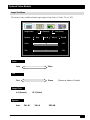
1. Go into the menu system and move to the Source sub-menu. Use the Menu key on the control pad
or remote control unit to scroll through items in the sub-menu. Select the Tuner items and press
or
keys to prompt out of the tuner menu.
}
Source
PC
Video
S-Video
Tuner
15
Volume
Treble
8
Bass
8
Mute
Tuner
Off
On
Press "<-" or "->" to select
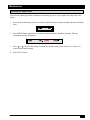
2. Use the Menu key on the control pad or remote control unit to scroll through the Tuner sub-menu.
• TV/CATV: Please select the TV signal source. If the source is from CATV, please choose
CATV. Otherwise, select TV.
• Nationality: Please select the corresponding number representing the user’s country. (See
reference chart.)
✓ Note: The item “NONE Tuner” is only for the user’s information and is not a function. For
example, if current A Box is NTSC Tuner box, then “NTSC Tuner” will appear in this
section.
}
*NONE*
TV/CATV
Nationality
26
Tuner
CATV
1
2
TV
3
4
5
3M™ Multimedia Projector MP7730
6
7
8
9
© 3M IPC 2000