1
E5EC-T/E5AC-T
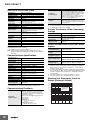
Nomenclature
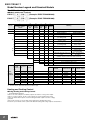
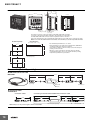
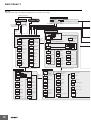
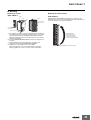
E5EC-T
Front panel
No. 1 display
Temperature unit
Top View of E5EC-T
PV or specified monitor/parameter
Operation indicators
No. 2 display
Top-panel
Setup
Tool port
SP or specified monitor/parameter value
No. 3 display
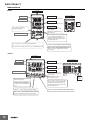
Use S Key to change the
digit (default setting).
Program No., segment No.,
remaining segment time, or MV
(valve opening).
Use the U D Keys to set
the parameter.
Front-panel Setup Tool port
Press U Key for at least 1 second when
Process value/Set point parameter are
displayed in Program SP Mode to go to
Display Segment Selection parameter in
Program Setting Level.
Press O Key once to go to Program Setting Level.
Use the M Key to change to another parameter.
Press O Key for at least 3 seconds to go to Initial Setting Level.
Press M and D Keys simultaneously for at
least 1 second to switch between run and
reset status.
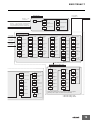
E5AC-T
Front Panel
Temperature unit
Operation indicators
Top View of E5AC-T
No. 1 display
PV or specified monitor/parameter
No. 2 display
SP or specified monitor/parameter value
Front-panel Setup Tool port
No. 3 display
Program No. and segment No.,
remaining segment time, or MV
(valve opening).
Press the O Key once to go to the
Program Setting Level.
Press the O Key for at least 3
seconds to go to the Initial Setting
Level.
Press the M Key to switch to another parameter.
Press M and D Keys simultaneously for at least 1
second to change between run and reset status.
12
Press the U or D Key
to set the parameter.
Press U Key for at least 1 second when
Process value/Set point parameter are
displayed in Program SP Mode to go to
Display Segment Selection parameter in
Program Setting Level.
Press the S Key to change the digit (default setting).
Top-panel
Setup
Tool port