1
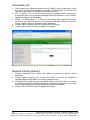
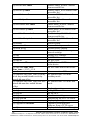
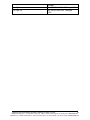
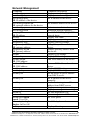
The basic commands in the Command Line Interface (CLI) are listed in the following
table.
System Management
Command
sys uptime
sys date
sys date –s MMDDhhmmYYYY.ss
MM: Month
DD: Day
hh: Hour
mm: Minute
YYYY: Year
ss: Second
sys hostname
sys hostname hostname
sys snmp
sys snmp disp
sys snmp getcommunity
sys snmp getcommunity
CommunityName
sys snmp setcommunity
sys snmp setcommunity
CommunityName
sys snmp syslocation
sys snmp syslocation location
sys snmp syscontact
sys snmp syscontact contact
sys snmp sysdescr
sys snmp sysdescr description
sys snmp trapdest add IP
sys snmp trapdest delete IP
sys passwd
sys actl on
sys actl off
sys actl disp
26
Command Description
Display system uptime.
Display system date and time.
Set system date and time.
Display system name.
Set system name.
Display SNMP settings.
Display SNMP settings.
Display SNMP GetRequest
community.
Set SNMP GetRequest
community.
Display SNMP SetRequest
community.
Set SNMP SetRequest
community.
Display location of the device.
Set location of the device.
Display contact person for the
device.
Set contact person for the device.
Display description of the device.
Set description for the device.
Add destination IP address of
SNMP trap.
Delete destination IP address of
SNMP trap.
Set new password.
Set access control ON to the
device.
Set access control OFF to the
device.
Display access control settings.
Manual Documentation Number: EIRM-EXTEND-1412m
B&B Electronics Mfg Co Inc – 707 Dayton Rd - PO Box 1040 - Ottawa IL 61350 - Ph 815-433-5100 - Fax 815-433-5104 – www.bb-elec.com
B&B Electronics – Westlink Commercial Park – Oranmore, Galway, Ireland – Ph +353 91-792444 – Fax +353 91-792445 – www.bb-europe.com