1
Programming Dialogs
8.3
Programming Flash Security/Lock
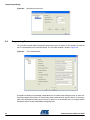
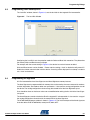
The ‘Lock Bits’ window, shown in Figure 8-4, sets the lock bits for the targeted LP microcontroller.
Figure 8-4.
The Lock Bits Window
Configuring the ‘Lock Bits’ sets the protection mode for Code and Data flash memories. They determine
the memory Write and Read access privileges
For example, with the current setting in Figure 8-4, the device has no lock features enabled.
Write and Read access can be disabled. Please note that setting a ‘Lock’ on the device will prevent LP
Studio from further communication with the device. A warning will be displayed if an attempt is made to
set a ‘Lock’ on the device.
8.4
Programming the Signature
All LP microcontrollers have User Signature and Atmel Signature memory features.
The User Signature is programmable flash memory that can be used by the user to store serial numbers,
revision information, date codes or other user parameters. It also contains analog configuration data for
the device. The analog configuration values occupy the second half of the User Signature space.
Care should be taken so that these values are not modified when writing the first half of the User Signature space.
The Atmel Signature contains the device ID of the targeted LP microcontroller. It also contains a copy of
the analog configuration values found in the second half of the User Signature.
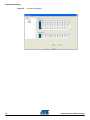
The AT89LP6440 Signature window is shown in Figure 8-5. The first three bytes of the Atmel signature
show the device ID for AT89LP6440, namely 0x1E, 0x64, 0xFF.
AT89LP Developer Studio User Guide
8-3
3711B–MICRO–04/10