1
MP200 USER MANUAL
3. Self Test
While pressing the paper feed switch for more than 10 seconds after the printer in turned
on, the self test mode is initiated. The printer self test includes a listing of the current
default settings, read and write test of internal RAM, checksum test of internal program
memory, loop back detection statement, a staggered dot line, a few lines of rotating
character set, and a diagnostic report. The printer then enters into the On-Line mode.
Configuration Setup
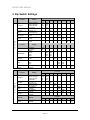
When the paper FEED switch is pressed and released instantly as the power is applied to
the printer, the printer will print the current printer configuration settings along with the DIP
switch information. If the printer setup needs to be changed, turn the Power Off before
changing the setting.
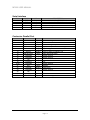
The printer will be setup at the factory as follows;
Model:
Firmware:
Interface:
Emulation:
CR Character:
Flow Control:
Data Bits:
Parity:
Baud Rate:
CPL:
Two Color:
Auto Cutter:
Journal :
MP200 / MP200R
Ver X.XX
Serial
Epson TM-U200
CR=CR only
DTR/DSR
8 Bits
None
9600
40/33 Char/Line
Installed
Installed
Installed
Page 7