1
MP200 USER MANUAL
4. User Switches
Panel Switches
Paper Feed button : Pressing the PF button momentarily will advance the paper one character line
and pressing it continuously will cause a fast feed at 15 lines per second.
Power Switch
A Power switch located on the lower left side of the printer is used to turn the printer on/off.
Indicators
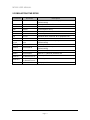
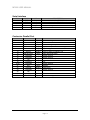
This section explains the different patterns signaled by the two LED indicators located on the top
cover of the MP200/MP200R.
LED1
LED2
LED3
GREEN
RED
RED
Power Off
OFF
OFF
OFF
Normal power is not supplied to the printer
Power On
Flash
ON
ON
Normal power is supplied to the printer
On line
ON
OFF
OFF
Normal error-free mode
Paper low
ON
OFF
ON
Insert new paper roll
Cover open
ON
Flash
OFF
Close cover
Paper empty
ON
ON
OFF
Flash
OFF
ON
OFF
Insert new paper roll
OFF
Impossible to recover
ON
ON
OFF
Ignored Paper Low
STATUS
Paper jam
Test mode
REMARKS
Page 8