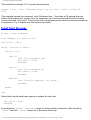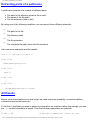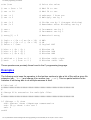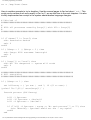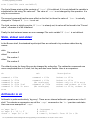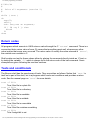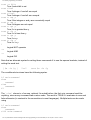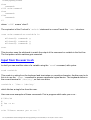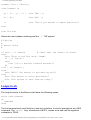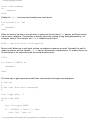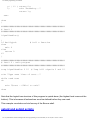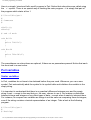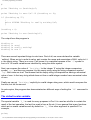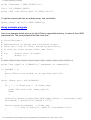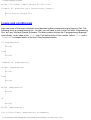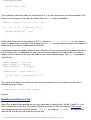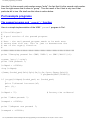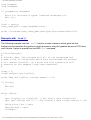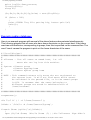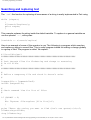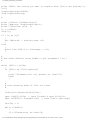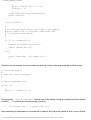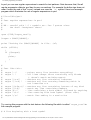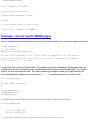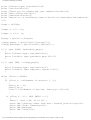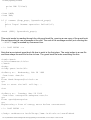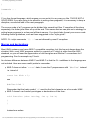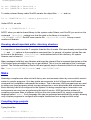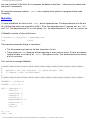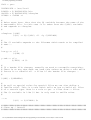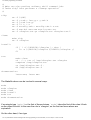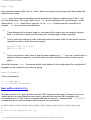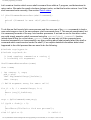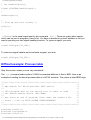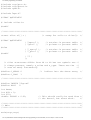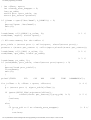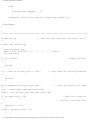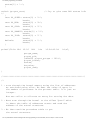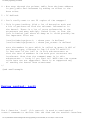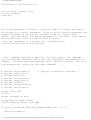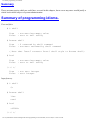
1
The UNIX programming environment The UNIX programming environment Edition 2.0, June 1997 Mark Burgess Centre of Science and Technology Faculty of Engineering, Oslo College Copyright (C) 1996/7 Mark Burgess Permission is granted to make and distribute verbatim copies of this manual provided the copyright notice and this permission notice are preserved on all copies. Permission is granted to copy and distribute modified versions of this manual under the conditions for verbatim copying, provided also that the section entitled "GNU General Public License" is included exactly as in the original, and provided that the entire resulting derived work is distributed under the terms of a permission notice identical to this one. Permission is granted to copy and distribute translations of this manual into another language, under the above conditions for modified versions, except that the section entitled "GNU General Public License" may be included in a translation approved by the author instead of in the original English. Foreword This is a revised version of the UNIX compendium which is available in printed form and online via the WWW and info hypertext readers. It forms the basis for a one or two semester course in UNIX. The most up-to-date version of this manual can be found at http://www.iu.hioslo.no/~mark/unix.html. It is a reference guide which contains enough to help you to find what you need from other sources. It is not (and probably can never be) a complete and self-contained work. Certain topics are covered in more detail than others. Some topics are included for future reference and are not intended to be part of an introductory course, but will probably be useful later. The chapter on X11 programming has been deleted for the time being. Comments to [email protected] Oslo, June 1996 Welcome If you are coming to unix for the first time, from a Windows or MacIntosh environment, be prepared for a rather different culture than the one you are used to. Unix is not about `products' and off-the-shelf software, it is about open standards, free software and the ability to change just about everything. ● What you personally might perceive as user friendliness in other systems, others might file:///C|/Dokumente und Einstellungen/The UNIX programming environment.htm (1 von 198)20.11.2004 11:29:41 The UNIX programming environment ● perceive as annoying time wasting. Unix offers you just about every level of friendliness and unfriendliness, if you choose your programs right. In this book, we take the programmer's point of view. Unix is about functionality, not about simplicity. Be prepared for powerful, not necessarily `simple' solutions. You should approach Unix the way you should approach any new system: with an open mind. The journey begins... Overview In this manual the word "host" is used to refer to a single computer system -- i.e. a single machine which has a name termed its "hostname". What is unix? Unix is one of the most important operating system in use today, perhaps even the most important. Since its invention around the beginning of the 1970s it has been an object of continual research and development. UNIX is not popular because it is the best operating system one could imagine, but because it is an extremely flexible system which is easy to extend and modify. It is an ideal platform for developing new ideas. Much of the success of UNIX may be attributed to the rapid pace of its development (a development to which all of its users have been able to contribute) its efficiency at running programs and the many powerful tools which have been written for it over the years, such as the C programming language, make, shell, lex and yacc and many others. UNIX was written by programmers for programmers. It is popular in situations where a lot of computing power is required and for database applications, where timesharing is critical. In contrast to some operating systems, UNIX performs equally well on large scale computers (with many processors) and small computers which fit in your suitcase! All of the basic mechanisms required of a multi-user operating system are present in UNIX. During the last few years it has become ever more popular and has formed the basis of newer, though less mature, systems like NT. One reason for this that now computers have now become powerful enough to run UNIX effectively. UNIX places burdens on the resources of a computer, since it expects to be able to run potentially many programs simultaneously. If you are coming to UNIX from DOS you may well be used to using applications software or helpful interactive utilities to solve every problem. UNIX is not usually like this: the operating system has much greater functionality and provides the possibilities for making your own, so it is less common to find applications software which implements the same things. UNIX has long been in the hands of academics who are used to making their own applications or writing their own programs, whereas as the DOS world has been driven by businesses who are willing to spend money on software. For that reason commerical UNIX software is often very expensive and therefore not available at this college. On the other hand, the flexibility of UNIX means that it is easy to write programs and it is possible to fetch gigabytes of free software from the internet to suit your needs. It may not look like what you are used to on your PC, but then you have to file:///C|/Dokumente und Einstellungen/The UNIX programming environment.htm (2 von 198)20.11.2004 11:29:41 The UNIX programming environment remember that UNIX users are a different kind of animal altogether Like all operating systems, UNIX has many faults. The biggest problem for any operating system is that it evolves without being redesigned. Operating systems evolve as more and more patches and hacks are applied to solve day-to-day problems. The result is either a mess which works somehow (like UNIX) or a blank refusal to change (like DOS or MacIntosh). From a practical perspective, Unix is important and successful because it is a multi-process system which ● ● ● ● ● ● ● has an enormous functionality built in, and the capacity to adapt itself to changing technologies, is relatively portable, is good at sharing resources (but not so good at security), has tools which are each developed to do one thing well, allows these tools to be combined in every imaginable way, using pipes and channeling of data streams, incorporates networking almost trivially, because all the right mechanisms are already there for providing services and sharing, building client-server pairs etc,. it is very adaptable and is often used to develop new ideas because of the rich variety of tools it possesses. Unix has some problems: it is old, it contains a lot of rubbish which no one ever bothered to throw away. Although it develops quickly (at light speed compared to either DOS or MacIntosh) the user interface has been the slowest thing to change. Unix is not user-friendly for beginners, it is userfriendly for advanced users: it is made for users who know about computing. It sometimes makes simple things difficult, but above all it makes things possible! The aim of this introduction is to ● ● ● ● introduce the unix system basics and user interface, develop the unix philosophy of using and combining tools, learn how to make new tools and write software, learn how to understand existing software. To accomplish this task, we must first learn something about the shell (the way in which UNIX starts programs). Later we shall learn how to solve more complex problems using Perl and C. Each of these is a language which can be used to put UNIX to work. We must also learn when to use which tool, so that we do not waste time and effort. Typical uses for these different interfaces are shell Command line interaction, making scripts which perform simple jobs such as running programs in batch, installing new software, simple system configuration and administration. perl Text interpretation, text formatting, output filters, mail robots, WWW cgi (common gateway interface) scripts in forms, password testing, simple database manipulation, simple clientserver applications. C Nearly all of UNIX is written in C. Any program which cannot be solved quickly using shell file:///C|/Dokumente und Einstellungen/The UNIX programming environment.htm (3 von 198)20.11.2004 11:29:41 The UNIX programming environment or perl can be written in C. One advantage is that C is a compiled language and many simple errors can be caught at compile time. Much of UNIX's recent popularity has been a result of its networking abilities: unix is the backbone of the internet. No other widely available system could keep the internet alive today. Once you have mastered the unix interface and philosophy you will find that i) the PC and MacIntosh window environments seem to be easy to use, but simplistic and primitive by comparison; ii) UNIX is far from being the perfect operating system--it has a whole different set of problems and flaws. The operating system of the future will not be UNIX as we see it today, nor will is be DOS or MacIntosh, but one thing is for certain: it will owe a lot to the UNIX operating system and will contain many of the tools and mechanisms we shall describe below. Flavours of unix Unix is not a single operating system. It has branched out in many different directions since it was introduced by AT&T. The most important `fork()' in its history happened early on when the university of Berkeley, California created the BSD (Berkeley Software Distribution), adding network support and the C-shell. Here are some of the most common implementations of unix. BSD: Berkeley, BSD SunOS: Sun Microsystems, BSD/sys 5 Solaris: Sun Microsystems, Sys 5/BSD Ultrix: Digital Equipment Corperation, BSD OSF 1: Digital Equipment Corperation, BSD/sys 5 HPUX: Hewlett-Packard, Sys 5 AIX: IBM, Sys 5 / BSD IRIX: Silicon Graphics, Sys 5 Linux: GNU, BSD/Posix How to use this reference guide This programming guide is something between a user manual and a tutorial. The information contained here should be sufficient to get you started with the unix system, but it is far from file:///C|/Dokumente und Einstellungen/The UNIX programming environment.htm (4 von 198)20.11.2004 11:29:41 The UNIX programming environment complete. To use this programming guide, you will need to work through the basics from each chapter. You will find that there is much more information here than you need straight away, so try not to be overwhelmed by the amount of material. Use the contents and the indices at the back to find the information you need. If you are following a one-semester UNIX course, you should probably concentrate on the following: ● ● ● ● ● ● The remainder of this introduction The detailed knowledge of the C shell An appreciation of the Bourne shell A detailed knowledge of Perl, guided by chapter 6. This chapter provides pointers on how to get started in perl. It is not a substitute for the perl book. Everything in chapter 7 about C programming. This chapter is written in note form, since it is assumed that you know a lot about C programming already. A sound appreciation of chapter 8 on network programming. The only way to learn UNIX is to sit down and try it. As with any new thing, it is a pain to get started, but once you are started, you will probably come to agree that UNIX contains a wealth of possibilities, perhaps more than you had ever though was possible or useful! One of the advantages of the UNIX system is that the entire UNIX manual is available on-line. You should get used to looking for information in the online manual pages. For instance, suppose you do not remember how to create a new directory, you could do the following: nexus% man -k dir dir dirname name dirs find hierarchy ls mkdir pwd rmdir ls (1) dirname (1) - list contents of directories - strip non-directory suffix from file bash (1) find (1) - bash built-in commands, see bash(1) - search for files in a directory ls (1) mkdir (1) pwd (1) rmdir (1) - list contents of directories make directories print name of current/working directory remove empty directories The `man -k' command looks for a keyword in the manual and lists all the references it finds. The command `apropos' is completely equivalent to `man -k'. Having discovered that the command to create a directory is `mkdir' you can now look up the specific manaul page on `mkdir' to find out how to use it: man mkdir Some but no all of the UNIX commands also have a help option which is activated with the `-h' or `--help' command-line option. file:///C|/Dokumente und Einstellungen/The UNIX programming environment.htm (5 von 198)20.11.2004 11:29:41 The UNIX programming environment dax% mkdir --help Usage: mkdir [OPTION] DIRECTORY... -p, --parents needed -m, --mode=MODE --help --version dax% no error if existing, make parent directories as set permission mode (as in chmod), not 0777 - umask display this help and exit output version information and exit NEVER-DO's in UNIX There are some things that you should never do in UNIX. Some of these will cause you more serious problems than others. You can make your own list as you discover more. ● ● You should NEVER EVER switch off the power on a Unix computer unless you know what you are doing. A Unix machine is not like a PC running DOS. Even when you are not doing anything, the system is working in the background. If you switch off the power, you could interrupt the system while it is writing to the disk drive and destroy your disk. You must also remember that several users might be using the system even though you cannot see them: they do not have to be sitting at the machine, they could be logged in over the network. If you switch off the power, you might ruin their valuable work. Once you have deleted a UNIX file using rm it is impossible to recover it! Don't use wildcards with rm without thinking quite carefully about what you are doing! It has happened to very many users throughout the history of UNIX that one tries to type rm *~ but instead, by a slip of the hand, one writes rm * ~ ● ● Unix then takes these wildcards in turn, so that the first command is rm * which deletes all of your files! BE CAREFUL! Don't ever call a program or an important file `core'. Many scripts go around deleting files called `core' because the, when a program crashes, UNIX dumps the entire kernel image to a file called `core' and these files use up a lot of disk space. If you call a file `core' it might get deleted! Don't call test programs test. There is a UNIX command which is already called test and chances are that when you try to run your program you will start the UNIX command instead. This can cause a lot of confusion because the UNIX command doesn't seem to do very much at all! What you should know before starting One library: several interfaces file:///C|/Dokumente und Einstellungen/The UNIX programming environment.htm (6 von 198)20.11.2004 11:29:41 The UNIX programming environment The core of unix is the library of functions (written in C) which access the system. Everything you do on a unix system goes through this set of functions. However, you can choose your own interface to these library functions. Unix has very many different interfaces to its libraries in the form of languages and command interpreters. You can use the functions directly in C, or you can use command programs like `ls', `cd' etc. These functions just provide a simple user interface to the C calls. You can also use a variety of `script' languages: C-shell, Bourne shell, Perl, Tcl, scheme. You choose the interface which solves your problem most easily. Unix commands are files With the exception of a few simple commands which are built into the command interpreter (shell), all unix commands and programs consist of executable files. In other words, there is a separate executable file for each command. This makes it extremely simple to add new commands to the system. One simply makes a program with the desired name and places it in the appropriate directory. Unix commands live in special directories (usually called bin for binary files). The location of these directories is recorded in a variable called path or PATH which is used by the system to search for binaries. We shall return to this in more detail in later chapters. Kernel and Shell Since users cannot command the kernel directly, UNIX has a command language known as the shell. The word shell implies a layer around the kernel. A shell is a user interface, or command interpreter. There are two main versions of the shell, plus a number of enhancements. /bin/sh The Bourne Shell. The shell is most often used for writing system scripts. It is part of the original unix system. /bin/csh The C-shell. This was added to unix by the Berkeley workers. The commands and syntax resemble C code. C-shell is better suited for interactive work than the Bourne shell. The program tcsh is a public-domain enhancement of the csh and is in common use. Two improved versions of the Bourne shell also exist: ksh, the Korn shell and bash, the Bourne-again shell. Although the shells are mainly tools for typing in commands (which are excutable files to be loaded and run), they contain features such as aliases, a command history, wildcard-expansions and job control functions which provide a comfortable user environment. The role of C file:///C|/Dokumente und Einstellungen/The UNIX programming environment.htm (7 von 198)20.11.2004 11:29:41 The UNIX programming environment Most of the unix kernel and daemons are written in the C programming language (1). Calls to the kernel and to services are made through functions in the standard C library. The commands like chmod, mkdir and cd are all C functions. The binary files of the same name /bin/chmod, /bin/ mkdir etc. are just trivial "wrapper" programs for these C functions. Until Solaris 2, the C compiler was a standard part of the UNIX operating system, thus C is the most natural language to program in in a UNIX environment. Some tools are provided for C programmers: dbx A symbolic debugger. Also gdb, xxgdb ddd. make A development tool for compiling large programs. lex A `lexer'. A program which generates C code to recognize words of text. yacc A `parser'. This is a tool which generates C code for checking the syntax of groups of textual words. rpcgen A protocol compiler which generates C code from a higher level langauge, for programming RPC applications. Stdin, stdout, stderr Unix has three logical streams or files which are always open and are available to any program. stdin The standard input - file descriptor 0. stdout The standard output - file descriptor 1. stderr The standard error - file descriptor 2. The names are a part of the C language and are defined as pointers of type FILE. #include <stdio.h> /* FILE *stdin, *stdout, *stderr; */ fprintf(stderr,"This is an error message!\n"); The names are `logical' in the sense that they do not refer to a particular device, or a particular place for information to come from or go. Their role is analogous to the `.' and `..' directories in the filesystem. Programs can write to these files without worrying about where the information comes from or goes to. The user can personally define these places by redirecting standard I/O. This is discussed in the next chapter. file:///C|/Dokumente und Einstellungen/The UNIX programming environment.htm (8 von 198)20.11.2004 11:29:41 The UNIX programming environment A separate stream is kept for error messages so that error output does not get mixed up with a program's intended output. The superuser (root) and nobody When logged onto a UNIX system directly, the user whose name is root has unlimited access to the files on the system. root can also become any other user without having to give a password. root is reserved for the system administrator or trusted users. Certain commands are forbidden to normal users. For example, a regular user should not be able to halt the system, or change the ownership of files (see next paragraph). These things are reserved for the root or superuser. In a networked environment, root has no automatic authority on remote machines. This is to prevent the system administrator of one machine in Canada from being able to edit files on another in China. He or she must log in directly and supply a password in order to gain access privileges. On a network where files are often accessible in principle to anyone, the username root gets mapped to the user nobody, who has no rights at all. The file hierarchy Unix has a hierachical filesystem, which makes use of directories and sub-directories to form a tree. The root of the tree is called the root filesystem or `/'. Although the details of where every file is located differ for different versions of unix, some basic features are the same. The main subdirectories of the root directory together with the most important file are shown in the figure. Their contents are as follows. `/bin' Executable (binary) programs. On most systems this is a separate directory to /usr/bin. In SunOS, this is a pointer (link) to /usr/bin. `/etc' Miscellaneous programs and configuration files. This directory has become very messy over the history of UNIX and has become a dumping ground for almost anything. Recent versions of unix have begun to tidy up this directory by creating subdirectories `/etc/ mail', `/etc/services' etc! `/usr' This contains the main meat of UNIX. This is where application software lives, together with all of the basic libraries used by the OS. `/usr/bin' More executables from the OS. `/usr/local' This is where users' custom software is normally added. `/sbin' A special area for statically linked system binaries. They are placed here to distinguish commands used solely by the system administrator from user commands and so that they lie on the system root partition where they are guaranteed to be accessible during booting. file:///C|/Dokumente und Einstellungen/The UNIX programming environment.htm (9 von 198)20.11.2004 11:29:41 The UNIX programming environment `/sys' This holds the configuration data which go to build the system kernel. (See below.) `/export' Network servers only use this. This contains the disk space set aside for client machines which do not have their own disks. It is like a `virtual disk' for diskless clients. `/dev, /devices' A place where all the `logical devices' are collected. These are called `device nodes' in unix and are created by mknod. Logical devices are UNIX's official entry points for writing to devices. For instance, /dev/console is a route to the system console, while /dev/kmem is a route for reading kernel memory. Device nodes enable devices to be treated as though they were files. `/home' (Called /users on some systems.) Each user has a separate login directory where files can be kept. These are normally stored under /home by some convention decided by the system administrator. `/var' System 5 and mixed systems have a separate directory for spooling. Under old BSD systems, /usr/spool contains spool queues and system data. /var/spool and /var/ adm etc are used for holding queues and system log files. `/vmunix' This is the program code for the unix kernel (see below). On HPUX systems with file is called `hp-ux'. On linux it is called `linux'. `/kernel' On newer systems the kernel is built up from a number of modules which are placed in this directory. Every unix directory contains two `virtual' directories marked by a single dot and two dots. ls -a . .. The single dot represents the directory one is already in (the current directory). The double dots mean the directory one level up the tree from the current location. Thus, if one writes cd /usr/local cd .. the final directory is /usr. The single dot is very useful in C programming if one wishes to read `the current directory'. Since this is always called `.' there is no need to keep track of what the current directory really is. `.' and `..' are `hard links' to the true directories. Symbolic links A symbolic link is a pointer or an alias to another file. The command file:///C|/Dokumente und Einstellungen/The UNIX programming environment.htm (10 von 198)20.11.2004 11:29:41 The UNIX programming environment ln -s fromfile /other/directory/tolink makes the file fromfile appear to exist at /other/directory/tolink simultaneously. The file is not copied, it merely appears to be a part of the file tree in two places. Symbolic links can be made to both files and directories. A symbolic link is just a small file which contains the name of the real file one is interested in. It cannot be opened like an ordinary file, but may be read with the C call readlink() See section lstat and readlink. If we remove the file a symbolic link points to, the link remains -- it just points nowhere. Hard links A hard link is a duplicate inode in the filesystem which is in every way equivalent to the original file inode. If a file is pointed to by a hard link, it cannot be removed until the link is removed. If a file has @math{n} hard links -- all of them must be removed before the file can be removed. The number of hard links to a file is stored in the filesystem index node for the file. Getting started If you have never met unix, or another multiuser system before, then you might find the idea daunting. There are several things you should know. Logging in Each time you use unix you must log on to the system by typing a username and a password. Your login name is sometimes called an `account' because some unix systems implement strict quotas for computer resources which have to be paid for with real money(2). login: mark password: Once you have typed in your password, you are `logged on'. What happens then depends on what kind of system you are logged onto and how. If you have a colour monitor and keyboard in front of you, with a graphical user interface, you will see a number of windows appear, perhaps a menu bar. You then use a mouse and keyboard just like any other system. This is not the only way to log onto unix. You can also log in remotely, from another machine, using the telnet or rlogin programs. If you use these programs, you will normally only get a text or command line interface (though graphics can still be arranged). Once you have logged in, a short message will be printed (called Message of the Day or motd) and you will see the C-shell prompt: the name of the host you are logged onto followed by a percent sign, e.g. file:///C|/Dokumente und Einstellungen/The UNIX programming environment.htm (11 von 198)20.11.2004 11:29:41 The UNIX programming environment SunOS Release 5.5 Version Generic [UNIX(R) System V Release 4.0] Copyright (c) 1983-1995, Sun Microsystems, Inc. Please report problems to [email protected] dax% Remember that every unix machine is a separate entity: it is not like logging onto a PC system where you log onto the `network' i.e. the PC file server. Every unix machine is a server. The network, in unix-land, has lots of players. The first thing you should do once you have logged on is to set a reliable password. A poor password might be okay on a PC which is not attached to a large network, but once you are attached to the internet, you have to remember that the whole world will be trying to crack your password. Don't think that no one will bother: some people really have nothing better to do. A password should not contain any word that could be in a list of words (in any language), or be a simple concatenation of a word and a number (e.g. mark123). It takes seconds to crack such a password. Choose instead something which is easy to remember. Feel free to use the PIN number from your bankers card in your password! This will leave you with fewer things to remember. e.g. Ma9876rk). Passwords can be up to eight characters long. Some sites allow you to change your password anywhere. Other sites require you to log onto a special machine to change your password: dax% dax% passwd Change your password on host nexus You cannot change it here dax% rlogin nexus password: ****** nexus% passwd Changing password for mark Enter login password: ******** Enter new password: ******** Reenter new passwd: ******** You will be prompted for your old password and your new password twice. If your network is large, it might take the system up to an hour or two to register the change in your password, so don't forget the old one right away! Mouse buttons Unix has three mouse buttons. On some PC's running Linux or some other PC unix, there are only two, but the middle mouse button can be simulated by pressing both mouse buttons file:///C|/Dokumente und Einstellungen/The UNIX programming environment.htm (12 von 198)20.11.2004 11:29:41 The UNIX programming environment simultaneously. The mouse buttons have the following general functions. They may also have additional functions in special software. index finger This is used to select and click on objects. It is also used to mark out areas and copy by dragging. This is the button you normally use. middle finger Used to pull down menus. It is also used to paste a marked area somewhere at the mouse position. outer finger Pulls down menus. On a left-handed system right and left are reversed. E-mail Reading electronic mail on unix is just like any other system, but there are many programs to choose from. There are very old programs from the seventies such as mail and there are fully graphical mail programs such as tkrat mailtool Choose the program you like best. Not all of the programs support modern multimedia extensions because of their age. Some programs like tkrat have immediate mail notification alerts. To start a mail program you just type its name. If you have an icon-bar, you can click on the mail-icon. Simple commands Inexperienced computer users often prefer to use file-manager programs to avoid typing anything. With a mouse you can click your way through directories and files without having to type anything (e.g. the fmgr or tkdesk programs). More experienced users generally find this to be slow and tedious after a while and prefer to use written commands. Unix has many short cuts and keyboard features which make typed commands extremely fast and much more powerful than use of the mouse. If you come from a DOS environment, the unix commands can be a little strange. Because they stem from an era when keyboards had to be hit with hammer force, and machines were very slow, the command names are generally as short as possible, so they seem pretty cryptic. Some familar ones which DOS borrowed from unix include, cd mkdir file:///C|/Dokumente und Einstellungen/The UNIX programming environment.htm (13 von 198)20.11.2004 11:29:41 The UNIX programming environment which change to a new directory and make a new directory respectively. To list the files in the current directory you use, ls To rename a file, you `move' it: mv old-name new-name Text editing and word processing Text editing is one of the things which people spend most time doing on any computer. It is important to distingiush text editing from word processing. On a PC or MacIntosh, you are perhaps used to Word or WordPerfect for writing documents. Unix has a Word-like program called lyx, but for the most part Unix users do not use word processors. It is more common in the unix community to write all documents, regardless of whether they are letters, books or computer programs, using a non-formatting text editor. (Unix word processors like Framemaker do exist, but they are very expensive. A version of MS-Word also exists for some unices.) Once you have written a document in a normal text editor, you call up a text formatter to make it pretty. You might think this strange, but the truth of the matter is that this two-stage process gives you the most power and flexibilty--and that is what most unix folks like. For writing programs, or anything else, you edit a file by typing: emacs myfile emacs is one of dozens of text-editors. It is not the simplest or most intuitive, but it is the most powerful and if you are going to spend time learning an editor, it wouldn't do any harm to make it this one. You could also click on emacs' icon if you are relying on a window system. Emacs is almost certainly the most powerful text editor that exists on any system. It is not a word-processor, it not for formatting printed documents, but it can be linked to almost any other program in order to format and print text. It contains a powerful programming language and has many intelligent features. We shall not go into the details of document formatting in this book, but only mention that programs like troff and Tex or Latex are used for this purpose to obtain typset-quality printing. Text formatting is an area where Unix folks do things differently to PC folks. The login environment Unix began as a timesharing mainframe system in the seventies, when the only terminals available were text based teletype terminals or tty-s. Later, the Massachusetts Institute of Technology (MIT) developed the X-windows interface which is now a standard across UNIX platforms. Because of this history, the X-window system works as a front end to the standard UNIX shell and interface, so to understand the user environment we must first understand the file:///C|/Dokumente und Einstellungen/The UNIX programming environment.htm (14 von 198)20.11.2004 11:29:41 The UNIX programming environment shell. Shells A shell is a command interpreter. In the early days of unix, a shell was the only way of issuing commands to the system. Nowadays many window-based application programs provide menus and buttons to perform simple commands, but the UNIX shell remains the most powerful and flexible way of interacting with the system. After logging in and entering a password, the unix process init starts a shell for the user logging in. Unix has several different kinds of shell to choose from, so that each user can pick his/her favourite command interface. The type of shell which the system starts at login is determined by the user's entry in the passwd database. On most systems, the standard login shell is a variant of the C-shell. Shells provide facilities and commands which ● ● ● ● ● ● ● ● ● Start and stop processes (programs) Allow two processes to communicate through a pipe Allow the user to redirect the flow of input or output Allow simple command line editing and command history Define aliases to frequently used commands Define global "environment" variables which are used to configure the default behaviour of a variety of programs. These lie in an "associated array" for each process and may be seen with the `env' command. Environment variables are inherited by all processes which are started from a shell. Provide wildcard expansion (joker notation) of filenames using `*,?,[]' Provide a simple script language, with tests and loops, so that users can combine system programs to create new programs of their own. Change and remember the location of the current working directory, or location within the file hierarchy. The shell does not contain any more specific functions--all other commands, such as programs which list files or create directories etc., are executable programs which are independent of the shell. When you type `ls', the shell looks for the executable file called `ls' in a special list of directories called the command path and attempts to start this program. This allows such programs to be developed and replaced independently of the actual command interpreter. Each shell which is started can be customized and configured by editing a setup file. For the Cshell and its variants this file is called `.cshrc', and for the Bourne shell and its variants it is called `.profile'. (Note that files which begin with leading dots are not normally visible with the `ls' command. Use `ls -a' to view these.) Any commands which are placed in these files are interpreted by the shell before the first command prompt is issued. These files are typically used to define a command search path and terminal characteristics. On each new command line you can use the cursor keys to edit the line. The up-arrow browses back through earlier commands. CTRL-a takes you to the start of the line. CTRL-e takes you to the end of the line. The TAB can be used to save typing with the `completion' facility See section file:///C|/Dokumente und Einstellungen/The UNIX programming environment.htm (15 von 198)20.11.2004 11:29:41 The UNIX programming environment Command/filename completion. Shell commands generally Shell commands are commands like cp, mv, passwd, cat, more, less, cc, grep, ps etc.. Very few commands are actually built into the shell command line interpreter, in the way that they are in DOS -- commands are mostly programs which exist as files. When we type a command, the shell searches for a program with the same name and tries to execute it. The file must be executable, or a Command not found error will result. To see what actually happens when you type a command like gcc, try typing in the following C-shell commands directly into a C-shell. (We shall discuss these commands soon.) foreach dir ( $path ) if ( -x $dir/gcc ) then echo Found $dir/gcc break else echo Searching $dir/gcc endif end # # # # for every directory in the list path if the file is executable Print message found! break out of loop The output of this command is something like Searching /usr/lang/gcc Searching /usr/openwin/bin/gcc Searching /usr/openwin/bin/xview/gcc Searching /physics/lib/framemaker/bin/gcc Searching /physics/motif/bin/gcc Searching /physics/mutils/bin/gcc Searching /physics/common/scripts/gcc Found /physics/bin/gcc If you type echo $path you will see the entire list of directories which are searched by the shell. If we had left out the `break' command, we might have discovered that UNIX often has several programs with the same name, in different directories! For example, /bin/mail /usr/ucb/mail /bin/Mail /bin/make /usr/local/bin/make. file:///C|/Dokumente und Einstellungen/The UNIX programming environment.htm (16 von 198)20.11.2004 11:29:42 The UNIX programming environment Also, different versions of unix have different conventions for placing the commands in directories, so the path list needs to be different for different types of unix machine. In the C-shell a few basic commands like cd and kill are built into the shell (as in DOS). You can find out which directory a command is stored in using the which command. For example nexus% which cd cd: shell built-in command. nexus% which cp /bin/cp nexus% which only searches the directories in $path and quits after the first match, so if there are several commands with the same name, you will only see the first of them using which. Finally, in the C-shell, the which command is built in. In the Bourne shell it is a program: nexus% which which which: shell built-in command. nexus% sh $ which which /usr/ucb/which $ exit nexus% Take a look at the script /usr/ucb/which. It is a script written in the C-shell. Environment and shell variables Environment variables are variables which the shell keeps. They are normally used to configure the behaviour of utility programs like lpr (which sends a file to the printer) and mail (which reads and sends mail) so that special options do not have to be typed in every time you run these programs. Any program can read these variables to find out how you have configured your working environment. We shall meet these variables frequently. Here are some important variables PATH TERM DISPLAY LD_LIBRARY_PATH HOST PRINTER # # # # # # The search path for shell commands (sh) The terminal type (sh and csh) X11 - the name of your display Path to search for object and shared libraries Name of this unix host Default printer (lpr) file:///C|/Dokumente und Einstellungen/The UNIX programming environment.htm (17 von 198)20.11.2004 11:29:42 The UNIX programming environment HOME # The path to your home directory (sh) path term noclobber prompt home # # # # # The The See The The search path for shell commands (csh) terminal type (csh) below under redirection default prompt for csh path to your home directory (csh) These variables fall into two groups. Traditionally the first group always have names in uppercase letters and are called environment variables, whereas variables in the second group have names with lowercase letters and are called shell variables-- but this is only a convention. The uppercase variables are global variables, whereas the lower case variables are local variables. Local variables are not defined for programs or sub-shells started by the current shell, while global variables are inherited by all sub-shells. The Bourne-shell and the C-shell use these conventions differently and not always consistently. You will see how to define these below. For now you just have to know that you can use the following commands from the C-shell to list these variables. The command env can be used in either C-shell or Bourne shell to see all of the defined environment variables. Wildcards Sometimes you want to be able to refer to several files in one go. For instance, you might want to copy all files ending in `.c' to a new directory. To do this one uses wildcards. Wildcards are characters like * ? which stand for any character or group of characters. In card games the joker is a `wild card' which can be substituted for any other card. Use of wildcards is also called filename substitution in the unix manuals, in the sections on sh and csh. The wildcard symbols are, `?' Match single character. e.g. ls /etc/rc.???? `*' Match any number of characters. e.g. ls /etc/rc.* `[...]' Match any character in a list enclosed by these brackets. e.g. ls [abc].C Here are some examples and explanations. `/etc/rc.????' Match all files in /etc whose first three characters are rc. and are 7 characters long. `*.c' Match all files ending in `.c' i.e. all C programs. `*.[Cc]' List all files ending on `.c' or `.C' i.e. all C and C++ programs. `*.[a-z]' Match any file ending in .a, .b, .c, ... up to .z etc. file:///C|/Dokumente und Einstellungen/The UNIX programming environment.htm (18 von 198)20.11.2004 11:29:42 The UNIX programming environment It is important to understand that the shell expands wildcards. When you type a command, the program is not invoked with an argument that contains * or ?. The shell expands the special characters first and invokes commands with the entire list of files which match the patterns. The programs never see the wildcard characters, only the list of files they stand for. To see this in action, you can type echo /etc/rc.* which gives /etc/rc /etc/rc.boot /etc/rc.ip /etc/rc.local /etc/rc.local% /etc/rc.local~ /etc/rc.single /etc/rc~ All shell commands are invoked with a command line of this form. This has an important corollary. It means that multiple renaming cannot work! Unix files are renamed using the mv command. In many microcomputer operating systems one can write rename *.x *.y which changes the file extension of all files ending in `.x' to the same name with a `.y' extension. This cannot work in unix, because the shell tries expands everything before passing the arguments to the command line. The local shell variable noglob switches off wildcard expansion in the C shell, but you still cannot rename multiple files using mv. Some free-software programs make this possible. Regular expressions The wildcards belong to the shell. They are used for matching filenames. UNIX has a more general and widely used mechanism for matching strings, this is through regular expressions. Regular expressions are used by the egrep utility, text editors like ed, vi and emacs and sed and awk. They are also used in the C programming language for matching input as well as in the Perl programming language and lex tokenizer. Here are some examples using the egrep command which print lines from the file /etc/rc which match certain conditions. The contruction is part of egrep. Everything in between these symbols is a regular expression. Notice that special shell symbols ! * & have to be preceded with a backslash \ in order to prevent the shell from expanding them! # Print all lines beginning with a comment # egrep '(^#)' /etc/rc # Print all lines which DON'T begin with # file:///C|/Dokumente und Einstellungen/The UNIX programming environment.htm (19 von 198)20.11.2004 11:29:42 The UNIX programming environment egrep '(^[^#])' /etc/rc # Print all lines beginning with e, f or g. egrep '(^[efg])' /etc/rc # Print all lines beginning with uppercase egrep '(^[A-Z])' /etc/rc # Print all lines NOT beginning with uppercase egrep '(^[^A-Z])' /etc/rc # Print all lines containing ! * & egrep '([\!\*\&])' /etc/rc # All lines containing ! * & but not starting # egrep '([^#][\!\*\&])' /etc/rc Regular expressions are made up of the following `atoms'. These examples assume that the file `/etc/rc' exists. If it doesn't exist on the machine you are using, try to find the equivalent by, for instance, replacing /etc/rc with /etc/rc* which will try to find a match beginning with the rc. `.' Match any single character except the end of line. `^' Match the beginning of a line as the first character. `$' Match end of line as last character. `[..]' Match any character in the list between the square brackets.(see below). `*' Match zero or more occurrances of the preceding expression. `+' Match one or more occurrences of the preceding expression. `?' Match zero or one occurrance of the preceding expression. You can find a complete list in the unix manual pages. The square brackets above are used to define a class of characters to be matched. Here are some examples, ● If the square brackets contain a list of characters, $[a-z156]$ then a single occurrance of file:///C|/Dokumente und Einstellungen/The UNIX programming environment.htm (20 von 198)20.11.2004 11:29:42 The UNIX programming environment ● ● any character in the list will match the regular expression: in this case any lowercase letter or the numbers 1, 5 and 6. If the first character in the brackets is the caret symbol `^' then any character except those in the list will be matched. Normally a dash or minus sign `-' means a range of characters. If it is the first character after the `[' or after `[^' then it is treated literally. Nested shell commands and " The backwards apostrophes `...` can be used in all shells and also in the programming language Perl. When these are encountered in a string the shell tries to execute the command inside the quotes and replace the quoted expression by the result of that command. For example: unix% echo "This system's kernel type is `/bin/file /vmunix`" This system's kernel type is /vmunix: sparc executable not stripped unix% foreach file ( `ls /etc/rc*` ) ? echo I found a config file $file ? echo Its type is `/bin/file $file` ? end I found a config file /etc/rc Its type is /etc/rc: executable shell script I found a config file /etc/rc.boot Its type is /etc/rc.boot: executable shell script I found a config file /etc/rc.ip Its type is /etc/rc.ip: executable shell script I found a config file /etc/rc.local Its type is /etc/rc.local: ascii text I found a config file /etc/rc.local~ Its type is /etc/rc.local~: ascii text I found a config file /etc/rc.single Its type is /etc/rc.single: executable shell script I found a config file /etc/rc~ Its type is /etc/rc~: executable shell script This is how we insert the result of a shell command into a text string or variable. UNIX command overview Important keys CTRL-A Jump to start of line. If `screen' is active, this prefixes all control key commands for `screen' and then the normal CTRL-A is replaced by CTRL-a a. CTRL-C file:///C|/Dokumente und Einstellungen/The UNIX programming environment.htm (21 von 198)20.11.2004 11:29:42 The UNIX programming environment Interrupt or break key. Sends signal 15 to a process. CTRL-D Signifies `EOF' (end of file) or shows expansion matches in command/filename completion See section Command/filename completion. CTRL-E Jump to end of line. CTRL-L Clear screen in newer shells and in emacs. Same as `clear' in the shell. CTRL-Z Suspend the present process, but do not destroy it. This sends signal 18 to the process. Alternative shells bash The Bourne Again shell, an improved sh. csh The standard C-shell. jsh The same as sh, with C-shell style job control. ksh The Korn shell, an improved sh. sh The original Bourne shell. sh5 On ULTRIX systems the standard Bourne shell is quite stupid. sh5 corresponds to the normal Bourne shell on these systems. tcsh An improved C-shell. zsh An improved sh. Window based terminal emulators xterm The standard X11 terminal window. shelltool, cmdtool Openwindows terminals from Sun Microsystems. These are not completely X11 compatible during copy/paste operations. screen This is not a window in itself, but allows you to emulate having several windows inside a single (say) xterm window. The user can switch between different windows and open new ones, but can only see one window at a time See section Multiple screens. Remote shells and logins rlogin Login onto a remote unix system. file:///C|/Dokumente und Einstellungen/The UNIX programming environment.htm (22 von 198)20.11.2004 11:29:42 The UNIX programming environment rsh Open a shell on a remote system (require access rights). telnet Open a connection to a remove system using the telnet protocol. Text editors ed An ancient line-editor. vi Visual interface to ed. This is the only "standard" unix text editor supplied by vendors. emacs The most powerful UNIX editor. A fully configurable, user programmable editor which works under X11 and on tty-terminals. xemacs A pretty version of emacs for X11 windows. pico A tty-terminal only editor, comes as part of the PINE mail package. xedit A test X11-only editor supplied with X-windows. textedit A simple X11-only editor supplied by Sun Microsystems. File handling commands ls List files in specified directory (like dir on other systems). cp Copy files. mv Move or rename files. touch Creates an empty new file if none exists, or updates date and time stamps on existing files. rm, unlink Remove a file or link (delete). mkdir, rmdir Make or remove a directory. A directory must be empty in order to be able to remove it. cat Concatenate or join together a number of files. The output is written to the standard output by default. Can also be used to simply print a file on screen. lp, lpr Line printer. Send a file to the default printer, or the printer defined in the `PRINTER' evironment variable. lpq, lpstat Show the status of the print queue. File browsing file:///C|/Dokumente und Einstellungen/The UNIX programming environment.htm (23 von 198)20.11.2004 11:29:42 The UNIX programming environment more Shows one screen full at a time. Possibility to search for a string and edit the file. This is like `type file | more' in DOS. less An enhanced version of more. mc Midnight commander, a free version of the `Norton Commander' PC utility for unix. (Only for non-serious UNIX users...) fmgr A window based file manager with icons and all that nonsense. Ownership and granting access permission chmod Change file access mode. chown, chgrp Change owner and group of a file. The GNU version of chown allows both these operations to be performed together using the syntax chown owner.group file. acl On newer Unices, Access control lists allow access to be granted on a per-user basis rather than by groups. Extracting from and rebuilding files cut Extract a column in a table paste Merge several files so that each file becomes a column in a table. sed A batch text-editor for searching, replacing and selecting text without human intervention. awk A prerunner to the Perl language, for extracting and modifying textfiles. rmcr Strip carriage return (ASCII 13) characters from a file. Useful for converting DOS files to unix. Locating files find Search for files from a specified directory using various criteria. locate Fast search in a global file database for files containing a search-string. whereis Look for a command and its documentation on the system. Disk usage. file:///C|/Dokumente und Einstellungen/The UNIX programming environment.htm (24 von 198)20.11.2004 11:29:42 The UNIX programming environment du Show number of blocks used by a file or files. df Show the state of usage for one or more disk partitions. Show other users logged on users Simple list of other users. finger Show who is logged onto this and other systems. who List of users logged into this system. w Long list of who is logged onto this system and what they are doing. Contacting other users write Send a simple message to the named user, end with CTRL-D. The command `mesg n' switches off messages receipt. talk Interactive two-way conversation with named user. irc Internet relay chat. A conferencing system for realtime multi-user conversations, for addicts and losers. Mail senders/readers mail The standard (old) mail interface. Mail Another mail interface. elm Electronic Mail program. Lots of functionality but poor support for multimedia. pine Pine Is No-longer Elm. Improved support for multimedia but very slow and rather stupid at times. Some of the best features of elm have been removed! mailtool Sun's openwindows client program. rmail A mail interface built into the emacs editor. netscape mail A mail interface built into the netscape navigator. zmail A commerical mail package. tkrat file:///C|/Dokumente und Einstellungen/The UNIX programming environment.htm (25 von 198)20.11.2004 11:29:42 The UNIX programming environment A graphical mail reader which supports most MIME types, written in tcl/tk. This program has a nice feel and allows you to create a searchable database of old mail messages, but has a hopeless locking mechanism. File transfer ftp The File Transfer program - copies files to/from a remote host. ncftp An enhanced ftp for anonymous login. Compilers cc The C compiler. CC The C++ compiler. gcc The GNU C compiler. g++ The GNU C++ compiler. ld The system linker/loader. ar Archive library builder. dbx A symbolic debugger. gdb The GNU symbolic debugger. xxgdb The GNU debugger with a windown driven front-end. ddd A motif based front-end to the gdb debugger. Other interpreted languages perl Practical extraction an report language. tcl A perl-like language with special support for building user interfaces and command shells. scheme A lisp-like extensible scripting language from GNU. mercury A prolog-like language for artificial intelligence. Processes and system statistics file:///C|/Dokumente und Einstellungen/The UNIX programming environment.htm (26 von 198)20.11.2004 11:29:42 The UNIX programming environment ps List system process table. vmstat List kernel virtual-memory statistics. netstat List network connections and statistics. rpcinfo Show rpc information. showmount Show clients mounting local filesystems. System identity uname Display system name and operating system release. hostname Show the name of this host. domainname Show the name of the local NIS domain. Normally this is chosen to be the same as the BIND/DNS domain, but it need not be. nslookup Interrogate the DNS/BIND name service (hostname to IP address conversion). Internet resources archie, xarchie Search the internet ftp database for files. xrn, fnews Read news (browser). netscape, xmosaic Read world wide web (WWW) (browser). Text formatting and postscript tex, latex Donald Knuth's text formatting language, pronounced "tek" (the x is really a greek "chi"). Used widely for technical publications. Compiles to dvi (device independent) file format. texinfo A hypertext documentation system using tex and "info" format. This is the GNU documentation system. This UNIX guide is written in texinfo!!! xdvi View a tex dvi file on screen. dvips Convert dvi format into postscript. ghostview, ghostscript View a postscript file on screen. file:///C|/Dokumente und Einstellungen/The UNIX programming environment.htm (27 von 198)20.11.2004 11:29:42 The UNIX programming environment Picture editors and processors xv Handles, edits and processes pictures in a variety of standard graphics formats (gif, jpg, tiff etc). Use xv -quit to place a picture on your root window. xpaint A simple paint program. xfig A line drawing figure editor. Produces postscript, tex, and a variety of other output formats. xsetroot Load an X-bitmap image into the screen (root window) background. Small images are tiled. Miscellaneous date Print the date and time. ispell Spelling checker. xcalc A graphical calculator. dc,bc Text-based calculators. xclock A clock! ping Send a "sonar" ping to see if another unix host is alive. Terminals In order to communicate with a user, a shell needs to have access to a terminal. Unix was designed to work with many different kinds of terminals. Input/output commands in Unix read and write to a virtual terminal. In reality a terminal might be a text-based Teletype terminal (called a tty for short) or a graphics based terminal; it might be 80-characters wide or it might be wider or narrower. Unix take into account these possibility by defining a number of instances of terminals in a more or less object oriented way. Each user's terminal has to be configured before cursor based input/output will work correctly. Normally this is done by choosing one of a number of standard terminal types a list which is supplied by the system. In practice the user defines the value of the environment variable `TERM' to an appropriate name. Typical examples are `vt100' and `xterm'. If no standard setup is found, the terminal can always be configured manually using UNIX's most cryptic and opaque of commands: `stty'. The job of configuring terminals is much easier now that hardware is more standard. Users' terminals are usually configured centrally by the system administrator and it is seldom indeed that one ever has to choose anything other than `vt100' or `xterm'. file:///C|/Dokumente und Einstellungen/The UNIX programming environment.htm (28 von 198)20.11.2004 11:29:42 The UNIX programming environment The X window system Because UNIX originated before windowing technology was available, the user-interface was not designed with windowing in mind. The X window system attempts to be like a virtual machine park, running a different program in each window. Although the programs appear on one screen, they may in fact be running on unix systems anywhere in the world, with only the output being local to the user's display. The standard shell interface is available by running an X client application called `xterm' which is a graphical front-end to the standard UNIX textual interface. The `xterm' program provides a virtual terminal using the X windows graphical user interface. It works in exactly the same way as a tty terminal, except that standard graphical facilities like copy and paste are available. Moreover, the user has the convenience of being able to run a different shell in every window. For example, using the `rlogin' command, it is possible to work on the local system in one window, and on another remote system in another window. The X-window environment allows one to cut and paste between windows, regardless of which host the shell runs on. The components of the X-window system The X11 system is based on the client-server model. You might wonder why a window system would be based on a model which was introduced for interprocess communication, or network communication. The answer is straightforward. The designers of the X window system realized that network communication was to be the paradigm of the next generation of computer systems. They wanted to design a system of windows which would enable a user to sit at a terminal in Massachusetts and work on a machine in Tokyo -- and still be able to get high quality windows displayed on their terminal. The aim of X windows from the beginning is to create a distributed window environment. When I log onto my friend's Hewlett Packard workstation to use the text editor (because I don't like the one on my EUNUCHS workstation) I want it to work correctly on my screen, with my keyboard -- even though my workstation is manufactured by a different company. I also want the colours to be right despite the fact that the HP machine uses a completely different video hardware to my machine. When I press the curly brace key {, I want to see a curly brace, and not some hieroglyphic because the HP station uses a different keyboard. These are the problems which X tries to address. In a network environment we need a common window system which will work on any kind of hardware, and hide the differences between different machines as far as possible. But it has to be flexible enough to allow us to change all of the things we don't like -- to choose our own colours, and the kind of window borders we want etc. Other windowing systems (like Microsoft windows) ignore these problems and thereby lock the user to a single vendors products and a single operating system. (That, of course, is no accident.) The way X solves this problem is to use the client server model. Each program which wants to open a window on somebody's compute screen is a client of the X window service. To get something drawn on a user's screen, the client asks a server on the host of interest to draw windows for it. No client ever draws anything itself -- it asks the server to do it on its behalf. There file:///C|/Dokumente und Einstellungen/The UNIX programming environment.htm (29 von 198)20.11.2004 11:29:42 The UNIX programming environment are several reasons for this: ● ● ● The clients can all talk a common `window language' or protocol. We can hide the difference between different kinds of hardware by making the machine-specific part of drawing graphics entirely a problem of implementing the server on the particular hardware. When a new type of hardware comes along, we just need to modify the server -- none of the clients need to be modified. We can contact different servers and send our output to different hardware -- thus even though a program is running on a CPU in Tokyo, it can ask the server in Massachusetts to display its window for it. When more than one window is on a user's display, it eventually becomes necessary to move the windows around and then figure out which windows are on top of which other windows etc. If all of the drawing information is kept in a server, it is straightforward to work out this information. If every client drew where it wanted to, it would be impossible to know which window was supposed to be on top of another. In X, the window manager is a different program to the server which does the drawing of graphics -- but the client-server idea still applies, it just has one more piece to its puzzle. How to set up X windows The X windows system is large and complex and not particularly user friendly. When you log in to the system, X reads two files in your home directory which decide which applications will be started what they will look like. The files are called .Xsession This file is a shell script which starts up a number of applications as background processes and exits by calling a window manager. Here is a simple example file #!/bin/csh # # .xsession file # # setenv PATH /usr/bin:/bin:/local/gnu/bin:/usr/X11R6/bin # # List applications here, with & at the end # so they run in the background # xterm -T NewTitle -sl 1000 -geometry 90x45+16+150 -sb & xclock & xbiff -geometry 80x80+510+0 & # Start a window manager. Exec replaces this script with # the fvwm process, so that it doesn't exist as a separate file:///C|/Dokumente und Einstellungen/The UNIX programming environment.htm (30 von 198)20.11.2004 11:29:42 The UNIX programming environment # (useless) process. exec /local/bin/fvwm .Xdefaults This file specifies all of the resources which X programs use. It can be used to change the colours used by applications, or font types etc. The subject of X-rescources is a large one and we don't have time for it here. Here is a simple example, which shows how you can make your over-bright xterm and emacs windows less bright grey shade. xterm*background: LightGrey Emacs*background: grey92 Xemacs*background: grey92 X displays and authority In the terminology used by X11, every client program has to contact a display in order to open a window. A display is a virtual screen which is created by the X server on a particular host. X can create several separate displays on a given host, though most machines only have one. When an X client program wants to open a window, it looks in the UNIX environment variable `DISPLAY' for the IP address of a host which has an X server it can contact. For example, if we wrote setenv DISPLAY myhost:0 the client would try to contact the X server on `myhost' and ask for a window on display number zero (the usual display). If we wrote setenv DISPLAY 198.112.208.35:0 the client would try to open display zero on the X server at the host with the IP address `198.112.208.35'. Clearly there must be some kind of security mechanism to prevent just anybody from opening windows on someone's display. X has two such mechanisms: xhost This mechanism is now obsolete. The `xhost' command is used to define a list of hosts which are allowed to open windows on the user's display. It cannot destinguish between individual users. i.e. the command xhost yourhost would allow anyone using yourhost to access the local display. This mechanism is only present for backward compatibility with early versions of X windows. Normally one should use the command xhost - to exclude all others from accessing the display. Xauthority The Xauthority mechanism has replaced the xhost scheme. It provides a security file:///C|/Dokumente und Einstellungen/The UNIX programming environment.htm (31 von 198)20.11.2004 11:29:42 The UNIX programming environment mechanism which can distinguish individual users, not just hosts. In order for a user to open a window on a display, he/she must have a ticket--called a "magic cookie". This is a binary file called `.Xauthority' which is created in the user's home directory when he/she first starts the X-windows system. Anyone who does not have a recent copy of this file cannot open windows or read the display of the user's terminal. This mechanism is based on the idea that the user's home directory is available via NFS on all hosts he/she will log onto, and thus the owner of the display will always have access to the magic cookie, and will therefore always be able to open windows on the display. Other users must obtain a copy of the file in order to open windows there. The command xauth is an interactive utility used for controlling the contents of the `.Xauthority' file. See the `xauth' manual page for more information. Multiple screens The window paradigm has been very successful in many ways, but anyone who has used a window system knows that the screen is simply not big enough for all the windows one would like! Unix has several solutions to this problem. One solution is to attach several physical screens to a terminal. The X window system can support any number of physical screens of different types. A graphical designer might want a high resolution colour screen for drawing and a black and white screen for writing text, for instance. The disadvantage with this method is the cost of the hardware. A cheaper solution is to use a window manager such as `fwvm' which creates a virtual screen of unlimited size on a single monitor. As the mouse pointer reaches the edge of the true screen, the window manager replaces the display with a new "blank screen" in which to place windows. A miniaturized image of the windows on a control panel acts as a map which makes it possible to find the applications on the virtual screen. Yet another possibility is to create virtual displays inside a single window. In other words, one can collapse several shell windows into a single `xterm' window by running the program `screen'. The screen command allows you to start several shells in a single window (using CTRL-a CTRLc) and to switch between them (by typing CTRL-a CTRL-n). It is only possible to see one shell window at a time, but it is still possible to cut and paste between windows and one has a considerable saving of space. The `screen' command also allows you to suspend a shell session, log out, log in again later and resume the session precisely where you left off. Here is a summary of some useful screen commands: screen Start the screen server. screen -r Resume a previously suspended screen session if possible. CTRL-a CTRL-c Start a new shell on top of the others (a fresh `screen') in the current window. CTRL-a CTRL-n Switch to the next `screen'. CTRL-a CTRL-a file:///C|/Dokumente und Einstellungen/The UNIX programming environment.htm (32 von 198)20.11.2004 11:29:42 The UNIX programming environment Switch to the last screen used. CTRL-a a When screen is running, CTRL-a is used for screen commands and cannot therefore be used in its usual shell meaning of `jump to start of line'. CTRL-a a replaces this. CTRL-a CTRL-d Detach the screen session from the current window so that it can be resumed later. It can be resumed with the `screen -r' command. CTRL-a ? Help screen. Files and access To prevent all users from being able to access all files on the system, unix records information about who creates files and also who is allowed to access them later. Each user has a unique username or loginname together with a unique user id or uid. The user id is a number, whereas the login name is a text string -- otherwise the two express the same information. A file belongs to user A if it is owned by user A. User A then decides whether or not other users can read, write or execute the file by setting the protection bits or the permission of the file using the command chmod. In addition to user identities, there are groups of users. The idea of a group is that several named users might want to be able to read and work on a file, without other users being able to access it. Every user is a member of at least one group, called the login group and each group has both a textual name and a number (group id). The uid and gid of each user is recorded in the file /etc/ passwd (See chapter 6). Membership of other groups is recorded in the file /etc/group or on some systems /etc/logingroup. Protection bits The following output is from the command ls -lag executed on a SunOS type machine. lrwxrwxrwx 1 root -r--r--r-- 1 root drwxr-sr-x 2 bin drwxr-sr-x 10 bin drwxr-sr-x 8 root drwx------ 2 root -rwxr-xr-x 1 root lrwxrwxrwx 1 root drwxr-xr-x 2 root drwxr-sr-x 2 bin dr-xr-xr-x 1 root drwxr-sr-x 2 root drwxr-sr-x 2 bin lrwxrwxrwx 1 root drwxrwxrwx 6 root wheel bin staff staff wheel daemon wheel wheel wheel staff wheel wheel staff wheel wheel 7 103512 11264 2560 512 512 249079 7 8192 512 512 512 512 13 732 Jun Jun May Jul Jun Sep Jun Jun Jun Jul May Jun Jun Jun Jul 1 1 11 8 1 26 1 1 1 23 11 1 1 1 8 1993 1993 17:00 02:06 1993 1993 1993 1993 1993 1992 17:00 1993 1993 1993 19:23 file:///C|/Dokumente und Einstellungen/The UNIX programming environment.htm (33 von 198)20.11.2004 11:29:42 bin -> usr/bin boot dev etc export home kadb lib -> usr/lib lost+found mnt net pcfs sbin sys->kvm/sys tmp The UNIX programming environment drwxr-xr-x 27 root drwxr-sr-x 10 bin -rwxr-xr-x 1 root wheel staff daemon 1024 Jun 14 512 Jul 23 2182656 Jun 4 1993 usr 1992 var 1993 vmunix The first column is a textual representation of the protection bits for each file. Column two is the number of hard links to the file (See exercises below). The third and fourth columns are the user name and group name and the remainder show the file size in bytes and the creation date. Notice that the directories /bin and /sys are symbolic links to other directories. There are sixteen protection bits for a UNIX file, but only twelve of them can be changed by users. These twelve are split into four groups of three. Each three-bit number corresponds to one octal number. The leading four invisible bits gives information about the type of file: is the file a plain file, a directory or a link. In the output from ls this is represented by a single character: -, d or l. The next three bits set the so-called s-bits and t-bit which are explained below. The remaining three groups of three bits set flags which indicate whether a file can be read `r', written to `w' or executed `x' by (i) the user who created them, (ii) the other users who are in the group the file is marked with, and (iii) any user at all. For example, the permission Type Owner Group Anyone d rwx r-x --tells us that the file is a directory, which can be read and written to by the owner, can be read by others in its group, but not by anyone else. Note about directories. It is impossible to cd to a directory unless the x bit is set. That is, directories must be `executable' in order to be accessible. Here are some examples of the relationship between binary, octal and the textual representation of file modes. Binary 001 010 100 110 101 - Octal 1 2 4 6 5 644 Text x w r rwr-x rw-r--r-- It is well worth becoming familiar with the octal number representation of these permissions. file:///C|/Dokumente und Einstellungen/The UNIX programming environment.htm (34 von 198)20.11.2004 11:29:42 The UNIX programming environment chmod The chmod command changes the permission or mode of a file. Only the owner of the file or the superuser can change the permission. Here are some examples of its use. Try them. # make read/write-able for everyone chmod a+w myfile # add the 'execute' flag for directory chmod u+x mydir/ # open all files for everyone chmod 755 * # set the s-bit on my-dir's group chmod g+s mydir/ # descend recursively into directory opening all files chmod -R a+r dir Umask When a new file gets created, the operating system must decide what default protection bits to set on that file. The variable umask decides this. umask is normally set by each user in his or her . cshrc file (see next chapter). For example umask 077 umask 022 # safe # liberal According the UNIX documentation, the value of umask is `XOR'ed (exclusive `OR') with a value of 666 & umask for plain files or 777 & umask for directories in order to find out the standard protection. Actually this is not quite true: `umask' only removes bits, it never sets bits which were not already set in 666. For instance umask Permission 077 077 022 022 600 700 644 755 (plain) (dir) (plain) (dir) The correct rule for computing permissions is not XOR but `NOT AND'. Making programs executable file:///C|/Dokumente und Einstellungen/The UNIX programming environment.htm (35 von 198)20.11.2004 11:29:42 The UNIX programming environment A unix program is normally executed by typing its pathname. If the x execute bit is not set on the file, this will generate a `Permission denied' error. This protects the system from interpreting nonsense files as programs. To make a program executable for someone, you must therefore ensure that they can execute the file, using a command like chmod u+x filename This command would set execute permissions for the owner of the file; chmod ug+x filename would set execute permissions for the owner and for any users in the same group as the file. Note that script programs must also be readable in order to be executable, since the shell has the interpret them by reading. chown and chgrp These two commands change the ownership and the group ownership of a file. Only the superuser can change the ownership of a file on most systems. This is to prevent users from being able to defeat quota mechanisms. (On some systems, which do not implement quotas, ordinary users can give a file away to another user but not get it back again.) The same applies to group ownership. Making a group Normally users other than root cannot define their own groups. This is a weakness in Unix from older times which no one seems to be in a hurry to change. At Oslo College, Computer Science, we use a local solution whereby users can edit a file to create their own groups. This file is called `/iu/nexus/local/iu/etc/iu-group'. The format of the group file is: group-name::group-number:comma-separated-list-of-users s-bit and t-bit (sticky bit) The s and t bits have special uses. They are described as follows. Octal Text Name 4000 2000 1000 chmod u+s chmod g+s chmod +t Setuid bit Setgid bit Sticky bit The effect of these bits differs for plain files and directories and differ between different versions of UNIX. You should check the manual page man sticky to find out about your system! The following is common behaviour. file:///C|/Dokumente und Einstellungen/The UNIX programming environment.htm (36 von 198)20.11.2004 11:29:42 The UNIX programming environment For executable files, the setuid bit tells UNIX that regardless of who runs the program it should be executed with the permissions and rights of owner of the file. This is often used to allow normal users limited access to root privileges. A setuid-root program is executed as root for any user. The setgid bit sets the group execution rights of the program in a similar way. In BSD unix, if the setgid bit is set on a directory then any new files created in that directory assume the group ownership of the parent directory and not the logingroup of the user who created the file. This is standard policy under system 5. A directory for which the sticky bit is set restrict the deletion of files within it. A file or directory inside a directory with the t-bit set can only be deleted or renamed by its owner or the superuser. This is useful for directories like the mail spool area and /tmp which must be writable to everyone, but should not allow a user to delete another user's files. (Ultrix) If an executable file is marked with a sticky bit, it is held in the memory or system swap area. It does not have to be fetched from disk each time it is executed. This saves time for frequently used programs like ls. (Solaris 1) If a non-executable file is marked with the sticky bit, it will not be held in the disk page cache -- that is, it is never copied from the disk and held in RAM but is written to directly. This is used to prevent certain files from using up valuable memory. On some systems (e.g. ULTRIX), only the superuser can set the sticky bit. On others (e.g. SunOS) any user can create a sticky directory. C shell The C shell is the command interpreter which you use to run programs and utilities. It contains a simple programming language for writing tailor-made commands, and allows you to join together unix commands with pipes. It is a configurable environment, and once you know it well, it is the most efficient way of working with unix. .cshrc and .login files Most users run the C-shell `/bin/csh' as their login environment, or these days, preferably the `tcsh' which is an improved version of csh. When a user logs in to a UNIX system the C-shell starts by reading some files which configure the environment by defining variables like path. ● ● The file `.cshrc' is searched for in your home directory. i.e. `~/.cshrc'. If it is found, its contents are interpreted by the C-shell as C-shell instructions, before giving you the command prompt(3). If and only if this is the login shell (not a sub-shell that you have started after login) then the file `~/.login' is searched for and executed. With the advent of the X11 windowing system, this has changed slightly. Since the window system takes over the entire login procedure, users never get to run `login shells', since the login shell is file:///C|/Dokumente und Einstellungen/The UNIX programming environment.htm (37 von 198)20.11.2004 11:29:42 The UNIX programming environment used up by the X11 system. On an X-terminal or host running X the `.login' file normally has no effect. With some thought, the `.login' file can be eliminated entirely, and we can put everything into the .cshrc file. Here is a very simple example `.cshrc' file. # # .cshrc - read in by every csh that starts. # # Set the default file creation mask umask 077 # Set the path set path=( /usr/local/bin /usr/bin/X11 /usr/ucb /bin /usr/bin . ) # Exit here if the shell is not interactive if ( $?prompt == 0 ) exit # Set some variables set set set set noclobber notify filec nobeep history=100 prompt="`hostname`%" prompt2 = "%m %h>" # tcsh, prompt for foreach and while setenv PRINTER myprinter setenv LD_LIBRARY_PATH /usr/lib:/usr/local/lib:/usr/openwin/lib # Aliases are shortcuts to unix commands alias alias alias alias passwd dir sys h yppasswd 'ls -lg \!* | more' 'ps aux | more' history It is possible to make a much more complicated .cshrc file than this. The advent of distributed computing and NFS (Network file system) means that you might log into many different machines running different versions of unix. The command path would have to be set differently for each type of machine. Defining variables with set, setenv We have already seen in the examples above how to define variables in C-shell. Let's formalize this. To define a local variable -- that is, one which will not get passed on to programs and subshells running under the current shell, we write set local = "some string" file:///C|/Dokumente und Einstellungen/The UNIX programming environment.htm (38 von 198)20.11.2004 11:29:42 The UNIX programming environment set myname = "`whoami`" These variables are then referred to by using the dollar `$' symbol. i.e. The value of the variable `local' is `$local'. echo $local $myname Global variables, that is variables which all sub-shells inherit from the current shell are defined using `setenv' setenv GLOBAL "Some other string" setenv MYNAME "`who am i`" Their values are also referred to using the `$' symbol. Notice that set uses an `=' sign while `setenv' does not. Variables can be also created without a value. The shell uses this method to switch on and off certain features, using variables like `noclobber' and `noglob'. For instance nexus% set flag nexus% if ($?flag) echo 'Flag is set!' Flag is set! nexus% unset flag nexus% if ( $?flag ) echo 'Flag is set!' nexus% The operator `$?variable' is `true' if variable exists and `false' if it does not. It does not matter whether the variable holds any information. The commands `unset' and `unsetenv' can be used to undefine or delete variables when you don't want them anymore. Arrays A useful facility in the C-shell is the ability to make arrays out of strings and other variables. The round parentheses `(..)' do this. For example, look at the following commands. nexus% nexus% a nexus% b nexus% d set array = ( a b c d ) echo $array[1] echo $array[2] echo $array[$#array] nexus% set noarray = ( "a b c d" ) nexus% echo $noarray[1] file:///C|/Dokumente und Einstellungen/The UNIX programming environment.htm (39 von 198)20.11.2004 11:29:42 The UNIX programming environment a b c d nexus% echo $noarray[$#noarray] a b c d The first command defines an array containing the elements `a b c d'. The elements of the array are referred to using square brackets `[..]' and the first element is `$array[1]'. The last element is `$array[4]'. NOTE: this is not the same as in C or C++ where the first element of the array is the zeroth element! The special operator `$#' returns the number of elements in an array. This gives us a simple way of finding the end of the array. For example nexus% echo $#path 23 nexus% echo "The last element in path is $path[$#path]" The last element in path is . To find the next last element we need to be able to do arithmetic. We'll come back to this later. Pipes and redirection in csh The symbols < > >> << | & have a special meaning in the shell. By default, most commands take their input from the file `stdin' (the keyboard) and write their output to the file `stdout' and their error messages to the file `stderr' (normally, both of these output files are defined to be the current terminal device `/dev/tty', or `/dev/console'). `stdin', `stdout' and `stderr', known collectively as `stdio', can be redefined or redirected so that information is taken from or sent to a different file. The output direction can be changed with the symbol `>'. For example, echo testing > myfile produces a file called `myfile' which contains the string `testing'. The single `>' (greater than) sign always creates a new file, whereas the double `>>' appends to the end of a file, if it already exists. So the first of the commands echo blah blah >> myfile echo Newfile > myfile adds a second line to `myfile' after `testing', whereas the second command writes over `myfile' and ends up with just one line `Newfile'. file:///C|/Dokumente und Einstellungen/The UNIX programming environment.htm (40 von 198)20.11.2004 11:29:42 The UNIX programming environment Now suppose we mistype a command ehco test > myfile The command `ehco' does not exist and so the error message `ehco: Command not found' appears on the terminal. This error message was sent to stderr -- so even though we redirected output to a file, the error message appeared on the screen to tell us that an error occurred. Even this can be changed. `stderr' can also be redirected by adding an ampersand `&' character to the `>' symbol. The command ehco test >& myfile results in the file `myfile' being created, containing the error message `ehco: Command not found'. The input direction can be changed using the `<' symbol for example /bin/mail mark < message would send the file `message' to the user `mark' by electronic mail. The mail program takes its input from the file instead of waiting for keyboard input. There are some refinements to the redirection symbols. First of all, let us introduce the C-shell variable `noclobber'. If this variable is set with a command like set noclobber then files will not be overwritten by the `>' command. If one tries to redirect output to an existing file, the following happens. unix% unix% unix% blah: set noclobber touch blah echo test > blah File exists. # create an empty file blah If you are nervous about overwriting files, then you can set `noclobber' in your `.cshrc' file. `noclobber' can be overridden using the pling `!' symbol. So unix% set noclobber unix% touch blah # create an empty file blah unix% echo test >! blah writes over the file `blah' even though `noclobber' is set. Here are some other combinations of redirection symbols `>>' file:///C|/Dokumente und Einstellungen/The UNIX programming environment.htm (41 von 198)20.11.2004 11:29:42 The UNIX programming environment Append, including `stderr' `>>!' Append, ignoring `noclobber' `>>&!' Append `stdout', `stderr', ignore `noclobber' `<<' See below. The last of these commands reads from the standard input until it finds a line which contains a word. It then feeds all of this input into the program concerned. For example, nexus% mail mark <<quit nexus 1> Hello mark nexus 2> Nothing much to say... nexus 2> so bye nexus 2> nexus 2> quit Sending mail... Mail sent! The mail message contains all the lines up to, but not including `marker'. This method can also be used to print text verbatim from a file without using multiple echo commands. Inside a script one may write: cat << "marker"; MENU 1) choice 1 2) choice 2 ... marker The cat command writes directly to stdout and the input is redirected and taken directly from the script file. A very useful construction is the `pipe' facility. Using the `|' symbol one can feed the `stdout' of one program straight into the `stdin' of another program. Similarly with `|&' both `stdout' and `stderr' can be piped into the input of another program. This is very convenient. For instance, look up the following commands in the manual and try them. ps aux | more echo 'Keep on sharpenin them there knives!' | mail henry vmstat 1 | head ls -l /etc | tail Note that when piping both standard input and standard error to another program, the two files do file:///C|/Dokumente und Einstellungen/The UNIX programming environment.htm (42 von 198)20.11.2004 11:29:42 The UNIX programming environment not mix synchronously. Often `stderr' appears first. `tee' and `script' Occasionally you might want to have a copy of what you see on your terminal sent to a file. `tee' and `script' do this. For instance, find / -type l -print | tee myfile sends a copy of the output of `find' to the file `myfile'. `tee' can split the output into as many files as you want: command | tee file1 file2 .... You can also choose to record the output an entire shell session using the `script' command. nexus% script mysession Script started, file is mysession nexus% echo Big brother is scripting you Big brother is scripting you nexus% exit exit Script done, file is mysession The file `mysession' is a text file which contains a transcript of the session. Command history The history feature in C-shell means that you do not have to type commands over and over again. In the `tcsh' version of the C shell, and the `bash' version of the Bourne shell, you can use the UP ARROW key to browse back through the list of commands you have typed previously. In the normal C-shell (`csh') there are three main commands. `!!' Execute the last command again. `!-3' Execute the third last command again. `!4' Execute command number 4. The first of these simply repeats the last command. The second counts backwards from the last command to three commands-ago. The final command gives an absolute number. The absolute command number can be seen by typing `history'. file:///C|/Dokumente und Einstellungen/The UNIX programming environment.htm (43 von 198)20.11.2004 11:29:42 The UNIX programming environment Command/filename completion In the `tcsh' extension of the C-shell, you can save hours worth of typing errors by using the completion mechanism. This feature is based on the TAB key. The idea is that if you type half a filename and press TAB, the shell will try to guess the remainder of the filename. It does this by looking at the files which match what you have already typed and trying to fill in the rest. If there are several files which match, the shell sounds the "bell" or beeps. You can then type CTRL-D to obtain a list of the possible alternatives. Here is an example: suppose you have just a single file in the current directory called `very_long_filename', typing more TAB results in the following appearing on the command line more very_long_filename The shell was able to identify a unique file. Now suppose that you have two files called `very_long_filename' and `very_big_filename', typing more TAB results in the following appearing on the command line more very_ and the shell beeps, indicating that the choice was not unique and a decision is required. Next, you type CTRL-D to see which files you ahve to choose from and the shell lists them and returns you to the command line, exactly where you were. You now choose `very_long_filename' by typing `l'. This is enough to uniquely identify the file. Pressing the TAB key again results in more very_long_filename on the screen. As long as you have written enough to select a file uniquely, the shell will be able to complete the name for you. Completion also works on shell commands, but it is a little slower since the shell must serach through all the directories in the command path to complete commands. Single and double quotes Two kinds of quotes can be used in shell apart from the backward quotes we mentioned above. The essential difference between them is that certain shell commands work inside double quotes but not inside single quotes. For example file:///C|/Dokumente und Einstellungen/The UNIX programming environment.htm (44 von 198)20.11.2004 11:29:42 The UNIX programming environment nexus% echo /etc/rc.* /etc/rc.boot /etc/rc.ip /etc/rc.local nexus% echo "/etc/rc.*" /etc/rc.* nexus% echo "`who am i` -- my name is $user ???" nexus!mark ttyp7 Jul 13 10:16 -- my name is mark ??? nexus% echo '`who am i` -- my name is $user ???' `who am i` -- my name is $user ??? We see that the single quotes prevent variable substitution and sub-shells. Wildcards do not work inside either single or double quotes. Job control, break key, `fg', `bg' So far we haven't mentioned UNIX's ability to multitask. In the Bourne shell (`sh') there are no facilities for controlling several user processes (4). C-shell provides some commands for starting and stopping processes. These originate from the days before windows and X11, so some of them may seem a little old-fashioned. They are still very useful nonetheless. Let's begin by looking at the commands which are true for any shell. Most programs are run in the foreground or interactively. That means that they are connected to the standard input and send their output to the standard output. A program can be made to run in the background, if it does not need to use the standard I/O. For example, a program which generates output and sends it to a file could run in the background. In a window environment, programs which create their own windows can also be started as background processes, leaving standard I/O in the shell free. Background processes run independently of what you are doing in the foreground. Unix Processes and BSD signals A background process is started using the special charcter `&' at the end of the command line. find / -name '*lib*' -print >& output & The final `&' on the end of this line means that the job will be run in the background. Note that this is not confused with the redirection operator `>&' since it must be the last character on the line. The command above looks for any files in the system containing the string `lib' and writes the list of files to a file called `output'. This might be a useful way of searching for missing libraries which you want to include in your environment variable `LD_LIBRARY_PATH'. Searching the enire disk from the root directory `/' could take a long time, so it pays to run this in the background. If we want to see what processes are running, we can use the `ps' command. `ps' without any file:///C|/Dokumente und Einstellungen/The UNIX programming environment.htm (45 von 198)20.11.2004 11:29:42 The UNIX programming environment arguments lists all of your processes, i.e. all processes owned by the user name you logged in with. `ps' takes many options, for instance `ps auxg' will list all processes in gruesome detail. (The "g" is for group, not gruesome!) `ps' reads the kernel's process tables directly. Processes can be stopped and started, or killed one and for all. The `kill' command does this. There are, in fact, two versions of the `kill' command. One of them is built into the C-shell and the other is not. If you use the C-shell then you will never care about the difference. We shall nonetheless mention the special features of the C-shell built-ins below. The kill command takes a number called a signal as an argument and another number called the process identifier or PID for short. Kill send signals to processes. Some of these are fatal and some are for information only. The two commands kill -15 127 kill 127 are identical. They both send signal 15 to PID 127. This is the normal termination signal and it is often enough to stop any process from running. Programs can choose to ignore certain signals by trapping signals with a special handler. One signal they cannot ignore is signal 9. kill -9 127 is a sure way of killing PID 127. Even though the process dies, it may not be removed from the kernel's process table if it has a parent (see next section). Here is the complete list of unix signals which the kernel send to processes in different circumstances. 1 2 3 4 5 6 7 8 9 10 11 12 13 14 15 16 17 18 "SIGHUP", "SIGINT", "SIGQUIT", "SIGILL", "SIGTRAP", "SIGIOT/SIGABRT", "SIGEMT", "SIGFPE", "SIGKILL", "SIGBUS", "SIGSEGV", "SIGSYS", "SIGPIPE", "SIGALRM", "SIGTERM", "SIGURG", "SIGSTOP", "SIGTSTP", /* /* /* /* /* /* /* /* /* /* /* /* /* /* /* /* /* /* hangup */ interrupt */ quit */ illegal instruction (not reset when caught) */ trace trap (not reset when caught) */ IOT instruction */ EMT instruction */ floating point exception */ kill (cannot be caught or ignored) */ bus error */ segmentation violation */ bad argument to system call */ write on a pipe with no one to read it */ alarm clock */ software termination signal from kill */ urgent condition on IO channel */ sendable stop signal not from tty */ stop signal from tty */ file:///C|/Dokumente und Einstellungen/The UNIX programming environment.htm (46 von 198)20.11.2004 11:29:42 The UNIX programming environment 19 20 21 22 23 24 25 26 27 28 29 30 31 "SIGCONT", "SIGCHLD/SIGCLD", "SIGTTIN", "SIGTTOU", "SIGIO/SIGPOLL", "SIGXCPU", "SIGXFSZ", "SIGVTALRM", "SIGPROF", "SIGWINCH", "SIGLOST", "SIGUSR1", "SIGUSR2" /* /* /* /* /* /* /* /* /* /* /* /* continue a stopped process */ to parent on child stop or exit */ to readers pgrp upon background tty read */ like TTIN for output if (tp->t_local<OSTOP) */ input/output possible signal */ exceeded CPU time limit */ exceeded file size limit */ virtual time alarm */ profiling time alarm */ window changed */ resource lost (eg, record-lock lost) */ user defined signal 1 */ We have already mentioned 15 and 9 which are the main signals for users. Signal 1, or `HUP' can be sent to certain programs by the superuser. For instance kill -1 <inetd> kill -HUP <inetd> which forces `inetd' to reread its configuration file. Sometimes it is useful to suspend a process temporarily and then restart it later. kill -18 <PID> kill -19 <PID> # suspend process <PID> # resume process <PID> Child Processes and zombies When you start a process from a shell, regardless of whether it is a background process or a foreground process, the new process becomes a child of the original shell. Remember that the shell is just a unix process itself. Moreover, if one of the children starts a new process then it will be a child of the child (a grandchild?)! Processes therefore form hierachies. Several children can have a common parent. If we kill a parent, then (unless the child has detached itself from the parent) all of its children die too. If a child dies, the parent is not affected. Sometimes when a child is killed, it does not die but becomes "defunct" or a zombie process. This means that the child has a parent which is waiting for it to finish. If the parent has not yet been informed that the child has died, for example because it has been suspended itself, then the dead child is not removed from the kernel's process table. When the parent wakes up and receives the message that the child has terminated, the process entry for the dead child can be removed. C-shell builtins: `jobs', `kill', `fg',`bg', break key Now let's look at some commands which are built into the C-shell for starting and stopping processes. C-shell refers to user programs as `jobs' rather than processes -- but there is no real file:///C|/Dokumente und Einstellungen/The UNIX programming environment.htm (47 von 198)20.11.2004 11:29:42 The UNIX programming environment difference. The added bonus of the C-shell is that each shell has a job number in addition to its PID. The job numbers are simpler and are private for the shell, whereas the PIDs are assigned by the kernel and are often very large numbers which are difficult to to remember. When a command is executed in the shell, it is assigned a job number. If you never run any background jobs then there is only ever one job number: 1, since every job exits before the next one starts. However, if you run background tasks, then you can have several jobs "active" at any time. Moreover, by suspending jobs, C-shell allows you to have several interactive programs running on the same terminal -- the `fg' and `bg' commands allow you to move commands from the background to the foreground and vice-versa. Take a look at the following shell session. nexus% emacs myfile & [1] 4990 nexus% ( other commands ... , edit myfile and close emacs ) [1] Exit 70 emacs myfile When a background job is done, the shell prints a message at a suitable moment between prompts. [1] Done emacs myfile This tells you that job number 1 finished normally. If the job exits abnormally then the word `Done' may be replaced by some other message. For instance, if you kill the job, it will say unix% kill %12 [12] Terminated textedit file You can list the jobs you have running using the `jobs' command. The output looks something like [1] + Running [3] Running [4] Running [5] Running [6] Running [7] Running [8] Running [9] Running [10] Running [11] - Running [15] Suspended textedit c.tex textedit glossary.tex textedit net.tex textedit overview.tex textedit perl.tex textedit shell.tex textedit sysadm.tex textedit unix.tex textedit x11.tex shelltool emacs myfile To suspend a program which you are running in the foreground you can type CTRL-z (this is like sending a `kill -18' signal from the keyboard). (5) You can suspend any number of programs file:///C|/Dokumente und Einstellungen/The UNIX programming environment.htm (48 von 198)20.11.2004 11:29:42 The UNIX programming environment and then restart them one at a time using `fg' and `bg'. If you want job 5 to be restarted in the foreground, you would type fg %5 When you have had enough of job 5, you can type CTRL-z to suspend it and then type fg %6 to activate job 6. Provided a job does not want to send output to `stdout', you can restart any job in the background, using a command like. bg %4 This method of working was useful before windows were available. Using `fg' and `bg', you can edit several files or work on several programs without have to quit to move from one to another. See also some related commands for batch processing `at', `batch' and `atq', `cron'. NOTE: CTRL-c sends a `kill -2' signal, which send a standard interrupt message to a program. This is always a safe way to interrupt a shell command. Scripts with arguments One of the useful features of the shell is that you can use the normal unix commands to make programs called scripts. To make a script, you just create a file containing shell commands you want to execute and make sure that the first line of the file looks like the following example. #!/bin/csh -f # # A simple script: check for user's mail # # set path = ( /bin /usr/ucb ) # Set the local path cd /var/spool/mail # Change dir foreach uid ( * ) echo "$uid has mail in the intray! " # space prevents an error! end The sequence `#!/bin/csh' means that the following commands are to be fed into `/bin/ file:///C|/Dokumente und Einstellungen/The UNIX programming environment.htm (49 von 198)20.11.2004 11:29:42 The UNIX programming environment csh'. The two symbols `#!' must be the very first two characters in the file. The `-f' option means that your `.cshrc' file is not read by the shell when it starts up. The file containing this script must be executable (see `chmod') and must be in the current path, like all other programs. Like C programs, C-shell scripts can accept command line arguments. Suppose you want to make a program to say hello to some other users who are logged onto the system. say-hello mark sarah mel To do this you need to know the names that were typed on the command line. These names are copied into an array in the C-shell called the argument vector, or `argv'. To read these arguments, you just treat `argv' as an array. #!/bin/csh -f # # Say hello # foreach name ( $argv ) echo Saying hello to $name echo "Hello from $user! " | write $name end The elements of the array can be referred to as `argv[1]'..`argv[$#argv]' as usual. They can also be referred to as `$1'..`$3' upto the last acceptable number. This makes C-shell compatible with the Bourne shell as far as arguments are concerned. One extra flourish in this method is that you can also refer to the name of the program itself as `$0'. For example, #!/bin/csh -f echo This is program $0 running for $user `$argv' represents all the arguments. You can also use `$*' from the Bourne shell. Sub-shells () The C-shell does not allow you to define subroutines or functions, but you can create a local shell, with its own private variables by enclosing commands in parentheses. #!/bin/csh cd /etc ( cd /usr/bin; ls * ) > myfile file:///C|/Dokumente und Einstellungen/The UNIX programming environment.htm (50 von 198)20.11.2004 11:29:42 The UNIX programming environment pwd This program changes the working directory to /etc and then executes a subshell which inside the brackets changes directory to /usr/bin and lists the files there. The output of this private shell are sent to a file `myfile'. At the end we print out the current working directory just to show that the `cd' command in brackets had no effect on the main program. Normally both parentheses must be on the same line. If a subshell command line gets too long, so that the brackets are not on the same line, you have to use backslash characters to continue the lines, ( command \ command \ command \ ) Tests and conditions No programming language would be complete without tests and loops. C-shell has two kinds of decision structure: the `if..then..else' and the `switch' structure. These are closely related to their C counterparts. The syntax of these is if (condition) command if (condition) then command command.. else command command.. endif switch (string) case one: commands breaksw case two: commands breaksw ... file:///C|/Dokumente und Einstellungen/The UNIX programming environment.htm (51 von 198)20.11.2004 11:29:42 The UNIX programming environment endsw In the latter case, no commands should appear on the same line as a `case' statement, or they will be ignored. Also, if the `breaksw' commands are omitted, then control flows through all the commands for case 2, case 3 etc, exactly as it does in the C programming language. We shall consider some examples of these statements in a moment, but first it is worth listing some important tests which can be used in `if' questions to find out information about files. `-r file' True if the file exists and is readable `-w file' True if the file exists and is writable `-x file' True if the file exists and is executable `-e file' True if the file simply exists `-z file' True if the file exists and is empty `-f file' True if the file is a plain file `-d file' True if the file is a directory We shall also have need of the following comparision operators. `==' is equal to (string comparison) `!=' is not equal to `>' is greater than `<' is less than `>=' is greater than or equal to `<=' is less than or equal to `=~' matches a wildcard `!~' does not match a wildcard The simplest way to learn about these statements is to use them, so we shall now look at some examples. #!/bin/csh -f file:///C|/Dokumente und Einstellungen/The UNIX programming environment.htm (52 von 198)20.11.2004 11:29:42 The UNIX programming environment # # # # Safe copy from <arg[1]> to <arg[2]> if ($#argv != 2) then echo "Syntax: copy <from-file> <to-file>" exit 0 endif if ( -f $argv[2] ) then echo "File exists. Copy anyway?" switch ( $< ) # Get a line from user case y: breaksw default: echo "Doing nothing!" exit 0 endsw endif echo -n "Copying $argv[1] to $argv[2]..." cp $argv[1] $argv[2] echo done endif This script tries to copy a file from one location to another. If the user does not type exactly two arguments, the script quits with a message about the correct syntax. Otherwise it tests to see whether a plain file has the same name as the file the user wanted to copy to. If such a file exists, it asks the user if he/she wants to continue before proceding to copy. Switch example: configure script Here is another example which compiles a software package. This is a problem we shall return to later See section Make. The problem this script tries to address is the following. There are many different versions of UNIX and they are not exactly compatible with one another. The program this file compiles has to work on any kind of UNIX, so it tries first to determine what kind of UNIX system the script is being run on by calling `uname'. Then it defines a variable `MAKE' which contains the path to the `make' program which will build software. The make program reads a file file:///C|/Dokumente und Einstellungen/The UNIX programming environment.htm (53 von 198)20.11.2004 11:29:42 The UNIX programming environment called `Makefile' which contains instructions for compiling the program, but this file needs to know the type of UNIX, so the script first copies a file `Makefile.src' using `sed' replace a dummy string with the real name of the UNIX. Then it calls make and sets the correct permission on the file using `chmod'. #!/bin/csh -f ################################################# # # # CONFIGURE Makefile AND BUILD software # # ################################################# set NAME = ( `uname -r -s` ) switch ($NAME[1]) case SunOS*: switch ($NAME[2]) case 4*: setenv TYPE SUN4 setenv MAKE /bin/make breaksw case 5*: setenv TYPE SOLARIS setenv MAKE /usr/ccs/bin/make breaksw endsw breaksw case ULTRIX*: setenv TYPE ULTRIX setenv MAKE /bin/make breaksw case HP-UX*: setenv TYPE HPuUX setenv MAKE /bin/make breaksw case AIX*: setenv TYPE AIX setenv MAKE /bin/make breaksw case OSF*: setenv TYPE OSF setenv MAKE /bin/make file:///C|/Dokumente und Einstellungen/The UNIX programming environment.htm (54 von 198)20.11.2004 11:29:42 The UNIX programming environment breaksw case IRIX*: setenv TYPE IRIX setenv MAKE /bin/make breaksw default: echo Unknown architecture $NAME[1] endsw # Generate Makefile from source file sed s/HOSTTYPE/$TYPE/ Makefile.src > Makefile echo "Making software. Type CTRL-C to abort and edit Makefile" $MAKE software chmod 755 software # call make to build program # set correct protection Loops in csh The C-shell has three loop structures: `repeat', `while' and `foreach'. We have already seen some examples of the `foreach' loop. The structure of these loops is as follows repeat number-of-times command while ( test expression ) commands end foreach control-variable ( list-or-array ) commands end The commands `break' and `continue' can be used to break out of the loops at any time. Here are some examples. repeat 2 echo "Yo!" | write mark file:///C|/Dokumente und Einstellungen/The UNIX programming environment.htm (55 von 198)20.11.2004 11:29:42 The UNIX programming environment This sends the message "Yo!" to mark's terminal twice. repeat 5 echo `echo "Shutdown time! Log out now" | wall ; sleep 30` ; halt This example repeats the command `echo Shutdown time...' five times at 30 second intervals, before shutting down the system. Only the superuser can run this command! Note the strange construction with `echo echo'. This is to force the repeat command to take two shell commands as an argument. (Try to explain why this works for yourself.) Input from the user # Test a user response echo "Answer y/n (yes or no)" set valid = false while ( $valid == false ) switch ( $< ) case y: echo "You answered yes" set valid = true breaksw case n: echo "You answered no" set valid = true breaksw default: echo "Invalid reponse, try again" breaksw endsw end Notice that it would have been simpler to replace the two lines set valid = true breaksw by a single line `break'. `breaksw' jumps out of the switch construction, after which the `while' test fails. `break' jumps out of the entire while loop. file:///C|/Dokumente und Einstellungen/The UNIX programming environment.htm (56 von 198)20.11.2004 11:29:42 The UNIX programming environment Extracting parts of a pathname A path name consists of a number of different parts: ● ● ● The path to the directory where a file is held. The name of the file itself. The file extension (after a dot). By using one of the following modifiers, we can extract these different elements. `:h' The path to the file `:t' The filename itself `:e' The file extension `:r' The complete file-path minus the file extension Here are some examples and the results: set f = ~/progs/c++/test.C echo $f:h /home/mark/progs/c++ echo $f:t test.C echo $f:e C echo $f:r /home/mark/progs/c++/test Arithmetic Before using these features in a real script, we need one more possibility: numerical addition, subtraction and multiplication etc. To tell the C-shell that you want to perform an operation on numbers rather than strings, you use the `@' symbol followed by a space. Then the following operations are possible. @ var = 45 # Assign a numerical value to var file:///C|/Dokumente und Einstellungen/The UNIX programming environment.htm (57 von 198)20.11.2004 11:29:42 The UNIX programming environment echo $var # Print the value @ var = $var + 34 @ var += 34 # Add 34 to var # Add 34 to var @ var -= 1 @ var *= 5 # subtract 1 from var # Multiply var by 5 @ var /= 3 @ var /= 3 # Divide var by 3 (integer division) # Remainder after dividing var by 3 @ var++ @ var-- # Increment var by 1 # Decrement var by 1 @ array[1] = 5 # Numerical array @ logic = ( $x > 6 && $x < 10) @ logic = ( $x > 6 || $x < 10) @ false = ! $var # AND # OR # Logical NOT @ bits = ( $x | $y ) @ bits = ( $x ^ $y ) @ bits = ( $x & $y ) # Bitwise OR # Bitwise XOR # Bitwise AND @ shifted = ( $var >> 2 ) @ back = ( $var << 2 ) # Bitwise shift right # Bitwise shift left These operators are precisely those found in the C programming language. Examples The following script uses the operators in the last two sections to take a list of files with a given file extension (say `.doc') and change it for another (say `.tex'). This is a partial solution to the limitation of not being able to do multiple renames in shell. #!/bin/csh -f ############################################################# # # Change file extension for multiple files # ############################################################# if ($#argv < 2) then echo Syntax: chext oldpattern newextension echo "e.g: chext *.doc tex " exit 0 endif file:///C|/Dokumente und Einstellungen/The UNIX programming environment.htm (58 von 198)20.11.2004 11:29:42 The UNIX programming environment mkdir /tmp/chext.$user # Make a scratch area set newext="$argv[$#argv]" set oldext="$argv[1]:e" # Last arg is new ext echo "Old extenstion was ($oldext)"" echo "New extension ($newext) -- okay? (y/n)" switch( $< ) case y: breaksw default: echo "Nothing done." exit 0 endsw ############################################################## # Remove the last file extension from files ############################################################## i = 0 foreach file ($argv) i++ if ( $i == $#argv ) break cp $file /tmp/chext.$user/$file:r # temporary store end ############################################################### # Add .newext file extension to files ############################################################### set array = (`ls /tmp/chext.$user`) foreach file ($array) if ( -f $file.$newext ) then echo destination file $file.$newext exists. No action taken. continue endif cp /tmp/chext.$user/$file $file.$newext rm $file.$oldext end file:///C|/Dokumente und Einstellungen/The UNIX programming environment.htm (59 von 198)20.11.2004 11:29:42 The UNIX programming environment rm -r /tmp/chext.$user Here is another example to try to decipher. Use the manual pages to find out about `awk'. This script can be written much more easily in Perl or C, as we shall see in the next chapters. It is also trivially implemented as a script in the system administration language cfengine. #!/bin/csh -f ########################################################### # # KILL all processes owned by $argv[1] with PID > $argv[2] # ########################################################### if ("`whoami`" != "root") then echo Permission denied exit 0 endif if ( $#argv < 1 || $#argv > 2 ) then echo Usage: KILL username lowest-pid exit 0 endif if ( $argv[1] == "root") then echo No! Too dangerous -- system will crash exit 0 endif ############################################################ # Kill everything ############################################################ if ( $#argv == 1 ) then set killarray = ( `ps aux | awk '{ if ($1 == user) \ {printf "%s ",$2}}' user=$argv[1]` ) foreach process ($killarray) kill -1 $process kill -15 $process > /dev/null kill -9 $process > /dev/null if ("`kill -9 $process | egrep -e 'No such process'`" == "") then echo "Warning - $process would not die - try again" endif end file:///C|/Dokumente und Einstellungen/The UNIX programming environment.htm (60 von 198)20.11.2004 11:29:42 The UNIX programming environment ############################################################# # Start from a certain PID ############################################################# else if ( $#argv == 2 ) then set killarray = ( `ps aux | awk '{ if ($1 == user && $2 > uid) \ {printf "%s ",$2}}' user=$argv[1] uid=$argv[2]` ) foreach process ($killarray) kill -1 $process > /dev/null kill -15 $process sleep 2 kill -9 $process > /dev/null if ("`kill -9 $process | egrep -e 'No such process'`" == "") then echo "Warning - $process would not die - try again" endif end endif This program would be better written in C or Perl. Bourne shell Programmers who are used to C or C++ often find it easier to program in C-shell because there are strong similarities between the two. The Bourne shell is somewhat different in style, but is structured in a way which makes it better suited to more complicated script writing, especially for system administrators. Also it is closer to the kernels own exec mechanism. The Bourne shell allows subroutines and default values for parameters. Most of the system scripts in UNIX are written in the Bourne shell. The principles of the Bourne shell are largely the same as those for the C-shell, so we shall skip fairly quickly through the details. Historically, the Bourne shell came before the C shell. .profile The `.profile' file is the Bourne shell's answer to `.cshrc'. This file is read by interactive `/ bin/sh' shells on starting up. On Sun systems the file `/etc/profile' is also read. On `HPUX' machines, the file `/etc/src.sh' is read. Variables and export file:///C|/Dokumente und Einstellungen/The UNIX programming environment.htm (61 von 198)20.11.2004 11:29:42 The UNIX programming environment Local and global variables are both defined using the syntax VARIABLE="Some string" VAR=13 It is important that there be no space between the variable and the equals sign. By default these variables are local. To make them global (so that child processes will inherit them) we use the command export VARIABLE This adds the variable to the process environment. It is the analogue of making `environment variables' with setenv in C shell. The command set -a changes the default so that all variables, after the command are created global. Arrays or lists are often simulated in shell by sandwiching the colon `:' symbol between items PATH=/bin:/usr/bin:/etc:/local/bin:. LD_LIBARAY_PATH=/usr/lib:/usr/openwin/lib:/local/lib but there is no real facility for arrays in the Bourne shell. Note that the UNIX `cut' command can be used to extract the elements of the list. Loops can also read such lists directly See section Loops in sh. A Perl script can also be used. The value of a variable is given by the dollar symbol as in C-shell. It is also possible to use curly braces around the variable name to `protect' the variable from interfering text. For example: $ animal=worm $ echo book$animal bookworm $ thing=book $ echo $thingworm (nothing..) $ echo ${thing}worm bookworm Default values can be given to variables in the Bourne shell. The following commands illustrate this. echo ${var-"No value set"} echo ${var="Octopus"} echo ${var+"Forced value"} file:///C|/Dokumente und Einstellungen/The UNIX programming environment.htm (62 von 198)20.11.2004 11:29:42 The UNIX programming environment echo ${var?"No such variable"} The first of these prints out the contents of `$var', if it is defined. If it is not defined the variable is substituted for the string "No value set". The value of `var' is not changed by this operation. It is only for convenience. The second command has the same effect as the first, but here the value of `$var' is actually changed to "Octopus" if `$var' is not set. The third version is slightly peculiar. If `$var' is already set, its value will be forced to be "Forced value", otherwise it is left undefined. Finally the last instance issues an error message "No such variable" if `$var' is not defined. Stdin, stdout and stderr In the Bourne shell, the standard input/output files are referred to by numbers rather than by names. stdin File number 0 stdout File number 1 stderr File number 2 The default routes for these files can be changed by redirection. The redirection commands are more complicated than in C-shell, but they are also more flexible. Here is a comparison. sh command command command command command errs csh > file 1> file 2> errs 1> file 2>&1 1> file 2> errs command > file command > file (No analogue) command >& file (No analogue) Description Stdout Stdout Stderr stdout stdout to file to file only to file errs and stderr to file to file, stderr to Arithmetic in sh Arithmetic is performed entirely `by proxy'. There are no internal arithmetic operators as in the Cshell. To evaluate an expression we call the `expr' command or the `bc' precision calculator. Here are some examples of `expr' a=`expr $a+1` a=`expr 4 + 10 \* 5` check = `expr $a \> $b` # increment a # 4+10*5 # true=1, false=0. True if $a > $b file:///C|/Dokumente und Einstellungen/The UNIX programming environment.htm (63 von 198)20.11.2004 11:29:42 The UNIX programming environment `expr' is very sensitive to spaces and backslash characters. Scripts and arguments Scripts are created by making an executable file which begins with the sequence of characters #!/bin/sh Although we didn't discuss it before, this construction is quite general: any executable file which begins with a sequence #!myprogram -option will cause the shell to attempt to execute myprogam -option filename where filename is the name of the file. If a script is to accept arguments then these can be referred to as ` $1 $2 $3..$9'. There is a logical limit of nine arguments to a script, but in practice it is possibile to get around this limitation. `$0' is the name of the script itself. Here is a simple script in the Bourne shell which prints out all its arguments. #!/bin/sh # # Print all arguments (version 1) # for arg in $* do echo Argument $arg done echo Total number of arguments was $# The `$*' symbol stands for the entire list of arguments (like `$argv' in C-shell) and `$#' is the total number of arguments (like `$#argv' in C-shell). Another way of achieving the same is to use the `shift' command. We shall meet this again in the Perl programming language. `shift' takes the first argument from the argument list and deletes it, moving all of the other arguments down one number -- this is how we can handle long lists of arguments in `sh'. file:///C|/Dokumente und Einstellungen/The UNIX programming environment.htm (64 von 198)20.11.2004 11:29:42 The UNIX programming environment #!/bin/sh # # Print all arguments (version 2) # while ( true ) do arg=$1; shift; echo $arg was an argument; if [ $# -eq 0 ]; then break fi done Return codes All programs which execute in UNIX return a value through the C `return' command. There is a convention that a return value of zero (0) means that everything went well, whereas any other value implies that some error occurred. The return value is usually the value returned in `errno', the extenal error variable in C. Shell scripts can test for these values either by placing the command directly inside an `if' test, or by testing the variable `$?' which is always set to the return code of the last command. Some examples are given following the next two sections. Tests and conditionals The Bourne shell has the usual array of tests. They are written as follows. Notice that `test' is itself not a part of the shell, but is a program which works out conditions and provides a return code. See the manual page on `test' for more details. test -f file True if the file is a plain file test -d file True if the file is a directory test -r file True if the file is readable test -w file True if the file is writable test -x file True if the file is executable test -s file True if the file contains something test -g file True if setgid bit is set file:///C|/Dokumente und Einstellungen/The UNIX programming environment.htm (65 von 198)20.11.2004 11:29:42 The UNIX programming environment test -u file True if setuid bit is set test s1=s2 True if strings s1 and s2 are equal test s1!=s2 True if strings s1 and s2 are unequal test x -eq y True if the integers x and y are numerically equal test x -ne y True if integers are not equal test x -gt y True if x is greater than y test x -lt y True if x is less than y test x -ge y True if x>=y test x -le y True if x <= y ! Logical NOT operator -a Logical AND -o Logical OR Note that an alternate syntax for writing these commands if to use the square brackets, instead of writing the word test. [ $x -lt $y ] "==" test $x -lt $y The conditional structures have the following syntax. if unix-command then command else commands fi The `else' clause is, of course, optional. As noted before, the first unix command could be anything, since every command has a return code. The result is TRUE if it evaluates to zero and false otherwise (in contrast to the conventions in most languages). Multiple tests can be made using if unix-command then commands elif unix-command file:///C|/Dokumente und Einstellungen/The UNIX programming environment.htm (66 von 198)20.11.2004 11:29:42 The UNIX programming environment then commands elif unix-command then commands else commands fi where `elif' means `else-if'. The equivalent of the C-school's `switch' statement is a more Pascal-like `case' structure. case unix-command-or-variable in wildcard1) commands ;; wildcard2) commands ;; wildcard3) commands ;; esac This structure uses the wildcards to match the output of the command or variable in the first line. The first pattern which matches gets executed. Input from the user in sh In shell you can read the value of a variable using the `read' command, with syntax read variable This reads in a string from the keyboard and terminates on a newline character. Another way to do this is to use the `input' command to access a particular logical device. The keyboard device in the current terminal is `/dev/tty', so that one writes variable = `line < /dev/tty` which fetches a single line from the user. Here are some examples of these commands. First a program which asks yes or no... #!/bin/sh # # Yes or no # echo "Please answer yes or no: " file:///C|/Dokumente und Einstellungen/The UNIX programming environment.htm (67 von 198)20.11.2004 11:29:42 The UNIX programming environment answer=`line < /dev/tty` case $answer in y* | Y* | j* | J* ) echo YES!! ;; n* | N* ) echo NO!! ;; *) echo "Can't you answer a simple question?" esac echo The end Notice the use of pattern matching and the `|' `OR' symbol. #!/bin/sh # # Kernel check # if test ! -f /vmunix # Check that the kernel is there! then echo "This is not BSD unix...hmmm" if [ -f /hp-ux ] then echo "It's a Hewlett Packard machine!" fi elif [ -w /vmunix ] then echo "HEY!! The kernel is writable my me!"; else echo "The kernel is write protected." echo "The system is safe from me today." fi Loops in sh The loop structures in the Bourne shell have the following syntax. while unix-command do commands done The first command will most likely be a test but, as before, it could in principle be any UNIX command. The `until' loop, reminiscent of BCPL, carries out a task until its argument evaluates to TRUE. file:///C|/Dokumente und Einstellungen/The UNIX programming environment.htm (68 von 198)20.11.2004 11:29:42 The UNIX programming environment until unix-command do commands done Finally the `for' structure has already been used above. for variable in list do commands done Often we want to be able to use an array of values as the list which for parses, but Bourne shell has no array variables. This problem is usually solved by making a long string separated by, for example, colons. For example, the $PATH variable has the form PATH = /usr/bin:/bin:/local/gnu/bin Bourne shell allows us to split such a string on whatever character we wish. Normally the split is made on spaces, but the variable `IFS' can be defined with a replacement. To make a loop over all directories in the command path we would therefore write IFS=: for name in $PATH; do commands done The best way to gain experience with these commands is through some examples. #!/bin/sh # # Get text from user repeatedly # echo "Type away..." while read TEXT do echo You typed $TEXT if [ "$TEXT" = "quit" ]; then echo "(So I quit!)" file:///C|/Dokumente und Einstellungen/The UNIX programming environment.htm (69 von 198)20.11.2004 11:29:42 The UNIX programming environment exit 0 fi done echo "HELP!" This very simple script is a typical use for a while-loop. It gets text repeatedly until the user type `quit'. Since read never returns `false' unless an error occurs or it detects an EOF (end of file) character CTRL-D, it will never exit without some help from an `if' test. If it does receive a CTRL-D signal, the script prints `HELP!'. #!/bin/sh # # Watch in the background for a particular user # and give alarm if he/she logs in # # To be run in the background, using & # if [ $# -ne 1 ]; then echo "Give the name of the user as an argument" > /dev/tty exit 1 fi echo "Looking for $1" until users | grep -s $1 do sleep 60 done echo "!!! WAKE UP !!!" > /dev/tty echo "User $1 just logged in" > /dev/tty This script uses `grep' in `silent mode' (-s option). i.e. grep never writes anything to the terminal. The only thing we are interested in is the return code the piped command produces. If `grep' detects a line containing the username we are interested in, then the result evaluates to TRUE and the sleep-loop exits. Our final example is the kind of script which is useful for a system administrator. It transfers over the Network Information Service database files so that a slave server is up to date. All we have to do is make a list of the files and place it in a `for' loop. The names used below are the actual names of the NIS maps, well known to system administrators. #!/bin/sh # file:///C|/Dokumente und Einstellungen/The UNIX programming environment.htm (70 von 198)20.11.2004 11:29:42 The UNIX programming environment # Update the NIS database maps on a client server. This program # shouldn't have to be run, but sometimes things go wrong and we # have to force a download from the main sever. # PATH=/etc/yp:/usr/etc/yp:$PATH MASTER=myNISserver for map in auto.direct auto.master ethers.byaddr ethers.byname\ group.bygid group.byname hosts.byaddr hosts.byname\ mail.aliases netgroup.byhost netgroup.byuser netgroup\ netid.byname networks.byaddr networks.byname passwd.byname\ passwd.byuid priss.byname protocols.byname protocols.bynumber\ rpc.bynumber services.byname services usenetgroups.byname; do ypxfr $1 -h $MASTER $map done Procedures and traps One of the worthy features of the Bourne shell is that it allows you to define subroutines or procedures. Subroutines work just like subroutines in any other programming language. They are executed in same shell (not as a sub-process). Here is an interesting program which demonstrates two useful things at the same time. First of all, it shows how to make a hierachical subroutine structure using the Bourne shell. Secondly, it shows how the `trap' directive can be used to trap signals, so that Bourne shell programs can exit safely when they are killed or when CTRL-C is typed. #!/bin/sh # # How to make a signal handler in Bourne Shell # using subroutines # ##################################################### # Level 2 ##################################################### ReallyQuit() { while true do echo "Do you really want to quit?" read answer case $answer in file:///C|/Dokumente und Einstellungen/The UNIX programming environment.htm (71 von 198)20.11.2004 11:29:42 The UNIX programming environment y* | Y* ) return 0;; *) echo "Resuming..." return 1;; esac done } ##################################################### # Level 1 ##################################################### SignalHandler() { if ReallyQuit then exit 0 else return 0 fi } # Call a function ##################################################### # Level 0 : main program ##################################################### trap SignalHandler 2 15 # Trap kill signals 2 and 15 echo "Type some lines of text..." while read text do echo "$text - CTRL-C to exit" done Note that the logical tree structure of this program is upside down (the highest level comes at the bottom). This is because all subroutines must be defined before they are used. This example concludes our brief survey of the Bourne shell. setuid and setgid scripts file:///C|/Dokumente und Einstellungen/The UNIX programming environment.htm (72 von 198)20.11.2004 11:29:42 The UNIX programming environment The superuser `root' is the only privileged user in UNIX. All other users have only restricted access to the system. Usually this is desirable, but sometimes it is a nuisance. A setuid script is a script which has its setuid-bit set. When such a script is executed by a user, it is run with all the rights and privileges of the owner of the script. All of the commands in the script are executed as the owner of the file and not with the user-id of the person who ran the script. If the owner of the setuid script is `root' then the commands in the script are run with root privileges! Setuid scripts are clearly a touchy security issue. When giving away one's rights to another user (especially those of `root') one is tempting hackers. Setuid scripts should be avoided. A setgid program is almost the same, but only the group id is set to that of the owner of the file. Often the effect is the same. An example of a setuid program is the `ps' program. `ps' lists all of the processes running in the kernel. In order to do this it needs permission to access the private data structures in the kernel. By making `ps' setgid root, it allows ordinary users to be able to read as much as the writers of `ps' thought fit, but no more. Naturally, only the superuser can make a file setuid or setgid root. Summary: Limitations of shell programming To summarize the last two long and oppressive chapters we shall take a step back from the details and look at what we have achieved. The idea behind the shell is to provide a user interface, with access to the system's facilities at a simple level. In the 70's user interfaces were not deisgned to be user-friendly. The UNIX shell is not particularly use friendly, but it is very powerful. Perhaps it would have been enough to provide only commands to allow users to write C programs. Since all of the system functions are available from C, that would certainly allow everyone to do what anything that UNIX can do. But shell programming is much more immediate than C. It is an environment of frequently used tools. Also for quick programming solutions: C is a compiled language, whereas the shell is an interpreter. A quick shell program can solve many problems in no time at all, without having to compile anything. Shell programming is only useful for `quick and easy' programs. To use it for anything serious is an abuse. Programming difficult things in shell is clumsy, and it is difficult to get returnedinformation (like error messages) back in a useful form. Besides, shell scripts are slow compared to real programs since they involve starting a new program for each new command. These difficulties are solved partly by Perl, which we shall consider next -- but in the final analysis, real programs of substance need to be written in C. Contrary to popular belief, this is not more difficult than programming in the shell -- in fact, many things are much simpler, because all of the shell commands originated as C functions. The shell is an extra layer of the UNIX onion which we have to battle our way through to get where we're going. file:///C|/Dokumente und Einstellungen/The UNIX programming environment.htm (73 von 198)20.11.2004 11:29:42 The UNIX programming environment Sometimes it is helpful to be shielded from low level details -- sometimes it is a hindrance. In the remaining chapters we shall consider more involved programming needs. Exercises 1. Write an improved `which' command in C-shell. 2. Make a counter program which records in a file how many times you log in to your account. You can call this in your .cshrc file. 3. Make a Bourne shell script to kill all the processes owned by a particular user. (Note, that if you are not the superuser, you cannot kill processes owned by other users.) 4. Write a script to replace the `rm' command with something safer. Think about a way of implementing `rm' so that it is possible to get deleted files back again in case of emergencies. This is not possible using the normal `rm' command. Hint: save files in a hidden directory `.deleted'. Make your script delete files in the `.deleted' directory if they are older than a week, so that you don't fill up the disk with rubbish. 5. Suppose you have a bunch of files with a particular file-extension: write a script in csh to change the extension to something else. e.g. to change *.C into *.c. Give the old and new extensions as arguments to the script. 6. Write a program in sh to search for files in the current directory which contain a certain string. e.g. search for all files which contain the word "if". Hint: use the "find" command. 7. Use the manual pages to find out about the commands `at', `batch' and `atq'. Test these commands by executing the shell command `date' at some time of your choice. Use the `-m' option so that the result of the job is mailed to you. 8. Write a script in sh or csh to list all of the files bigger than a certain size starting from the current directory, and including all subdirectories. This kind of program is useful for system administrators when a disk becomes full. Perl So far, we have been looking at shell programming for performing fairly simple tasks. Now let's extend the idea of shell programming to cover more complex tasks like systems programming and network communications. Perl is a language which was designed to retain the immediateness of shell languages, but at the same time capture some of the flexibility of C. Perl is an acronym for Practical extraction and report language. In this chapter, we shall not aim to teach Perl from scratch -- the best way to learn it is to use it! Rather we shall concentrate on demonstrating some principles. Sed and awk, cut and paste One of the reasons for using Perl is that it is extremely good at textfile handling--one of the most important things for UNIX users, and particularly useful in connection with CGI script processing on the World Wide Web. It has simple built-in constructs for searching and replacing text, storing information in arrays and retrieving them in sorted form. All of the these things have previously been possible using the UNIX shell commands sed file:///C|/Dokumente und Einstellungen/The UNIX programming environment.htm (74 von 198)20.11.2004 11:29:42 The UNIX programming environment awk cut paste but these commands were designed to work primarily in the Bourne shell and are a bit `awk'ward to use for all but the simplest applications. `sed' is a stream editor. It takes command line instructions, reads input from the stream stdin and produces output on stdout according to those instructions. `sed' works line by line from the start of a textfile. `awk' is a pattern matching and processing language. It takes a textfile and reads it line by line, matching regular expressions and acting on them. `awk' is powerful enough to have conditional instructions like `if..then..else' and uses C's `printf' construction for output. `cut' Takes a line of input and cuts it into fields, separated by some character. For instance, a normal line of text is a string of words separated by spaces. Each word is a different field. `cut' can be used, for instance, to pick out the third column in a table. Any character can be specified as the separator. `paste' is the logical opposite of cut. It concatenates @math{n} files, and makes each line in the file into a column of a table. For instance, `paste one two three' would make a table in which the first column consisted of all lines in `one', the second of all lines in `two' and the third of all lines in `three'. If one file is longer than the others, then some columns have blank spaces. Perl unifies all of these operations and more. It also makes them much simpler. Program structure To summarize Perl, we need to know about the structure of a Perl program, the conditional constructs it has, its loops and its variables. In the latest versions of Perl (Perl 5), you can write object oriented programs of great complexity. We shall not go into this depth, for the simple reason that Perl's strength is not as a general programming language but as a specialized language for textfile handling. The syntax of Perl is in many ways like the C programming language, but there are important differences. ● ● ● ● Variables do not have types. They are interpreted in a context sensitive way. The operators which acts upon variables determine whether a variable is to be considered a string or as an integer etc. Although there are no types, Perl defines arrays of different kinds. There are three different kinds of array, labelled by the symbols `$', `@' and `%'. Perl keeps a number of standard variables with special names e.g. `$_ @ARGV' and `% ENV'. Special attention should be paid to these. They are very important! The shell reverse apostrophe notation `command` can be used to execute UNIX programs and get the result into a Perl variable. file:///C|/Dokumente und Einstellungen/The UNIX programming environment.htm (75 von 198)20.11.2004 11:29:42 The UNIX programming environment Here is a simple `structured hello world' program in Perl. Notice that subroutines are called using the `&' symbol. There is no special way of marking the main program -- it is simply that part of the program which starts at line 1. #!/local/bin/perl # # Comments # &Hello(); &World; # end of main sub Hello { print "Hello"; } sub World { print "World\n"; } The parentheses on subroutines are optional, if there are no parameters passed. Notice that each line must end in a semi-colon. Perl variables Scalar variables In Perl, variables do not have to be declared before they are used. Whenever you use a new symbol, Perl automatically adds the symbol to its symbol table and initializes the variable to the empty string. It is important to understand that there is no practical difference between zero and the empty string in perl -- except in the way that you, the user, choose to use it. Perl makes no distinction between strings and integers or any other types of data -- except when it wants to interpret them. For instance, to compare two variables as strings is not the same as comparing them as integers, even if the string contains a textual representation of an integer. Take a look at the following program. #!/local/bin/perl # # Nothing! file:///C|/Dokumente und Einstellungen/The UNIX programming environment.htm (76 von 198)20.11.2004 11:29:42 The UNIX programming environment # print "Nothing == $nothing\n"; print "Nothing is zero!\n" if ($nothing == 0); if ($nothing eq "") { print STDERR "Nothing is really nothing!\n"; } $nothing = 0; print "Nothing is now $nothing\n"; The output from this program is Nothing Nothing Nothing Nothing == is zero! is really nothing! is now 0 There are several important things to note here. First of all, we never declare the variable `nothing'. When we try to write its value, perl creates the name and associates a NULL value to it i. e. the empty string. There is no error. Perl knows it is a variable because of the `$' symbol in front of it. All scalar variables are identified by using the dollar symbol. Next, we compare the value of `$nothing' to the integer `0' using the integer comparison symbol `==', and then we compare it to the empty string using the string comparison symbol `eq'. Both tests are true! That means that the empty string is interpreted as having a numerical value of zero. In fact any string which does not form a valid integer number has a numerical value of zero. Finally we can set `$nothing' explicitly to a valid integer string zero, which would now pass the first test, but fail the second. As extra spice, this program also demonstrates two different ways of writing the `if' command in perl. The default scalar variable. The special variable `$_' is used for many purposes in Perl. It is used as a buffer to contain the result of the last operation, the last line read in from a file etc. It is so general that many functions which act on scalar variables work by default on `$_' if no other argument is specified. For example, print; file:///C|/Dokumente und Einstellungen/The UNIX programming environment.htm (77 von 198)20.11.2004 11:29:42 The UNIX programming environment is the same as print $_; Array (vector) variables The complement of scalar variables is arrays. An array, in Perl is identified by the `@' symbol and, like scalar variables, is allocated and initialized dynamically. @array[0] = "This little piggy went to market"; @array[2] = "This little piggy stayed at home"; print "@array[0] @array[1] @array[2]"; The index of an array is always understood to be a number, not a string, so if you use a nonnumerical string to refer to an array element, you will always get the zeroth element, since a nonnumerical string has an integer value of zero. An important array which every program defines is @ARGV This is the argument vector array, and contains the commands line arguments by analogy with the C-shell variable `$argv[]'. Given an array, we can find the last element by using the `$#' operator. For example, $last_element = $ARGV[$#ARGV]; Notice that each element in an array is a scalar variable. The `$#' cannot be interpreted directly as the number of elements in the array, as it can in the C-shell. You should experiment with the value of this quantity -- it often necessary to add 1 or 2 to its value in order to get the behaviour one is used to in the C-shell. Perl does not support multiple-dimension arrays directly, but it is possible to simulate them yourself. (See the Perl book.) Special array commands The `shift' command acts on arrays and returns and removes the first element of the array. Afterwards, all of the elements are shifted down one place. So one way to read the elements of an array in order is to repeatedly call `shift'. $next_element=shift(@myarray); file:///C|/Dokumente und Einstellungen/The UNIX programming environment.htm (78 von 198)20.11.2004 11:29:42 The UNIX programming environment Note that, if the array argument is omitted, then `shift' works on `@ARGV' by default. Another useful function is `split', which takes a string and turns it into an array of strings. `split' works by choosing a character (usually a space) to delimit the array elements, so a string containing a sentence separated by spaces would be turned into an array of words. The syntax is @array = split; # works with spaces on $_ @array = split(pattern,string); # Breaks on pattern ($v1,$v2...) = split(pattern,string); # Name array elements with scalars In the first of these cases, it is assumed that the variable `$_' is to be split on whitespace characters. In the second case, we decide on what characterthe split is to take place and on what string the function is to act. For instance @new_array = split(":","name:passwd:uid:gid:gcos:home:shell"); The result is a seven element array called `@new_array', where `$new_array[0]' is `name' etc. In the final example, the left hand side shows that we wish to capture elements of the array in a named set of scalar variables. If the number of variables on the lefthand side is fewer than the number of strings which are generated on the right hand side, they are discarded. If the number on the left hand side is greater, then the remainder variables are empty. Associated arrays One of the very nice features of Perl is the ability to use one string as an index to another string in an array. For example, we can make a short encyclopaedia of zoo animals by constructing an associative array in which the keys (or indices) of the array are the names of animals, and the contents of the array are the information about them. $animals{"Penguin"} = "A suspicious animal, good with cheese crackers..."; $animals{"dog"} = "Plays stupid, but could be a cover..."; if ($index eq "fish") { $animals{$index} = "Often comes in square boxes. Very cold."; } An entire associated array is written `%array', while the elements are `$array{$key}'. Perl provides a special associative array for every program called `%ENV'. This contains the environment variables defined in the parent shell which is running the Perl program. For example file:///C|/Dokumente und Einstellungen/The UNIX programming environment.htm (79 von 198)20.11.2004 11:29:42 The UNIX programming environment print "Username = $ENV{"USER"}\n"; $ld = "LD_LIBRARY_PATH"; print "The link editor path is $ENV{$ld}\n"; To get the current path into an ordinary array, one could write, @path_array= split(":",$ENV{"PATH"}); Array example program Here is an example which prints out a list of files in a specified directory, in order of their UNIX protection bits. The least protected file files come first. #!/local/bin/perl # # Demonstration of arrays and associated arrays. # Print out a list of files, sorted by protection, # so that the least secure files come first. # # e.g. arrays <list of words> # arrays *.C # ############################################################ print "You typed in ",$#ARGV+1," arguments to command\n"; if ($#ARGV < 1) { print "That's not enough to do anything with!\n"; } while ($next_arg = shift(@ARGV)) { if ( ! ( -f $next_arg || -d $next_arg)) { print "No such file: $next_arg\n"; next; } ($dev,$ino,$mode,$nlink,$uid,$gid,$rdev,$size) = stat($next_arg); $octalmode = sprintf("%o",$mode & 0777); $assoc_array{$octalmode} .= $next_arg. " : size (".$size."), mode (".$octalmode.")\n"; } file:///C|/Dokumente und Einstellungen/The UNIX programming environment.htm (80 von 198)20.11.2004 11:29:42 The UNIX programming environment print "In order: LEAST secure first!\n\n"; foreach $i (reverse sort keys(%assoc_array)) { print $assoc_array{$i}; } Loops and conditionals Here are some of the most commonly used decision-making constructions and loops in Perl. The following is not a comprehensive list -- for that, you will have to look in the Perl bible: Programming Perl, by Larry Wall and Randal Schwartz. The basic pattern follows the C programming language quite closely. In the case of the `for' loop, Perl has both the C-like version, called `for' and a `foreach' command which is like the C-shell implementation. if (expression) { block; } else { block; } command if (expression); unless (expression) { block; } else { block; } while (expression) { block; } do { block; } while (expression); for (initializer; expression; statement) file:///C|/Dokumente und Einstellungen/The UNIX programming environment.htm (81 von 198)20.11.2004 11:29:42 The UNIX programming environment { block; } foreach variable(array) { block; } In all cases, the `else' clauses may be omitted. Strangely, perl does not have a `switch' statement, but the Perl book describes how to make one using the features provided. The for loop The for loop is exactly like that in C or C++ and is used to iterate over a numerical index, like this: for ($i = 0; $i < 10; $i++) { print $i, "\n"; } The foreach loop The foreach loop is like its counterpart in the C shell. It is used for reading elements one by one from a regular array. For example, foreach $i ( @array ) { print $i, "\n"; } Iterating over elements in arrays One of the main uses for `for' type loops is to iterate over successive values in an array. This can be done in two ways which show the essential difference between for and foreach. If we want to fetch each value in an array in turn, without caring about numerical indices, the it is simpest to use the foreach loop. @array = split(" ","a b c d e f g"); foreach $var ( @array ) file:///C|/Dokumente und Einstellungen/The UNIX programming environment.htm (82 von 198)20.11.2004 11:29:42 The UNIX programming environment { print $var, "\n"; } This example prints each letter on a separate line. If, on the other hand, we are interested in the index, for the purposes of some calculation, then the for loop is preferable. @array = split(" ","a b c d e f g"); for ($i = 0; $i <= $#array; $i++) { print $array[$i], "\n"; } Notice that, unlike the for-loop idiom in C/C++, the limit is `$i <= $#array', i.e. `less than or equal to' rather than `less than'. This is because the `$#' operator does not return the number of elements in the array but rather the last element. Associated arrays are slightly different, since they do not use numerical keys. Instead they use a set of strings, like in a database, so that you can use one string to look up another. In order to iterate over the values in the array we need to get a list of these strings. The keys command is used for this. $assoc{"mark"} = "cool"; $assoc{"GNU"} = "brave"; $assoc{"zebra"} = "stripy"; foreach $var ( keys %assoc ) { print "$var , $assoc{$var} \n"; } The order of the keys is not defined in the above example, but you can choose to sort them alphabetically by writing foreach $var ( sort keys %assoc ) instead. Iterating over lines in a file Since Perl is about file handling we are very interested in reading files. Unlike C and C++, perl likes to read files line by line. The angle brackets are used for this, See section Files in perl. Assuming that we have some file handle `<file>', for instance `<STDIN>', we can always read the file line by line with a while-loop like this. file:///C|/Dokumente und Einstellungen/The UNIX programming environment.htm (83 von 198)20.11.2004 11:29:42 The UNIX programming environment while ($line = <file>) { print $line; } Note that $line includes the end of line character on the end of each line. If you want to remove it, you should add a `chop' command: while ($line = <file>) { chop $line; print "line = ($line)\n"; } Files in perl Opening files is straightforward in Perl. Files must be opened and closed using -- wait for it -- the commands `open' and `close'. You should be careful to close files after you have finished with them -- especially if you are writing to a file. Files are buffered and often large parts of a file are not actually written until the `close' command is received. Three files are, of course, always open for every program, namely `STDIN', `STDOUT'and `STDERR'. Formally, to open a file, we must obtain a file descriptor or file handle. This is done using `open'; open (file_descrip,"Filename"); The angular brackets `<..>' are used to read from the file. For example, $line = <file_descrip>; reads one line from the file associated with `file_descrip'. Let's look at some examples of filing opening. Here is how we can implement UNIX's `cut' and `paste' commands in perl: #!/local/bin/perl # # Cut in perl # # Cut second column while (<>) file:///C|/Dokumente und Einstellungen/The UNIX programming environment.htm (84 von 198)20.11.2004 11:29:42 The UNIX programming environment { @cut_array = split; print "@cut_array[1]\n"; } This is the simplest way to open a file. The empty file descriptor `<>' tells perl to take the argument of the command as a filename and open that file for reading. This is really short for `while($_=<STDIN>)' with the standard input redirected to the named file. The `paste'program can be written as follows: #!/local/bin/perl # # Paste in perl # # Two files only, syntax : paste file 1file2 # open (file1,"@ARGV[0]") || die "Can't open @ARGV[0]\n"; open (file2,"@ARGV[1]") || die "Can't open @ARGV[1]\n"; while (($line1 = <file1>) || ($line2 = <file2>)) { chop $line1; chop $line2; print "$line1 } $line2\n"; # tab character between Here we see more formally how to read from two separate files at the same time. Notice that, by putting the read commands into the test-expression for the `while' loop, we are using the fact that `<..>' returns a non-zero (true) value unless we have reached the end of the file. To write and append to files, we use the shell redirection symbols inside the `open' command. open(fd,"> filename"); open(fd,">> filename"); # open file for writing # open file for appending We can also open a pipe from an arbitrary UNIX command and receive the output of that command as our input: open (fd,"/bin/ps aux | "); A simple perl program file:///C|/Dokumente und Einstellungen/The UNIX programming environment.htm (85 von 198)20.11.2004 11:29:42 The UNIX programming environment Let us now write the simplest perl program which illustrates the way in which perl can save time. We shall write it in three different ways to show what the short cuts mean. Let us implement the `cat' command, which copies files to the standard output. The simplest way to write this is perl is the following: #!/local/bin/perl while (<>) { print; } Here we have made heavy use of the many default assumptions which perl makes. The program is simple, but difficult to understand for novices. First of all we use the default file handle <> which means, take one line of input from a default file. This object returns true as long as it has not reached the end of the file, so this loop continues to read lines until it reaches the end of file. The default file is standard input, unless this script is invoked with a command line argument, in which case the argument is treated as a filename and perl attempts to open the argument-filename for reading. The print statement has no argument telling it what to print, but perl takes this to mean: print the default variable `$_'. We can therefore write this more explicitly as follows: #!/local/bin/perl open (HANDLE,"$ARGV[1]"); while (<HANDLE>) { print $_; } Here we have simply filled in the assumptions explicitly. The command `<HANDLE>' now reads a single line from the named file-handle into the default variable `$_'. To make this program more general, we can elimiate the defaults entirely. #!/local/bin/perl open (HANDLE,"$ARGV[1]"); while ($line=<HANDLE>) { print $line; } == and `eq' file:///C|/Dokumente und Einstellungen/The UNIX programming environment.htm (86 von 198)20.11.2004 11:29:42 The UNIX programming environment Be careful to distinguish between the comparison operator for integers `==' and the corresponding operator for strings `eq'. These do not work in each other's places so if you get the wrong comparison operator your program might not work and it is quite difficult to find the error. chop The command `chop' cuts off the last character of a string. This is useful for removing newline characters when reading files etc. The syntax is chop; # chop $_; chop $scalar; # remove last character in $scalar Perl subroutines Subroutines are indicated, as in the example above, by the ampersand `&' symbol. When parameters are passed to a Perl subroutine, they are handed over as an array called `@_'. Which is analogous to the `$_' variable. Here is a simple example: #!/local/bin/perl $a="silver"; $b="gold"; &PrintArgs($a,$b); # end of main sub PrintArgs { ($local_a,$local_b) = @_; print "$local_a, $local_b\n"; } die - exit on error When a program has to quit and give a message, the `die' command is normally used. If called without an argument, Perl generates its own message including a line number at which the error occurred. To include your own message, you write die "My message...."; If the string is terminated with a `\n' newline character, the line number of the error is not file:///C|/Dokumente und Einstellungen/The UNIX programming environment.htm (87 von 198)20.11.2004 11:29:42 The UNIX programming environment printed, otherwise Perl appends the line number to your string. When opening files, it is common to see the syntax: open (filehandle,"Filename") || die "Can't open..."; The logical `OR' symbol is used, because `open' returns true if all goes well, in which case the right hand side is never evaluated. If `open' is false, then die is executed. You can decide for yourself whether or not you think this is good programming style -- we mention it here because it is common practice. The stat() idiom The unix library function stat() is used to find out information about a given file. This function is available both in C and in Perl. In perl, it returns an array of values. Usually we are interested in knowing the access permissions of a file. stat() is called using the syntax @array = stat ("filename"); or alternatively, using a named array ($device,$inode,$mode) = stat("filename"); The value returned in the mode variable is a bit-pattern, See section Protection bits. The most useful way of treating these bit patterns is to use octal numbers to interpret their meaning. To find out whether a file is readable or writable to a group of users, we use a programming idiom which is very common for dealing with bit patterns: first we define a mask which zeroes out all of the bits in the mode string except those which we are specifically interested in. This is done by defining a mask value in which the bits we want are set to 1 and all others are set to zero. Then we AND the mask with the mode string. If the result is different from zero then we know that all of the bits were also set in the mode string. As in C, the bitwise AND operator in perl is called `&'. For example, to test whether a file is writable to other users in the same group as the file, we would write the following. $mask = 020; # Leading 0 means octal number ($device,$inode,$mode) = stat("file"); if ($mode & $mask) { print "File is writable by the group\n"; } file:///C|/Dokumente und Einstellungen/The UNIX programming environment.htm (88 von 198)20.11.2004 11:29:42 The UNIX programming environment Here the 2 in the second octal number means "write", the fact that it is the second octal number from the right means that it refers to "group". Thus the result of the if-test is only true if that particular bit is true. We shall see this idiom in action below. Perl example programs The passwd program and `crypt()' function Here is a simple implementation of the UNIX `passwd' program in Perl. #!/local/bin/perl # # A perl version of the passwd program. # # Note - the real passwd program needs to be much more # secure than this one. This is just to demonstrate the # use of the crypt() function. # ############################################################# print "Changing passwd for $ENV{'USER'} on $ENV{'HOST'}\n"; system 'stty','-echo'; print "Old passwd: "; $oldpwd = <STDIN>; chop $oldpwd; ($name,$coded_pwd,$uid,$gid,$x,$y,$z,$gcos,$home,$shell) = getpwnam($ENV{"USER"}); if (crypt($oldpwd,$coded_pwd) ne $coded_pwd) { print "\nPasswd incorrect\n"; exit (1); } $oldpwd = ""; # Destroy the evidence! print "\nNew passwd: "; $newpwd = <STDIN>; print "\nRepeat new passwd: "; $rnewpwd = <STDIN>; file:///C|/Dokumente und Einstellungen/The UNIX programming environment.htm (89 von 198)20.11.2004 11:29:42 The UNIX programming environment chop $newpwd; chop $rnewpwd; if ($newpwd ne $rnewpwd) { print "\n Incorrectly typed. Password unchanged.\n"; exit (1); } $salt = rand(); $new_coded_pwd = crypt($newpwd,$salt); print "\n\n$name:$new_coded_pwd:$uid:$gid:$gcos:$home:$shell\n"; Example with `fork()' The following example uses the `fork' function to start a daemon which goes into the background and watches the system to which process is using the greatest amount of CPU time each minute. A pipe is opened from the BSD `ps' command. #!/local/bin/perl # # A fork() demo. This program will sit in the background and # make a list of the process which uses the maximum CPU average # at 1 minute intervals. On a quiet BSD like system this will # normally be the swapper (long term scheduler). # $true = 1; $logfile="perl.cpu.logfile"; print "Max CPU logfile, forking daemon...\n"; if (fork()) { exit(0); } while ($true) { open (logfile,">> $logfile") || die "Can't open $logfile\n"; open (ps,"/bin/ps aux |") || die "Couldn't open a pipe from ps !!\n"; $skip_first_line = <ps>; $max_process = <ps>; close(ps); file:///C|/Dokumente und Einstellungen/The UNIX programming environment.htm (90 von 198)20.11.2004 11:29:42 The UNIX programming environment print logfile $max_process; close(logfile); sleep 60; ($a,$b,$c,$d,$e,$f,$g,$size) = stat($logfile); if ($size > 500) { print STDERR "Log file getting big, better quit!\n"; exit(0); } } Example reading databases Here is an example program with several of the above features demonstrated simultaneously. This following program lists all users who have home directories on the current host. If the home area has sub-directories, corresponding to groups, then this is specified on the command line. The word `home' causes the program to print out the home directories of the users. #!/local/bin/perl ################################################################## # # allusers - list all users on named host, i.e. all # users who can log into this machine. # # Syntax: allusers group # allusers mygroup home # allusers myhost group home # # NOTE : This command returns only users who are registered on # the current host. It will not find users which cannot # be validated in the passwd file, or in the named groups # in NIS. It assumes that the users belonging to # different groups are saved in subdirectories of # /home/hostname. # ################################################################## &arguments(); die "\n" if ( ! -d "/home/$server" ); $disks = `/bin/ls -d /home/$server/$group`; foreach $home (split(/\s/,$disks)) { open (LS,"cd $home; /bin/ls $home |") || die "allusers: Pipe didn't file:///C|/Dokumente und Einstellungen/The UNIX programming environment.htm (91 von 198)20.11.2004 11:29:42 The UNIX programming environment open"; while (<LS>) { $exists = ""; ($user) = split; ($exists,$pw,$uid,$gid,$qu,$cm,$gcos,$dir)=getpwnam($user); if ($exists) { if ($printhomes) { print "$dir\n"; } else { print "$user\n"; } } } close(LS); } ######################################################## sub arguments { $printhomes = 0; $group = "*"; $server = `/bin/hostname`; chop $server; foreach $arg (@ARGV) { if (substr($arg,0,1) eq "u") { $group = $arg; next; } if ($arg eq "home") { $printhomes = 1; next; } $server= $arg; } #default is to interpret as a server. } file:///C|/Dokumente und Einstellungen/The UNIX programming environment.htm (92 von 198)20.11.2004 11:29:42 The UNIX programming environment Searching and replacing text The `sed'-like function for replacing all occurances of a string is easily implemented in Perl using while (<input>) { s/$search/$replace/g; print output; } This example replaces the string inside the default variable. To replace in a general variable we use the operator `=~', with syntax: $variable =~ s/search/replace/ Here is an example of some of this operator in use. The following is a program which searches and replaces a string in several files. This is useful program indeed for making a change globally in a group of files! The program is called `file-replace'. #!/local/bin/perl ############################################################## # # Look through files for findstring and change to newstring # in all files. # ############################################################## # # Define a temporary file and check it doesn't exist # $outputfile = "tmpmarkfind"; unlink $outputfile; # # Check command line for list of files # if ($#ARGV < 0) { die "Syntax: file-replace [file list]\n"; } print "Enter the string you want to find (Don't use quotes):\n\n:"; $findstring=<STDIN>; chop $findstring; file:///C|/Dokumente und Einstellungen/The UNIX programming environment.htm (93 von 198)20.11.2004 11:29:42 The UNIX programming environment print "Enter the string you want to replace with (Don't use quotes):\n \n:"; $replacestring=<STDIN>; chop $replacestring; # print "\nFind: $findstring\n"; print "Replace: $replacestring\n"; print "\nConfirm (y/n) "; $y = <STDIN>; chop $y; if ( $y ne "y") { die "Aborted -- nothing done.\n"; } else { print "Use CTRL-C to interrupt...\n"; } # # Now shift default array @ARGV to get arguments 1 by 1 # while ($file = shift) { if ($file eq "file-replace") { print "Findmark will not operate on itself!"; next; } # # Save existing mode of file for later # ($dev,$ino,$mode)=stat($file); open (INPUT,$file) || warn "Couldn't open $file\n"; open (OUTPUT,"> $outputfile") || warn "Can't open tmp"; $notify = 1; while (<INPUT>) { if (/$findstring/ && $notify) file:///C|/Dokumente und Einstellungen/The UNIX programming environment.htm (94 von 198)20.11.2004 11:29:42 The UNIX programming environment { print "Fixing $file...\n"; $notify = 0; } s/$findstring/$replacestring/g; print OUTPUT; } close (OUTPUT); # # If nothing went wrong (if outfile not empty) # move temp file to original and reset the # file mode saved above # if (! -z $outputfile) { rename ($outputfile,$file); chmod ($mode,$file); } else { print "Warning: file empty!\n."; } } Similarly we can search for lines containing a string. Here is the grep program written in perl #!/local/bin/perl # # grep as a perl program # # Check arguments etc while (<>) { print if (/$ARGV[1]/); } The operator `/search-string/' returns true if the search string is a substring of the default variable $_. To search an arbitrary string, we write .... if (teststring =~ /search-string/); Here teststring is searched for occurrances of search-string and the result is true if one is found. file:///C|/Dokumente und Einstellungen/The UNIX programming environment.htm (95 von 198)20.11.2004 11:29:42 The UNIX programming environment In perl you can use regular expressions to search for text patterns. Note however that, like all regular expression dialects, perl has its own conventions. For example the dollar sign does not mean "match the end of line" in perl, instead one uses the `\n' symbol. Here is an example program which illustrates the use of regular expressions in perl: #!/local/bin/perl # # Test regular expressions in perl # # NB - careful with \ $ * symbols etc. Use " quotes since # the shell interprets these! # open (FILE,"regex_test"); $regex = $ARGV[$#ARGV]; print "Looking for $ARGV[$#ARGV] in file...\n"; while (<FILE>) { if (/$regex/) { print; } } # # Test like this: # # regex '.*' # regex '.' # # regex '[a-z]' # regex '[^a-z]' # # regex '[A-Za-z]' # regex '[0-9]' # regex '#.*' # regex '^#.*' # regex ';\n' # - prints every line (matches everything) - all lines except those containing only blanks (. doesn't match ws/white-space) - matches any line containing lowercase - matches any line containg something which is not lowercase a-z - matches any line containing letters of any kind - match any line containing numbers - line containing a hash symbol followed by anything - line starting with hash symbol (first char) - match line ending in a semi-colon Try running this program with the test data on the following file which is called `regex_test' in the example program. # A line beginning with a hash symbol file:///C|/Dokumente und Einstellungen/The UNIX programming environment.htm (96 von 198)20.11.2004 11:29:42 The UNIX programming environment JUST UPPERCASE LETTERS just lowercase letters Letters and numbers 123456 123456 A line ending with a semi-colon; Line with a comment # COMMENT... Example: convert mail to WWW pages Here is an example program which you could use to automatically turn a mail message of the form From: Newswire To: Mail2html Subject: Nothing happened On the 13th February at kl. 09:30 nothing happened. No footprints were found leading to the scene of a terrible murder, no evidence of a struggle .... etc etc into an html-file for the world wide web. The program works by extracting the message body and subject from the mail and writing html-commands around these to make a web page. The subject field of the mail becomes the title. The other headers get skipped, since the script searches for lines containing the sequence "colon-space" or `: '. A regular expression is used for this. #!/local/bin/perl # # Make HTML from mail # &BeginWebPage(); &ReadNewMail(); &EndWebPage(); ########################################################## sub BeginWebPage { print "<HTML>\n"; print "<BODY>\n"; file:///C|/Dokumente und Einstellungen/The UNIX programming environment.htm (97 von 198)20.11.2004 11:29:42 The UNIX programming environment } ########################################################## sub EndWebPage { print "</BODY>\n"; print "</HTML>\n"; } ########################################################## sub ReadNewMail { while (<>) { if (/Subject:/) # Search for subject line { # Extract subject text... chop; ($left,$right) = split(":",$_); print "<H1> $right </H1>\n"; next; } elsif (/.*: .*/) # Search for - anything: anything { next; # skip other headers } print; } } Generate WWW pages automagically The following program scans through the password database and build a standardized html-page for each user it finds there. It fills in the name of the user in each case. Note the use of the `<<' operator for extended input, already used in the context of the shell, See section Pipes and redirection in csh. This allows us to format a whole passage of text, inserting variables at strategic places, and avoid having to the print over many lines. #!/local/bin/perl # # Build a default home page for each user in /etc/passwd file:///C|/Dokumente und Einstellungen/The UNIX programming environment.htm (98 von 198)20.11.2004 11:29:42 The UNIX programming environment # # #################################################################### # Level 0 (main) #################################################################### $true = 1; $false = 0; # First build an associated array of users and full names setpwent(); while ($true) { ($name,$passwd,$uid,$gid,$quota,$comment,$fullname) = getpwent; $FullName{$name} = $fullname; print "$name - $FullName{$name}\n"; last if ($name eq ""); } print "\n"; # Now make a unique filename for each page and open a file foreach $user (sort keys(%FullName)) { next if ($user eq ""); print "Making page for $user\n"; $outputfile = "$user.html"; open (OUT,"> $outputfile") || die "Can't open $outputfile\n"; &MakePage; close (OUT); } #################################################################### # Level 1 #################################################################### sub MakePage { print OUT <<ENDMARKER; file:///C|/Dokumente und Einstellungen/The UNIX programming environment.htm (99 von 198)20.11.2004 11:29:42 The UNIX programming environment <HTML> <BODY> <HEAD><TITLE>$FullName{$user}'s Home Page</TITLE></HEAD> <H1>$FullName{$user}'s Home Page</H1> Hi welcome to my home page. In case you hadn't got it yet my name is: $FullName{$user}... I study at <a href=http://www.iu.hioslo.no>Høgskolen i Oslo</a>. </BODY> </HTML> ENDMARKER } Other supported functions Perl has very many functions which come directly from the C library. To give a taster, a few are listed here. The Perl book contains a comprehensive description of these. Fork The standard UNIX fork command for spawning new processes. Sockets Support for network socket communication. Directories Directory opening and handling routines. Databases Reading from the password files and the host databases is supported through the standard C functions `getpasswdbyname' etc. dressed up to look like Perl. Crypt The password encryption function. Regexp Regular expressions and pattern matching, search and replace functions as in `sed'. Operators Perl has the full set of C's logical operators. File testing Tests from the shell like `if (-f file)'. Here are some of the most frequently used functions chmod Change the file mode of a file. e.g. chmod 755,filename chdir Change the current working directory. e.g. chdir /etc stat Get info about permissions, ownership and type of a file. file:///C|/Dokumente und Einstellungen/The UNIX programming environment.htm (100 von 198)20.11.2004 11:29:42 The UNIX programming environment open Open a file for reading, `>' writing, `|' as a pipe. close Close an open file handle. system Execute a shell command as a child process. e.g. system "ls"; split Split a string variable into an array of elements, by searching for a special character (space or `:' etc.) e.g. @array=split(":",$string). rename Rename a file. e.g. rename old name new-name mkdir Make a new directory. mkdir newdir shift Read the first element of an array and delete it, shifting all the array elements down by one. (e.g. $first=shift(@array);). chop Chops off the last character of a string. Often used for deleting the end-of-line character when reading from a file. oct Interprets a number as octal (converts to decimal). e.g. $decimal = oct(755); kill Send a kill signal to a list of processes. e.g. kill -9, pid1,pid2... You should explore Perl's possibilities yourself. Perl is a good alternative to the shell which has much of the power of C and is therefore ideal for simple and more complex system programming tasks. If you intend to be a system administrator for UNIX systems, you could do much worse than to read the Perl book and learn Perl inside out. Summary The Practical Extraction and Report Language is a powerful tool which goes beyond shell programming, but which retains much of the immediateness of shell programming in a more formal programming environment. The success of Perl has led many programmers to use it exclusively. In the next section, I would like to argue that programming directly in C is not much harder. In fact it has advantages in the long run. The power of Perl is that it is as immediate as shell programming. If you are inexperienced, Perl is a little easier than C because many features are ready programmed into the language, but with time one also builds up a repertoire of C functions which can do the same tricks. Exercises 1. Write a progam which prints out all of its arguments alphabetically together with the first and the last, and the number of arguments. 2. Write a program which prints out the pathname of the home directory for a given user. The file:///C|/Dokumente und Einstellungen/The UNIX programming environment.htm (101 von 198)20.11.2004 11:29:42 The UNIX programming environment 3. 4. 5. 6. user's login name should be given as an argument. Write a program called `search-replace' which looks for a given string in a list of files and replaces it with a new string. You should be able to specify a list of files using ordinary unix wildcards. e.g. `search-replace search-string replace-string *.text'. This is a dangerous operation! What if the user types the strings incorrectly? How can you may the program safer? Write a program which opens a pipe from `ps' and computes the total cpu-time used by each user. Print the results in order of maximum to minimum. Hint: use an associated array to store the information. Write a program which forks and goes into the background. Make the program send you mail when some other user of your choice logs in. Use sleep to check only every few minutes. Open a pipe from `find' and collect statistics over how many files there are in all of your sub-directories. Project Write a program which checks the `sanity' of your UNIX system. 1. Check that the password file /etc/passwd is not writable by general users. 2. Check that the processes `cron' and `sendmail' are running. 3. Check that, if the file `/etc/exports' or `/etc/dfs/dfstab' exists, the nfsd daemon is running. 4. Check that if the filesystem table `/etc/fstab' (or its equivalent on non-BSD systems) contains NFS mounted filesystems, the `biod' or `nfsiod' daemon is running. 5. Check that the file `/etc/resolv.conf' contains the correct domain name. It may or may not be the same as that returned by the shell command `domainname'. If it is not the same, you should print the message `NIS domain has different name to DNS domain'. WWW and CGI programming CGI stands for the Common Gateway Interface. It is the name given to scripts which can be executed from within pages of the world wide web. Although it is possible to use any language in CGI programs (hence the word `common'), the usual choice is Perl, because of the ease with which Perl can handle text. The CGI interface is pretty unintelligent, in order to be as general as possible, so we need to do a bit of work in order to make scripts work. Permissions The key thing about the WWW which often causes a lot of confusion is that the W3 service runs with a user ID of `nobody'. The purpose of this is to ensure that nobody has the right to read or write files unless they are opened very explicitly by the user who owns them. In order for files to be readable on the WWW, they must have file mode `644' and they must lie file:///C|/Dokumente und Einstellungen/The UNIX programming environment.htm (102 von 198)20.11.2004 11:29:42 The UNIX programming environment in a directory which has mode `755'. In order for a CGI program to be executable, it must have permission `755' and in order for such a program to write to a file in a user's directory, it must be possible for the file to be created (if necessary) and everyone must be able to write to it. That means that files which are written to by the WWW must have mode `666' and must either exist already or lie in a directory with permission `777'(6). Protocols CGI script programs communicate with W3 browsers using a very simple protocol. It goes like this: ● ● ● A web page sends data to a script using the `forms' interface. Those data are concatenated into a single line. The data in separate fields of a form are separated by `&' signs. New lines are replaced by the text `%0D%0A', which is the DOS ASCII representation of a newline, and spaces are replaced by `+' symbols. A CGI script reads this single line of text on the standard input. The CGI script replies to the web browser. The first line of the reply must be a line which is tells the browser what mime-type the data are sent in. Usually, a CGI script replies in HTML code, in which case the first line in the reply must be: Content-type: text/html This must be followed by a blank line. HTML coding of forms To start a CGI program from a web page we use a form which is a part of the HTML code enclosed with the parentheses <FORM method="POST" ACTION="/cgi-script-alias/program.pl"> ... </FORM> The method `post' means that the data which get typed into this form will be piped into the CGI program via its standard input. The `action' specifies which program you want to start. Note that you cannot simply use the absolute path of the file, for security reasons. You must use something called a `script alias' to tell the web browser where to find the program. If you do not have a script alias defined for you personally, then you need to get one from your system administrator. By using a script alias, no one from outside your site can see where your files are located, only that you have a `cgi-bin' area somewhere on your system. Within these parentheses, you can arrange to collect different kinds of input. The simplest kind of input is just a button which starts the CGI program. This has the form <INPUT TYPE="submit" VALUE="Start my program"> file:///C|/Dokumente und Einstellungen/The UNIX programming environment.htm (103 von 198)20.11.2004 11:29:42 The UNIX programming environment This code creates a button. When you click on it the program in your `action' string gets started. More generally, you will want to create input boxes where you can type in data. To create a single line input field, you use the following syntax: <INPUT NAME="variable-name" SIZE=40> This creates a single line text field of width 40 characters. This is not the limit on the length of the string which can be typed into the field, only a limit on the amount which is visible at any time. It is for visual formatting only. The NAME field is used to identify the data in the CGI script. The string you enter here will be sent to the CGI script in the form `variable-name=value of input...'. Another type of input is a text area. This is a larger box where one can type in text on several lines. The syntax is: <TEXTAREA NAME="variable-name" ROW=50 COLS=50> which means: create a text area of fifty rows by fifty columns with a prompt to the left of the box. Again, the size has only to do with the visual formatting, not to do with limits on the amount of text which can be entered. As an example, let's create a WWW page with a complete form which can be used to make a guest book, or order form. <HTML> <HEAD> <TITLE>Example form</TITLE> <!-- Comment: Mark Burgess, 27-Jan-1997 --> <LINK REV="made" HREF="mailto:[email protected]"> </HEAD> <BODY> <CENTER><H1>Write in my guest book...</H1></CENTER> <HR> <CENTER><H2>Please leave a comment using the form below.</H2><P> <FORM method="POST" ACTION="/cgi-bin-mark/comment.pl"> Your Name/e-mail: <INPUT NAME="variable1" SIZE=40> <BR><BR> <P> <TEXTAREA NAME="variable2" cols=50 rows=8></TEXTAREA> <P> <INPUT TYPE=submit VALUE="Add message to book"> <INPUT TYPE=reset VALUE="Clear message"> </FORM> <P> file:///C|/Dokumente und Einstellungen/The UNIX programming environment.htm (104 von 198)20.11.2004 11:29:42 The UNIX programming environment </BODY> </HTML> The reset button clears the form. When the submit button is pressed, the CGI program is activated. Interpreting data from forms To interpret and respond to the data in a form, we must write a program which satsifies the protocol above, See section Protocols. We use perl as a script langauge. The simplest valid CGI script is the following: #!/local/bin/perl # # Reply with proper protocol # print "Content-type: text/html\n\n"; # # Get the data from the form ... # $input = <STDIN>; # # ... and echo them back # print $input, "\n Done! \n"; Although rather banal, this script is a useful starting point for CGI programming, because it shows you just how the input arrives at the script from the HTML form. The data arrive all in a single, enormously long line, full of funny characters. The first job of any script is to decode this line. Before looking at how to decode the data, we should make an important point about the protocol line. If a web browser does not get this `Content-type' line from the CGI script it returns with an error: 500 Server Error The server encountered an internal error or misconfiguration and was unable to complete your request. file:///C|/Dokumente und Einstellungen/The UNIX programming environment.htm (105 von 198)20.11.2004 11:29:42 The UNIX programming environment Please contact the server administrator, and inform them of the time the error occurred, and anything you might have done that may have caused the error. Error: HTTPd: malformed header from script www/cgi-bin/comment.pl Before finishing your CGI script, you will probably ecounter this error several times. A common reason for getting the error is a syntax error in your script. If your program contains an error, the first thing a browser gets in return is not the `Content-type' line, but an error message. The browser does not pass on this error message, it just prints the uninformative message above. If you can get the above script to work, then you are ready to decode the data which are sent to the script. The first thing is to use perl to split the long line into an array of lines, by splitting on `&'. We can also convert all of the `+' symbols back into spaces. The script now looks like this: #!/local/bin/perl # # Reply with proper protocol # print "Content-type: text/html\n\n"; # # Get the data from the form ... # $input = <STDIN>; # # ... and echo them back # print "$input\n\n\n"; $input =~ s/\+/ /g; # # Now split the lines and convert # @array = split('&',$input); foreach $var ( @array ) { print "$var\n"; } file:///C|/Dokumente und Einstellungen/The UNIX programming environment.htm (106 von 198)20.11.2004 11:29:42 The UNIX programming environment print "Done! \n"; We now have a series of elements in our array. The output from this script is something like this: variable1=Mark+Burgess&variable2=%0D%0AI+just+called+to+say+ (wrap) ....%0D%0A...hey+pig%2C+nothing%27s+working+out+the+way+I+planned variable1=Mark Burgess variable2=%0D%0AI just called to say (wrap) ....%0D%0A...hey pig%2Cnothing%27s working out the way I planned Done! As you can see, all control characters are converted into the form `%XX'. We should now try to do something with these. Since we are usually not interested in keeping new lines, or any other control codes, we can simply null-out these with a line of the form $input =~ s/%..//g; The regular expression `%..' matches anything beginning with a percent symbol followed by two characters. The resulting output is then free of these symbols. We can then separate the variable contents from their names by splitting the input. Here is the complete code: #!/local/bin/perl # # Reply with proper protocol # print "Content-type: text/html\n\n"; # # Get the data from the form ... # $input = <STDIN>; # # ... and echo them back # print "$input\n\n\n"; $input =~ s/%..//g; $input =~ s/\+/ /g; @array = split('&',$input); file:///C|/Dokumente und Einstellungen/The UNIX programming environment.htm (107 von 198)20.11.2004 11:29:42 The UNIX programming environment foreach $var ( @array ) { print "$var<br>"; } print "<hr>\n"; ($name,$variable1) = split("variable1=",$array[0]); ($name,$variable2) = split("variable2=",$array[1]); print "<br>var1 = $variable1<br>"; print "<br>var2 = $variable2<br>"; print "<br>Done! \n"; and the output variable1=Mark+Burgess&variable2=%0D%0AI+just+called+to+say (wrap) +....%0D%0A...hey+pig%2C+nothing%27s+working+out+the+way+I+planned variable1=Mark Burgess variable2=I just called to say .......hey pig nothings working (wrap) out the way I planned var1 = Mark Burgess var2 = I just called to say .......hey pig nothings working out the way I planned (wrap) Done! A complete guestbook example Let us now use this technique to develop a guest book aplication. Based on the code above, analyze the following code. #!/local/bin/perl #################################################################### # # Guest book # #################################################################### $guestbook_page = "/iu/nexus/ud/mark/www/tmp/cfguest.html"; $tmp_page = "/iu/nexus/ud/mark/www/tmp/guests.tmp"; $remote_host = $ENV{"REMOTE_HOST"}; file:///C|/Dokumente und Einstellungen/The UNIX programming environment.htm (108 von 198)20.11.2004 11:29:42 The UNIX programming environment print print print print print print \n"; "Content-type: text/html\n\n"; "<br><hr><br>\n"; "Thank you for submitting your comment!<br><br>\n"; "best wishes,<br><br>"; "-Mark<br><br><br>"; "Return to <a href=http://www.iu.hioslo.no/~mark/menu.html>menu</a> $args = <STDIN>; $input =~ s/%..//g; $input =~ s/\+/ /g; @array = split('&',$input); ($skip,$name) = split("var1=",$array[0]); ($skip,$message) = split("var2=",$array[1]); if (! open (PAGE, $guestbook_page)) { print "Content-type: text/html\n\n"; print "couldn't open guestbook page file!"; } if (! open (TMP, "+>$tmp_page")) { print "Content-type: text/html\n\n"; print "couldn't open temporary output file!"; } while ($line = <PAGE>) { if ($line =~ /<h3>Number of entries: (..)/) { $entry_no = $1; $entry_no++; $line = "<h3>Number of entries: $entry_no </h3>\n"; } if ($line =~ /<!-- LAST ENTRY -->/) { $date = `date +"%A, %b %d %Y"`; print TMP "<b>Entry $date from host: $remote_host</b>\n<p>\n"; print TMP "From: $name\n<p>\n"; print TMP $message; print TMP "\n<hr>\n"; } file:///C|/Dokumente und Einstellungen/The UNIX programming environment.htm (109 von 198)20.11.2004 11:29:42 The UNIX programming environment print TMP "$line"; } close PAGE; close TMP; if (! rename ($tmp_page, $guestbook_page)) { print "Oops! Rename operation failed!\n"; } chmod (0666, $guestbook_page); This script works by reading through the old guest book file, opening a new copy of the guest book file and appending a new messages at the end. The end of the message section (not counting the `</HTML>' tags) is marked by a comment line. <!-- LAST ENTRY --> Note that a provisional guest book file has to exist in the first place. The script writes to a new file and then swaps the new file for the old one. The guest book file looks something like this: <html><head> <title>Comments</title> </head> <body> <h1>My guest book</h1> <b>Entry no. Wednesday, Feb 28 1996 from host: dax</b> <p> From: [email protected] <p> Just to start the ball rolling.... <hr> <b>Entry no. Tuesday, Mar 26 1996 from host: enterprise.subspace.net</b> <p> From: spock@enterprise <p> Registering a form of energy never before encountered. <!-- LAST ENTRY --> </body> <address><a href="http://www.iu.hioslo.no/~mark">Mark file:///C|/Dokumente und Einstellungen/The UNIX programming environment.htm (110 von 198)20.11.2004 11:29:42 The UNIX programming environment Burgess</a> - [email protected]</addre ss> </html> Try to work through this example step for step. C programming This section is not meant to teach you C. It is a guide to using C in UNIX and it is assumed that you have a working knowledge of the language. Shell or C? In the preceding chapters we have been looking at ways to get simple programming tasks done. The immediateness of the script languages is a great advantage when we just want to get a job done as quickly as possible. Scripts lend themselves to simple system administration tasks like file processing, but they do not easily lend themselves to more serious programs. Although some system administrators have grown to the idea that shell programming is easier, I would argue that this is not really true. First of all, most of the UNIX shell commands are just wrapper programs for C function calls. Why use the wrapper when you can use the real thing? Secondly, the C function calls return data in pointers and structures which are very easy to manipulate, whereas piping the output of shell programs into others can be a very messy and awkward way of working. Here are some of the reasons why we also need a more traditional programming language like C. 1. The shell languages do not allow us to create an acceptable user-interface, like X-windows, or the curses (cursor manipulation) library. They are mainly intended for file-processing. (Though recently the Tk library has provided a way of creating user interfaces in Tcl and Perl.) 2. Shell commands read their input line-by-line. Not all input is generated in this simple way -we also need to be able to read through lines i.e. the concept of a data stream. 3. More advanced data structures are needed for most applications, such as linked lists and binary trees, acyclic graphs etc. 4. Compilers help to sort out simple typographical and logical errors by compile-time checking source code. 5. Compiled code is faster than interpreted code. 6. Many tools have been written to help in the programming of C code (dbx, lex, yacc etc.). C program structure The form of a C program A C program consists of a set of function, beginning with the main program: main () /* This is a comment */ file:///C|/Dokumente und Einstellungen/The UNIX programming environment.htm (111 von 198)20.11.2004 11:29:42 The UNIX programming environment { Commands ... } C is a free format language, which means you can write it in any way you like. THIS IS NOT A GOOD IDEA! If you are going to be effective in writing clear programs, it is necessary to keep a discipline, as we shall see in the next paragraph. The source code of a C program can be divided into several text files. C compiles all functions separately; the linker joins them all up at the end. This means that we can plan out a strategy for writing large programs in a clear and efficient manner. You should also format your source code following careful guidelines, such as those suggested in the "style guide". NOTE: C++ style comments `//...' are not allowed by most C compilers. Macros and declarations Most UNIX systems now have ANSI C compatible compilers, but this has not always been the situation! Also, most UNIX programs written in a version of C which is older than the ANSI standard, so you will need an appreciation of old Kernighan and Ritchie C conventions for C programming. See for example my C book. An obvious difference between ANSI C and K&R C is that the C++ additions to the language are not included. Here are some useful points to remember. ● K&R C does not allow `const' data, it uses the C preprocessor with `#define' instead. i.e. intead of const int blah = 1; use #define blah 1 ● Remember that the hash symbol `#' must be the first character on a line under UNIX. K&R C doesn't use function prototypes or declarations of the form: void function (char *string, int a, int b) { } Instead one writes: file:///C|/Dokumente und Einstellungen/The UNIX programming environment.htm (112 von 198)20.11.2004 11:29:42 The UNIX programming environment void function (string, a, b) char *string; int a,b; { } Several files Most unix programs are very large and are split up into many files. Remember, when you split up programs into several files, you must declare variables as `extern' in file A if they are really declared in file B. in which you want to use them. This tells the compiler that it should not try to create local storage for the variable, because this was already done in another file. A note about UNIX system calls and standards Most of the system calls in UNIX return data in the form of `struct' variables. Sometimes these are structures used by the operating system itself -- in other cases they are just put together so that programmers can handle a packet of data in a convenient way. If in doubt, you can find the definitions of these structures in the relevant include files under `/ usr/include'. Since UNIX comes in many flavours the system calls are not always compatible and may have different options and arguments. Because of this there is a number of standardizing organizations for UNIX. One of them is POSIX which is an organization run by the major UNIX vendors. Programs written for UNIX are now expected to be POSIX compliant. This is not something you need to think about at the level of this course, but you should certainly remember that there exist programming standards and that these should be adhered to. The aim is to work towards a single standard UNIX. Compiling: `cc', `ld' and `a.out' The C compiler on the unix system is traditionally called `cc' and has always been traditional part of every unix environment. Recently several unix vendors have stopped including the C compiler as a part of the system (in order to charge extra), but there is a public domain version of the compiler called `gcc' (for GNU C), so we shall use this in the examples. To compile a program consisting of several files of code, we first compile all of the separate pieces without trying to link them. There are therefore two stages: first we turn `.c' files into `.o' files. This compiles code but does not fix any address references. Then we link all `.o' files into the final executable, including any libraries which are used. Let's suppose we have files `a.c', `b.c' and `c.c'. We write: file:///C|/Dokumente und Einstellungen/The UNIX programming environment.htm (113 von 198)20.11.2004 11:29:42 The UNIX programming environment gcc -c a.c b.c c.c This creates files `a.o', `b.o' and `c.o'. Next we link them into one file called `myprog'. gcc -o myprog a.o b.o c.o If the naming option `-o myprog' is not used, the link `ld' uses the default name a.out for the executable file. Libraries and `LD_LIBRARY_PATH' The resulting file is called `myprog' and includes references only to the standard library `libc'. If we wish to link in the math library `libm' or the cursor movement library `libcurses' -- or in general, a library called `libBLAH' , we need to use the `-l' directive. gcc -o myprog files.o -lm -lcurses -lBLAH The compiler looks for a suitable library in all of the directories listed in the environment variable `LD_LIBRARY_PATH'. Alternatively we can add a directory to the search path by using the `-L'. option: cc -o myprog files.o -lm -lcurses -lBLAH -L/usr/local/lib Include files Normally the compiler looks for include files only in the directory `/usr/include'. We can add further paths to search using the `-I' option. cc -o myprog file.c -I/usr/local/include -I/usr/local/X11/include Previously, unix libraries have been in `a.out' code format, but recent releases of unix have gone over to a more efficient and flexible format called ELF (executable and linking format). Shared and static libraries The libraries the linker links with are simply collections of C functions which someone has written. The source code for such a library is just the source for a collection of functions -- there is no main program. To make an archive (static) library we compile all of the functions we wish to include in the library using cc -c function1.c function2.c ... and then join the files using the `ar' command. file:///C|/Dokumente und Einstellungen/The UNIX programming environment.htm (114 von 198)20.11.2004 11:29:42 The UNIX programming environment ar rcv libMYLIB.a function1.o ar rcv libMYLIB.a function2.o To make a shared library under SunOS we take the object files `*.o' and run ld -o libMYLIB.so.1.1 -assert pure-text *.o Under HPUX, we write ld -b -o libMYLIB.so.1.1 *.o NOTE: when you add a shared library to the system under Solaris, and SunOS you must run the command `ldconfig', making sure that the path to the library is included in `LD_LIBRARY_PATH'. SunOS uses a cache file `/etc/ld.so.cache' to keep current versions of libraries. Knowing about important paths: directory structure It is important to know how the C compiler finds the files it needs. We have already mentioned the `-I' and `-L' options to the compilation command line. In general, all system include files can be found in the directory `/usr/include' and subdirectories of this directory. All system libraries can be found in `/usr/lib'. Many packages build their own libraries and keep the relevant files in separate directories so that if the system gets reinstalled, they do not get deleted. This is true for example of the X-windows system. The include and library files for this are typically kept in directories which look something like `/usr/local/X11R5/include' and `/usr/X11R6/lib'. Make Nowadays compilers are often sold with fancy user environments driven by menus which make it easier to compile programs. Unix has similar environments, but all of them use shell-based command line compilation underneath the surface. That is because UNIX programmers are used to writing very large programs which occupy perhaps ten or more directories and subdirectories. Each directory has to be configured to the system it is being compiled upon. Interactive user environments are very poor at performing this kind of service. UNIX solves the problem of compiling enormous trees of software (such as the unix system itself!) by using a compilation language called `make'. Such language files can be generated automatically by scripts, allowing very complex programs to configure and compile themselves from a single control script. Compiling large projects Typing lines like cc -c file1.c file2.c ... file:///C|/Dokumente und Einstellungen/The UNIX programming environment.htm (115 von 198)20.11.2004 11:29:42 The UNIX programming environment cc -o target file1.o .... repeatedly to compile a complicated program can be a real nuisance. One possibility would therefore be to keep the command in a script. This might we time wasting though. Suppose you are working on a big project which consists of many lines of source code -- but are editing only one file. You really only want to recompile the file you are working on and then relink all of the object files. Recompiling files which haven't changed would be a waste of time. But that means you have to change the script each time you change what you need to compile. A better solution is to use the `make' command. `make' was designed for precisely this purpose. To use `make', we create a file called `Makefile' in the same directory as our program. `make' is a quite general program for building software. It is not specifically tied to the C programming language--- it can be used in any programming language. A `make' configuration file -- called `Makefile' contains rules for how to compile or build other files which make up a program. For example, the default file knows that in order to go from `prog.c' to `prog.o' the command `cc -c prog.c' must be executed. The Makefile contains a list of all of the files which compose the program and rules as to how to get to the finished product from the source. The idea is that, to compile a program, we just have to type "make". `make' then reads the Makefile and compiles all of the parts which need compiling. It does not recompile files which have not changed since the last compilation! How does it do this? `make' works by comparing the timestamp on the file it needs to create with the time-stamp on the file which is to be compiled. If the compiled version is newer than the source -- the source does not need to be recompiled. To make this idea work in practice, `make' has to know how to go through the steps of compiling a program. Some default rules are defined in a global configuration file /usr/include/make/default.mk Let's consider an example of what happens for the the three files `a.c', `b.c' and `c.c' in the example above -- and let's not worry about what the Makefile looks like yet. The first time we compile, only the `.c' files exist. When we type `make', the program looks at its rules and finds that it has to make a file called `myprog'. To make this it needs to execute the command gcc -o myprog a.o b.o c.o So it looks for `a.o' etc and doesn't find them. It now goes to a kind of subroutine and looks to see if it has any rules for making files called `.o' and it discovers that these are made by compiling with the `gcc -c' option. Since the files do not exist, it does this. Now the files `a.o b.o c.o' exist and it jumps back to the original problem of trying to make `myprog'. All the files it needs now exist and so it executes the command and builds `myprog'. If we now edit `a.c', and type `make' once again -- it goes through the same procedure as before file:///C|/Dokumente und Einstellungen/The UNIX programming environment.htm (116 von 198)20.11.2004 11:29:42 The UNIX programming environment but now it finds all of the files. So it compares the dates on the files -- if the source is newer than the result, it recompiles. By using this recursive method, `make' only compiles those parts of a program which need compiling. Makefiles To write a Makefile, we have to tell `make' about dependencies. The dependencies of a file are all of those files which are required to build it. Thus, the dependencies of `myprog' are `a.o', `b.o' and `c.o'. The dependencies of `a.o' are simply `a.c', the dependencies of `b.o' are `b.c' and so on. A Makefile consists of rules of the form: filename or extension : dependencies TAB rule; There are two important things to remember: ● ● The file names must start on the first character of a line. There must be a TAB character at the beginning of every rule or action. If there are spaces instead of tabs, or no tab at all, `make' will signal an error. This bizarre feature can cause a lot of confusion. Let's look at an example Makefile. ##################################################################### # # Makefile for the cfengine (C) Mark Burgess 1993 # 23 August 1994, revised Mark # ##################################################################### HEADERS = cf.defs.h PARSER = cf.y cf.l OBJ = cfengine.o \ ifconf.o \ variables.o\ classes.o \ toolkits.o \ parsehandler.o \ edittools.o\ y.tab.o \ lex.yy.o CC = cc LEX = lex file:///C|/Dokumente und Einstellungen/The UNIX programming environment.htm (117 von 198)20.11.2004 11:29:42 The UNIX programming environment YACC = yacc INSTALLDIR = /usr/local BINDIR = ${INSTALLDIR}/bin SRCDIR = ${INSTALLDIR}/cfengine CFLAGS = -DSUN4 -O # # Rules start here. Note that the $@ variable becomes the name of the # executable file. In this case it is taken from the ${OBJ} variable # and expands to cfengine. # cfengine: ${OBJ} ${CC} -o $@ ${OBJ} -ll -ly ${LDFLAGS} # # The $? variable expands to the filename which needs to be compiled # next... # lex.yy.c: cf.l ${LEX} $? y.tab.c: cf.y ${YACC} -d $? # # If a header file changes, normally we need to recompile everything. # There is no way that make can know this unless we write a rule which # forces it to rebuild all .o files if the header file changes... # ${OBJ}: ${HEADERS} # # # # # # As well as special rules for special files we can also define a "suffix rule". This is a rule which tells us how to build all files of a certain type. Here is a rule to get .o files from .c files. The $< variable is like $? but is only used in suffix rules. .c.o: ${CC} -c ${CFLAGS} $< ####################################################################### # Clean up / install ####################################################################### file:///C|/Dokumente und Einstellungen/The UNIX programming environment.htm (118 von 198)20.11.2004 11:29:42 The UNIX programming environment # # Make can also perform ordinary shell command jobs # "make tidy" here performs a cleanup operation # tidy: rm rm rm rm rm rm rm -f -f -f -f -f -f -f ${OBJ} y.tab.c lex.yy.c y.tab.h y.tab lex.yy *% *~ *.o mconfig.tab.c mconfig.tab.h a.out man.dvi man.aux man.log man.toc cfengine.tar.gz cfengine.tar cfengine.tar.Z clean: make tidy rm -f cfengine install: if [ ! -f ${BINDIR}/cfengine ]; then \ ln -s ${SRCDIR}/cfengine ${BINDIR}/cfengine ;\ fi tar: make clean cd ../..; tar cf /tmp/cfengine.tar cfengine compress /tmp/cfengine.tar cp /tmp/cfengine.tar.Z . rm /tmp/cfengine.tar.Z documentation: latex man; latex man The Makefile above can be invoked in several ways. make make make make make make cfengine clean install tar documentation If we simple type `make' i.e. the first of these choices, `make' takes the first of the rules it finds as the object to build. In this case the rule is `cfengine', so the first two forms above are equivalent. On the other hand, if we type file:///C|/Dokumente und Einstellungen/The UNIX programming environment.htm (119 von 198)20.11.2004 11:29:42 The UNIX programming environment make clean then execution starts at the rule for `clean', which is normally used to remove all files except the original source code. `make' uses some special variables (which resemble the special variables used in Perl -- but don't confuse them). The most useful one is `$@' which represents the current target -- or the object which `make' would like to compile. i.e. as `make' checks each file it would like to compile, `$@' is set to the current filename. `$@' This evaluates to the current target i.e. the name of the object you are currently trying to build. It is normal to use this as the final name of the program when compiling `$?' This is used only outside of suffix rules and means the name of all the files which must be compiled in order to build the current target. target: file1.o file2.o TAB cc -o $@ $? `$<' This is only used in suffix rules. It has the same meaning as `$?' but only in suffix rules. It stands for the pre-requisite, or the file which must be compiled in order to make a given object. Note that, because `make' has some default rules defined in its configuration file, a single-file C program can be compiled very easily by typing make filename.c This is equivalent to cc -c filename.c cc -o filename filename.o New suffix rules for C++ Standard rules for C++ are not often built into UNIX systems at the time of writing, but we can create them in our own Makefiles very easily. Here we shall use the GNU compiler g++'s conventions for C++ files. Here is a sample Makefile for using C++. Note that the `.SUFFIXES' command must be used to declare new endings or file extensions. ################################################################## # # This is the Makefile for g++ # file:///C|/Dokumente und Einstellungen/The UNIX programming environment.htm (120 von 198)20.11.2004 11:29:42 The UNIX programming environment ################################################################## OBJ = oblig3.o blocks.o hardware.o inode.o CCPLUS = g++ .SUFFIXES: .C .o .h # # Program Rules # filesys: ${OBJ} $(CCPLUS) -o filesys $(OBJ) # # Extra dependencies on the header file # (if the header file changes, we need to rebuild *.o) # oblig3.o: filesys.h blocks.o: filesys.h hardware.o: filesys.h inode.o: filesys.h # # Suffix rules # .C.o: $(CCPLUS) -c $< The general rule here tells make that a `.o' file can be created from a `.C' file by executing the command `$(CCPLUS) -c'. (This is identical to the C case, exept for the name of the compiler). The extra dependencies tell make that, if we change the header file `filesys.h', then we must recompile all the files which read in `filesys.h', since this could affect all of these. Finally, the highest level rule says that to make `filesys' from the `.o' files, we have to run ` $(CCPLUS) -o filesys *.o'. argv, argc and envp When we write a C program which is to read command line arguments, they are fed to us as an array of strings called the argument vector. The mechanisms for the C-shell and Perl are derived from the C argument vector. To read in the command line, we write main (argc,argv,envp) int argc; file:///C|/Dokumente und Einstellungen/The UNIX programming environment.htm (121 von 198)20.11.2004 11:29:42 The UNIX programming environment char *argv[], *envp[]; { printf ("The first argument was %s\n",argv[1]); } Argument zero is the name of the program itself and `argv[argc-1]' is the last argument. The above definitions are in Kernighan and Ritchie C style. In ANSI C, the arguments can be declared using prototype: main (int argc, char **argv) { } The array of strings `envp[]' is a list of values of the environment variables of the system, formatted by NAME=value This gives C programmers access to the shell's global environment. Environment variables in C In addition to the `envp' vector, it is possible to access the environment variables through the call `getenv()'. This is used as follows; suppose we want to access the shell environment variable `$HOME'. char *string; string = getenv("HOME"); `string' is now a pointer to static but public data. You should not use `string' as if it were you're own property because it will be used again by the system. Copy it's contents to another string before using the data. char buffer[500]; strcpy (buffer,string); Text parsing tools: `lex' and `yacc' This section is a taster only. You only need to know what lex and yacc are, not how they work. `lex' and `yacc' are two tools for the C programmer who wishes to make a text parser. A text file:///C|/Dokumente und Einstellungen/The UNIX programming environment.htm (122 von 198)20.11.2004 11:29:42 The UNIX programming environment parser is a program which reads a text file and interprets the symbols in it. Every programming language must include a text parser, for instance. The `yacc' (yet another compiler compiler) program generates C code which parses a textfile, given a description of the syntax rules for the file. In other words, we define the logical structure of the text file, according to the way we wish to interpret it and give the rules to `yacc'. `yacc' produces C code from this which does the job. `lex' is a `lexer'. It is normally used together with `yacc'. `lex' tokenizes or identifies symbols in a file. What that means is that it reads in a file and matches types of string in the file which are defined in terms of regular expressions by the programmer, and returns symbolic values for those strings. Although `lex' can be used by independently of `yacc', it is normally used to identify the different types of string which define the syntax of a file. For example, suppose `yacc' was parsing a C program. On the beginning of a line, it might expect to find either a variable name or a preprocessor symbol. A variable name is just a string consisting of characters from the set `0-9aZ_', whereas a preprocessor command always starts with the character `#'. `yacc' passes control to `lex' which reads the file and matches the first object on the line. If it finds a variable, it returns to `yacc' a token which is a number or value corresponding to `variable'. Similarly, if it finds a preprocessor command, it returns a token for that. If it doesn't match either type it returns something else and `yacc' signals a syntax error. Here is a `yacc' file which parses a file consisting of lines of the form a+b, where $a$ and $b$ are numbers -- any other syntax is incorrect. We could have used this later in the example program for the client-server example, See section Sockets. You can learn more about lex and yacc in "Lex and Yacc", J. Levine, T. Mason and D. Brown, O'Reilly and Assoc. %{ /*******************************************************************/ /* */ /* PARSER for a + b protocol */ /* */ /* The section between the single %'s gets copied verbatim into */ /* the resulting C code yacc generates -- including this comment! */ /* */ /*******************************************************************/ #include <stdio.h> extern char *yytext; %} %token NUMBER PLUS file:///C|/Dokumente und Einstellungen/The UNIX programming environment.htm (123 von 198)20.11.2004 11:29:42 The UNIX programming environment %% specification: statement: { yyerror("Warning: invalid statement");} | statement; NUMBER PLUS NUMBER; The lexer to go with this parser generates the tokens NUMBER and PLUS used by `yacc': %{ /*******************************************************************/ /* */ /* LEXER for a + b protocol */ /* */ /* Returns token types NUMBER and PLUS to yacc, one at a time */ /* */ /*******************************************************************/ #include "y.tab.h" /* yacc produces this -- need this line! */ %} number plus [0-9]+ [+] %% number { return NUMBER; } plus { return PLUS; } . { return yytext[0]; } %% /* EOF */ The main program which uses `yacc' and `lex' looks like this: extern FILE *yyin; file:///C|/Dokumente und Einstellungen/The UNIX programming environment.htm (124 von 198)20.11.2004 11:29:42 The UNIX programming environment main () { if ((yyin = fopen("My_Input_File","r")) == NULL) { printf("Can't open file\n"); exit (1); } /* Open file */ while (!feof(yyin)) { yyparse(); } fclose (yyin); } Files and directories opendir, readdir Files and directories are handled by functions defined in the header file `dirent.h'. In earlier UNIX systems the file `dir.h' was used -- and the definitions were slightly different. To get a list of files in a directory we must open the directory and read from it -- just like a file. (A directory is just a file which contains data on its entries). The commands are opendir closedir readdir See the manual pages for dirent. These functions return pointers to a `dirent' structure which is defined in the file `/usr/include/dirent.h'. To determine the file statistics we use the function call `stat()' or its corollory `lstat()'. Both these functions find out information about files (permissions, owner, filetype etc). The only difference between them is the way in which they treat symbolic links. If `stat' is used on a symbolic link, it stats the file the link points to rather than the link itself. If `lstat' is used, the data refer to the link. Thus, to detect a link, we must use `lstat', See section lstat and readlink. System structs The data in the `stat' structure are defined in the files `/usr/include/sys/stat.h', `/usr/ include/dirent.h' and `/usr/include/sys/types.h'. Here are the most important structures. struct dirent file:///C|/Dokumente und Einstellungen/The UNIX programming environment.htm (125 von 198)20.11.2004 11:29:42 The UNIX programming environment { off_t d_off; /* offset of next disk dir entry d_fileno; d_reclen; d_namlen; d_name[255+1]; /* /* /* /* */ unsigned long unsigned short unsigned short char }; struct stat { dev_t ino_t mode_t short uid_t gid_t dev_t off_t time_t int time_t int time_t int long long long }; st_dev; st_ino; st_mode; st_nlink; st_uid; st_gid; st_rdev; st_size; st_atime; st_spare1; st_mtime; st_spare2; st_ctime; st_spare3; st_blksize; st_blocks; st_spare4[2]; /* /* /* /* /* /* file number of entry */ length of this record */ length of string in d_name */ name (up to MAXNAMLEN + 1) */ device number*/ file inode */ permission */ Number of hardlinks to file */ user id */ group id */ /* size in bytes */ lstat and readlink The function `stat()' treats symbolic links as though they were the files they point to. In other words, if we use `stat()' to read a symbolic link, we end up reading the file the link points to and not the link itself--- we never see symbolic links. To avoid this problem, there is a different version of the stat function called `lstat()' which is identical to `stat()' except that it treats links as links and not as the files they point to. This means that we can test whether a file is a symbolic link, only if we use `lstat()'. (See the next paragraph.) Once we have identified a file to be a symbolic link, we use the `readlink()' function to obtain the name of the file the link points to. #define bufsize 512 char buffer[bufsize]; readlink("/path/to/file",buffer,bufsize); file:///C|/Dokumente und Einstellungen/The UNIX programming environment.htm (126 von 198)20.11.2004 11:29:42 The UNIX programming environment The result is returned in the string buffer. stat() test macros As we have already mentioned, the UNIX mode bits contain not only information about what permissions a file has, but also bits describing the type of file -- whether it is a directory or a link etc. There are macros defined in UNIX to extract this information from the `st_mode' member of the `stat' structure. They are defined in the `stat.h' headerfile. Here are some examples. #define #define #define #define #define S_ISBLK(m) S_ISCHR(m) S_ISDIR(m) S_ISFIFO(m) S_ISREG(m) #define S_ISLNK(m) #define S_ISSOCK(m) /* /* /* /* /* is is is is is block device */ character device */ directory */ fifo pipe/socket */ regular (normal) file */ /* is symbolic link */ /* is a lock */ /* Not POSIX */ #define S_IRWXU /* rwx, owner */ #define S_IRUSR /* read permission, owner */ #define S_IWUSR /* write permission, owner */ #define S_IXUSR /* execute/search permission, owner */ #define S_IRWXG /* rwx, group */ #define S_IRGRP /* read permission, group */ #define S_IWGRP /* write permission, grougroup */ #define S_IXGRP /* execute/search permission, group */ #define S_IRWXO /* rwx, other */ #define S_IROTH /* read permission, other */ #define S_IWOTH /* write permission, other */ #define S_IXOTH /* execute/search permission, other */ These return true or false when acting on the mode member. Here is an example See section readdir() example program. struct stat statvar; stat("file",&statvar); /* test return values */ if (S_ISDIR(statvar.st_mode)) { printf("Is a directory!"); } readdir() example program file:///C|/Dokumente und Einstellungen/The UNIX programming environment.htm (127 von 198)20.11.2004 11:29:42 The UNIX programming environment The following example program demonstrates the use of the directory functions in dirent and the `stat' function call. /********************************************************************/ /* */ /* Reading directories and `statting' files */ /* */ /********************************************************************/ #include #include #include #include <stdio.h> <dirent.h> <sys/types.h> <sys/stat.h> #define DIRNAME "/." #define bufsize 255 /********************************************************************/ main () { DIR *dirh; struct dirent *dirp; struct stat statbuf; char *pathname[bufsize]; char *linkname[bufsize]; if ((dirh = opendir(DIRNAME)) == NULL) { perror("opendir"); exit(1); } for (dirp = readdir(dirh); dirp != NULL; dirp = readdir(dirh)) { if (strcmp(".",dirp->d_name) == 0 || strcmp("..",dirp->d_name) == 0) { continue; } if (strcmp("lost+found",dirp->d_name) == 0) { continue; } sprintf(pathname,"%s/%s",DIRNAME,dirp->d_name); if (lstat(pathname,&statbuf) == -1) { file:///C|/Dokumente und Einstellungen/The UNIX programming environment.htm (128 von 198)20.11.2004 11:29:42 /* see man stat */ The UNIX programming environment perror("stat"); continue; } if (S_ISREG(statbuf.st_mode)) { printf("%s is a regular file\n",pathname); }; if (S_ISDIR(statbuf.st_mode)) { printf("%s is a directory\n",pathname); } if (S_ISLNK(statbuf.st_mode)) { bzero(linkname,bufsize); /* clear string */ readlink(pathname,linkname,bufsize); printf("%s is a link to %s\n",pathname,linkname); } printf("The mode of %s is %o\n\n",pathname,statbuf.st_mode & 07777); } closedir(dirh); } Process control, fork, exec, popen and system There is a number of ways in which processes can interact with one another and in which we can control their behaviour. We shall not go into great detail in this course, only provide examples for reference. The UNIX `fork()' function is used to create child processes. This is the basis of all `heavyweight' multitasking under unix. Here is a simple example of fork in which we start a child process from within a program and wait for it to finish. Note that the code for the parent and the child is is the same file. The only thing that distinguishes parent from child is the value returned by the fork function. When `fork()' is called, it duplicates the entire current process so that two parallel processes are then running. The only difference between these is that the child process (the copy) gets a return value of zero from `fork()', whereas the parent gets a return value equal to the process identifier (pid) of the child. This value can be used by the parent to send messages or to wait for the child. Here we show a simple example in which the `wait(NULL)' command is used to wait for the last child spawned by the parent. /**************************************************************/ file:///C|/Dokumente und Einstellungen/The UNIX programming environment.htm (129 von 198)20.11.2004 11:29:42 The UNIX programming environment /* */ /* A brief demo of the UNIX process duplicator fork(). */ /* */ /**************************************************************/ #include <stdio.h> /***************************************************************/ main () { int pid, cid; pid = getpid(); printf ("Fork demo! I am the parent (pid = %d)\n",pid); if (! fork()) { cid = getpid(); printf ("I am the child (cid = %d) of (pid=%d)\n",cid,pid); ChildProcess(); exit(0); } printf("Parent waiting here for the child...\n"); wait(NULL); printf("Child finished, parent quitting too!\n"); } /**************************************************************/ ChildProcess() { int i; for (i = 0; i < 10; i++) { printf ("%d...\n",i); sleep(1); } } Another possibility is that we might want to execute a program and wait to find out what the result of the program is before continuing. There are two ways to do this. The first is a variation on the theme above and uses fork(). file:///C|/Dokumente und Einstellungen/The UNIX programming environment.htm (130 von 198)20.11.2004 11:29:42 The UNIX programming environment Let's create a function which runs a shell command from within a C program, and determines its return value. We make the result a boolean (integer) value, so that the function returns `true' if the shell command exits normally, See section Return codes. if (ShellCommandReturnsZero(shell-command)) { printf ("Command %s went ok\n",shell-command); } To do this we first have to fork a new process and then use one of the exec commands to load a new code image on top of the new process. shell commands from C This sounds complicated, but it is necessary because of the way unix handles processes. If we had no use for the return value, we could simply execute a shell command using the system("shell command") function, (which does all this for us) but when system() exits, we can only tell if the command was executed successfully or unsuccessfully--we learn nothing about what actually failed (the shell or command which was executed under the shell?) If we require detailed information about what happened to the child process then we need to do the following. #include <sys/types.h> #include <sys/wait.h> /* Send complete command as a string */ /* including all arguments */ ShellCommandReturnsZero(comm) char *comm; { int status, i, argc; pid_t pid; char arg[maxshellargs][bufsize]; char **argv; /* Build argument array for execv call*/ for (i = 0; i < maxshellargs; i++) { bzero (arg[i],bufsize); } argc = SplitCommand(comm,arg); if ((pid = fork()) < 0) { FatalError("Failed to fork new process"); } else if (pid == 0) /* child */ file:///C|/Dokumente und Einstellungen/The UNIX programming environment.htm (131 von 198)20.11.2004 11:29:42 The UNIX programming environment { argv = malloc((argc+1)*sizeof(char *)); for (i = 0; i < argc; i++) { argv[i] = arg[i]; } argv[i] = (char *) NULL; if (execv(arg[0],argv) == -1) { yyerror("script failed"); perror("execvp"); exit(1); } } else /* parent */ { if (wait(&status) != pid) { printf("Wait for child failed\n"); perror("wait"); return false; } else { if (WIFSIGNALED(status)) { printf("Script %s returned: %s\n",comm,WTERMSIG(status)); return false; } if (! WIFEXITED(status)) { return false; } if (WEXITSTATUS(status) == 0) { return true; } else { return false; } } } file:///C|/Dokumente und Einstellungen/The UNIX programming environment.htm (132 von 198)20.11.2004 11:29:42 The UNIX programming environment } /*******************************************************************/ SplitCommand(comm,arg) char *comm, arg[maxshellargs][bufsize]; { char *sp; int i = 0, j; char buff[bufsize]; for (sp = comm; *sp != NULL; sp++) { bzero(buff,bufsize); if (i >= maxshellargs-1) { yyerror("Too many arguments in embedded script"); FatalError("Use a wrapper"); } while (*sp == ' ' || *sp == '\t') { sp++; } switch (*sp) { case '\"': sscanf (++sp,"%[^\"]",buff); break; case '\": sscanf (++sp,"%[^\']",buff); break; default: sscanf (sp,"%s",buff); break; } for (j = 0; j < bufsize; j++) { arg[i][j] = buff[j]; } sp += strlen(arg[i]); i++; } return (i); } file:///C|/Dokumente und Einstellungen/The UNIX programming environment.htm (133 von 198)20.11.2004 11:29:42 The UNIX programming environment In this example, the script waits for the exit signal from the child process before continuing. The return value from the child is available from the wait function with the help of a set of macros defined in `/usr/include/sys/wait.h'. The value is given by WTERMSIG(status). In the final example, we can open a pipe to a process directly in a C program as though it were a file, by using the function popen(). Pipes may be opened for reading or for writing, in exactly the same way as a file is opened. The child process is automatically synchronized with the parent using this method. Here is a program which opens a unix command for reading (both stdout and stderr) from the child process are piped into the program. Notice that the syntax used in this call is that used by the Bourne shell, since this is build deeply into the unix execution design. #define bufsize 1024 FILE *pp; char VBUFF[bufsize]; ... if ((pp = popen( "/sbin/mount -va 2<&1","r")) == NULL) { printf("Failed to open pipe\n"); return errorcode; } while (!feof(pp)) { fgets(VBUFF,bufsize,pp); /* Just write the output to stdout */ printf ("Pipe read: %s\n",VBUFF); } pclose(pp); Traps and signals Processes can receive signals from the UNIX kernel at any time. Some of these signals terminate the execution of the program. This can cause problems if the program is in the middle of critical activity such as writing to a file. For that reason we can trap signals and provide our own routine for handling them in a special way. A signal handler is made by calling the function `signal()' for each signal and by specifying a pointer to a function which will be called in the event of a signal. For example: main () file:///C|/Dokumente und Einstellungen/The UNIX programming environment.htm (134 von 198)20.11.2004 11:29:42 The UNIX programming environment { int HandleSignal(); signal(SIGTERM,HandleSignal); } HandleSignal() { /* Tidy up and exit cleanly */ exit(0); } `SIGTERM' is the usual signal sent by the command `kill'. There are many other signals which can be sent to programs. Here is list. You have to decide for yourself whether or not you want to provide your own signal handling function. To ignore a signal, you write signal(SIGtype,SIG_IGN); To remove a signal handler and re-activate a signal, you write signal(SIGtype,SIG_DFL); Difficult example: Process table Skip this section unless you are very interested! The `ps' command under system 5 UNIX is somewhat different to that in BSD. Here is an example of reading the kernel process table on a HPUX machine. The output is listed BSD style. /***************************************************************/ /* */ /* mps module for HP-UX machines 9000 series */ /* */ /* This program must be run setuid root in order to read */ /* the kernel memory device /dev/kmem. */ /* */ /* See notes at end of program. Hint: make the window a bit */ /* wider -- this is WIDE SCREEN ENTERTAINMENT! */ /* */ /***************************************************************/ #include <stdio.h> #include <sys/param.h> #include <fcntl.h> file:///C|/Dokumente und Einstellungen/The UNIX programming environment.htm (135 von 198)20.11.2004 11:29:42 The UNIX programming environment #include <sys/proc.h> #include <sys/pstat.h> #include <pwd.h> #include "mps.h" #ifdef hp9000s800 # include <nlist.h> #endif /******************************************************************/ struct nlist nl[] = { /* setup for calls to nlist(3) */ { "nproc" }, { "proc" }, /* entries in process table /* pointer to process table */ */ { "_nproc" }, { "_proc" }, /* entries in process table /* pointer to process table */ */ #ifdef hp9000s800 #else #endif { "" } }; /* nlist structures differ from OS to OS but two symbols are */ /* always present, namely n_value and n_type. These are the */ /* ones we need, fortunately. */ #define C_NPROC 0 #define C_PROC 1 /* indices into the above array */ /******************************************************************/ #define VMUNIX "/hp-ux" #define ROOT 0 int kmem; int AUX = 0; int UID; double FSCALE = 0.01; /* This should really be read from */ /* the kernel, but never mind.. */ /******************************************************************/ /* Main */ /******************************************************************/ main(argc,argv) file:///C|/Dokumente und Einstellungen/The UNIX programming environment.htm (136 von 198)20.11.2004 11:29:42 The UNIX programming environment int argc; char *argv[]; { CheckOptions(argc,argv); Init(); ReadTable(); } /******************************************************************/ /* Level 1 */ /******************************************************************/ CheckOptions(argc,argv) /* Uses GLOBAL flags */ int argc; char *argv[]; { int i; for (i = 1; i < argc; i++) { if (argv[i][0] == '-' || argv[i][0] == 'a') { *argv[i] = '\0'; AUX = 1; } } } /*******************************************************************/ Init() { UID = getuid(); /* who is running this ? */ if (nlist(VMUNIX, nl) < 0) { perror("nlist: procedure table"); exit(1); } } /*******************************************************************/ ReadTable() file:///C|/Dokumente und Einstellungen/The UNIX programming environment.htm (137 von 198)20.11.2004 11:29:42 The UNIX programming environment { int offset, nproc; int already_seen_swapper = 0; long pt_addr; struct proc *proc_table, *p; struct pst_status *pstatus; if ((kmem = open("/dev/kmem", O_RDONLY)) < 0) { perror("open: /dev/kmem"); exit(1); } lseek(kmem, nl[C_NPROC].n_value, 0); read(kmem, &nproc, sizeof nproc); /* 1 */ /* Allocate memory for the tables */ proc_table = (struct proc *) calloc(nproc, sizeof(struct proc)); pstatus = (struct pst_status *) calloc(nproc,sizeof(struct pst_status)); lseek(kmem, nl[C_PROC].n_value, 0); read(kmem, &pt_addr, sizeof pt_addr); /* 2 */ /* 3 */ lseek(kmem, pt_addr, 0); if (read(kmem, proc_table, sizeof(struct proc)*nproc) < 0) { perror("read proc_table"); close(kmem); exit(1); } printf("USER PID CPU RSS STAT TIME COMMMAND\n"); for (offset = 0; offset < nproc; offset++) { p = (struct proc *) &(proc_table[offset]); if (pstat(PSTAT_PROC,&(pstatus[offset]), sizeof(struct pst_status),0,p->p_pid) != 1) { continue; } else { if (p->p_pid == 0 && already_seen_swapper) { continue; file:///C|/Dokumente und Einstellungen/The UNIX programming environment.htm (138 von 198)20.11.2004 11:29:42 /* 4 */ /* 5 */ /* 6 */ The UNIX programming environment } else { already_seen_swapper = 1; } FormatOut((struct pst_status *)&(pstatus[offset])); } } close(kmem); } / ************************************************************************/ FormatOut (p) */ /* extract info from pst structure -see 6 struct pst_status *p; { struct passwd *pw; static char status[5] = {' ',' ',' ',' ',NULL}; int hrs,mins; if (p == NULL) */ { return; } if ( !AUX && (p->pst_uid != UID)) */ { return; } /* Empty pointer /* Only want the users processes pw = getpwuid((uid_t)p->pst_uid); */ hrs = (int)p->pst_cptickstotal/3600; mins = (int)(p->pst_cptickstotal%3600)/60; if (p->pst_nice > 10) */ { */ status[2] = 'N'; } else if (p->pst_nice < 10) { /* get the users real name /* BSD nice notation /* actually not that nice file:///C|/Dokumente und Einstellungen/The UNIX programming environment.htm (139 von 198)20.11.2004 11:29:42 The UNIX programming environment status[2] = '<'; } switch (p->pst_stat) /* Try to give some BSD status info */ { case PS_SLEEP: status[0] = 'S'; break; case PS_RUN: status[0] = 'R'; break; case PS_STOP: status[0] = 'T'; break; case PS_ZOMBIE: status[0] = 'Z'; break; case PS_IDLE: status[0] = 'I'; break; default: status[0] = '?'; break; } printf("%-8s %6d %5.2f %6d %4s %2.2d:%2.2d %s\n", pw->pw_name, p->pst_pid, (double) p->pst_pctcpu * 100.0, p->pst_rssize, status, hrs,mins, p->pst_cmd); } /********************************************************************/ /* 1 - scan through the kernel memory using the list of addresses we retrieved using nlist. We want the value of nproc ie the number of processes in the process table. It's just an integer. Now use calloc to allocate an array for storing the data. 2 - Next scan through the kernel to the offset "proc" which is where the table of addresses starts and read the address of the actual structure. 3 - We then read the procedure table to get the actual structure. file:///C|/Dokumente und Einstellungen/The UNIX programming environment.htm (140 von 198)20.11.2004 11:29:42 The UNIX programming environment 4 - Now step through the pointer table from the base address in proc_table and increment by adding an offset to the base value. 5 - If defined. 6 - Don't really want to see 50 copies of the swapper! 7 - This is pure hacking. With a lot of detective work and a bit of patience we find the relevant information in the kernel. There is a lot of cross referencing in the structures and many multiply linked lists, so that the info is buried just about as deep as it could possibly be. The important files are /usr/include/sys/proc.h - where proc is defined /usr/include/sys/pstat.h - where pst_status is defined note the member in proc which is called *p_upreg is NOT of the latter type, although in Top-3.0 this is used!!!!! In fact most of the info is in this sub-structure so that the tens of members in the main proc structure are irrelevant. Note that the command name is in this substructure -- lucky if you find it!! NOTE that the system calls here are not supported. There is no supported way of reading the kernel data structures! */ @end smallexample Device control: ioctl The C function `ioctl' (I/O control) is used to send special control commands to devices like the disk and the network interface. file:///C|/Dokumente und Einstellungen/The UNIX programming environment.htm (141 von 198)20.11.2004 11:29:42 The UNIX programming environment The syntax of the function is int ioctl(fd, request, arg) int fd, request; long arg; The first parameter is normally as device handle or socket descriptor. The second is a control parameter. Lists of valid control parameters are normally defined in the system `include' files for a particular device. They are device and system dependent so you need a local manual and som detective work to find out what they are. The final parameter is a pointer to a variable which receives return data from the device. `ioctl' commands are device specific, by their nature. The commands for the ethernet interface device are only partially standardized, for example. We could read the ethernet device (which is called `le0' on a Sun workstation), using the following command: # # # # # # # # include include include include include include include include <sys/socket.h> <sys/ioctl.h> <net/if.h> <netinet/in.h> <arpa/inet.h> <netdb.h> <sys/protosw.h> <net/route.h> /* Typical includes for internet */ struct ifreq IFR; int sk; struct sockaddr_in sin; strcpy(IFR.ifr_name,"le0"); IFR.ifr_addr.sa_family = AF_INET; if ((sk = socket(AF_INET,SOCK_DGRAM,IPPROTO_IP)) == -1) { perror("socket"); file:///C|/Dokumente und Einstellungen/The UNIX programming environment.htm (142 von 198)20.11.2004 11:29:42 The UNIX programming environment exit(1); } if (ioctl(sk,SIOCGIFFLAGS, (caddr_t) &IFR) == -1) { perror ("ioctl"); exit(1); } We shall not go into the further details of `ioctl', but simply note its role in system programming. Exercises 1. Write a daemon program with a signal handler which makes a log of the heaviest (maximum cpu) process running, every five minutes. The program should exit if the log file becomes greater than 5-kbytes. 2. Rewrite in C the perl program which lists all the files in the current directory containing a certain string. 3. Write a version of `more' which prints control characters safely. See the `cat -e' command. 4. file:///C|/Dokumente und Einstellungen/The UNIX programming environment.htm (143 von 198)20.11.2004 11:29:42 The UNIX programming environment Write a Makefile to create a shared library from a number of object files. Network Programming The purpose of this chapter is to briefly describe the daemons which provide services for a TCP/IP network and the essential mechanisms behind the Berkeley socket library. Sockets The backbone of network communciation is the Berkeley socket mechanism. Berkeley sockets are part of the standard C library. Here we list two example programs which show how to make a client-server pair. The server enters a loop, and listens for connections from clients. The generic address `INADDR_ANY' is a wildcard file:///C|/Dokumente und Einstellungen/The UNIX programming environment.htm (144 von 198)20.11.2004 11:29:42 The UNIX programming environment for any address on the current local network segment (as far as the nearest router). The client program sends requests to the server as a protocol in the form of a string of the type `a + b'. Normally `a' and `b' are numbers, in which case the server returns their sum to the client. If the message has the special form `halt + *', where the star is arbitrary, then the server shuts down. Any other form of message results in an error, which the server signals to the client. @smallexample /**********************************************************************/ /* */ /* The client part of a client-server pair. This simply takes two */ /* numbers and adds them together, returning the result to the client */ /* */ /* Compiled with: */ /* cc server.c */ /* */ /* User types: */ /* 3 + 5 */ /* a + b */ /* halt + server */ /**********************************************************************/ #include #include #include #include #include <stdio.h> <sys/types.h> <sys/socket.h> <netinet/in.h> <netdb.h> #define PORT 0x1234 #define HOST "nexus.iu.hioslo.no" #define bufsize 20 /* Arbitrary non-reserved port */ file:///C|/Dokumente und Einstellungen/The UNIX programming environment.htm (145 von 198)20.11.2004 11:29:42 The UNIX programming environment /**********************************************************************/ /* Main */ /**********************************************************************/ main (argc,argv) int argc; char *argv[]; { struct sockaddr_in cin; struct hostent *hp; char buffer[bufsize]; int sd; if (argc != 4) { printf("syntax: client a + b\n"); exit(1); } if ((hp = gethostbyname(HOST)) == NULL) { file:///C|/Dokumente und Einstellungen/The UNIX programming environment.htm (146 von 198)20.11.2004 11:29:42 The UNIX programming environment perror("gethostbyname: "); exit(1); } memset(&cin,0,sizeof(cin)); /* Another way to zero memory */ cin.sin_family = AF_INET; cin.sin_addr.s_addr = ((struct in_addr *)(hp->h_addr))->s_addr; cin.sin_port = htons(PORT); printf("Trying to connect to %s = %s\n",HOST,inet_ntoa(cin.sin_addr)); if ((sd = socket(AF_INET,SOCK_STREAM,0)) == -1) { perror("socket"); exit(1); } if (connect(sd,&cin,sizeof(cin)) == -1) { perror("connect"); exit(1); } file:///C|/Dokumente und Einstellungen/The UNIX programming environment.htm (147 von 198)20.11.2004 11:29:42 The UNIX programming environment sprintf(buffer,"%s + %s",argv[1],argv[3]); if (send(sd,buffer,strlen(buffer),0) == -1) { perror ("send"); exit(1); } if (recv(sd,buffer,bufsize,0) == -1) { perror("recv"); exit (1); } printf ("Server responded with %s\n",buffer); close (sd); unlink("./socket"); } /**********************************************************************/ /* */ /* The server part of a client-server pair. This simply takes two */ /* numbers and adds them together, returning the result to the client */ /* */ file:///C|/Dokumente und Einstellungen/The UNIX programming environment.htm (148 von 198)20.11.2004 11:29:42 The UNIX programming environment /* Compiled with: */ /* cc server.c */ /* */ /**********************************************************************/ #include #include #include #include #include #define #define #define #define #define <stdio.h> <sys/types.h> <sys/socket.h> <netinet/in.h> <netdb.h> PORT 0x1234 bufsize 20 queuesize 5 true 1 false 0 /**********************************************************************/ /* Main */ /**********************************************************************/ main () { struct sockaddr_in cin; struct sockaddr_in sin; struct hostent *hp; char buffer[bufsize]; int sd, sd_client, addrlen; memset(&sin,0,sizeof(sin)); /* Another way to zero memory */ sin.sin_family = AF_INET; sin.sin_addr.s_addr = INADDR_ANY; /* Broadcast address */ sin.sin_port = htons(PORT); if ((sd = socket(AF_INET,SOCK_STREAM,0)) == -1) { perror("socket"); exit(1); } if (bind(sd,&sin,sizeof(sin)) == -1) { perror("bind"); exit(1); } /* Must have this on server */ if (listen(sd,queuesize) == -1) { perror("listen"); file:///C|/Dokumente und Einstellungen/The UNIX programming environment.htm (149 von 198)20.11.2004 11:29:42 The UNIX programming environment exit(1); } while (true) { if ((sd_client = accept(sd,&cin,&addrlen)) == -1) { perror("accept"); exit(1); } if (recv(sd_client,buffer,sizeof(buffer),0) == -1) { perror("recv"); exit(1); } if (!DoService(buffer)) { break; } if (send(sd_client,buffer,strlen(buffer),0) == -1) { perror("send"); exit(1); } close (sd_client); } close (sd); printf("Server closing down...\n"); } /**************************************************************/ DoService(buffer) char *buffer; /* This is the protocol section. Here we must */ /* check that the incoming data are sensible */ { int a=0,b=0; printf("Received: %s\n",buffer); sscanf(buffer,"%d + %d\n",&a,&b); file:///C|/Dokumente und Einstellungen/The UNIX programming environment.htm (150 von 198)20.11.2004 11:29:42 The UNIX programming environment if (a > 0 && b> 0) { sprintf(buffer,"%d + %d = %d",a,b,a+b); return true; } else { if (strncmp("halt",buffer,4) == 0) { sprintf(buffer,"Server closing down!"); return false; } else { sprintf(buffer,"Invalid protocol"); return true; } } } In the example we use `streams' to implement a typical input/output behaviour for C. A stream interface is a so-called reliable protocol. There are other kinds of sockets too, called unrealiable, or UDP sockets. Features to notice on the server are that we must bind to a specific address. The client is always implicitly bound to an address since a socket connection always originates from the machine on which the client is running. On the server however we want to know which addresses we shall be receiving requests from. In the above example we use the generic wildcard address `INADDR_ANY' which means that any host can connect to the server. Had we been more specific, we could have limited communication to two machines only. By calling `listen ()' we set up a queue for incoming connections. Rather than forking a separate process to handle each request we set up a queue of a certain depth. If we exceed this depth then new clients rtying to connect will be refused connection. The `accept' call is the mechanism which extracts a `reply handle' from the socket. Using the handle obtained from this call we can reply to the client without having to open a special socket explicitly. NIS - The Network Information Service The network information service is a local area network database service for sharing information common to all hosts. Each database is called a map. The maps contain information which relates to the local domain. They do not contain information from outside the domain. The databases comprise: passwd The network-wide password database which supplements /etc/passwd on each host. group The network wide group database which supplements /etc/group. netgroups file:///C|/Dokumente und Einstellungen/The UNIX programming environment.htm (151 von 198)20.11.2004 11:29:42 The UNIX programming environment These are groups of hosts and/or users which are used only the the purpose of system administration. They can be used as shorthands for large numbers of users in the password file or exports file etc. See next chapter. mail aliases Network wide mail data (nicknames). hosts This is used to supplement the /etc/hosts file which maps hostnames into IP addresses. This file is essentially redundant when DNS is running and more and more systems use DNS exclusively. ethers Used to map hostnames into ethernet addresses. This is only used by diskless workstations and certain x-terminals. services This replaces the network service list in /etc/services. protocols Replaces /etc/protocols. networks Replaces /etc/networks. automount Configuration files for the NFS automounter. NIS has two main components, a client end process called `ypbind' and the server end daemon `ypserv'. In addition standard C library calls can be used to interrogate the NIS databases. The server process is run by one or more machines which have keep identical copies of the data. When it starts, the `ypbind' process sends a broadcast request (a call to all hosts on the network segment) for a server which can serve the local NIS domain and waits for a response. When a server replies with its IP address, ypbind caches the answer in `/yp/var/binding/domainname.version', if the directory exists. All client programs which want to get information from the server can determine which server to query from this information. The user level program ypwhich shows the name of the server, the NIS services are currently bound to. Some other user-level commands are ypmatch mark passwd ypcat hosts # lookup entry for mark in passwd file # list hosts database The C library calls which query the databases are, amongst others, getpwnam getpwuid getgrnam gethostent getnetgrent getservbyname getservbyport get protobyname get get get get get get get get password data by name password data by uid group data by name entry in hosts database entry in netgroups database servive by name service by port protocol by name For a complete list and how to use these, see the UNIX manual. file:///C|/Dokumente und Einstellungen/The UNIX programming environment.htm (152 von 198)20.11.2004 11:29:42 The UNIX programming environment The following example shows how to read the password file of the system. The functions used here can be used regardless of whether the network information service (NIS) is in use. The data are returned in a structure which is defined in `/usr/include/pwd.h'. /******************************************************************/ /* */ /* Read the passwd file by name and sequentially */ /* */ /******************************************************************/ #include <unistd.h> #include <pwd.h> main () { int uid; struct passwd *pw; /* Note in sys 5, type is uid_t not int */ uid = getuid(); pw = getpwuid(uid); printf ("Your login name is %s\n",pw->pw_name); printf ("Now here comes the whole file!\n\n"); setpwent(); while (getpwent()) { printf ("%s:%s:%s\n",pw->pw_name,pw->pw_gecos,pw->pw_dir); } endpwent(); } DNS - The Domain Name Service The second network database service is that which converts host and domain names into IP numbers and vice versa. This is the domain name service, usually implemented by the BIND (Berkeley Internet Name Domain) software. The information here concerns version 4.9 of this software. The DNS or name service is implemented by a daemon called named which runs on a well known host. Each domain must have at least one registered primary name server -- and usually has a number of secondary or backup nameservers. All hosts must know the IP address of the nameserver in order to contact it. file:///C|/Dokumente und Einstellungen/The UNIX programming environment.htm (153 von 198)20.11.2004 11:29:42 The UNIX programming environment In the ULTRIX operating system a configuration file /etc/svc.conf allows the system administrator to decide where gethostbyname will search for data. It can, for example, be told to look first in the DNS database, then in NIS, and then in /etc/hosts on the local host. Under SunOS, the default is to first look in NIS and then (provided a special option is compiled into the NIS maps) it will continue to search in DNS. A replacement library package is available freely called resolv+. This package is also used on Linux systems. It enables the behaviour to be configured independently of how NIS is configured. The order for interrogating the databases is held in a file `/etc/host.conf' which contains a line of the form order hosts, bind, nis In the solaris operating system, the file `nsswitch.conf' is used to control the order of lookups. The file `/etc/resolv.conf' can also contain this kind of information in later releases of the BIND software, but this is often ignored or overridden by the mechanisms mentioned above. nslookup The user-level command `nslookup' can be used to query the nameserver. The syntax is nslookup host.domain nslookup IPaddress For example: nexus% nslookup ftp.uu.net Server: elektron.uio.no Address: 129.240.22.222 Non-authoritative answer: Name: ftp.uu.net Address: 192.48.96.9 nexus% nslookup 129.240.22.224 Server: elektron.uio.no Address: 129.240.22.222 Name: aurora.uio.no Address: 129.240.22.224 If no argument is given, `nslookup' is started in interactive mode, from which it is possible to use commands like help ls domain.name ls -h domain.name ls -t mx domain.name # # # # list list list list commands hosts in the named domain OS type mail exchangers for hosts in domain file:///C|/Dokumente und Einstellungen/The UNIX programming environment.htm (154 von 198)20.11.2004 11:29:42 The UNIX programming environment gethostbyname() This is perhaps the most important function which performs name lookup. `gethostbyname()' gets its information either from files, NIS or DNS. Its behaviour is configured by the files mentioned above, See section DNS - The Domain Name Service. It is used to look up the IP address of a named host (including domain name if DNS is used). On the configurable systems described above, the full list of servers is queried until a reply is obtained. The order in which the different services are queried is important here since DNS returns a fully qualified name (host name plus domain name) whereas NIS and the `/etc/hosts' file database return only a hostname. gethostbyname returns data in the form of a pointer to a static data structure. The syntax is #include <netdb.h> struct hostent *hp; hp = gethostbyname("myhost.domain.country") The resulting structure varies on different implementations of UNIX, but the `old BSD standard' is of the form: struct hostent { char *h_name; char **h_aliases; int h_addrtype; int h_length; char **h_addr_list; }; #define h_addr /* /* /* /* /* h_addr_list[0] official name of host */ alias list */ host address type */ length of address */ list of addresses from name server */ /* address, for backward compatiblity */ The structure contains a list of addresses and or aliases from the nameserver. The interesting quantity is usually extracted by means of the macro `h_addr' whcih gives the first value in the address list, though officially one should examine the whole list now. This value is a pointer which can be converted into a text form by the following hideous type transformation: #include <sys/types.h> #include <sys/socket.h> #include <netinet/in.h> struct sockaddr_in sin; cin.sin_addr.s_addr = ((struct in_addr *)(hp->h_addr))->s_addr; file:///C|/Dokumente und Einstellungen/The UNIX programming environment.htm (155 von 198)20.11.2004 11:29:42 The UNIX programming environment printf("IP address = %s\n",inet_ntoa(cin.sin_addr)); See the client program in the first section of this chapter for an example of its use. NFS Sun's network filesystem is maintained by a number of daemon processes. NFS works on top of Sun's RPC (Remote Procedure Call) package. Some of these daemons are named `rpc.something'. Some systems (like Ultrix) drop the `rpc' prefix. The following list of names is based on Sun's own naming scheme. portmap The RPC portmapper. Converts RPC program numbers into ports. keyserv Public key server. rpc.mountd Handles access control and file handles -- who is allowed to access the filesystem? The mount daemon also performs pathname translation so that when we `mount' a network filesystem on a directory on our local host, the resulting filenames of the mounted system translate correctly back into the pathnames of the original system. automount Mounts filesystems automatically, only when they are needed. rpc.nfsd This is the workhorse which actually sends data across the network. nfsd services nfs requests for any client, altering the filesystem physically. rpc.pcnfsd A server which implements basic nfs services for DOS environments. This includes password authentification and printer services. rpc.bootparamd Obtains boot configuration data for diskless Sun workstations. This is distinct from the bootp and tftp protocols used by other manufacturers. rpc.rquotad Informs on quotas for remote filesystems. To establish a connection with a remote filesystem, NFS uses the standard UNIX method of mounting filesystems. A client wishing to mount a remote filesystem sends a mount request to the server's mount daemon. This daemon verifies that the caller has permission to mount the filesystem and translates the pathnames of the files appropriately. The mount daemon then returns an NFS file handle which subsequent read/write operations can use. When a read/write operation is directed at an NFS filehandle, an nfsd daemon at the server end is scheduled to handle the request. Note the NFS code resides entirely in the system kernel. The nfsd daemons are only wrapper programs for NFS system calls. They exist because the servers need to be multithreaded in order to handle multiple requests. Most kernels are not multithreaded so this is simulated by making daemons independent processes which are then scheduled as heavyweight processes by the kernel. The effect is to multithread the kernel system calls. file:///C|/Dokumente und Einstellungen/The UNIX programming environment.htm (156 von 198)20.11.2004 11:29:42 The UNIX programming environment C support for NFS The support for NFS mounting in the standard C library is through two sources. NFS is based on the Sun's RPC system, so the basic calls are only instances of standard RPC protocols. The C functions in the standard input/output library can be used to access NFS filesystems. Since NFS imitates the UNIX filesystem as closely as possible, NFS filesystems can be mounted in exactly the same way as ordinary filesystems. Unfortunately, the C functions which perform the mount operation in UNIX and depressingly non-standard. They differ on almost every implementation of UNIX. The basic function which mounts a filesystem, in `mount' (see man (2) mount). The mount table is stored in a file /etc/mtab on BSD systems (again the name varies wildly from UNIX to UNIX, mnttab on HPUX for instance). The file /etc/rmtab on an NFS server contains a list of remote-mounted filesystems which are mounted by remote clients. C functions exist which can read the filesystem tables and place the resulting data in C struct types. Alas, these struct defintions are also quite different on different systems. See `/usr/include/sys/mount.h', so the user wishing to write system-independent code is confounded at the lowest level. Exercises 1. Use `gethostbyname()' to make a simple program like `nslookup' which gives the internet address of a named host. 2. Modify the client server example above to make a `remote ls' command called `rls'. You should be able to use the syntax rls (options) hostname:/path/to/file Basic System Administration This chapter is a brief skip-through guide. It is not intended to be comprehensive. More a more informative guide to system and network administration, see the document Network and systems administration which can be viewed on line at `http://www.iu.hioslo.no/CentreSciTech'. Setting up a UNIX machine is not always just a case of opening the box and plugging it in. If it is to be connected to a network it must have an IP address, be configured to contact certain servers, and possibly be configured as a server itself. In this chapter, we consider some of the practical knowledge of a UNIX system which all administrators and programmers should know. System administration can be automated to a large extent by writing scripts and/or programs in C. Moreover UNIX already contains a lot of scripts which are written in the shell. By means of examples and for inspiration, let us touch briefly on some of the system configuration issues. Booting and shutting down the system file:///C|/Dokumente und Einstellungen/The UNIX programming environment.htm (157 von 198)20.11.2004 11:29:42 The UNIX programming environment The most important time the system has to be configured is when it starts up. The boot procedure Normally a UNIX machine will try to boot when it is switched on. On some systems it might be necessary to type `b' or `boot'. Each system has its own conventions. A system boots by executing the boot-block on the first partition of disk number zero. The boot-block is like a signal which tells UNIX that the machine is allowed to boot from that partition. If a disk has no bootblock, the machine will not boot from it. On a BSD system, the boot block simply mounts the first `root' partition `/' and loads the `boot' program (under ULTRIX this file is called `ultrixboot') which subsequently loads the kernel file `/vmunix'. On the HPUX system, the kernel is loaded by the `initial system loader' and is called `/hp-ux'. Newer systems have other names for the kernel. The last step of the boot procedure is to start the process called `init' which starts by running some configuration scripts and later takes on the job of monitoring terminals for login requests, starting new processes for these logins. (On some systems, like HPUX, a file `/etc/inittab' configures `init' and tells it to start other processes in addition to logins.) The configuration scripts are files called `/etc/rc*'. On BSD systems they are typically called `rc', `rc.boot' and `rc.local'. On system 5 and POSIX based systems a new mechanism called `inittab' has been introduced and the concept of different `run-levels' has been introduced. In practice the effect is the same as the older rc-files. On a system with partitions, these files lie on the root partition along with the kernel. At this stage only the root partition is mounted. These scripts bring the system up in one of two modes: ● ● Single user mode. Multi-user mode. In single user mode, only the system administrator has access to the system -- no other logins are permitted. The system mounts the root and `/usr' partitions only and enters a shell. This mode is used for debugging or for performing crucial operations for which the presence of other users would be a hindrance. Single user mode is the ultimate `critical section'. There is no virtual memory support in single user mode -- i.e. no swapping or paging. When the single user shell is exited, the system either reboots or switches to multi-user mode, by signalling `init' to permit other logins. In multi-user mode, the configuration scripts ● ● ● ● ● ● Start the swapper. Set the name of the system and the domainname of the network. Configure the network interface. Start the network services: portmap, inetd, mountd etc Mount all remaining filesystems and disks. Start accounting or quota checking (if required). file:///C|/Dokumente und Einstellungen/The UNIX programming environment.htm (158 von 198)20.11.2004 11:29:42 The UNIX programming environment ● Load the X window system? The shutdown procedure Anyone can start a UNIX machine, but you must be the superuser in order to shut it down gracefully. When shutting down the system it is polite to inform all users in advance, so that they have a fighting chance to finish what they are doing and save their work. Then all processes must be terminated, then the disks must be synchronized with their caches -- then you can pull the plug. The most important step from a hardware viewpoint is the disabling and synchronization of the disks. If the power fails while the disk is writing data, or before data have been written from the cache to the disk, the filesystem could be damaged or even destroyed. The commands for halting the system are: halt Halt the system immediately and sync disks. reboot Halt the system immediately, sync disks and reboot. sync Synchronize disk filesystems. shutdown A polite form of halt which warns users to log out and kills processes carefully. Under SunOS, the shutdown command on NFS servers sends warning messages to all network client machines as well as to all users. A straightforward Perl script or C program could implement this feature on other UNIX implementations. Mount, export and filesystems `mount' and `umount' To make a disk partition appear as part of the file tree it has to be "mounted". We say that a particular filesystem is mounted on a directory. The command `mount' mounts filesystems and disks defined in the filesystem table file. This is a file which holds data for mount to read. The filesystem table has different names on different implementations of UNIX. Solaris 1 (SunOS) /etc/fstab Solaris 2 /etc/vfstab HPUX /etc/checklist AIX /etc/filesystems IRIX /etc/fstab ULTRIX file:///C|/Dokumente und Einstellungen/The UNIX programming environment.htm (159 von 198)20.11.2004 11:29:42 The UNIX programming environment /etc/fstab OSF1 /etc/fstab LINUX /etc/fstab These files also have different syntax on different machines. The eventual standard which most systems comply with (SunOS, HPUX, OSF1) is # # SunOS 4* / Solaris 1 # /dev/sd0a /dev/sd0g # NFS gluino:/mn/gluino/pc fidibus:/var/spool/mail fidibus:/mn/fidibus/u1 fidibus:/mn/fidibus/u2 / /usr 4.2 rw 4.2 rw 1 1 1 2 /mn/gluino/pc /var/spool/mail /mn/fidibus/u1 /mn/fidibus/u2 nfs nfs nfs nfs 0 0 0 0 rw,bg,hard,intr rw,bg,hard,intr rw,bg,hard,intr rw,bg,hard,intr 0 0 0 0 In HPUX: # # HPUX # /dev/dsk/c201d6s0 /dev/dsk/c201d5s0 fidibus:/mn/fidibus/fys fidibus:/usr/spool/mail fidibus:/mn/fidibus/u1 fidibus:/mn/fidibus/u2 hassel:/mn/hassel/u1 / /mn/hope/disk /mn/fidibus/fys /usr/mail /mn/fidibus/u1 /mn/fidibus/u2 /mn/hassel/u1 hfs hfs nfs nfs nfs nfs nfs defaults defaults rw,nosuid rw,suid 0 rw,suid 0 rw,suid 0 rw,suid 0 0 1 0 2 0 0 0 0 0 0 The syntax of the command is mount filesystem directory type (options) There are two main types of filesystem -- a disk filesystem (ufs, hfs) (which means a physical disk) and the nfs network filesystem. If we mount a 4.2 filesystem it means that it is, by definition, a local disk on our system and is described by some logical device name like `/dev/something'. If we mount an nfs filesystem, we must specify the name of the filesystem and the name of the host to which the physical disk is attached. Here are some examples, using the SunOS filesystem list above: mount -a # mount all in fstab file:///C|/Dokumente und Einstellungen/The UNIX programming environment.htm (160 von 198)20.11.2004 11:29:42 The UNIX programming environment mount -at nfs mount -at 4.2 mount /var/spool/mail # mount all in fstab which are type nfs # mount all in fstab which are type 4.2 # mount only this fs with options given in fstab (The `-t' option does not work on all UNIX implementations.) Of course, we can type the commands manually too, if there is no entry in the filesystem table. For example, to mount an nfs filesystem on machine `gandalf' called `/site/gandalf/local' so that it appears in our filesystem at `/ mounted/gandalf', we would write mount gandalf:/site/gandalf/local /mounted/gandalf The directory `/mounted/gandalf' must exist for this to work. If it contains files, then these files will no longer be visible when the filesystem is mounted on top of it, but they are not destroyed. Indeed, if we then unmount using umount /mounted/gandalf (the spelling is correct) then the files will reappear again. Some implementations of NFS allow filesystems to be merged at the same mount point, so that the user sees a mixture of all the filesystems mounted at the same point. Disk device names The convention for naming disk devices in BSD and system 5 unix differs. Let us take SCSI disks as an example. Under BSD, the SCSI disks have names according to the following scheme /dev/sd0a First partition of disk 0 of the standard disk controller. /dev/sd0b Second partition of disk 0 on the standard disk controller. /dev/sd1c Third partition of disk 1 on the standard disk controller. System 5 unix employs a more complex, but also more general naming scheme. Here is an example from solaris 2: /dev/dsk/c0t3d0s0 Disk controller 0, target (disk) 3, device 0, segment (partition) 0 /dev/dsk/c1t1d0s4 Disk controller 1, target (disk) 1, device 0, segment (partition) 4 Not all systems distinguish between target and device. On many systems you will find only t or d but not both. Automating Mounts In a large computer community, such as a university or even one faculty in a university, it is very natural to file:///C|/Dokumente und Einstellungen/The UNIX programming environment.htm (161 von 198)20.11.2004 11:29:42 The UNIX programming environment have some kind of system for sharing disks. For example, there might be a disk server for the staff's home directories, a disk server for student's home directories, a mail server, a software server for SunOS, a software server for Ultrix...etc. One way to achieve this would be to mount every available disk on every machine, but this can set up deadlock situations which lead to problems, and it is also a waste of resources. To set up each workstation on the network, we should only have to mount the right disks on the right machines. For instance, the Sun software server should only be mounted on Sun machines. The student disk doesn't have to be mounted on the professor's personal Rolls-Royce workstation...but everyone needs to mount the mail box area. This is a natural task for a script to manage. The script would have to check the filesystem table to see that the necessary filesystems were there -- and if not, add them. It would also have to mount them. It might further be necessary to link the filesystems to some standard locations -- also a good task for a script. There are two ways of mounting NFS filesystems. One is to use the normal mount command, the other is to to the automounter. The automounter is a daemon which mounts filesystems only when they are needed, rather than permanently when the machine boots. Both methods require a certain amount of setting up. Another way of handling this problem is to use an administration tool like cfengine, See section cfengine -who needs a script?. Mount options and cross mounting The options in the filesystem table have the following meaning. rw read/write permission ro read only permission hard do not give up if the server doesn't answer do give up, do not hang bg continue trying to mount in the background if server doesn't answer intr Interruptible with CTRL-C suid Allow set-uid programs nosuid Disallow set-uid programs A deadlock situation can occur when trying to mount NFS filesystems. Suppose for example that machine A mounts a filesystem from machine B. Suppose also that machine B mounts its /usr filesystem from machine A. This is called cross-mounting. The `/usr' filesystem is crucial to B -- indeed it cannot export any filesystems until it can execute the file `/usr/etc/rpc.mountd' (a SunOS machine). file:///C|/Dokumente und Einstellungen/The UNIX programming environment.htm (162 von 198)20.11.2004 11:29:42 The UNIX programming environment Unfortunately, because the startup script `/etc/rc.local' tries to mount all filesystems (network and disk) when A boots, A waits for a response from the server on B -- but B is waiting for A to export its filesystems, which it will never do because it is waiting for B! The solution to this dilemma is to use the `bg' option and the `intr' option. `intr' means that it is possible to abort the mount operation with a CTRL-C. `bg' means that once if the connection times out, `mount' continues trying to mount the server in the background -- but the A doesn't wait for B. Unfortunately, the background option is not the default, so it helps to know this in advance. If necessary, the deadlock can be broken by booting in single user mode (no filesystems except `/' and `/usr') and editing the filesystem table. exports or share In order to be able to mount a filesystem, we must grant permission to others on the host to which the disk is physically attached. We say that the host must export the filesystem so that others can use it. Exporting a filesystem means adding the name of our system to a list of allowed hosts for each filesystem we want to mount. The file is called `/etc/exports' on most implementations. Under solaris it is called `/etc/dfs/dfstab'. The format of the file varies enormously between different versions of unix, but the general format is somthing like this: /usr -access=boson:fermion:semion:anyon /export/exec/kvm/sun4c.sunos.4.1.3 /export/root/boson -access=boson,root=boson /export/swap2/boson -access=boson,root=boson /export/root/fermion -access=fermion,root=fermion /export/swap2/fermion -access=fermion,root=fermion /export/root/semion -access=semion,root=semion /export/swap1/semion -access=semion,root=semion /mn/anyon/local -access=local-hosts:external-machine.dom.com (Note: you should always check the manual on your machine because there is always something which is different on a different implementation of UNIX!) The access command gives permission to the hosts boson, fermion, semion and anyon. The `root' account on fermion and boson has no privileges in the filesystem `/usr' on the server. `root' gets mapped to the user `nobody' as usual. But the command `root=boson' on the next line means that the machine boson can write to the filesystem `/export/root/boson' with all privileges! This is used to allow diskless machines to to use a disk on a remote server, for example. A final note about the last line is in order. The entry `local-hosts' stands for a whole group of names. It is called a `netgroup'. We only note that the possibility exists for keeping the file tidy using collective names. On the ULTRIX system, we only need to edit the file `/etc/exports'. This file is reread on each mount request. On most systems, the export list is cached in memory and it is necessary to update this cache file:///C|/Dokumente und Einstellungen/The UNIX programming environment.htm (163 von 198)20.11.2004 11:29:42 The UNIX programming environment by running the program exportfs -a This only works if the NFS server daemons are running. Under solaris 2, the export mechanism has been replaced by the `share' command. The file `/etc/ exports' no longer exists, but is replaced by a shell script `/etc/dfs/dfstab' which executes a number of share commands. In addition a script shareall is provided which does the equivalent of `exportfs -a'. Passwords, groups and netgroups Another place for scripts and utility programs is for user registration. Remarkably there are no particularly good programs bundled with any machines for performing this task realistically. If a network has only one or two users, the password file could be edited directly -- but consider the start of semester at a university when maybe hundreds of students need accounts in one go. All we have is their names, but we need to think of usernames and passwords for them, create directories and give them appropriate privileges so that they can only log in on `student machines'. This is an ideal task for a script. DNS/BIND: /etc/resolv.conf and /etc/host.conf etc Each host needs to have a list of nameservers for resolving internet domain names. On each system, the information about where to find a server for the name-service is contained in the file `/etc/resolv. conf'. The basic format of this file is as follows: domain iu.hioslo.no nameserver 128.39.89.10 nameserver 129.240.22.230 nameserver 129.240.2.3 This file is empty on a new machine, but its presence is crucial if the system is to be able to communicate on the internet. The first line declares the name of the local domain and the next three lines declare the names of nameservers which will answer requests. Each part of the network might have its own nameserver so as to spread the load somewhat. We have to decide a primary server and two backup servers for each machine we configure. This is also a natural task for a script or cfengine. Network interface configuration: ifconfig Perhaps even before the nameserver can be used, we need to configure the network interface for our system so that it can talk to its surroundings. To do this, we need to set the IP address, the netmask and the broadcast address for our host. This job needs to be done in the startup files mentioned at the beginning of this chapter. The command to set file:///C|/Dokumente und Einstellungen/The UNIX programming environment.htm (164 von 198)20.11.2004 11:29:42 The UNIX programming environment these numbers is probably in one of these scripts `/etc/rc.local' on a BSD system), but the manufacturer of the machine doesn't know the details of your network, so you have to fill in the details yourself. The command to do this is `ifconfig' (interface configuration). Here is the command to configure the author's host: ifconfig le0 128.39.89.10 netmask 255.255.255.0 broadcast 128.39.89.255 This sets the IP address of the interface `le0' to 128.39.89.10 and the netmask and broadcast addresses as indicated. Although this can be done once and for all, there may be machines on a network which have not been correctly configured. There could be enough right that they actually manage to talk to the network, but not everything would work as intented. Again, a simple script would do the job of checking that the values were correct. `ifconfig' will print its configuration given the command ifconfig le0 The ethernet interface has different names on different unices: le0 Sun (SunOS/Solaris) ln0 Digital (Ultrix/osf1) lan0 HPUX en0 AIX (IBM) ec0 IRIX cfengine -- who needs a script? Although it is possible to write scripts to automate and check many of the procedures above, a general tool would be a much better idea. cfengine is a very high level description language which allows the system administrator to configure an entire network from a simple descriptive file. cfengine uses classes to identify the needs of individual machines. Thus, we sould define actions to be carried out for all systems which ran AIX, or all workstations in the faculty of medicine, or all the machines which are both servers and run HPUX..etc. cfengine takes care of links, mount operations, interface configuration, nameserver designation, controlled script execution and a number of other tasks. It performs substantial checking on each link it makes without the need for any user code, and most importantly its use of class abstractions reduces the number of tests which have to be made to determine the correct configuration for each host. See http://www.iu.hioslo.no/~mark/cfengine file:///C|/Dokumente und Einstellungen/The UNIX programming environment.htm (165 von 198)20.11.2004 11:29:42 The UNIX programming environment Summary There are many topics which we could have covered in this chapter, but to cover any more would justify a whole book on the subject of system administration. Summary of programming idioms. True and false # C shell True False - non-zero/non-empty value - zero or null string # Bourne shell True False - 0 returned by shell command - non-zero returned by shell command ( Note that "test" converts from C shell style to Bourne shell) # Perl True False - non-zero/non-empty value - zero or null string /* C */ True False - non zero integer - zero integer Input from tty # C shell $< # Bourne shell line read # Perl <STDIN> /* C */ file:///C|/Dokumente und Einstellungen/The UNIX programming environment.htm (166 von 198)20.11.2004 11:29:42 The UNIX programming environment scanf Redirection of I/O # C shell command command command command1 > >& >> | file file file command2 # Bourne shell command command command command1 > file > file 2>&1 >> file | command2 # Perl open open open open open (HANDLE,">file") (HANDLE,">file 2>&1") (HANDLE,">>file") (HANDLE,"command1 |") (HANDLE,"| command2") /* C */ fopen fopen fopen popen popen ("file","w"); printf(..) ("file","w"); printf(..); fprintf(stderr,..) ("file","a"); printf(..) ("command1","r") ("command2","w") Loops and tests /* C */ Shell foreach end while end repeat if then else endif switch case breaksw endsw # Bourne shell while do done until do done if then else fi case in esac file:///C|/Dokumente und Einstellungen/The UNIX programming environment.htm (167 von 198)20.11.2004 11:29:42 The UNIX programming environment for in do done # Perl while for foreach until do while do until if then else unless else /* C */ while do while for if then else switch case Arguments from command line # C shell $argv[] $#argv # Bourne Shell $1, $2, $3... $# $* # Perl $ARGV[] $#ARGV /* C */ char argv[][] int argc Arithmetic # C shell a = $b + $c # Bourne shell a = `expr $b + $c` file:///C|/Dokumente und Einstellungen/The UNIX programming environment.htm (168 von 198)20.11.2004 11:29:42 The UNIX programming environment # Perl $a = $b + $c; /* C */ a = b + c; Numerical comparison # C shell if ( $x == $y ) then endif # Bourne shell if [ $x -eq $y ]; then fi # Perl if ( $x == $y ) { } /* C */ if ( x == y ) { } String comparison # C shell if ( $x == $y ) then endif # Bourne shell if [ $x = $y ]; then fi # Perl if ( $x eq $y ) then { file:///C|/Dokumente und Einstellungen/The UNIX programming environment.htm (169 von 198)20.11.2004 11:29:42 The UNIX programming environment } /* C */ if (strcmp(x,y) == 0) { } Opening a file # C shell, Bourne shell - cannot be done (pipes only) # Perl open (READ_HANDLE,"filename"); open (WRITE_HANDLE,"> filename"); open (APPEND_HANDLE,">> filename"); /* C */ FILE *fp; fp = fopen ("file","r"); fp = fopen ("file","w"); fp = fopen ("file","a"); Opening a directory # C shell foreach dir ( directory/* ) ... end # Bourne shell for dir in directory/* ; do ... done # Perl opendir (HANDLE,"directory") || die; while ($entry = readdir(HANDLE)) { file:///C|/Dokumente und Einstellungen/The UNIX programming environment.htm (170 von 198)20.11.2004 11:29:42 The UNIX programming environment } closedir(HANDLE); # C #include <dirent.h> DIR *dirh; struct dirent *dirp; if ((dirh = opendir(name)) == NULL) { perror("opendir") exit(1); } for (dirp = readdir(dirh); dirp != NULL; dirp = readdir(dirh)) { ... /* dirp->d_name points to child */ } closedir(dirh); Testing file types # C shell if ( -f file ) if ( -d file ) # plain file # directory # Bourne shell if [ -f file ] if [ -d file ] # plain file # directory # Perl if ( -f file ) if ( -d file ) if ( -l file ) # plain file # directory # symbolic link /* C */ #include <sys/stat.h> struct stat statvar; file:///C|/Dokumente und Einstellungen/The UNIX programming environment.htm (171 von 198)20.11.2004 11:29:42 The UNIX programming environment stat("file", &statvar); if (S_ISREG(statvar.mode)) if (S_ISDIR(statvar.mode)) /* plain file */ /* directory */ lstat("file", &statvar); if (S_ISLNK(statvar.mode)) /* symbolic link */ Command and Variable Index ! ● ● ● ● ● `!' in sh `!' not `!=' `!=' in sh `!~' " ● ● " " shell construction $ ● ● ● ● $ in regular expressions $< in make $? in make http://nodevice.com/sections/Programming/unix.html#IDX803 & ● & `&' AND ● ' ● ' ( file:///C|/Dokumente und Einstellungen/The UNIX programming environment.htm (172 von 198)20.11.2004 11:29:42 The UNIX programming environment ● () in csh * ● ● * * in regular expressions + ● ● ● ● `+' + in regular expressions `++' `+=' ● ● ● ● ● ● ● ● ● ● ● ● ● ● ● ● ● ● ● ● ● ● ● ● ● ● ● `-' `--' --help `-=' `-a' in sh -d file `-d' in sh -e file `-eq' in sh -f file `-f' in sh `-g' in sh `-ge' in sh `-gt' in sh -h `-le' in sh `-lt' in sh `-ne' in sh `-o' in sh -r file `-r' in sh `-s' in sh `-u' in sh -w file `-w' in sh `-x' in sh -z file file:///C|/Dokumente und Einstellungen/The UNIX programming environment.htm (173 von 198)20.11.2004 11:29:42 The UNIX programming environment ● -z in perl . ● ● ● ● ● ● . . in regular expressions .. .cshrc .profile .xsession / ● ● ● ● ● ● ● ● ● ● ● ● ● ● ● ● ● ● ● `/bin' `/bin/csh' `/bin/sh' `/dev' `/devices' `/etc' `/etc/group' `/etc/passwd' `/export' `/home' `/sbin' `/sys' `/users' `/usr' `/usr/bin' `/usr/local' `/var' `/var/adm' `/vr/spool' : ● :e :h :r :t ● `<' ● ● ● < file:///C|/Dokumente und Einstellungen/The UNIX programming environment.htm (174 von 198)20.11.2004 11:29:42 The UNIX programming environment ● ● ● ● ● < `<' less than <<, << `<<' shift `<=' = ● ● ● ● ● `=' assignment `=' in sh `==', `==' `==' equal to (compare) `=~' > ● ● ● ● ● ● `>' > `>' greater than `>=' >> `>>' shift ? ● ● ? ? in regular expressions [ ● ● [] [] in regular expressions ^ ● ● ^ in regular expressions `^' XOR ` ● ● ` `...` file:///C|/Dokumente und Einstellungen/The UNIX programming environment.htm (175 von 198)20.11.2004 11:29:42 The UNIX programming environment a ● apropos `ar' `archie' argc in C argv in C `awk' ● breaksw ● ● ● ● ● b c ● ● ● ● ● ● ● ● ● ● ● ● ● ● ● ● ● `cat' `cc' `CC' `chgrp' `chmod' `chown' `cmdtool' continue `cp' crypt() CTRL-A CTRL-C CTRL-D CTRL-E CTRL-L CTRL-Z `cut' d ● ● ● ● ● ● ● ● `date' `dbx' `dc' ddd `df' DISPLAY `domainname' `du' file:///C|/Dokumente und Einstellungen/The UNIX programming environment.htm (176 von 198)20.11.2004 11:29:42 The UNIX programming environment ● `dvips' ● `ed' `elm' `emacs' env `eq' e ● ● ● ● f ● ● ● ● ● ● ● `find' `finger' `fmgr' `fnews' foreach fork() `ftp' g ● ● ● ● ● ● `g++' `gcc' `gdb' getenv() `ghostscript' `ghostview' h ● ● ● HOME HOST `hostname' i ● ● ● ioctl() `irc' `ispell' k file:///C|/Dokumente und Einstellungen/The UNIX programming environment.htm (177 von 198)20.11.2004 11:29:42 The UNIX programming environment ● keys l ● ● ● ● ● ● ● ● ● ● ● ● `latex' `ld' `LD_LIBRARY_PATH' LD_LIBRARY_PATH `less' ln ln -s `locate' `lp', `lp' `lpq' `lpstat' `ls' m ● ● ● ● ● ● man -k `mesg' mkdir `mkdir' `more' `mv' n ● ● ● `ncftp' `netstat' `nslookup' p ● ● ● ● ● ● ● ● `paste' PATH `pico' `pine' `ping' `PRINTER' PRINTER `ps' file:///C|/Dokumente und Einstellungen/The UNIX programming environment.htm (178 von 198)20.11.2004 11:29:42 The UNIX programming environment r ● ● ● ● ● ● ● ● rand() `rcpinfo' `rename' in perl repeat `rlogin' `rmail' `rmdir' `rsh' s ● ● ● ● ● ● ● ● ● `screen' `sed' set `setroot' `shelltool' `showmount' stderr stdin stdout t ● ● ● ● ● ● ● ● `talk' `tcl' `telnet' TERM `tex' `texinfo' `textedit' `touch' u ● ● ● ● `uname' `unlink', `unlink' unset `users' v file:///C|/Dokumente und Einstellungen/The UNIX programming environment.htm (179 von 198)20.11.2004 11:29:42 The UNIX programming environment ● ● ● `vi' `vmstat' `vmunix' w ● ● ● ● ● ● `w' `whereis' which while `who' `write' x ● `xarchie' `xcalc' `xdvi' `xedit' `xemacs' `xfig' `xmosaic' `xpaint' `xrn' `xterm' `xv' `xxgdb' ● `zmail' ● ● ● ● ● ● ● ● ● ● ● z | ● ● ● | `|' OR `||' logical OR Concept Index # file:///C|/Dokumente und Einstellungen/The UNIX programming environment.htm (180 von 198)20.11.2004 11:29:42 The UNIX programming environment ● `#!program' sequence, `#!program' sequence $ ● $ in regular expressions `$<' operator ● ' and " ● ' ( ● () and subshells () operators to make array in csh ● * in regular expressions ● + in regular expressions ● * + ● ● `-I' option to cc `-L' option to cc . ● . directory, . directory . in regular expressions .. directory, .. directory `.cshrc' file `.login' file `.profile' set up in sh .xsession file ● `/etc/fstab' ● ● ● ● ● ● / file:///C|/Dokumente und Einstellungen/The UNIX programming environment.htm (181 von 198)20.11.2004 11:29:42 The UNIX programming environment ● `/etc/group', `/etc/group' `/etc/passwd' ● `1>' in sh ● 1 2 ● `2>' in sh `2>&1' in sh ● `<>' filehandle in perl ● ? in regular expressions ● < ? [ ● `[]' for test in sh [] in regular expressions ● ^ in regular expressions ● ^ ` ● ● ` symbol and embedded shells ``..`' in perl a ● ● ● ● ● ● `a.out' accept() Access bits Access bits, octal form Access bits, text form Access control file:///C|/Dokumente und Einstellungen/The UNIX programming environment.htm (182 von 198)20.11.2004 11:29:42 The UNIX programming environment ● ● ● ● ● ● ● ● ● ● ● ● ● ● ● ● ● ● ● ● ● ● ● ● ● ● Access control lists Access rights Access to files ACLs ANSI C Appending to a file with `>>' apropos `ar' archiver `archie' program Argument vector in csh Argument vector in perl, Argument vector in perl Arguments, command line `argv' Arithemtic in sh Arithemtic operations in csh Arrays (associated) in perl Arrays (normal) in perl Arrays and `split' Arrays in csh Arrays in perl Associated arrays, iteration `at' command AT&T Automated mounts `awk' `awk' pattern extractor b ● ● ● ● ● ● ● ● ● ● ● ● ● ● ● `Background picture' Background process, Background process Backwards quotes bash, bash `batch' command Berkeley Internet Name Domain (BIND) `bg' command BIND bind() Booting a unix system Bourne shell, Bourne shell Break key `breaksw' Browsing through a file BSD file:///C|/Dokumente und Einstellungen/The UNIX programming environment.htm (183 von 198)20.11.2004 11:29:42 The UNIX programming environment ● ● Build software script Built in commands c ● ● ● ● ● ● ● ● ● ● ● ● ● ● ● ● ● ● ● ● ● ● ● ● ● ● ● ● ● ● ● ● ● ● ● ● ● ● ● C C library calls and shell commands C programming C shell C shell setup files C++ suffix rules C, role in unix Calculator, shell Calculator, X windows `cat' command `cc' `CC' CGI protocol Changing file mode chgrp command `chgrp' command chmod command `chmod' command `chop' command in perl chown command `chown' command `close' command in perl closedir command `cmdtool' Command completion Command history Command interpreter Command line arguments Command line arguments in C Command line arguments in perl, Command line arguments in perl Command line arguments in sh Command path Command window Commands as files Commands path Comparison operators in csh Compiler script Compilers Compiling huge programs file:///C|/Dokumente und Einstellungen/The UNIX programming environment.htm (184 von 198)20.11.2004 11:29:42 The UNIX programming environment ● ● ● ● ● ● ● ● ● ● ● ● ● ● ● ● ● ● ● ● ● ● Compiling programs connect() `continue' in csh Continuing long lines Copy of output to file core `cp' command Creating directories Creating files `csh' csh CTRL-A CTRL-C CTRL-D CTRL-D and EOF CTRL-E CTRL-L CTRL-Z Curses `cut' Cut as a perl script `cut' command d ● ● ● ● ● ● ● ● ● ● ● ● ● ● ● ● ● ● ● Database maps Database support `date' command Date stamp, updating `dbx' debugger Deadlock in NFS, Deadlock in NFS Debugger Debugger for C Debugger GUI Decisions and return codes in sh delete Dependencies in Makefiles Devices `df' command `dfstab', `dfstab' `die' Directories, creating Directories, deleting dirent directory interface file:///C|/Dokumente und Einstellungen/The UNIX programming environment.htm (185 von 198)20.11.2004 11:29:42 The UNIX programming environment ● ● ● ● ● ● ● ● ● ● ● ● Disk partition names Disk usage. DISPLAY variable Display, X DNS `do..while' in perl Domainname `domainname' command DOS Drawing program `du' command dvi to postscript e ● ● ● ● ● ● ● ● ● ● ● ● ● ● ● ● ● ● ● ● ● ● ● `ed' egrep command `elm' mailer `emacs' Embedded shell Encryption End of file CTRL-D env command Environment variables, Environment variables Environment variables in C, Environment variables in C Environment variables in perl, Environment variables in perl Environment, unix user envp in C `eq' and `==' in perl Error messages Errors in perl Executable, making programs Exiting on errors in perl `EXPORT' command in sh Exporting filesystems Expressions, regular extern variables Extracting filename components f ● ● `fg' command File access permission file:///C|/Dokumente und Einstellungen/The UNIX programming environment.htm (186 von 198)20.11.2004 11:29:42 The UNIX programming environment ● ● ● ● ● ● ● ● ● ● ● ● ● ● ● ● ● ● ● ● ● ● ● ● ● ● ● ● ● ● ● File handles in perl File hierarchy File mode, changing File protection bits File transfer File type, determining in C Filename completion Files in perl Files, iterating over lines Fileysystem table `find' command, `find' command Finding commands Finding FTP files `finger' service `fmgr' file manager `fnews' news reader For loop for loop in perl for loop in sh For loops in perl foreach foreach example Foreach loop foreach loop in perl Foreground process Forking new processes Formatting text in a file Forms in HTML `ftp' program FTP resources, finding Fully qualified name g ● ● ● ● ● ● ● ● ● ● `g++' `gcc' `gdb' debugger getenv() function getgrnam() gethostbyname(), gethostbyname() gethostent() getnetgrent() getpwnam() getpwuid() file:///C|/Dokumente und Einstellungen/The UNIX programming environment.htm (187 von 198)20.11.2004 11:29:42 The UNIX programming environment ● ● ● ● ● ● ● ● ● ● ● getservbyname() getservbyport() Getting command output into a string `ghostscript' "GNU postscript" interpreter `ghostview' postscript previewer gif Global variables Global variables in csh Global variables in sh Granting permission groups h ● ● ● ● ● ● `halt' command Hard links, Hard links Help function for commands Hierarchy, file `hostname' command Hypertext i ● ● ● ● ● ● ● ● ● ● ● ● ● ● ● ● ● ● ● ● I/O streams `if' in perl if..then..else in csh if..then..else..fi in sh `ifconfig' command `IFS' variable in sh INADDR_ANY Include file search path Include files Index nodes Information about file properties init inittab inodes Input in csh Input in sh Input over many lines Inserting a command into a string Internet relay chat Internet resources file:///C|/Dokumente und Einstellungen/The UNIX programming environment.htm (188 von 198)20.11.2004 11:29:42 The UNIX programming environment ● ● ● ● ● ● Interpretation of values in perl Interrupt handler in sh ioctl() `IRC' Iterating over files Iteration over arrays j ● ● ● ● ● ● Job control Job numbers in csh Job, moving to background Joker notation jpg jsh k ● ● ● ● ● ● ● Kernel kernel Kernel access Kernel files Kernighan and Ritchie C `kill' command ksh, ksh l ● ● ● ● ● ● ● ● ● ● ● ● ● ● ● `latex' `ld' loader/linker `less' command lex `lex' Lexer libc libcurses libm Library path for C loader Limitations of shell programs Links in C Links, where do they point? listen() ln -s file:///C|/Dokumente und Einstellungen/The UNIX programming environment.htm (189 von 198)20.11.2004 11:29:42 The UNIX programming environment ● ● ● ● ● ● ● ● ● ● ● ● ● ● ● ● ● ● ● ● Local variables Local variables in csh Local variables in perl Local variables in sh `locate' command Logging on Login environment Login evironment Long file listing Long lines, continuing Loops and list separators Loops in csh Loops in sh `lp' command `lpq' `lpr' command `lpstat' ls -l `ls command' lstat() m ● ● ● ● ● ● ● ● ● ● ● ● ● ● ● ● ● ● ● ● ● MacIntosh Macros for stat Mail clients make Make rules for C++ Make software script Making a script Making directories Making scripts in sh Masking programs executable Matching filenames, Matching filenames Matching strings mc Mercury `mesg' Messages Mime types in W3 mkdir `mkdir' command `more' command `mosaic' file:///C|/Dokumente und Einstellungen/The UNIX programming environment.htm (190 von 198)20.11.2004 11:29:42 The UNIX programming environment ● ● ● ● ● ● ● Mounted file systems Mounting filesystems Moving a job to the background Moving files Multiple C files, compiling Multiple screens `mv' command n ● ● ● ● ● ● ● ● ● ● ● ● nc `ncftp' program `netstat' network statistics Network databases Network information service Never do in unix NFS and C support NIS nobody noclobber overwrite protection noclobber variable `nslookup' command, `nslookup' command o ● ● ● ● ● ● ● `open' command in perl opendir command Opening a pipe in C Operating system name Operators in csh Output to file Output, sending to a file p ● ● ● ● ● ● ● ● Painting program Panic button Parameters in perl functions Parser Partitions Parts of a filename `passwd' file `paste' file:///C|/Dokumente und Einstellungen/The UNIX programming environment.htm (191 von 198)20.11.2004 11:29:42 The UNIX programming environment ● Paste as a perl script `paste' command PATH path path Pattern matching in perl, Pattern matching in perl Pattern replacement in perl PC windows Perl perl Perl variables and types Perl, strings and scalar Perl, truncating strings Permissions on files Permissions, determining in C `pico' Picture processing `pine' mailer Pipe Pipes Pipes in C Piping to more to prevent scrolling popen() Portmapper POSIX standard Postscript viewers Printer queue Printer status `PRINTER' variable Printing a file Printing multiple lines Procedures and subroutines in sh Process. moving to background Processes Prompt, redefining Protecting files from overwrite with `>' Protection bits `ps' command ● Quotas ● ● ● ● ● ● ● ● ● ● ● ● ● ● ● ● ● ● ● ● ● ● ● ● ● ● ● ● ● ● ● ● ● ● ● ● ● q file:///C|/Dokumente und Einstellungen/The UNIX programming environment.htm (192 von 198)20.11.2004 11:29:42 The UNIX programming environment r ● ● ● ● ● ● ● ● ● ● ● ● ● ● ● ● ● ● ● ● ● ● ● ● ● readdir command readlink() `reboot' command recv() Redefining list separator in sh Redirecting stdio in sh Redirection of stdio Regular expressions Reliable socket protocol Renaming files repeat Result of a command into a string Return codes `rlogin' rlogin program `rm' command `rmail' in emacs `rmdir' command Role of C in unix Root privileges root user RPC rpcgen `rpcinfo' `rsh' s ● ● ● ● ● ● ● ● ● ● ● ● ● s-bit, s-bit Scalar variables in perl scheme `screen' Screens Script aliases in W3 Script, making Scripts in sh, making Searching and replacing in perl (example) `sed' as a perl script `sed' batch editor `sed' editor `sed', search and replace file:///C|/Dokumente und Einstellungen/The UNIX programming environment.htm (193 von 198)20.11.2004 11:29:42 The UNIX programming environment ● ● ● ● ● ● ● ● ● ● ● ● ● ● ● ● ● ● ● ● ● ● ● ● ● ● ● ● ● ● ● ● ● ● ● ● ● ● ● ● ● ● ● ● send() Sending messages set command setenv command setgid bit Setting the prompt Setting up the C shell Setting up the x environment setuid bit SetUID scripts sh `sh' sh5 Shared libraries Sharing filesystems shell, shell, shell Shell commands and C library calls Shells, various `shelltool' `shift' and arrays `shift' and arrays in perl shift operator on strings `showmount' `shutdown' command Signal handler in sh Single and double quotes `sleep' command socket() Sockets Soft links `Sonar' ping Spelling checker `split' and arrays `split' command Splitting C into many files. Splitting output to several files Standard error Standard I/O in perl Standard I/O in sh Standard I/O, redirection Standard input Standard output Starting Starting shell jobs file:///C|/Dokumente und Einstellungen/The UNIX programming environment.htm (194 von 198)20.11.2004 11:29:42 The UNIX programming environment ● ● ● ● ● ● ● ● ● ● ● ● ● ● ● ● ● ● ● ● ● stat() Static linking Statistics about a file Sticky bit Strings in perl `stty' and switching off term echo Subroutines in perl Subshells and () Suffix rules in Makefiles superuser Suspending a job Swapper Swapping text strings switch..case in csh Symbolic links System 5 System administration `System details' System identity and `uname' System name System V t ● ● ● ● ● ● ● ● ● ● ● ● ● ● ● ● ● ● ● ● t-bit TAB completion key `talk' service `TCL' TCP/IP tcsh, tcsh `tee' command Teletype terminal `telnet' telnet Terminal echo and `stty' Terminals `test' in sh test programs test, don't call your program this Testing files Testing reponse from other hosts. Tests and conditions in csh Tests in sh `tex' file:///C|/Dokumente und Einstellungen/The UNIX programming environment.htm (195 von 198)20.11.2004 11:29:42 The UNIX programming environment ● ● ● ● ● ● ● ● ● ● ● ● ● ● ● ● `texinfo' system Text form of access bits Text formatting `textedit' The arguement vector in C The domain name service tiff Time and date Time stamp, updating Tk library `touch' command Traps in sh Truncating strings in perl tty `type' in DOS Types in perl u ● ● ● ● ● ● ● ● ● ● ● ● ● ● ● umask variable, umask variable `uname' command Undefining variables undelete UNIX UNIX history `unless' in perl `unlink' command unset command `until' Up arrow Updating file time stamp User database support User environment `users' command v ● ● ● ● ● Variables, global Variables, local `vi' Viewing a file `vmstat' virtual memory stats file:///C|/Dokumente und Einstellungen/The UNIX programming environment.htm (196 von 198)20.11.2004 11:29:42 The UNIX programming environment w ● ● ● ● ● ● ● ● ● ● ● ● ● ● ● ● ● ● ● `w' command `wait.h' Waiting for child processes `whereis' command which command while `while' in perl `while' in sh while loop in sh `who' command `whoami' command Wildcards, Wildcards Windows on PC Wrapper functions Wrappers `write' command write example Writing a script WTERMSIG(status) x ● ● ● ● ● ● ● ● ● ● ● ● ● ● ● ● ● ● ● X access control X display, X display X protocol X window system X windows X windows access X windows authentification X-windows `xarchie' client Xauthority mechanism `xedit' `xemacs' `xfig' drawing program xhost mechanism `xpaint' program `xrn' news reader `xterm' xterm program `xv' picture processor file:///C|/Dokumente und Einstellungen/The UNIX programming environment.htm (197 von 198)20.11.2004 11:29:42 The UNIX programming environment ● `xxgdb' y ● ● yacc `yacc', `yacc' z ● `zmail' client zsh ● `|' symbol, `|' symbol ● | This document was generated on 24 June 1997 using the texi2html translator version 1.50. file:///C|/Dokumente und Einstellungen/The UNIX programming environment.htm (198 von 198)20.11.2004 11:29:42