1
This chapter’s purpose is to complement the user’s manual that came along with
your copy of MadWorld and to provide a complete listing of the many attacks,
weapons, and props available to Jack during the course of play. We also provide
detailed explanations of the scoring system and secrets that you can unlock.
fundamentals
Controls
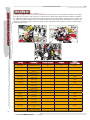
MadWorld features an intuitive and easy to master control scheme. It combines the excitement of playing with
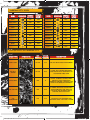
the Wii Remote and the precision movement afforded by the Nunchuk attachment. The following table details the
basic controls.
BAsiC Controls During
on-Foot segments
BAsiC Controls During
motorCyCle segments
Control
ACtion
Control
ACtion
Control Stick
Moves Jack. Double-tap in
same direction to run
Control Stick
Steers motorcycle
C Button
Reset camera angle
Z Button
Turbo
C Button (hold)
Activate/Deactivate camera
lock
Nunchuk (swing)
Attack with left arm (throw);
180-degree turn
Z Button
Jump
A Button
Accelerate
Nunchuk (swing)
Dodge
B Button
Brake
A Button
Attack; activate devices
Wii Remote (swing)
A Button (hold)
Grab enemies/props
Atack with right arm
(chainsaw); 360-degree spin
attack
B Button
Use chainsaw
- Button
Access Pause Menu
Wii Remote (horizontal swing)
Backfist attack
Wii Remote (vertical swing)
Uppercut attack
Control Pad Up
Pick up weapon/healing item
Control Pad Down
Taunt (draws nearby enemies)
Control Pad Left/Right
Equip/Unequip secondary
weapon
- Button
Access Pause Menu
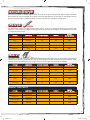
AttACk ComBos
AnD throws
Control
ACtion
Run + A Button
Shoulder Charge
Jump + A Button
Jump Attack
Dodge + A Button
Counter-Punch
Grab Enemy + Swing Wii
Remote Vertically
Grab Enemy + Swing Wii
Remote Horizontally
Grab Enemy + Swing Nunchuk
Shoulder Throw
Side Throw
Head-butt
4
02 BASICS.indd 4
2/24/09 2:34:03 PM