1
DI-145 Hardware Manual
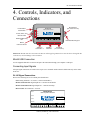
4. Controls, Indicators, and
Connections
Event Marker
Push Button
Event
Power, Active, and
Remote LEDs
Active
SD Card Slot
(not used in DI-145)
Model DI-145
Data Acquisition Starter Kit
Power
Download software
at dataq.com/145
www.dataq.com
Remote
Remote Control
Event
Record
Analog inputs (±10 VFS, ±150 V max.)
Ch1
Ch2
Ch3
Ch4
Bulkhead Mounting
Ear
-
+
+
-
+
-
-
+
+
-
Reserved
-
+
Bulkhead Mounting Ear
Mini-B
USB Connection
Analog In
Channels 1-4
Digital In
Channels
Reserved
(no connection)
Please note: The SD card slot is not used in the DI-145. Allowing foreign materials to enter the device through the SD
card slot may result in damage to the instrument.
Mini-B USB Connection
Use the supplied USB cable to connect and power the instrument through your computer’s USB port.
Connecting Input Signals
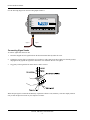
All input signal connections are made to the 16-port screw terminals. Each terminal is labeled directly on the instrument case.
DI-145 Signal Connections
Refer to the following for screw terminal port identification.
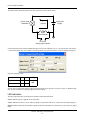
Ch#: Analog channels 1-4 (±10VFS, ±150V transient Max.)
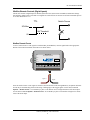
Remote Control Event: Digital Input bit 0—Remote Event Marker
Remote Control Record: Digital Input bit 1—Remote Start/Stop
Reserved NC: No connection—reserved.
Model DI-145
Event
Data Acquisition Starter Kit
Power
Download software
at dataq.com/145
Active
www.dataq.com
Remote
Analog Inputs (±10 VFS, ±150 V max.)
Ch1
Ch2
Ch3
Ch4
+
-
+
-
+
-
+
-
Remote Control
Event
Record
+
-
+
Reserved
-
Controls, Indicators, and Connections
7