1
DMX 512 CONTROLLER SERIES
Introduction of the panel
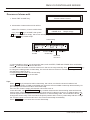
The panel is as following:
DMX 512 Intelligent Lighting Controller
SCANNER
CLEAR
1-16
17-32
HOLD
Sunny 512 Controller
LED LAMP
POWER
CHANNELS
1 17
2 18
3 19
4 20
5 21
6 22
7 23
8 24
9 25
13 29
10 26
14 30
11 27
15 31
1
2
12 28
16 32
3
4
5
6
7
8
SPEED
9
10
11
12
13
14
15
16
10
10
10
10
10
10
10
10
8
8
8
8
8
8
8
8
6
6
6
6
6
6
6
6
4
4
4
4
4
4
4
4
2
2
2
2
2
2
2
2
0
0
0
0
0
0
0
0
FAST
SLOW
A
B
C
SINGLE
A
B
C
Sunny 512
SINGLE
DMX 512 Controller
SAVE TO EDIT SAVE TO
SCENE CHASE
ENV.
SELECT
1
2
3
4
1
2
3
4
5
6
7
8
5
6
7
8
9
10
11
12
9
10
11
12
1
2
3
4
5
6
7
8
9
10
11
MUSIC
DELETE
SET X/Y
ADD
ENTER / SWITCH
BLACKOUT
EDIT
13
14
15
16
13
14
15
16
12
13
14
15
X
SCENE
CHASE
Y
ENVIRONMENT
DMX OPERATOP
SCANNER
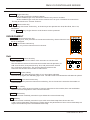
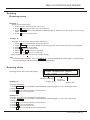
CLEAR Clear key
Clear all states chosen by scanner keys and quit manual operation.
SCANNER
1-16 Section key
When the indicating light is on, 1-16 scanner can be chosen from number
keyboard.
17-32 Section key
When the indicating light is on, 17-32 scanner can be chosen from number
keyboard.
HOLD Scanner hold key
When the indicating light is on, it is a scanner hold state. Multi scanner can
be manual operated.
CLEAR
1-16
17-32
HOLD
1 17
2 18
3 19
4 20
5 21
6 22
7 23
8 24
9 25
10 26
11 27
12 28
13 29
14 30
15 31
16 32
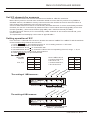
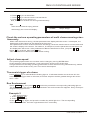
1 ~ 16 Scanner number key:
Press these keys, the corresponding indicating lights are on and indicate the scanners are in manual
operating states.
USER MANUAL
4/17