1
C-Nav1010 User Guide
Quick Start Guide
Follow this Quick Start Guide to set up the standard
configuration of the C-Nav1010, designed for
productivity with minimal setup time.
Hardware Connect
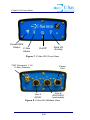
Connect the supplied Positronic 9-pin connector of the
serial cable to Port A or Port B of the C-Nav1010.
Connect the DB9 end to the PC.
TNC Connector
1” Antenna Mount
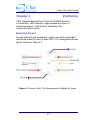
Mount the supplied L1/L-band antenna to a mast, as
described in Chapter 3. (Ensure the antenna is in an
area with a 360º view of the sky).
Connect a GPS antenna cable to the GPS antenna.
Connect the other end to the TNC connector, labeled
ANT 1, on the receiver.
i