1
C-Nav1010 User Guide
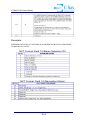
C-Nav1010R Only: To track C-Nav Corrections Service
Signals at high latitudes, mount the L-band antenna to a
mast as described in Chapter 3. Connect a GPS
antenna cable to the L-band antenna. Connect the other
end to the TNC connector, labeled ANT 2, on the CNav1010R receiver.
Connect supplied DC power cord to 9-36VDC-power
source. Refer to Figure 4 for power cable pin
assignments.
Connect the Positronic 9-pin end of the power adapter
to the receiver power port.
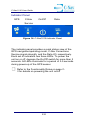
GPS
C-Nav
On/Off
Data
Service
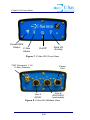
Depress the On/Off switch on the front panel for more
than 3 seconds to power on the receiver. All LEDs
illuminate for 3-5 seconds during power-up.
Your C-Nav1010 Hardware is now properly connected.
ii