1
PostAds Banner(s)
Introduction
Welcome to PostAds‘s Banner User Manual. Our Banner rotation allows you to post and/or manage a variety
of image ads, rich-media / flash ads on our site. Currently we support 728 x 90 (Leaderboard) and 468 x 60 (Full
Banner) sizes in all of our categories / subcategories, and main page. Our banner rotation also provides highly
detailed statistics to you and your advertisers.
Getting Started
Account Creation:
Automatic
PostAds Banner ads accounts can only be created by purchasing an initial banner, then an
email will be sent that provides you with a set of instruction to setup an account. Once the
account has been setup it is yours for life, and you can load you first banner to start you
campaign, plus advertisers can purchase addition banner slots.
Manual
Additionally advertisers can contact PostAds and request us to manually create an account.
Please note that In order for advertisers to start a campaign they will need to purchase a
banner slots on the site.
Account Login:
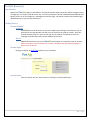
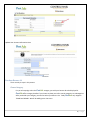
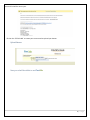
Navigate to Banner Ad Login Page and enter your credentials.
Account Update:
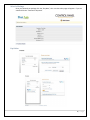
Place you mouse over the “Other Features / Settings” to select popup menu.
5|Page