1
Ultra-mini SIP PoE IP Camera
ICA-4130S/ICA-4230S
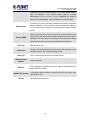
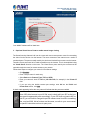
time segment
Profile
I-frame Interval
EPTZ
High / Main / Base selection
Set the I-frame interval to 1~30
EPTZ is simply “electronic pan-tilt-zoom”. The function is supported in
720P only.
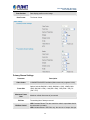
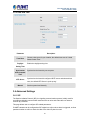
Secondary Stream Settings
Description
Parameter
Video Codec
Frame Size
Maximum Frame
Rate
Bit Rate
H.264/MPEG-4/MJPEG available
The optional resolutions of the secondary stream depend on the Codec
of the primary stream and the secondary stream
Maximum refresh frame rate of per second
Transmitting bits of data per second
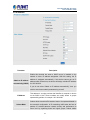
CBR: Constant Bitrate. The rate at which a codec's output data should
be consumed is constant.
Bit Rate Control
Profile
I-frame Interval
VBR: Variable Bitrate. VBR files vary the amount of output date per
time segment
High / Main / Base selection
Set the I-frame interval to 1~30
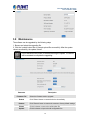
If you log in the camera as an ordinary user, setting function will be not available.
If you log in the camera as the administrator, you can perform all the settings
provided within the device.
When the configuration is finished, please click “Save” to save and enable the
setting.
3.5.2 Image
21