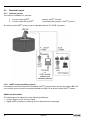
1
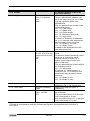
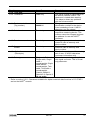
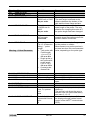
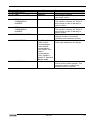
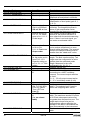
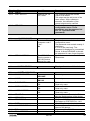
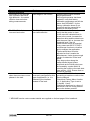
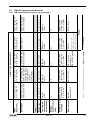
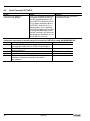
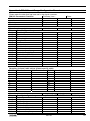
Event
Fault
Electrical Connections and Communication Output
Current Output value < 4 mA.
No power supply.
Connection of the device is
incorrect.
The calibration of the current
output is incorrect.
Reads 22 mA.
An error has occurred.
The device is in its start-up
phase.
The value at the current output
does not correspond to the
value at the display (PC STAR
2 or HART® communicator).
The current output settings are
incorrect.
Data communication via the
digital interface is not working.
The BM 102 is in its start up
phase, wait 50 seconds and
try again.
The communication
parameters of the computer
are set incorrectly.
Bad connection to the
interface.
Current output value is
< 4 mA.
Current output value is
= 22 mA
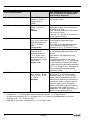
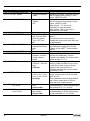
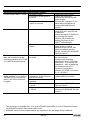
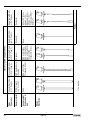
Action
Check the power supply
Check the connection
between the device and the
power supply.
Execute the calibration if you
have authorized access or
contact KROHNE Service
centre**.
This happens in case the
range 4-20 mA / error 22 mA
is selected.
Check the status of the device
by selecting the marker
window (F8) or enter the
status (4.0) menu of the
®
HART communicator.
Wait 50 seconds. If the current
value drops to a value
between 4 and 20 mA, and
goes immediately back to
22 mA, contact your KROHNE
Service Centre**.
Check the current loop and
the connections.
Configure the output as
described in Sect. 3.3.3 (user
sub-menu 1.3) of the BM 102
Handbook – also try adjusting
the threshold using F11Dynamic Configuration
function (PCSTAR 2) or menu
2.1.5.1.0 (HHC).
Check computer setting
(address/device number).
Check connection.
Contact your KROHNE
Service Centre**.
If problem persists then
contact your KROHNE Service
Centre**.
* This document is available from your local KROHNE Sales office or on the “Download Centre”
on KROHNE’s website http://www.krohne.com/.
** KROHNE service centre contact details are supplied on the last page of this handbook.
62
BM 102