1
A FEW DELISCRIPT POINTERS:
1
PLEASE
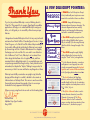
If you've just purchased Deliscript or are just thinking about it –
Thank You! This manual for its usage in OpenType® compatible
applications will help you to understand Deliscript’s many possibilies, or it will guide you to successfully utilize its many unique
features.
I designed and created Deliscript with a lot of very savvy technical
assistance from Patrick Griffin of Canada Type in Toronto. A huge
Thank You goes out to Patrick for all his tireless help in making this
font a reality. Although the initial idea for Deliscript was inspired
by the neon sign in front of Canter’s Delicatessen in Los Angeles,
the design soon took on a life of its own – and its own distinctive
look. Unlike most "retro" fonts, Deliscript is not a retread of an
older design that had been lost or forgotten, found, and then
recreated. Like its sibling Metroscript, it is a completely new and
unique design created from the ground up. It may have historical
antecedents, but despite the "déjà vu" feeling it may provoke, let
me assure you that it’s as new and fresh as anything else out there.
Deliscript was inititally conceived as an upright script, but after
playing with the design for a while, I decided to also create an
italicized version: Deliscript Slant. This version is much more than
the upright version skewed at an angle– it has its own unique
characters that only appear in Deliscript Slant.
Wrong/Right
Gum
Gum Gum
Cannoli
Cannoli
Cannoli
4
+5°
+10°
You CAN change the angle (slightly)
without affecting the font proportion by
using the "Shear" tool in your application.
4
For the alternate characters, connections
and ligatures to work properly we would
strongly recommend keeping the Standard
Ligatures and Contextual Alternates buttons
in the OpenType palette always turned on.
5
5
The Swash button in the OpenType
palette is used not just for enabling the
variable length tails, but also for activiating
certain complete words and phrases such as
'No', 'of the', 'by', etc.
6
6
The Stylistic Alternates button is used to
activate alternate characters (consult the
Character Set on page 4), The Titling
Alternates button is used to activate the
unique crossbars which can extend out from
the lowercase 't', described on page 3.
7
7
Michael Doret
Alphabet Soup Type Founders
May, 2009
S OUP
You CAN change the proportion of the
type by scaling it (slightly) either horizontally or vertically. If you are using Deliscript
Slant this will also change the angle of the
letters.
3
Nor mal
I hope you enjoy using these fonts as much as I did creating them!
A LPHABET
NEVER change the letterspacing
between adjacent lowercase characters. The
character alignment has been carefully
planned, and changing the letterspacing
can lead to unintended consequences!
2
2
3
PLEASE don’t set Deliscript in all caps!
In fact, traditionally most scripts were never
meant to be used without lower case letters.
1
T YPE
F OUNDERS
http://Mic haelDoret.com/AlphabetSoup/soup.html
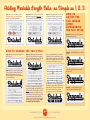
Adding Variable Length Tails: as Simple as 1, 2, 3.
Step 1: Set your text making sure that
Standard Ligatures, Contextual Alternates,
and the Swash buttons are enabled.
Step 2: With the 3 buttons selected in the
OpenType Palette, type an Underscore. The
shortest length of the default tail will appear.
Step 3: Keep tapping the Underscore key
until the desired length is achieved (in this
case eight more keystrokes). Voila! Simple.
HOW TO
ADJUST THE
TA I L L E N G T H
AFTER
DETERMINING
T H E TA I L S T Y L E :
Step 1: Move the text cursor to between
the last letter and the tail...
H O W T O C H A N G E T H E TA I L S T Y L E :
Step 1: Move the text insertion point to the
right of the tail.
Step 3: With the end of the tail selected
(Step 2, at left), double-click on the shortest
tail from one of the other five styles. This will
change the style of the tail to that style.
There are six different tail styles, and each is
displayed in order—from shortest to longest
within each style—at the bottom of the Glyph
palette. The six different styles can be seen in
more detail in the Tails Menu on page 5.
Step 2: ...then hit the Delete key to shorten
the tail...
...keep hitting the Delete key to shorten the
tail even more.
Step 2: Hold down the Shift key and type
a left arrow( ) to select the end of the tail.
Open the Glyph palette and notice the
different tail styles, the current one being the
one that’s highlighted.
To change it to a different style yet again,
repeat Step 2 (at left) and double-click on the
shortest tail of the desired style. The shortest
tails are always the ones directly following
the last (longest) tail of a previous style in the
Glyph palette (reading left to right). Then
finally, to adjust the length of the tail, see the
instructions in the box to the right: “HOW
TO ADJUST THE TAIL LENGTH . . .”
A LPHABET
S OUP
In addition to the four more traditional tail
designs, there are two that are taller than the
others (#3 & #5). These special, thicker tails
can be used to accomodate secondary
words, such as in a logo or title treatment.
T YPE
F OUNDERS
http://Mic haelDoret.com/AlphabetSoup/soup.html
Step 3: ...or hit the Underscore key to
create a longer tail. Ahhhh, just right!
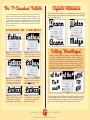
The “T–Crossbar” Fe
One feature that I designed into Deliscript (and I believe that this feature has never before
been seen in a font) is the unique ability to extend the crossbar of the lowercase "t" out to
the left or right over other adjacent lowercase letters, or even over a wordspace. This type
of flourish had previously only been seen in hand-lettering. Your use of this feature should
probably be on the conservative side (and probably only in titles, logos, or single words),
because it might be a little much to see it overused in blocks of text! So have fun—but use
this feature judiciously!
SliAl
Alternate characters (where available) may be accessed by highlighting a letter with the Type Tool,
and then enabling the Stylistic Alternates button in the OpenType palette. Please check the Glyph
Palette for availability of alternates.
A C T I VA T I N G T H E T - C R O S S B A R S
Step 1: Move the text insertion point to the
right of the tail.
Step 1: Set your desired copy with (as
usual) both the Standard Ligatures and
Contextual Alternates buttons enabled.
Step 2: Using the Type Tool select the
letters for the t-crossbar to pass over. It can
even be the entire word (minus the cap).
Step 3: Click on the Titling Alternates
button. You’ll see the crossbars appear
over the areas you selected. The 't' has
also now changed to an alternate 't'.
Step 4: To remove the crossbar from
an area select it again with the Type Tool
and then disable the Titling Alternates
button by pressing it again.
Step 5: If you’d like the crossbar to
extend beyond the end of the word—add
a wordspace after the word and then
select that wordspace with the Type Tool.
Step 6: Then all you need do is to
again enable the Titling Alternates button,
and you’ll have a crossbar extending
beyond the end of the word
A LPHABET
S OUP
Setting “WordLogos”
In addition to individual letters, ligatures, numbers, accents, symbols, and various and
sundry glyphs, I’ve created what we’ll call "WordLogos"—complete words that you can
access as part of a Deliscript setting or separately for any purpose. They include words or
phrases such as "of the" and Ltd. They are accessed by typing the words you want to set
followed by a '#'. For example if you want to access the "of the" WordLogo you would
type "of the#", highlight all the letters with the Type Tool and then, in similar fashion to
how the tails were accessed, enable the Swash button in the OpenType palette. The typewritten text then turns into a WordLogo (see examples below).
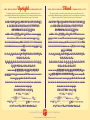
On the following page is the Deliscript Character Set. It wouldn’t be practical to show all of the
more than 800 glyphs making up each font, so I’ve eliminated some of the more obvious ones
such as the many that are necessary to enable the t-crossbars. I also didn’t think it would be
practical to show each and every length of the six designs that comprise the120 tails.
T YPE
F OUNDERS
http://Mic haelDoret.com/AlphabetSoup/soup.html
THE DELISCRIPT
Upright
CHARACTER SET
THE
DELISCRIPT
Slant
CHARACTER
SET
The character set below is not totally complete: the tails and t-crossbar characters are not
represented here. Other than having crossbar extensions, the t-crossbar characters are otherwise
identical to characters below. The tails are featured on page 5 of this manual.
The character set below is not totally complete: the tails and t-crossbar characters are not
represented here. Other than having crossbar extensions, the t-crossbar characters are otherwise
identical to characters below. The tails are featured on page 5 of this manual.
AABCDEFGHIJKLMNOPQRST UVWXYZ
& ÀÁÂÃÄÅÀÁÂÃÄÅÆÇÈÉÊËÌÍÎÏŁÑ
ÒÓÔÕÖØŒŠÙÚÛÜŸÝŽÐÞ
aabbccddeefffffgghhiij jkkllmmnnoooppqq
r rr r rs s sttu uvvvvwwwwx x yy z z z z
ààááââããääååææççđđ èè éé êê ëëììííîî ï ïııłłññòòòó
óóôôôöööõõõøøøœœ š šßßùùúúûûüüýýÿÿ ž ž ž ž
ðððþþ
CrCzCzEgErEsEzEzFiFiFjFlTaTeTcThTiTiTjTo
TrTsTuTwTwTw
ÈgÉgÊgËg ÈrÉrÊrËrÈsÉsÊsËsÈzÉzÊzËzÈzÉz
ÊzËzFìFíTàTàxTèTèxTéTéxTìTí
axax exexffffffffifififjfj flflflftftft
gg gggjgrixix jjnxnxoxoxththux uxvrvs vswr
ws wsyjyxyxzb zh zk zl zt zz zzzzb
àx áx âx ãx äx åx èx éx êx ëxìxíxîxïxıx ıxòxóxôx
õxöxùxúxûxüxýx ÿx
1234567890 $¢£ƒ¤¥
# %‰ ¹²³ ¼½¾⁄ °
_–—( )[]{}/\‘’“”'"’s‹›«».,:;„…!?¡¿·•
®©©™@*†‡ªº˛¸ˆ`´˜¨˘˙˚˝ˇ¯§¶|¦-^~<+−×÷=>
úûüýþÿ& ABC D
AABCDEFGHIJKLMNOPQRST UVWXYZ
& ÀÁÂÃÄÅÀÁÂÃÄÅÆÇÈÉÊËÌÍÎÏŁÑ
ÒÓÔÕÖØŒŠÙÚÛÜŸÝŽÐÞ
aabbccddeefff ffg ghhiij jkkl l l lmmnnooo
ppqq r rr r r s s sttuuvvvvw wwwx x y y z z z z
ààááââããääååææççđđ èè éé êê ëëììííîî ï ïııłłññ
òòòóóóôôôöööõõõøøøœœ š šßßùùúúûûüüýý
ÿÿ ž ž žžðððþþ
CrCzCzErEsEzEzFiFiFjQuTaTcTeThTiTiTjTo
TrTsTuTwTwTw
ÈrÉrÊrËrËrÉsÊsËsÈzÉzÊzËzÈzÉzÊzËzFìFí
TàTàxTèTèxTéTéxTìTí
axax exex ffffffffifififjfjfj flflflftftgjix
ixjj lflf llflililillllllltltltjjnxnxoxoxth
thuxuxvrvs vswrws wsyxyxzb zh zk zt zz zzzzb
àxáxâxãxäxåxèxéxêxëxìxíxîx ïx ïxıxıxòxóx
ôxõxöxùxúxûxüxýxÿx
1234567890 $¢£ƒ¤¥
# %‰ ¹²³ ¼½¾⁄ °
_–—()[ ]{}/\‘’“”'" ’s ‹›«».,:;„…!?¡¿·•
®©©™@*†‡ªº˛¸ˆ`´˜¨˘˙˚˝ˇ¯§¶|¦-^~<+−×÷=>
ûüýþÿ&A BCDE
A LPHABET
S OUP
T YPE
F OUNDERS
http://Mic haelDoret.com/AlphabetSoup/soup.html
Deliscript
Tails␣␣
T H E
You’re probably familiar with Michael Doret’s logo and lettering work without
being aware of it. If you’ve seen his logo for the NY Knicks or one of his many Time
covers then you might be aware of the power and dynamism he has brought to the art
of the letterform. He's now applying to his font design efforts all those years of experience in creating letterform art –now under the name Alphabet Soup Type Founders.
M E N U
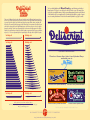
There are 6 different tail styles, and within each style there are 20 different lengths ranging from
short to long. All the tails may be found at the very bottom of the Glyph Palette and are arranged
in groups from left to right by style. Within each group they start with the shortest, and end with
the longest. The next style then starts again with its shortest tail. It is important to be able to discern
which are the shortest tails in the Glyph Palette because it will be necessary in order to be able to
change the tail style. The tails are represented below in the same order they appear in the Glyph
Palette–left to right and top to bottom. Not all the lengths are represented due to space constraints:
styles #1, 2, 5 & 6 are represented by their longest lengths, while styles #3 & 4 by all 20 lengths.
Tail Style #1
Tail Style #2
Tail Style #3
Tail Style #4
Click Here to View or Purchase
http://myfonts.com/fonts/alphabetsoup/deliscript/
Check out these other fonts from Alphabet Soup
available now at
The Original...
and
Bank
Gothic
Condensed
e
ns
io
Mul
t
Clickhttp://myfonts.com/fonts/alphabetsoup/bank-gothic-as/
here to view or purchase Bank Gothic
lor Ca
p
4
ra
You’ve Come to Know and Love
le
8
fonts
All the Usual
Characters
ab
Tail Style #6
o
i•C
La y
Tail Style #5
pl
om e
te
c
Click http://myfonts.com/fonts/alphabetsoup/metroscript/
here to view or purchase Metroscript
a newly devised
b le V e r s
font
— FamilY —
Deliscript Design and Art: Michael Doret
Click http://myfonts.com/fonts/alphabetsoup/power-station/
here to view or purchase PowerStation
D e l i s c r i p t O p e n Ty p e P r o g r a m m i n g : P a t r i c k G r i f f i n / C a n a d a Ty p e
h t t p : / / C a n a d a Ty p e . c o m
A LPHABET
Click
here to view or purchase Orion
http://myfonts.com/fonts/alphabetsoup/orion-md/
The Deliscript User Manual © 2009 Michael Doret
S OUP
T YPE
F OUNDERS
http://Mic haelDoret.com/AlphabetSoup/soup.html