1
Chapter 6: Contract Template Fees, Returns, and Phases
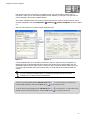
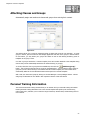
Control when the system considers an account late. The system will warn employees during the
check-in process.
Figure 6-7.
Account Late By: Number of days a payment must be late before any late fees are applied. (This only
applies to your ‘In House’ members.)
Warning After: A warning message will appear during check-in if a member’s payment is late by this many
days.
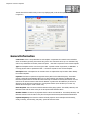
The following areas are controlled by AAC for AAC-billed members.
For consistency, In-House accounts should be set with the same
values as those billed by AAC.
Return Fees:
Checks: The amount you wish to charge for a returned check.
EFT: The amount you wish to charge for a returned EFT Draft.
Credit Cards: The amount you wish to charge for a returned credit card payment.
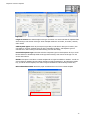
Late Fee Percentage: The Default % is the percentage you want to charge on late payments. The
Minimum $ and Maximum $ amounts limit the amount you can actually charge for late fees. If the Late Fee
is calculated to be less than the Minimum $, the Minimum $ amount will be charged. If the Late Fee is
calculated to be more than the Maximum $, the Maximum $ amount will be charged.
Late Fee Amount: Use this if you have a flat dollar amount you charge for late payments instead of
calculating them based on a percentage. (If you specify both a Late Fee percentage and a Late Fee Amount,
only the Late Fee Amount will be used.)
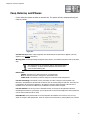
Phase Breaks: These phase breaks are used to determine the timelines of an account. They are very
similar in concept to A/R aging breaks. These are used in various functions to group together your accounts.
79