1
XD300
USB 2.0 XPRESS DOCKING STATION
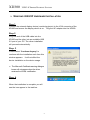
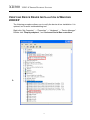
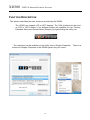
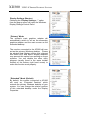
Display Settings Shortcut
Choosing the “Display Settings…” option
from the pop-up menu will open the Windows
Display Settings Control Panel.
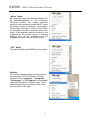
“Primary” Mode
The system’s main graphics adapter will
automatically switch to act as the secondary
graphics adapter and the main screen as the
extended desktop.
The monitor connected to the XD300 will now
act as the primary Windows desktop. Please
be advised that display utilities that shipped
with some AGP and built-in display adapters
may prevent this option from working on some
systems. You can disable the other utility
program (usually found in the same toolbar
located on the bottom right hand corner) to
make this function work properly.
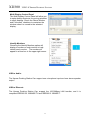
“Extended” Mode (Default)
By default, the monitor connected to XD300
will work as, “Extended Desktop” which
extends the primary Windows desktop of your
system. You can change the relative position
of this extended desktop under the Display
Properties.
15