1
DASP-52104 Card User’s Manual
2.5 Quick Setup and Test
To install a new DASP-52104 into an IBM PC compatible
computer, at first, power-off the PC and open its chassis, then
plug the DASP-52104 into a PCI slot. The DASP-52104 is a plug
and play device for MS Windows, and the OS will detect your
DASP-52104 after you power on the PC. The detail of driver and
software installation is described in software manual of
DASP-52104.
After the hardware and software installation, user can emulate and
test DASP-52104 step by step as follows.
To perform a complete test of the DASP-52104, we
can route the output signals of the DASP-52104 to a
voltage / current measurement equipment for
read-out. And then, by following the DASP-52104 test
branch of the ToolWorkShop which will fully test I/O
channels of the DASP-52104 as descried in the
following paragraphs.
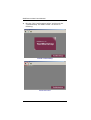
Launch the ‘PCI Configuration Utility’ of DASP-52104
to ensure that the resource of DASP-52104 is
properly dispatched by the OS. Press the scan button
in the toolbar of the ‘PCI Configuration Utility’ to find
the installed DASP-52104, and then check the
resource list as show in following.
Scan DASP-52104 with PCI Configuration Utility and Check the
Dispatched Resource
Hardware Installation
13