1
IPU-1025
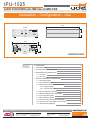
3.- TYPICAL APPLICATION OF IPU-100
3. TYPICALAPPLICATION OF IPU-100.
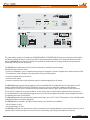
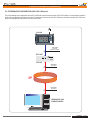
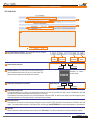
Figure 1 provides an example configuration of the PA system for IP networks of UDE.
The audio decoder IPU-1025 model is the element that allows the decoding of audio sent digitally to a conventional audio
signal to be amplified conveniently and connected directly to speakers, horns or trumpets.
The IP Paging Desk (IPU-100P) with color touch screen, where the operator can select the zones where the message
must be activated once you press and hold the button of "PTT" (Talk).
In addition, the SIP server (IPU-360) which acts as intermediary between all IP devices connected to the LAN working.
As can be seen our IPU-1025 devices can connect to the wide range of speakers, horns and trumpets of UNION
DESARROLLOS ELECTRONICOS.
IPU-100P
IPU-1025
USB
IPU-100P
DEVICE
ON
ON
OK
FAULT
CALL
IN
OUT
FAULT
CONFIG NET
USB
ACTIVITY
Engineered and made in E.U.
MESSAGE
SPEECH
IP
IPU-1025
IPU-100
DEVICE
ON
OK
FAULT
CALL
IN
OUT
CONFIG NET
USB
IPU-1025
ACTIVITY
Engineered and made in E.U.
IPU-100
DEVICE
ON
OK
FAULT
CALL
IN
OUT
CONFIG NET
USB
ACTIVITY
Engineered and made in E.U.
IPU-1025
DEVICE
ON
IPU-360
OK
FAULT
CALL
IN
OUT
CONFIG NET
USB
ACTIVITY
Engineered and made in E.U.
Installation - Configuration - Use - IPU-1025
Rev. 0
610.440A
4 29