1
RI-8100 User’s Manual
CH 01
Rx
LSB
0 5,0 0 0. 0 0
FREQ
CH01
Rx
LSB
0 5,0 0 0. 0 0
CH 01
Rx
LSB
0 4, 9 9 9. 9 0
“∨”
-10Hz
”
blink
FREQ
0 6, 2 0 0. 0 0
SET
0 5,0 0 0. 0 0
0 5,0 0 0.1 0
0 0, 0 0 0. 0 0
+10Hz
......
ESC
ESC
CH01
Rx
LSB
0 6, 2 0 0. 0 0
CH 01 Rx
LSB
0 4,9 9 0.0 0
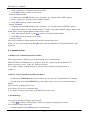
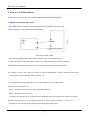
Fig.7. Setting of frequency
- Volume control
Push [/\] button or [\/] button to control volume of received signal.
- Setting of communication mode (M-MODE)
ㅇ In main mode, push [SET] button twice and push [<]([>]) button until “M-MODE” appears. Then
power setting menu is displayed.
ㅇ Push [/\] button or [\/] button to select “MANUAL” or “AUTO” mode.
If “AUTO” mode is set, RI-8100’s transmitting channel can be changed between CH01~CH09
automatically.
ㅇ Push [ESC] button to return to main mode.
- Setting of power(POW)
ㅇ In main mode, push [SET] button twice and push [<]([>]) button until “POWER” appears. Then
power setting menu is displayed.
ㅇ Push [/\] button or [\/] button to change power by step 1W.
ㅇ Push [ESC] button to return to main mode.
- Setting of hopping mode(HOP)
ㅇ In main mode, push [SET] button twice and push [<]([>]) button until “HOP” appears. Then hopping
setting menu is displayed.
ㅇ Push [/\] button or [\/] button to select “RANDOM”, “ADAPTIVE” or “INTELLIG” mode.
ㅇ Push [ESC] button to return to main mode.
- Setting of network number(NET)
ㅇ In main mode, push [SET] button twice and push [<]([>]) button until “NET” appears.
-7-