1
Service Menu Parameters
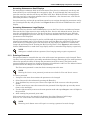
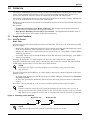
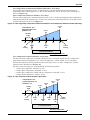
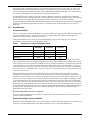
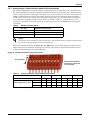
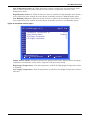
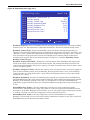
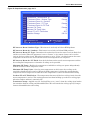
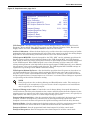
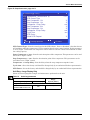
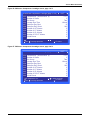
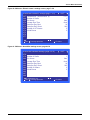
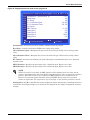
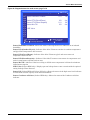
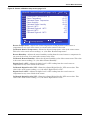
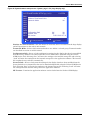
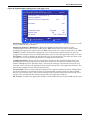
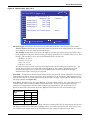
Figure 91 Options setup, page 4 of 5
OPTIONS SETUP (page 4 of 5)
S434
S435
S436
S437
S438
S439
S440
S441
S442
S443
S444
PASSWORD (Actual Level 0)
Measure Type
Analog Input 1:
Not Config
Analog Input 2:
Not Config
Analog Input 3:
Not Config
Analog Input 4:
Not Config
Units System for Custom Inputs
UNIT 01
????
Precision
Metric
to select parameter
to confirm
for next/previous unit
to change parameter
then
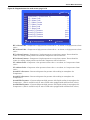
Measure Type—Determines the measurement units and allowable range for each analog input.
Factory Std measurement type means the input is being used by the PA program for unit control
and cannot be set to any other measurement type.
Not Config measurement type means the input is available for custom sensor use, but has not
been configured. After unit code execution, all analog inputs that are available will be set to “Not
Config,” and can then be set to any of the following choices by the user:
• Air Pres 1, 2, 3 or 4
• Pressure 1, 2, 3 or 4
• Temp 1, 2, 3 or 4
• Percent 1, 2, 3 or 4
It is not necessary to match a measurement type number to the analog input number (i.e., “Air
Pres 2” does not have to be connected to Analog Input 2). The numeric designation on each
measurement type is just to allow the user to differentiate between readouts if multiple
measurements of the same type are required.
Precision—Parameters in the Precision column must match the DIP switch settings for each analog
input being used. There are two choices for these parameters: 0-5V and 0-10V. This setting will also
regulate the range of an analog input’s linear characteristic on Page 5 of the Options Setup screen of
the Service Menu (see Figure 92).
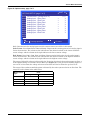
Line S441—Determines the unit type (English or SI) that will be used for the setup and readout of
custom sensors. This parameter affects only analog inputs. All lines in other menus involving
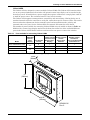
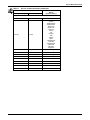
pressures or temperatures will have their readout type determined by line U404 of the User Selection menu. The table below shows the English and SI units for each measurement type.
Measurement
Type
Units
English
SI
Air Pres
inWC
Pa
Pressure
PSI
Bar
Temp
°F
°C
Percent
%
%
When the unit type is changed on line S441, the linear characteristics for all of the inputs on Page 5 of
the Options Setup screen of the Service Menu will be converted to match the new units system, and
the readout in the Sensor Data in the User Menu will also change to reflect the new units.
98