1
SmartSwitch Router 2000
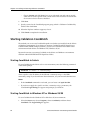
Getting Started Guide
9032766-04
Copyright
© 2000 by Cabletron Systems, Inc. All rights reserved.
Cabletron Systems, Inc.
35 Industrial Way
Rochester, NH 03867-5005
Printed in the United States of America
Changes
Cabletron Systems, Inc., reserves the right to make changes in specifications and other information
contained in this document without prior notice. The reader should in all cases consult Cabletron
Systems, Inc., to determine whether any such changes have been made.
The hardware, firmware, or software described in this manual is subject to change without notice.
Disclaimer
IN NO EVENT SHALL CABLETRON SYSTEMS BE LIABLE FOR ANY INCIDENTAL, INDIRECT,
SPECIAL, OR CONSEQUENTIAL DAMAGES WHATSOEVER (INCLUDING BUT NOT LIMITED
TO LOST PROFITS) ARISING OUT OF OR RELATED TO THIS MANUAL OR THE INFORMATION
CONTAINED IN IT, EVEN IF CABLETRON SYSTEMS HAS BEEN ADVISED OF, KNOWN, OR
SHOULD HAVE KNOWN, THE POSSIBILITY OF SUCH DAMAGES.
Trademarks
Cabletron Systems is a registered trademark and Cabletron and SmartSwitch are trademarks of
Cabletron Systems, Inc.
All other product names mentioned in this manual may be trademarks or registered trademarks of
their respective companies.
Regulatory Compliance Information
Regulatory Compliance Information
This product complies with the following:
Safety
UL 1950; CSA C22.2, No. 950; 73/23/EEC; EN 60950; IEC 950
Electromagnetic
FCC Part 15; CSA C108.8; 89/336/EEC; EN 55022; EN 61000-3-2
Compatibility (EMC)
EN 61000-3-3; EN 50082-1, AS/NZS 3548; VCCI V-3
Regulatory Compliance Statements
FCC Compliance Statement
This device complies with Part 15 of the FCC rules. Operation is subject to the following two
conditions: (1) this device may not cause harmful interference, and (2) this device must accept any
interference received, including interference that may cause undesired operation.
NOTE: This equipment has been tested and found to comply with the limits for a Class A digital
device, pursuant to Part 15 of the FCC rules. These limits are designed to provide reasonable
protection against harmful interference when the equipment is operated in a commercial environment.
This equipment uses, generates, and can radiate radio frequency energy and if not installed in
accordance with the operator’s manual, may cause harmful interference to radio communications.
Operation of this equipment in a residential area is likely to cause interference in which case the user
will be required to correct the interference at his own expense.
WARNING: Changes or modifications made to this device that are not expressly approved by the
party responsible for compliance could void the user’s authority to operate the equipment.
Industry Canada Compliance Statement
This digital apparatus does not exceed the Class A limits for radio noise emissions from digital
apparatus set out in the Radio Interference Regulations of the Canadian Department of
Communications.
Le présent appareil numérique n’émet pas de bruits radioélectriques dépassant les limites applicables
aux appareils numériques de la class A prescrites dans le Règlement sur le brouillage radioélectrique
édicté par le ministère des Communications du Canada.
SmartSwitch Router 2000 Getting Started Guide
iii
Regulatory Compliance Statements
NOTICE: The Industry Canada label identifies certified equipment. This certification means that the
equipment meets telecommunications network protective, operational, and safety requirements as
prescribed in the appropriate Terminal Equipment Technical Requirements document(s). The
department does not guarantee the equipment will operate to the user’s satisfaction.
Before installing this equipment, users should ensure that it is permissible to be connected to the
facilities of the local telecommunications company. The equipment must also be installed using an
acceptable method of connection. The customer should be aware that compliance with the above
conditions may not prevent degradation of service in some situations.
Repairs to certified equipment should be coordinated by a representative designated by the supplier.
Any repairs or alterations made by the user to this equipment, or equipment malfunctions, may give
the telecommunications company cause to request the user to disconnect the equipment.
Users should ensure for their own protection that the electrical ground connections of the power
utility, telephone lines, and internal metallic water pipe system, if present, are connected together. This
precaution may be particularly important in rural areas. CAUTION: Users should not attempt to
make such connections themselves, but should contact the appropriate electric inspection authority, or
electrician, as appropriate.
NOTICE: The Ringer Equivalence Number (REN) assigned to each terminal device provides an
indication of the maximum number of terminals allowed to be connected to a telephone interface. The
termination on an interface may consist of any combination of devices subject only to the requirement
that the sum of the Ringer Equivalence Numbers of all the devices does not exceed 5.
VCCI Compliance Statement
This is a Class A product based on the standard of the Voluntary Control Council for Interference by
Information Technology Equipment (VCCI). If this equipment is used in a domestic environment,
radio disturbance may arise. When such trouble occurs, the user may be required to take corrective
actions.
iv
SmartSwitch Router 2000 Getting Started Guide
Safety Information: Class 1 Laser Transceivers
Safety Information: Class 1 Laser Transceivers
This product may use Class 1 laser transceivers. Read the following safety information before
installing or operating this product.
The Class 1 laser transceivers use an optical feedback loop to maintain Class 1 operation limits. This
control loop eliminates the need for maintenance checks or adjustments. The output is factory set and
does not allow any user adjustment. Class 1 laser transceivers comply with the following safety
standards:
•
21 CFR 1040.10 and 1040.11, U.S. Department of Health and Human Services (FDA)
•
IEC Publication 825 (International Electrotechnical Commission)
•
CENELEC EN 60825 (European Committee for Electrotechnical Standardization)
When operating within their performance limitations, laser transceiver output meets the Class 1
accessible emission limit of all three standards. Class 1 levels of laser radiation are not considered
hazardous.
Laser Radiation and Connectors
When the connector is in place, all laser radiation remains within the fiber. The maximum amount of
radiant power exiting the fiber (under normal conditions) is –12.6 dBm or 55 x 10 -6 watts.
Removing the optical connector from the transceiver allows laser radiation to emit directly from the
optical port. The maximum radiance from the optical port (under worst case conditions) is 0.8 W cm-2
or 8 x 10³ W m2 sr–1.
Do not use optical instruments to view the laser output. The use of optical instruments to view
laser output increases eye hazard. When viewing the output optical port, power must be removed
from the network adapter.
SmartSwitch Router 2000 Getting Started Guide
v
Cabletron Systems, Inc. Program License Agreement
Cabletron Systems, Inc.
Program License Agreement
IMPORTANT: THIS LICENSE APPLIES FOR USE OF PRODUCT IN THE FOLLOWING
GEOGRAPHICAL REGIONS:
CANADA
MEXICO
CENTRAL AMERICA
SOUTH AMERICA
BEFORE OPENING OR UTILIZING THE ENCLOSED PRODUCT, CAREFULLY READ THIS
LICENSE AGREEMENT.
This document is an agreement (“Agreement”) between You, the end user, and Cabletron Systems, Inc.
(“Cabletron”) that sets forth your rights and obligations with respect to the Cabletron software
program (“Program”) in the package. The Program may be contained in firmware, chips or other
media. UTILIZING THE ENCLOSED PRODUCT, YOU ARE AGREEING TO BECOME BOUND BY
THE TERMS OF THIS AGREEMENT, WHICH INCLUDES THE LICENSE AND THE LIMITATION
OF WARRANTY AND DISCLAIMER OF LIABILITY. IF YOU DO NOT AGREE TO THE TERMS OF
THIS AGREEMENT, RETURN THE UNOPENED PRODUCT TO CABLETRON OR YOUR DEALER,
IF ANY, WITHIN TEN (10) DAYS FOLLOWING THE DATE OF RECEIPT FOR A FULL REFUND.
IF YOU HAVE ANY QUESTIONS ABOUT THIS AGREEMENT, CONTACT CABLETRON SYSTEMS
(603) 332-9400. Attn: Legal Department.
1.
LICENSE. You have the right to use only the one (1) copy of the Program provided in this
package subject to the terms and conditions of this License Agreement.
You may not copy, reproduce or transmit any part of the Program except as permitted by the
Copyright Act of the United States or as authorized in writing by Cabletron.
2.
OTHER RESTRICTIONS. You may not reverse engineer, decompile, or disassemble the
Program.
3.
APPLICABLE LAW. This License Agreement shall be interpreted and governed under the laws
and in the state and federal courts of New Hampshire. You accept the personal jurisdiction and
venue of the New Hampshire courts.
4.
EXPORT REQUIREMENTS. You understand that Cabletron and its Affiliates are subject to
regulation by agencies of the U.S. Government, including the U.S. Department of Commerce,
which prohibit export or diversion of certain technical products to certain countries, unless a
license to export the product is obtained from the U.S. Government or an exception from obtaining
such license may be relied upon by the exporting party.
If the Program is exported from the United States pursuant to the License Exception CIV under the
U.S. Export Administration Regulations, You agree that You are a civil end user of the Program and
agree that You will use the Program for civil end uses only and not for military purposes.
vi
SmartSwitch Router 2000 Getting Started Guide
Cabletron Systems, Inc. Program License Agreement
If the Program is exported from the United States pursuant to the License Exception TSR under the
U.S. Export Administration Regulations, in addition to the restriction on transfer set forth in
Sections 1 or 2 of this Agreement, You agree not to (i) reexport or release the Program, the source
code for the Program or technology to a national of a country in Country Groups D:1 or E:2
(Albania, Armenia, Azerbaijan, Belarus, Bulgaria, Cambodia, Cuba, Estonia, Georgia, Iraq,
Kazakhstan, Kyrgyzstan, Laos, Latvia, Libya, Lithuania, Moldova, North Korea, the People’s
Republic of China, Romania, Russia, Rwanda, Tajikistan, Turkmenistan, Ukraine, Uzbekistan,
Vietnam, or such other countries as may be designated by the United States Government), (ii)
export to Country Groups D:1 or E:2 (as defined herein) the direct product of the Program or the
technology, if such foreign produced direct product is subject to national security controls as
identified on the U.S. Commerce Control List, or (iii) if the direct product of the technology is a
complete plant o r any major component of a plant, export to Country Groups D:1 or E:2 the direct
product of the plant or a major component thereof, if such foreign produced direct product is
subject to national security controls as identified on the U.S. Commerce Control List or is subject to
State Department controls under the U.S. Munitions List.
5.
UNITED STATES GOVERNMENT RESTRICTED RIGHTS. The enclosed Product (i) was
developed solely at private expense; (ii) contains “restricted computer software” submitted with
restricted rights in accordance with section 52.227-19 (a) through (d) of the Commercial Computer
Software-Restricted Rights Clause and its successors, and (iii) in all respects is proprietary data
belonging to Cabletron and/or its suppliers. For Department of Defense units, the Product is
considered commercial computer software in accordance with DFARS section 227.7202-3 and its
successors, and use, duplication, or disclosure by the Government is subject to restrictions set
forth herein.
6.
EXCLUSION OF WARRANTY. Except as may be specifically provided by Cabletron in writing,
Cabletron makes no warranty, expressed or implied, concerning the Program (including its
documentation and media).
CABLETRON DISCLAIMS ALL WARRANTIES, OTHER THAN THOSE SUPPLIED TO YOU BY
CABLETRON IN WRITING, EITHER EXPRESS OR IMPLIED, INCLUDING BUT NOT LIMITED
TO IMPLIED WARRANTIES OF MERCHANTABILITY AND FITNESS FOR A PARTICULAR
PURPOSE, WITH RESPECT TO THE PROGRAM, THE ACCOMPANYING WRITTEN
MATERIALS, AND ANY ACCOMPANYING HARDWARE.
7.
NO LIABILITY FOR CONSEQUENTIAL DAMAGES. IN NO EVENT SHALL CABLETRON OR
ITS SUPPLIERS BE LIABLE FOR ANY DAMAGES WHATSOEVER (INCLUDING, WITHOUT
LIMITATION, DAMAGES FOR LOSS OF BUSINESS, PROFITS, BUSINESS INTERRUPTION,
LOSS OF BUSINESS INFORMATION, SPECIAL, INCIDENTAL, CONSEQUENTIAL, OR
RELIANCE DAMAGES, OR OTHER LOSS) ARISING OUT OF THE USE OR INABILITY TO USE
THIS CABLETRON PRODUCT, EVEN IF CABLETRON HAS BEEN ADVISED OF THE
POSSIBILITY OF SUCH DAMAGES. BECAUSE SOME STATES DO NOT ALLOW THE
EXCLUSION OR LIMITATION OF LIABILITY FOR CONSEQUENTIAL OR INCIDENTAL
DAMAGES, OR IN THE DURATION OR LIMITATION OF IMPLIED WARRANTIES IN SOME
INSTANCES, THE ABOVE LIMITATION AND EXCLUSIONS MAY NOT APPLY TO YOU.
SmartSwitch Router 2000 Getting Started Guide
vii
Cabletron Systems Sales and Service, Inc. Program License Agreement
Cabletron Systems Sales and Service, Inc.
Program License Agreement
IMPORTANT: THIS LICENSE APPLIES FOR USE OF PRODUCT IN THE UNITED STATES OF
AMERICA AND BY UNITED STATES OF AMERICA GOVERNMENT END USERS.
BEFORE OPENING OR UTILIZING THE ENCLOSED PRODUCT, CAREFULLY READ THIS
LICENSE AGREEMENT.
This document is an agreement (“Agreement”) between You, the end user, and Cabletron Systems
Sales and Service, Inc. (“Cabletron”) that sets forth your rights and obligations with respect to the
Cabletron software program (“Program”) in the package. The Program may be contained in firmware,
chips or other media. UTILIZING THE ENCLOSED PRODUCT, YOU ARE AGREEING TO BECOME
BOUND BY THE TERMS OF THIS AGREEMENT, WHICH INCLUDES THE LICENSE AND THE
LIMITATION OF WARRANTY AND DISCLAIMER OF LIABILITY. IF YOU DO NOT AGREE TO THE
TERMS OF THIS AGREEMENT, RETURN THE UNOPENED PRODUCT TO CABLETRON OR YOUR
DEALER, IF ANY, WITHIN TEN (10) DAYS FOLLOWING THE DATE OF RECEIPT FOR A FULL
REFUND.
IF YOU HAVE ANY QUESTIONS ABOUT THIS AGREEMENT, CONTACT CABLETRON SYSTEMS
(603) 332-9400. Attn: Legal Department.
1.
LICENSE. You have the right to use only the one (1) copy of the Program provided in this
package subject to the terms and conditions of this License Agreement.
You may not copy, reproduce or transmit any part of the Program except as permitted by the
Copyright Act of the United States or as authorized in writing by Cabletron.
2.
OTHER RESTRICTIONS. You may not reverse engineer, decompile, or disassemble the
Program.
3.
APPLICABLE LAW. This License Agreement shall be interpreted and governed under the laws
and in the state and federal courts of New Hampshire. You accept the personal jurisdiction and
venue of the New Hampshire courts.
4.
EXPORT REQUIREMENTS. You understand that Cabletron and its Affiliates are subject to
regulation by agencies of the U.S. Government, including the U.S. Department of Commerce,
which prohibit export or diversion of certain technical products to certain countries, unless a
license to export the product is obtained from the U.S. Government or an exception from obtaining
such license may be relied upon by the exporting party.
If the Program is exported from the United States pursuant to the License Exception CIV under the
U.S. Export Administration Regulations, You agree that You are a civil end user of the Program and
agree that You will use the Program for civil end uses only and not for military purposes.
viii
SmartSwitch Router 2000 Getting Started Guide
Cabletron Systems Sales and Service, Inc. Program License Agreement
If the Program is exported from the United States pursuant to the License Exception TSR under the
U.S. Export Administration Regulations, in addition to the restriction on transfer set forth in
Sections 1 or 2 of this Agreement, You agree not to (i) reexport or release the Program, the source
code for the Program or technology to a national of a country in Country Groups D:1 or E:2
(Albania, Armenia, Azerbaijan, Belarus, Bulgaria, Cambodia, Cuba, Estonia, Georgia, Iraq,
Kazakhstan, Kyrgyzstan, Laos, Latvia, Libya, Lithuania, Moldova, North Korea, the People’s
Republic of China, Romania, Russia, Rwanda, Tajikistan, Turkmenistan, Ukraine, Uzbekistan,
Vietnam, or such other countries as may be designated by the United States Government), (ii)
export to Country Groups D:1 or E:2 (as defined herein) the direct product of the Program or the
technology, if such foreign produced direct product is subject to national security controls as
identified on the U.S. Commerce Control List, or (iii) if the direct product of the technology is a
complete plant o r any major component of a plant, export to Country Groups D:1 or E:2 the direct
product of the plant or a major component thereof, if such foreign produced direct product is
subject to national security controls as identified on the U.S. Commerce Control List or is subject to
State Department controls under the U.S. Munitions List.
5.
UNITED STATES GOVERNMENT RESTRICTED RIGHTS. The enclosed Product (i) was
developed solely at private expense; (ii) contains “restricted computer software” submitted with
restricted rights in accordance with section 52.227-19 (a) through (d) of the Commercial Computer
Software-Restricted Rights Clause and its successors, and (iii) in all respects is proprietary data
belonging to Cabletron and/or its suppliers. For Department of Defense units, the Product is
considered commercial computer software in accordance with DFARS section 227.7202-3 and its
successors, and use, duplication, or disclosure by the Government is subject to restrictions set
forth herein.
6.
EXCLUSION OF WARRANTY. Except as may be specifically provided by Cabletron in writing,
Cabletron makes no warranty, expressed or implied, concerning the Program (including its
documentation and media).
CABLETRON DISCLAIMS ALL WARRANTIES, OTHER THAN THOSE SUPPLIED TO YOU BY
CABLETRON IN WRITING, EITHER EXPRESS OR IMPLIED, INCLUDING BUT NOT LIMITED
TO IMPLIED WARRANTIES OF MERCHANTABILITY AND FITNESS FOR A PARTICULAR
PURPOSE, WITH RESPECT TO THE PROGRAM, THE ACCOMPANYING WRITTEN
MATERIALS, AND ANY ACCOMPANYING HARDWARE.
7.
NO LIABILITY FOR CONSEQUENTIAL DAMAGES. IN NO EVENT SHALL CABLETRON
OR ITS SUPPLIERS BE LIABLE FOR ANY DAMAGES WHATSOEVER (INCLUDING,
WITHOUT LIMITATION, DAMAGES FOR LOSS OF BUSINESS, PROFITS, BUSINESS
INTERRUPTION, LOSS OF BUSINESS INFORMATION, SPECIAL, INCIDENTAL,
CONSEQUENTIAL, OR RELIANCE DAMAGES, OR OTHER LOSS) ARISING OUT OF THE USE
OR INABILITY TO USE THIS CABLETRON PRODUCT, EVEN IF CABLETRON HAS BEEN
ADVISED OF THE POSSIBILITY OF SUCH DAMAGES. BECAUSE SOME STATES DO NOT
ALLOW THE EXCLUSION OR LIMITATION OF LIABILITY FOR CONSEQUENTIAL OR
INCIDENTAL DAMAGES, OR IN THE DURATION OR LIMITATION OF IMPLIED
WARRANTIES IN SOME INSTANCES, THE ABOVE LIMITATION AND EXCLUSIONS MAY
NOT APPLY TO YOU.
SmartSwitch Router 2000 Getting Started Guide
ix
Cabletron Systems Limited Program License Agreement
Cabletron Systems Limited
Program License Agreement
IMPORTANT: THIS LICENSE APPLIES FOR THE USE OF THE PRODUCT IN THE FOLLOWING
GEOGRAPHICAL REGIONS:
EUROPE
MIDDLE EAST
AFRICA
ASIA
AUSTRALIA
PACIFIC RIM
BEFORE OPENING OR UTILIZING THE ENCLOSED PRODUCT, CAREFULLY READ THIS
LICENSE AGREEMENT.
This document is an agreement (“Agreement”) between You, the end user, and Cabletron Systems
Limited (“Cabletron”) that sets forth your rights and obligations with respect to the Cabletron
software program (“Program”) in the package. The Program may be contained in firmware, chips or
other media. UTILIZING THE ENCLOSED PRODUCT, YOU ARE AGREEING TO BECOME BOUND
BY THE TERMS OF THIS AGREEMENT, WHICH INCLUDES THE LICENSE AND THE
LIMITATION OF WARRANTY AND DISCLAIMER OF LIABILITY. IF YOU DO NOT AGREE TO THE
TERMS OF THIS AGREEMENT, RETURN THE UNOPENED PRODUCT TO CABLETRON OR YOUR
DEALER, IF ANY, WITHIN TEN (10) DAYS FOLLOWING THE DATE OF RECEIPT FOR A FULL
REFUND.
IF YOU HAVE ANY QUESTIONS ABOUT THIS AGREEMENT, CONTACT CABLETRON SYSTEMS
(603) 332-9400. Attn: Legal Department.
1.
LICENSE. You have the right to use only the one (1) copy of the Program provided in this
package subject to the terms and conditions of this License Agreement.
You may not copy, reproduce or transmit any part of the Program except as permitted by the
Copyright Act of the United States or as authorized in writing by Cabletron.
2.
OTHER RESTRICTIONS. You may not reverse engineer, decompile, or disassemble the
Program.
3.
APPLICABLE LAW. This License Agreement shall be governed in accordance with English law.
The English courts shall have exclusive jurisdiction in the event of any disputes.
4.
EXPORT REQUIREMENTS. You understand that Cabletron and its Affiliates are subject to
regulation by agencies of the U.S. Government, including the U.S. Department of Commerce,
which prohibit export or diversion of certain technical products to certain countries, unless a
license to export the product is obtained from the U.S. Government or an exception from obtaining
such license may be relied upon by the exporting party.
If the Program is exported from the United States pursuant to the License Exception CIV under the
U.S. Export Administration Regulations, You agree that You are a civil end user of the Program and
agree that You will use the Program for civil end uses only and not for military purposes.
x
SmartSwitch Router 2000 Getting Started Guide
Cabletron Systems Limited Program License Agreement
If the Program is exported from the United States pursuant to the License Exception TSR under the
U.S. Export Administration Regulations, in addition to the restriction on transfer set forth in
Sections 1 or 2 of this Agreement, You agree not to (i) reexport or release the Program, the source
code for the Program or technology to a national of a country in Country Groups D:1 or E:2
(Albania, Armenia, Azerbaijan, Belarus, Bulgaria, Cambodia, Cuba, Estonia, Georgia, Iraq,
Kazakhstan, Kyrgyzstan, Laos, Latvia, Libya, Lithuania, Moldova, North Korea, the People’s
Republic of China, Romania, Russia, Rwanda, Tajikistan, Turkmenistan, Ukraine, Uzbekistan,
Vietnam, or such other countries as may be designated by the United States Government), (ii)
export to Country Groups D:1 or E:2 (as defined herein) the direct product of the Program or the
technology, if such foreign produced direct product is subject to national security controls as
identified on the U.S. Commerce Control List, or (iii) if the direct product of the technology is a
complete plant o r any major component of a plant, export to Country Groups D:1 or E:2 the direct
product of the plant or a major component thereof, if such foreign produced direct product is
subject to national security controls as identified on the U.S. Commerce Control List or is subject to
State Department controls under the U.S. Munitions List.
5.
UNITED STATES GOVERNMENT RESTRICTED RIGHTS. The enclosed Product (i) was
developed solely at private expense; (ii) contains “restricted computer software” submitted with
restricted rights in accordance with section 52.227-19 (a) through (d) of the Commercial Computer
Software-Restricted Rights Clause and its successors, and (iii) in all respects is proprietary data
belonging to Cabletron and/or its suppliers. For Department of Defense units, the Product is
considered commercial computer software in accordance with DFARS section 227.7202-3 and its
successors, and use, duplication, or disclosure by the Government is subject to restrictions set
forth herein.
6.
EXCLUSION OF WARRANTY. Except as may be specifically provided by Cabletron in writing,
Cabletron makes no warranty, expressed or implied, concerning the Program (including its
documentation and media).
CABLETRON DISCLAIMS ALL WARRANTIES, OTHER THAN THOSE SUPPLIED TO YOU BY
CABLETRON IN WRITING, EITHER EXPRESS OR IMPLIED, INCLUDING BUT NOT LIMITED
TO IMPLIED WARRANTIES OF MERCHANTABILITY AND FITNESS FOR A PARTICULAR
PURPOSE, WITH RESPECT TO THE PROGRAM, THE ACCOMPANYING WRITTEN
MATERIALS, AND ANY ACCOMPANYING HARDWARE.
7.
NO LIABILITY FOR CONSEQUENTIAL DAMAGES. IN NO EVENT SHALL CABLETRON OR
ITS SUPPLIERS BE LIABLE FOR ANY DAMAGES WHATSOEVER (INCLUDING, WITHOUT
LIMITATION, DAMAGES FOR LOSS OF BUSINESS, PROFITS, BUSINESS INTERRUPTION,
LOSS OF BUSINESS INFORMATION, SPECIAL, INCIDENTAL, CONSEQUENTIAL, OR
RELIANCE DAMAGES, OR OTHER LOSS) ARISING OUT OF THE USE OR INABILITY TO USE
THIS CABLETRON PRODUCT, EVEN IF CABLETRON HAS BEEN ADVISED OF THE
POSSIBILITY OF SUCH DAMAGES. BECAUSE SOME STATES DO NOT ALLOW THE
EXCLUSION OR LIMITATION OF LIABILITY FOR CONSEQUENTIAL OR INCIDENTAL
DAMAGES, OR IN THE DURATION OR LIMITATION OF IMPLIED WARRANTIES IN SOME
INSTANCES, THE ABOVE LIMITATION AND EXCLUSIONS MAY NOT APPLY TO YOU.
SmartSwitch Router 2000 Getting Started Guide
xi
Declaration of Conformity Addendum
Declaration of Conformity
Addendum
Application of Council Directive(s)
89/336/EEC
73/23/EEC
Manufacturer’s Name
Manufacturer’s Address
Cabletron Systems, Inc.
35 Industrial Way
PO Box 5005
Rochester, NH 03867
European Representative’s Name
European Representative’s Address
Mr. J. Solari
Cabletron Systems Limited
Nexus House, Newbury
Business Park
London Road, Newbury
Berkshire RG13 2PZ, England
Conformance to Directive(s)/Product
Standards
EC Directive 89/336/EEC
EC Directive 73/23/EEC
EN 55022
EN 50082-1
EN 60950
Equipment Type/Environment
Networking equipment for use in a commercial
or light-industrial environment
We the undersigned, hereby declare, under our sole responsibility, that the equipment packaged
with this notice conforms to the above directives.
Manufacturer
Legal Representative in Europe
Mr. Ronald Fotino
Full Name
Mr. J. Solari
Full Name
Principal Compliance Engineer
Title
Managing Director, E.M.E.A.
Title
Rochester, NH, USA
Location
Newbury, Berkshire, England
Location
xii
SmartSwitch Router 2000 Getting Started Guide
Contents
Preface ....................................................................................................... 1
About This Guide............................................................................................................... ......1
Who Should Read This Guide? ..............................................................................................1
How to Use This Guide .......................................................................................................... .1
Related Documentation...........................................................................................................2
Chapter 1: Features Overview ................................................................. 3
Specifications ................................................................................................................. ...........3
TCP/UDP Services ...........................................................................................................5
Features....................................................................................................................... ...............5
Bridging....................................................................................................................... .......6
Port and Protocol VLANs ................................................................................................6
Routing ........................................................................................................................ .......7
IP Routing ...................................................................................................................7
IP Multicast Routing..................................................................................................7
IPX Routing.................................................................................................................8
Layer-4 Switching .............................................................................................................8
Security ....................................................................................................................... ........8
Quality of Service............................................................................................................. .9
Statistics ..............................................................................................................................9
Management Platforms ....................................................................................................9
Hardware Overview ..............................................................................................................10
Chassis ..............................................................................................................................10
External Controls .....................................................................................................11
Motherboard Features ....................................................................................................11
Boot Flash..................................................................................................................12
RAM Memory ..........................................................................................................12
Power Supplies................................................................................................................12
Fans ...................................................................................................................................12
Expansion Modules ........................................................................................................13
10/100BASE-TX Expansion Module.....................................................................13
Cabling and Connector Specifications...........................................................14
LEDs ...................................................................................................................14
100BASE-FX Expansion Module ...........................................................................15
Cabling and Connector Specifications...........................................................15
LEDs ...................................................................................................................16
1000BASE-SX Expansion Module..........................................................................16
Cabling and Connector Specifications...........................................................17
LEDs ...................................................................................................................17
SmartSwitch Router 2000 Getting Started Guide
xiii
Contents
1000BASE-LX Expansion Module ........................................................................ 18
Cabling and Connector Specifications.......................................................... 19
LEDs................................................................................................................... 19
Dual Serial and Quad Serial – C/CE Expansion Modules ............................... 20
Cabling and Connector Specifications.......................................................... 21
LEDs................................................................................................................... 21
Chapter 2: Hardware Installation........................................................... 23
Safety Considerations ........................................................................................................... 23
Preventing Injury ........................................................................................................... 23
Preventing Equipment Damage................................................................................... 24
Hardware Specifications ...................................................................................................... 24
Installing the Hardware ....................................................................................................... 24
Verifying Your Shipment .............................................................................................. 25
Installing the Chassis ..................................................................................................... 26
Table-Top Installation ............................................................................................ 26
Rack Mount Installation......................................................................................... 26
Installing an Expansion Module .................................................................................. 27
Attaching the Console Management Cables .............................................................. 31
Connecting to the Serial Port................................................................................. 31
Connecting to the 10/100Base-TX Port................................................................ 33
Attaching Port Cables.................................................................................................... 34
10/100BASE-TX Expansion Module .................................................................... 34
100BASE-FX Expansion Module........................................................................... 36
1000BASE-SX and 1000BASE-LX Expansion Modules...................................... 37
Dual Serial and Quad Serial – C/CE Expansion Modules ............................... 37
Chapter 3: Software Installation and Setup.......................................... 41
Powering On and Booting the Software ............................................................................ 41
Starting the Command Line Interface ................................................................................ 42
Access Modes.................................................................................................................. 42
Basic Line Editing Commands ..................................................................................... 43
Setting Basic System Information ....................................................................................... 44
Setting Up SNMP Community Strings .............................................................................. 46
Setting Up Passwords ........................................................................................................... 49
Setting the DNS Domain Name and Address................................................................... 50
Setting SYSLOG Parameters ................................................................................................ 52
Loading System Image Software......................................................................................... 54
Loading Boot PROM Software ............................................................................................ 55
Upgrading the VFS................................................................................................................ 56
Activating Configuration Changes and Saving the Configuration File ........................ 57
Activating the Configuration Commands in the Scratchpad .................................. 57
Saving the Active Configuration to the Startup Configuration File....................... 58
Viewing the Current Configuration ............................................................................ 58
Chapter 4: Installing and Starting Cabletron CoreWatch..................... 61
What Is Cabletron CoreWatch? ........................................................................................... 61
System Requirements ........................................................................................................... 62
Installing Cabletron CoreWatch.......................................................................................... 62
xiv
SmartSwitch Router 2000 Getting Started Guide
Contents
Installing on a Solaris System........................................................................................62
Installing on a Windows NT or Windows 95/98 System .........................................63
Starting Cabletron CoreWatch .............................................................................................64
Starting CoreWatch in Solaris .......................................................................................64
Starting CoreWatch in Windows NT or Windows 95/98.........................................64
Starting CoreWatch from within SPECTRUM Enterprise Manager .......................65
Appendix A: Troubleshooting ............................................................... 67
Appendix B: Technical Support.............................................................. 69
Telephone Assistance ............................................................................................................69
FAX Service .............................................................................................................................69
Electronic Services..................................................................................................................69
Placing a Support Call ...........................................................................................................70
Hardware Warranty ..............................................................................................................70
Software Warranty.................................................................................................................70
Repair Services........................................................................................................................71
Index ........................................................................................................ 73
SmartSwitch Router 2000 Getting Started Guide
xv
Contents
xvi
SmartSwitch Router 2000 Getting Started Guide
Preface
About This Guide
This guide provides a general overview of the 2-slot SmartSwitch Router (SSR 2000)
hardware and software features and provides procedures for installing the SSR 2000 and
setting it up for management using CoreWatch Element Management software. For
product information not available in this guide, see the manuals listed in “Related
Documentation” on page 2.
Who Should Read This Guide?
Read this guide if you are a network administrator responsible for installing and setting
up the SSR 2000.
Note:
Only qualified personnel should perform the installation procedures in this
guide.
How to Use This Guide
If You Want To
See
Get an overview of the SSR 2000 software and
hardware features
Chapter 1, “Features Overview” on page 3
Install the SSR 2000 hardware
Chapter 2, “Hardware Installation” on page 23
Install and boot the software, and set up the SSR
2000
Chapter 3, “Software Installation and Setup”
on page 41
Set up the SSR 2000 for management using
CoreWatch
Chapter 4, “Installing and Starting Cabletron
CoreWatch” on page 61
Troubleshoot installation problems
Appendix A, “Troubleshooting” on page 67
Contact Cabletron Systems for technical support
Appendix B, “Technical Support” on page 69
SmartSwitch Router 2000 Getting Started Guide
1
Preface
Related Documentation
The Cabletron Systems documentation set includes the following items. Refer to these
other documents to learn more about your product.
For Information About
2
See the
Managing the SSR 2000 using the CoreWatch
Element Management application
CoreWatch User’s Manual and the
CoreWatch online help
How to use Command Line Interface (CLI)
commands to configure and manage the SSR 2000
SmartSwitch Router User Reference
Manual
The complete syntax for all CLI commands
SmartSwitch Router Command Line
Interface Reference Manual
System messages
SmartSwitch Router Error Reference
Manual
SmartSwitch Router 2000 Getting Started Guide
Chapter 1
Features Overview
The SmartSwitch Router 2000 (SSR 2000) provides non-blocking, high-speed Layer-2
(switching), Layer-3 (routing), and Layer-4 (application) switching. This chapter provides
a basic overview of the SSR 2000 software and hardware feature set.
•
If you want to skip this information and install the SSR 2000 now, see Chapter 2,
“Hardware Installation” on page 23.
•
If you want to boot the SSR 2000 software and perform basic configuration tasks now,
see Chapter 3, “Software Installation and Setup” on page 41.
•
If you want to set up a management station for using CoreWatch, see Chapter 4,
“Installing and Starting Cabletron CoreWatch” on page 61.
Specifications
The SSR 2000 provides high-speed switching and full non-blocking throughput. The
hardware provides high-speed performance regardless of the performance monitoring,
filtering, and Quality of Service (QoS) features enabled by the software. You do not need
to accept performance compromises to run QoS or access control lists (ACLs).
SmartSwitch Router 2000 Getting Started Guide
3
Chapter 1: Features Overview
The following table lists the basic hardware and software specifications for the SSR 2000.
Table 1. Basic hardware and software specifications
Feature
Throughput
•
8.0-Gbps non-blocking switching fabric
•
6.0 million packets-per-second routing throughput
•
Up to 16,000 routes
•
Up to 128,000 Layer-4 application flows
•
Up to 180,000 Layer-2 MAC addresses
•
4,096 Virtual LANs (VLANs)
•
2,000 Layer-2 security and access-control filters
•
3MB input/output buffering per Gigabit port
•
1MB input/output buffering per 10/100 port
•
IP: RIP v1/v2, OSPF, BGP v2/v3/v4
•
IPX: RIP, SAP
•
Multicast: IGMP, DVMRP
Bridging and
VLAN protocols
•
802.1d Spanning Tree
•
802.1Q (VLAN trunking)
Media Interface
protocols
•
802.3 (10Base-T/100Base-TX)
Quality of
Service (QoS)
•
Layer-2 prioritization (802.1p)
•
Layer-3 source-destination flows
•
Layer-4 source-destination flows
•
Layer-4 application flows
RMON
•
RMON v1/v2 for each port
Management
•
SNMP
•
CoreWatch Element Manager (GUI)
•
Emacs-like Command Line Interface (CLI)
•
Traffic from specific ports
•
Traffic to specific expansion slots (expansion modules)
Capacity
Routing
protocols
Port mirroring
4
Specification
SmartSwitch Router 2000 Getting Started Guide
Chapter 1: Features Overview
This guide and other SSR 2000 documentation refers to the SSR 2000’s Layer-2, Layer-3,
and Layer-4 switching and routing. These layers are based on the International Standards
Organization (ISO) 7-layer reference model. Here is an example of that model. The
SSR 2000 operates within the layers that are not shaded. Notice that Layer-2 is divided
into an LLC layer and a MAC layer. The SSR 2000 operates at the MAC layer but not the
LLC layer.
Layer 7
Application
Layer 6
Presentation
Layer 5
Session
Layer 4
TCP/UDP - application
Layer 3
IP/IPX - routing
Layer 2
LLC
Layer 2
MAC -bridging
Layer 1
Physical Interfaces
TCP/UDP Services
The following table lists some well known TCP/UDP services provided by the SSR 2000.
Table 2. TCP/UDP services
TCP Port
UDP Port
Description
23
Telnet
161
SNMP
67
BOOTP/DHCP Relay Agent
520
Routed
Features
This section describes the following SSR 2000 features:
•
Address-based and flow-based bridging
•
Port-based VLANs and protocol-based VLANs
•
IP and IPX routing
SmartSwitch Router 2000 Getting Started Guide
5
Chapter 1: Features Overview
•
Layer-4 (application) switching
•
Security
•
Quality of Service (QoS)
•
Statistics
•
Management
Bridging
The SSR 2000 provides the following types of high-speed bridging:
•
Address-based bridging – The SSR 2000 performs this type of bridging by looking up
the destination address in an L2 lookup table on the expansion module that receives
the bridge packet from the network. The L2 lookup table indicates the exit port(s) for
the bridged packet. If the packet is addressed to the SSR 2000’s own MAC address, the
packet is routed rather than bridged.
•
Flow-based bridging – The SSR 2000 performs this type of bridging by looking up an
entry in the L2 lookup table containing both the source and destination addresses of
the bridge packet.
Your choice of bridging method does not affect SSR 2000 performance. However, addressbased bridging is more efficient because it requires fewer table entries while flow-based
bridging provides tighter management and control over bridged traffic.
The SSR 2000 ports perform address-based bridging by default, but can be configured to
perform flow-based bridging instead of address-based bridging on a per-port basis. A
port cannot be configured to perform both types of bridging at the same time.
Port and Protocol VLANs
The SSR 2000 supports the following types of Virtual LANs (VLANs):
•
Port-based VLANs – A port-based VLAN is a set of ports that comprises a Layer-2
broadcast domain. The SSR 2000 confines MAC-layer broadcasts to the ports in the
VLAN on which the broadcast originates. SSR 2000 ports outside the VLAN do not
receive the broadcast.
•
Protocol-based VLANs – A protocol-based VLAN is a named set of ports that
comprises an IP or IPX broadcast domain. The SSR 2000 confines IP or IPX broadcasts
to the ports within the IP or IPX based VLAN. Protocol-based VLANs sometimes are
called subnet VLANs or Layer-3 VLANs.
You can include the same port in more than one VLAN, even in both port-based and
protocol-based VLANs. Moreover, you can define VLANs that span across multiple
SSR 2000s. To simplify VLAN administration, the SSR 2000 supports 802.1q trunk ports,
6
SmartSwitch Router 2000 Getting Started Guide
Chapter 1: Features Overview
which allow you to use a single port to “trunk” traffic from multiple VLANs to another
SSR 2000 or switch which supports 802.1q.
Routing
The SSR 2000 provides high-speed routing for the following protocols:
•
Internet Protocol (IP) – the protocol switching and routing devices use for moving
traffic within the Internet and within many corporate intranets.
•
Internet Packet Exchange (IPX) – a protocol by Novell used in Netware products.
Note:
All other protocols that require routing must be tunneled using IP.
By default, the SSR 2000 uses one MAC address for all interfaces. The SSR 2000 can be
configured to have a separate MAC address for each IP interface and a separate MAC
address for each IPX interface. When the SSR 2000 receives a packet whose destination
MAC address is one of the SSR 2000’s IP or IPX interface MAC addresses, the port that
received the packet from the network uses information in the module’s L3 lookup tables
(or information supplied by the motherboard) to route the packet to its IP destination(s).
You can create only one IP and IPX interface on a single port or VLAN. You can add
secondary IP addresses to the same IP interface. When you add an interface to a set of
ports, you are adding a VLAN to those ports. Ports that contain IP and IPX interfaces can
still perform Layer-2 bridging.
IP Routing
The SSR 2000 supports the following IP unicast routing protocols:
•
RIP v1 and RIP v2
•
OSPF v2
•
BGP v2/v3/v4
IP interfaces do not use a specific routing protocol by default. When you configure an
interface for routing, you also specify the routing protocol the interface will use.
IP Multicast Routing
The SSR 2000 supports the following IP multicast routing protocols:
•
IGMP v1 and IGMP v2
•
DVMRP v3
The SSR 2000 does not use a specific IP Multicast routing protocol by default. Configuring
an interface for IP Multicast simultaneously specifies its routing protocol.
SmartSwitch Router 2000 Getting Started Guide
7
Chapter 1: Features Overview
IPX Routing
The SSR 2000 supports the following IPX routing protocols:
•
IPX RIP – a version of the Routing Information Protocol (RIP) tailored for IPX
•
IPX SAP – the Service Advertisement Protocol, which allows hosts attached to an IPX
network to reach printers, file servers, and other services
By default, IPX routing is enabled on the SSR 2000 when an IPX interface is created.
Layer-4 Switching
In addition to Layer-2 bridging and Layer-3 routing, the SSR 2000 performs Layer-4
switching. Layer-4 switching is based on applications and flows.
•
Layer-4 applications – The SSR 2000 understands the application for which an IP or
IPX packet contains data and therefore enables you to manage and control traffic on an
application basis. For IP traffic, the SSR 2000 looks at the packet’s TCP or UDP port
number to determine the application. For IPX packets, the SSR 2000 looks at the
destination socket to determine the application.
•
Layer-4 flows – The SSR 2000 can store Layer-4 flows in each expansion module. A
Layer-4 flow consists of the source and destination addresses in the IP or IPX packet
combined with the TCP or UDP source and destination port number (for IP) or the
source and destination socket (for IPX). You can therefore manage and control
individual flows between hosts on an individual application basis.
A single host can have many individual Layer-4 entries in the SSR 2000. For example, an
IP host might have separate Layer-4 application entries for email, FTP, HTTP, and so on, or
separate Layer-4 flow entries for specific email destinations and for specific FTP and Web
connections.
Security
The bridging, routing, and application (Layer-2, Layer-3, and Layer-4) support described
in previous sections enables you to implement security filters that meet the specific needs
of your organization. You can implement the following types of filters to secure traffic on
the SSR 2000:
8
•
Layer-2 source filters (block bridge traffic based on source MAC address)
•
Layer-2 destination filters (block bridge traffic based on destination MAC address)
•
Layer-2 flow filters (block bridge traffic based on specific source-destination pairs)
•
Layer-3 source filters (block IP or IPX traffic based on source IP or IPX address)
•
Layer-3 destination filters (block IP or IPX traffic based on destination IP or IPX
address)
SmartSwitch Router 2000 Getting Started Guide
Chapter 1: Features Overview
•
Layer-3 flow filters (block IP or IPX traffic based on specific source-destination pairs)
•
Layer-4 application filters (block traffic based on UDP or TCP source and destination
ports for IP or source and destination sockets for IPX)
Quality of Service
Although the SSR 2000 supplies non-blocking high-speed throughput, you can configure
the SSR 2000 to apply Quality of Service (QoS) policies during peak periods to guarantee
service to specific hosts, applications, and flows (source-destination pairs). This is
especially useful in networks where the traffic level can exceed the network medium’s
capacity.
The SSR 2000 QoS is based on four queues: control, high, medium, and low. Control traffic
has the highest priority, high the second highest, and so on. The default priority for all
traffic is low.
You can configure QoS policies for the following types of traffic:
•
Layer-2 prioritization (802.1p)
•
Layer-3 and Layer-4 application flows
Statistics
The SSR 2000 can provide extensive statistical data on demand. You can access the
following types of statistics:
•
Layer-2 RMON and MIB II Statistics – Port statistics for normal packets and for errors
(packets in, packets out, CRC errors, and so on)
•
Layer-3 RMON v2 Statistics – Statistics for ICMP, IP, IP-interface, IP routing, IP
multicast, VLAN
•
Layer-4 RMON v2 Statistics – Statistics for TCP and UDP
Management Platforms
You can manage the SSR 2000 using the following management platforms:
•
Command Line Interface (CLI) – An EMACs editor-like interface that accepts typed
commands and responds when applicable with messages or tables. You will use the
CLI to perform the basic setup procedures described in Chapter 3 of this guide.
•
CoreWatch – Cabletron Systems’ Java-based device management software. CoreWatch
provides a graphical interface to the SSR 2000, providing most of the same monitoring
and control features as the CLI.
SmartSwitch Router 2000 Getting Started Guide
9
Chapter 1: Features Overview
•
SNMP MIBs and traps – The SSR 2000 supports SNMP v1 and many standard
networking MIBs. You can access the SSR 2000’s SNMP agent using Cabletron
integration software for HP OpenView 5.x on Windows NT or Solaris 2.x, or Cabletron
Spectrum on Solaris 2.x. Chapter 3, “Software Installation and Setup” on page 41 in this
guide explains how to set up SNMP on the SSR 2000. Chapter 4, “Installing and
Starting Cabletron CoreWatch” on page 61 explains how to access the SSR 2000’s
SNMP agents.
Hardware Overview
This section describes the SSR 2000’s hardware specifications. Chapter 2, “Hardware
Installation” on page 23 in this guide describes how to install the hardware. This section
describes the following hardware:
•
Chassis and external controls
•
Motherboard features
•
Power supplies
•
Expansion modules
Chassis
The SSR 2000 chassis contains 16 10/100BASE-TX ports and two expansion slots (slots 3
and 4). Currently, Cabletron configures the SSR 2000 at the factory in one of the following
ways before shipping:
•
16 10/100BASE-TX ports and two empty expansion slots
•
24 10/100BASE-TX ports and a 2-port 1000BASE-SX or 1000BASE-LX gigabit module
in the expansion slot
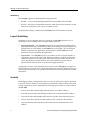
Figure 1 shows the front view of a loaded SSR 2000.
10/100BASE-TX module
1000BASE-SX (Gigabit) module
SSR-2
1
2
3
3
4
4
5
5
6
6
7
7
10/100BASE-TX
8
8
SSR-2-SX
2000
10/100 MGMT
RST
10/100BASE-TX 1
2
1
1000BASE-SX
Tx
Link
Rx
AN
2
1
3
4
Tx
Link
Rx
AN
5
2
6
4
7
8 10/100BASE-TX
CONSOLE
SYS
3
SSR-2-TX
1
OK
ERR
HBT
DIAG
2
Figure 1. Front view of loaded SSR 2000
10
SmartSwitch Router 2000 Getting Started Guide
Chapter 1: Features Overview
External Controls
The SSR 2000 has the following external controls. Where appropriate, this guide describes
how to use the controls.
•
A Male DB-9 Data Communications Equipment (DCE) port for serial connection from
a management terminal. Use this port to establish a direct CLI connection to the
SSR 2000. The default baud rate is 9600.
•
A 10Base-T/100Base-TX Data Terminal Equipment (DTE) port for network connection
from a management terminal. The port is configured as Media Data Interface (MDI).
Use this port to establish a CoreWatch management connection to the SSR 2000 over a
local or bridged Ethernet segment.
•
A Reset switch (RST). Use this switch to reboot the SSR 2000’s motherboard from the
internal boot flash in the event of a system failure. The Reset switch is recessed in the
SSR 2000’s chassis, so you will have to use a tool like a small allen wrench to activate
the switch.
•
System switch (SYS). This switch stops the system software and starts the debugger.
Normally, you should not use this switch unless directed to do so by Cabletron Systems
personnel.
•
Status LEDs.
Table 3. Status LEDs
LED Label
Description
OK
When this LED is on, the SSR 2000 and all expansion modules are
functioning correctly.
ERR
When this LED is on, a fatal system error has occurred. Activate the
SSR 2000’s boot PROM to reboot the router.
HBT
This LED flashes when the SSR 2000’s boot PROM is active.
DIAG
When this LED is on, the SSR 2000 is in diagnostic mode. (While in
diagnostic mode, you will notice several other LEDs on the SSR 2000
are active, as well.)
Motherboard Features
The internal “motherboard” performs all the SSR 2000’s computing and routing functions.
It contains system-wide bridging and routing tables. Traffic that does not yet have an
entry in the L2 and L3/L4 lookup tables on individual expansion modules is handled by
the motherboard. After processing traffic, the motherboard updates the L2 and L3/L4
tables on the ports and/or expansion slot(s) that received the traffic. The ports/expansion
slot(s) thus “learn” about how to forward traffic.
SmartSwitch Router 2000 Getting Started Guide
11
Chapter 1: Features Overview
Boot Flash
The motherboard has a boot flash containing the SSR 2000’s boot software and
configuration files. The system software image file resides on an internal flash chip and
can be upgraded from a TFTP server.
RAM Memory
The SSR 2000’s motherboard uses 32MB of RAM to hold routing and other tables. This
RAM is “fixed” and is not removable or upgradable.
The SSR-2-B128-AA uses 128MB of RAM to hold routing and other tables. This RAM is
“fixed” and is not removable or upgradable.
Power Supplies
The SSR 2000 uses two power supplies, each delivering 3.3, 5, and 12 volts DC to the
motherboard, internal fans, and other components. Each power supply provides a portion
of the power necessary to operate the SSR 2000, with the added bonus that, in the unlikely
event that one of the power supplies should fail, the remaining power supply will assume
the entire load and provide enough current to operate a fully-configured SSR 2000 chassis.
Note:
Be sure to plug the SSR 2000 into a single-phase grounded power source located
within 6 feet of the installation site.
The following table lists the specifications for the power supplies.
Table 4. Power supply voltage and current specifications
Input voltage
Input current (maximum)
100-125 VAC
2.6 A
200-240 VAC
1.3 A
Fans
The SSR 2000 contains two internal fans to provide cooling air flow across the
motherboard and expansion slot(s). The fans are located near the middle of the chassis,
between the power supplies and the motherboard.
Note:
12
To ensure that the fans can provide adequate cooling, Cabletron recommends that
you allow a minimum of 3 inches of clearance on each side of the chassis.
SmartSwitch Router 2000 Getting Started Guide
Chapter 1: Features Overview
Expansion Modules
The following expansion modules can be installed in the SSR 2000:
•
10/100BASE-TX
•
100BASE-FX
•
1000BASE-SX
•
1000BASE-LX
•
Dual Serial (WAN)
•
Quad Serial – C (WAN)
•
Quad Serial – CE (WAN)
10/100BASE-TX Expansion Module
The 10/100BASE-TX expansion module contains eight independent Ethernet ports. Each
port senses whether it is connected to a 10-Mbps segment or a 100-Mbps segment and
automatically configures itself as a 10Base-T or 100Base-TX port. Figure 2 shows the front
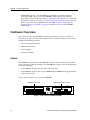
panel of the 10/100BASE-TX expansion module.
Link LED
Activity LED
SSR-2-TX
10/100BASE-TX
1
2
3
4
5
6
7
8
10Base-T/100Base-TX ports
Figure 2. Front panel of 10/100BASE-TX expansion module
SmartSwitch Router 2000 Getting Started Guide
13
Chapter 1: Features Overview
Cabling and Connector Specifications
The following table lists the media specifications for the 10/100BASE-TX expansion
module.
Table 5. 10/100BASE-TX expansion module specifications
Port Type
10Base-T
100Base-TX
Specification
•
802.3 standard
•
RJ-45 connector wired as Media Data Interface Crossed
(MDIX); see “10/100BASE-TX Expansion Module” on page 34
for pin assignments
•
EIA Category 3, 4, or 5 unshielded twisted pair cabling
•
Maximum 328 feet (100 meters) segment length
•
802.3u standard
•
RJ-45 connector wired as Media Data Interface Crossed
(MDIX); see “10/100BASE-TX Expansion Module” on page 34
for pin assignments
•
EIA Category 5 unshielded twisted pair cabling
•
Maximum 100 meters (328 feet) segment length
LEDs
The 10/100BASE-TX expansion module uses the following LEDs.
Table 6. 10/100BASE-TX expansion module LEDs
LED
14
Description
Link
Each port has two LEDs on its connector. The green LED on the left
side of the connector indicates the link status. When this LED is lit,
the port hardware is detecting that a cable is plugged into the port
and the port has established communication with the device at the
other end.
Activity
The amber LED on the right side of each port connector flashes each
time the port’s transceiver sends or receives packets.
SmartSwitch Router 2000 Getting Started Guide
Chapter 1: Features Overview
100BASE-FX Expansion Module
The 100BASE-FX expansion module provides the same features as the 10/100BASE-TX
expansion module but uses multimode fiber-optic cable (MMF) to connect to the network.
Figure 3 shows the front panel of the 100BASE-FX expansion module.
SSR-2-FX
100BASE-FX
1
2
3
4
5
6
7
8
Lnk Act
Lnk Act
Lnk Act
Lnk Act
Lnk Act
Lnk Act
Lnk Act
Lnk Act
100BASE-FX port
Figure 3. Front panel of 100BASE-FX expansion module
Cabling and Connector Specifications
The following table lists the media specifications for the 100BASE-FX expansion module.
Table 7. 100BASE-FX expansion module specifications
Port type
100Base-FX
Specification
•
802.3u standard
•
SC-style Media Interface Connector (MIC); either connection
pin in the MIC can be used for transmit or receive.
•
62.5 micron multimode fiber-optic cable
•
Maximum 412 meters (1352 feet) segment length for halfduplex links
•
Maximum 2 kilometers (6562 feet) segment length for fullduplex links
SmartSwitch Router 2000 Getting Started Guide
15
Chapter 1: Features Overview
LEDs
The 100BASE-FX expansion module uses the following LEDs.
Table 8. 100BASE-FX expansion module LEDs
LED
Description
Lnk
Each port has two LEDs located to the left of the connector.
The green Lnk LED indicates the link status. When this LED is
lit, the port hardware is detecting that a cable is plugged into
the port and the port has established communication with the
device at the other end.
Act
The amber Act LED flashes each time the port’s transceiver
sends or receives packets.
1000BASE-SX Expansion Module
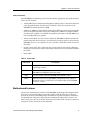
The 1000BASE-SX expansion module contains two independent Gigabit (1000-Mbps)
Ethernet ports. The ports connect to multimode-mode fiber (MMF) cables. Figure 4 shows
the front panel of the 1000BASE-SX expansion module.
SSR-2-SX
1000BASE-SX
Tx
Link
Rx
AN
1
Gigabit port
Tx
Link
Rx
AN
2
Gigabit port
Figure 4. Front panel of 1000BASE-SX expansion module
16
SmartSwitch Router 2000 Getting Started Guide
Chapter 1: Features Overview
Cabling and Connector Specifications
The following table lists the media specifications for the 1000BASE-SX expansion module.
Table 9. 1000BASE-SX expansion module specifications
Port type
Specification
1000Base-SX
•
802.3z standard (also uses 802.3x for flow control)
•
SC-style Media Interface Connector (MIC)
•
62.5 micron or 50 micron multimode fiber-optic cable
•
Maximum 275 meters (902 feet) segment length for 62.5 micron
fiber-optic cable, based on installed fiber bandwidth
•
Maximum 550 meters (1804 feet) segment length for 50 micron
fiber-optic cable, based on installed fiber bandwidth
LEDs
The 1000BASE-SX expansion module uses the following LEDs.
Table 10. 1000BASE-SX expansion module LEDs
LED
Per-port Link
Per-port Rx
Per-port Tx
Description
•
Green – indicates that the port hardware detects a cable plugged
into the port and a good link is established.
•
Red (intermittent) – indicates that the port received an error
during operation.
•
Red (solid) – indicates that the port hardware detects a cable
plugged into the port, however, a bad link is established.
•
Off – indicates that no link from exists with the port.
•
Green – indicates when the port’s transceiver receives packets.
•
Orange – indicates when the port’s transceiver receives flowcontrol packets.
•
Green – indicates when the port’s transceiver transmits packets.
•
Orange – indicates when the port’s transceiver transmits flowcontrol packets.
SmartSwitch Router 2000 Getting Started Guide
17
Chapter 1: Features Overview
Table 10. 1000BASE-SX expansion module LEDs (Continued)
LED
Description
Per-port AN
•
Green – indicates that the expansion module is autonegotiating
the operating mode of the link between full-duplex and halfduplex.
•
Orange (intermittent) – indicates that autonegotiation is in
process.
•
Orange (solid) – indicates a problem with autonegotiation
configuration.
•
Red – indicates an autonegotiation failure. This fault may occur if
the link partner does not support full duplex.
•
Off – indicates that autonegotiation has been disabled or the link
is down.
1000BASE-LX Expansion Module
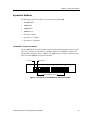
The 1000BASE-LX expansion module provides the same features as the 1000BASE-SX
expansion module, and supports both single-mode fiber (SMF) and MMF. Figure 5 shows
the front panel of the 1000BASE-LX expansion module.
SSR-2-LX
1000BASE-LX
Tx
Link
Rx
AN
1
Gigabit port
Tx
Link
Rx
AN
2
Gigabit port
Figure 5. Front panel of 1000BASE-LX expansion module
18
SmartSwitch Router 2000 Getting Started Guide
Chapter 1: Features Overview
Cabling and Connector Specifications
The following table lists the media specifications for the 1000BASE-LX expansion module.
Table 11. 1000BASE-LX expansion module specifications
Port type
Specification
1000Base-LX
•
802.3z standard (also uses 802.3x for flow control)
•
SC-style Media Interface Connector (MIC)
•
62.5 micron or 50 micron multimode fiber-optic cable
•
9.5 micron single-mode fiber-optic cable
•
Maximum 550 meters (1804 feet)a segment length for 62.5
micron fiber-optic cable, based on installed fiber bandwidth
•
Maximum 550 meters (1804 feet) segment length for 50 micron
fiber-optic cable, based on installed fiber bandwidth
•
Maximum 5 kilometers (229,659 feet) segment length for 10
micron single-mode fiber-optic cable
a. Patch cord required.
LEDs
The 1000BASE-LX expansion module uses the following LEDs.
Table 12. 1000BASE-LX expansion module LEDs
LED
Per-port Link
Per-port Rx
Description
•
Green – indicates that the port hardware detects a cable plugged
into the port and a good link is established.
•
Red (intermittent) – indicates that the port received an error
during operation.
•
Red (solid) – indicates that the port hardware detects a cable
plugged into the port, however, a bad link is established.
•
Off – indicates that no link from exists with the port.
•
Green – indicates when the port’s transceiver receives packets.
•
Orange – indicates when the port’s transceiver receives flowcontrol packets.
SmartSwitch Router 2000 Getting Started Guide
19
Chapter 1: Features Overview
Table 12. 1000BASE-LX expansion module LEDs (Continued)
LED
Description
Per-port Tx
Per-port AN
•
Green – indicates when the port’s transceiver transmits packets.
•
Orange – indicates when the port’s transceiver transmits flowcontrol packets.
•
Green – indicates that the expansion module is autonegotiating
the operating mode of the link between full-duplex and halfduplex.
•
Orange (intermittent) – indicates that autonegotiation is in
process.
•
Orange (solid) – indicates a problem with autonegotiation
configuration.
•
Red – indicates an autonegotiation failure. This fault may occur if
the link partner does not support full duplex.
•
Off – indicates that autonegotiation has been disabled or the link
is down.
Dual Serial and Quad Serial – C/CE Expansion Modules
The Dual Serial expansion module contains a single dual serial WAN port (two serial
ports located on one high density connector). The Quad Serial – C and Quad Serial – CE
expansion modules each contain two dual serial WAN ports. In addition, the Quad
Serial – C expansion module includes compression, and the Quad Serial – CE expansion
module includes compression and encryption, for each WAN port. Figure 6 shows the
front panel of the Dual Serial WAN expansion module.
SSR-2-SER
Dual Serial
1
2
1,2
Link
Rx
Tx
Figure 6. Front panel of Dual Serial WAN expansion module
20
SmartSwitch Router 2000 Getting Started Guide
Chapter 1: Features Overview
Figure 7 shows the front panel of the Quad Serial WAN expansion module.
SSR-2-SERC
Quad Serial - C
1
2
3
1,2
Link
Link
Rx
Rx
Tx
Tx
4
3,4
Figure 7. Front panel of Quad Serial – C/CE WAN expansion module
Cabling and Connector Specifications
The following table lists the media specifications for the Dual Serial and Quad
Serial – C/CE expansion modules.
Table 13. Dual Serial and Quad Serial – C/CE WAN expansion module specifications
Port Type
Dual serial
a.
Specification
•
V.35, X.21, EIA530, EIA530A, or RS449
•
LFH-60 high density connector; see “Dual Serial and Quad
Serial – C/CE Expansion Modules” on page 37 for pin
assignments
•
Recommended 3 meters (10 feet) segment length for standard
WAN expansion module-to-CSU/DSU data port.a
Connector cables for WAN expansion modules may be ordered from Cabletron Systems. For detailed
information, including part numbers, see “Dual Serial and Quad Serial – C/CE Expansion
Modules” on page 37.
LEDs
The Dual Serial and Quad Serial – C/CE expansion modules use the following LEDs.
Table 14. Dual Serial and Quad Serial – C/CE WAN expansion module LEDs
LED
Description
Per-port Link
Indicates that the expansion module detects a cable plugged into the
port and a good link is established.
Per-port Rx
Indicates when the port’s transceiver receives data.
Per-port Tx
Indicates when the port’s transceiver transmits data.
SmartSwitch Router 2000 Getting Started Guide
21
Chapter 1: Features Overview
22
SmartSwitch Router 2000 Getting Started Guide
Chapter 2
Hardware
Installation
This chapter provides hardware installation information and procedures in the following
sections:
•
Safety considerations
•
Hardware specifications
•
Installing the hardware
If the hardware is already installed and you are ready to install the software and perform
basic system configuration, see Chapter 3, “Software Installation and Setup” on page 41.
Safety Considerations
Read the following safety warnings and product cautions to avoid personal injury or
product damage.
Preventing Injury
Observe the following safety warnings to prevent accidental injury when working with
the SSR 2000 hardware.
•
To avoid back strain, be careful when lifting the SSR 2000 out of the shipping box.
•
Never attempt to rack mount the SSR 2000 unaided. Ask an assistant to help you hold
the SSR 2000.
•
Before performing any upgrade or installation procedures, ensure that the SSR 2000 is
powered off.
SmartSwitch Router 2000 Getting Started Guide
23
Chapter 2: Hardware Installation
•
Never operate the SSR 2000 with exposed expansion slots.
•
Never operate the SSR 2000 if the it becomes wet or the area where it has been installed
is wet.
Preventing Equipment Damage
Observe the precautions listed in this section to prevent accidental damage to the
SSR 2000 components.
Caution: To prevent accidental product damage, observe the following precautions:
•
Always use proper electrostatic discharge (ESD) gear when handling expansion
modules or other internal parts of the chassis.
•
Make sure you allow adequate room for air flow around the SSR 2000.
Hardware Specifications
The following table lists the physical and environmental specifications for the SSR 2000.
Table 15. SSR 2000 physical and environmental specifications
Dimensions
Inches: 2.8” (height) x 17” (width) x 18.5” (depth)
Centimeters: 7.1cm x 43.2cm x 47cm
Weight
Pounds: 22
Kilograms: 10
Power
100-125 VAC, 4 A maximum;
200-240 VAC, 2 A maximum
Operating temperature
Fahrenheit: 41oF to 104oF
Centigrade: 5oC to 40oC
Installing the Hardware
This section describes how to perform the following tasks:
24
•
Verifying your shipment
•
Installing the chassis (on a tabletop or in an equipment rack)
•
Installing expansion modules
SmartSwitch Router 2000 Getting Started Guide
Chapter 2: Hardware Installation
•
Attaching console management cables
•
Attaching port cables
Verifying Your Shipment
Before you begin installing your SSR 2000, check your shipment to ensure that everything
you ordered arrived securely. Cabletron assembles the SSR 2000 according to one of the
configurations under “Chassis” on page 10 before shipping.
Caution: To avoid back strain, be careful when lifting the SSR 2000 out of the shipping box.
Open the shipping box(es) and verify that you received the following equipment:
•
An SSR 2000, power cord(s), and a console cable. The console cable is used for
connecting a terminal to the SSR 2000’s console port.
•
One copy of the SmartSwitch Router 2000 Getting Started Guide (the book you are
reading now).
•
An SSR Documentation CD-ROM, including current version release notes.
•
An SSR 2000 software kit with a CD-ROM containing the CoreWatch element
management software and user documentation (in a separate box).
•
Rack mount kit, including two rack mounting brackets and fastening screws.
Depending on your order, your shipment will also contain the expansion modules you
ordered.
SmartSwitch Router 2000 Getting Started Guide
25
Chapter 2: Hardware Installation
Installing the Chassis
Cabletron recommends that only qualified personnel conduct installation of any SSR
chassis.
Warning: Before performing any upgrade or installation procedures, ensure that the
SSR 2000 is powered off.
This section contains procedures for the following types of installation:
•
Table-top installation
•
Rack mount installation
Table-Top Installation
You can install the SSR 2000 on a tabletop.
1.
Select a table that is stable (not wobbly) and is not in an area subject to frequent foot
traffic. Remember that you will be attaching numerous cables to the SSR 2000.
2.
Place the SSR 2000 on the table, allowing at least 3” of space on each side for adequate
air flow to the cooling fans.
Rack Mount Installation
You can install the SSR 2000 in a standard 19” equipment rack. The SSR 2000 chassis
contains screw holes for front-mounting brackets.
Note:
Never attempt to rack mount the SSR 2000 unaided. Ask an assistant to help you
hold the chassis.
To install the SSR 2000 chassis in an equipment rack, use the following procedure. You
need a phillips-head screwdriver to perform this procedure.
Figure 8 shows an example of how to install the SSR 2000 in an equipment rack. The
procedure following the figure describes how to install the SSR 2000 in an equipment rack.
26
SmartSwitch Router 2000 Getting Started Guide
Chapter 2: Hardware Installation
SSR-2
10/100BASE-TX 1
2
2
3
3
4
4
5
5
6
6
7
10/100BASE-TX
8
7
1
8
SSR-2-SX
2000
10/100 MGMT
1
1000BASE-SX
Tx
Link
Rx
AN
2
1
3
4
Tx
Link
Rx
AN
5
2
6
4
7
8 10/100BASE-TX
CONSOLE
SYS
SSR-2-TX
1
RST
3
OK
ERR
HBT
DIAG
2
Figure 8. Installing the SSR 2000 chassis in an equipment rack
To install the SSR 2000 in an equipment rack:
1.
If your SSR 2000 is not already equipped with rack-mounting brackets, take the
following steps. Otherwise skip to Step 2.
a.
Align one of the mounting brackets over the corresponding holes in the side of
the SSR 2000. The mounting bracket is correctly positioned when the side with
two open mounting holes is flush with the front of the SSR 2000.
b.
Use the phillips-head screwdriver and the supplied phillips-head screws to attach
the mounting bracket to both the side and bottom of the chassis. (There are four
holes for each rack mounting bracket—the one on the side of the chassis that you
exposed in Step a, and three holes in the bottom of the chassis.)
Note:
c.
Be sure to use the phillips-head screws supplied by Cabletron. If you use
screws that are longer than the ones included with your shipment, there
is a danger of damaging the SSR 2000‘s internal components.
Attach the other mounting bracket.
2.
Along with an assistant, lift the SSR 2000 into place in the mounting rack.
3.
While your assistant holds the chassis in place, use the phillips-head screwdriver and
four phillips-head screws to attach the mounting brackets to the mounting rack.
Caution: Make sure the screws are tight before your assistant releases the chassis. If you
accidentally leave the screws loose, the chassis can slip and fall, possibly becoming
damaged.
Installing an Expansion Module
Warning: Before performing any upgrade or installation procedures, ensure that the
SSR 2000 is powered off and that you are properly “grounded” to avoid electrostatic
discharge while working inside the SSR 2000’s chassis.
SmartSwitch Router 2000 Getting Started Guide
27
Chapter 2: Hardware Installation
It may be necessary at some point for you to upgrade or replace your SSR 2000’s
expansion module(s) after receiving your SSR 2000 from Cabletron. Although you can
install any of the available expansion modules in either of the SSR 2000’s expansion slots,
Figure 14 shows an example of how to install a 1000BASE-SX or 1000BASE-LX gigabit
expansion module. The procedure following the figure describes how to install the
expansion module.
To install a 1000BASE-SX or 1000BASE-LX gigabit expansion module:
1.
Ensure that the SSR 2000 is powered off.
2.
If your SSR 2000 is equipped for rackmountability, use the phillips-head screwdriver
to remove the mounting brackets from each side of the SSR 2000.
3.
Take off the SSR 2000’s top cover.
a.
Use the phillips-head screwdriver to remove the four mounting screws (two on
each side of the router, front and back) that hold the top cover on the SSR 2000.
SSR-2
4
3
3
4
5
6
7
8
2000
10/100 MGMT
1
2
3
4
5
6
7
8 10/100BASE-TX
CONSOLE
SYS
1
2
RST
10/100BASE-TX 1
OK
ERR
2
HBT
DIAG
Figure 9. Removing the SSR 2000’s cover
b.
4.
Slide the cover away from the front of the SSR 2000 about 1/2”, then lift it away
from the SSR 2000.
Use the phillips-head screwdriver to remove the four mounting screws in the existing
face plate or cover plate corresponding to the expansion slot where you plan to install
the 1000BASE-SX or 1000BASE-LX gigabit expansion module. Be sure not to damage
or remove the conductive tape on the inside of the chassis, both above and below the
expansion slot opening.
blank expansion module face plate
4
Figure 10. Removing a face plate or cover plate (view from outside chassis)
28
SmartSwitch Router 2000 Getting Started Guide
Chapter 2: Hardware Installation
5.
From the inside of the chassis, line up the four holes in the expansion module’s face
plate with the corresponding holes around the empty expansion slot in the chassis,
and use the phillips-head screwdriver to tighten the screws (from the front) on each
side of the expansion module’s face plate to affix it to the chassis.
Note:
You will probably have to gently push the expansion card’s face plate down
while lining up the first of the screws. The grounding fingers for the
10/100BASE-TX module that sits immediately below the empty expansion
slot protrude upwards to make contact with the bottom of the face plate.
Figure 11. Installing the new face plate (view from inside chassis)
Note:
There are two different types of face plates for the expansion modules. There
is a regular face place and an EMI extended face plate. Shown below is a
picture of the EMI extended face plate:
Figure 12. EMI extended face plate
SmartSwitch Router 2000 Getting Started Guide
29
Chapter 2: Hardware Installation
Front of SSR 2000
Additional
Screw Hole
on Face Plate
Align Slots Over
Stand-offs on
Mother Board.
Figure 13. Installing the EMI extended face plate (view from inside chassis)
6.
Insert the 1000BASE-SX or 1000BASE-LX gigabit expansion module from the top and
ensure that it makes maximum surface contact with its face plate.
7.
Line up the two screw holes at the back of the expansion module and connect
the stacking connector at the back of the expansion module to the pins on the
SSR 2000’s motherboard.
Caution: The female and male connectors for the expansion modules are not keyed, so it is
possible to misalign the connection. Ensure that all pins fit properly into the female
connector on the expansion module before applying power to the SSR 2000.
8.
Use the phillips-head screwdriver to tighten all six screws that will hold the
expansion module in place in the SSR 2000’s chassis.
Note:
30
There are two additional screws that are required with the EMI extended face
plate as shown below:
SmartSwitch Router 2000 Getting Started Guide
Chapter 2: Hardware Installation
9
*
*
8
*These two screws are
used only with extended
EMI face plate
7
SSR-2
10/100BASE-TX 1
2
2
3
3
4
4
1
5
5
6
6
7
7
10/100BASE-TX
8
8
1000BASE-SX
SSR-2-SX
2000
10/100 MGMT
RST
SSR-2-TX
1
SYS
3
1
Tx
Link
Rx
AN
2
1
3
4
Tx
Link
Rx
AN
5
2
6
4
7
8 10/100BASE-TX
CONSOLE
OK
ERR
HBT
DIAG
2
Figure 14. Installing a 1000BASE-SX or 1000BASE-LX Gigabit expansion module
9.
Replace the SSR 2000’s cover.
When you are ready to attach the segment cables, use the procedures in “Attaching Port
Cables” on page 34.
Attaching the Console Management Cables
The SSR 2000 has two ports for attaching management consoles to the SSR 2000.
•
A male DB-9 DCE port for direct serial connection from a terminal. Use this port to
perform basic setup, including setting up the SSR 2000 for management through the
network using CoreWatch or SNMP.
•
An RJ-45 10/100Base-T DTE port for Telnet connection from a host on the network. The
port is configured for Media Data Interface (MDI). You use this port to manage the
SSR 2000 using CoreWatch or SNMP.
Connecting to the Serial Port
Figure 15 shows where to plug in the cable to the SSR 2000’s serial port. The procedure
following the figure describes how to set up and insert the cable.
SmartSwitch Router 2000 Getting Started Guide
31
Chapter 2: Hardware Installation
SSR-2
2
3
3
4
4
5
5
6
6
7
7
10/100BASE-TX
8
8
SSR-2-SX
2000
10/100 MGMT
RST
10/100BASE-TX 1
2
1
1
1000BASE-SX
Tx
Link
Rx
AN
2
1
3
4
Tx
Link
Rx
AN
5
2
6
4
7
8 10/100BASE-TX
CONSOLE
SYS
3
SSR-2-TX
1
OK
ERR
2
HBT
DIAG
Figure 15. Plugging into the SSR 2000’s serial (DB-9 DCE) port
To attach the supplied console cable to the SSR 2000’s DB-9 port:
1.
Locate the console cable included with the SSR 2000 chassis. The console cable is a
female to female DB-9 crossover cable that has the following pin assignments:
Table 16. DB-9 connector pin assignments
32
Signal (SSR 2000 port)
Pin
Signal (management console port)
Unused
1
Unused
TXD (transmit data)
2
RXD (receive data)a
RXD (receive data)
3
TXD (transmit data)
Unused
4
Unused
GND (ground)
5
GND (ground)
Unused
6
Unused
CTS (clear to send)
7
CTS (clear to send)
RTS (request to send)
8
RTS (request to send)
Unused
9
Unused
a.
The left hand column pin assignments are for the male DB-9 connector on the SSR 2000. Thus, pin 2
(TXD or “transmit data”) must emerge on the management console’s end of the connection as RXD
(“receive data”) and so on.
2.
Plug one end of the console cable into the SSR 2000’s DCE DB-9 port.
3.
Plug the other end of the console cable into the management console’s DTE port.
SmartSwitch Router 2000 Getting Started Guide
Chapter 2: Hardware Installation
4.
When you are ready to begin configuring the SSR 2000, use procedures in Chapter 3,
“Software Installation and Setup” on page 41 to power on the switch and boot the
software. You will perform initial setup by entering CLI commands on the
management console.
Connecting to the 10/100Base-TX Port
Use the RJ-45 10/100Base-TX DTE port for Telnet connection from a host on the network.
The port is configured for Media Data Interface (MDI). Figure 16 shows where to plug in
to the SSR 2000’s 10/100Base-TX port. The procedure following the figure describes how
to set up and insert the cable.
SSR-2
2
3
3
4
4
5
5
6
6
7
10/100BASE-TX
8
7
8
SSR-2-SX
2000
10/100 MGMT
RST
10/100BASE-TX 1
2
1
1
1000BASE-SX
Tx
Link
Rx
AN
2
1
3
4
Tx
Link
Rx
AN
5
2
6
4
7
8 10/100BASE-TX
CONSOLE
SYS
3
SSR-2-TX
1
OK
ERR
2
HBT
DIAG
Figure 16. Plugging into the SSR 2000’s 10/100Base-TX port
To attach a cable to the 10/100Base-TX port:
1.
Obtain a cable with an RJ-45 connector that has the following pin assignments:
Table 17. RJ-45 connector pin assignments
Signal (SSR 2000 port)
Pin
Signal (management console port)
TXD (transmit data)
1
RXD (receive data)a
TXD (transmit data)
2
RXD (receive data)
RXD (receive data)
3
TXD (transmit data)
Unused
4
Unused
Unused
5
Unused
SmartSwitch Router 2000 Getting Started Guide
33
Chapter 2: Hardware Installation
Table 17. RJ-45 connector pin assignments (Continued)
Signal (SSR 2000 port)
Pin
Signal (management console port)
RXD (receive data)
6
TXD (transmit data)
Unused
7
Unused
Unused
8
Unused
a.
The right hand column pin assignments are for the RJ-45 connector on the SSR 2000. Thus, pin 1 (TXD
or “transmit data”) must emerge on the management console’s end of the connection as RXD (“receive
data”) and so on.
2.
Make sure the TXD signals from the SSR 2000 emerge as RXD signals on the
management console and the TXD signals from the management console emerge as
RXD signals on the SSR 2000.
3.
After ensuring that the pin assignments on both ends of the connection are correct,
plug the appropriate end of the connection into the SSR 2000’s RJ-45 10/100Base-TX
port.
4.
Plug the other end of the connection into the management console’s port.
5.
When you are ready to configure the SSR 2000 using CoreWatch or SNMP, use
procedures in Chapter 4, “Installing and Starting Cabletron CoreWatch” on page 61 to
start an SNMP or CoreWatch management session.
Attaching Port Cables
The following sections describe how to connect the SSR 2000 to your network.
10/100BASE-TX Expansion Module
Figure 17 illustrates plugging your 10Base-T or 100Base-TX cable into a 10/100BASE-TX
port. The procedure following the figure explains how to set up and insert the cable.
34
SmartSwitch Router 2000 Getting Started Guide
Chapter 2: Hardware Installation
SSR-2
2
3
3
4
4
5
5
6
6
7
7
10/100BASE-TX
8
8
SSR-2-SX
2000
10/100 MGMT
RST
10/100BASE-TX 1
2
1
1
1000BASE-SX
Tx
Link
Rx
AN
2
1
3
4
Tx
Link
Rx
AN
5
2
6
4
7
8 10/100BASE-TX
CONSOLE
SYS
3
SSR-2-TX
1
OK
ERR
2
HBT
DIAG
Figure 17. Plugging an ethernet cable into a 10/100BASE-TX port
To attach segment cables to your 10/100BASE-TX ports:
1.
For all the 10/100-Mbps ports, obtain copper cables that have the following pin
assignments. The RJ-45 connectors on the 10/100 ports are configured as Media Data
Interface Crossed (MDIX). You can use Category 3 (Cat-3) or higher wire for 10-Mbps
segments. For 100-Mbps segments, use Cat-5 or higher wire. The ports automatically
sense to which type of segment they are connected and configure themselves to
transmit and receive at the appropriate bandwidth.
Table 18. RJ-45 connector pin assignments
a.
Signal (SSR 2000 port)
Pin
Signal (connected device port)
TXD (transmit data)
1
RXD (receive data)a
TXD (transmit data)
2
RXD (receive data)
RXD (receive data)
3
TXD (transmit data)
Unused
4
Unused
Unused
5
Unused
RXD (receive data)
6
TXD (transmit data)
Unused
7
Unused
Unused
8
Unused
The right hand column pin assignments are for the RJ-45 connector on the SSR 2000. Thus, pin 1 (TXD
or “transmit data”) must emerge on the management console’s end of the connection as RXD (“receive
data”) and so on.
SmartSwitch Router 2000 Getting Started Guide
35
Chapter 2: Hardware Installation
Figure 18 shows the pin positions in the 10/100BASE-TX connectors.
87654321
Figure 18. 10/100BASE-TX RJ-45 connector
2.
Make sure the TXD signal from the port emerges as an RXD signal on the switch,
router, or host on the other end of the segment cable. Likewise, make sure the TXD
signal from the port emerges as an RXD signal on the other end of the segment.
3.
Plug one end of the cable into the port and the other end of the cable into the device at
the other end of the connection.
100BASE-FX Expansion Module
The 100BASE-FX expansion module supports multimode fiber (MMF). Figure 19 shows
where to plug your fiber cable into a port on the 100BASE-FX expansion module.
The procedure following the figures describes how to set up and insert the cables.
SSR-2
1
3
4
5
6
7
10/100BASE-TX
8
SSR-2-FX
3
Lnk
Act
2
3
4
5
6
7
8
2000
10/100 MGMT
RST
10/100BASE-TX 1
2
4
1
2
Lnk
3
7
Lnk
Act
Act
Lnk
1
Lnk
2
4
Lnk
8
Lnk
5
5
Lnk
6
100BASE-FX
4
Act
6
7
8 10/100BASE-TX
CONSOLE
SYS
3
SSR-2-TX
1
OK
ERR
HBT
DIAG
2
Figure 19. Plugging an ethernet cable into a 100BASE-FX expansion module port
The 100BASE-FX expansion module uses SC-style Media Interface Connectors (MICs) to
attach to multimode fiber (MMF) cables.
To attach the segment cables to your 100BASE-FX expansion module, obtain an MMF
cable with an SC MIC and plug the MIC into the port connector. When you plug the other
end of the cable into another device, ensure that the cable connected to the transmit port
on the SSR is connected to the receive port on the other device. The receive port on the SSR
should be connected to the transmit port on the other device.
36
SmartSwitch Router 2000 Getting Started Guide
Chapter 2: Hardware Installation
1000BASE-SX and 1000BASE-LX Expansion Modules
The 1000BASE-SX expansion module supports multimode fiber (MMF), and the
1000BASE-LX expansion module supports single-mode fiber (SMF) as well as MMF.
Figure 20 shows how to plug your fiber cable into a port on the 1000BASE-SX or
1000BASE-LX expansion module.
The procedure following the figure describes how to set up and insert the cables.
SSR-2
2
3
3
4
4
5
5
6
6
7
10/100BASE-TX
8
7
1
8
SSR-2-SX
2000
10/100 MGMT
RST
10/100BASE-TX 1
2
1
1000BASE-SX
Tx
Link
Rx
AN
2
1
3
4
Tx
Link
Rx
AN
5
2
6
4
7
8 10/100BASE-TX
CONSOLE
SYS
3
SSR-2-TX
1
OK
ERR
HBT
DIAG
2
Figure 20. Plugging an ethernet cable into a 1000BASE-SX or 1000BASE-LX
expansion module
The 1000BASE-SX and 1000BASE-LX expansion modules use SC-style Media Interface
Connectors (MICs) to attach to SMF and/or MMF cables.
To attach the segment cables to your 1000BASE-SX or 1000BASE-LX expansion module,
obtain a SMF and/or MMF cable with an SC MIC and plug the MIC into the port
connector. When you plug the other end of the cable into another device, insure that the
cable connected to the transmit port on the SSR 2000 is connected to the receive port on
the other device. The receive port on the SSR 2000 should be connected to the transmit
port on the other device.
Dual Serial and Quad Serial – C/CE Expansion Modules
The Dual Serial and Quad Serial – C/CE expansion modules each use the same 60-pin
LFH-60 high density connector to link to their respective Channel Service Units/Data
Service Units (CSU/DSUs). Figure 22 on page 39 shows how to plug your serial cable into
a port on the Dual Serial or Quad Serial – C/CE expansion modules.
SmartSwitch Router 2000 Getting Started Guide
37
Chapter 2: Hardware Installation
Cabletron offers the following four cables, used to connect the SSR to standard CSU/DSU
modules:
Table 19. Cabletron dual serial port to CSU/DSU connector cables
a.
Cabletron Part Number
CSU/DSU Connector Type
Standard
SSR-V35DTE-02
Two (2) V.35 34-pin connectorsa
V.35
SSR-530DTE-02
Two (2) DB-25 25-pin connectors
EIA-530
SSR-449DTE-02
Two (2) DB-37 37-pin connectors
RS-449
SSR-X21DTE-02
Two (2) DB-15 15-pin connectors
X.21
The two remote ends of each type of connector cable is labeled “Port A” and “Port B”. “Port A”
corresponds to Port 1 on a Dual Serial WAN expansion module and Port 1 or 3 on a
Quad Serial – C/CE, depending upon which WAN expansion module port you are using. Similarly,
“Port B” corresponds to Port 2 on a Dual Serial WAN expansion module and Port 2 or 4 on a Quad
Serial – C/CE.
Note:
Because the LFH-60 high density connectors on Dual Serial and Quad
Serial – C/CE expansion modules contain two serial WAN ports per interface, all
four cable types defined above feed two CSU/DSU ports.
Table 20 maps the pin assignments for Cabletron’s LFH-60 high density connectors for the
Dual Serial and Quad Serial – C/CE expansion modules.
Table 20. LFH-60 high density connector pin assignments
Pin
38
Signal
Pin
Signal
Pin
Signal
Pin
Signal
1
P1_GND
16
P2_TXC_A
31
P1_GND
46
P2_TXD_A
2
P1_MODE[2]
17
P2_TXC_B
32
P1_MODE[0]
47
P2_TXD_B
3
P1_CTS_B
18
P2_DCD_A
33
P1_DCD_B
48
P2_RTS_A
4
P1_CTS_A
19
P2_DCD_B
34
P1_DCD_A
49
P2_RTS_B
5
P1_RTS_B
20
P2_MODE[1]
35
P0_RXD_B
50
P2_DSR_A
6
P1_RTS_A
21
P2_GND
36
P0_RXD_A
51
P2_DSR_B
7
P1_SCTE_B
22
P2_GND
37
Reserved
52
P2_LL_A
8
P1_SCTE_A
23
P1_TXD_A
38
P2_GND
53
P2_SHIELD
9
P1_GND
24
P1_TXD_B
39
P2_MODE[0]
54
Reserved
10
P2_GND
25
P1_TXC_A
40
P2_CTS_B
55
P1_RXC_A
11
P2_MODE[2]
26
P1_TXC_B
41
P2_CTS_A
56
P1_RXC_B
SmartSwitch Router 2000 Getting Started Guide
Chapter 2: Hardware Installation
Table 20. LFH-60 high density connector pin assignments (Continued)
Pin
Signal
Pin
Signal
Pin
Signal
Pin
Signal
12
P2_RXD_B
27
P1_DSR_A
42
P2_DTR_B
57
P1_DTR_A
13
P2_RXD_A
28
P1_DSR_B
43
P2_DTR_A
58
P1_DTR_B
14
P2_RXC_B
29
P1_MODE[1]
44
P2_SCTE_B
59
P1_LL_A
15
P2_RXC_A
30
P1_GND
45
P2_SCTE_A
60
P1_SHIELD
Figure 21 shows the pin positions in the LFH-60 high density connector.
1
30
15
16
31
60
45
46
Figure 21. LFH-60 high density connector
The procedure following the figure describes how to set up and insert the cables.
SSR-2
3
4
5
6
7
10/100BASE-TX
8
SSR-2-SERC
Quad Serial - C
1
2
3
4
5
6
7
1
8
2000
10/100 MGMT
RST
10/100BASE-TX 1
2
1
2
3
1,2
Link
Link
Rx
Rx
Tx
Tx
2
3
4
4
5
4
3,4
6
7
8 10/100BASE-TX
CONSOLE
SYS
3
SSR-2-TX
1
OK
ERR
HBT
DIAG
2
Figure 22. Plugging a LFH-60 high density connector cable into a Dual Serial or
Quad Serial – C/CE expansion module
Cabletron Dual Serial and Quad Serial – C/CE expansion modules use standard copper
twisted-pair cable with one of four custom remote-end connectors to attach to their
respective CSU/DSU modules.
To attach the segment cables to your Dual Serial or Quad Serial – C/CE expansion
module:
SmartSwitch Router 2000 Getting Started Guide
39
Chapter 2: Hardware Installation
40
1.
Obtain one of the for Cabletron connector cables described in “Cabletron dual serial
port to CSU/DSU connector cables” on page 38 and connect the single LFH-60 high
density connector to the SSR WAN interface you wish to use.
2.
Plug the remote end of the connector for each port you wish to use into its respective
CSU/DSU data port.
SmartSwitch Router 2000 Getting Started Guide
Chapter 3
Software
Installation and
Setup
This chapter provides the following software installation and basic setup procedures:
•
Powering on and booting the software
•
Starting the Command Line Interface (CLI)
•
Setting basic system information
•
Setting up SNMP community strings
•
Setting up passwords
•
Setting the DNS domain name and address
•
Setting SYSLOG parameters
•
Loading system image software
•
Loading the boot PROM software
•
Activating configuration changes and saving the configuration file
Powering On and Booting the Software
To power on the SSR 2000 and boot the software:
1.
Make sure any exposed expansion slots are free of foreign objects, such as tools or
your hands, and are covered with coverplates.
SmartSwitch Router 2000 Getting Started Guide
41
Chapter 3: Software Installation and Setup
2.
Plug the SSR 2000’s power supplies into a power source. Assuming that your power
source is currently active, the SSR 2000 will automatically power on and attempt to
boot using the software image in the motherboard’s boot flash.
While the software is booting, the HBT (heartbeat) LED on the chassis flashes. When
the software finishes booting, the HBT LED goes dark and the OK LED lights up,
indicating that the SSR 2000 software is online. As the software boots, the management
console attached to the SSR 2000’s DB-9 DCE port displays messages related to the
phases of the boot sequence. When the software is fully booted, the following message
appears on the management console:
Press RETURN to activate console...
3.
Press Return (or Enter) to activate the CLI on the console.
Starting the Command Line Interface
To start the Command Line Interface (CLI), power on the system. Startup messages
appear on the console (the terminal attached to one of the SSR 2000’s ports).
After the software is fully booted and you press Return (or Enter) to activate the CLI, the
CLI prompts you for a password. You can define separate passwords for login access and
Enable mode. The factory default password for both of these is set to blank. (Simply press
Return.)
Access Modes
The CLI has the following access modes:
42
•
User – Allows you to display basic information and use basic utilities such as ping but
does not allow you to display SNMP, filter and access control list information, or make
other configuration changes. You can tell you are in User mode when the command
prompt ends with a “>” character.
•
Enable – Allows you to display SNMP, filter, and access control information as well as
all the information you can display in User mode. To enter Enable mode, enter the
enable command, then supply the password when prompted. When you are in Enable
mode, the command prompt ends with a “#“ character.
•
Configure – Allows you to make configuration changes. To enter Configure mode, first
enter Enable mode (enable command), then enter the configure command from the
Enable command prompt. When you are in Configure mode, the command prompt
ends with ”(config)#.”
•
Boot – This mode appears when the SSR 2000 or the system image is not found during
bootup. You should enter the reboot command to reset the router. If the SSR 2000 still
fails to bootup, please call Cabletron Technical Support.
SmartSwitch Router 2000 Getting Started Guide
Chapter 3: Software Installation and Setup
Note:
The command prompt will show the name of the SSR 2000 in front of the
mode character(s). The default name is “ssr”. The procedure in “Setting Basic
System Information” on page 44 describes how to change the system name.
When you are in Configure or Enable mode, use the exit command or press Ctrl+Z to exit
to the previous access mode.
Note:
When you exit Configure mode, the CLI will ask you whether you want to
activate the configuration commands you have issued. If you enter yes or y, the
configuration commands you issued are placed into effect and the SSR 2000’s
configuration is changed accordingly. However, the changes are not written to the
Startup configuration file in the SSR 2000’s boot flash and therefore are not
reinstated after a reboot. See “Activating Configuration Changes and Saving the
Configuration File” on page 57 for information about saving configuration
changes.
Basic Line Editing Commands
The CLI supports EMACs-like line editing commands. The following table lists some
commonly used commands. For a complete set of commands, see the SmartSwitch Router
User Reference Manual.
Table 21. Some commonly used CLI commands
Key sequence
Command
Ctrl+A
Move cursor to beginning of line
Ctrl+B
Move cursor back one character
Ctrl+D
Delete character
Ctrl+E
Move cursor to end of line
Ctrl+F
Move cursor forward one character
Ctrl+N
Scroll to next command in command history (use the cli show
history command to display the history)
Ctrl+P
Scroll to previous command in command history
Ctrl+U
Erase entire line
Ctrl+X
Erase from cursor to end of line
Ctrl+Z
Exit current access mode to previous access mode
SmartSwitch Router 2000 Getting Started Guide
43
Chapter 3: Software Installation and Setup
Setting Basic System Information
Use the procedure in this section to set the following system information:
•
System time and date
•
System name
•
System location
•
Contact name (the person to contact regarding this SSR 2000)
Note:
Some of the commands in this procedure accept a string value. String values can
be up a maximum of 255 characters in length, including blank spaces. Surround
strings that contain blanks with quotation marks (example: “string with internal
blanks”).
To set the system information:
1.
Ensure that you are in Enable mode by entering the enable command in the CLI.
2.
Use the following commands to set the system time and date and then verify the
setting
set date year <number> month <month-name> day <day> hour <hour>
minute <minute> second <second>
system show date
Here is an example:
ssr# system set date year 1998 month january day 19 hour 11 minute 54
second 0
Time changed to: Mon Jan 19 11:54:00 1998
ssr# system show date
Current time: Mon Jan 19 11:54:04 1998
3.
Ensure that you are in Configure mode by entering the configure command in the
CLI. The commands in Step 4 through Step 10 can be entered only from Configure
mode.
4.
Use the following commands to set the system name, location, and contact
information:
system set name "<string>"
system set location "<string>"
system set contact "<string>"
44
SmartSwitch Router 2000 Getting Started Guide
Chapter 3: Software Installation and Setup
Here is an example:
ssr(config)# system set name "ctron-ssr-1"
ssr(config)# system set location "Sunnyvale, CA"
ssr(config)# system set contact "John Smith"
5.
Use the interface add ip command to set the IP address and netmask for the en0
Ethernet interface, as shown in the following example:
ssr(config)# interface add ip en0 address-netmask 10.50.11.22/16
Note:
6.
The en0 interface is automatically created by the system and is reserved for
the SSR 2000’s management port.
To show the changes accumulated in the scratchpad, enter the show command while
in Configure mode, as shown in the following example:
ssr(config)# show
-EDIT-I-NOCONFIG, the running system has no configuration
******** Non-committed changes in Scratchpad ********
1*: system set name "ctron-ssr-1"
2*: system set location "Sunnyvale, CA"
3*: system set contact "John Smith"
When you enter commands in Configure mode, the SSR 2000 does not immediately
execute the commands. Instead, the SSR 2000 checks the syntax of the commands and
if they are syntactically correct, stores them in a temporary scratchpad in memory. The
scratchpad is automatically cleared when you log out of the SSR, so you must activate
the changes and then save them to the Startup configuration file to retain the changes,
as explained below.
The scratchpad allows you to make configuration changes without worrying about the
order in which you issue the commands. Also, if you change your mind about
configuration changes you are making, you do not need to incrementally back out of
the changes. You can simply choose not to activate them. As you become more familiar
with the SSR 2000 and the CLI and begin to make detailed configuration changes, you
may find the scratchpad quite useful. For simple changes such as the ones in this
procedure, you might instead want to activate the changes as you go, then use CLI
commands to view the results of the changes.
7.
Enter the save active command to activate commands, such as the “system set...”
commands you used in Step 4, in the scratchpad.
If you exit Configure mode (by entering the exit command or pressing Ctrl+Z) before
activating any of your changes in the scratchpad, the CLI will ask you whether you
want to make the changes in the scratchpad active by displaying the following
message:
Do you want to make the changes Active [yes]?
SmartSwitch Router 2000 Getting Started Guide
45
Chapter 3: Software Installation and Setup
8.
Enter yes or y to activate the changes.
9.
To display the active configuration, enter the system show active-config command,
as shown in the following example:
ctron-ssr-1# system show active-config
Running system configuration:
!
! Last modified from Console on Mon Jan 19 11:55:35 1998
!
1 : system set name "ctron-ssr-1"
2 : system set location "Sunnyvale, CA"
3 : system set contact "John Smith"
Changes in the active configuration take effect on the running system but will not be
restored following a reboot.
10. To ensure that changes are restored following a reboot, you must save the active
database to the Startup configuration file by taking the following steps:
a.
Enter the exit command to return to Enable mode.
b.
Enter the copy active to startup command.
The CLI displays the following message:
Are you sure you want to overwrite the Startup configuration [no]?
11. Enter yes or y to add the active configuration to the Startup configuration file.
Note:
You also can save active changes to the Startup configuration file from within
Configure mode by entering the save startup command.
See “Activating Configuration Changes and Saving the Configuration File” on page 57 for
more information about the scratchpad, active database, and Startup configuration.
Setting Up SNMP Community Strings
To use SNMP to manage the SSR 2000, you need to set up an SNMP community on the
SSR 2000. Otherwise, the SSR 2000’s SNMP agent runs in local trap process mode until
you disable it using the snmp stop command. In addition, if you want to be able to access
the SNMP traps issued by the SSR 2000’s SNMP agent, you need to specify the IP address
of the target for the SNMP traps.
To add the SNMP community string and specify the target for traps, take the following
steps:
1.
46
Ensure that you are in Enable mode by entering the enable command in the CLI.
SmartSwitch Router 2000 Getting Started Guide
Chapter 3: Software Installation and Setup
2.
Ensure that you are in Configure mode by entering the configure command in the
CLI.
3.
Use the following commands to add an SNMP community string and set a target for
the traps.
snmp set community <community-name> privilege read
snmp set target <IP-addr> community <community-name>
Note:
The target IP address must be locally attached to the SSR 2000. You cannot
specify a target that is connected to the SSR 2000 by another router. If the IP
address is more than one hop away from the SSR 2000, configure the
SSR 2000 with a static route to the target so that a cold start trap is sent.
4.
Enter the show command to examine the changes accumulated in the scratchpad.
5.
Enter the save active command to activate the commands you entered in the previous
steps.
6.
To verify the changes, enter the snmp show all command.
SmartSwitch Router 2000 Getting Started Guide
47
Chapter 3: Software Installation and Setup
Here is an example of the commands and output for configuring SNMP and saving the
changes.
ctron-ssr-1# config
ctron-ssr-1(config)# snmp set community public privilege read-only
ctron-ssr-1(config)# snmp set target 10.50.11.12 community public
ctron-ssr-1(config)# save active
ctron-ssr-1(config)# exit
ctron-ssr-1# snmp show all
SNMP Agent status:
enabled mode
SNMP Last 2 Clients:
10.50.100.53
Mon Mar 30 10:31:27 1998
10.50.100.43
Mon Mar 30 10:31:22 1998
SNMP Chassis Identity:
not configured.
Trap Table:
Index Trap Target Addr
Community String
----- none configured -----
Status
Traps by Type:
Authentication trap: enabled
Link Up/Down
trap: enabled
Community Table:
Index Community String
1.
public
Privilege
READ-WRITE
SNMP statistics:
247019 packets received
246346 get requests
745 get-next requests
184 get-bulk requests
50 set requests
0 bad SNMP versions
1 bad community names
0 ASN.1 parse errors
0 PDUs too big
247018 packets sent
246346 get responses
745 get-next responses
184 get-bulk responses
50 set responses
7.
48
After verifying the SNMP configuration, save the changes to the Startup
configuration file by entering the copy active to startup command.
SmartSwitch Router 2000 Getting Started Guide
Chapter 3: Software Installation and Setup
Remember to enter yes or y when the CLI asks you whether you want to overwrite the
Startup configuration.
Setting Up Passwords
You can password protect CLI access to the SSR 2000 by setting up passwords for login
access and Enable access. Users who have a login password but not an Enable password
can use only the commands available in User mode. Users with an Enable password can
use the commands available in Enable and Configure modes as well as the commands in
User mode.
In addition, you can set up the SSR 2000 for TACACS and/or RADIUS authentication on
login and password by a TACACS or RADIUS server. You can find a section describing
configuration of the SSR 2000 for TACACS and RADIUS in the SmartSwitch Router User
Reference Manual.
Note:
If a password is configured for Enable mode, the SSR 2000 prompts you for the
password when you enter the enable command. Otherwise, the SSR 2000
displays a message advising you to configure an Enable password before entering
Enable mode. From Enable mode, you can access Configure mode to make
configuration changes.
The default password for each access level is blank. (Simply press Enter or Return without
entering a password.) If you want to add password protection to the CLI, use the
following procedure.
1.
Ensure that you are in Enable mode by entering the enable command in the CLI.
2.
Ensure that you are in Configure mode by entering the configure command in the
CLI.
3.
Use the following command for each password you want to set:
system set password login|enable <string>|none
4.
Enter the show command to examine the changes accumulated in the scratchpad.
5.
Enter the save active command to activate the commands.
6.
Enter the system show active-config command to verify the active changes.
SmartSwitch Router 2000 Getting Started Guide
49
Chapter 3: Software Installation and Setup
Here is an example of the commands in the previous steps:
ctron-ssr-1(config)# system set password login demo
ctron-ssr-1(config)# system set password enable demo
ctron-ssr-1(config)# save active
ctron-ssr-1# exit
ctron-ssr-1# system show active-config
Running system configuration:
!
! Last modified from Console on Mon Jan 19 12:12:19 1998
!
1 : system set name "ctron-ssr-1"
2 : system set location "Sunnyvale, CA"
3 : system set contact "John Smith"
4 : system set hashed-password login jNIssH c976b667e681d03ccd5fc527f219351a
5 : system set hashed-password enable zcGzbO 5d1f73d2d478ceaa062a0b5e0168f46a
6 : snmp set community public privilege read
7 : snmp set target 10.50.11.12 community public
Caution: Test all the new passwords before saving the active configuration to the Startup
configuration file. As shown in the example above, the passwords are shown in the active
configuration in an encrypted format and will also appear this way in the Startup
configuration.
To keep your passwords secure, the SSR 2000 does not have a command for displaying
passwords. If you forget a password, you can remove the password by entering the
following command while in Configure mode. (See the SmartSwitch Router Command Line
Interface Reference Manual for more information.)
system set password login|enable none
Setting the DNS Domain Name and Address
If you want the SSR 2000 to be able to access a DNS server, use the following procedure to
specify the domain name and IP address for the DNS server.
1.
50
Ensure that you are in Enable mode by entering the enable command in the CLI.
SmartSwitch Router 2000 Getting Started Guide
Chapter 3: Software Installation and Setup
2.
Use the following command to verify that the SSR 2000 can reach the DNS server by
pinging the server, as shown in the following example:
ctron-ssr-1# ping 10.50.11.12
PING 10.50.11.12 (10.50.11.12): 56 data bytes
64 bytes from 10.50.11.12: icmp_seq=0 ttl=255 time=0 ms
--- 10.50.11.12 ping statistics ---
1 packets transmitted, 1 packets received, 0% packet loss
round-trip min/avg/max = 0/0/0 ms
3.
Ensure that you are in Configure mode by entering the configure command in the
CLI.
4.
If you have not done so already, use the interface add ip command to set the IP
address and netmask for the en0 Ethernet interface, as shown in the following
example:
ssr(config)# interface add ip en0 address-netmask 10.50.11.22/16
Note:
5.
The en0 interface is automatically created by the system and is reserved for
the SSR 2000’s management port.
Use the following command to specify the domain name for which the DNS server(s)
have authority:
system set dns domain <domain-name>
where <domain-name> is your specified domain name (example: cabletron.com).
6.
Use the following command to “add” one or more DNS servers to the SSR 2000:
system set dns server ["]<IP-address> [<IP-address>] [<IP-address>]["]
where <IP-address> is the IP address of the DNS server. You can specify up to three
DNS servers.
Note:
7.
If you specify more than one IP address, you must separate the addresses
with a space and surround them with a single pair of quotes. You do not need
to surround a single IP address with quotes.
Enter the save active command to activate the commands and enter yes or y to
activate the changes.
SmartSwitch Router 2000 Getting Started Guide
51
Chapter 3: Software Installation and Setup
Here is an example of the commands above featuring the addition of two DNS server
IP addresses:
ctron-ssr-1# config
ctron-ssr-1(config)# system set dns domain "mktg.cabletron.com"
ctron-ssr-1(config)# system set dns server "10.50.11.12 10.50.12.11"
ctron-ssr-1(config)# save active
8.
Enter the system show dns command to verify the new DNS settings, as shown in the
following example:
ctron-ssr-1# system show dns
DNS domain: cabletron.com, DNS server(s): 10.50.11.12 10.50.12.11
9.
Use the ping command to verify that the SSR 2000 can resolve the DNS server name
into its IP address, as shown in the following example:
ctron-ssr-1# ping ssr1
PING ssr1.mktg.cabletron.com (10.50.11.12): 56 data bytes
64 bytes from 10.50.11.12: icmp_seq=0 ttl=255 time=0 ms
--- ssr1.mktg.cabletron.com ping statistics --1 packets transmitted, 1 packets received, 0% packet loss
round-trip min/avg/max = 0/0/0 ms
Setting SYSLOG Parameters
The CLI can use SYSLOG messages to communicate the following types of messages to a
SYSLOG server:
•
Fatal – Provide information about events that caused the SSR 2000 to crash and reset.
•
Error – Provide information about errors.
•
Warning – Provide warnings against invalid configuration information and other
conditions that are not necessarily errors. This is the default.
•
Informational – Provide informational messages such as status messages. The
SYSLOG messages that the SSR 2000 displays while booting the software and reading
the startup configuration file are examples of Informational messages.
The SSR 2000 writes the SYSLOG messages to a SYSLOG daemon on UDP port 514. You
can set the CLI to send all or only some of the message types. By default, the CLI sends
warning, error, and fatal messages but not informational messages to the specified
SYSLOG server.
Use the following procedure to specify the SYSLOG server and the types of messages you
want the CLI to log on the server.
52
SmartSwitch Router 2000 Getting Started Guide
Chapter 3: Software Installation and Setup
1.
Ensure that you are in Enable mode by entering the enable command in the CLI.
2.
Use the following command to verify that the SSR 2000 can reach the SYSLOG server
by pinging the server:
ping <IP-addr>
3.
Ensure that you are in Configure mode by entering the configure command in the
CLI.
4.
If you have not already done so, use the interface add ip command to set the IP
address and netmask for the en0 Ethernet interface, as shown in the following
example:
ssr(config)# interface add ip en0 address-netmask 10.50.11.22/16
Note:
5.
The en0 interface is automatically created by the system and is reserved for
the SSR 2000’s management port.
Use the following commands to “add” the SYSLOG server to the SSR 2000, set the
message level, and set the SYSLOG facility:
system set syslog server <hostname-or-IP-addr>
system set syslog level fatal|error|warning|info
system set syslog facility <facility-type>
Here is an example:
ctron-ssr-1# config
ctron-ssr-1(config)# system set syslog server 10.50.11.12
ctron-ssr-1(config)# system set syslog level info
ctron-ssr-1(config)# system set syslog facility local0
SmartSwitch Router 2000 Getting Started Guide
53
Chapter 3: Software Installation and Setup
6.
Enter the show command to show the commands you just entered. Because you have
not activated these configuration changes yet, they are listed in the scratchpad section
of the output. Here is an example:
ssr-1(config)# show
Running system configuration:
!
! Last modified from Console on Mon Jan 19 12:37:21 1998
!
1 : interface add ip en0 address-netmask 10.50.11.22/16
!
2 : system set dns server 10.50.11.12
3 : system set dns domain mktg.cabletron.com
4 : system set name "ctron-ssr-1"
5 : system set location "Sunnyvale, CA
6 : system set contact "John Smith"
7 : system set hashed-password login jNIssH c976b667e681d03ccd5fc527f219351a
8 : system set hashed-password enable zcGzbO 5d1f73d2d478ceaa062a0b5e0168f46a
!
9 : snmp set community public privilege read
10 : snmp set target 10.50.11.12 community public
******** Non-committed
1*: system set syslog
2*: system set syslog
3*: system set syslog
Note:
7.
changes in Scratchpad ********
server 10.50.11.12
level info
facility local0
The other configuration changes made during this CLI session are also listed.
Active changes are listed in the “Running system configuration section” and
unactivated changes are listed in the “Non-committed changes in
Scratchpad” section.
To activate the SYSLOG commands, enter the save active command.
Loading System Image Software
The SSR 2000 operates using the system image software installed in its internal flash chip.
To upgrade the system software and operate using the upgraded image, go through the
following procedure:
1.
Display the current boot settings by entering the system show version command, as
shown in the following example:
ssr8-2# system show version
Software Information
Software Version
: 1.2.0.0
Copyright
: Copyright (c) 1998 Cabletron Systems, Inc.
Image Information : Version 1.2.0.0, built on Thu Jul 30 01:16:15 1998
Image Boot Location: tftp://10.50.89.88/ssr1200
Boot Prom Version : prom-1.1.0.0
54
SmartSwitch Router 2000 Getting Started Guide
Chapter 3: Software Installation and Setup
Note:
In this example, the location “pc-flash” indicates that the SSR 2000 is set to
use the factory-installed system software in the motherboard’s internal flash
chip.
2.
Copy the software upgrade you want to install onto a TFTP server that the SSR 2000
can access. (Use the ping command to verify that the SSR can reach the TFTP server.)
3.
Use the following command to copy the software upgrade onto the internal flash chip
in the SSR 2000:
system image add <IPaddr-of-TFTP-host> <image-file-name>
Here is an example:
ctron-ssr-1# system image add 10.50.11.12 ssr2000
Downloading image 'ssr1200' from host '10.50.11.12'
to local image ssr1200 (takes about 3 minutes)
kernel: 100%
Image checksum validated.
Image added.
4.
Enter the system image list command to verify that the new image exists on the
internal flash chip, as shown in the following example:
ctron-ssr-1# system image list
Images currently available:
ssr1200
5.
Use the following command to select the image file the SSR 2000 will use the next time
you reboot the switch.
system image choose <file-name>
Here is an example:
ctron-ssr-1# system image choose ssr1200
Making image ssr1200 the active image for next reboot
6.
Enter the system image list command to verify the change.
Note:
You do not need to activate this change.
Loading Boot PROM Software
The SSR boots using the boot PROM software installed in the SSR 2000’s internal memory.
To upgrade the boot PROM software and boot using the upgraded image, use the
following procedure.
SmartSwitch Router 2000 Getting Started Guide
55
Chapter 3: Software Installation and Setup
1.
Display the current boot settings by entering the system show version command, as
shown in the following example:
ctron-ssr-1# system show version
Software Information
Software Version
: 1.2.0.0
Copyright
: Copyright (c) 1998 Cabletron Systems, Inc.
Image Information : Version 1.2.0.0, built on Thu Jul 30 01:16:15 1998
Image Boot Location: tftp://10.50.89.88/ssr1200
Boot Prom Version : prom-1.1.0.0
Note:
In this example, the location “pc-flash” indicates that the SSR 2000 is set to
use the factory-installed software in the motherboard’s internal flash chip.
2.
Copy the software upgrade you want to install onto a TFTP server that the SSR 2000
can access. (Use the ping command to verify that the SSR can reach the TFTP server.)
3.
Use the following command to copy the boot PROM upgrade into the SSR 2000’s
internal memory:
system promimage upgrade <IPaddr-of-TFTP-host> <image-file-name>
Here is an example:
ctron-ssr-1# system promimage upgrade 10.50.11.12 prom2
Downloading image 'prom-1.1.0.0' from host '10.50.11.12'
to local image prom-1.1.0.0 (takes about 3 minutes)
kernel: 100%
Image checksum validated.
Image added.
4.
Enter the system show version command to verify that the new boot PROM software
is on the internal memory of the SSR 2000.
Upgrading the VFS
A new VFS files system called VFS2 is now available. The new VFS2 dramatically
decreases the time required for deleting and adding system images.
Note:
Upgrading the file system to VFS2 will not erase your configuration image.
The new VFS2 file system is only compatible with:
56
•
boot PROM version v.1.1.0.8
•
system image version 3.1 or later
SmartSwitch Router 2000 Getting Started Guide
Chapter 3: Software Installation and Setup
To upgrade the VFS file system to VFS2, perform the following steps:
1.
Upgrade the firmware to release version 3.1 or later.
2.
Upgrade the bootprom to version v.1.1.0.8. See “Loading Boot PROM Software” on
page 55 for instructions on upgrading the software.
3.
Reboot.
4.
Press esc during bootup to enter the bootprom mode.
5.
Type pcmakeversion2 to convert your old VFS1 flash card into a new VFS2 file
system.
6.
Reboot.
Activating Configuration Changes and Saving the
Configuration File
The SSR 2000 uses three special configuration files:
•
Active – The commands from the Startup configuration file and any configuration
commands that you have made active from the scratchpad (see below).
Caution: The active configuration remains in effect only during the current power cycle. If
you power down or reboot the SSR 2000 without saving the active configuration changes
to the Startup configuration file, the changes are lost.
•
Startup – The configuration file that the SSR 2000 uses to configure itself when the
system is powered on.
•
Scratchpad – The configuration commands you have entered during a management
session. These commands do not become active until you explicitly activate them.
Because some commands depend on other commands for successful execution, the
SSR 2000 scratchpad simplifies system configuration by allowing you to enter
configuration commands in any order, even when dependencies exist. When you
activate the commands in the scratchpad, the SSR 2000 sorts out the dependencies and
executes the command in the proper sequence.
Activating the Configuration Commands in the Scratchpad
The configuration commands you have entered using procedures in this chapter are in the
Scratchpad but have not yet been activated. Use the following procedure to activate the
configuration commands in the scratchpad:
1.
Ensure that you are in Enable mode by entering the enable command in the CLI.
2.
Ensure that you are in Configure mode by entering the configure command in the
CLI.
SmartSwitch Router 2000 Getting Started Guide
57
Chapter 3: Software Installation and Setup
3.
Enter the save active command.
If you exit Configure mode (by entering the exit command or pressing Ctrl+Z) before
activating any of your changes in the scratchpad, the CLI will ask you whether you
want to make the changes in the scratchpad active by displaying the following
message:
Do you want to make the changes Active [yes]?
4.
Enter yes or y to activate the changes.
Saving the Active Configuration to the Startup Configuration File
After you save the configuration commands in the scratchpad, the SSR 2000 executes the
commands and makes the corresponding configuration changes. However, if you power
down or reboot the SSR 2000, the new changes are lost. Use the following procedure to
save the changes into the Startup configuration file so that the SSR 2000 reinstates the
changes when you reboot the software.
1.
Ensure that you are in Enable mode by entering the enable command in the CLI.
2.
Enter the copy active to startup command to copy the configuration changes in the
Active configuration to the Startup configuration.
The CLI displays the following message:
Are you sure you want to overwrite the Startup configuration [no]?
3.
Enter yes or y to save the changes.
Note:
You also can save active changes to the Startup configuration file from within
Configure mode by entering the save startup command.
The new configuration changes are added to the Startup configuration file stored in the
SSR 2000’s boot flash.
Viewing the Current Configuration
If you want to view the current configuration:
1.
Ensure that you are in Enable mode by entering the enable command in the CLI.
2.
Enter the following command to display the status of each command line:
system show active-config
58
SmartSwitch Router 2000 Getting Started Guide
Chapter 3: Software Installation and Setup
The CLI displays the active configuration file with the following possible annotations:
–
Commands without errors are displayed without any annotation.
–
Commands with errors are annotated with an “E”.
–
If a particular command has been applied such that it can be expanded on
additional interfaces/modules, then it is annotated with a “P”. For example, if you
enabled stp on all ports in the current system, however, the SSR contains only 1
module, then that particular command could be expanded at a later date when
more modules have been added to the SSR.
A command like stp enable et.*.* would be displayed as follows:
P: stp enable et.*.*
indicating that it is only partially applied. If you add more modules to the SSR at
a later date and then update the configuration file to encompass all of the available
modules in the SSR, then the “P:” portion of the above command line would
disappear when displaying this configuration file.
If a potentially partial command, which was originally configured to encompass
all of the available modules on the SSR, becomes only partially activated (after a
hotswap or some such chassis reconfiguration), then the status of that command
line will automatically change to indicate a partial completion status, complete
with “P:”.
Note:
Commands with no annotation or annotated with a “P:” are not in error.
SmartSwitch Router 2000 Getting Started Guide
59
Chapter 3: Software Installation and Setup
60
SmartSwitch Router 2000 Getting Started Guide
Chapter 4
Installing and Starting
Cabletron CoreWatch
This chapter:
•
Provides an overview of Cabletron CoreWatch, a Java-based graphical user interface
(GUI) you can use to monitor and configure your SmartSwitch Router
•
Discusses the browser and hardware requirements of CoreWatch
•
Explains installing the CoreWatch software
•
Describes starting CoreWatch
What Is Cabletron CoreWatch?
Cabletron CoreWatch is a comprehensive, easy-to-use, network management and device
configuration application for SSRs. Based on Java, CoreWatch provides configuration,
monitoring, and reporting capabilities with the assistance of wizards and drag-and-drop
operations. Cabletron CoreWatch simplifies tasks such as configuring routers, VLANs,
security filters, and setting up application-level QoS policies.
Cabletron CoreWatch management features include:
•
Java-based GUI
•
Simplified routing configuration
•
Intuitive QoS management
•
Configuration of security filters and ACLs
•
Drag-and-drop VLAN setup and administration
•
Extensive performance monitoring
SmartSwitch Router 2000 Getting Started Guide
61
Chapter 4: Installing and Starting Cabletron CoreWatch
•
Comprehensive configuration using wizards and drag-and-drop operation
•
Detailed HTML-based reporting
System Requirements
Cabletron CoreWatch can run in the Solaris, Windows NT, and Windows 95/98
environments. As shown in the following table, CoreWatch’s system requirements depend
on your operating system. The table identifies which browser to use with each operating
system and gives the minimum hardware requirements for each environment.
Solaris 2.5.1 or 2.6
Windows NT 4.0x
Windows 95/98
Netscape Navigator 3.0
or above
Netscape Navigator 3.0 or
above, or Microsoft Internet
Explorer 4.0 or above
Netscape Navigator 3.0 or
above, or Microsoft Internet
Explorer 4.0 or above
CPU
Sparc20 or above
Pentium 133 or above
Pentium 133 or above
RAM
128 MB
64 MB
64 MB
Disk
40 MB Free
20 MB Free
20 MB Free
Browser
Installing Cabletron CoreWatch
You can install CoreWatch on a Solaris 2.5.1 or Solaris 2.6 running CDE, Windows NT,
Windows 95, or Windows 98 system. The method you use to install CoreWatch depends
on your environment. Separate discussions on installing CoreWatch in the Solaris or
Windows environments follow.
Note:
Cabletron CoreWatch requires CDE to run properly on Solaris 2.5.1 and 2.6
operating systems. Ensure that your Solaris system includes CDE before
attempting to run CoreWatch.
Installing on a Solaris System
To install CoreWatch from a CD onto a Solaris 2.5.1 or 2.6 system:
62
1.
If you plan to integrate CoreWatch with HP OpenView, be sure the HP OpenView
daemon is running. For details, see your HP OpenView documentation.
2.
Insert the CoreWatch CD into your CD-ROM drive.
SmartSwitch Router 2000 Getting Started Guide
Chapter 4: Installing and Starting Cabletron CoreWatch
3.
Log in as super user by entering the following command:
% su - root
4.
Ensure that you are in the appropriate subdirectory to access the CD-ROM by
entering the following command:
# cd /cdrom/cdrom0
5.
Run the CoreWatch installation script by entering the following command:
# install.sh
Cabletron CoreWatch is installed on your system in the /opt/CScw directory.
6.
Add /opt/CScw/bin to your environment path.
For details on adding items to a path, see your Solaris documentation.
Installing on a Windows NT or Windows 95/98 System
Note:
You must have Admin privileges to install CoreWatch on a Windows NT system.
To install CoreWatch on a Windows NT or Windows 95/98 system:
1.
If you plan to integrate CoreWatch with HP OpenView on a Windows NT system, be
sure the HP OpenView daemon is running. For details, see your HP OpenView
documentation.
2.
Insert the CoreWatch CD into your CD-ROM drive and double-click on the install.bat
icon. The CoreWatch installation wizard appears.
3.
Click Next.
4.
After reviewing the license agreement, click Yes to accept it.
5.
Enter your name and your company’s name in the appropriate text boxes. Then click
Next.
6.
Specify the folder in which you want to install the software and click Next.
You can keep the default folder or click Browse and then browse to another folder.
7.
Set up the type of installation by doing one of the following:
–
Choose Typical to install the most common options.
–
Choose Compact to install the minimum files needed to run CoreWatch.
SmartSwitch Router 2000 Getting Started Guide
63
Chapter 4: Installing and Starting Cabletron CoreWatch
–
Choose Custom and click Next if you are an advanced user and want to specify
which files to install. Options with a check mark will be installed. Click to the left
of an item to select or clear its check box.
8.
Click Next.
9.
Specify a name for the CoreWatch program group, which is Cabletron CoreWatch by
default. Then click Next.
10. When the Explorer window reappears, close it.
11. Click Finish to complete the installation.
Starting Cabletron CoreWatch
The method you use to start CoreWatch depends on whether you installed it in the Solaris
or Windows environment. If you choose to integrate CoreWatch with HP OpenView or
Cabletron SPECTRUM during installation, you can start CoreWatch from within either
environment in both Solaris and Windows NT/Windows 95/98.
Separate discussions on starting CoreWatch in the Solaris and Windows environments
and from within SPECTRUM or HP OpenView follow.
Starting CoreWatch in Solaris
To start CoreWatch in the Solaris 2.5.1 or 2.6 environment, enter the following command
at the Solaris prompt:
% CoreWatch -a <IPaddr> -r <community-string>
where <ipaddr> is the IP address of the SSR and <community-string> is the SSR’s
community string. If you do not know this information, see your network administrator.
Notes:
•
If the CoreWatch command is not found, you can locate it in /opt/CScw/bin.
•
If you do not supply the <ipaddr> and the <community-string> parameters, the
CoreWatch Login Dialog box appears and prompts you for them.
Starting CoreWatch in Windows NT or Windows 95/98
To start CoreWatch in the Windows NT or Windows 95/98 environment:
1.
64
Select the Start menu, choose Programs, choose CoreWatch, and then choose
CoreWatch. The Login Dialog box appears.
SmartSwitch Router 2000 Getting Started Guide
Chapter 4: Installing and Starting Cabletron CoreWatch
Note:
If you installed the program in a startup folder other than Programs →
CoreWatch, select that folder from the Start menu and then select CoreWatch.
2.
Type the name or IP address and community string for the SSR. If you do not know
this information, see your network administrator.
3.
Click OK.
Alternately, you can start CoreWatch by selecting the Start menu, choosing Run..., and
entering the following command in the Run dialog box:
C:\Program Files\Cabletron\BIN\CoreWatch -a <IPaddr> -r <community-string>
where <ipaddr> is the IP address of the SSR and <community-string> is the SSR’s
community string. If you do not know this information, see your network administrator.
Starting CoreWatch from within SPECTRUM Enterprise Manager
Cabletron SPECTRUM Enterprise Manager is an object-oriented network management
platform. SPECTRUM, which is available on Solaris and Windows NT, provides a suite of
bundled applications as well as additional optional applications. The SSR is modeled in
SPECTRUM using the SmartSwRtr model type. The SSR can be Auto-Discovered or
manually created in a SPECTRUM Topology View and then copied to an Organization
and/or Location View.
To start CoreWatch from within SPECTRUM:
1.
Start SPECTRUM.
2.
If you know the topology location for your model, proceed to that location.
Otherwise, open the Find View by choosing the View menu, selecting New View, and
then selecting Find. Select Model-Type Name and enter the SmartSwRtr command to
display all the SmartSwRtr models or select Network Address to display a particular
model.
3.
Bring up the menu for the SmartSwRtr model and select CoreWatch.
This starts CoreWatch using the SmartSwRtr model's network address and community
name.
SmartSwitch Router 2000 Getting Started Guide
65
Chapter 4: Installing and Starting Cabletron CoreWatch
66
SmartSwitch Router 2000 Getting Started Guide
Appendix A
Troubleshooting
If you experience difficulty with the basic hardware or software setup procedures in this
guide, check the following table to see whether the difficulty you are experiencing is
described. If you find a description of the difficulty you are experiencing, try the
resolution(s) recommended for the difficulty.
If the resolution does not remove the difficulty or the difficulty is not listed in this
appendix, see Appendix B, “Technical Support” on page 69 for information about
contacting Cabletron Systems or your reseller for technical support.
If you experience this difficulty
Try this remedy
The SSR 2000 exhibits no activity (no
LEDs are on, the fan module is not
operating, and so on).
Make sure the power supply is installed and
plugged into a power source and the power
source is active. Also check to see whether the
switch on the power supply is in the on
position.
The power supply is installed but is
not operating.
Check the power cable and the circuit to
which the power supply is connected.
The fan is not active.
Check the power cable and the circuit to
which the power supply is connected.
No expansion modules are active.
Check the power cable and the circuit to
which the power supply is connected.
A specific expansion module is
inactive.
Make sure the expansion module has been
properly installed in its expansion slot. See
“Installing an Expansion Module” on page 27
for more detailed information.
An older software version continues
to boot instead of the newer version
on a TFTP server.
Use the procedure in “Loading System Image
Software” on page 54 to configure the
SSR 2000 to boot using newer software.
SmartSwitch Router 2000 Getting Started Guide
67
Appendix A: Troubleshooting
If you experience this difficulty
Try this remedy
You are unable to access the
configuration commands in the CLI.
From the CLI, type enable to access Enable
mode, then type configure to access
Configure mode.
Configuration changes do not seem to
be taking effect.
Use the procedure in “Activating the
Configuration Commands in the Scratchpad”
on page 57 to activate the changes.
Configuration changes are not
reinstated after a reboot.
Use the procedure in “Saving the Active
Configuration to the Startup Configuration
File” on page 58 to save the configuration
changes to the Startup configuration file.
CoreWatch cannot access the
SSR 2000.
Make sure you have properly installed
CoreWatch and check the network connection
between the CoreWatch management station
and the SSR 2000.
The SSR 2000 is not resolving DNS
names.
Use the procedure in “Setting the DNS
Domain Name and Address” on page 50 to set
up DNS.
If you have already performed this procedure,
make sure you can use NS lookup on the DNS
server to get the default domain.
An SNMP manager cannot access the
SSR 2000.
Use the procedure in “Setting Up SNMP
Community Strings” on page 46 to set up an
SNMP community string and specify a target
for SNMP traps.
If you have already performed this procedure,
type snmp show all in the CLI to check the
SNMP settings.
Use the traceroute and ping commands to
verify that the SSR 2000 can reach the SNMP
management station.
You are unable to ping a certain host.
68
Create and add an IP or IPX interface for the
host. See the SmartSwitch Router User Reference
Manual for information.
SmartSwitch Router 2000 Getting Started Guide
Appendix B
Technical Support
This appendix tells you what to do if you need technical support for your SSR.
Cabletron offers several important support and service programs that provide highquality support to our customers. For technical support, first contact your place of
purchase. If you need additional assistance, contact Cabletron Systems, Inc. There are
several easy ways to reach Cabletron Customer Support and Service.
Telephone Assistance
Our Technical Support Center is available Monday through Friday, 8am to 8pm Eastern
Time, by calling (603) 332-9400.
FAX Service
You can fax support questions to us at any time at 603-337-3075.
Electronic Services
You can contact Cabletron’s Bulletin Board Service by dialing 603-335-3358.
Our internet account can be reached at [email protected].
You can reach the Cabletron FTP site:
ftp://ftp.cabletron.com
Login: anonymous
Password: your email address
SmartSwitch Router 2000 Getting Started Guide
69
Appendix B: Technical Support
To send comments or suggestions concerning this document, contact the Cabletron
Systems Technical Writing Department via the following email address:
[email protected]. Make sure to include the document Part Number in the
email message.
You can also check our home pages on the World Wide Web.
•
http://www.cabletron.com
•
http://www.ctron.com
Placing a Support Call
Before calling Cabletron Systems, have the following information ready:
•
Your Cabletron Systems service contract number
•
A description of the failure
•
A description of any action(s) already taken to resolve the problem (e.g., changing
mode switches, rebooting the unit, etc.)
•
The serial and revision numbers of all involved Cabletron Systems products in the
network
•
A description of your network environment (layout, cable type, etc.)
•
Network load and frame size at the time of trouble (if known)
•
The device history (i.e., have you returned the device before, is this a recurring
problem, etc.)
•
Any previous Return Material Authorization (RMA) numbers
Hardware Warranty
Cabletron warrants its products against defects in the physical product for one year from
the date of receipt by the end user (as shown by Proof of Purchase). A product that is
determined to be defective should be returned to the place of purchase. For more detailed
warranty information, please consult the Product Warranty Statement received with your
product.
Software Warranty
Cabletron software products carry a 90-day software warranty. During this period,
customers may receive updates and patches for verified, reported software issues.
70
SmartSwitch Router 2000 Getting Started Guide
Appendix B: Technical Support
Repair Services
Cabletron offers an out-of-warranty repair service for all our products at our Santa Clara
Repair Facility. Products returned for repair will be repaired and returned within 5
working days. A product sent directly to Cabletron Systems, Inc. for repair must first be
assigned a Return Material Authorization (RMA) number. A product sent to Cabletron
Systems, Inc., without an RMA number displayed outside the box will be returned to the
sender unopened, at the sender ’s expense.
To obtain an RMA number, contact Cabletron Technical Support. When you call for an
RMA number, your support representative will spend a few minutes with you, making
sure the board is defective. Once they confirm that the board is defective, they will assign
an RMA number. Payment, shipping instructions, and turnaround time will be confirmed
when the RMA number is assigned.
SmartSwitch Router 2000 Getting Started Guide
71
Appendix B: Technical Support
72
SmartSwitch Router 2000 Getting Started Guide
Index
Numerics
10/100BASE-TX expansion module
cable installation 34
overview 13
1000BASE-LX expansion module
cable installation 37
overview 18
1000BASE-SX expansion module
cable installation 37
overview 16
1000-Mbps port 16, 18
100BASE-FX expansion module
cable installation 36
overview 15
100Base-FX port 15
100Base-TX port 13
10Base-T port 13
10Base-T/100Base-TX management port 11
802.1p 9
A
access modes
Configure mode 42
Enable mode 42
User mode 42
active configuration 57
address-based bridging 6
application switching 8
B
baud rate 11
BGP-4 7
bridging 6
browser requirements 62
C
chassis
features 10
installation 26
SmartSwitch Router 2000 Getting Started Guide
LEDs 11
powering on 41
CLI, see Command Line Interface
Command Line Interface
access modes
Configure mode 42
Enable mode 42
User mode 42
management platform 9
management port 11
management port, cable installation 31
community string 64, 65
configuration file 57
Configure mode 42
contact name, setting 44
CoreWatch
features 61
installing
in Solaris 62–63
in Windows 63–64
linking with SPECTRUM Enterprise
Manager 65
management platform 9
overview 61
requirements 62
starting
in Solaris 64
in Windows 64
CPU requirements 62
D
damage, preventing 24
date, setting 44
DB-9 port 11
default baud rate 11
disk requirements 62
DNS, setting up SSR access 50
Dual Serial expansion module
cable installation 37
overview 20
73
Index
electrostatic discharge (ESD) 24
Enable mode 42
equipment damage, preventing 24
ESD, see electrostatic discharge
expansion modules 13
1000BASE-LX 19
1000BASE-SX 17
100BASE-FX 16
chassis 11
Dual Serial 21
Quad Serial - C/CE 21
linking
SPECTRUM Enterprise Manager 65
Login passwords 64, 65
F
M
dual serial port 20
DVMRP 7
E
fan 12
features, overview 3
filters, security 8
flow-based bridging 6
flow-based switching 8
H
hardware
installation 23
overview 10
requirements 62
specifications 24
I
IGMP 7
injury, avoiding 23
installation, software 41
installing CoreWatch
in Solaris 62–63
in Windows 63–64
IP address, community string 65
IP multicasting 7
IP routing 7
IPX RIP 8
IPX routing 7
IPX SAP 8
ISO OSI model 5
L
L2 lookup table 6
Layer-2 6
Layer-2 VLANs 6
Layer-3 7
Layer-3 VLANs 6
Layer-4 8
LEDs
10/100BASE-TX 14
74
management cables, installation 31
management platforms
Command Line Interface 9
CoreWatch 9
SNMP 9
messages, SYSLOG 52
N
networking layers 5
NVRAM 12
O
OpenView
linking with SPECTRUM 65
OSPF 7
overview
features 3
hardware 10
software 5
P
passwords
Login 64, 65
setting up 49
performance 3
port
1000-Mbps 16, 18
100Base-FX 15
100Base-TX 13
10Base-T 13
cable installation 34
dual serial 20
gigabit 16, 18
port-based VLANs 6
power supply 12
powering on 41
precautions 23
PROM software
SmartSwitch Router 2000 Getting Started Guide
Index
booting 55
loading 55
protocol-based VLANs 6
Q
Quad Serial - C/CE expansion module
cable installation 37
overview 20
Quality of Service (QoS) 9
R
RAM requirements 62
requirements
browser 62
CoreWatch 62
CPU 62
disk 62
hardware 62
RAM 62
RIP, IPX 8
routing 7
SYS switch 11
SYSLOG, setting up 52
system location, setting 44
system name, setting 44
system software
booting 54
loading 54
system switch 11
T
TCP, Layer-4 flow 8
TCP/UDP services 5
time, setting 44
troubleshooting 67
U
UDP
Layer-4 flow 8
services 5
User mode 42
V
S
safety precautions 23
SAP 8
scratchpad 57
security
filters 8
setting up passwords 49
segment cable, installation 34
serial port 11
SNMP
management platform 9
setting up 46
software
booting 41
installation 41
overview 5
Solaris
CoreWatch requirements 62
installing CoreWatch 62–63
starting CoreWatch 64
specifications 24
starting CoreWatch
in Solaris 64
in Windows 64
Startup configuration 57
statistics 9
subnet VLANs 6
SmartSwitch Router 2000 Getting Started Guide
VLANs 6
W
warnings 23
Windows 95/98
CoreWatch requirements 62
installing CoreWatch 63–64
starting CoreWatch 64
Windows NT
CoreWatch requirements 62
installing CoreWatch 63–64
starting CoreWatch 64
75
Index
76
SmartSwitch Router 2000 Getting Started Guide