1
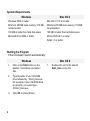
System Requirements Windows Mac OS X Windows 2000 or better Mac OS X 10.3.9 or better Minimum 256 MB main memory; 512 MB recommended Minimum 256 MB main memory; 512 MB recommended 100 MB or better free hard disk space 100 MB or better free hard disk space Microsoft Word 2000 or better Microsoft Word X or better Safari 1.3 or better Starting the Program If the CD doesn’t launch automatically: Windows 1. Click on the Start button on the taskbar. Scroll down and select Run. 2. Type the letter of your CDROM drive followed by :\Start_Here.exe For example, if your CDROM drive is named D, you would type D:\Start_Here.exe 3. Click OK or press [Enter]. 2 Mac OS X 1. Doubleclick on the file named Start_Here on the CD.