1
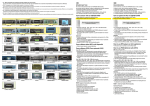
enter [DISPLAY] page enter [DATE & TIME] setting page [DEL ALL] pictures/videos copy all images in FALSH to TF card restore to factory settings and set enter [RECORD SET] page language enter [BELL] setting page enter [ADDRESS RESET] page Remarks: In menu page, press [MENU] button to switch and select between different icons, the color of the selected icon will turn to red; then press [UP] button to enter the selected setting page. In [DISPLAY] page, you can adjust the brightness/color/contrast from 0 to 10. In [DATE & TIME] page, select ON in DISPLAY and the system will mark date&time in the captured picture/video clips; Select OFF in DISPLAY and the system will not mark date&time in the captured picture/video clips. In [RECORD SET] page, you can set the capture type: (video/image) and system behavior (automatically/manually). In [SETTING] page, you can restore monitor to factory settings and set language. In [BELL] page, you can adjust ring volume from 0 to 3. In [ADDRESS RESET] page, you can set the intercom address of the monitor to “MASTER”, “EXT1”, “EXT2” or “EXT3”. The address of different monitors in one network cannot be duplicated. 11