1
3 Connections
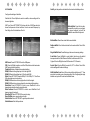
(1) Select [OSD Language] and press
RIGHT/LEFT key to select an
language.
(2) Select [Dish Setup] and press
RIGHT/LEFT/OK to Dish Setup
menu.
(3) Once channel tuning is complete,
you are now ready to watch TV.
Caution: Make sure to check the voltage specification of the wall outlet is the
same rating with the receiver. To prevent the risk of electric shock, do not
open the cover or the back of the receiver.
LNB
4.1 Program Manage Settings
To access the Menu, press the MENU button and select [Program].The
Menu provides options to adjust the Program Manage Settings. Select an
option and press OK or RIGHT to adjust that setting. Press the EXIT button
to exit the Menu.
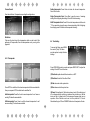
4.1.1 Program Edit
To edit your program preferences
(lock, skip, favourite, move or delete),
you will need to enter the Program
Edit Menu. This Menu requires a
password to access. Enter the default
password '000000'
Set Favourite Program
You can create a short list of favourite programs that you can easily access.
Set Favourite TV or Radio program:
1. Select the preferred program then press the FAVOURITE button. A heartshaped symbol will appear and the program is marked as a favourite.
2. Repeat the previous step to select more Favourite programs.
3. To confirm and exit the Menu, press the EXIT key. Disable favourite TV or
Radio Program; Press the FAVOURITE button on the Remote Control with
the heart-shaped symbol.
Note: When connecting the receiver to other equipment, e.g., TV, VCR and
amplifier, make sure to refer to relevant user manual for instruction. Also,
make sure you disconnect all the equipments from the mains supply before
the connection.
4 First Time Installation
After all connections have been made properly, switch on TV and make sure
the receiver is connected to the Main Power. Press Power button to switch
receiver on. If you are using the receiver for the first time or restored to
Factory Default, the Main Menu will appear on your TV screen.
3
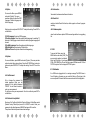
View Favourite Program
1. Press the Favourite button and the
Favourite Menu will appear.
2. Press UP/DOWN to select your
Favourite Programs.
3. Press OK to select your favourite
program.