1
Chapter 3 Basic Settings
Factory Default Settings
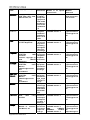
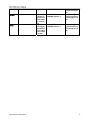
We’ll elaborate the DAP-3760 factory default settings. You can re-acquire these parameters by default. If
necessary, please refer to the “Restore Factory Default Settings”.
Table 2 DAP-3760 Factory Default Settings
Features
Factory Default Settings
Username
admin
Password
Null
Device Name
DAP-3760
Mode
Bridge (CSMA)
Ethernet Data Rate
AUTO
LAN
IP Address
192.168.0.50
Subnet Mask
255.255.255.0
Gateway
0.0.0.0
Primary DNS Server
0.0.0.0
Secondary DNS Server
0.0.0.0
Dynamic(DHCP)
Disable
Spanning Tree
Disable
Wireless Band
802.11a
Channel/Frequency
149/5.745GHz (CE: 100/5.5GHz)
Data Rate
Best
Bandwidth
20MHz
WMM
Enable
Super Mode
Disable
RTS Threshold (byte)
2346
Fragmentation Length (byte)
2346
Distance in Meters
10000
Security
Open System
Encryption
None
SSH (Secure Shell)
Enable
Enable/Disable
Disable
SNMP
Public Community String
Public
Settings
Private Community String
Private
Trap Server IP
0.0.0.0
Chapter 3 Basic Settings
25