1
Special Features using the optional RC402N
RC402N Features and Functions
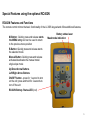
The remote control mirrors the basic functionality of the LL300S keypad and offers additional features.
M-Button : Quickly press and release starts
the MENU entry and can be used to return
to the previous menu position
E-Button: Quickly press and release starts
the selected mode
Manual Button: Quickly press and release
activates/deactivates the manual mode/
single slope mode
Up/Down Arrow Buttons
Left/Right Arrow Buttons
ON/OFF button - press for 1 second to turn
on the unit; press and hold for 2 seconds to
turn off the unit
RC402N Battery- Status-LED (red)
Battery status laser
Mask mode indication
15