1
Rear Panel/Side Panel/Lower Panel
SDI IN
1
MONITOR
OUT
1
SDI IN
2
MONITOR
OUT
qg
7
8
3
LAN
PEER TO PEER
NETWORK
LAN
AUDIO
(10/100)
OUT
SDI IN
4
MONITOR
OUT
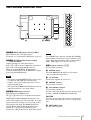
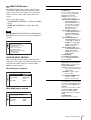
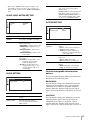
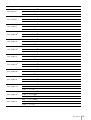
148qa SDI IN (SDI input) connectors (BNC)
Input connectors for serial digital signals.
For details, see “Connecting the SDI Signals” (page 23).
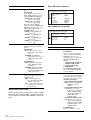
259qs MONITOR OUT (monitor output)
connectors (BNC)
Output connectors for serial digital signals.
Each of 1 to 4 connectors outputs the signal that is
input to the corresponding SDI IN connector.
When the optional BKM-XP1 4K SxS Player is
mounted, the SDI signal from the BKM-XP1 is output
by pressing the OPTION button.
Notes
• The signal from the MONITOR OUT connector does
not satisfy the ON-LINE signal specifications.
• Output is only activated when the power is on. No
output in standby mode.
• The signal from the BKM-XP1 4K SxS Player may be
output in the monitor’s own signal format.
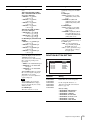
360qd HDMI input connectors
Input connectors for HDMI signals.
The 1 to 4 connectors are available for four inputs.
HDMI (High-Definition Multimedia Interface) is an
interface that supports both video and audio on a single
digital connection, allowing you to enjoy high quality
digital picture and sound. The HDMI specification
supports HDCP (High-bandwidth Digital Content
Protection), a copy protection technology that
incorporates coding technology for digital video signals.
5
6
MONITOR
OUT
qj qk ql w;
3
4
1
3
qh
2
2
SDI IN
5V 0.5A
1
9
0
qa
qs
4
qd
2
qf
Note
For an HDMI cable (optional), use High Speed HDMI
Cable with the cable type logo. (We recommend a Sony
cable.) When inputting 4K resolution (3840 × 2160 or
4096 × 2160) signal, use a cable of 3 m or less.
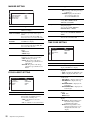
7qf PC input connectors (12)
Used for future expansion.
o OPTION mount
Attach the BKM-XP1 4K SxS Player. For details,
contact an authorized Sony dealer.
p AC IN Socket
Connects the supplied AC power cord.
q OPTION connector
Used for future expansion.
r LAN (10/100) connector
Used for future expansion.
Connect to the LAN (10/100) connector of the network
by using a 10BASE-T/100BASE-TX LAN cable.
CAUTION
For safety, do not connect the connector for peripheral
device wiring that might have excessive voltage to this
port.
s NETWORK switch
Used for future expansion.
Location and Function of Parts and Controls
11